 Kavitha Muralitharan

TL;DR: Learn to retrieve relevant information from large documents without processing entire files in AI applications. Explore how the new Syncfusion® .NET Document Chunking Library organizes Excel, Word, PDF, PowerPoint, and Markdown documents into meaningful, structure-aware chunks for embedding generation, semantic search, vector indexing, and Retrieval-Augmented Generation (RAG) workflows. Discover how to use it in an ASP.NET Core application to prepare content for semantic search and RAG solutions.
Building AI-powered applications often involves processing thousands of Word documents, PDFs, spreadsheets, and presentations. However, extracting text is only the first step. Preserving the context within headings, tables, worksheets, and slides is equally important for effective information retrieval.
The new Syncfusion® .NET Document Chunking Library, introduced in Essential Studio® 2026 Volume 3, addresses this challenge by dividing supported documents into meaningful chunks while retaining their structure, metadata, and citation details. The library is available across multiple platforms, including ASP.NET MVC, Blazor, Windows Forms, WPF, WinUI, and .NET MAUI.
In this blog, we’ll explore its key features and see how to use the .NET library in an ASP.NET Core application to upload documents, generate structured chunks, and retrieve their content and source information.
Meet the Syncfusion .NET Document Chunking Library
Traditional text splitters divide content primarily by character or token count. This approach can separate headings from their explanations or split tables into unrelated fragments.
The new Syncfusion .NET Document Chunking Library uses document structure to create meaningful chunks. It provides a unified processing workflow for:
- Word documents
- PDF files
- Excel workbooks
- PowerPoint presentations
- Markdown files
The library also supports configurable chunk sizes, token overlap, metadata extraction, and citation generation.
These capabilities help developers prepare structured content for applications such as:
- Retrieval-Augmented Generation (RAG)
- Semantic search
- Enterprise search
- Knowledge assistants
- Document intelligence platforms
How document chunking works
The library follows a straightforward processing workflow:
- Load a supported document from a file or stream.
- Configure the chunking options, including token limits, overlap, metadata, and citations.
- Process the document using format-specific rules.
- Generate chunks based on meaningful document boundaries.
- Review the extracted content, metadata, and citation details.
- Pass the generated chunks to embedding models or search services for indexing and retrieval.
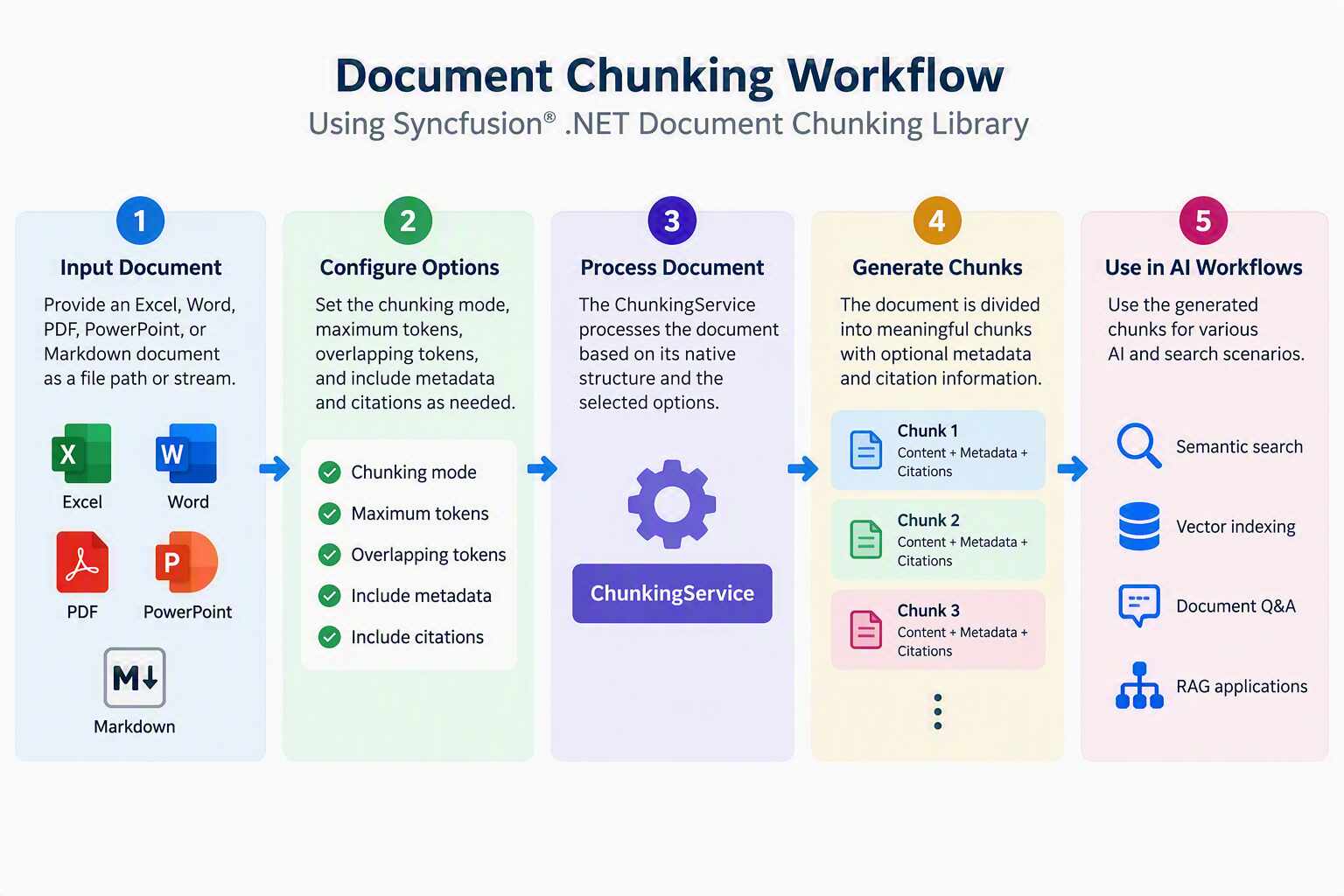
For example, consider a quarterly report containing a heading, a paragraph explaining revenue growth, and a table showing revenue by region.
A basic text splitter may separate these elements based on its configured size limit. A structure-aware approach can use the selected chunking mode to preserve relevant content boundaries and source information.
This helps retrieval systems work with more meaningful content instead of disconnected text fragments.
Get started with the .NET Document Chunking Library in ASP.NET Core
Let’s integrate the library into an ASP.NET Core application and process supported documents.
Prerequisites
Before you begin, ensure your development environment includes:
- Visual Studio 2022 (17.0 or later)
- .NET 10 SDK or later
- A supported Word, PDF, Excel, PowerPoint, or Markdown document
Install the required NuGet package
Create a new ASP.NET Core Web App (Model-View-Controller) project and select .NET 10 or a later target framework.
Install the following NuGet package:
dotnet add package Syncfusion.DocumentChunking.Net.Core
Add the required namespace to your controller:
using Syncfusion.DocumentChunking;
Create a document upload page
Add the following code to Views/Home/Index.cshtml to create a form that accepts supported document formats:
@{
    ViewData["Title"] = "Document Chunking";
}

<h1>Document Chunking</h1>

<form asp-controller="Home"
      asp-action="ChunkDocument"
      method="post"
      enctype="multipart/form-data">

    <div>
        <label for="document">Select a document</label>

        <input id="document"
               name="document"
               type="file"
               accept=".xlsx,.xls,.xlsm,.xlsb,.docx,.doc,.pdf,.ppt,.pptx,.pptm,.potx,.md"
               required />
    </div>

    <br />

    <button type="submit">Chunk Document</button>
</form>
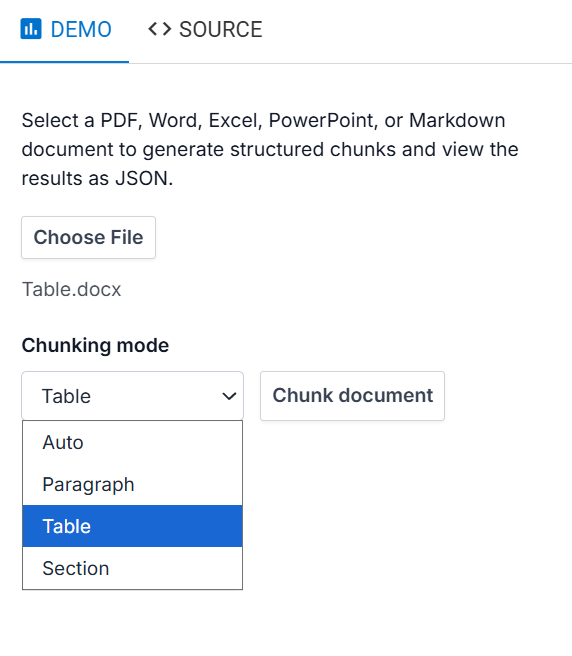
The upload form accepts the following formats:
| Format | Supported extensions |
|---|---|
| Excel | .xlsx, .xls, .xlsm, .xlsb |
| Word | .docx, .doc |
| PowerPoint | .ppt, .pptx, .pptm, .potx |
| Markdown | .md |
The HTML accept attribute helps users select supported files in the browser. Always validate uploaded files on the server before processing them.
Generate chunks from uploaded documents
Once a document is uploaded, create a ChunkingService instance and configure the chunking options.
The following example detects the uploaded file format and selects the corresponding document-specific chunking options.
Add this action method to HomeController.cs:
public IActionResult ChunkDocument(IFormFile document)
{
    if (document == null || document.Length == 0)
    {
        return BadRequest("Select a document to chunk.");
    }

    string fileName = document.FileName;
    string extension = Path.GetExtension(fileName).ToLowerInvariant();

    ChunkingService chunkingService = new ChunkingService();

    using Stream fileStream = document.OpenReadStream();

    ChunkingOptions options =
        new ChunkingOptions
        {
            MaxTokens = 500,
            OverlapTokens = 0,
            IncludeMetadata = true,
            IncludeCitation = true
        };

    switch (extension)
    {
        case ".xlsx":
        case ".xls":
        case ".xlsm":
        case ".xlsb":
            options.SourceOptions =
                new ExcelChunkingOptions
                {
                    ChunkingMode = ExcelChunkingMode.Auto
                };
            break;

        case ".docx":
        case ".doc":
            options.SourceOptions =
                new WordChunkingOptions
                {
                    ChunkingMode = WordChunkingMode.Section
                };
            break;

        case ".pdf":
            options.SourceOptions =
                new PdfChunkingOptions
                {
                    ChunkingMode = PdfChunkingMode.Auto
                };
            break;

        case ".pptx":
        case ".ppt":
        case ".pptm":
        case ".potx":
            options.SourceOptions =
                new PowerPointChunkingOptions
                {
                    ChunkingMode = PowerPointChunkingMode.Auto
                };
            break;

        case ".md":
            options.SourceOptions =
                new MarkdownChunkingOptions
                {
                    ChunkingMode = MarkdownChunkingMode.Table
                };
            break;

        default:
            return BadRequest(
                $"The file format '{extension}' is not supported.");
    }

    IChunkingResult result =
        chunkingService.Chunk(fileStream, fileName, options);

    DisplayChunkingResult(result);

    return Content(
        "The document was chunked successfully. " +
        "See the application console for the chunking results.");
}
In this example:
MaxTokenssets the maximum token count for each chunk.OverlapTokensdetermines how many tokens are shared between consecutive chunks.IncludeMetadataenables source document and chunk metadata.IncludeCitationenables source-location information.SourceOptionsselects the chunking mode for the uploaded document format.
Here, token overlap is disabled by setting OverlapTokens to 0. You can configure it based on how much context you want to retain between consecutive chunks.
The example uses Auto mode for Excel, PDF, and PowerPoint, Section mode for Word, and Table mode for Markdown. You can change these modes according to your document structure and application requirements.
Review generated chunks, metadata, and citations
The ChunkingService returns an IChunkingResult containing the generated chunks.
Each IChunk provides the extracted content and can include metadata and citation information, depending on the configured options.
Add the following helper method to display the generated results in the application console:
private static void DisplayChunkingResult(
    IChunkingResult result)
{
    Console.WriteLine(
        $"Chunk Count: {result.Chunks.Count}");

    foreach (IChunk chunk in result.Chunks)
    {
        Console.WriteLine("================================");

        Console.WriteLine($"Chunk ID: {chunk.ChunkId}");
        Console.WriteLine($"Chunk Index: {chunk.ChunkIndex}");

        Console.WriteLine(
            $"Content:{Environment.NewLine}{chunk.Content}");

        Console.WriteLine(
            $"Citation: {chunk.Citation?.DisplayText}");

        Console.WriteLine("Citation Location Details");

        if (chunk.Citation?.LocationDetails != null)
        {
            foreach (KeyValuePair<string, object> item
                in chunk.Citation.LocationDetails)
            {
                Console.WriteLine(
                    $"Location Key: {item.Key}, " +
                    $"Location Value: {item.Value}");
            }
        }

        Console.WriteLine(
            $"Metadata SourceDocumentId: " +
            $"{chunk.Metadata?.SourceDocumentId}");

        Console.WriteLine(
            $"Metadata File Name: " +
            $"{chunk.Metadata?.FileName}");

        Console.WriteLine(
            $"Metadata File Type: " +
            $"{chunk.Metadata?.FileType}");

        Console.WriteLine(
            $"Metadata Token Count: " +
            $"{chunk.Metadata?.TokenCount}");

        Console.WriteLine(
            $"Metadata Character Count: " +
            $"{chunk.Metadata?.CharacterCount}");
    }
}
This method displays the generated chunk content, identifiers, citation details, and metadata in the application console.
A typical chunking result can include:
- Unique chunk identifiers and indexes
- Extracted chunk content
- Source document identifiers
- File names and file types
- Token and character counts
- Citation text and source-location details
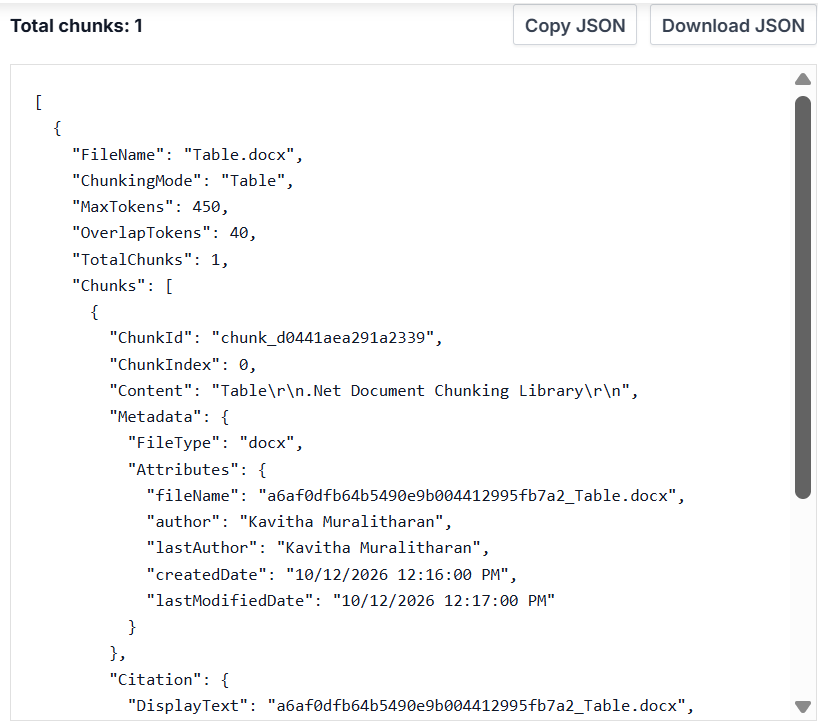
For detailed setup instructions and additional examples, refer to the official .NET Document Chunking Library documentation.
Explore document-specific chunking modes
Different document formats have different structures. The library provides format-specific chunking modes so developers can choose how content is divided.
| Document type | Available chunking modes |
|---|---|
| Word | Auto, Paragraph, Table, Section |
| Auto, Paragraph, Table, Page | |
| Excel | Auto, Table, Worksheet |
| PowerPoint | Auto, Table, Notes, Slide |
| Markdown | Auto, Paragraph, Table, Heading |
For example:
- Paragraph: Creates chunks based on paragraph boundaries in Word or PDF documents.
- Table: Processes table content in supported document formats.
- Worksheet: Organizes Excel content by worksheet.
- Slide: Creates PowerPoint chunks based on individual slides.
- Heading: Organizes Markdown content around its heading structure.
The Auto mode selects a suitable chunking approach based on the document’s content and structure.
These options help developers prepare content according to its source format rather than relying only on fixed-size text splitting.
Preserve metadata and citations for enterprise AI workflows
Enterprise AI applications often need to identify where retrieved information came from. The library supports metadata enrichment and citation generation to help maintain this traceability.
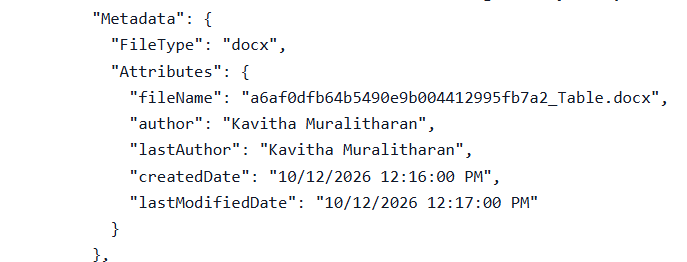
Metadata provides information about the source document and generated chunk, including:
- Source document identifier
- File name and file type
- Token count
- Character count
- Format-specific document attributes
Citation information identifies the original location of the extracted content. Depending on the document format, it can include:
| Document format | Example source reference |
|---|---|
| Excel | Worksheet names and cell ranges |
| Word | Heading paths and content types |
| Page numbers and page ranges | |
| PowerPoint | Slide numbers and titles |
| Markdown | Heading paths and line ranges |
For example, a citation for an Excel chunk may identify a worksheet and cell range, while a Markdown citation may include its heading hierarchy and line numbers.
This information helps applications trace retrieved content to its original source and display relevant references to users.
The generated chunks can then be passed to embedding models and stored in search indexes or vector databases. Embedding generation, indexing, and AI model integrations are implemented separately within your application.
Frequently Asked Questions
How does the .NET Document Chunking Library differ from basic text splitting?
Traditional text splitters divide content primarily by character or token limits. The .NET Document Chunking Library processes documents based on their native structure and supports format-specific chunking modes. It can preserve relevant relationships between headings, paragraphs, tables, worksheets, slides, and pages while retaining metadata and citation information.
Does the .NET Document Chunking Library require Microsoft Office?
No. The library uses Syncfusion document-processing components and does not rely on Microsoft Office Interop for supported document-processing operations. This makes it suitable for server-side and cross-platform application scenarios.
Can the generated chunks be used with vector databases and RAG applications?
Yes. Generated chunks can be passed to embedding models and used in semantic search, vector indexing, document question answering, and RAG workflows. Metadata helps organize and filter indexed content, while citation information helps trace chunks to their original document locations. Integrations with embedding models, search services, vector databases, and AI models must be implemented separately in your application.
Why is document-aware chunking important for AI applications?
Enterprise documents often contain headings, tables, worksheets, sections, and slides that provide important context. Preserving these structural relationships during chunking helps retrieval systems work with more meaningful content and provides source information for traceability.
Conclusion
Preparing enterprise documents for AI applications starts with preserving the context within them. The new Syncfusion .NET Document Chunking Library helps developers divide Word, PDF, Excel, PowerPoint, and Markdown documents into structured chunks with configurable chunking modes, metadata, and citation information.
Use the generated chunks as a foundation for semantic search, vector indexing, and RAG applications.
Explore the live demo and documentation to see how the library can simplify document preparation for your AI-powered applications.
You can also explore the What’s New and Release Notes to discover the latest document-processing features.
For existing Syncfusion customers, the latest version of Essential Studio is available from the License and Downloads page. New users can explore the library through the 30-day free trial.
If you have questions or feedback, reach out through our support forums, feedback portal, or support portal.



Be the first to get updates