
ServiceStack Succinctly®

CHAPTER 5
Service Implementation
In this chapter, we will describe in detail how to build each of the services mentioned in Chapter 3. We will also describe how to implement all the relative components that enable full support for the functionalities we want to implement.
Our solution will contain three services and all three will implement all of the HTTP methods. The following table contains the list of verbs and the respective routes that will be implemented.
- Services with respective operations
Service | Description |
OrderService | Contains methods that insert, delete, create, and update orders.
|
ProductService | Contains methods that insert, delete, create, and update products.
|
OrderItemService | Contains methods that manipulate OrderItems associated with an order.
|
For all three services, we will implement the following components:
- Service Model (Request and Response DTO) object definitions.
- Route specification.
- Mapper(s) implementation.
- Validator implementation.
- Service implementation.
- Configuration (application host) wiring everything together.
Additional Information
Link and Status DTOs
All of the Response DTO objects will use the Status and Link classes. I’ve included the code here as a reference.
public class Status { public int Id { get; set; } public string Name { get; set; } } public class Link { public string Rel { get; set; } public string Href { get; set; } public string Title { get; set; } public string Type { get; set; } } |
The Link class will contain the hypermedia information related to the resource.
Test Project
To test the various services, create a new project called ServiceStack.Succinctly.Host.IntegrationTest that references the following assemblies:
- From the NuGet package: ServiceStack.Common, which will install the ServiceStack.Common, ServiceStack.Text, and ServiceStack.Interfaces DLLs.
- Microsoft.VisualStudio.QualityTools.UnitTestFramework, which is the standard Microsoft .NET assembly that contains testing attributes.
- ServiceStack.Succinctly.ServiceInterface, which is the project that contains our DTO implementation.
Removing Namespaces
To remove superfluous namespaces from XML returned objects, add the following code to the Assembly.cs in the ServiceStack.Succinctly.ServiceInterface project.
[assembly: ContractNamespace("", ClrNamespace="ServiceStack.Succinctly.ServiceInterface.OrderModel")] [assembly: ContractNamespace("", ClrNamespace="ServiceStack.Succinctly.ServiceInterface.OrderItemModel")] [assembly: ContractNamespace("", ClrNamespace="ServiceStack.Succinctly.ServiceInterface.ProductModel")] [assembly: ContractNamespace("", ClrNamespace="ServiceStack.Succinctly.ServiceInterface")] |
Product Service
In our solution, the Product class can be seen as a reference data class as it is a property of the OrderItem class. Since one Product can be assigned to several OrderItems, there is a need to have a separate service that specifically manages a Product itself. ProductService is a classic create, read, update, and delete (CRUD) service.
Service Model
As a particularity of the service, I’ve chosen to create two separate DTOs for managing inserts and updates. I’ve done so to show that there is such a possibility and that we may fine-tune the actual requests. Indeed, the CreateProduct class specifically doesn’t have the Id because the client shouldn’t know about the Id when creating a product. However, you may choose not to implement it in such a way, but to have a more consistent object instead (as we are going to see in the OrderService implementation).
The following five classes will be used as Request DTOs of the service. The GetProducts class intentionally does not have properties; it is mainly used for routing a request to the proper service method as we will see later.
|
public class GetProduct { public int Id { get; set; } }
public class CreateProduct { public string Name { get; set; } public Status Status { get; set; } } public class UpdateProduct { public int Id { get; set; } public string Name { get; set; } public Status Status { get; set; } } public class DeleteProduct { public int Id { get; set; } } |
Almost all of the Service methods will return the ProductResponse object. ProductResponse is a mirror of the Product and, as we will see, it can contain more or less information. In our case, it contains a list of Links and no information about the Product.Version, which is only used for optimistic concurrency control.
ProductsResponse instead will hold a list of ProductResponse. This is helpful as we can reuse this object and enrich it with further attributes that can be useful for paging, navigation, etc.
Route Specification
In the application host (Global.asax.cs), we need to register the various routes related to the Product service. As we have seen in the previous chapters, this is done either in the application host’s constructor or in the Configure method. I’ve chosen to use the constructor because I want to use the Configure method only for the IoC-related items.
using ServiceStack.Succinctly.Host.Extensions; public ServiceAppHost(): base("Order Management", typeof (ServiceAppHost).Assembly) { Routes .Add<GetProducts> ("/products", "GET", "Returns Products") .Add<GetProduct> ("/products/{Id}", "GET", "Returns a Product") .Add<CreateProduct>("/products", "POST", "Creates a Product") .Add<UpdateProduct>("/products/{Id}", "PUT", "Updates a Product") .Add<DeleteProduct>("/products/{Id}", "DELETE", "Deletes a Product"); } |
The ServiceStack Routes.Add() method currently doesn’t expose the method signature that we have just seen. To achieve this, I’ve created an extension method. The Routes property implements the IServiceRoute interface and, once we know this, it’s very easy to extend.
Product Mapper Implementation
We need to map the data back and forth from the domain object model to the service object model (DTOs). The best way to do so is to create a specific class that enables the application to transform the Product domain object to ProductResponse and CreateProduct/UpdateProduct to the Product. Because this can be quite a heavy workload in the case of big classes, I advise you to use some specific libraries such as AutoMapper[21] as this would decrease the amount of necessary code. Explaining how AutoMapper works is outside the scope of this book but, as we will see, it’s pretty intuitive and easy to use.
Adding the AutoMapper library to the project is as easy as running the following NuGet command:
PM> Install-Package AutoMapper |
The ProductMapper implements the IProductMapper interface, which will make it easier to be injected to the Service. Let’s create the following file in the ServiceStack.Succinctly.Host project under the ServiceStack.Succinctly.Host.Mappers namespace.
The following code example shows the definition of the IProductMapper interface.
using OrderManagement.Core.Domain; using ServiceStack.Succinctly.ServiceInterface.ProductModel;
namespace ServiceStack.Succinctly.Host.Mappers { public interface IProductMapper { Product ToProduct(CreateProduct request); Product ToProduct(UpdateProduct request); ProductResponse ToProductResponse(Product product); List<ProductResponse> ToProductResponseList(List<Product> products); } } |
The following code is the implementation of the ProductMapper.
using OrderManagement.Core.Domain; using SrvObjType = ServiceStack.Succinctly.ServiceInterface; using SrvObj = ServiceStack.Succinctly.ServiceInterface.ProductModel;
namespace ServiceStack.Succinctly.Host.Mappers { public class ProductMapper : IProductMapper { static ProductMapper() { Mapper.CreateMap<SrvObjType.Status, Status>(); Mapper.CreateMap<Status, SrvObjType.Status>(); Mapper.CreateMap<SrvObj.CreateProduct, Product>(); Mapper.CreateMap<SrvObj.UpdateProduct, Product>(); Mapper.CreateMap<Product, SrvObj.ProductResponse>(); }
public Product ToProduct(SrvObj.CreateProduct request) { return Mapper.Map<Product>(request); }
public Product ToProduct(SrvObj.UpdateProduct request) { return Mapper.Map<Product>(request); }
public SrvObj.ProductResponse ToProductResponse(Product product) { var productResponse = Mapper.Map<SrvObj.ProductResponse>(product);
productResponse.Links = new List<SrvObjType.Link> { new SrvObjType.Link { Title = "self", Rel = "self", Href = "products/{0}".Fmt(product.Id), } }; return productResponse; }
//Transforms a list of products into a list of ProductResponses. public List<SrvObj.ProductResponse> ToProductResponseList( List<Product> products) { var productResponseList = new List<SrvObj.ProductResponse>(); products.ForEach(x => productResponseList.Add(ToProductResponse(x))); return productResponseList; } } } |
Note: All of our services will have a Mapper class by design because we want to separate the Request and Response DTOs (service model) from the application domain model.
Validation Implementation
As we saw in the previous chapter, we can create some custom validation logic. We will create some in this case because we want to make our implementation a bit stronger. For our current example, we will just make sure that when the Product is created or updated, we check that the Name property is set and is not longer than 50 characters. We will create the following two classes in the ServiceStack.Succinctly.Host.Validation namespace, and will register those two validators in the application host.
Application Host Configuration
The following code shows the full implementation of the application host.
Service Implementation
ProductService implements two Get methods, one Post, one Put, and one Delete. Every ServiceStack service has to inherit from the ServiceStack.ServiceInterface.Service class.
As shown in the following code example, ProductService has two properties: ProductMapper and ProductRepository, which will hold the instances that will be injected at run time by the IoC container.
Get Products by Id
When calling GET /product/1, the following method will be called. As you can see, the implementation is quite simple:
- Get the data from the repository.
- If nothing has been found, then return the 404 Not Found status code (the Response.StatusCode attribute can be used to do so).
- If something is returned by the repository, then by using the ProductMapper, we transform the Product (transform the domain model to the ProductResponse service model).
In order to call the GET service method in the previous example, we can use any web client. The following example shows a unit test (using Microsoft Test Framework) that uses the built-in ServiceStack JsonServiceClient to perform a GET on the /products/{Id} URI.
|
public void GetProductByProductId_ReturnsValidProduct() { //ARRANGE --- int PRODUCT_ID = 1; var client = new JsonServiceClient("http://localhost:50712/");
//ACT ------ var product = client.Get<ProductResponse>("/products/" + PRODUCT_ID);
//ASSERT ---- Assert.IsTrue(product!=null); Assert.IsTrue(product.Id == PRODUCT_ID); } |
If we were to use a browser to navigate to http://localhost:50712/products/1.xml, we would get the following response.
<ProductResponse xmlns:i="http://www.w3.org/2001/XMLSchema-instance"> <Id>1</Id> <Links> <Link> <Href>products/1</Href> <Rel>self</Rel> <Title>self</Title> <Type i:nil="true"/> </Link> </Links> <Name>Pizza</Name> <Status> <Id>1</Id> <Name>Active</Name> </Status> </ProductResponse> |
Returning All Products
In this case, the service accepts a GetProducts message which, on its own, doesn’t have any property. But, as we are going to see later, being the collection that is returned, we can build the paging, sorting, filtering, etc. For the time being though, we simply pass a request and the service method will:
- Get the data from the repository.
- Transform the data from the domain model to the service model (DTO).
|
public ProductsResponse Get(GetProducts request) { //Get data from the database. List<Product> products = ProductRepository.GetAll(); //Transform to ProductsResponse and return. return new ProductsResponse() { Products = ProductMapper.ToProductResponseList(products) }; } |
To call the /products in order to get the list of available products, the client would look like the following.
|
public void GetAllProducts_ReturnsValidProductList() { //ARRANGE --- var client = new JsonServiceClient("http://localhost:50712/");
//ACT ------ var products = client.Get<ProductsResponse>("/products");
//ASSERT ---- Assert.IsTrue(products != null); Assert.IsTrue(products.Products.Count > 0); } |
And, as shown in the web browser:
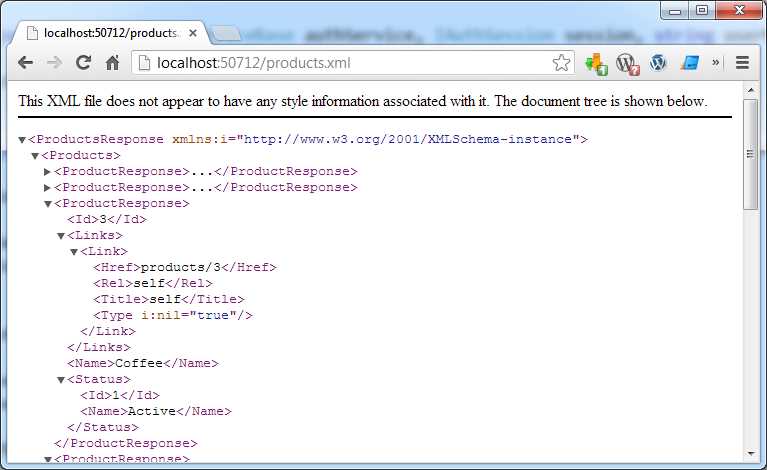
- List of products
Creating a New Product
When creating new Products, there are several things to note:
- To create objects, the POST method is used.
- Once the Product is created and successfully sent to the repository (database), we will return to the client the full Product as we did with the GET /products/1.
- To note that the object has been created, we will add the Location in the header and inform the client of the object’s new location.
- Status code 201 Created will be returned to the client.
|
public ProductResponse Post(CreateProduct request) { //Transform the request to Domain.Product. var domainProduct = ProductMapper.ToProduct(request);
//Storing data to database. var newProduct = ProductRepository.Add(domainProduct);
//Transform to ProductResponse. var response = ProductMapper.ToProductResponse(newProduct);
//Manipulate the header and StatusCode. Response.AddHeader("Location", Request.AbsoluteUri + "/" + newProduct.Id); Response.StatusCode = (int)HttpStatusCode.Created;
return response; } |
To insert a new product using the ServiceStack client, we will test that the Response is returning 201 Created HTTP status and that the Location header has been returned with the new URI.
|
public void CreateNewProduct_ReturnsObjectAnd201CreatedStatus() { //ARRANGE --- WebHeaderCollection headers = null; HttpStatusCode statusCode = 0; const string PRODUCT_NAME = "Cappuccino"; const string SITE = "http://localhost:50712"; const string PRODUCTS = "/products"; const string URI = SITE + PRODUCTS; var client = new JsonServiceClient(SITE) { //Grabbing the header once the call is ended. LocalHttpWebResponseFilter = httpRes => { headers = httpRes.Headers; statusCode = httpRes.StatusCode; } }; var newProduct = new CreateProduct { Name = PRODUCT_NAME, Status = new Status {Id = 1} };
//ACT ------ var product = client.Post<ProductResponse>(PRODUCTS, newProduct);
//ASSERT ---- Assert.IsTrue(headers["Location"] == URI + "/" + product.Id); Assert.IsTrue(statusCode == HttpStatusCode.Created); Assert.IsTrue(product.Name == PRODUCT_NAME); } |
After the POST method has been called, the following is the response from the service, header, and body. As you can see, the 201 Created verb and the Location headers are specified and returned to the client.
HTTP/1.1 201 Created Cache-Control: private Content-Type: application/xml Location: http://localhost:50712/products/10 Server: Microsoft-IIS/8.0 X-Powered-By: ServiceStack/3.956 Win32NT/.NET Date: Tue, 13 Aug 2013 22:15:42 GMT Content-Length: 277 <ProductResponse> <Id>10</Id> <Links> <Link> <Href>products/10</Href> <Rel>self</Rel> <Title>self</Title> <Type i:nil="true" /> </Link> </Links> <Name>Cappuccino</Name> <Status> <Id>1</Id> <Name>Active</Name> </Status> </ProductResponse> |
Updating a Product
To update a product, our service will implement the PUT method which will accept the UpdateProduct message.
Before doing any work, we check if the resource we are updating is available in the repository. If it is not, we then force the 404 Not Found status code which indicates that the resource is not available. In a successful scenario, either the 200 (OK) or 204 (No Content) response codes should be sent to indicate successful completion of the request. We will return 200 (OK) and the full body of the message if the call is successful.
To test the product update, where only the status of the resource would be updated to Inactive:
|
public void UpdateProduct_ReturnsUpdatedObject() { //ARRANGE --- HttpStatusCode statusCode = 0; const string PRODUCT_NAME = "White Wine"; const string SITE = "http://localhost:50712"; const string PRODUCT_LINK = "/products/2";
var client = new JsonServiceClient(SITE) { //Grabbing the header once the call is ended. LocalHttpWebResponseFilter = httpRes => { statusCode = httpRes.StatusCode; } };
var updateProduct = new UpdateProduct { Name = PRODUCT_NAME, Status = new Status {Id = 2} // Id = 2 means inactive. };
//ACT ------ var product = client.Put<ProductResponse>(PRODUCT_LINK, updateProduct);
//ASSERT ---- Assert.IsTrue(statusCode == HttpStatusCode.OK); Assert.IsTrue(product.Name == PRODUCT_NAME); Assert.IsTrue(product.Status.Id == 2); } |
The difference between the original and the new (updated) resource is only the Status.Id.
Original Resource | Server Response |
|
<ProductResponse> <Id>2</Id> <Links> <Link> <Href>products/2</Href> <Rel>self</Rel> <Title>self</Title> <Type i:nil="true"/> </Link> </Links> <Name>White Wine</Name> <Status> <Id>1</Id> <Name>Active</Name> </Status> </ProductResponse> | HTTP/1.1 200 OK Cache-Control: private Content-Type: application/xml Server: Microsoft-IIS/8.0 Date: Tue, 13 Aug 2013 22:19:55 GMT Content-Length: 278
<ProductResponse> <Id>2</Id> <Links> <Link> <Href>products/2</Href> <Rel>self</Rel> <Title>self</Title> <Type i:nil="true"/> </Link> </Links> <Name>White Wine</Name> <Status> <Id>2</Id> <Name>Inactive</Name> </Status> </ProductResponse> |
Deleting a Product
In case the resource is not found, we can return the 404 Not Found status code. But you might choose not to return an error and instead return 200 OK. In this example, I’ve chosen to inform the client about the nonexistence of the resource. When returning 201 NoContent, we won’t return any body.
|
public HttpResult Delete(DeleteProduct request) { var domainObject = ProductRepository.GetById(request.Id); if (domainObject == null) { Response.StatusCode = (int)HttpStatusCode.NotFound; } else { ProductRepository.Delete(request.Id); Response.StatusCode = (int)HttpStatusCode.NoContent; } return null; } |
The following code tests the Delete method implemented in the service.
|
public void DeleteProduct_ReturnsNoContent() { //ARRANGE --- HttpStatusCode statusCode = 0; const string SITE = "http://localhost:50712";
var client = new JsonServiceClient(SITE) { //Grabbing the header once the call is ended. LocalHttpWebResponseFilter = httpRes => { statusCode = httpRes.StatusCode; } };
//ACT ------ client.Delete<HttpResult>("/products/5");
//ASSERT ---- Assert.IsTrue(statusCode == HttpStatusCode.NoContent); } |
Order Service
OrderService will implement the following methods:
- GET /orders
- GET /orders/{id}
- POST /orders
- PUT /orders/{id}
- DELETE /orders/{id}
As we did in the ProductService, we will divide the implementation the same way.
Service Model
OrderService’s service model is a bit more complex since we have a graph of objects that should mimic in some ways the domain object model. In this example, I’ve chosen to use the Order name for the DTO class when creating and updating an Order rather than the CreateOrder and UpdateOrder as I did in the previous chapter. This is mainly for brevity. Keep in mind that you should take care of the naming convention and follow it through all the services as much as possible (as it would be much easier for clients to understand your service’s object model).
The following classes will be used as Request DTOs of the service.
public class GetOrders { }
public class GetOrder { public int Id { get; set; } } public class DeleteOrder { public int Id { get; set; } } //Class used for Create and Update. public class Order { public int Id { get; set; } public bool IsTakeAway { get; set; } public DateTime CreationDate { get; set; } public Status Status { get; set; } public List<OrderItem> Items { get; set; } }
public class OrderItem { public int Id { get; set; } public Product Product { get; set; } public int Quantity { get; set; } }
public class Product { public int Id { get; set; } public string Name { get; set; } public Status Status { get; set; } } |
Almost all of the Service methods will return the OrderResponse object. OrderResponse is a representation of the Order which is a class within the domain object. But, as we will see, it can contain some more information. In our case, it contains a list of Links.
|
{ public List<OrderResponse> Orders { get; set; } }
public class OrderResponse { public bool IsTakeAway { get; set; } public DateTime CreationDate { get; set; } public Status Status { get; set; } public List<OrderItemResponse> Items { get; set; } public List<Link> Links { get; set; } }
public class OrderItemResponse { public int Id { get; set; } public ProductResponse Product { get; set; } public int Quantity { get; set; } public List<Link> Links { get; set; } }
public class ProductResponse { public int Id { get; set; } public string Name { get; set; } public Status Status { get; set; } public List<Link> Links { get; set; } } |
Route Specification
In the application host, we need to register the various Request DTOs to their relative URLs.
|
.Add<GetOrder> ("/orders/{Id}", "GET", "Returns an Order") .Add<GetOrders> ("/orders", "GET", "Returns Orders" ) .Add<Order> ("/orders", "POST", "Creates an Order") .Add<Order> ("/orders/{Id}", "PUT", "Updates an Order") .Add<DeleteOrder>("/orders/{Id}", "DELETE", "Deletes an Order"); |
Order Mapper Implementation
In order to map the data back and forth from the domain object model to the service model (DTOs), as we did in the ProductService example, we will have a specific OrderMapper class for this.
The OrderMapper implements the IOrderMapper interface which will make it easier to be injected to the service.
The following example is the full implementation of the mapper.
Validation Implementation
The order validator is simple. It only checks if the order contains a not-empty OrderItems collection and it will simultaneously check that the CreationDate is not in the future.
Application Host Configuration
The following code shows the full implementation of the application host. This comprehends the previously defined configuration for the ProductService.
The highlighted code is what is needed for the OrderService. As we may see, it is just a natural progression by following the same style of coding and service creation.
Service Implementation
OrderService implements two Get methods, one Post, one Put, and one Delete.
As shown in the following code example, OrderService has four public properties, namely OrderMapper, OrderRepository, ProductRepository, and StatusRepository, which will hold the instances that will be injected at run time by the IoC container.
Getting Orders by OrderId
When calling GET /orders/1, the Get(GetProduct request) method will be called. As we have seen previously with the ProductService, the structure is very similar:
- Get the data from the repository.
- If nothing is found, return the 404 Not Found error. This is done by setting the Response.StatusCode value.
- If something is returned by the repository, use the OrderMapper to transform the Order (transform the domain model to the OrderResponse service model).
|
public OrderResponse Get(GetOrder request) { var domainObject = OrderRepository.GetById(request.Id); if (domainObject == null) { Response.StatusCode = (int) HttpStatusCode.NotFound; return null; } else { //Transform to OrderResponse and return. return OrderMapper.ToOrderResponse(domainObject); } } |
In order to call the GET service method used in the previous example, we will use the XmlServiceClient which, by default, would communicate with the Content-Type: application/xml. The following example shows a test that uses the built-in ServiceStack client to perform a GET on the /orders/{Id} URI.
|
public void GetOrdersByOrderId() { //ARRANGE --- const int ORDER_ID = 1; var client = new XmlServiceClient("http://localhost:50712/");
//ACT ------ var order = client.Get<OrderResponse>("/orders/" + ORDER_ID);
//ASSERT ---- Assert.IsTrue(order != null); Assert.IsTrue(order.Id == ORDER_ID); } |
Returning All Orders
In this case, the service accepts a GetOrders message. As we have seen in the ProductService, we follow the same procedure:
- Get data from the repository.
- Transform data from the domain to the service object model.
public OrdersResponse Get(GetOrders request) { //Get data from the database. var orders = OrderRepository.GetAllOrders();
//Transform to OrdersResponse and return. return new OrdersResponse() { Orders = OrderMapper.ToOrderResponseList(orders) }; } |
To call GET /orders (to get the list of available orders), the client code would look like the following example.
|
public void GetAllOrders() { //ARRANGE --- var client = new XmlServiceClient("http://localhost:50712/");
//ACT ------ var orders = client.Get<OrdersResponse>("/orders");
//ASSERT ---- Assert.IsTrue(orders != null); Assert.IsTrue(orders.Orders.Count > 0); } |
Creating a New Order
When creating new Orders, there are several things to note:
- To create objects, the POST method is used.
- Before doing any further checks, we will make sure that a correct Domain.Order is generated, and therefore a Status and Product are retrieved from the repository and assigned to the object.
- Once the Order is created and successfully sent to the repository, we will return the full Order representation client as we would do with GET /orders/1.
- To note that the object has been created, we will add the location in the header and inform the client of the object’s new location.
- Status code 201 Created will be returned to the client.
To insert a new Order using the ServiceStack client, we will test that the response is returning the 201 Created HTTP status and that the Location header has been filled.
|
public void CreateNewOrder() { //ARRANGE --- WebHeaderCollection headers = null; HttpStatusCode statusCode = 0; const string SITE = "http://localhost:50712"; const string ORDERS = "/orders"; const string URI = SITE + ORDERS;
var client = new XmlServiceClient(SITE) { //Grabbing the header once the call is ended. LocalHttpWebResponseFilter = httpRes => { headers = httpRes.Headers; statusCode = httpRes.StatusCode; } }; var newOrder = new Order { CreationDate = DateTime.Now, IsTakeAway = true, Status = new Status {Id = 1}, //Active Items = new List<OrderItem> { new OrderItem {Product = new Product {Id = 1}, Quantity = 10}, new OrderItem {Product = new Product {Id = 2}, Quantity = 10} } };
//ACT ------ var order = client.Post<OrderResponse>(ORDERS, newOrder);
//ASSERT ---- Assert.IsTrue(headers["Location"] == URI + "/" + order.Id); Assert.IsTrue(statusCode == HttpStatusCode.Created); Assert.IsTrue(order.Items.Count == 2); Assert.IsTrue(order.Status.Id == 1); //Status is active. } |
After the Order is created, the following XML will be generated and headers will be returned to the client.
HTTP/1.1 201 Created Cache-Control: private Content-Type: application/xml Location: http://localhost:50712/orders/5 Server: Microsoft-IIS/8.0 X-Powered-By: ServiceStack/3.956 Win32NT/.NET X-AspNet-Version: 4.0.30319 X-Powered-By: ASP.NET Date: Wed, 14 Aug 2013 22:13:31 GMT Content-Length: 722 <OrderResponse xmlns:i="http://www.w3.org/2001/XMLSchema-instance"> <CreationDate>2013-08-13T00:00:00</CreationDate> <Id>5</Id> <IsTakeAway>false</IsTakeAway> <Items> <OrderItemResponse> <Id>8</Id> <Links> <Link> <Href>orders/5/items/8</Href> <Rel>self</Rel> <Title>self</Title> <Type i:nil="true" /> </Link> </Links> <Product> <Id>1</Id> <Links> <Link> <Href>products/1</Href> <Rel>self</Rel> <Title>self</Title> <Type i:nil="true" /> </Link> </Links> <Name>Pizza</Name> <Status> <Id>1</Id> <Name>Active</Name> </Status> </Product> <Quantity>10</Quantity> </OrderItemResponse> </Items> <Links> <Link> <Href>orders/5</Href> <Rel>self</Rel> <Title>self</Title> <Type i:nil="true" /> </Link> </Links> <Status> <Id>1</Id> <Name>Active</Name> </Status> </OrderResponse> |
Updating an Order
To update an Order, our service will implement the PUT method, which will accept the Order message.
If an existing resource is modified, either the 200 (OK) or 204 (No Content) response codes should be sent to indicate successful completion of the request. In our case, if everything goes well, we don’t specify anything because 200 OK is the default response. If the Order doesn’t exist, I’ve chosen to return a “Not Found” message.
To test the Order update, we will change a couple of fields: CreationDate, IsTakeAway, Quantity, and the Product associated with the OrderItem with an Id of 6.
In the assert section, we will check that the newly created object has the values assigned to the updated Order.
|
public void UpdateOrder() { //ARRANGE --- HttpStatusCode statusCode = 0; const string SITE = "http://localhost:50712"; const string ORDERS_LINK = "/orders/1"; const string URI = SITE + ORDERS_LINK; const int NEW_PRODUCT_ID = 5; DateTime NEW_CREATION_DATE = new DateTime(2013, 08, 08);
var client = new XmlServiceClient(SITE) { //Grabbing the header once the call is ended. LocalHttpWebResponseFilter = httpRes => { statusCode = httpRes.StatusCode; } };
var updateOrder = new Order { CreationDate = NEW_CREATION_DATE, IsTakeAway = false, Items = new List<OrderItem>() { new OrderItem { Id = 6, //Setting a different product! Product = new Product {Id = NEW_PRODUCT_ID}, //Setting a different quantity. Quantity = 100 } }, Status = new Status {Id = 1} };
//ACT ------ var orderResponse = client.Put<OrderResponse>(ORDERS_LINK, updateOrder);
//ASSERT ---- Assert.IsTrue(statusCode == HttpStatusCode.OK); Assert.IsTrue(orderResponse.CreationDate == NEW_CREATION_DATE); Assert.IsTrue(orderResponse.IsTakeAway == false); Assert.IsTrue(orderResponse.Items.Count == 1); Assert.IsTrue(orderResponse.Items[0].Product.Id == NEW_PRODUCT_ID); } |
When testing the data in the browser by accessing GET /Orders/6, we can see that the Order has been updated.
Deleting an Order
When deleting an Order, the important thing is to return the “No content” status after the deletion has taken place. When returning the “No content” status, the message body shouldn’t be returned back to the client.
The following code tests the Delete method implemented in the service.
|
public void DeleteOrder() { //ARRANGE --- HttpStatusCode statusCode = 0; const string SITE = "http://localhost:50712";
var client = new XmlServiceClient(SITE) { //Grabbing the header once the call is ended. LocalHttpWebResponseFilter = httpRes => { statusCode = httpRes.StatusCode; } };
//ACT ------ client.Delete<HttpResult>("/orders/2");
//ASSERT ---- Assert.IsTrue(statusCode == HttpStatusCode.NoContent); } |
OrderItem Service
OrderItemService will implement the following methods:
- GET /orders/1234/items
- GET /orders/1234/items/{id}
With this example, I want to show how to create a service that will enable navigating complex properties of a parent resource. While we can implement the creation or updating of an existing OrderItem, I think that is not as important since we have already seen how to create or update a resource in the previous two services. So, I’ve intentionally omitted the POST, PUT, and DELETE verbs for the OrderItem.
Service Model
OrderItemService’s service model is simple. The following classes will be used as the Request DTOs of the service.
|
{ public int OrderId { get; set; } public int ItemId { get; set; } } public class GetOrderItems { public int OrderId { get; set; } } |
We will reuse the OrderItemResponse that we have previously created for the OrderService because it perfectly suits the need, and create a new class, OrderItemsResponse, that will carry on a list of OrderItem responses.
Route Specification
In the application host, we need to register the various Request DTOs to their relative URIs.
|
.Add<GetOrderItem>("/orders/{OrderId}/items/{ItemId}","GET"," Get an OrderItem") .Add<GetOrderItems>("/orders/{OrderId}/items", "GET", "Get a list of OrderItems"); |
Mapper Implementation
We will reuse the OrderMapper because it implements all of the necessary mappings.
Service Implementation
The following code example shows the public members of the OrderItemService. As in previous examples, public members will be injected by the IoC.
Returning All OrderItems Associated with a Specific Order
When calling GET /orders/1/items, the Get(GetOrderItem request) method will be called.
The client code will check the existence of the items.
|
public void GetOrderItemsByOrderId() { //ARRANGE --- int ORDER_ID = 1; string ITEMS_LINK = "/orders/" + ORDER_ID + "/items";
var client = new XmlServiceClient("http://localhost:50712/");
//ACT ------ var items = client.Get<OrderItemsResponse>(ITEMS_LINK);
//ASSERT ---- Assert.IsNotNull(items != null); Assert.IsNotNull(items.Items); Assert.IsTrue(items.Items.Count == 2); } |
Returning a Specific OrderItem
The particularity of this method is that GetOrderItem contains both the OrderId and ItemId properties.
And it contains the test code that fully tests the URI GET /orders/1/items/2.
|
public void GetOrderItemByOrderId() { //ARRANGE --- var ITEM_ID = "2"; var client = new XmlServiceClient("http://localhost:50712/"); string ITEM_LINK = "/orders/1/items/2";
//ACT ------ var item = client.Get<OrderItemResponse>(ITEM_LINK);
//ASSERT ---- Assert.IsNotNull(item != null); Assert.IsTrue(item.Id.ToString() == ITEM_ID); } |
Conclusion
In this chapter, we have seen the implementation of all the verbs for the three web services as well as how to wire the requests to the right call.
We were able to test the implementation by using the unit tests, and we have seen how to use the JsonServiceClient and the XmlServiceClient to call the newly implemented services.


- Flexible data integration with REST-based APIs
- Supports various authentication methods, including basic HTTP and no authentication
- Handles diverse data formats like JSON, CSV, and XML
- Dynamic data retrieval with date parameter filtering