
ScriptDOM Succinctly®

CHAPTER 6
Variables
In this chapter, we will use ScriptDOM to get a list of variables and parameters from a stored procedure. Let’s consider our newbie script from Chapter 1. Code Listing 18 shows that procedure.
Code Listing 18: Newbie procedure
CREATE procedure [FindUsersByLanguage](@languagecode varchar) as begin set nocount on declare @numPeopleFound int select * from [Person] where LanguageID = null or LanguageID <> @languagecode end |
Some problems include:
· No size specified on the language code parameters
· Unused variables
· No schema specified on the create procedure
In this chapter, we will use ScriptDOM to find each of these issues.
Variable declarations
The DeclareVariableStatement exists for each declare statement and the list of variables. In addition to the standard statement properties defined in Chapter 4, this statement also has a Declarations property, which is a list of all declaration variable elements found in the script.
The key properties of the DeclareVariableElement class are shown in Table 7.
Table 7: DeclarationVariableElement key properties
Property | ScriptDOM class | Description |
|---|---|---|
DataType | SQL data type reference | SQLDataType option that contains the data type name (date, int, etc.). See SQL Data Type Enum to see the data types. |
Value | Function call | If value is set from a function, function details can be derived from the FunctionCall class |
(Integer, float, etc.) Literal | The nested Value property will contain the value of the literal data type | |
VariableName | Identifier | This class contains the name of the variable |
Visitor method
The visitor method call to get all Declare statements is shown in Code Listing 19.
Code Listing 19: Visit method for declared variables
public override void ExplicitVisit(DeclareVariableStatement node) { base.ExplicitVisit(node); } |
Within the method code, we can process the Declarations list. We will extract the variable name and the line and row number. We also have a string indicating a variable (V) or parameter (P). Also, we add an empty slot to hold the number of times the variable is referenced. Listing 20 shows the code to load the declarations into a dictionary object.
Code Listing 20: Visitor class
namespace Chap6 { public class Visitor : TSqlFragmentVisitor { private Dictionary<string, varInfo> variables = new Dictionary<string, varInfo>(); public struct varInfo { public int LineNumber; public int ColumnNumber; public int TimesVariableUsed; public string VarType; // V=variable, P=parameter public string DataType; public int DataSize; } // Class properties public Dictionary<string, varInfo> Variables { get => variables; set => variables = value; } public string ProcedureName; public string SchemaName; public Visitor() { } // Visitor statements /// <summary> /// Get any variable declarations /// </summary> /// <param name="node"></param> public override void ExplicitVisit(DeclareVariableStatement node) { foreach (DeclareVariableElement varObj in node.Declarations) { SqlDataTypeReference dt = (SqlDataTypeReference)varObj.DataType; string datatype = dt.Name.BaseIdentifier.Value; int varSize = 0; if (dt.Parameters.Count>0) { var pm = dt.Parameters[0]; if (pm is IntegerLiteral) { varSize = int.Parse(pm.Value); } if (pm is MaxLiteral) { varSize = 1024; } } varInfo v = new varInfo { LineNumber = varObj.StartLine, ColumnNumber = varObj.StartColumn, TimesVariableUsed = 0, VarType = "V", DataType = datatype, DataSize = varSize, }; Variables.Add(varObj.VariableName.Value.ToString(), v); } base.ExplicitVisit(node); } |
We create a dictionary and structure to hold information extracted from the DeclareVariableElement. Each time a declaration is found, it will be added to the dictionary.
Parameter definitions
The parameters passed to the procedure will be part of the CreateProcedureStatement, so we can create a Visit reference to that as well. The code is similar to the declaration code, except we are using a different source and specifying the var type as a P for parameter. Listing 21 shows the Explicit class override for the CreateProcedureStatement.
Code Listing 21: Create procedure explicit visit
/// <summary> /// Extract procedure name and any parameters /// </summary> /// <param name="node"></param> public override void ExplicitVisit(CreateProcedureStatement node) { ProcedureName = node.ProcedureReference.Name.BaseIdentifier.Value; if (node.ProcedureReference.Name.SchemaIdentifier is not null) { SchemaName = node.ProcedureReference.Name.SchemaIdentifier.Value; } if (node.Parameters.Count > 0) { foreach (ProcedureParameter p in node.Parameters) { SqlDataTypeReference dt = (SqlDataTypeReference)p.DataType; string datatype = dt.Name.BaseIdentifier.Value; int varSize = 0; if (dt.Parameters.Count > 0) { var pm = dt.Parameters[0]; if (pm is IntegerLiteral) { varSize = int.Parse(pm.Value); } if (pm is MaxLiteral) { varSize = 1024; } } varInfo v = new varInfo { LineNumber = p.StartLine, ColumnNumber = p.StartColumn, TimesVariableUsed = 0, VarType = "P", DataType = datatype, DataSize = varSize, }; Variables.Add(p.VariableName.Value.ToString(), v); } } base.ExplicitVisit(node); } |
In this method, we are adding the parameters to our variable collection and also grabbing the procedure and schema name. If a schema is not specified, the schema name string will be empty.
Variable usage
We can create another Visit to be called each time a variable is referenced. The code is shown in Code Listing 22.
Code Listing 22: Visit method for declared variables
public override void ExplicitVisit(VariableReference node) { base.ExplicitVisit(node); } |
The VariableReference class has a property called Name, which is the variable being referenced. Code Listing 23 shows the Visit updated to increment the TimeVariableUsed count for the variable.
Code Listing 23: Count references to variable
public override void ExplicitVisit(VariableReference node) { if (variables.ContainsKey(node.Name)) { varInfo v = variables[node.Name]; v.TimesVariableUsed++; variables[node.Name] = v; } base.ExplicitVisit(node); } |
When the program is finished, the Variables property will contain all declared variables and the number of times the variable was used. We can also add a property to the Visitor class to return a list of unused variables, as shown in Listing 24.
Code Listing 24: Get list of unused variables
public List<string> UnusedVariables { get { List<string> result = new List<string>(); result = variables. Where(v => v.Value.TimesUsed<1).Select(v=>v.Key).ToList(); return result; } } |
Main code
With the Visitor class completed, we can define our code to display the variables and any errors found. Listing 25 is the main program.
Code Listing 25: Main variable checking program
private static void Main(string[] args) { Console.WriteLine("ScriptDOM Parser - Newbie procedure"); Console.WriteLine(""); var parser = new TSql160Parser(true, SqlEngineType.All); IList<ParseError>? errors = null; StringBuilder sb = new(); sb.AppendLine("-- Chap 6 Newbie procedure"); sb.AppendLine(""); sb.AppendLine("CREATE procedure [FindUsersByLanguage](@languagecode varchar)"); sb.AppendLine("AS "); sb.AppendLine("BEGIN"); sb.AppendLine(" set nocount on"); sb.AppendLine(" declare @numPeopleFound int"); sb.AppendLine(" select * from [person]"); sb.AppendLine(" where LanguageID is null or LanguageID <> @languagecode"); sb.AppendLine("END"); byte[] byteArray = Encoding.ASCII.GetBytes(sb.ToString()); MemoryStream stream = new(byteArray); StreamReader rdr = new(stream); tSqlScript tree = (tSqlScript)parser.Parse(rdr, out errors); Visitor treedata = new Visitor(); tree.Accept(treedata); if (errors.Count > 0) { foreach (ParseError err in errors) { Console.WriteLine(err.Message); } } else { // Show the parameters and variables found Console.WriteLine("Procedure: " + treedata.ProcedureName); if (string.IsNullOrEmpty(treedata.SchemaName)) { Console.WriteLine("ERROR: Missing schema name"); } Console.WriteLine("Parameters"); Console.WriteLine(""); string msg = ""; foreach (var item in treedata.Variables. Where((v) => v.Value.VarType == "P")) { msg = ""; Visitor.varInfo v = item.Value; if (v.DataType.ToLower().Contains("char") && v.DataSize ==0) { msg = "ERROR: No size specified (defaults to 1)"; } if (v.TimesUsed<1) { msg = "ERROR: "+item.Key+" is never used..."; } Console.WriteLine(item.Key + " [" + v.DataType + "] " + msg); } Console.WriteLine(""); Console.WriteLine("Variables"); Console.WriteLine(""); foreach (var item in treedata.Variables. Where((v) => v.Value.VarType == "V")) { msg = ""; Visitor.varInfo v = item.Value; if (v.DataType.ToLower().Contains("char") && v.DataSize == 0) { msg = "ERROR: No size specified (defaults to 1)"; } if (v.TimesUsed < 1) { msg = "ERROR: " + item.Key + " is never used..."; } Console.WriteLine("Line " + v.LineNumber.ToString() + ": " + item.Key + " [" + v.DataType + "] " + msg); } Console.WriteLine(""); } Console.ReadKey(); Console.WriteLine(""); Console.WriteLine("End of demo"); } |
When this is run on the newbie’s code, the console output appears as shown in Figure 9.
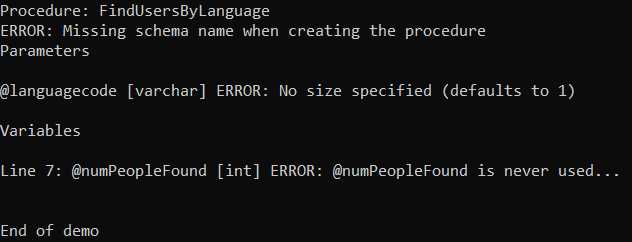
Figure 9: Newbie’s errors
Summary
We hope this whets your appetite for the type of analysis ScriptDOM is capable of. You can loop through all stored procedures in a database and report the errors from this Visitor class. The source code for all chapters is available at GitHub.


- 1800+ high-performance UI components.
- Includes popular controls such as Grid, Chart, Scheduler, and more.
- 24x5 unlimited support by developers.