
ScriptDOM Succinctly®

CHAPTER 9
Update Statement
The UPDATE statement is used to update columns in a database table. We can create a visitor method to grab the UPDATE statement. In this chapter, we are going to write code to check if an UPDATE statement contains a WHERE clause. However, if the UPDATE statement is a temporary table or table variable, we won’t flag it as an error. The following code snippet can create a visitor method to grab UPDATE statements.
public override void Visit(UpdateStatement node) |
The node parameter will be an UpdateStatement type, and the key property will be the update specification object. If a clause is not found in the statement, the property for that clause will be null.
Listing 38 shows a sample stored procedure that updates tables.
Code Listing 38: Update statements
CREATE PROCEDURE dbo.UpdateCustomers(@taxRate float,@statecode varchar(2)) AS BEGIN UPDATE dbo.Customer SET taxRate = @taxRate, LastUpdated = getDate(), UpdCounter += 1 WHERE stateCode=@stateCode END |
Target
The Target property is a NamedTableReference object, which can be used to determine the table being updated. The code snippet in Listing 39 shows how we can test for a missing WHERE clause, and that the table is not a temporary table.
Code Listing 39: Check target name if missing WHERE clause
// Search for update statements with no WHERE clause UpdateSpecification? upd = node.UpdateSpecification; if (upd.WhereClause is null && upd.Target is NamedTableReference) { NamedTableReference tbl = (NamedTableReference)upd.Target; string tblName = tbl.SchemaObject.BaseIdentifier.Value; if ( ! ((tblName.StartsWith("#") || tblName.StartsWith("@")) ) ) { Console.WriteLine("Line "+node.StartLine.ToString()+ ": UPDATE to " + tblName + " table is missing a WHERE expression"); } } |
The Schema.Object.BaseIdentifier provides the table name being updated. In addition, the server identifier, database identifier, and schema identifier can access each part of the table reference. Figure 12 illustrates a fully referenced table and properties to access each part.
[s11].[jbsite].[dbo].[Person]
Figure 12: Fully qualified table
FROM clause
The UPDATE statement allows you to update the data from another table, as shown in Listing 40.
Code Listing 40: Sample UPDATE FROM
UPDATE dbo.taxLog SET rateCode = xx.Rate FROM (SELECT StateCode,Rate FROM stateCodes ) xx WHERE xx.StateCode=taxlog.State |
If a FROM clause exists in the UPDATE statement, the FROM property will contain the table reference object. The FromClause object has a collection of TableReference objects, as shown in Table 23.
Table 23: From Clause properties
Property | Type | Description | Properties |
|---|---|---|---|
Table References | Query-derived table | Alias query expression | Alias assigned · From clause · Group By clause · Order By clause · Select elements · Where clause |
Named table reference | Alias schema object | Alias assigned · Server name · Database name · Schema name · Base identifier |
Set clauses
This collection is a list of AssignmentSetClause objects, an object for each column being updated. Due to a recent requested software update, the company would like all date columns to contain UTC (Coordinated Universal Time) dates, rather than local dates. SQL Server has a function called GetUTCDate(), which will return the UTC time.
We need code to review all UPDATE statements and report those statements that update a date field and use GetDate(), rather than GetUTCDate(). We do not want to report any updates to temporary tables, though.
Each item in the collection has the properties shown in Table 24.
Table 24: Set clause properties
Property | Types | Description |
|---|---|---|
AssignmentKind | Equals (=) Add equals (+) Multiply equals (*) Subtract equals (-) | Column = value Column += value Column *= value Column -= value |
Column | Column reference expression | Column type: regular, identity Multi-part identifier value |
NewValue | Variable reference | Name holds variable name |
Function call | Function name | |
String literal | Value property | |
Integer literal | Value property |
Listing 41 shows code to check for the GetDate() function call, so it can be replaced with GetUtcDate().
Code Listing 41: Identify GetDate() updates
UpdateSpecification upd = node.UpdateSpecification; foreach ( AssignmentSetClause setvar in upd.SetClauses) { if (setvar.NewValue is FunctionCall) { FunctionCall fn = setvar.NewValue as FunctionCall; if ( fn != null ) { NamedTableReference tbl = (NamedTableReference)upd.Target; string tblName = tbl.SchemaObject.BaseIdentifier.Value; if (! ((tblName.StartsWith("#") || tblName.StartsWith("@"))) ) { if (fn.FunctionName.Value.ToLower() == "getdate") { Console.WriteLine("Line " + node.StartLine.ToString() + ": UPDATE to " + tblName + " table is using GetDate() rather than GetUtcDate())"); } } } }
} |
WHERE clause
The primary property on the WHERE clause is the search condition object, which returns the first and second expressions. For a simple WHERE (one condition), the object type is a Boolean comparison expression. In the WHERE filter (such as statecode = @statecode), the search condition object will contain a first expression (in this case, a FunctionCall object) and a second expression (a variable reference). The comparison type (equals) shows how the two expressions are compared. Table 25 shows the mapping between the code and the object.
Table 25: Example WHERE parsing
SQL code | Object |
|---|---|
Upper(party_affiliation) | Function call object, with a function-name nested object |
= | Comparison type (equals) |
@whichparty | Variable reference, with a name field holding the variable name |
The object types will vary, such as column reference, string literal, and so on. The comparison type will be an enumeration, such as equals, greater than, or less than.
Example
An example UPDATE statement is shown in Figure 13.
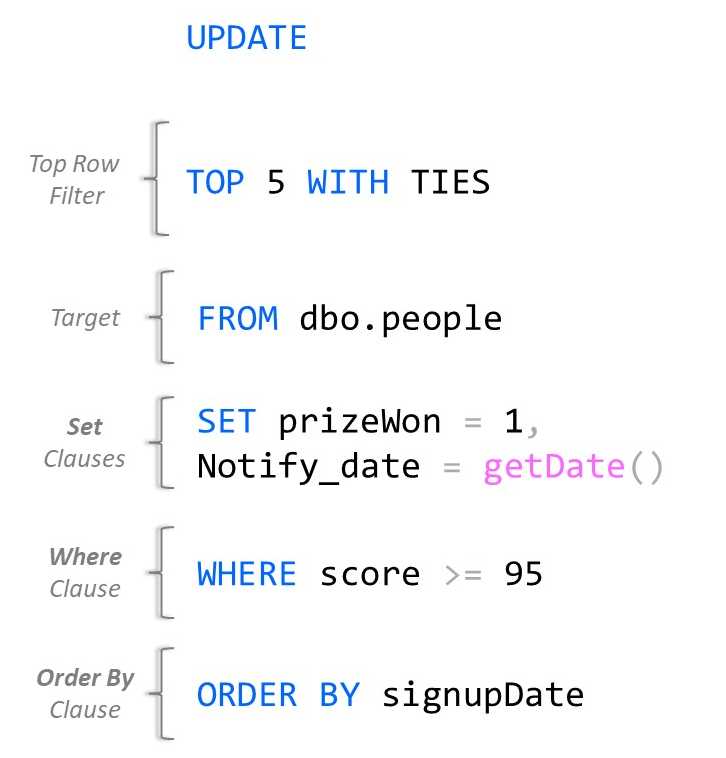
Figure 13: Example UPDATE statement
Summary
The UPDATE statement has several properties and sources of the content to update. You can use this visitor method to search the columns being updated, determine which table is being updated, and possibly the table providing the update source.


- 1800+ high-performance UI components.
- Includes popular controls such as Grid, Chart, Scheduler, and more.
- 24x5 unlimited support by developers.