
ScriptDOM Succinctly®

CHAPTER 7
Select Statement
The SELECT statement is certainly the most comprehensive and flexible data manipulation language statement in the SQL command set. The SELECT visitor class parses the SELECT statement, identifying tables, where expressions, columns, etc. The SELECT statement in SQL (particularly the WHERE expression) can be very complex, and ScriptDOM shines in helping parse it out.
We will use the SELECT statement to deal with the phone list problem from Chapter 1 (shown in Listing 26), but the SELECT statement processing is much more capable.
Code Listing 26: PhoneList
CREATE procedure [dbo].[PhoneList] (@whichparty varchar(12)) as begin select * from dbo.voters where upper(party_affiliation) = @whichparty end |
Visitor method
The visitor method call to get SELECT statements is shown in Listing 27. The node has a base class of a QueryExpression, but we are going to get the child class, QuerySpecification, to get the necessary extra properties for handling the SELECT statement. This will be a fairly common theme in your Visitor classes: many properties are only exposed in the child class.
Code Listing 27: Visitor method for select statements
public override void ExplicitVisit(SelectStatement node) { if (node.QueryExpression is QueryExpression) { QuerySpecification qe = node.QueryExpression as QuerySpecification; } base.ExplicitVisit(node); } |
Note: We need to cast the QueryExpression to a QuerySpecification to access the various properties. For example, the QueryExpression only has the ForClause property, the OffsetClause, and the OrderByClause. The QuerySpecification adds the FromClause, the GroupByClause, etc. It is derived from the QueryExpression class, but adds the additional properties needed to process a SQL SELECT statement.
The node will contain all the standard properties (FirstTokenIndex, FragmentLength, StartLine, etc.) However, Table 8 lists the properties unique to the SELECT statement, which are the properties we will likely use during our analysis method.
Table 8: Unique SELECT statement properties
Property | Type | Description |
|---|---|---|
ComputeClause | Collection of Compute expressions | Although the property still exists, it has not been supported since SQL 2012. You should replace it with ROLLUP. |
Into | Schema object name | The name of the table to which the results are sent. This can be null or possibly a fully qualified table name |
OptimizerHints | Collection of optimizer hint options | Any optimizer hints found in the query (See the OPTION keyword for details) · Hint kind (Enum of the option) · Value (Setting for the option) |
QueryExpression | Query specification | Details of tables, WHERE clauses, OrderBy, etc. |
The QueryExpression property has the various information we need to parse the SELECT statement. If a particular clause, such as ORDER BY, is not present in the code, it will be null in the QueryExpression property. This is the workhorse property of the SELECT statement. Table 9 lists the key properties.
Table 9: Query expression properties
Property | Type | Description |
|---|---|---|
ForClause | Collection of FOR settings (XML, JSON) | The Options property will vary depending on the type of FOR option. For example, the expression FOR JSON PATH ROOT(‘voters’) will return two JSON FOR clause options: · Path (no parameters) · Root (Parameter value of voters) |
FromClause | From clause | Table references: · Named table reference · Qualified join · Null if no table specified |
GroupByClause | Group by clause | A group-by option (none, rollup, cube) collection of expression-grouping specification objects. |
HavingClause | Having clause | The search condition (Boolean comparison class) for the having expression is found in this object |
OrderByClause | Order by clause | This class has a list of expressions making up the order clause; the expression can be functions, column names, or integer values |
SelectElements | List | Each column type (*, column, etc.): · Select star expression · Select scalar expression o Column reference o Binary expression |
TopRowFilter | Top row filter class | Contains the: · Expression (integer or function) · Percent Boolean · With ties Boolean |
WhereClause | Where clause | The search condition class provides the details of the WHERE condition |
A very simple code snippet might check to see if the TopRowFilter is specified (not null) while the OrderByClause is null. Such a condition could bring back random rows, which is probably not what is expected.
Determining tables
The FromClause property of the query expression contains the table references used by the query. For a simple query (one table), the TableReferences collection will contain a named table object with two key properties: the alias (null if not used) and the schema object, which provides the name of the table (property base identifier). A schema object has other properties to identify each element in a four-part table reference, shown in Table 10.
Table 10: Four-part table reference
Element | Example | Property |
|---|---|---|
Server name | [JDB01] | ServerIdentifier |
Database name | [BookExample] | DatabaseIdentifier |
Schema name | [dbo] | SchemaIdentifier |
Base identifier | [customer] | Table or view name |
To make table naming easier, we can add the private method shown in Listing 28 to our Visitor class. It takes a schema object and returns a string table name (with as many components as found in the object)
Code Listing 28: Schema to TableName
private string SchemaToTableName(SchemaObjectName schemaObject) { string tblName = ""; if (schemaObject.ServerIdentifier != null) { tblName = "["+ schemaObject.ServerIdentifier.Value+"]."; } if (schemaObject.DatabaseIdentifier != null) { tblName += "[" + schemaObject.DatabaseIdentifier.Value + "]."; } if (schemaObject.SchemaIdentifier!= null) { tblName += "[" + schemaObject.SchemaIdentifier.Value + "]."; } tblName += "[" + schemaObject.BaseIdentifier.Value + "]"; return tblName; } |
Handling JOINS
When there are joins in the SELECT statement, the Table References collection will not be a named table object, but rather a qualified join object. This object contains properties to determine the join tables and the expression to join the tables or views.
Table 11 shows the properties of the qualified join object.
Table 11: Qualified Join class
Property | Type | Description |
|---|---|---|
FirstTableReference | Named table reference | Details of the table or view |
QualifiedJoinType | Enumeration | Full, inner, left, right |
SearchCondition | Boolean comparison | Expression used to join tables |
SecondTableReference | Named table reference | Details of the second table or view |
If there are more than two tables being joined, the second table reference will be a qualified join object instead of a named table reference. Depending on the query complexity, this object structure can get quite deep.
To simplify the processing, we can create a nested object called JoinedTables and a list of joined tables in the Visitor class. Listing 29 shows the object and list property.
Code Listing 29: Joined tables
public class JoinedTables { public string? LeftTable { get; set; } public string? RightTable { get; set; } public QualifiedJoinType? joinType { get; set; } public string? JoinExpression { get; set; } public BooleanComparisonExpression? joinOn { get; set; } } public List<JoinedTables> tables = new List<JoinedTables>(); public string? BaseTable; |
We can now add a function that will process the SELECT statement and return a list of joined tables found in the SELECT statement. It will also set the base table string to a qualified table name. Listing 30 is the code to iterate the FROM clause to create the joined list.
Code Listing 30: Populate joined tables
private void BuildJoinedTables(FromClause fromClause) { tables.Clear(); BaseTable = ""; if (fromClause != null) { // If first reference is a table, rather than a join reference, // then only a single table if (fromClause.TableReferences[0] is NamedTableReference) { NamedTableReference tb = (NamedTableReference)fromClause.TableReferences[0]; BaseTable = SchemaToTableName(tb.SchemaObject); return; } if (fromClause.TableReferences[0] is QualifiedJoin) { QualifiedJoin qn = (QualifiedJoin)fromClause.TableReferences[0]; NamedTableReference tb1 = (NamedTableReference)qn.FirstTableReference; BaseTable = SchemaToTableName(tb1.SchemaObject); if (tb1.Alias != null) { BaseTable += " " + tb1.Alias.Value; } NamedTableReference tb2 = (NamedTableReference)qn.SecondTableReference; string SecondTable = SchemaToTableName(tb2.SchemaObject); if (tb2.Alias != null) { SecondTable += " " + tb2.Alias.Value; } JoinedTables jt = new JoinedTables(); jt.LeftTable = BaseTable; jt.RightTable = SecondTable; jt.ExpObj = (BooleanComparisonExpression)qn.SearchCondition; jt.JoinExpression = SearchExpressionToText(jt.ExpObj); jt.joinType = qn.QualifiedJoinType; tables.Add(jt); return; } } } |
We also include a function to convert the Join expression to text to make it more readable. Listing 31 contains the SearchExpressionToText() function.
Code Listing 31: Search Expression to Text
private string SearchExpressionToText(BooleanComparisonExpression ExpObj) { string ans = ""; // Column reference, alias, and column name if(ExpObj.FirstExpression is ColumnReferenceExpression) { ColumnReferenceExpression? cr1 = ExpObj.FirstExpression as ColumnReferenceExpression; for(int x=0;x<cr1.MultiPartIdentifier.Count;x++) { if (x>0) { ans += "."; } ans += cr1.MultiPartIdentifier[x].Value; } switch(ExpObj.ComparisonType) { case BooleanComparisonType.LessThan: ans += " < "; break; case BooleanComparisonType.GreaterThan: ans += " > "; break; case BooleanComparisonType.GreaterThanOrEqualTo: ans += " <= "; break; case BooleanComparisonType.LessThanOrEqualTo: ans += " <= "; break; default: ans += " = "; break; } ColumnReferenceExpression? cr2 = ExpObj.SecondExpression as ColumnReferenceExpression; for (int x = 0; x < cr2.MultiPartIdentifier.Count; x++) { if (x > 0) { ans += "."; } ans += cr2.MultiPartIdentifier[x].Value; } } return ans; } |
WHERE clause
The primary property on the WHERE clause is the SearchCondition object, which returns the first and second expressions. For a simple WHERE (one condition), the object type is a BooleanComparisonExpression. In the WHERE filter (such as upper(party_affiliation) = @whichparty), the SearchCondition object will contain a first expression (in this case, a function call object) and a second expression (a variable reference). The comparison type (equals) shows how the two expressions are compared. Table 12 shows the mapping between the code and the object.
Table 12: Example WHERE parsing
SQL code | Object |
|---|---|
Upper(party_affiliation) | Function call object, with a function name nested object |
= | Comparison type (equals) |
@whichparty | Variable reference, with a name field holding the variable name |
The object types will vary, such as column reference or string literal. The comparison type will be an enumeration, such as equals, greater than, or less than.
When there are multiple expressions, the search condition changes a bit. It will be a type Boolean binary expression, with a binary expression type of AND/OR. The first expression could be a Boolean comparison expression, with options similar to Table 12. Similarly, the second expression can be a simple comparison.
Depending on the complexity of the WHERE clause, the object can get pretty deep. Table 13 shows a visual reference of the object structure for the following SQL clause:
Party affiliation=@whichParty AND gender=’F’
Table 13: Multiple condition WHERE example
Object |
· Search condition is a Boolean binary expression · Binary expression type: And · First expression: Boolean comparison expression o First expression: Column reference (party affiliation) o Comparison type: Equals o Second expression: Variable (@whichParty) · Second expression: Boolean comparison expression o First expression: Column reference (gender) o Comparison type: Equals o Second expression: String literal (F) |
If a third condition were added, the second expression would become a Boolean binary expression object and would have first and second expression objects. The collection of expression properties will be as deep as needed to handle all of the conditions.
Tip: If you find the nesting getting pretty deep, it might be worth redesigning the query.
ORDER BY clause
The ORDER BY clause object only has one property of interest, the OrderByElements property, which is a collection of each expression in the ORDER BY clause. This list contains any number of ExpressionWithSortOrder objects.
Within the SortOrder objects, there are two interesting properties: The SortOrder is an enumerated value of ascending, descending, or not specified; the Expression property provides the details of the sort item.
Column reference expression
A column reference uses the multi-part identifier to return the column and possibly the table or alias name. You can loop through the property to determine the column for the OrderBy. Code Listing 32 shows the code to assemble the column reference.
Code Listing 32: Build Column reference
string ans = ""; for(int x=0;x<cr1.MultiPartIdentifier.Count;x++) { if (x>0) { ans += "."; } ans += cr1.MultiPartIdentifier[x].Value; } |
Integer literal
SQL Server allows you to use numeric position when specifying sort order, although it is discouraged and may be unsupported in future SQL versions. If you use an integer sort column reference, the Value property will contain the numeric value.
Note: You can also sort on other literal values (dates, strings, etc.). While SQL supports this, it is not likely to provide any benefit to sort on a literal string.
GROUP BY clause
The GROUP BY clause object contains details about the grouping logic of the query. Table 14 shows the key properties of the class.
Table 14: Group By clause
Property | Type | Description |
|---|---|---|
All | Boolean | The All option is noncompliant and only for backward compatibility |
GroupByOption | Enumeration | Cube, None, Rollup |
GroupingSpecifications | Collection | Collection of expression group specification objects for each value in the group by expression |
Note: The All option is noncompliant for SQL Server and Azure.
Each ExpressionGroupSpecification object represents a column in the GROUP BY clause. The key property is the expression object, which provides details about the column.
Table 15: Expression class
Property | Type | Description |
|---|---|---|
ColumnType | Enum | Regular or identity are the most common types |
Multi-Part Identifier | Multi-part identifier | The Identifiers collection lists each column, and the Value property contains the column name |
Having clause
The key property of the Having clause is a search condition (which is a Boolean comparison expression). This operates in the same manner as the search condition on the WHERE clause.
Example
Figure 10 shows a SELECT statement and the ScriptDOM objects that contain each clause.
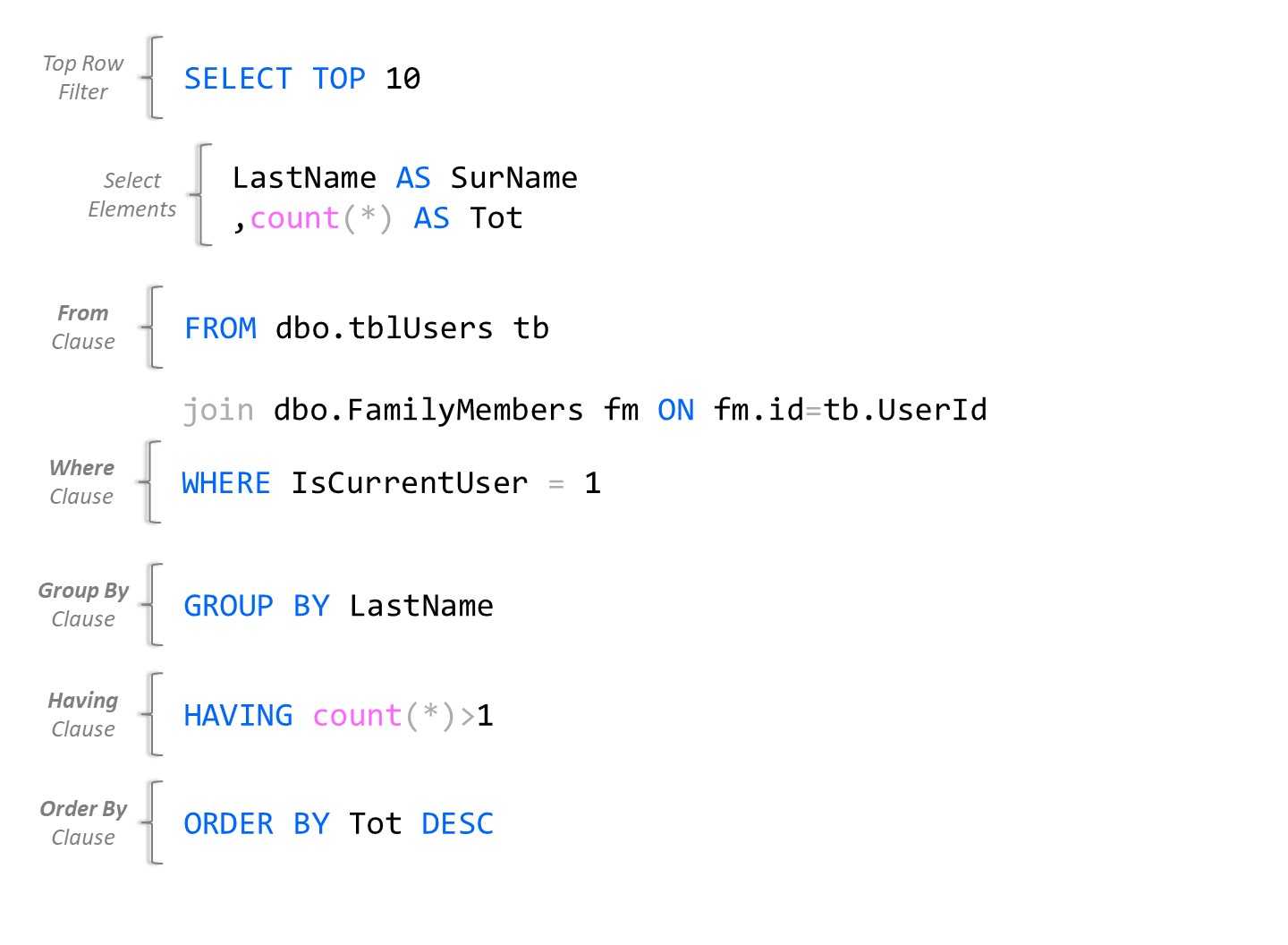
Figure 10: SELECT statement
Summary
The SELECT clause can get very complex with many options. ScriptDOM allows you to extract all components of the statement. When a clause does not exist in the statement, the class will be null in the QuerySpecification object.
You can look for many issues in the select statement node, such as using SELECT *, numeric ORDER BY expressions, and tables without schemas.


- 1800+ high-performance UI components.
- Includes popular controls such as Grid, Chart, Scheduler, and more.
- 24x5 unlimited support by developers.