
Prompt Engineering for Developers Succinctly®

CHAPTER 6
App Front End
Overview
Alright, this is the part where you might be wondering whether to use one of those fancy code editors or vibe coding tools for the app’s front end and UI—something like Lovable, v0, Bolt, Base44, or Replit. There are many others.
Well, let me tell you something that most people don’t know. Most of the vibe coding tools out there, at least the most well-known ones (previously listed), don’t fully support PHP, and if they do, the results are somewhat limited—at least at the time of writing this ebook.
Maybe by the time you are reading this ebook, PHP support in some of these vibe coding platforms will be more prevalent.
Most of these tools support React and Next.js applications. Among the ones I tested, Replit has broader coverage and goes beyond React.
PhpStorm from JetBrains is a PHP-focused IDE that now includes AI-enhanced capabilities. I’ve not tried it myself, but I’ve heard from peers that it works quite well with PHP, and the AI features are pretty good. You might want to give this a try.
However, as I mentioned at the beginning of this ebook, the goal is to use something simple like ChatGPT to get results, so we’ll sketch out the front end in the same way.
Where we left off
In the last prompt we used, ChatGPT returned the following.
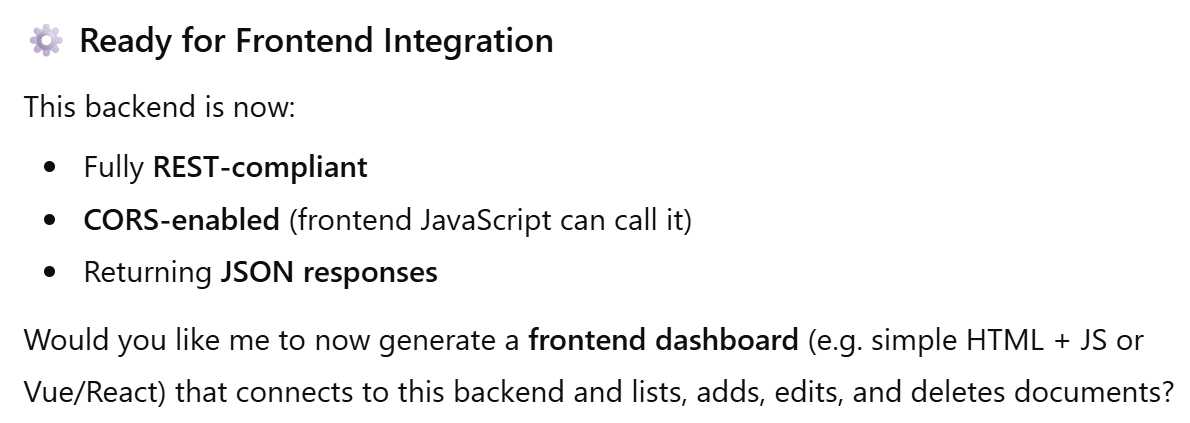
Figure 6-a: The Last Part of the Previous ChatGPT Response
Notice how ChatGPT offers the option to generate the app’s front end without requiring us to specify anything. I find this super cool and helpful.
So, let’s go ahead and take advantage of ChatGPT’s offer. Just a word of caution—don’t expect the front-end UI to be something super fancy. It will probably be very bare bones. In any case, let’s use the following prompt.
Code Listing 6-a: Initial Front-End Prompt
Yes, please generate a front-end dashboard with simple HTML and vanilla JavaScript (no Vue, no React, no Svelte) that connects to this back end, and lists, adds, updates, and deletes documents. |
As you can see, the prompt is quite specific. Let’s see what response we get back from our AI assistant.
Code Listing 6-b: Initial Front-End Prompt Result (index.html)
Perfect — below is a complete, ready-to-run front-end dashboard (index.html) that works seamlessly with your previously created PHP back end (crud.php). ✅ Highlights: · Uses Bootstrap 5 for styling. · Written in vanilla JavaScript (no frameworks). · Supports full CRUD: o Read: Fetch and list all documents. o Create: Add a new document via a form. o Update: Inline edit for existing document fields. o Delete: Remove a document with confirmation. · Automatically updates the table after every operation. <!DOCTYPE html> <html lang="en"> <head> <meta charset="UTF-8"> <meta name="viewport" content="width=device-width, initial-scale=1"> <title>Document Dashboard</title> <link href=" https://cdn.jsdelivr.net/npm/[email protected]/dist/css/bootstrap.min.css" rel="stylesheet"> </head> <body class="bg-light"> <div class="container py-4"> <h1 class="text-center mb-4">📁 Document Management Dashboard</h1> <!-- Add Document Form --> <div class="card mb-4"> <div class="card-header">Add New Document</div> <div class="card-body"> <form id="addForm" class="row g-3"> <div class="col-md-3"> <input type="text" class="form-control" id="name" placeholder="Name" required> </div> <div class="col-md-3"> <input type="text" class="form-control" id="type" placeholder="Type" required> </div> <div class="col-md-3"> <input type="date" class="form-control" id="expiration_date" required> </div> <div class="col-md-3"> <input type="text" class="form-control" id="notes" placeholder="Notes (optional)"> </div> <div class="col-12 text-end"> <button type="submit" class="btn btn-primary">Add Document</button> </div> </form> </div> </div> <!-- Documents Table --> <div class="card"> <div class="card-header">Documents</div> <div class="card-body"> <table class="table table-striped table-hover" id="documentsTable"> <thead class="table-dark"> <tr> <th>ID</th> <th>Name</th> <th>Type</th> <th>Expiration Date</th> <th>Notes</th> <th>Actions</th> </tr> </thead> <tbody></tbody> </table> </div> </div> </div> <script> const API_URL = 'crud.php'; const tableBody = document.querySelector('#documentsTable tbody'); const form = document.getElementById('addForm'); // Fetch and display all documents async function fetchDocuments() { const res = await fetch(API_URL); const data = await res.json(); renderTable(data); } // Render table function renderTable(documents) { tableBody.innerHTML = ''; documents.forEach(doc => { const tr = document.createElement('tr'); tr.innerHTML = ` <td>${doc.id}</td> <td contenteditable="true" data-field="name">${doc.name}</td> <td contenteditable="true" data-field="type">${doc.type}</td> <td contenteditable="true" data- field="expiration_date">${doc.expiration_date}</td> <td contenteditable="true" data-field="notes"> ${doc.notes || ''}</td> <td> <button class="btn btn-success btn-sm me-2" onclick="updateDocument(${doc.id}, this)">Update</button> <button class="btn btn-danger btn-sm" onclick="deleteDocument(${doc.id})">Delete</button> </td> `; tableBody.appendChild(tr); }); } // Add new document form.addEventListener('submit', async (e) => { e.preventDefault(); const name = document.getElementById('name').value; const type = document.getElementById('type').value; const expiration_date = document.getElementById('expiration_date').value; const notes = document.getElementById('notes').value; const res = await fetch(API_URL, { method: 'POST', headers: { 'Content-Type': 'application/json' }, body: JSON.stringify({ action: 'add', name, type, expiration_date, notes }) }); const result = await res.json(); if (result.success) { form.reset(); fetchDocuments(); } else { alert('Error adding document: ' + result.error); } }); // Update document async function updateDocument(id, btn) { const row = btn.closest('tr'); const updatedDoc = {}; row.querySelectorAll('[data-field]').forEach(td => { updatedDoc[td.dataset.field] = td.innerText.trim(); }); updatedDoc.id = id; const res = await fetch(API_URL, { method: 'POST', headers: { 'Content-Type': 'application/json' }, body: JSON.stringify({ action: 'update', ...updatedDoc }) }); const result = await res.json(); if (result.success) { alert('Document updated successfully!'); fetchDocuments(); } else { alert('Error updating document: ' + result.error); } } // Delete document async function deleteDocument(id) { if ( !confirm('Are you sure you want to delete this document?')) return; const res = await fetch(API_URL, { method: 'POST', headers: { 'Content-Type': 'application/json' }, body: JSON.stringify({ action: 'delete', id }) }); const result = await res.json(); if (result.success) { fetchDocuments(); } else { alert('Error deleting document: ' + result.error); } } // Initialize fetchDocuments(); </script> </body> </html> Expected Back End (crud.php) Make sure your back end (crud.php) supports these actions: · GET → Returns all documents as JSON. · POST with JSON payload {action: 'add', ...} → Inserts a document. · POST with JSON payload {action: 'update', ...} → Updates a document. · POST with JSON payload {action: 'delete', id: ...} → Deletes a document. If your current back end only supports getAllDocuments() and getDocumentById(), I can expand it to fully support add, update, and delete (REST-style) next. |
Right off the bat, I noticed one error in the ChatGPT response. The back end is called crud.php instead of crud_api.php.
So, let’s fix that by changing this const API_URL = 'crud.php'; to const API_URL = 'crud_api.php';.
With that done, ensure the index.html file resides in the htdocs folder, then go to localhost/index.html to test it.
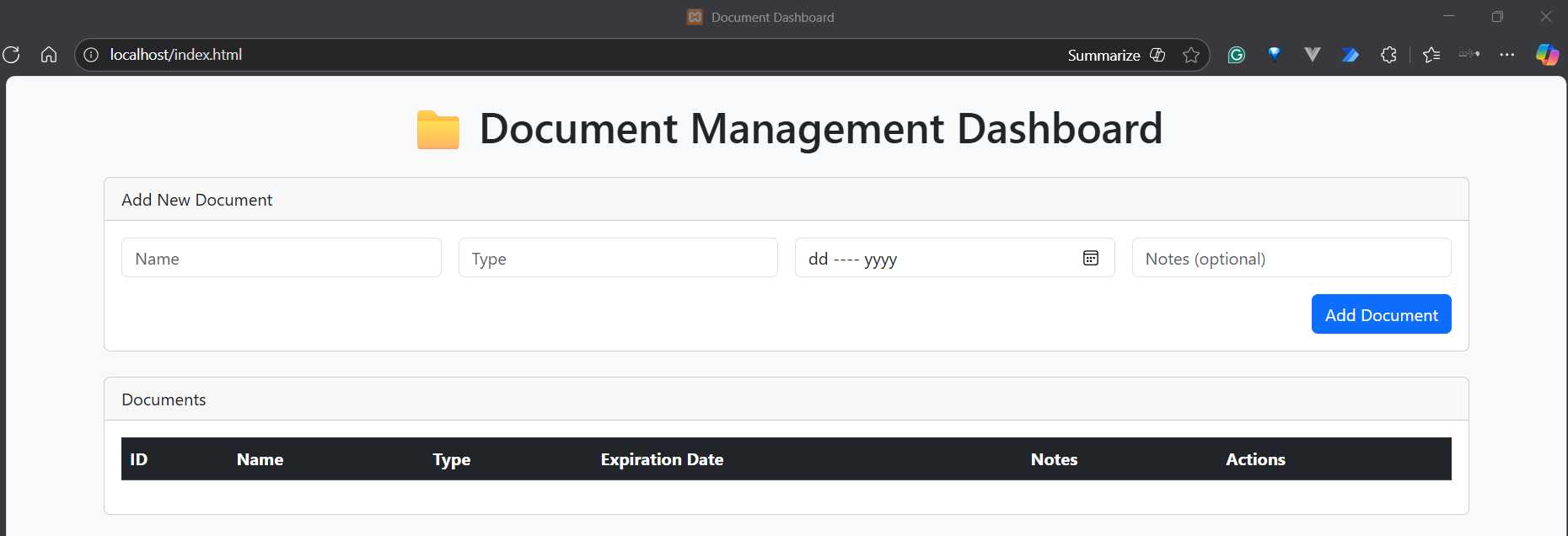
Figure 6-b: The Generated Front End
Look at that! Let’s put this into context for a moment. It’s not the prettiest site I’ve seen, but from a visual standpoint, it seems to be precisely what we need, at least for now.
The real test is whether this works with the back-end API. Because, from experience, I know this doesn’t work right away. Therefore, I usually open the browser developer tools to catch anything that might happen.
I tried adding a new document and ran into the following issue. It’s possible that you won’t get this error at all, though.

Figure 6-c: Errors (Browser Developer Tools)
To nail this down, I usually copy the error and paste it into the AI assistant chat window—in our case, ChatGPT. Let’s do this and see what feedback we get.
Code Listing 6-c: ChatGPT Feedback
Perfect — that error tells us your PHP back end (crud.php) is printing human-readable messages like “✅ Document added successfully” instead of returning pure JSON, which breaks the front-end fetch(...).json() call. Let’s fix that. Below is a complete and correct crud.php back end that works seamlessly with the HTML dashboard I gave you earlier. It: · Uses PDO for SQLite (documents.sqlite). · Returns proper JSON responses for all CRUD operations. · Handles errors gracefully. · Supports: o GET → Fetch all documents o GET?id=1 → Fetch single document o POST {action: "add"} → Add document o POST {action: "update"} → Update document o POST {action: "delete"} → Delete document <?php header('Content-Type: application/json'); error_reporting(E_ALL); ini_set('display_errors', 1); function getDbConnection(): PDO { try { $dbFile = __DIR__ . '/documents.sqlite'; $pdo = new PDO('sqlite:' . $dbFile); $pdo->setAttribute(PDO::ATTR_ERRMODE, PDO::ERRMODE_EXCEPTION); return $pdo; } catch (PDOException $e) { echo json_encode(['success' => false, 'error' => 'Database connection failed: ' . $e->getMessage()]); exit; } } function getAllDocuments(): array { try { $pdo = getDbConnection(); $stmt = $pdo->query( "SELECT * FROM documents ORDER BY expiration_date ASC"); return $stmt->fetchAll(PDO::FETCH_ASSOC); } catch (PDOException $e) { return []; } } function getDocumentById(int $id): ?array { try { $pdo = getDbConnection(); $stmt = $pdo->prepare("SELECT * FROM documents WHERE id = :id"); $stmt->execute([':id' => $id]); $doc = $stmt->fetch(PDO::FETCH_ASSOC); return $doc ?: null; } catch (PDOException $e) { return null; } } function addDocument(string $name, string $type, string $expirationDate, ?string $notes = null): bool { try { $pdo = getDbConnection(); $stmt = $pdo->prepare("INSERT INTO documents (name, type, expiration_date, notes) VALUES (:name, :type, :expiration_date, :notes)"); return $stmt->execute([ ':name' => $name, ':type' => $type, ':expiration_date' => $expirationDate, ':notes' => $notes ]); } catch (PDOException $e) { return false; } } function updateDocument(int $id, string $name, string $type, string $expirationDate, ?string $notes = null): bool { try { $pdo = getDbConnection(); $stmt = $pdo->prepare("UPDATE documents SET name = :name, type = :type, expiration_date = :expiration_date, notes = :notes WHERE id = :id"); return $stmt->execute([ ':id' => $id, ':name' => $name, ':type' => $type, ':expiration_date' => $expirationDate, ':notes' => $notes ]); } catch (PDOException $e) { return false; } } function deleteDocument(int $id): bool { try { $pdo = getDbConnection(); $stmt = $pdo->prepare("DELETE FROM documents WHERE id = :id"); return $stmt->execute([':id' => $id]); } catch (PDOException $e) { return false; } } // ----------------------------- // REST-like request handling // ----------------------------- $method = $_SERVER['REQUEST_METHOD']; if ($method === 'GET') { if (isset($_GET['id'])) { $doc = getDocumentById((int)$_GET['id']); if ($doc) { echo json_encode($doc); } else { echo json_encode(['success' => false, 'error' => 'Document not found']); } } else { echo json_encode(getAllDocuments()); } exit; } if ($method === 'POST') { $input = json_decode(file_get_contents('php://input'), true); if (!$input || !isset($input['action'])) { echo json_encode(['success' => false, 'error' => 'Invalid JSON input']); exit; } switch ($input['action']) { case 'add': $ok = addDocument($input['name'], $input['type'], $input['expiration_date'], $input['notes'] ?? null); echo json_encode(['success' => $ok]); break; case 'update': if (!isset($input['id'])) { echo json_encode(['success' => false, 'error' => 'Missing document ID']); break; } $ok = updateDocument((int)$input['id'], $input['name'], $input['type'], $input['expiration_date'], $input['notes'] ?? null); echo json_encode(['success' => $ok]); break; case 'delete': if (!isset($input['id'])) { echo json_encode(['success' => false, 'error' => 'Missing document ID']); break; } $ok = deleteDocument((int)$input['id']); echo json_encode(['success' => $ok]); break; default: echo json_encode(['success' => false, 'error' => 'Unknown action']); } exit; } // Default case echo json_encode(['success' => false, 'error' => 'Unsupported request method']); |
Given this response, let’s copy the generated code and overwrite the crud_api.php file, which should now look as follows.
Code Listing 6-d: crud_api.php (Updated)
<?php header('Content-Type: application/json'); error_reporting(E_ALL); ini_set('display_errors', 1); function getDbConnection(): PDO { try { $dbFile = __DIR__ . '/documents.sqlite'; $pdo = new PDO('sqlite:' . $dbFile); $pdo->setAttribute(PDO::ATTR_ERRMODE, PDO::ERRMODE_EXCEPTION); return $pdo; } catch (PDOException $e) { echo json_encode(['success' => false, 'error' => 'Database connection failed: ' . $e->getMessage()]); exit; } } function getAllDocuments(): array { try { $pdo = getDbConnection(); $stmt = $pdo->query( "SELECT * FROM documents ORDER BY expiration_date ASC"); return $stmt->fetchAll(PDO::FETCH_ASSOC); } catch (PDOException $e) { return []; } } function getDocumentById(int $id): ?array { try { $pdo = getDbConnection(); $stmt = $pdo->prepare("SELECT * FROM documents WHERE id = :id"); $stmt->execute([':id' => $id]); $doc = $stmt->fetch(PDO::FETCH_ASSOC); return $doc ?: null; } catch (PDOException $e) { return null; } } function addDocument(string $name, string $type, string $expirationDate, ?string $notes = null): bool { try { $pdo = getDbConnection(); $stmt = $pdo->prepare("INSERT INTO documents (name, type, expiration_date, notes) VALUES (:name, :type, :expiration_date, :notes)"); return $stmt->execute([ ':name' => $name, ':type' => $type, ':expiration_date' => $expirationDate, ':notes' => $notes ]); } catch (PDOException $e) { return false; } } function updateDocument(int $id, string $name, string $type, string $expirationDate, ?string $notes = null): bool { try { $pdo = getDbConnection(); $stmt = $pdo->prepare("UPDATE documents SET name = :name, type = :type, expiration_date = :expiration_date, notes = :notes WHERE id = :id"); return $stmt->execute([ ':id' => $id, ':name' => $name, ':type' => $type, ':expiration_date' => $expirationDate, ':notes' => $notes ]); } catch (PDOException $e) { return false; } } function deleteDocument(int $id): bool { try { $pdo = getDbConnection(); $stmt = $pdo->prepare("DELETE FROM documents WHERE id = :id"); return $stmt->execute([':id' => $id]); } catch (PDOException $e) { return false; } } // ----------------------------- // REST-like request handling // ----------------------------- $method = $_SERVER['REQUEST_METHOD']; if ($method === 'GET') { if (isset($_GET['id'])) { $doc = getDocumentById((int)$_GET['id']); if ($doc) { echo json_encode($doc); } else { echo json_encode(['success' => false, 'error' => 'Document not found']); } } else { echo json_encode(getAllDocuments()); } exit; } if ($method === 'POST') { $input = json_decode(file_get_contents('php://input'), true); if (!$input || !isset($input['action'])) { echo json_encode(['success' => false, 'error' => 'Invalid JSON input']); exit; } switch ($input['action']) { case 'add': $ok = addDocument($input['name'], $input['type'], $input['expiration_date'], $input['notes'] ?? null); echo json_encode(['success' => $ok]); break; case 'update': if (!isset($input['id'])) { echo json_encode(['success' => false, 'error' => 'Missing document ID']); break; } $ok = updateDocument((int)$input['id'], $input['name'], $input['type'], $input['expiration_date'], $input['notes'] ?? null); echo json_encode(['success' => $ok]); break; case 'delete': if (!isset($input['id'])) { echo json_encode(['success' => false, 'error' => 'Missing document ID']); break; } $ok = deleteDocument((int)$input['id']); echo json_encode(['success' => $ok]); break; default: echo json_encode(['success' => false, 'error' => 'Unknown action']); } exit; } // Default case echo json_encode(['success' => false, 'error' => 'Unsupported request method']); |
Your index.html file should look like the following.
Code Listing 6-e: index.html
<!DOCTYPE html> <html lang="en"> <head> <meta charset="UTF-8"> <meta name="viewport" content="width=device-width, initial-scale=1"> <title>Document Dashboard</title> <link href="https://cdn.jsdelivr.net/npm/[email protected]/ dist/css/bootstrap.min.css" rel="stylesheet"> </head> <body class="bg-light"> <div class="container py-4"> <h1 class="text-center mb-4">📁 Document Management Dashboard</h1> <!-- Add Document Form --> <div class="card mb-4"> <div class="card-header">Add New Document</div> <div class="card-body"> <form id="addForm" class="row g-3"> <div class="col-md-3"> <input type="text" class="form-control" id="name" placeholder="Name" required> </div> <div class="col-md-3"> <input type="text" class="form-control" id="type" placeholder="Type" required> </div> <div class="col-md-3"> <input type="date" class="form-control" id="expiration_date" required> </div> <div class="col-md-3"> <input type="text" class="form-control" id="notes" placeholder="Notes (optional)"> </div> <div class="col-12 text-end"> <button type="submit" class="btn btn-primary">Add Document</button> </div> </form> </div> </div> <!-- Documents Table --> <div class="card"> <div class="card-header">Documents</div> <div class="card-body"> <table class="table table-striped table-hover" id="documentsTable"> <thead class="table-dark"> <tr> <th>ID</th> <th>Name</th> <th>Type</th> <th>Expiration Date</th> <th>Notes</th> <th>Actions</th> </tr> </thead> <tbody></tbody> </table> </div> </div> </div> <script> const API_URL = 'crud_api.php'; const tableBody = document.querySelector('#documentsTable tbody'); const form = document.getElementById('addForm'); // Fetch and display all documents async function fetchDocuments() { const res = await fetch(API_URL); const data = await res.json(); renderTable(data); } // Render table function renderTable(documents) { tableBody.innerHTML = ''; documents.forEach(doc => { const tr = document.createElement('tr'); tr.innerHTML = ` <td>${doc.id}</td> <td contenteditable="true" data-field="name">${doc.name}</td> <td contenteditable="true" data-field="type">${doc.type}</td> <td contenteditable="true" data-field="expiration_date"> ${doc.expiration_date}</td> <td contenteditable="true" data-field="notes"> ${doc.notes || ''}</td> <td> <button class="btn btn-success btn-sm me-2" onclick="updateDocument(${doc.id}, this)">Update</button> <button class="btn btn-danger btn-sm" onclick="deleteDocument(${doc.id})">Delete</button> </td> `; tableBody.appendChild(tr); }); } // Add new document form.addEventListener('submit', async (e) => { e.preventDefault(); const name = document.getElementById('name').value; const type = document.getElementById('type').value; const expiration_date = document.getElementById('expiration_date').value; const notes = document.getElementById('notes').value; const res = await fetch(API_URL, { method: 'POST', headers: { 'Content-Type': 'application/json' }, body: JSON.stringify({ action: 'add', name, type, expiration_date, notes }) }); const result = await res.json(); if (result.success) { form.reset(); fetchDocuments(); } else { alert('Error adding document: ' + result.error); } }); // Update document async function updateDocument(id, btn) { const row = btn.closest('tr'); const updatedDoc = {}; row.querySelectorAll('[data-field]').forEach(td => { updatedDoc[td.dataset.field] = td.innerText.trim(); }); updatedDoc.id = id; const res = await fetch(API_URL, { method: 'POST', headers: { 'Content-Type': 'application/json' }, body: JSON.stringify({ action: 'update', ...updatedDoc }) }); const result = await res.json(); if (result.success) { alert('Document updated successfully!'); fetchDocuments(); } else { alert('Error updating document: ' + result.error); } } // Delete document async function deleteDocument(id) { if (!confirm( 'Are you sure you want to delete this document?')) return; const res = await fetch(API_URL, { method: 'POST', headers: { 'Content-Type': 'application/json' }, body: JSON.stringify({ action: 'delete', id }) }); const result = await res.json(); if (result.success) { fetchDocuments(); } else { alert('Error deleting document: ' + result.error); } } // Initialize fetchDocuments(); </script> </body> </html> |
Now, if you point the browser to localhost/index.html, you should see the list of existing documents contained in the SQLite database.
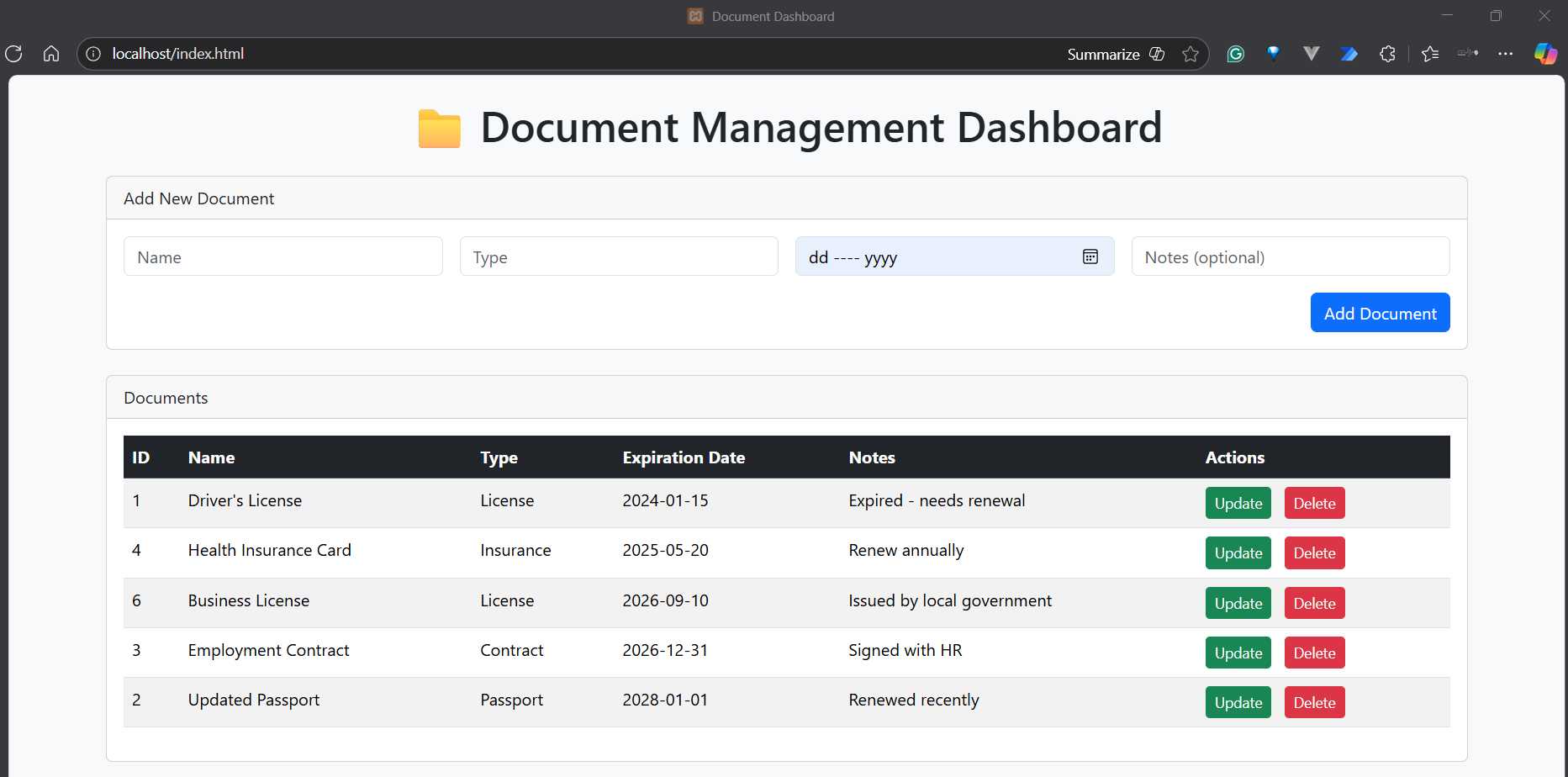
Figure 6-d: Document Management Dashboard with Various Documents
Great. Now, let’s add a new document to test the back end.
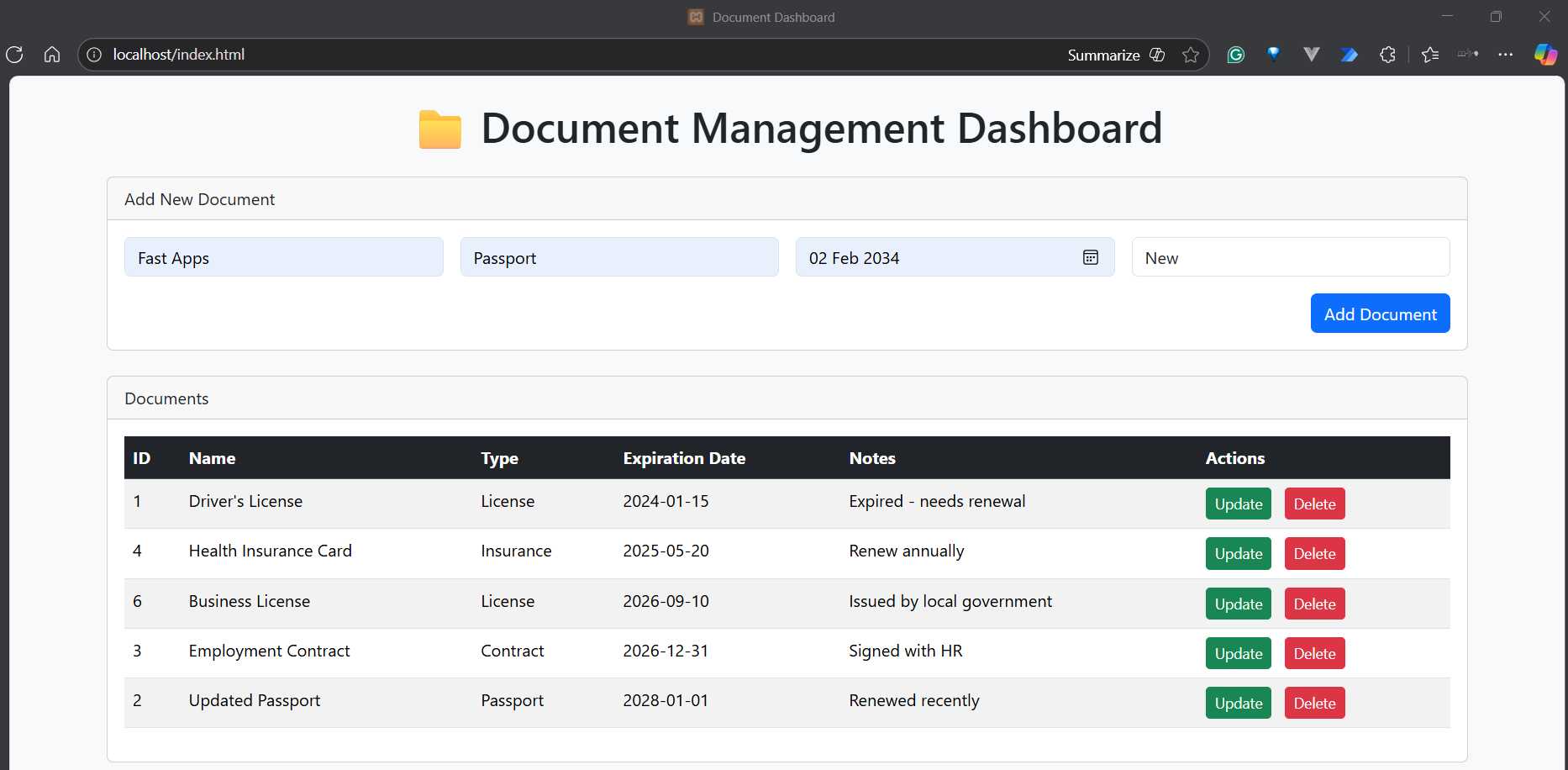
Figure 6-e: Adding a New Document
After clicking Add Document, we should see the new document added to the list.
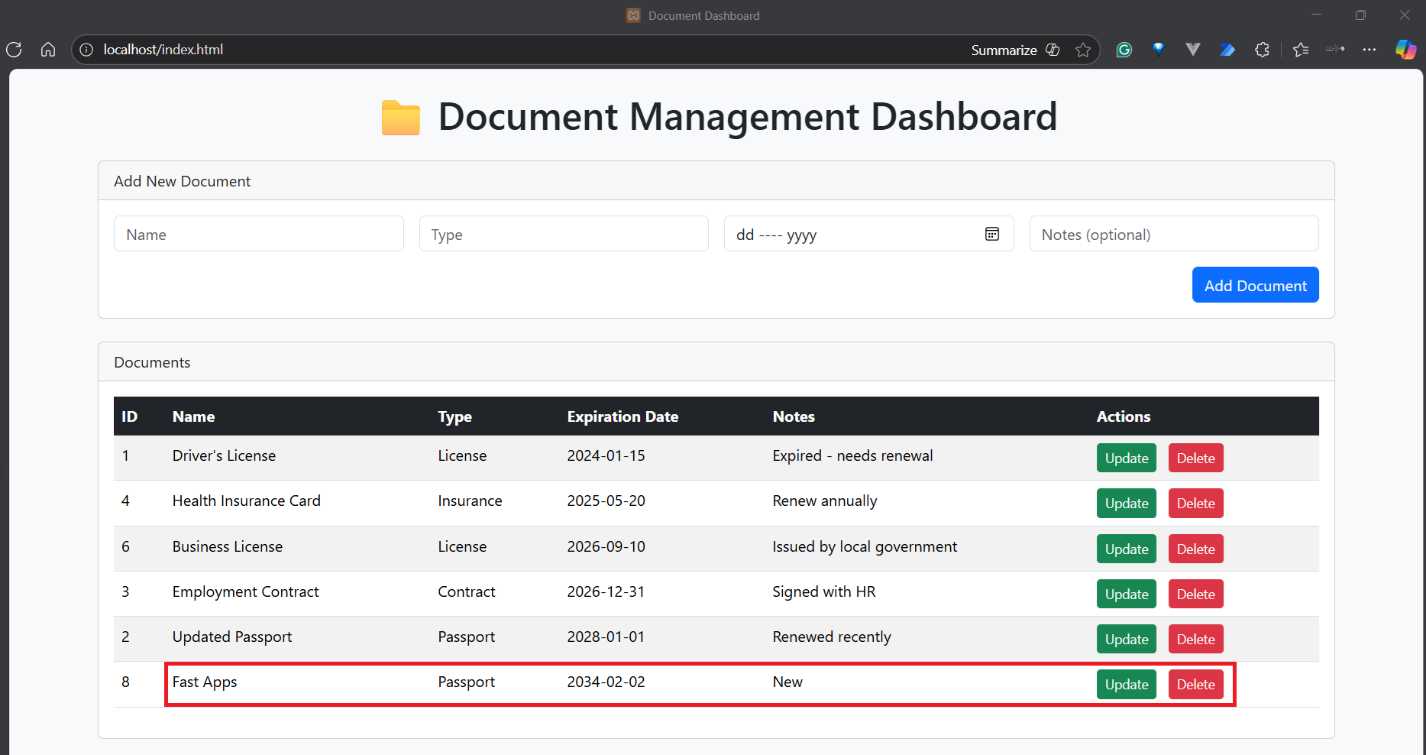
Figure 6-f: Document Added Successfully
Awesome. That also worked. Now, let’s remove the document from the list by clicking Delete next to it.

Figure 6-g: Requesting Confirmation to Delete
As you can see, the application prompts the user to confirm the deletion of the document. Let’s click OK.
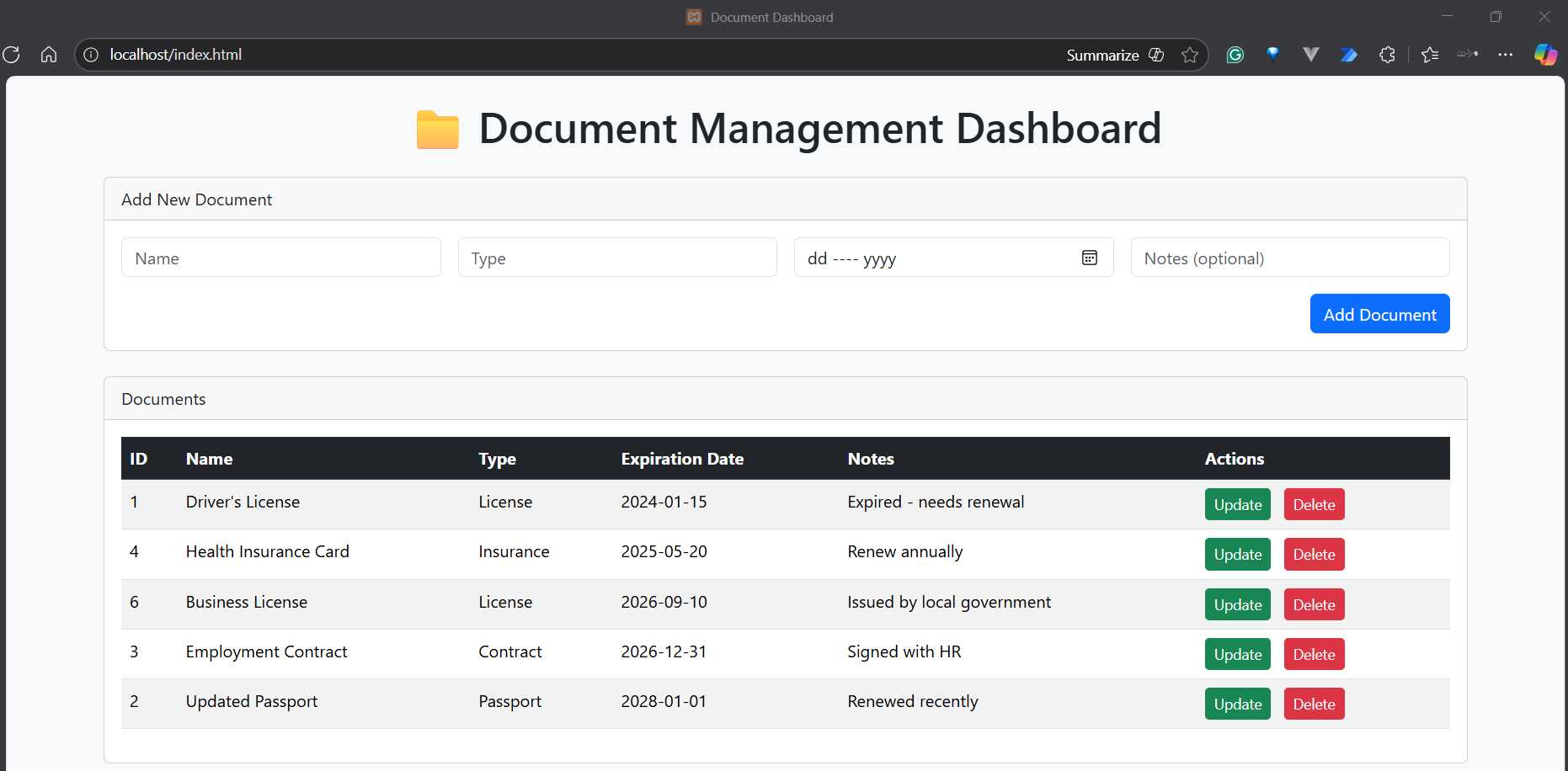
Figure 6-h: Document Deleted
After confirming, the document is successfully deleted. So, in essence, we have a working solution.


- 1800+ high-performance UI components.
- Includes popular controls such as Grid, Chart, Scheduler, and more.
- 24x5 unlimited support by developers.