
OpenAI Succinctly®

CHAPTER 6
Whisper
The Whisper API from OpenAI is a speech-to-text API that uses the Whisper model to transcribe audio. The model has been trained on a diverse dataset of audio and is capable of multilingual speech recognition, speech translation, and language identification.
Note: To use the Whisper API, files must be under 25 MB in size. For audio files larger than this, you'll have to either split them into 25 MB or smaller chunks or convert them to a compressed audio format.
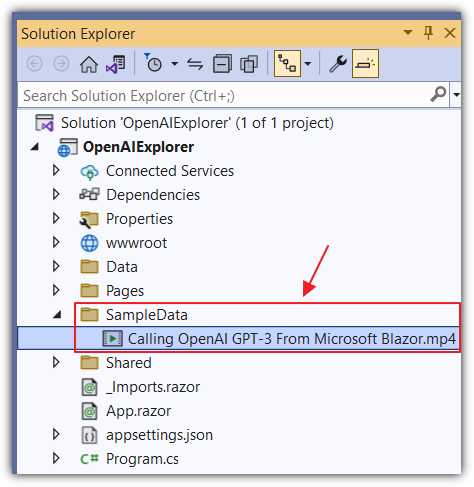
Figure 39: Add SampleData Folder and .MP4 File
Create a Blazor transcription application
To demonstrate what Whisper can do, we will open the OpenAIExplorer project, add a new folder called SampleData, and an .mp4 file (you can download a sample file using the following link: https://bit.ly/3LX55Ic).
Note: File types accepted are: mp3, mp4, mpeg, mpga, m4a, wav, and webm.
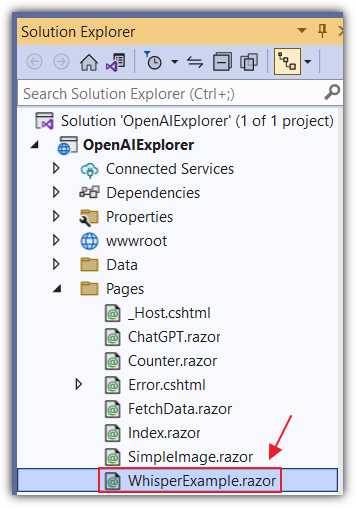
Figure 40: Add WhisperExample.razor
Next, we will add a new Razor control called WhisperExample.razor to the project, which will transcribe the audio of a video file.
Replace all the code in the file with the following code.
Code Listing 27
@page "/whisperexample" @using OpenAI; @using OpenAI.Audio; @using OpenAI.Edits; @using OpenAI.Models; @inject IConfiguration _configuration <PageTitle>Whisper Example</PageTitle> <h1>Whisper Transcription</h1> <button class="btn btn-primary" @onclick="UploadFile"> Upload File </button> <br /> <br /> <h4>Response:</h4> @if (!Processing) { <textarea rows="10" cols="75" @bind="response" /> } else { <br> <h4>Processing...</h4> } |
The code contains an Upload File button that calls a function called UploadFile when clicked. This function will upload the file to the speech-to-text API to be transcoded by the Whisper model (into the language the audio is in).
Next, there is a statement that checks the value of the Processing variable. If the value is false, then the code displays a <textarea> element that will display the text transcription of the audio in the file, after the file has been uploaded and processed.
Add the following code, which will set up the necessary variables and retrieve the Organization and ApiKey.
Code Listing 28
@code { string Organization = ""; string ApiKey = ""; string response = ""; bool Processing = false; protected override void OnInitialized() { Organization = _configuration["OpenAIServiceOptions:Organization"] ?? ""; ApiKey = _configuration["OpenAIServiceOptions:ApiKey"] ?? ""; } } |
Finally, add the following code to the @code section, which will respond to the click of the Upload File button, upload the file to the CreateTranscriptionAsync method of the AudioEndpoint, and receive the response.
Code Listing 29
private async Task UploadFile() { // Set response to empty string. response = ""; // Set Processing to true. Processing = true; // Trigger a UI refresh. StateHasChanged(); // Create an instance of the OpenAIClient // using the provided API key and organization. var api = new OpenAIClient(new OpenAIAuthentication(ApiKey, Organization)); // Set the audioAssetPath to a sample audio file. string audioAssetPath = @"SampleData/Calling OpenAI GPT-3 From Microsoft Blazor.mp4"; // Create an AudioTranscriptionRequest object // with the audio file path and language. var request = new AudioTranscriptionRequest( Path.GetFullPath(audioAssetPath), language: "en"); // Perform audio transcription using the // OpenAI API and set the response string. response = await api.AudioEndpoint.CreateTranscriptionAsync(request); // Set Processing to false and trigger a UI refresh. Processing = false; StateHasChanged(); } |
Add a link to the control in the NavMenu.razor control and hit F5 to run the application. Navigate to the Razor page and click Upload File.
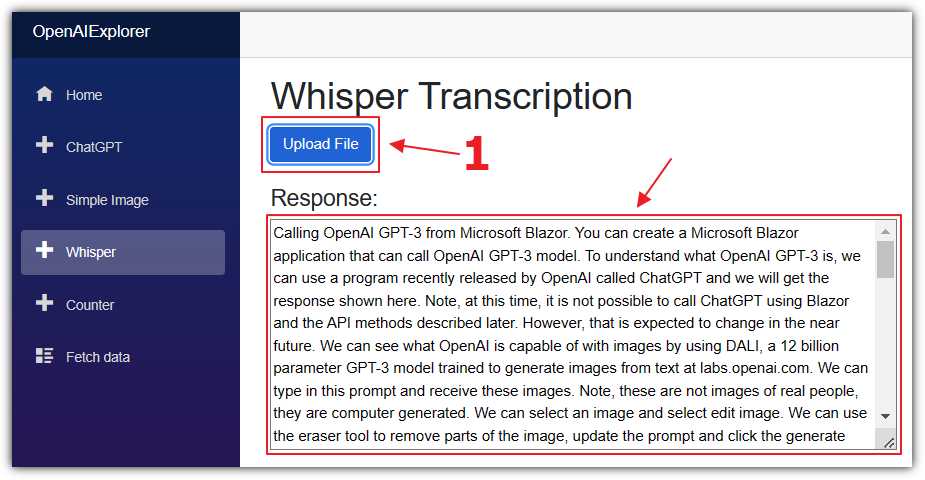
Figure 41: Display Transcription
After a few moments, the text transcription of the audio in the file will display in the Response box.
Note: The Speech to Text API also translates audio into different languages. The full documentation for the Audio API is located here.


- 1800+ high-performance UI components.
- Includes popular controls such as Grid, Chart, Scheduler, and more.
- 24x5 unlimited support by developers.