
.NET Aspire Succinctly®

CHAPTER 1
Introducing .NET Aspire
When joining a new dev team, one of the first hurdles you will encounter is not the code itself—it’s getting the solution to run. Some developers refer to this as “time to F5.” You could spend hours, even days, configuring certificates, seeding databases, copying environment files, and stringing together scripts from places such as README files or even wikis. As we know, every company does this differently, and your experience in setting up a new project on your developer machine is often slow and frustrating. Unfortunately, this is an initiation ritual many developers have to follow.
What is .NET Aspire?
This problem is addressed head-on by .NET Aspire, which provides a code-first application model. It describes all the moving parts you could encounter in a distributed system. This includes projects, containers, databases, caches, and cloud resources. It wires them together for you automatically. Instead of spending many hours getting the application configured in a local environment, your time to F5 is significantly reduced.
David Fowler explained that the goal of .NET Aspire was to take all the manual knowledge contained in setup scripts, READMEs, etc., and turn that into code that can be versioned, shared, and reused. Onboarding is therefore consistent across teams and projects. From there, you can launch an entire application with a single command. This includes live telemetry, service discovery, and integration credentials.
This means that the developer pain points of onboarding no longer include wikis, setup scripts, or copy-pasted connection strings. Instead, developers and their local environments are benefiting from automated orchestration without any manual configuration. Think of .NET Aspire as a modern orchestrator that brings together:
· Service and dependency orchestration (Redis, SQL, etc.).
· Service discovery between projects.
· Observability and telemetry via the built-in dashboard.
· A unified toolchain for developers that extends into publishing and deployment tasks.
A common misconception is that Aspire is only for .NET. This is not true anymore, as Microsoft is building first-class support for Python and JavaScript with the same streamlined experience. Although the official name of the development stack is .NET Aspire, Microsoft documentation and external resources often refer to it as just Aspire.
If you’ve dealt with the pain of wiring up infrastructure, managing deployments across environments, troubleshooting a setup that only worked once, or onboarding teammates with outdated instructions, .NET Aspire directly addresses those challenges. The .NET Aspire system is often described as “opinionated.” This means it provides clear conventions and sensible defaults for building cloud-native apps, allowing developers to spend less time on setup and more time on building features. Developers are still free to override those defaults when they need to.
Why now?
During an interview with Nick Chapsas, David Fowler mentioned that the original code name of .NET Aspire was System Distributed. The Microsoft team started thinking about what it would mean to build something made for the cloud. They recognized that developers were spending a lot of time on the plumbing of distributed applications: connecting a web API to a database, adding in a cache, or configuring secure communication between services. This often meant days of trial and error, and problems solved in isolation with little-to-no reuse or consistency across teams.
The question became: what if these practical problems could be abstracted into a shared model? It is this line of thinking that led to Aspire. Instead of expecting developers to learn a patchwork of orchestration tools and config patterns, Aspire encapsulates those concerns in code. The “time to F5” is dramatically reduced by turning days of onboarding into minutes.
Another factor that led to .NET Aspire was the maturity of the platforms. By .NET 8 and 9, the core components such as ASP.NET Core, logging, telemetry, and Entity Framework were already solid foundations. The missing link was a higher-level layer to tie them all together for distributed systems.
In summary, .NET Aspire emerged because the ecosystem and the developer community were ready. One could say that the building blocks were in place, while the complexity of trying to orchestrate them all had become an obstacle.
Aspire, therefore, provides a unified way to model applications and their dependencies, solving the practical problems first in order to lay a solid foundation for the more complex challenges of distributed, cloud-native applications.
Setting up your developer workstation
Before diving into some code, it’s worth taking a few minutes to ensure that your workstation is set up properly for .NET Aspire. Most developers will already have some version of the .NET SDK and Visual Studio installed. But .NET Aspire has a few requirements that need to be addressed before starting to look under the hood.
In this section, we will walk through setting up a clean environment, configuring Visual Studio with the necessary workloads, and getting the environment just right to start using .NET Aspire. If you prefer a lighter toolchain, use Visual Studio Code with the C# Dev Kit.
.NET SDK
Start with checking your version of .NET by running dotnet --version in the command prompt. For .NET Aspire, you need at least the .NET 8 SDK or later installed. We will be using .NET 9 for the examples in this book.
If you are working with .NET 8, you will need the .NET Aspire Workload installed (see Figure 1). Starting with .NET 9, there is no need to install the workload.
Note: You can also run dotnet --list-sdks in the command prompt to see what is installed on your machine.
You can have multiple SDKs installed on your machine. Aspire will default to the latest one. You can download the .NET 9.0 SDK here.
Visual Studio
Install or update Visual Studio 2022 to version 17.12 or newer. You can create Aspire projects using Visual Studio 2022 Community, Professional, or Enterprise, and you can download Visual Studio 2022 here.
At the time of writing this book, I am using Visual Studio 2022 version 17.14. You also need to ensure that you have the ASP.NET and web development workload installed, as shown in Figure 1.
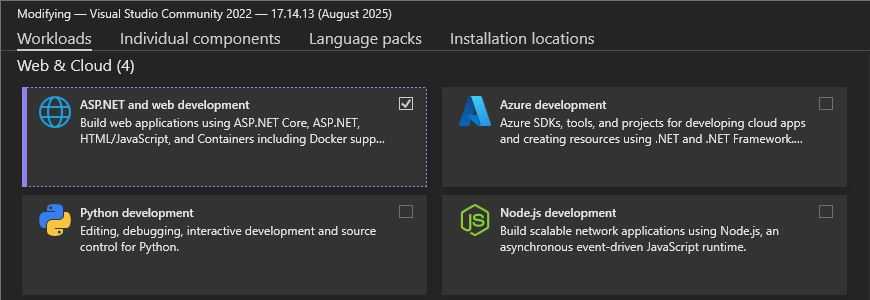
Figure 1: Add the ASP.NET and web development Workload
In the Individual components tab, ensure that you have the .NET Aspire SDK checked.
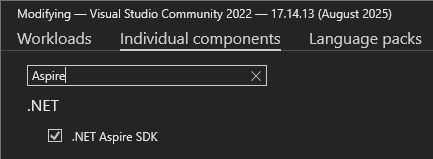
Figure 2: The Aspire Component
.NET Aspire templates and CLI
You can run the following command to install the latest (at the time of writing) .NET Aspire 9.4 templates: dotnet new install Aspire.ProjectTemplates::9.4.0 –force.
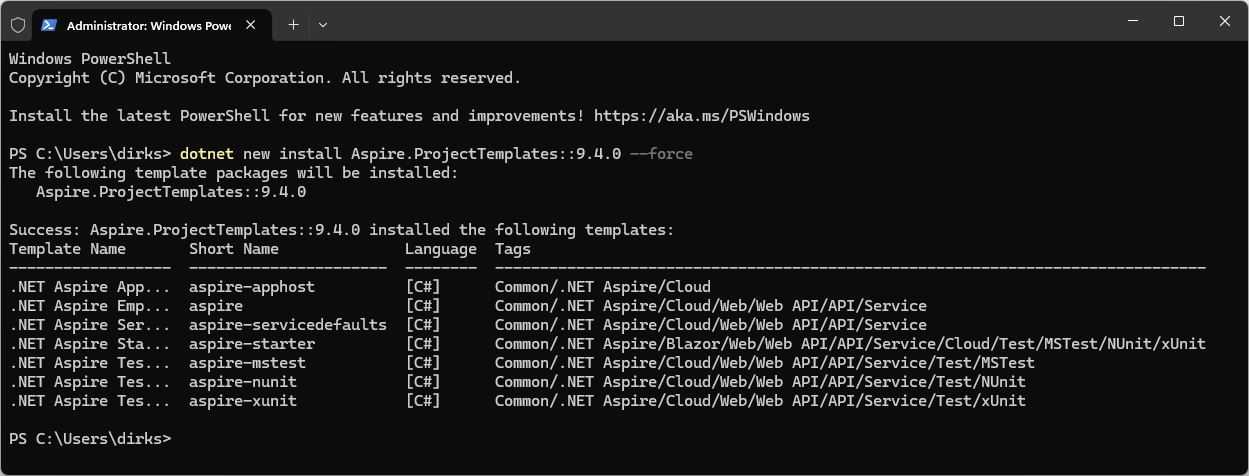
Figure 3: Aspire Project Templates Installed
To install the .NET Aspire CLI, you need to run dotnet tool install -g Aspire.Cli. This is optional. but provides useful commands such as:
· aspire new: Creates a new Aspire project.
· aspire run: Finds the AppHost in your project and runs it.
· aspire add: Adds hosting integration packages.
· aspire config: Configures Aspire settings.
· aspire publish: Generates the deployment artifacts.
Figure 4 shows the installation of the .NET Aspire CLI.
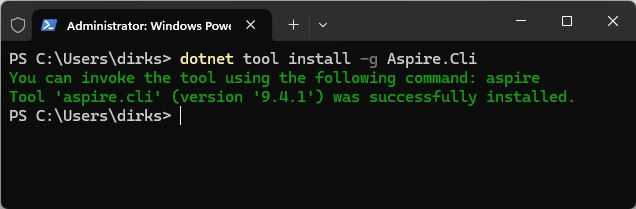
Figure 4: Installing .NET Aspire CLI
Lastly, it is recommended to have Docker Desktop or Podman installed.
Docker or Podman
Microsoft recommends that you have Docker Desktop installed, which allows you to integrate with other services that .NET Aspire makes available to you as containers. You can get Docker here.
If you don’t like Docker, you can also use Podman to install and work with containers. You can get the installer for Podman here.
Mac, Linux, or Windows without Visual Studio
If you are using a Mac, Linux, or Windows without Visual Studio, you need to:
· Install the latest .NET SDK (.NET 8 or later).
· Install Visual Studio Code with the C# Dev Kit to enable IntelliSense and debugging.
If on .NET 8, you also need to install the .NET Aspire Workload by running dotnet workload update and dotnet workload install aspire in your Terminal.
Have a look at the “Getting Started with C# in VS Code” article here.


- 1800+ high-performance UI components.
- Includes popular controls such as Grid, Chart, Scheduler, and more.
- 24x5 unlimited support by developers.