
Camtasia Succinctly®

CHAPTER 5
Camtasia Files and Projects
In the previous chapter, we recorded a small video tutorial about the Alarms & Clock application, using the output from the computer’s screen. Then the recording material of this exercise was saved in a file named alarmstutorial.trec. This file is known as a recording, and for the purposes of Camtasia, it is considered a media file. However, a media file is only one piece of a complete video production. There could be several media files needed in order to make a complete video, and to succeed in this matter, Camtasia needs to organize those files into a single place: a project file.
Camtasia project
A Camtasia project is a media file that references all other media files to be included in a complete video production. Every time the user needs to work with any of those media files, he or she should open the project file. Every project file is saved with a .camproj file extension.
Other media file types
In a Camtasia project, other common media file types include:
- TechSmith Recordings (.trec files): These files contain screen video, microphone audio, webcam, and webcam recordings. Also, these are multiplatform files. This means that they can be used in Camtasia for Windows and Camtasia for Mac.
- Images (.png, .jpeg, etc.): Used as title slides or for other visual effects.
- Audio (.wav, .mp3, etc.): Used as a background music, or contain narrations recorded outside of Camtasia.
Camtasia default folder
By default, Camtasia uses the Documents\Camtasia Studio folder to save any media file. This behavior can be changed, but for the purposes of this book, it will remain the same.
Best practices for file organization
When we work with projects, it is recommended we create a separate folder for each one of them. This folder will contain all the media files needed to produce the video.
Attending the exercise from Chapter 4, a folder named Alarms_Tutorial was created before saving the alarmstutorial.trec file. Now we’re going to use this folder to save the project file that will hold all media files needed to produce the Alarms & Clock Video Tutorial. We’re going to name the file alarmstutorial.camproj.
After the project file is saved, Camtasia displays a window that looks like the following figure.
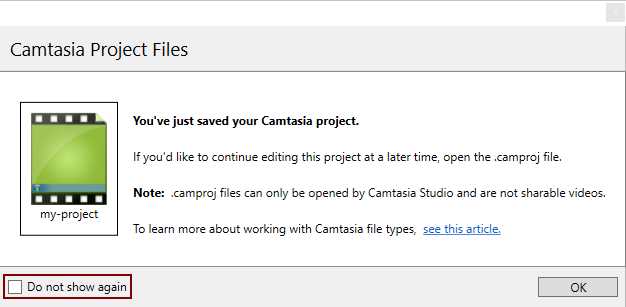
- Camtasia Project Files window
At this time, Camtasia is telling us that a project file was saved, but there’s no way to open this file outside of the program itself. That is, the file isn’t a sharable video. The message also says that the file should be opened every time we need to edit any media file held by the project.
After you become familiar with Camtasia, you can prevent this window from being displayed by checking the Do not show again check box, located at the bottom-left corner of the window. Click OK to close this window.
Now, if we look into the Alarms_Tutorial folder, a couple of files can be seen: one file corresponds to the recording (.trec), and the other one is the Camtasia project file (.camproj). When any other file is needed for the project, it should be saved into this folder, in order to keep all project material properly organized.
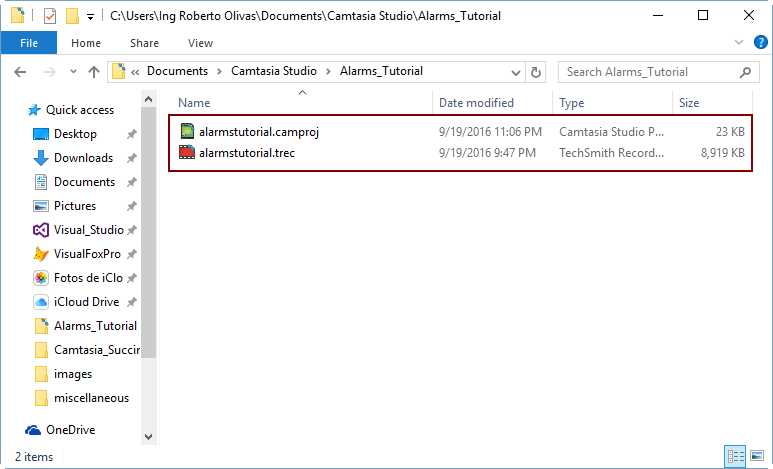
- The Alarms_Tutorial project’s folder
Chapter summary
A Camtasia Project is a media file that references all other media files to be included in a complete video production. Every project file is saved with a .camproj file extension. In a Camtasia Project, other common media file types include TechSmith recordings (.trec files), images (such as .png and .jpg files), and audio files.
By default, Camtasia uses the Documents\Camtasia Studio folder to save any media file, but when we work with projects, it is recommended we create a separate folder for each one of them. All media files needed to produce the video should be saved into this folder, including the project file. It also should be taken into account that a project file isn’t a video itself—the project file is only intended to keep all video media files.


- 1800+ high-performance UI components.
- Includes popular controls such as Grid, Chart, Scheduler, and more.
- 24x5 unlimited support by developers.