
TL;DR: Building every UI and document-processing capability from scratch can divert engineering effort away from product differentiation. This guide shares four lessons from Syncfusion’s BoldSign, BoldDesk, Bold BI, and Bold Reports: reuse proven building blocks, evaluate components within real-world processes, keep reusable technology separate from domain-specific logic, and leverage production experience to continuously improve shared technology.

Most SaaS products combine two kinds of engineering work.
- The first is domain-specific: processes, data, rules, security model, and the user experience that make the product valuable.
- The second is recurring infrastructure: grids, editors, charts, navigation, forms, document processing, viewers, upload, and other interaction patterns that appear across many applications.
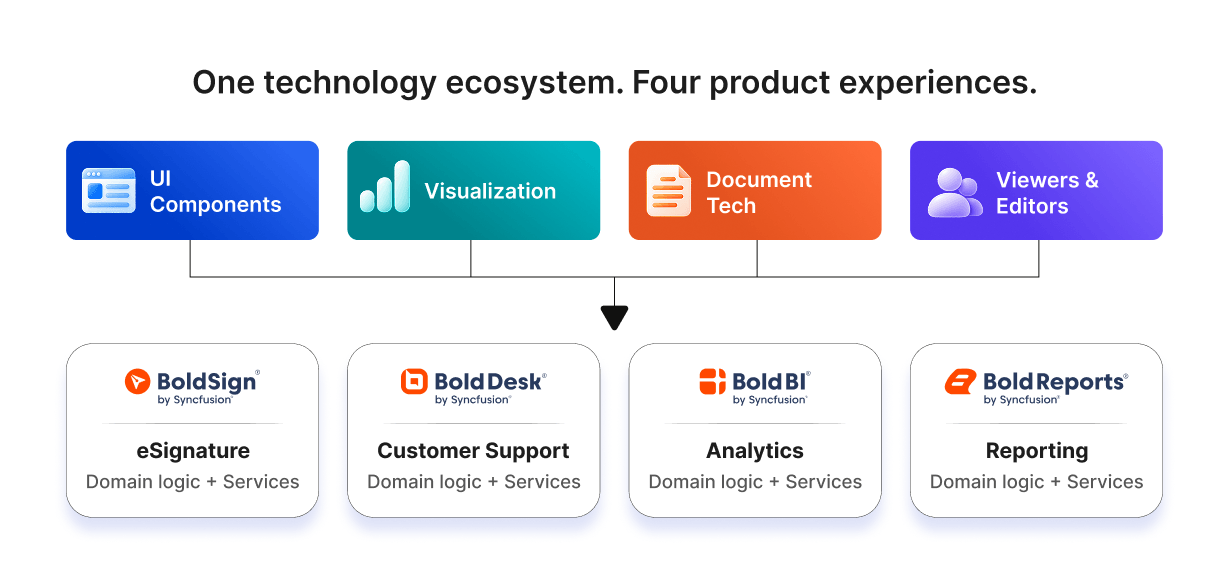
The architectural question is not “build or buy everything.” It is where to draw the boundary. Syncfusion’s SaaS products offer four useful examples because they apply reusable technologies across domains: eSignature, customer support, analytics, and enterprise reporting.
The guiding principle: Reuse the primitives when they are not your differentiator. Keep domain logic, bussiness processes, security, and product meaning in the application layer.
Lesson 1: Reuse the primitives; differentiate in the domain
A recurring mistake in SaaS architecture is spending disproportionate engineering time on infrastructure users expect but don’t pay for. A support customer does not choose a help desk because its team wrote a table widget from scratch. An eSignature customer does not care whether the PDF parser is homegrown. They care whether the signing process is reliable, secure, efficient, and well integrated with their business.
BoldSign illustrates the principle clearly. Document conversion, PDF manipulation, text extraction, and form-field operations are document mechanics. BoldSign’s differentiated value comes from the bussiness operation around those mechanics: preparing agreements, managing recipients, orchestrating signing, sending reminders, tracking status, producing audit evidence, and integrating through APIs. BoldSign publicly supports document preparation, fields, templates, reminders, and audit-related processes.
The same pattern appears in BoldDesk. Structured ticket lists, rich-text authoring, file uploads, charts, dialogs, and navigation are generic interaction problems. Ticket lifecycle, SLA rules, customer context, assignment, automation, and support collaboration are domain problems.
KEY: Ask of every subsystem: would a customer value this capability because it is unique to our product, or do they simply expect it to work?
A practical build-versus-reuse test
| Question | If “yes,” lean toward |
| Is the capability central to product differentiation? | Build or deeply customize |
| Does the capability encode proprietary domain logic? | Build |
| Is it a recurring UI/document problem across many products? | Reuse |
| Would building it require specialized format or accessibility expertise? | Reuse or partner |
| Will the team need to maintain it across frameworks and browsers for years? | Reuse unless strategically necessary |
| Does the product require unusual behavior unavailable in existing technology? | Build or extend |
Lesson 2: Evaluate components inside real scenarios, not only demos
A feature demo proves that an API exists. It does not prove that the component will work well inside your application. Production software exposes composition problems: several controls share focus, state, overlays, layout, keyboard behavior, data, and lifecycle events.
Bold BI is a good illustration. An analytics designer may combine toolbars, menus, tabs, splitters, tree navigation, grids, drag-and-drop, resizing, input controls, and visualization surfaces. The hard problem is not whether each control works separately. It is whether the complete workspace remains coherent while users explore schemas, configure widgets, resize dashboards, apply filters, and move between design contexts. Bold BI publicly supports self-service and embedded analytics with interactive dashboard creation and embedding.
When evaluating a reusable component, build a representative vertical slice. Use realistic data and file sizes. Include the surrounding controls. Exercise mobile behavior. Turn on keyboard navigation. Test error and empty states. Upgrade the framework once during the proof of concept if the dependency is strategic.
Note: The best proof of concept is not the vendor sample. It is a small version of your real product experience.
Evaluation checklist:
- Can several components coexist without focus, overlay, or z-index conflicts?
- Can the UI be themed and customized without fragile CSS overrides?
- Are state and events predictable enough for your application architecture?
- Does performance remain acceptable with representative data volumes?
- Can core business processes be completed by keyboard and assistive technology?
- Does the component behave consistently across the browsers and devices you support?
- Can your test automation reliably interact with it?
- What happens when the framework or component package is upgraded?
Lesson 3: Design for composition and clear boundaries
Reusable components create leverage only when product boundaries stay clean. The UI layer should not become the permanent home of business logic, and a shared component should not absorb product- specific rules simply because one application needs them.
Bold Reports provides a useful model. A TreeView can represent hierarchy. Input controls can configure properties. Charts and gauges can visualize data. Those controls do not need to understand RDL, report parameters, expressions, datasets, scheduling, or export semantics. Bold Reports owns those reporting concepts. Its public embedded-reporting stack includes a Report Designer, Report Viewer, Report Writer, and Report Server.
| Reusable layer | Product/domain layer |
| Rendering and interaction primitives | Business entities and process state |
| Generic events and validation hooks | Domain validation and policy |
| Component-level accessibility semantics | End-to-end process accessibility |
| Theming/customization APIs | Product design decisions |
| Document manipulation APIs | Document business meaning and lifecycle |
| Performance inside the component | Application orchestration, caching, and data strategy |
The benefit of this separation is operational as well as architectural. Teams can upgrade components with less risk, unit-test domain logic independently, reuse patterns across products, and avoid a shared library becoming coupled to one product’s internal model.
KEY: A reusable component should know how to perform an interaction. The application should know why that interaction matters.
Lesson 4: Treat internal usage as a feedback environment
A developer-tools company using its own technology gains a useful feedback source: its product teams become internal consumers. They experience the same classes of issues external developers encounter – integration friction, API ergonomics, performance at application scale, accessibility across user processes, design-system consistency, and framework upgrades.
BoldDesk, for example, combines dense ticket data, conversation authoring, file attachments, automation, and administrative processes. The fact that these interactions live together can expose issues that a single- component sample cannot. BoldDesk publicly supports ticketing, process automation, SLAs, collaboration, and related help-desk features.
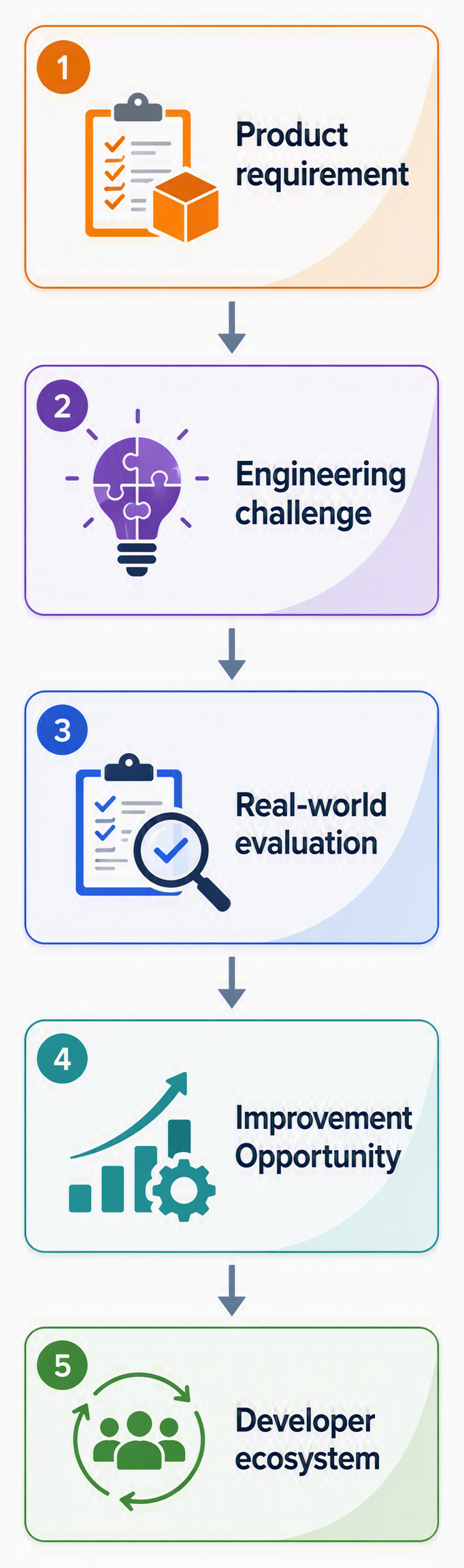
The important discipline is abstraction. Not every internal product request belongs to a shared library. A broadly reusable improvement may deserve to flow back into the platform; a domain-specific rule should remain in the product. The feedback loop works when it improves judgment about what belongs where.
KEY: Internal use is most valuable when it sharpens shared technology – not when it turns a reusable component into a copy of one application.
Putting the four lessons together
| Lesson | Architecture question | Practical action |
| 1. Reuse primitives | Is this capability differentiating or expected? | Spend custom engineering where the product creates unique value. |
| 2. Test real processes | Does it work in our system, not just a sample? | Prototype a representative vertical slice with real constraints. |
| 3. Keep boundaries clear | Who owns the business meaning? | Keep domain rules out of generic UI/document infrastructure. |
| 4. Use feedback well | What should become shared technology? | Promote broadly reusable improvements; keep one-off behavior local. |
A 10-question evaluation worksheet
Use these questions before adopting a UI component suite, document SDK, viewer, editor, reporting engine, or similar reusable technology.
- What problem are we trying to avoid rebuilding?
- Is that problem a source of competitive differentiation for our product?
- Which real processes should the proof of concept reproduce?
- What data volumes, file sizes, and device constraints must we test?
- What accessibility requirements apply to the complete process?
- How much customization can we accomplish through supported APIs rather than overrides?
- How well do the required components compose with one another?
- What is the upgrade, support, and security-response model?
- What licensing and deployment constraints apply as our SaaS product grows?
- If we adopt this technology, which responsibilities remain with our team?
What this means for Saas teams
Reusable developer technology is not a shortcut around product engineering. It is a way to concentrate on product engineering where it matters most.
BoldSign, BoldDesk, Bold BI, and Bold Reports demonstrate the same pattern in different domains: shared technologies handle recurring documents, UI, navigation, visualization, and interaction problems; the SaaS products attach business logic, processes, security, services, data, and user experience.
That is the standard worth applying to your own architecture. Reuse what is repeatable. Own what differentiates you. Test components as part of a system. Keep domain boundaries explicit. And treat every real application as a source of engineering feedback.
One-sentence takeaway: Reusable components should reduce the amount of software your team has to reinvent – without reducing the amount of product thinking your team does.