PDF Viewer with form fields

Hello,

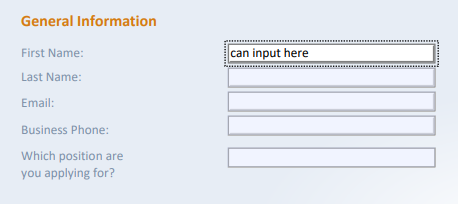
if I understand it correctly, your PDF Viewer control for .NET MAUI does not support having form fields inside the pdf itself, which can be edited and saved to a file or am I missing something? Do you plan to implement this feature in the future?

I'd like to have something like this in directly my application:


Thanks


2 Replies 1 reply marked as answer

SS SalmanBaris ShahulHameed Syncfusion Team June 22, 2023 01:04 PM UTC

Hi Jakub ,


Yes, our current version of the PDF Viewer control for .NET MAUI does not support for displaying form fields inside the PDF that can be edited and saved. However, we have plans to implement this form filing support (as in Xamarin) in our upcoming 2023 volume 4 release, which is expected to be rolled out in the month of December 2023.


At the planning stage for every release cycle, we review all open features and identify features for implementation based on specific parameters, including product vision, technological feasibility, and customer interest.

You can track the implementation of this feature from the following feedback link:

https://www.syncfusion.com/feedback/44702/support-to-fill-and-save-the-form-fields-in-the-pdf-documents

Disclaimer: The date for the feature's implementation is tentative and not a commitment on our part.

Regards,

Salman

Marked as answer

DG Deepak Gunasekaran Syncfusion Team December 20, 2023 05:51 AM UTC

Hi Jakub,


We have provided the support for Form Filling in PDF Viewer in our Essential Studio 2023 Volume 4 release v24.1.41 which is rolled out and is available for download under the following link.


Essential Studio 2023 Volume 4 Main Release v24.1.41 is available for download | Announcements Forums | Syncfusion


Please refer to our following UG documentation link for more details about the feature


We thank you for your support and appreciate your patience in waiting for this release. Please get in touch with us if you would require any further assistance.


Regards,   

Deepak G


Loader.
Up arrow icon