- Home
- Forum
- ASP.NET Web Forms
- Grid control inside update panel not triggering button click event
Grid control inside update panel not triggering button click event
Hi,
Attachment: griderror_1999b09d.zip
I have placed grid control inside asp update panel along with asp button. when i click on button it shows the following script error:
ScriptResource.axd:885 Uncaught Error: Sys.WebForms.PageRequestManagerServerErrorException: An unknown error occurred while processing the request on the server. The status code returned from the server was: 500(…)
When i remove grid control from my aspx page, button click event work fine.
Kindly help!
Attachment: griderror_1999b09d.zip
SIGN IN To post a reply.
13 Replies
KK
Karthick Kuppusamy
Syncfusion Team
November 23, 2016 11:06 AM UTC
Hi Abhishek,
We have analyzed your requirement and we are able to reproduce the reported issue at our end while binding the large data to the grid.So we suggest you to use the URL Adaptor to bind the huge amount of data.
For you convenience we have created the sample that can be downloaded from the below link.
In this sample we have achieved your requirements on button click by passing the URL in the client side of button click and prevented the server side button events. We have passed the URL in the dataSource method of grid using ej.DataManager.
Now the data will be bound to grid when clicking the button.
Please refer the below code example.
| <asp:Content ID="Content1" ContentPlaceHolderID="ContentPlaceHolder1" runat="Server"> <asp:Button ID="btnProcess" runat="server" Text="Read the Data to server"OnClientClick="return Navigate();" OnClick="btnProcessStrategy_Click"UseSubmitBehavior="false" /> <ej:Grid ID="Grid" runat="server" AllowPaging="True"> <ClientSideEvents ActionComplete="complete" /> … </ej:Grid> </ContentTemplate> </asp:UpdatePanel> <script type="text/javascript"> function Navigate() { var obj = $('#<%= Grid.ClientID %>').data("ejGrid"); $("#autoComp").val((selectedvalue)); obj.dataSource(ej.DataManager({ url: "Default.aspx/DataSource", adaptor: newej.UrlAdaptor() })); } </script> </asp:Content> |
Also please refer the documentation link about dataSource method.
If we misunderstood your requirement then could you please share the following details.
1.Please share the grid code.
2.How much data binded for the grid through the button click?
3. Share the video to know in what scenario you have faced the issue.
4.Share the sample if possible or share more information to reproduce the issue.
The provided information will help us to analyze the issue and provide you the response as early as possible.
Regards,
Karthick.K.
AS
Abhishek Shandilya
November 24, 2016 02:02 AM UTC
Hi Karthick,
Thanks for quick response. But this solution does not work for me because i am using sqldatasource for databinding to grid. Now, I am sharing the complete code with you, so you can understand the problem that i am facing. Here is the code:
//ASPX Code
<%@ Page Title="" Language="vb" AutoEventWireup="false" MasterPageFile="~/Site.Master" CodeBehind="viewsalesinvoice.aspx.vb" Inherits="FutureERP.viewsalesinvoice" %>
<%@ Register Assembly="Syncfusion.EJ.Web, Version=14.3400.0.49, Culture=neutral, PublicKeyToken=3d67ed1f87d44c89"
Namespace="Syncfusion.JavaScript.Web" TagPrefix="ej" %>
<%@ Register assembly="Syncfusion.EJ, Version=14.3400.0.49, Culture=neutral, PublicKeyToken=3d67ed1f87d44c89" namespace="Syncfusion.JavaScript.Models" tagprefix="ej" %>
<asp:Content ID="Content1" ContentPlaceHolderID="head" runat="server">
<script language="javascript" type="text/javascript">
$(document).ready(function () {
$("#<%=cmbday.ClientID %>").focus();
$("#aspnetForm").submit(function () {
if ($("#<%=cmbday.ClientID %>").val() == '') {
jAlert('Please select Day', 'Message', function () {
$("#<%=cmbday.ClientID %>").focus();
});
return false
} else if ($("#<%=cmbmonth.ClientID %>").val() == '') {
jAlert('Please select Month', 'Message', function () {
$("#<%=cmbmonth.ClientID %>").focus();
});
return false
} else if ($("#<%=cmbyear.ClientID %>").val() == '') {
jAlert('Please select Year', 'Message', function () {
});
$("#<%=cmbyear.ClientID %>").focus();
return false
} else if (validate_date($("#<%=cmbday.ClientID %>").val(), $("#<%=cmbmonth.ClientID %>").val(), $("#<%=cmbyear.ClientID %>").val()) == false) {
jAlert('Invalid Date', 'Message', function () {
$("#<%=cmbday.ClientID %>").focus();
});
return false;
} else if ($("#<%=cmbtday.ClientID %>").val() == '') {
jAlert('Please select Day', 'Message', function () {
$("#<%=cmbtday.ClientID %>").focus();
});
return false
} else if ($("#<%=cmbtmonth.ClientID %>").val() == '') {
jAlert('Please select Month', 'Message', function () {
$("#<%=cmbtmonth.ClientID %>").focus();
});
return false
} else if ($("#<%=cmbtyear.ClientID %>").val() == '') {
jAlert('Please select Year', 'Message', function () {
$("#<%=cmbtyear.ClientID %>").focus();
});
return false
} else if (validate_date($("#<%=cmbtday.ClientID %>").val(), $("#<%=cmbtmonth.ClientID %>").val(), $("#<%=cmbtyear.ClientID %>").val()) == false) {
jAlert('Invalid Date', 'Message', function () {
$("#<%=cmbtday.ClientID %>").focus();
});
return false;
} else if (doDateperiod($("#<%=cmbday.ClientID %>").val(), $("#<%=cmbmonth.ClientID %>").val(), $("#<%=cmbyear.ClientID %>").val(), $("#<%=cmbtday.ClientID %>").val(), $("#<%=cmbtmonth.ClientID %>").val(), $("#<%=cmbtyear.ClientID %>").val()) == false) {
jAlert('Invalid Period', 'Message', function () {
$("#<%=cmbtday.ClientID %>").focus();
});
return false
}
return true;
});
});
</script>
</asp:Content>
<asp:Content ID="Content2" ContentPlaceHolderID="pagecontent" runat="server">
<input type="hidden" id="txtid" runat="server" />
<div id="form-panel">
<h1 id="lblinvoice" class="form-panel-heading">Modify/View Stock Quality Check</h1>
<div class="form-panel-mid">
<div id="divtable" style="width:100%; margin:0; padding:10px 0 0 0;">
<asp:ScriptManager ID="ScriptManager" runat="server" EnablePartialRendering="true" />
<asp:UpdatePanel ID="UpdatePanel" runat="server" UpdateMode="Conditional" ChildrenAsTriggers="true">
<contenttemplate>
<table id="tbentry" cellpadding="1" cellspacing="2" border="0" width="100%">
<tr class="entry" style="height:22px">
<td style="width:25%; text-align:right">
<label for="user">From : </label>
</td>
<td style="width:75%; text-align:left">
<SELECT style="float: left; width:50px;" id="cmbday" runat="server">
<OPTION value="" selected="selected">DD</OPTION><OPTION
value="1">1</OPTION><OPTION value="2">2</OPTION><OPTION
value="3">3</OPTION><OPTION value="4">4</OPTION><OPTION
value="5">5</OPTION><OPTION value="6">6</OPTION><OPTION
value="7">7</OPTION><OPTION value="8">8</OPTION><OPTION
value="9">9</OPTION><OPTION value="10">10</OPTION><OPTION value="11">11</OPTION><OPTION
value="12">12</OPTION><OPTION value="13">13</OPTION><OPTION value="14">14</OPTION><OPTION
value="15">15</OPTION><OPTION value="16">16</OPTION><OPTION value="17">17</OPTION><OPTION
value="18">18</OPTION><OPTION value="19">19</OPTION><OPTION value="20">20</OPTION><OPTION
value="21">21</OPTION><OPTION value="22">22</OPTION><OPTION value="23">23</OPTION><OPTION
value="24">24</OPTION><OPTION value="25">25</OPTION><OPTION
value="26">26</OPTION><OPTION
value="27">27</OPTION><OPTION value="28">28</OPTION><OPTION value="29">29</OPTION><OPTION
value="30">30</OPTION>
<OPTION value="31">31</OPTION></SELECT>
<select id="cmbmonth" class="cmb" runat="server" style="width:100px;">
<OPTION value="" selected="selected">Month</OPTION>
<OPTION value="1">January</OPTION>
<OPTION value="2">February</OPTION>
<OPTION value="3">March</OPTION>
<OPTION value="4">April</OPTION>
<OPTION value="5">May</OPTION>
<OPTION value="6">June</OPTION>
<OPTION value="7">July</OPTION>
<OPTION value="8">August</OPTION>
<OPTION value="9">September</OPTION>
<OPTION value="10">October</OPTION>
<OPTION value="11">November</OPTION>
<OPTION value="12">December</OPTION>
</select>
<select id="cmbyear" class="cmb" runat="server" style="width:75px">
<option selected="selected" value="">Year</option>
</select></td>
</tr>
<tr class="entry" style="height:22px">
<td style="width:25%; text-align:right">
<label for="user">To : </label>
</td>
<td style="width:75%; text-align:left">
<select id="cmbtday" style="float: left; width:50px;" runat="server">
<option selected="selected" value="">DD</option>
<option value="1">1</option>
<option value="2">2</option>
<option value="3">3</option>
<option value="4">4</option>
<option value="5">5</option>
<option value="6">6</option>
<option value="7">7</option>
<option value="8">8</option>
<option value="9">9</option>
<option value="10">10</option>
<option value="11">11</option>
<option value="12">12</option>
<option value="13">13</option>
<option value="14">14</option>
<option value="15">15</option>
<option value="16">16</option>
<option value="17">17</option>
<option value="18">18</option>
<option value="19">19</option>
<option value="20">20</option>
<option value="21">21</option>
<option value="22">22</option>
<option value="23">23</option>
<option value="24">24</option>
<option value="25">25</option>
<option value="26">26</option>
<option value="27">27</option>
<option value="28">28</option>
<option value="29">29</option>
<option value="30">30</option>
<option value="31">31</option>
</select>
<select id="cmbtmonth" style="width: 100px; float: left;" runat="server">
<option selected="selected" value="">Month</option>
<option value="1">January</option>
<option value="2">February</option>
<option value="3">March</option>
<option value="4">April</option>
<option value="5">May</option>
<option value="6">June</option>
<option value="7">July</option>
<option value="8">August</option>
<option value="9">September</option>
<option value="10">October</option>
<option value="11">November</option>
<option value="12">December</option>
</select>
<select id="cmbtyear" runat="server" style="float: left; width:75px;">
<option value="">Year</option>
</select>
</td>
</tr>
<tr class="entry" style="height:22px">
<td style="width:25%; text-align:right"></td>
<td style="width:75%; text-align:left">
<asp:Button ID="btnsubmit" runat="server" OnClick="btn_Click" Text="Submit" Width="110" />
</td>
</tr>
</table>
<ej:Grid ID="dg" runat="server" IsResponsive="true" AllowSelection="false" AllowSorting="True" DataSourceID="sql" AllowSearching="True"
OnServerWordExporting="FlatGrid_ServerWordExporting" OnServerPdfExporting="FlatGrid_ServerPdfExporting"
OnServerExcelExporting="FlatGrid_ServerExcelExporting" AllowScrolling="true" AllowTextWrap="true" ShowSummary="true">
<SummaryRows>
<ej:SummaryRow Title="Total">
<SummaryColumn>
<ej:SummaryColumn SummaryType="Sum" DisplayColumn="value" DataMember="value" />
</SummaryColumn>
</ej:SummaryRow>
</SummaryRows>
<Columns>
<ej:Column Field="vno" HeaderText="No." Template="<a rel='nofollow' href='salesinvoice.aspx?id={{:id}}'>{{:vno}}</a>" Width="75" />
<ej:Column Field="vdate" HeaderText="Date" Width="100" Format="{0:dd-MM-yyyy}" />
<ej:Column Field="billno" HeaderText="Ref. No." Width="125"/>
<ej:Column Field="name" HeaderText="Party Name" Width="250" />
<ej:Column Field="saletype" HeaderText="SaleType" Width="100" />
<ej:Column Field="value" HeaderText="Value" TextAlign="Right" Width="100" />
<ej:Column Field="status" HeaderText="Status" TextAlign="Center" AllowFiltering="false" Width="70" />
<ej:Column HeaderText="Print" TextAlign="Center" Template="<a target='_blank' rel='nofollow' href='reportviewer.aspx?id={{:id}}&tp=10'>Print</a>" Width="60" AllowSorting="false" AllowFiltering="false" />
</Columns>
<ScrollSettings Width="800" Height="400" />
<ToolbarSettings ShowToolbar="True" ToolbarItems="search,excelExport,wordExport,pdfExport"></ToolbarSettings>
</ej:Grid>
</contenttemplate>
<Triggers>
<asp:AsyncPostBackTrigger ControlID="btnsubmit" />
</Triggers>
</asp:UpdatePanel>
</div>
</div>
</div>
<asp:SqlDataSource ID="sql" ConnectionString="<%$ ConnectionStrings:connectinfo %>" runat="server"
SelectCommand="Select a.id,a.vno,a.vdate,isnull(e.name,'') as name,case when a.saletype=0 then 'Local' else 'Central' end as saletype,isnull(round(a.amount,0),0) as value,isnull(a.billno,'') as billno,
case a.status when 1 then 'Done' else 'Canceled' end as status
from voucherMaster a
left join PartyMaster e on a.distid=e.ID and a.CompanyID=e.CompanyID
where a.vtype=@vtype and a.departmentid=@depid and a.companyid=@compid and convert(datetime,convert(varchar(80),a.vdate,112))>=@from and convert(datetime,convert(varchar(80),a.vdate,112))<=@to order by a.vdate">
<SelectParameters>
<asp:Parameter Name="depid" Type="String" Direction="Input" />
<asp:Parameter Name="compid" Type="Int64" Direction="Input" />
<asp:Parameter Name="from" Type="DateTime" Direction="Input" />
<asp:Parameter Name="to" Type="DateTime" Direction="Input" />
<asp:Parameter Name="vtype" Type="Int16" Direction="Input" />
</SelectParameters>
</asp:SqlDataSource>
</asp:Content>
//Server code
Imports System.Data.SqlClient
Imports Syncfusion.EJ.Export
Imports DevExpress.XtraPrinting
Imports System.Globalization
Public Class viewsalesinvoice
Inherits System.Web.UI.Page
Dim myconn As New SqlConnection(ConfigurationManager.ConnectionStrings("connectinfo").ToString())
Dim script As String = ""
Protected Sub Page_Load(ByVal sender As Object, ByVal e As System.EventArgs) Handles Me.Load
Try
If Not IsPostBack Then
myconn.Open()
For i As Integer = 2013 To Date.Now.Year + 1
cmbyear.Items.Add(New ListItem(i, i))
cmbtyear.Items.Add(New ListItem(i, i))
Next
cmbday.Value = 1
cmbtday.Value = Date.Now.Day
cmbmonth.Value = Date.Now.Month
cmbtmonth.Value = Date.Now.Month
cmbyear.Value = Date.Now.Year
cmbtyear.Value = Date.Now.Year
Dim vtype As Integer = Val(Request.QueryString("tp"))
Dim formid As Integer = 0
If vtype = 8 Then
formid = 73
ElseIf vtype = 9 Then
formid = 82
End If
If FormAuthentication(formid, Page.User.Identity.Name, myconn) = False Then
Response.Redirect("index.aspx")
Exit Sub
End If
Dim cmd As New SqlCommand("Select name from voucher_info where vtype=" & vtype, myconn)
Dim vname As String = cmd.ExecuteScalar()
ViewState("vname") = vname
script = script & "$('#lblinvoice').text('Modify/View " & vname & "');"
Page.ClientScript.RegisterClientScriptBlock(Me.GetType(), "editscript", "$(function(){" & script & "});", True)
sql.SelectParameters("vtype").DefaultValue = vtype
sql.SelectParameters.Item("depid").DefaultValue = GetDepartmentID(myconn)
sql.SelectParameters.Item("compid").DefaultValue = GetCompID(myconn)
sql.SelectParameters.Item("from").DefaultValue = New Date(Date.Now.Year, Date.Now.Month, 1)
sql.SelectParameters.Item("to").DefaultValue = Date.Now
dg.DataBind()
myconn.Close()
End If
Catch ex As Exception
End Try
End Sub
Protected Overrides Sub InitializeCulture()
Dim ci As New CultureInfo("en-IN")
ci.NumberFormat.CurrencySymbol = "Rs"
Threading.Thread.CurrentThread.CurrentCulture = ci
MyBase.InitializeCulture()
End Sub
Sub btn_Click(ByVal sender As Object, ByVal e As EventArgs)
Try
btnsubmit.Text = "Clicked"
sql.SelectParameters.Item("from").DefaultValue = New Date(Val(cmbyear.Value), Val(cmbmonth.Value), Val(cmbday.Value))
sql.SelectParameters.Item("to").DefaultValue = New Date(Val(cmbtyear.Value), Val(cmbtmonth.Value), Val(cmbtday.Value))
'dg.DataBind()
Catch ex As Exception
Response.Write(ex.Message)
End Try
End Sub
Public Sub FlatGrid_ServerExcelExporting(ByVal sender As Object, ByVal e As Syncfusion.JavaScript.Web.GridEventArgs)
Try
Dim exp As ExcelExport = New ExcelExport()
'exp.Export(dg.Model, DirectCast(dg.DataSource, IEnumerable), "CityList.xlsx", ExcelVersion.Excel2007, True, True, ExportTheme.FlatLime)
Catch ex As Exception
Response.Write(ex.Message)
End Try
End Sub
Public Sub FlatGrid_ServerWordExporting(ByVal sender As Object, ByVal e As Syncfusion.JavaScript.Web.GridEventArgs)
Try
Catch ex As Exception
Response.Write(ex.Message)
End Try
End Sub
Public Sub FlatGrid_ServerPdfExporting(ByVal sender As Object, ByVal e As Syncfusion.JavaScript.Web.GridEventArgs)
Try
Catch ex As Exception
Response.Write(ex.Message)
End Try
End Sub
End Class
KK
Karthick Kuppusamy
Syncfusion Team
November 24, 2016 03:49 PM UTC
Hi Abhishek,
While we binding the large amount of sql data to the grid we are faced the reported issue and we suggest you to use the ‘SqlLoadOnDemand’ concept for your requirement
Online sample link: https://asp.syncfusion.com/demos/web/grid/sqlloadondemand.aspx.
Regards,
K.Karthick.
Hi Abhishek,
While we binding the large amount of sql data to the grid we are faced the reported issue and we suggest you to use the ‘SqlLoadOnDemand’ concept for your requirement
Online sample link: http://asp.syncfusion.com/demos/web/grid/sqlloadondemand.aspx.
Regards,K.Karthick.
Problem is not with databinding concept, if i remove the update panel from the page, grid works fine. I think there is some javascript code confliction of asp script manager with ej grid javascript files. You have to help with Javascript error. Kindly go through the code once again.
KK
Karthick Kuppusamy
Syncfusion Team
November 29, 2016 01:50 AM UTC
Hi Abhishek,
We have analyzed your provided code and still we are not able to reproduce the reported issue.
Please find the code example.
| <asp:Updatepanel ID="panel1" runat="server"> <input type="hidden" id="txtid" runat="server" /> <ContentTemplate> <ej:Grid ID="EmployeesGrid" runat="server" Width="900px" AllowPaging="true" AllowFiltering="true" AllowSorting="true"> <DataManager URL="GridFeatures.aspx/Data" Adaptor="WebMethodAdaptor" /> <Columns> <ej:Column Field="CustomerID" IsPrimaryKey="true" HeaderText="Customer ID" Width="80" /> <ej:Column Field="CompanyName" HeaderText="Company Name" Width="80" /> <ej:Column Field="ContactName" HeaderText="Contact Name" Width="100" EditType="Numeric" /> <ej:Column Field="Address" HeaderText="Address" Width="80" /> </Columns> </ej:Grid> <asp:SqlDataSource ID="SqlData" runat="server" ConnectionString="<%$ ConnectionStrings:SQLConnectionString %>" SelectCommand="SELECT * FROM [Orders]"></asp:SqlDataSource> </ContentTemplate> </ContentTemplate> </asp:Updatepanel> <script language="javascript" type="text/javascript"> $(document).ready(function () { $("#aspnetForm").submit(function () { alert("hi"); }); return false </script> </asp:Content> |
Sample link: https://www.syncfusion.com/downloads/support/directtrac/general/ze/Updatepanel1354150083.zip.
If you still faced the issue could you please share the sample or modify the sample as issue reproducible.
Regards,
K.Karthick.
AS
Abhishek Shandilya
November 29, 2016 01:53 AM UTC
In order to re-produce the issue, you have to add asp button inside update panel and define its click event on server side.
KK
Karthick Kuppusamy
Syncfusion Team
November 29, 2016 01:42 PM UTC
Hi Abhishek,
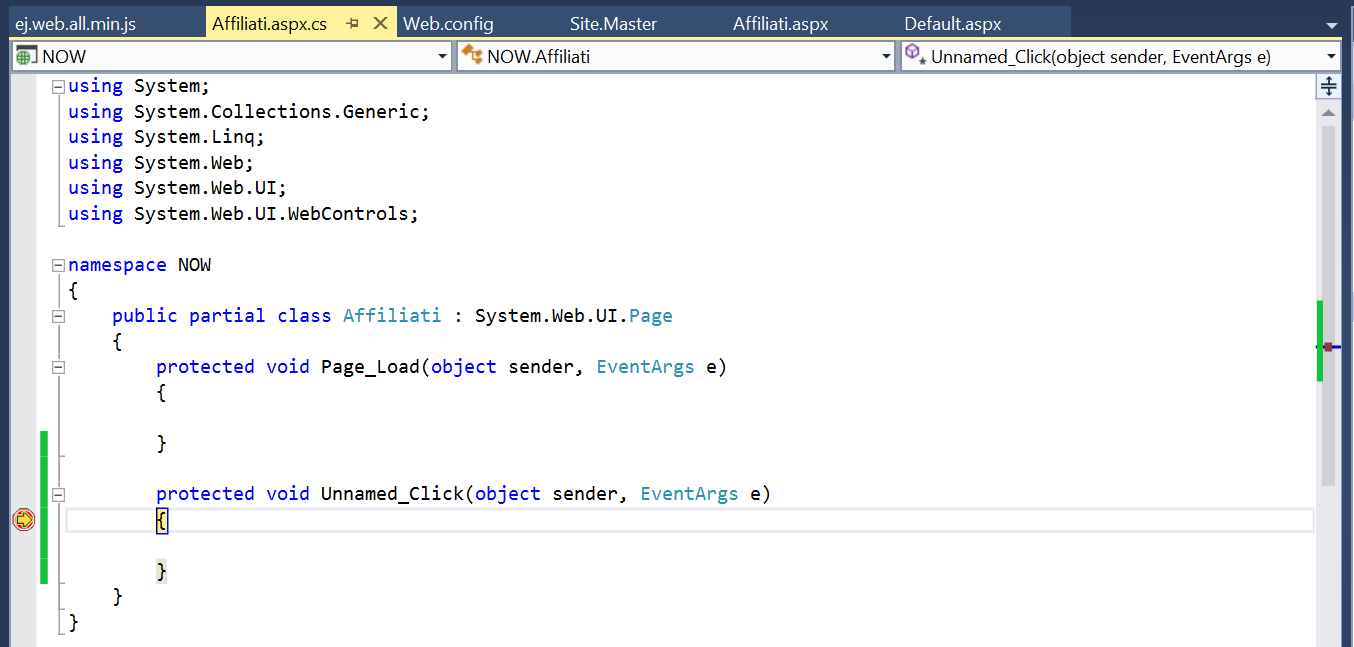
We have created a sample based on your requirement and we are unable to reproduce the issue.In that sample we have created a asp button and we define its click event in server side.
Please find the code example.
| asp:Content ID="Content1" ContentPlaceHolderID="MainContent" runat="server"> <asp:Updatepanel ID="panel1" runat="server"> <ContentTemplate> <asp:Button OnClick="Unnamed_Click" Text="clickthecolumn" runat="server" /> <ej:Grid ID="Grid1" runat="server" DataSourceID="SqlDataSource1" MinWidth="0" AllowPaging="true"> <Columns> <ej:Column AllowEditing="False" DataType="number" Field="OrderID" HeaderText="Column4" IsIdentity="True" IsPrimaryKey="True"> <NumericEditOptions Tag="" /> </ej:Column> <ej:Column DataType="string" Field="CustomerID" HeaderText="Column4"> <NumericEditOptions Tag="" /> </ej:Column> <ej:Column DataType="number" Field="EmployeeID" HeaderText="Column4"> <NumericEditOptions Tag="" /> </ej:Column> <ej:Column DataType="date" Field="OrderDate" HeaderText="Column4"> <NumericEditOptions Tag="" /> </ej:Column> </Columns> <PageSettings Template=""></PageSettings> </ej:Grid> </ContentTemplate> </asp:Updatepanel> <asp:SqlDataSource ID="SqlDataSource1" runat="server" ConnectionString="<%$ ConnectionStrings:SQLConnectionString %>" SelectCommand="SELECT [OrderID], [CustomerID], [EmployeeID], [OrderDate] FROM [Orders]"></asp:SqlDataSource> </asp:Content> |
Please find the snapshot for the serverside click event.
 |
Please share the sample or modify the sample as issue reproducible and revert back to us.
Regards,
K.Karthick.
AS
Abhishek Shandilya
November 30, 2016 05:54 PM UTC
Thanks sir its working fine. now i want to export this grid in world excel and pdf. so please share code so i can implement this.
KK
Karthick Kuppusamy
Syncfusion Team
December 1, 2016 09:33 AM UTC
Hi Abihishek,
We are happy to hear that the provided solution is helped you.
Please find help documentation for exporting.
Online demo link:
Please let us know if you need any further assistance on this.
Regards,
K.Karthick.
AS
Abhishek Shandilya
December 1, 2016 06:22 PM UTC
I have already checked these links with no success. Can you please add the export to excel, word code in the project that you have shared with me earlier.
Thanks in advance.
SA
Saravanan Arunachalam
Syncfusion Team
December 2, 2016 12:37 PM UTC
Hi Abhishek,
We are sorry for the inconvenience.
The partial post will done when rendered the Grid control within the update panel and we need to trigger the post-back for exporting. We have already discussed this query in the following Knowledge Base document.
Regards,
Saravanan A.
AS
Abhishek Shandilya
December 8, 2016 03:06 AM UTC
Thanks, now its working fine. But when i export data to excel it shows warning message in excel. I have attached screenshots with excel file for reference.
Attachment: excelerror_401fa6ee.zip
Kindly help!
Attachment: excelerror_401fa6ee.zip
SA
Saravanan Arunachalam
Syncfusion Team
December 8, 2016 11:08 AM UTC
HI Abhishek,
We have analyzed your provided information and the mentioned issue occurred due to document is corrupted. That the issue occurred in different scenarios and we can’t provide the exact solution. So, could you please share the following details to reproduce the issue?
· Provide clear replication procedure to reproduce the issue.
· Provide the client Grid rendering code.
· Provide your data schema/data model to bind the data to the Grid.
· Provide server side exporting code.
· Provide screenshot of expected output.
· If possible reproduce the issue in below attached sample.
So that we could provide you response as early as possible? And we have attached the exporting sample with update panel that can be downloaded from the below link.
Regards,
Saravanan A.
SIGN IN To post a reply.
- 13 Replies
- 3 Participants
-
AS Abhishek Shandilya
- Nov 22, 2016 05:50 PM UTC
- Dec 8, 2016 11:08 AM UTC

