
 Rangarajan Ashokan
TL;DR: Still downloading DOCX files, editing them externally, and uploading them back? That process leads to duplicate versions, broken formatting, and lost productivity. Learn why modern applications are moving to in-browser DOCX editing and how a React DOCX Editor simplifies document management while preserving document fidelity.
You open a document, download it, make a quick edit, and upload it back. A few hours later, someone else edits a different copy. Now there are multiple versions, conflicting changes, and no clear source of truth.
This download edit, and reupload cycle feels normal, but it quietly breaks document processes in modern applications. For developers building React apps, the real issue isn’t how users behave. It’s that editing still happens outside the application.
The solution is Syncfusion® React DOCX editor that keeps editing entirely inside the application, no downloads, no stray copies, no round-trip HTML conversions that break Word formatting.
In this post, you’ll learn:
- Challenges with file-based document processes (download, edit, and reupload)
- How in-browser DOCX editing works
- Key features of a React DOCX editor
- Integration basics and real-world use cases
Why file-based DOCX processes break modern apps
At first glance, file-based processes seem simple: download, edit, and upload. In practice, they introduce friction at every step.
- Version confusion
Every download creates a new copy. Teams quickly lose track of which version is current. - Security risks
Files move to personal devices, emails, or external drives. Once they leave your app, control is gone. - Formatting issues
When documents are edited across different tools, layouts break, especially with complex tables or page structures. - Operational overhead
Comparing versions, merging edits, and fixing formatting takes time that should never be spent. - Poor user experience
Switching between tools interrupts processes and slows down simple changes.
These issues aren’t edge cases; they’re structural problems caused by file-based editing.
How in-browser DOCX editing works
The core limitation of most browser-based editors is how they handle DOCX files.
The problem with HTML-based editing
Many editors convert DOCX files to HTML, allow editing, and then rebuild the DOCX file on export.
That conversion step introduces:
- Layout inconsistencies
- Broken tables
- Lost formatting
- Pagination issues
Native DOCX editing approach
In contrast, native in-browser DOCX editing works directly with the document model.
- No format conversion: Edits apply directly to the DOCX structure.
- Page-level accuracy: Margins, headers, and pagination remain consistent.
- Reliable output: What you see during editing matches the exported file.
- Efficient handling: Large documents stay responsive with virtualization.
This architectural difference is what determines whether an editor preserves fidelity or breaks it.
Tips: Keep documents in SFDT during the drafting phase to speed up and improve efficiency. Export to DOCX at milestones: final approval, regulatory submission, or external distribution. This approach preserves fidelity at every stage without unnecessary format conversions during the active editing cycle.
Essential features for a production-ready React DOCX Editor
A usable editor isn’t just about typing text. Production applications require a combination of editing, collaboration, and control.
Collaboration
- Track changes for reviewing edits
- Inline comments and threaded discussions
- Real-time co-editing with a shared document state
Security and control
- Role-based access (view, edit, approve)
- Protected regions for sensitive sections
- Audit logs for compliance and traceability
Document management
- Autosave to prevent data loss
- Version history for rollback
- Approval processes for structured reviews
Export and integration
- Accurate DOCX export
- PDF generation for sharing or archiving
- API and webhook support for backend integration
These capabilities turn document editing into a controlled, scalable process inside your app.
Syncfusion React DOCX Editor with native in-browser editing
Our React DOCX editor is a production-ready document editing tool that directly edits documents in the UI, rather than relying on file handling.
With a native DOCX editor integrated into the app:
- Documents stay centralized
- Edits happen instantly
- Formatting remains consistent
- Users don’t leave the application
This approach replaces fragmented processes with a single, controlled editing experience.
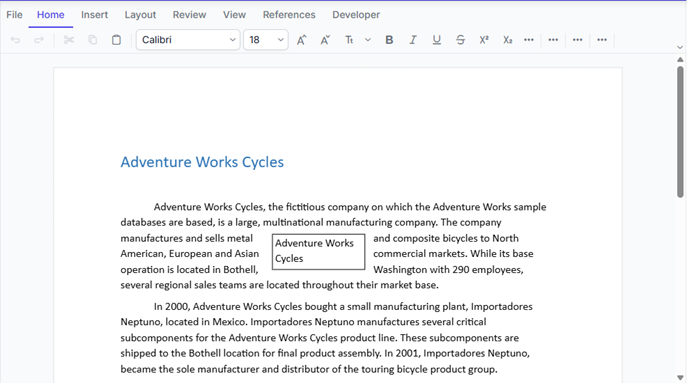
It provides additional capabilities like:
- Native DOCX rendering: Applies Word rules directly (styles, tables, pagination) for accurate WYSIWYG output
- Framework support: Ready-to-use npm components for React, Angular, Vue, and JavaScript
- Flexible deployment: Supports cloud, on-premises, and hybrid setups with self-hosted APIs
Integrating Syncfusion DOCX Editor into a React App
The following walkthrough covers the complete setup, from installing the package to embedding a working editor into your React application.
1. Set up your React project
Use create React App or Vite to initialize your project:
npx create-react-app syncfusion-doc-editor
cd syncfusion-doc-editor
2. Install Syncfusion Document Editor
npm install @syncfusion/ej2-react-documenteditor3. Import required Styles
Add the following to your index.css to ensure proper styling:
@import '../node_modules/@syncfusion/ej2-base/styles/material.css';
@import '../node_modules/@syncfusion/ej2-buttons/styles/material.css';
@import '../node_modules/@syncfusion/ej2-inputs/styles/material.css';
@import '../node_modules/@syncfusion/ej2-popups/styles/material.css';
@import '../node_modules/@syncfusion/ej2-lists/styles/material.css';
@import '../node_modules/@syncfusion/ej2-navigations/styles/material.css';
@import '../node_modules/@syncfusion/ej2-splitbuttons/styles/material.css';
@import '../node_modules/@syncfusion/ej2-dropdowns/styles/material.css';
@import "../node_modules/@syncfusion/ej2-documenteditor/styles/material.css";
4. Embedding the DOCX Editor component
Create a new file named DocumentEditor.js inside the src folder and add the following code:
import * as React from 'react';
import { DocumentEditorContainerComponent, Toolbar } from '@syncfusion/ej2-react-documenteditor';

DocumentEditorContainerComponent.Inject(Toolbar);

function App() {
    return (
        <DocumentEditorContainerComponent
            id="container"
            height={'590px'}
            serviceUrl="https://document.syncfusion.com/web-services/docx-editor/api/documenteditor/"
            enableToolbar={true}
        />
    );
}

export default DocumentEditor;
Note: Syncfusion uses SFDT (Syncfusion Document Text) format for efficient document rendering and editing. In the example above, we load a document using SFDT to initialize the editor.
5. Use the component in App.js
Import and use the DocumentEditor component in your App.js file:
import React from 'react';
import DocumentEditor from './DocumentEditor';

function App() {
  return (
    <div className='App'>
      <DocumentEditor />
    </div>
  );
}

export default App;
6. Run your application
Start the application using the start script.
npm start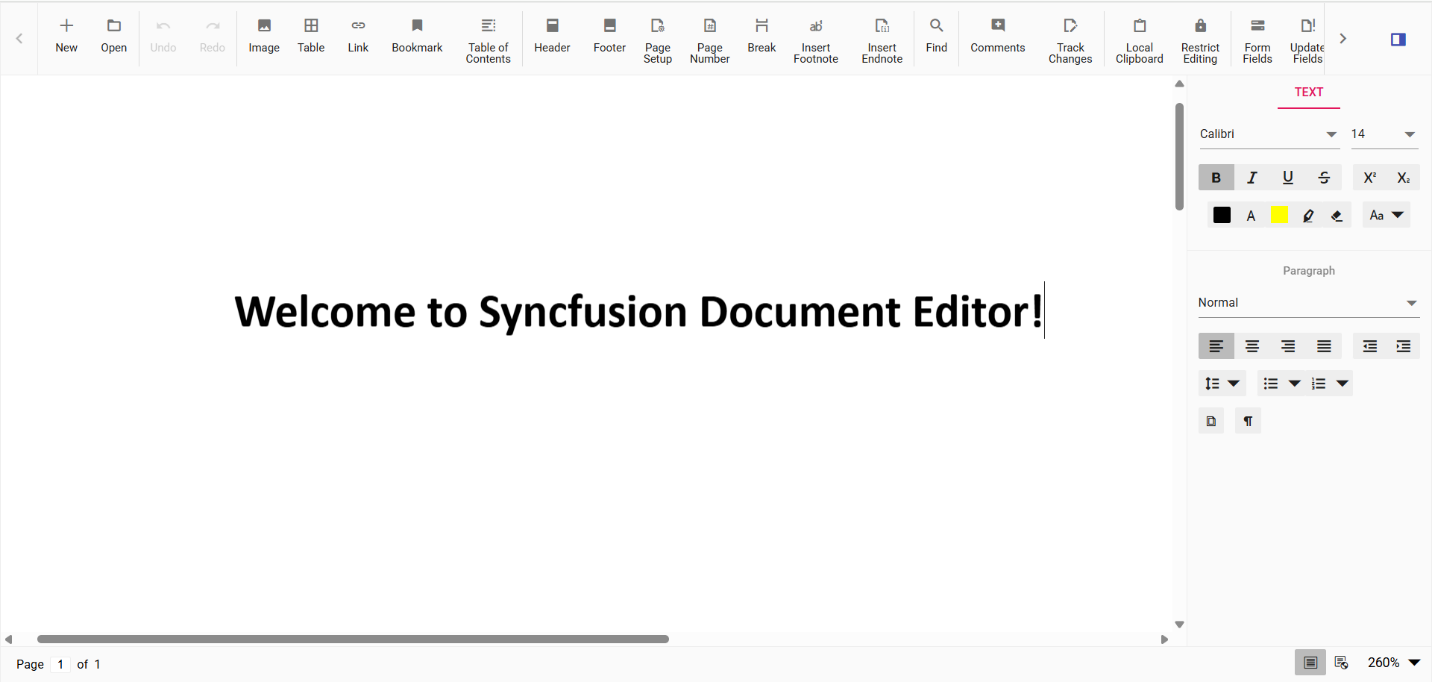
Curious about implementing a DOCX editor in your React app? Check out the official documentation for a complete step‑by‑step integration guide and get started in minutes.
Real-world use cases
- Legal and contracts: Teams collaborate on contracts with track changes and audit logs, avoiding confusion from email-based revisions.
- Human resources: Templates stay consistent while allowing controlled edits, eliminating formatting issues in offer letters and documents.
- Healthcare and compliance: Sensitive documents remain inside secure systems with full audit trails, supporting regulatory requirements.
- Financial services: Reports stay centralized, with clear version history and controlled approvals.
- Education: Course materials maintain structure while enabling safe customization without repeated rework.
Frequently Asked Questions
Editing runs entirely inside the application. Role-based permissions, protected regions, encryption in transit and at rest (deployment-dependent), and full audit logs ensure documents never leave your environment without explicit exports.What keeps documents secure during in-browser editing?
Yes. Use SFDT (the editor’s native JSON format) for interim storage and autosave during active processes, then export to DOCX or PDF at distribution milestones. This avoids unnecessary conversion during drafting.Can we store documents without exporting DOCX every time?
All edits happen within the application against a single live document. Autosave, version history, and access controls ensure that changes are captured and that every user works from the same current file.How do we maintain a single source of truth across users and devices?
You can cut each editing cycle from 15-30 minutes down to just 2-5 minutes, because everything happens instantly inside the app, no downloads, no file handling, and far fewer formatting or version-related issues.How much time can we actually save by using the Syncfusion DOCX Editor instead of downloading and reuploading documents?
Any of three common triggers: recurring formatting support tickets, an audit finding about uncontrolled file copies, or a contract cycle delayed by version confusion. Any one of these signals that the download loop is costing more than the migration.What's the right trigger to switch from an HTML editor to a DOCX-native editor?
No. Syncfusion DOCX Editor uses virtualization to render only visible content. Scrolling, editing, and navigation stay responsive in long documents because the browser never loads the full DOM at once.Does in-browser editing slow down for long documents?

Conclusion
Thank you for reading! The download, edit, and reupload cycle introduces hidden costs, version confusion, formatting drift, security gaps, and wasted time.
Moving DOCX editing into the browser addresses the root cause. Documents stay in one place, edits remain consistent, and processes become faster and easier to manage.
For React applications, in-browser DOCX editing isn’t just a convenience; it’s a shift toward more reliable, scalable document experiences.
Syncfusion DOCX Editor delivers this model for for React, Angular, Vue, and JavaScript, with the collaboration tools, compliance features, and integration flexibility that production document processes require. The result is faster editing cycles, fewer support tickets, stronger compliance posture, and document processes your users can actually trust.
👉 Try the React DOCX Editor live demo to see its native editing in action.
👉 Browse the documentation to check API reference, integration guides, and starter samples.
If you’re a Syncfusion user, you can download the setup from the license and downloads page. Otherwise, you can download a free 30-day trial.
You can also contact us through our support forum, support portal, or feedback portal for queries. We are always happy to assist you!
![AI-Assisted Workload Balancing Resource Planning for On-Time Project Delivery [Webinar Show Notes]](https://www.syncfusion.com/blogs/wp-content/uploads/2026/05/AI-Assisted-Workload-Balancing-Resource-Planning-for-On-Time-Project-Delivery-Webinar-Show-Notes.png)


 No spam, just valuable updates.