
 Thangavel E
TL;DR: Learn how to add real-time collaboration to a React Block Editor using Yjs and WebSockets. This guide walks through building a shared editing experience with live document synchronization, user presence, and remote cursors without implementing custom conflict-resolution logic. You’ll also explore provider selection, production considerations, and best practices for creating reliable multi-user editing experiences.
Most developers think collaborative editing is simple, until they try building it.
Allowing multiple users to edit the same document in real-time involves much more than syncing text. You need to:
- Handle concurrent changes,
- Keep document state consistent,
- Show active users,
- Display remote cursors, and
- Recover from connection interruptions without losing data.
That’s why features that feel effortless in tools like Google Docs are surprisingly difficult to implement.
If you’re building documentation portals, product specifications, incident reports, contracts, or knowledge bases, real-time collaboration is often a user expectation today.
The good news is that you don’t have to solve these challenges from scratch. The Syncfusion® React Block Editor provides a collaboration module designed to integrate with Yjs, a CRDT-based framework that manages synchronization and conflict resolution automatically, letting you focus on the editing experience rather than the underlying complexity.
In this guide, we’ll build a real-time collaborative editor using React, TypeScript, Yjs, and WebSockets. We’ll cover document synchronization, user presence, remote cursors, choosing the right Yjs provider, and key considerations for production deployments.
When does real-time collaboration make sense?
Real-time collaboration is ideal when multiple users need to edit the same document simultaneously while seeing live updates, presence indicators, and remote cursors.
Common use cases include:
- Product specifications and PRDs,
- Legal drafts and contract reviews,
- Incident reports and postmortems,
- Launch plans and project documentation,
- OKR and team planning documents.
However, this approach may not be the best fit for:
- Large wiki-style document networks,
- Fully offline mobile applications, and
- Scenarios that require direct device-to-device CRDT synchronization without a server.
Understanding what “real-time collaboration” actually means
Before diving into the implementation, it’s useful to understand a few concepts that power the collaborative experience.
CRDTs: The foundation of conflict-free editing
At the heart of Yjs is a Conflict-Free Replicated Data Type (CRDT). A CRDT allows multiple users to edit shared content simultaneously while ensuring every participant eventually sees the same document state.
The practical benefit is simple: two users can make changes at the same time without accidentally overwriting one another’s work.
Awareness: Knowing who’s doing what
Collaboration isn’t just about synchronizing content. Users also need context about other participants.
Yjs uses an awareness layer to share temporary information such as:
- Cursor positions,
- Text selections,
- User names, and
- Avatar information.
Because awareness data is temporary, it disappears when a user disconnects and doesn’t become part of the document itself.
Shared document state
Actual document content lives inside a shared Y.Doc file. Unlike awareness data, modifications stored in the document persist and can be synchronized across reconnects and future editing sessions.
Together, the shared document and awareness layer create the experience users expect from modern collaborative applications.
Why real-time collaboration matters
Modern editors need to support more than rich text. Users expect teams to create, review, and update content together without worrying about version conflicts or overwritten changes.
The Syncfusion React Block Editor treats content as independent blocks, such as paragraphs, headings, tables, callouts, and code snippets, making it easier to edit and organize content while maintaining a smooth writing experience. When combined with Yjs, both content changes and document structure stay synchronized across connected users.
This enables two key capabilities:
- Edit simultaneously without conflicts: Yjs automatically resolves concurrent changes, so that multiple users can work in the same document at the same time.
- See collaboration in real-time: Remote cursors, selections, and user presence indicators make it easy to understand who is editing and where changes are happening.
What you get out of the box
The collaboration module builds on Yjs and works alongside existing Block Editor features such as slash commands, rich text formatting, drag-and-drop, mentions, labels, paste cleanup, and accessibility support.
Key capabilities include:
- Real-time multi-user editing with automatic conflict resolution.
- Live user presence, selections, and remote cursors.
- Per-user undo and redo, allowing users to revert only their own changes.
- Synchronized rich text formatting, including headings, lists, links, colors, alignment, and inline styles.
- Mention and label synchronization with metadata preserved across all users.
- Support for multiple Yjs providers, including y-websocket, y-webrtc, Hocuspocus, Liveblocks, PartyKit, and more.
Whether someone is updating text, reordering sections, or adding a new callout block, every connected user sees changes reflected in real-time.
How real-time collaboration works
Behind the scenes, collaboration relies on three components: a shared Yjs document, a provider that synchronizes connected clients, and the Block Editor that renders and updates content.
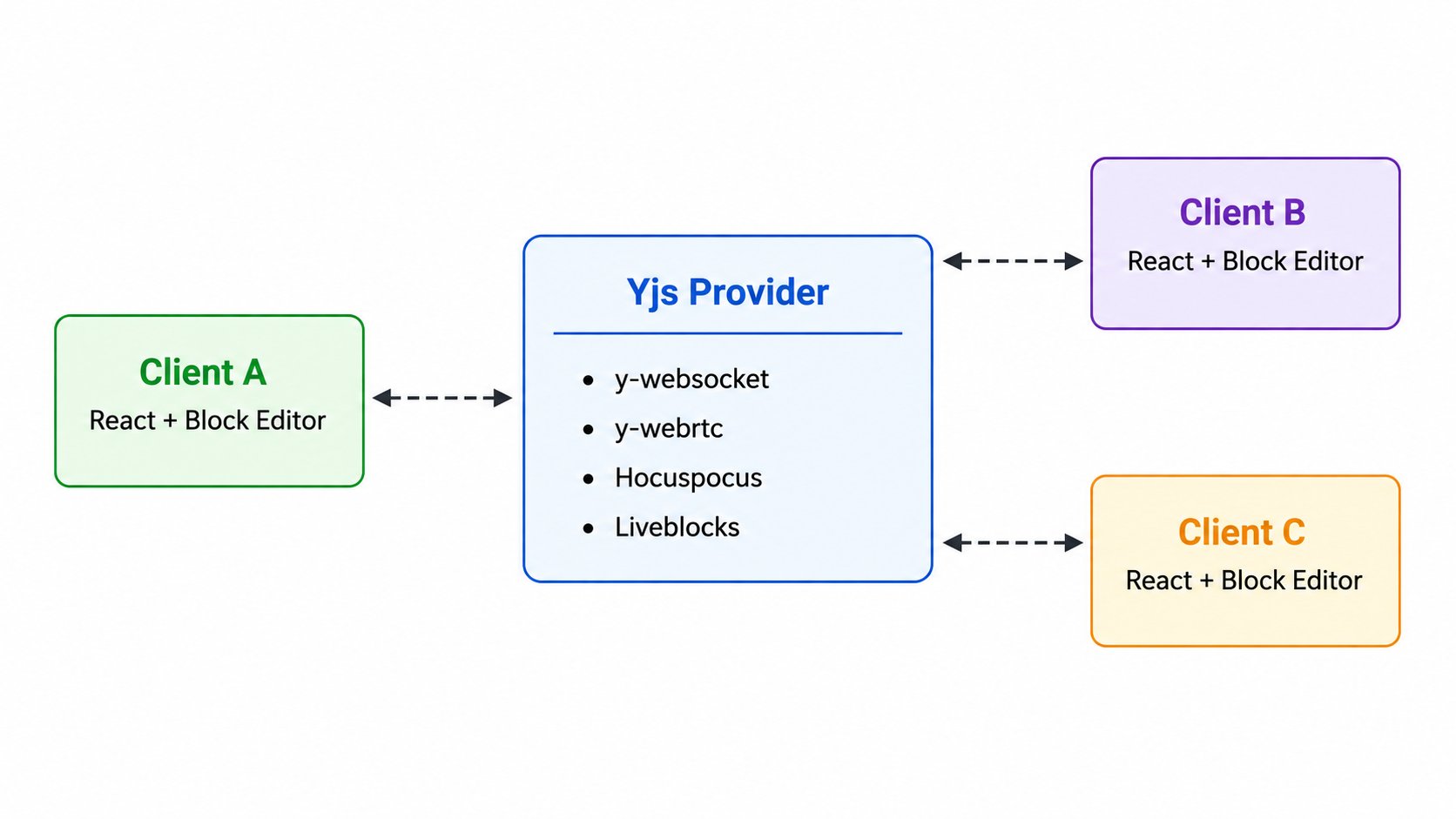
The process is straightforward:
- Each client initializes a Y.Doc file and creates a shared
Y.XmlFragmentcalled blockeditor. - A
YjsAdapterprovides the editor with access to the Yjs runtime and the shared fragment. - A Yjs provider connects all clients to the same collaboration room.
- The React Block Editor renders content from the shared fragment and writes local changes back to it. Yjs then automatically synchronizes those changes across all connected clients.
- When awareness is enabled, cursor positions, selections, and user information are exchanged through a separate channel.
As a result, multiple users can edit the same document simultaneously while keeping content, structure, and collaboration state synchronized.
Choosing the right Yjs provider
The Yjs provider you choose determines how clients connect, synchronize data, and handle persistence. The best option depends on your deployment requirements, scalability needs, and whether you want to manage the infrastructure yourself.
| Provider | Transport | Persistence | Signaling/Auth | Best for |
| y-webrtc | Peer-to-peer | None by default | Public signaling by default; no auth | Local development, demos, single-session prototypes |
| y-websocket | WebSocket | None by default | You provide the server and auth | Self-hosted staging and small production |
| Hocuspocus | WebSocket | Pluggable (Redis, Postgres) | Token-based auth, extensions | Scalable self-hosting with persistence and auth |
| Liveblocks | Managed WebSocket | Hosted | Hosted auth, REST API | Teams that want a fully managed backend with devtools |
| PartyKit | Serverless on Cloudflare | Optional Durable Object persistence | Cloudflare auth | Serverless deployments, prototypes with persistence |
| y-indexeddb | None (local) | Browser only | None | Offline persistence in a single browser |
For production environments:
- y-websocket offers maximum control,
- Hocuspocus adds persistence and authentication capabilities, and
- Liveblocks provides a managed collaboration infrastructure with minimal operational overhead.
Build it yourself or start with existing collaboration support?
When planning collaborative editing, it’s easy to underestimate how much work exists beyond the editor UI. Synchronization, conflict handling, user presence, offline recovery, and persistence often require significantly more effort than the editing experience itself.
The table below compares some of the key responsibilities involved in building a collaborative editor from scratch versus using the Syncfusion React Block Editor with Yjs.
| Feature | Build yourself | Syncfusion + Yjs |
| CRDT | Design and implement CRDT, merge strategies, and conflict resolution from scratch. | Uses Yjs’s production-tested CRDT with automatic conflict-free synchronization. |
| Real-time synchronization | Build custom synchronization, diffing, patch generation, and nested content updates. | Automatic incremental synchronization for content, properties, and document structure. |
| Presence & collaboration | Implement cursors, selections, user awareness, and presence using custom protocols. | Built-in real-time cursors, selections, user presence, and awareness through Yjs. |
| Provider & offline sync | Build custom WebSocket messaging, offline persistence, and multi-device synchronization. | Built-in WebSocket providers, offline persistence, and seamless multi-device synchronization. |
| Production readiness | Requires validation for scalability, offline support, conflict recovery, and performance. | Enterprise-ready with proven scalability, offline synchronization, and automatic recovery. |
Building a collaborative editor involves much more than rendering content. By combining the Syncfusion React Block Editor with Yjs, you can focus on creating user-facing features while relying on a proven foundation for synchronization, presence, and shared editing experiences.
Building a real-time collaborative React Block Editor using Yjs
Let’s build a collaborative editor using Vite, React, TypeScript, Yjs, and the Block Editor.
Step 1: Create the project
Start by scaffolding a new React TypeScript application and installing the required packages:
npm create vite@latest collab-editor -- --template react-ts
cd collab-editor
npm install @syncfusion/ej2-react-blockeditor yjs y-websocket
Step 2: Configure the editor theme
Next, replace the contents of the src/index.css file with the following imports:
@import "@syncfusion/ej2-base/styles/tailwind3.css";
@import "@syncfusion/ej2-inputs/styles/tailwind3.css";
@import "@syncfusion/ej2-popups/styles/tailwind3.css";
@import "@syncfusion/ej2-buttons/styles/tailwind3.css";
@import "@syncfusion/ej2-splitbuttons/styles/tailwind3.css";
@import "@syncfusion/ej2-navigations/styles/tailwind3.css";
@import "@syncfusion/ej2-dropdowns/styles/tailwind3.css";
@import "@syncfusion/ej2-react-blockeditor/styles/tailwind3.css";
If your application already uses a different design system, replace tailwind3 with themes such as fluent, material, bootstrap5, material-dark, or bootstrap5-dark to match the rest of your UI.
Step 3: Create a collaboration hook
To keep the editor integration clean, create a dedicated collaboration hook. This hook manages the Y.Doc, shared Y.XmlFragment, Yjs provider, and the collaboration adapter throughout the component’s lifecycle, and automatically cleans up resources when the component is unmounted.
Refer to the code in the src/hooks/useCollaboration.ts. file
Step 4: Connect the editor
With the collaboration hook in place, the final step is to connect it to the Block Editor.
The following src/App.tsx file brings everything together by integrating the collaboration hook, rendering the editor, and displaying collaboration details such as connection status and active users. Once configured, multiple clients connected to the same room can edit the document in real-time.
Refer to the code in the src/App.tsx file and run the application.
Step 5: Run a local WebSocket server
To synchronize changes across multiple browser sessions, you’ll need a y-websocket server running locally.
First, install the WebSocket server:
npm install -g @y/websocket-serverThen, start the server in a separate terminal:
npx y-websocketBy default, the server runs on ws://localhost:1234. The connection URL configured in the App.tsx file already points to this address, so the editor can connect and begin synchronizing changes immediately.
Step 6: Test the real-time collaboration experience
With both npm run dev and npx y-websocket running, it’s time to verify that collaboration is working as expected.
- Open the application in two browser windows at http://localhost:5173.
- Make sure both windows display the same initial content and show the Connected status.
- In the first window, edit any paragraph. The changes should appear in the second window almost instantly.
- In the second window, place the cursor in a different location. The first window should display the user’s presence, including their remote cursor and participant information.
- Refresh both windows and reconnect. If your chosen provider supports persistence, the shared document state will be restored automatically.
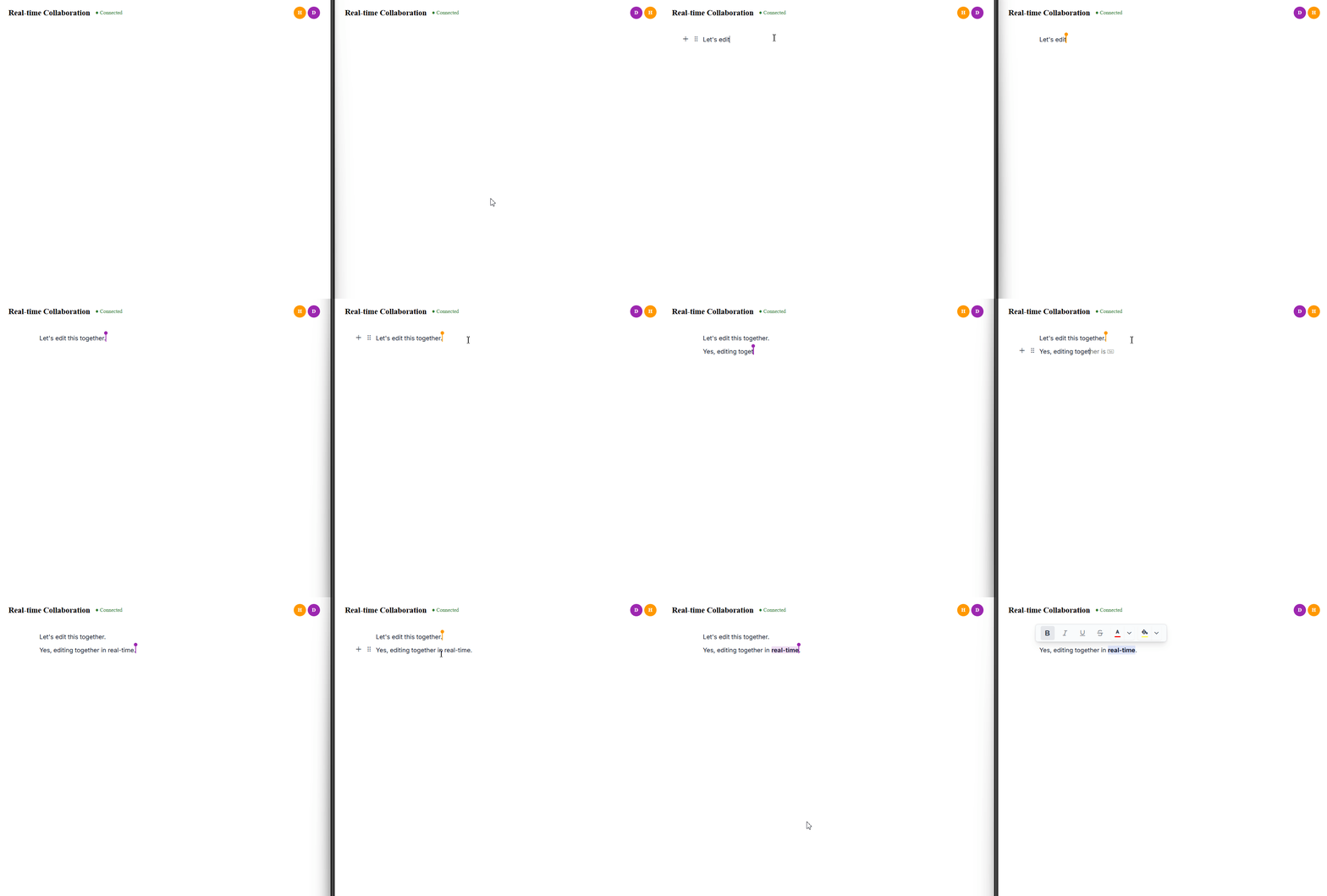
At this point, you have a working collaborative editor with real-time synchronization, user presence, and shared editing capabilities.
Real-world scenario: Managing a product launch document
Consider a product team preparing for a major release. The product manager maintains the launch plan, the engineering lead documents technical risks, the design team updates messaging and assets, and the legal team reviews compliance requirements. Instead of passing documents back and forth, everyone contributes to the same document simultaneously.
Using the React Block Editor with Yjs, the team built a React application where each section, such as headings, paragraphs, tables, callouts, and lists, is represented as an editable block within a shared document. The editor connects to a y-websocket server, allowing changes to synchronize instantly across all participants.
With collaboration awareness enabled, team members can see active users, remote cursors, and selection highlights in real-time. This makes it easy to identify who is working on which section and reduces duplicate effort during reviews and updates.
The outcome
- Faster document creation: Multiple contributors can draft content simultaneously instead of waiting for handoffs.
- Fewer editing conflicts: Changes are synchronized automatically, and collaboration-aware undo/redo ensures users only revert their own edits.
- Reusable collaboration pattern: The same approach can be applied to other team scenarios, including incident reports, quarterly planning documents, and contract reviews.
For teams that regularly collaborate on shared content, real-time editing helps reduce coordination overhead and keeps everyone working from a single source of truth.
Best practices for real-time collaborative editing
A few implementation choices can make a significant difference as your collaborative editor grows from a prototype to a production application:
- Choose the right provider for your environment: Use y-webrtc or PartyKit for development and experimentation, y-websocket or Hocuspocus for self-hosted deployments, and Liveblocks if you prefer a managed service.
- Use consistent room identifiers: Each room ID should uniquely map to a single document to ensure users join the correct collaboration session.
- Integrate with your identity system: Usernames, avatars, and colors should come from the same identity source used throughout your application for a consistent experience.
- Consider offline support: Pairing Yjs with y-indexeddb helps preserve changes locally and improves resilience during temporary connectivity issues.
- Test real-world collaboration scenarios: Open multiple browser windows and simulate network delays to validate synchronization, cursor accuracy, undo/redo behavior, and reconnection handling.
- Clean up resources properly: Always dispose of the provider and Y.Doc when the component unmounts to avoid lingering connections and stale awareness states.
Common issues and how to fix them
Even with a straightforward setup, a few common configuration issues can prevent collaboration features from working as expected.
| Issue | Possible cause | Solution |
| Cursors don’t appear, and remote changes aren’t visible | Awareness is disabled, or the selected provider doesn’t support awareness. | Enable enableAwareness and verify that your provider supports awareness features. |
| Remote usernames are missing on cursors | User information isn’t provided in the user’s configuration. | Populate the user field for all participants, including the local user. |
| Changes sync locally but not across clients | Clients are connected to different rooms or the provider is disconnected. | Ensure all clients use the same room ID and verify the connection in the browser’s network panel. |
| Adapter or runtime imports fail | The installed package version exposes APIs differently. | Check the package documentation and installed type definitions. The collaboration adapter should provide yRuntime and yXmlFragment. |
| WebSocket connections disconnect frequently | The server endpoint is unreachable or reconnect settings aren’t configured. | Validate the WebSocket URL, enable provider retry options, and display connection status in the UI. |
For more advanced troubleshooting and configuration details, refer to the official React Block Editor collaboration documentation.
Preparing for production
A collaborative editor that works locally isn’t always ready for real-world usage. Before deploying, consider the following:
- Use secure WebSocket connections (wss://): Most browsers block unencrypted WebSocket connections in production environments.
- Protect document access: Authenticate users and validate access to collaboration rooms using signed tokens or your existing identity system.
- Add server-side rate limiting: This prevents a faulty or malicious client from overwhelming the collaboration channel.
- Persist shared documents: Without persistence, recent edits can be lost if the server restarts. Solutions such as Hocuspocus with database storage or Yjs persistence adapters can help retain document state.
- Capture operational telemetry: Track connection, disconnection, and error events to simplify troubleshooting.
- Monitor connection health: A connection status indicator in the UI helps users understand when synchronization issues occur.
- Load test early: Simulate multiple concurrent users to validate synchronization performance, cursor latency, and conflict resolution behavior.
Performance tips
As collaboration scales, a few optimizations can improve the user experience:
- Disable awareness when needed: Presence updates are lightweight, but they still consume bandwidth. Consider disabling them in low-bandwidth environments.
- Lazy-load the editor: In frameworks such as Next.js, dynamically loading the editor can improve initial page load times.
- Optimize bundle size: Import only the components and modules you use to reduce the amount of JavaScript shipped to the browser.
Accessibility considerations
Collaboration features introduce accessibility requirements beyond the editor itself.
- Announce presence changes: Use ARIA live regions so screen readers can notify users when collaborators join or leave.
- Respect reduced-motion preferences: Apply prefers-reduced-motion to presence indicators and collaboration-related animations.
- Maintain focus stability: Awareness updates should never unexpectedly move keyboard focus within the editor.
While the Block Editor follows WCAG 2.1 accessibility patterns, collaboration-specific experiences should also be reviewed as part of your application’s overall accessibility strategy.
Browser compatibility
Collaborative editing relies on web technologies that are widely supported in modern browsers:
- y-websocket and Hocuspocus require WebSocket support, which is universal in modern browsers.
- y-webrtc relies on WebRTC support available in current Chromium, Firefox, and Safari browsers.
- y-indexeddb uses IndexedDB for local persistence and works across modern browsers that support progressive web applications.
From rich text editing and document formatting to media embedding and collaborative content creation, Syncfusion React Block Editor equips developers with everything needed to deliver modern, intuitive content authoring experiences.
Frequently Asked Questions
How does the React Block Editor handle simultaneous edits to the same block?
The React Block Editor uses Yjs CRDTs to synchronize changes. Edits to different blocks merge automatically, while concurrent edits at the same position are resolved deterministically. Undo and redo actions affect only the local user’s changes without impacting other collaborators.
Can I use the React Block Editor collaboration features without a backend?
Yes. For development and prototypes, you can use providers that require little or no backend infrastructure. For staging and production environments, a WebSocket-based provider is recommended for reliable synchronization and persistence.
How do I show who is currently editing a document?
Enable the enableAwareness property in the React Block Editor’s collaborationSettings, provide user details such as names and avatar colors, and set the local user’s ID. The editor automatically displays remote cursors and selections, while active user information can be retrieved from the provider’s awareness state.
Can I disable collaboration for certain documents?
Yes. Collaboration is optional. If you don’t configure collaborationSettings, the editor functions as a standard single-user editor.
Does collaboration affect performance?
Collaboration features are designed to be lightweight, but they do introduce additional network traffic. If user presence isn’t needed, disabling enableAwareness can help reduce overhead.
Can I switch providers later?
Yes. You can start with a provider such as y-webrtc during development and move to y-websocket or a managed service later. The shared Y.Doc and collaboration setup remain the same.
GitHub reference
For more details, refer to the example for real-time collaborative editing in React Block Editor using Yjs on the GitHub repository.
Bring real-time collaboration to your next React project
Building real-time collaboration means solving challenges such as synchronization, conflict resolution, and user presence. By combining the Syncfusion React Block Editor with Yjs, you can add these capabilities without building the collaboration layer from scratch.
Start with a local y-websocket server, connect multiple clients, and see how edits, cursors, and document updates stay synchronized in real-time. As your application grows, you can extend the same foundation with authentication, persistence, and production-scale infrastructure.
Ready to explore collaborative editing in your own application? Check out the resources below:
- Try the sample application to see real-time collaboration, remote cursors, and shared document editing in action.
- New to Syncfusion? Start a 30-day free trial and explore the capabilities of the Syncfusion React Block Editor.
- Already a Syncfusion customer? Download the latest release from the License and Downloads page.
- Need help getting started? Reach out through the support forum, support portal, or feedback portal for technical assistance and guidance.



 No spam, just valuable updates.