
 Eshwari Balraj
TL;DR: Need to split a large PDF, extract a few pages, or merge multiple files without installing software? This guide shows how to use free online PDF tools to split by page ranges, extract specific pages, and combine PDFs, fast, with clean output and temporary file handling. It also explains what’s happening under the hood and when it makes sense to use an SDK like Syncfusion’s PDF JavaScript Library inside your own app.
PDFs are the standard format for sharing reports, eBooks, invoices, contracts, and academic files. But working with PDFs isn’t always straightforward. You may need to extract specific pages, split a large document into smaller files, or merge multiple PDFs into one organized document, all without installing heavy software or paying for premium tools.
That’s where free, browser‑based Syncfusion® PDF tools come in. With just a few clicks, you can split, merge, extract, and reorganize PDF files directly online, no downloads, no sign‑ups, and no technical expertise required.
This guide explains how free online PDF tools help you manage documents efficiently and how to use split and merge features to simplify everyday workflows.

Common PDF challenges in everyday digital workflows
PDFs are everywhere at work, in education, and in personal projects. Despite their popularity, they often introduce friction into routine tasks.
Here are the most common PDF challenges users face and how online tools help overcome them effortlessly:
1. Large or Multi-section PDFs
Long reports, multi-chapter eBooks, and scanned PDFs are cumbersome to share and navigate when you only need specific sections.
Solution: A free browser‑based PDF splitter allows you to break large PDFs into smaller, usable parts in seconds.
2. Extracting only selected pages
Whether it’s a signature page, receipt, or a single chapter, extracting specific pages using traditional software is often unnecessarily complex or locked behind paid features.
Solution: A free online PDF page extractor lets you quickly select and download just the pages you need, making document handling simple and fast.
3. Combining multiple PDFs
Merging documents is a common requirement, yet many tools restrict file counts, add watermarks, or require subscriptions.
Solution: A free online PDF merger lets you upload multiple files, reorder them easily, and generate a clean, unified PDF without limitations or signups.
4. Basic page management
Tasks like reordering pages, rotating sections, separating chapters, or removing unwanted content shouldn’t require premium desktop software.
Solution: Modern online PDF management tools give you instant access to essential features, making it easy to organize and restructure your PDFs for free, right in your browser.
Split PDF online: Extract and manage pages effortlessly
Splitting a PDF is one of the most useful document handling tasks. You might need to isolate chapters, remove unnecessary sections, or create smaller files for sharing.
With a free online PDF splitter, you can extract pages, define custom ranges, and generate organized output files quickly and easily.
Why split a PDF online?
Splitting helps you:
- Extract only relevant sections
- Create smaller files for email or uploads
- Remove unwanted or confidential pages
- Organize complex documents
- Avoid paid or complicated desktop software
How the split PDF tool works
You can split a PDF using two flexible modes:
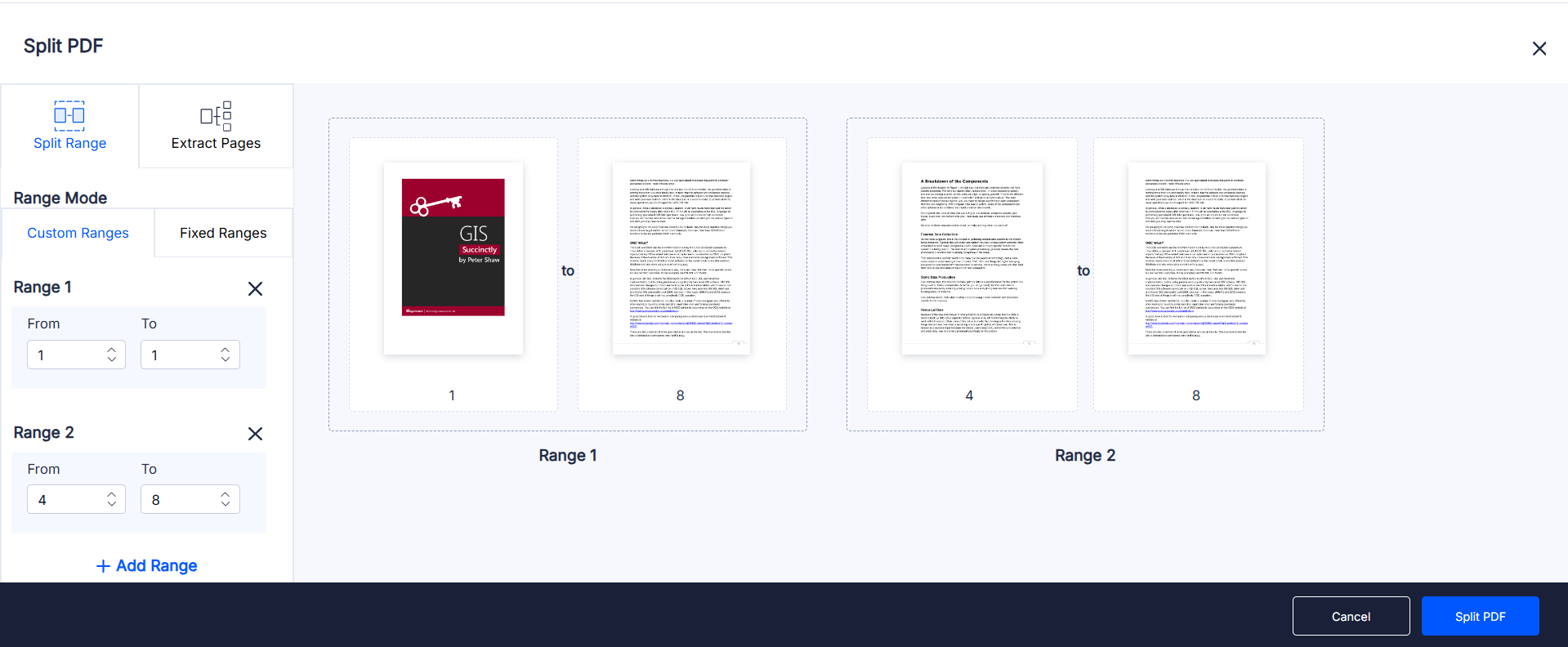
Mode 1: Split by page range
Perfect for breaking a document into organized sections.
- Custom ranges: Define multiple page ranges (e.g., 1–3, 4–7, 10–15).
- Fixed ranges: Automatically split a PDF into equal parts (e.g., every 5 pages).
- Add multiple ranges: Ideal for extracting multiple sections at once.
- Clear visual preview: Review each output range (Range 1, Range 2, etc.) labeled clearly before download.
Mode 2: Extract specific pages
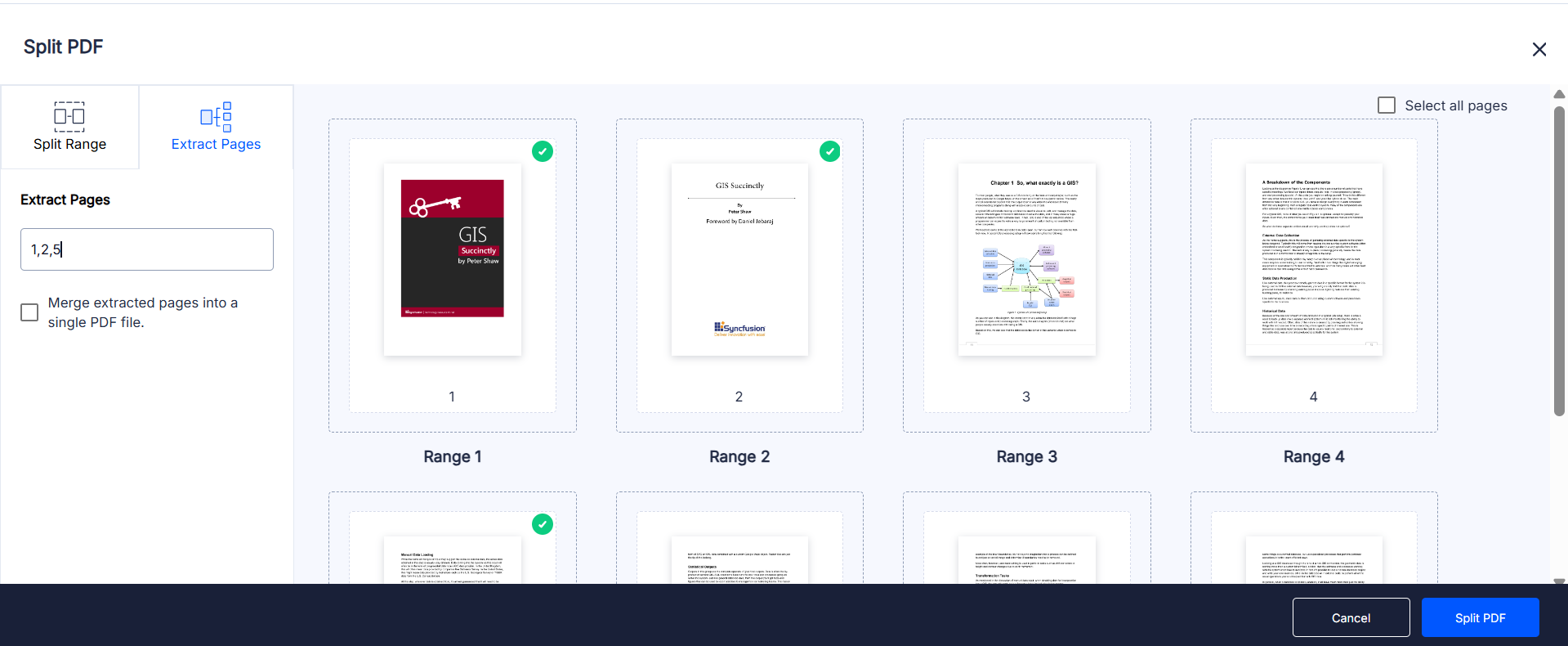
Perfect when you only need a few pages from a large document.
- Enter single pages or mixed ranges (e.g., 2, 5–7, 12).
- Combine extracted pages into a single PDF if needed.
- Preview selected pages before downloading.
Perfect for contracts, receipts, and selected slides or sections.
Output and processing
After selecting your split mode:
- Files are processed instantly.
- Formatting and layout remain intact.
- Output can be downloaded as individual PDFs or ZIP files.
- Files are handled securely and temporarily in the browser.
Split your PDF for free in just a few seconds. Try it out now!
Merge PDF online: Combine files into one organized document
Merging PDFs helps streamline storage, sharing, and submission. Instead of dealing with multiple files, you can create a single, structured document that’s easier to manage.
A free online PDF merger makes merging files fast and frustration-free, with no software installations, no signups, and no hidden limitations.
Why merge PDF files online?
Merging PDFs allows you to:
- Combine related files into one document
- Reduce clutter and file management overhead
- Maintain consistent formatting
- Simplify downloading, printing, and sharing
- Avoid watermarks or paid software
How the Merge PDF tool works
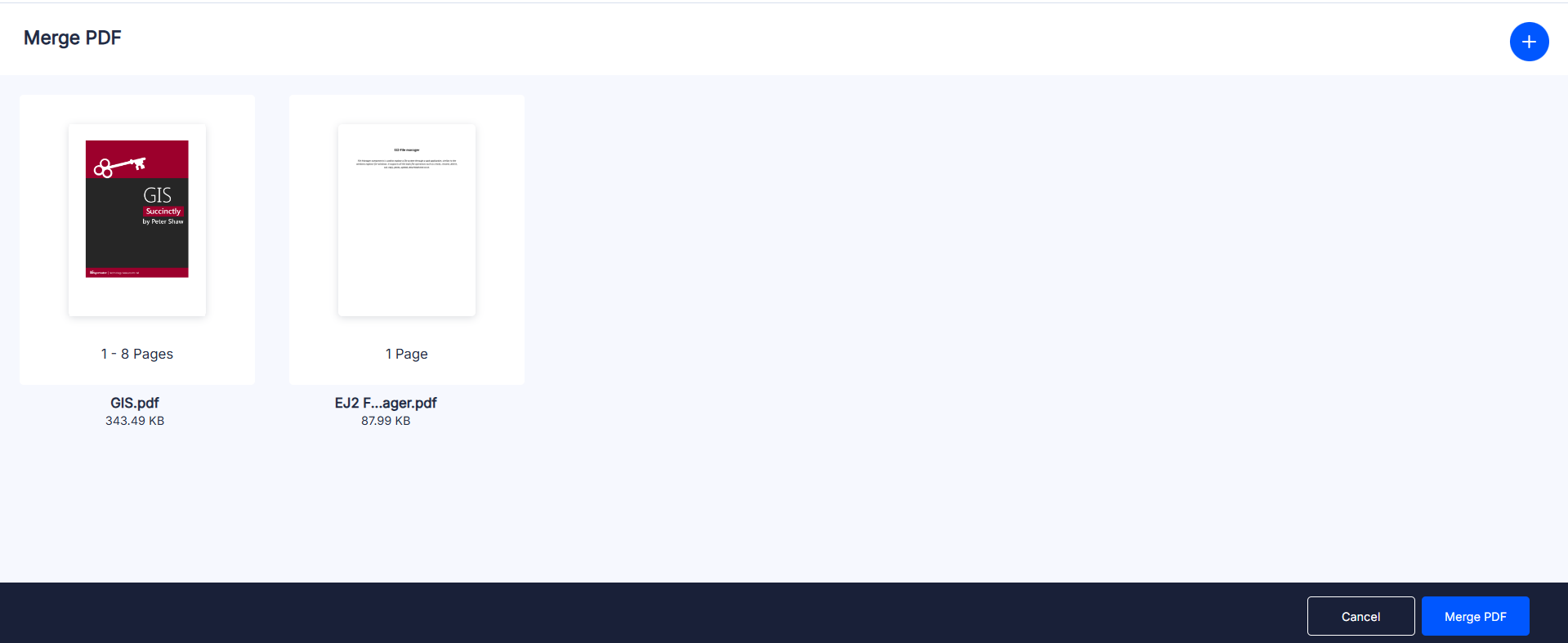
Syncfusion’s Merge free PDF tool is designed with clarity and simplicity in mind. You can combine any number of PDF files in just a few steps:
- Upload files
Drag and drop multiple PDFs or select them from your device. Each file appears with a visual preview. - Reorder pages or files
Arrange PDFs in your preferred sequence to control the final document structure. - Merge and download
The files are merged instantly into a clean, high-quality PDF that’s ready for download.
The tool supports mixed page sizes, orientations, scanned files, and even encrypted PDFs (with permission).
Merge your PDF files for free in just a few seconds. Try it out now!
Why Syncfusion’s free PDF tools stand out
Syncfusion’s online PDF tools are designed for speed, simplicity, and security. Key advantages include:
- Powered by an Enterprise‑Grade PDF JavaScript engine trusted by global organizations.
- Completely free with no limits or watermarks
- No installation or sign‑up required
- Fast processing for both small and large files
- Clean, intuitive user interface
- Secure, privacy‑focused file handling
- Works seamlessly across desktop and mobile devices
Yes. You can select individual pages or mixed ranges and download them as a combined or separate PDF. No. Fonts, images, and layout remain intact after splitting or merging. No. Files are processed temporarily and then automatically deleted. Yes. Both scanned and digital PDFs, including mixed-page-size files, are supported. No. All tools work directly in your browser on desktop and mobile devices.Frequently Asked Questions
Can I extract non-consecutive pages?
Will document quality change?
Are files stored on the server?
Does it work with scanned or mixed-size PDFs?
Is installation required?
Conclusion
Thank you for reading! Managing PDFs doesn’t have to be complicated. Whether you need to split pages, extract key sections, or merge multiple files into one document, free online PDF tools make the process quick, secure, and accessible.
With no installations, no watermarks, and no restrictions, you can handle everyday PDF tasks in seconds directly from your browser.
Explore the Syncfusion PDF JavaScript Library to enhance your applications with advanced PDF processing features.
Split and merge your PDFs online for free, easily, and securely. Try it now!
If you’re a Syncfusion user, you can download the setup from the license and downloads page. Otherwise, you can download a free 30-day trial.
You can also contact us through our support forum, support portal, or feedback portal for queries. We are always happy to assist you!
 No spam, just valuable updates.