
 Chinnu Muniyappan
TL;DR: Need to manage PDF annotations across platforms in C#? This guide walks you through importing and exporting annotations using XFDF, FDF, and JSON formats, enabling seamless collaboration, review processes, and data portability. You’ll learn how to filter annotations by type, author, and appearance; perfect for building scalable document systems and annotation-driven applications.
PDF annotations, comments, highlights, shapes, stamps, and approvals are central to document review processes. But problems start the moment those annotations need to move: between document versions, reviewers, or backend systems.
Passing around entire PDFs doesn’t scale. Feedback gets duplicated, overwritten, or lost. Reviewing history fragments across versions makes automation nearly impossible.
The real solution is simple in principle: treat annotations as portable data, not something permanently locked inside a PDF file. This guide walks through how to import and export PDF annotations in C# using XFDF, FDF, and JSON, and how to filter and preserve them effectively using the Syncfusion® .NET PDF Library.
Why annotation import and export actually matter
In real-world review cycles, PDFs don’t stay still. Content changes, pages move, new versions get published. What reviewers care about is that their feedback carries forward.
Without proper annotation import/export support, teams run into the same issues repeatedly:
- Review comments are tied to outdated versions
- Annotations can’t be reapplied automatically
- Feedback lives in silos across files
- Audit trails and approvals are lost
- Backend systems can’t consume or process review data
Separating annotations from the document solves all of this. Annotations become reusable, traceable, and easy to move across systems, even as the underlying PDF evolves.
Annotation exchange formats: XFDF, FDF, and JSON
There are three formats commonly used to exchange PDF annotations reliably. Each serves a slightly different purpose, but all of them allow annotations to travel independently of the document.
XFDF (XML Forms Data Format)
XFDF is an XML-based, human-readable format designed specifically for PDF annotation and form data. It’s easy to inspect, archive, and share across tools.
Use XFDF when:
- Annotations need to be reviewed or audited
- Data must remain readable outside the application
- You’re sharing annotations across different systems or teams
FDF (Forms Data Format)
FDF is more compact and closer to native PDF object syntax. It’s efficient and fast, making it a good choice for backend processing.
Use FDF when:
- Performance and file size matter
- You’re running a batch or server-side operations
- Compatibility with Adobe-centric processes is required
JSON (JavaScript Object Notation)
JSON is ideal for integrating annotation data with modern applications and services.
Use JSON when:
- Annotations flow through APIs or microservices
- Data needs to be transformed programmatically
- You’re syncing annotations with web or cloud-based systems
Working with annotations using the Syncfusion .NET PDF Library
The Syncfusion .NET PDF Library provides direct access to annotation data, metadata, and appearance, without relying on external viewers or UI components.
With it, you can:
- Import and export annotations in XFDF, FDF, or JSON
- Filter annotations by type, author, or page
- Preserve visual appearance across document versions
- Run everything in headless or server-side environments
Quick Setup with Syncfusion .NET PDF Library
Create a new .NET console project, install the Syncfusion.Pdf.Net.Core NuGet package, and add the required namespaces:
In your Program.cs file, include the essential namespaces.
using Syncfusion.Pdf.Parsing;
using Syncfusion.Pdf.Interactive;
That’s enough to get started.
Importing and Exporting Annotations (Same Pattern, Different Formats)
All three formats: XFDF, FDF, and JSON use the same import/export API pattern. You only change the format parameter.
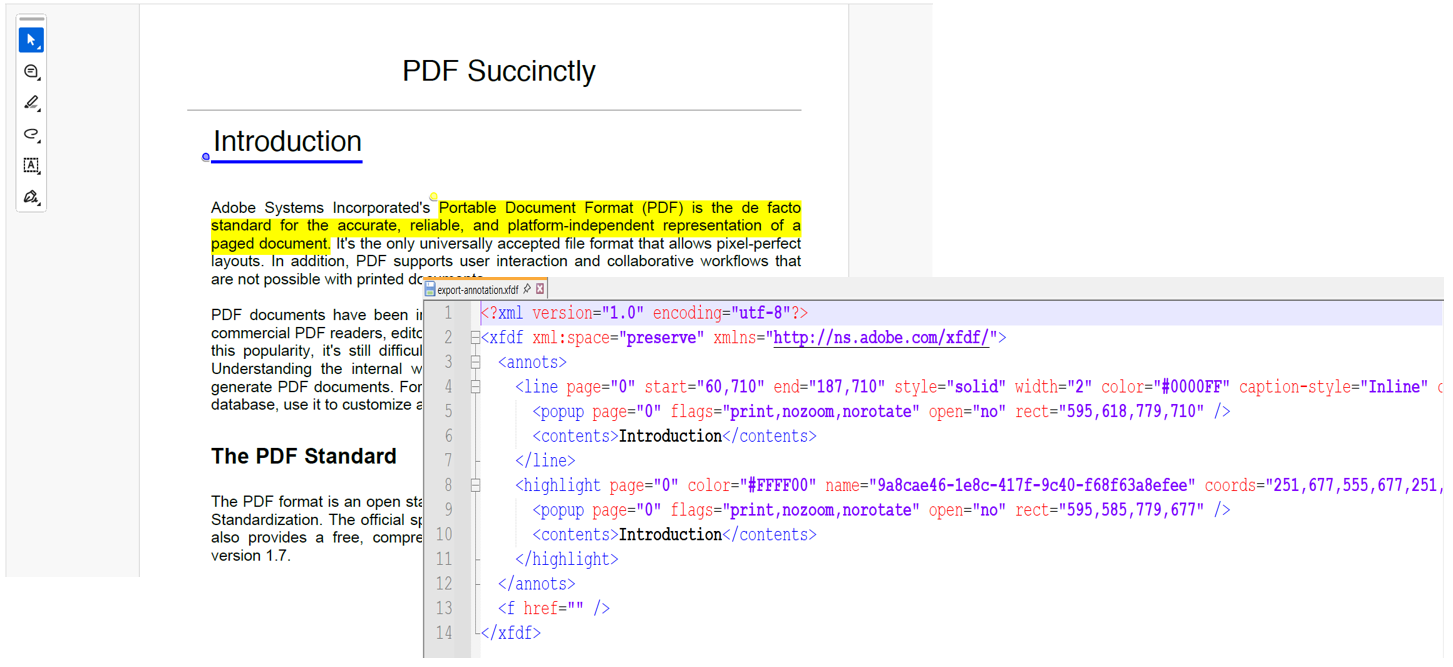
Basic Import and Export Example using XFDF:
//Load the PDF document
using (PdfLoadedDocument document = new PdfLoadedDocument("input-with-annotations.pdf"))
{
    //Export annotations to XFDF
    document.ExportAnnotations(
        "annotations.xfdf",
        AnnotationDataFormat.XFdf
    );

    //Import annotations back into the document
    document.ImportAnnotations(
        "annotations.xfdf",
        AnnotationDataFormat.XFdf
    );

    //Save the updated document
    document.Save("output.pdf");
}
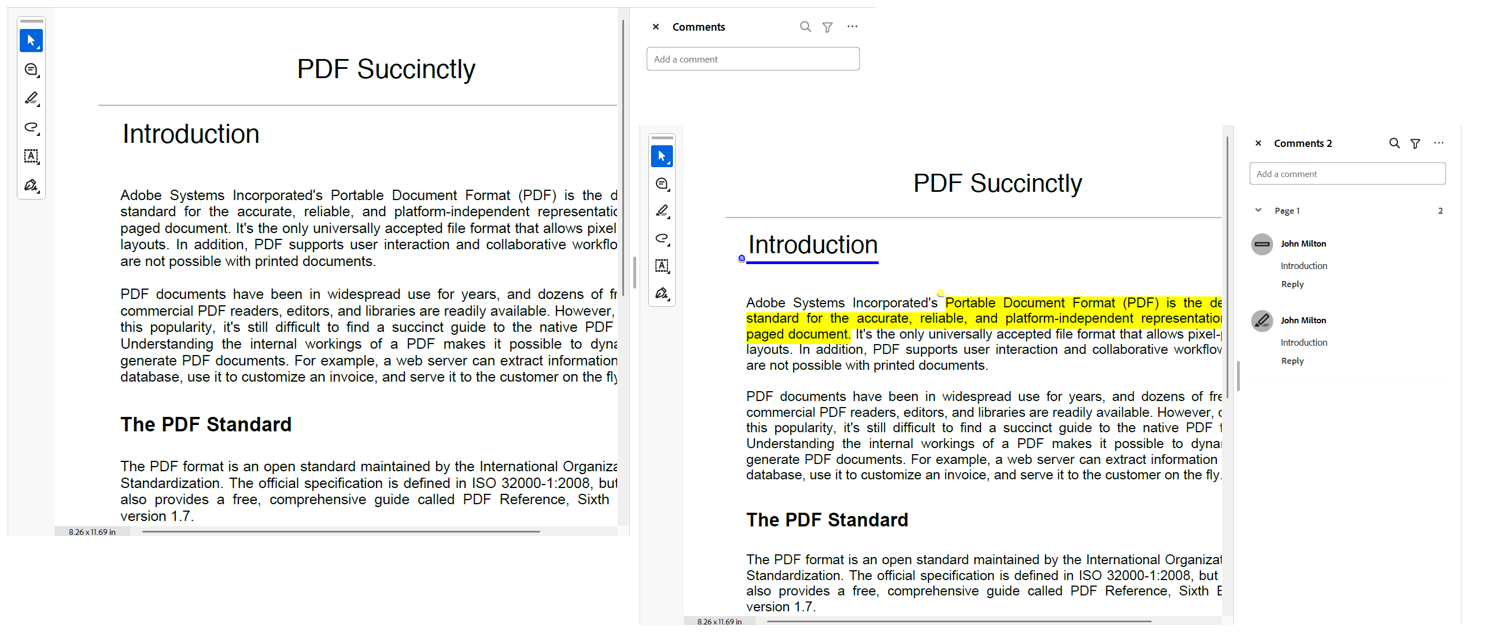
To switch formats, replace AnnotationDataFormat.XFdf with Fdf or Json. No structural changes required.
To explore detailed setup steps and advanced configuration options, refer to our official documentation. You can also explore the PDF annotations in .NET PDF Library feature tour.
Filtering annotations during export
Exporting every annotation is rarely what real applications need. More often, you want a focused subset, highlights from a reviewer, comments from specific pages, or annotations matching custom logic.
Our .NET PDF Library supports flexible export options, allowing developers to tailor annotation extraction with precision.
Filter by annotation type
You can export specific annotation types using the PdfAnnotationExportSettings class, allowing developers to efficiently export only the required annotation categories, such as highlights, text notes, stamps, or shapes.
Here is how to export only highlight and underline annotations to XFDF:
//Create annotation export settings
PdfAnnotationExportSettings annotationExportSettings = new PdfAnnotationExportSettings()
{
    //Set the annotation types to export
    AnnotationTypes = new[]
    {
        PdfLoadedAnnotationType.RectangleAnnotation,
        PdfLoadedAnnotationType.LineAnnotation
    },
    //Set the export format to XFDF
    DataFormat = AnnotationDataFormat.XFdf
};
//Export the specified annotations to XFDF format
document.ExportAnnotations(
    "export-specific-annotation.xfdf",
    annotationExportSettings
);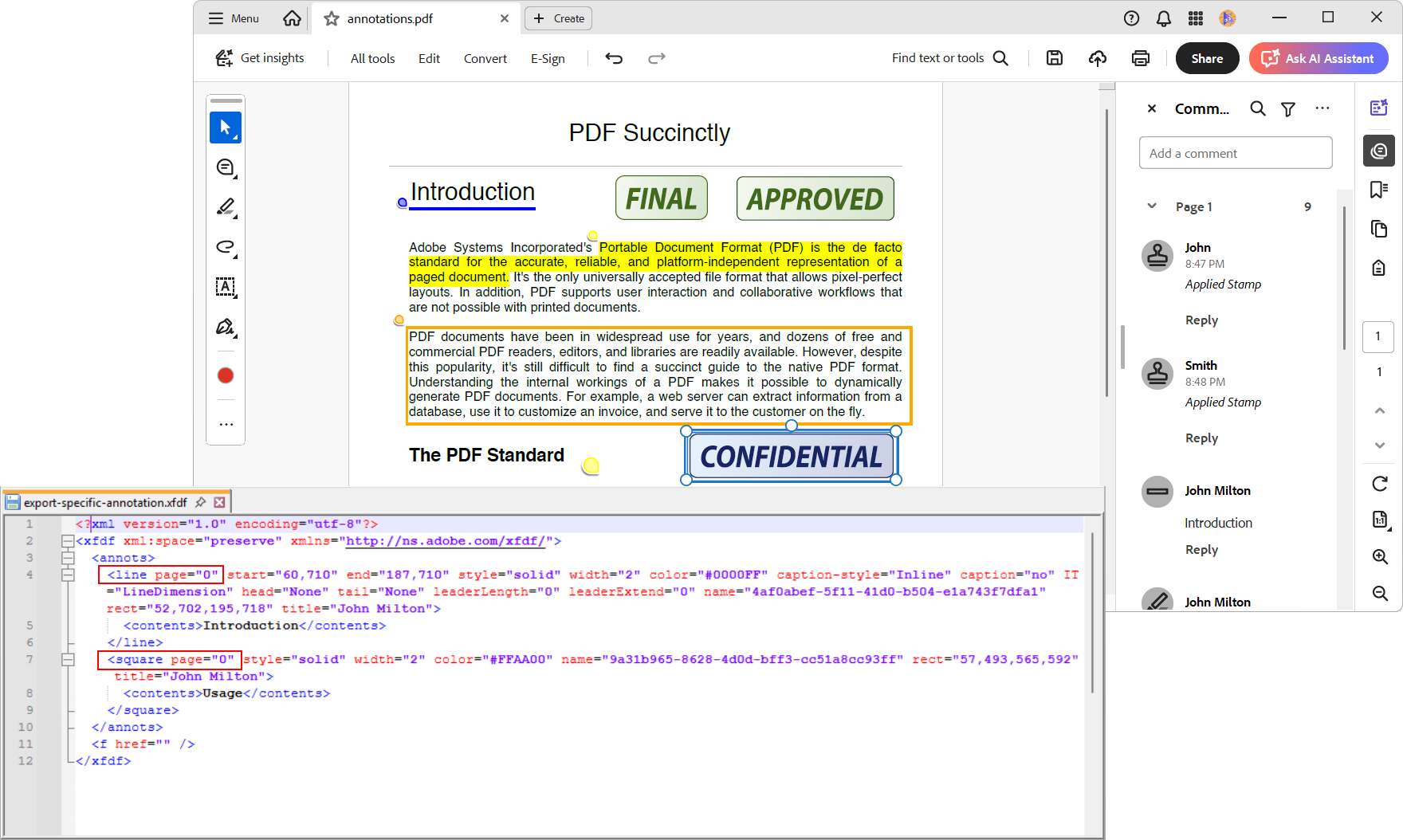
This is useful when different annotation types are handled differently, for example, highlights vs. approvals.
Filter by author, page range, or custom logic
Export annotations using the PdfExportAnnotationCollection class, allowing developers to apply custom filtering logic by iterating through annotations and selecting only the required ones.
- Author/user: Target annotations from specific reviewers for personalized feedback extraction.
- Page range: Export annotations from selected pages, useful for partial document processing.
Additionally, developers can extend this approach to implement advanced scenarios like date-based filtering, status-based export, keyword matching, or layer-specific filtering, depending on the available annotation properties.
Here is how to filter annotations by author and export only those relevant to a particular user.
//Create annotation export collection
PdfExportAnnotationCollection exportAnnotationCollection = new PdfExportAnnotationCollection();

//Iterate through the pages in the document
foreach (PdfLoadedPage page in document.Pages)
{
    //Iterate through the annotations in the page
    foreach (PdfLoadedAnnotation annotation in page.Annotations)
    {
        //Check the author of the annotation
        if (annotation.Author == "John Milton")
        {
            //Add the annotation to the export collection
            exportAnnotationCollection.Add(annotation);
        }
    }
}
//Export the specified annotations to an XFDF format
document.ExportAnnotations(
    "export-specific-collection.xfdf"
    AnnotationDataFormat.XFdf,
    exportAnnotationCollection
);
This approach lets you implement advanced scenarios such as:
- Reviewer-based exports
- Page-range filtering
- Date-based or status-based selection
- Keyword or metadata matching
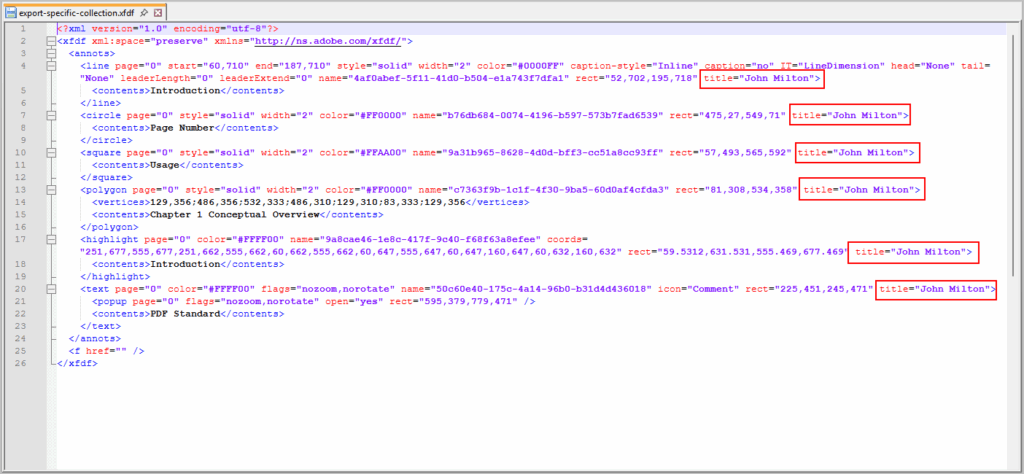
By combining built-in type-based filtering with custom collection strategies, you can implement highly targeted annotation export tailored to complex application requirements.
Preserving annotation appearance
Annotations don’t just carry data; they carry intent. Color, opacity, border style, and icons often communicate priority or approval state.
By default, exporting only the raw data can strip away these visual cues. Our .NET PDF Library allows you to include appearance information during export.
//Create annotation export settings
PdfAnnotationExportSettings exportSettings = new PdfAnnotationExportSettings()
{
    //Enable the appearance export
    ExportAppearance = true,
    //Set the export format to XFDF
    DataFormat = AnnotationDataFormat.XFdf
};

document.ExportAnnotations(
    "annotations-with-appearance.xfdf",
    exportSettings
);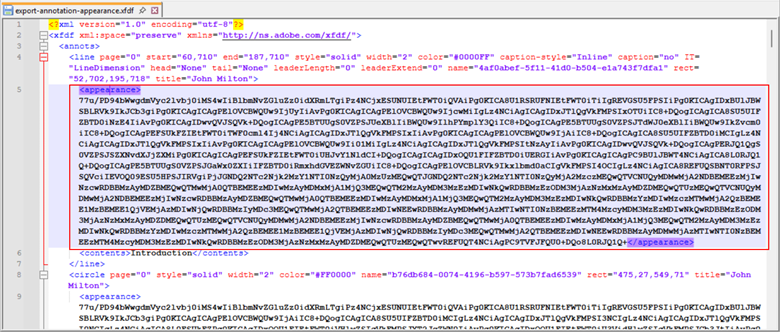
This is especially important in archival, cross-system, or collaborative review environments. For more custom annotation appearances and advanced rendering options, check out our official documentation.
GitHub reference
You can find the complete sample project in our GitHub demo.
Frequently Asked Questions
Yes. You can import annotations sequentially from multiple XFDF, FDF, or JSON files into the same PdfLoadedDocument. Existing annotations are preserved unless you explicitly modify them.Can I merge annotations from multiple sources into a single PDF?
Yes. The Syncfusion .NET PDF Library has no UI dependency, making it suitable for background services, batch processes, and CI/CD pipelines.Can annotation import and export run in server-side or headless environments?
No. Importing annotations does not affect encryption, permissions, or digital signatures unless those properties are explicitly modified in code.Does importing annotations change PDF security or permissions?
Yes. You can filter annotations by author by iterating through the document pages and exporting only the annotations that match a specific reviewer name.Can I export annotations from specific reviewers?
Yes. Imported annotations remain fully interactive after import and can be edited or removed unless they are flattened.Can imported annotations be edited or removed later?
Yes. Annotation coordinates account for page rotation, ensuring annotations appear in the correct location after import.Are annotation positions preserved on rotated or updated pages?
Conclusion
Thank you for reading! Annotation portability isn’t a nice-to-have, it’s what turns PDF review from a manual process into a reliable system.
With support for XFDF, FDF, and JSON, the .NET PDF Library makes it possible to:
- Preserve review continuity across document versions
- Automate annotation processing in backend systems
- Export focused, meaningful feedback
- Keep visual intent intact across tools and viewers
Instead of rebuilding comments by hand or passing PDFs around endlessly, annotations become what they should be: structured, reusable data that moves cleanly with your workflow.
If you’re a Syncfusion user, you can download the setup from the license and downloads page. Otherwise, you can download a free 30-day trial.
You can also contact us through our support forum, support portal, or feedback portal for queries. We are always happy to assist you!


 No spam, just valuable updates.