
 Gowrimathi S
TL;DR: The best Angular chart library depends on your app’s complexity, customization needs, and support requirements. ng2-charts is suitable for lightweight use cases, while ngx-echarts offers advanced customization. Highcharts and FusionCharts are strong choices for polished dashboards and reporting. Syncfusion Angular Charts is a good fit for enterprise applications that need broad chart coverage, built-in interactivity, export options, accessibility, and support.
Charts are often the most important part of an Angular dashboard. They help users spot trends, compare values, monitor performance, and make decisions faster. But choosing a chart library is not just about how the charts look. You also need to evaluate how well the library fits your Angular workflow, how much customization it supports, how it performs with larger datasets, and whether it gives your team enough documentation and support to ship confidently.
In this guide, we’ll compare five popular Angular chart libraries:
- Highcharts
- FusionCharts
- Syncfusion Angular Charts
- ng2-charts
- ngx-echarts
We’ll look at their strengths, trade-offs, and best-fit use cases so you can choose the right option for your next Angular application.

How to choose an Angular Chart library
Before comparing libraries, it helps to define what “best” means for your project. A small internal reporting page and a complex enterprise analytics dashboard may need very different charting solutions.
When evaluating Angular chart libraries, consider:
- Chart variety: Does the library support the chart types your app needs now and later?
- Angular integration: Does it fit naturally into Angular projects?
- Performance: Can it handle your expected data volume and interaction patterns?
- Interactivity: Does it include zooming, panning, tooltips, selection, drill-downs, or live updates?
- Customization: Can you match your application’s branding and UX standards?
- Accessibility: Does it support keyboard navigation, screen readers, and accessibility standards?
- Export options: Can users export charts for reports, documents, and presentations?
- Documentation and support: Can your team resolve implementation issues quickly?
- Licensing: Does the pricing or license model fit your team and deployment needs?
Angular chart libraries at a glance
| Best for | Key strength | Trade-off to consider |
| Enterprise dashboards and business apps | Broad chart coverage, built-in interactivity, export, accessibility, docs, and support | Maybe more capability than a very small project needs |
| Polished commercial charting experiences | Mature charting features and strong visual quality | Licensing and product fit should be reviewed for your use case |
| Business dashboards with many visualization types | Wide chart variety and dashboard-friendly visuals | Evaluate customization and long-term fit for Angular workflows |
| Lightweight Angular apps using Chart.js | Simple setup and familiar Chart.js foundation | Less suited for advanced enterprise dashboard requirements |
| Advanced and highly customizable visualizations | Angular wrapper for Apache ECharts | Requires comfort with ECharts configuration patterns |
Spend less time building data visualization features from scratch. Syncfusion Angular Charts includes ready-to-use support for multiple chart types, data binding, interactive tooltips, legends, zooming, selection, and responsive layouts.
Start Building Today1. Highcharts
Highcharts is a mature commercial charting library commonly used in customer-facing analytics dashboards, reporting interfaces, and commercial visualization products.
It is known for:
- Polished chart presentation
- Responsive behavior
- Mature interactivity
- Accessibility support
- Strong customization capabilities
Angular integration is available through the highcharts-angular package.
Basic installation
npm install highcharts-angular highcharts
Then import the HighchartsChartModule into your app.
Key strengths
Highcharts is often selected for:
- Polished analytics dashboards
- Reporting systems and executive reporting interfaces
- Applications that prioritize visual refinement
Its mature ecosystem and professional visual defaults make it a practical option for commercial dashboard experiences.
Best fit
Choose Highcharts if your project needs:
- Polished chart visuals
- Commercial reporting experiences
- Responsive dashboards
- Strong customization flexibility
Trade-off
Before adoption, teams should carefully evaluate:
- Licensing
- Required chart modules
- Angular integration needs
This helps ensure alignment with deployment requirements.
2. FusionCharts
FusionCharts is another commercial visualization library frequently used in executive dashboards, management reporting systems, and presentation-oriented analytics applications.
It provides Angular integration along with a broad collection of dashboard-focused visualizations.
Basic installation
npm install fusioncharts angular-fusioncharts
Then import FusionChartsModule into your Angular application.
Key strengths
FusionCharts is useful for:
- Business dashboards
- Management reporting
- Executive presentations
- Visual analytics interfaces
Its broad range of visualizations and dashboard-oriented presentation style make it appealing for reporting-heavy applications.
Best fit
Choose FusionCharts if your application focuses heavily on:
- Management dashboards
- Reporting interfaces
- Presentation-oriented analytics experiences
Trade-off
Teams should evaluate:
- Angular workflow compatibility
- Customization flexibility
- Licensing
- Long-term maintainability
before adoption.
3. Syncfusion Angular Charts
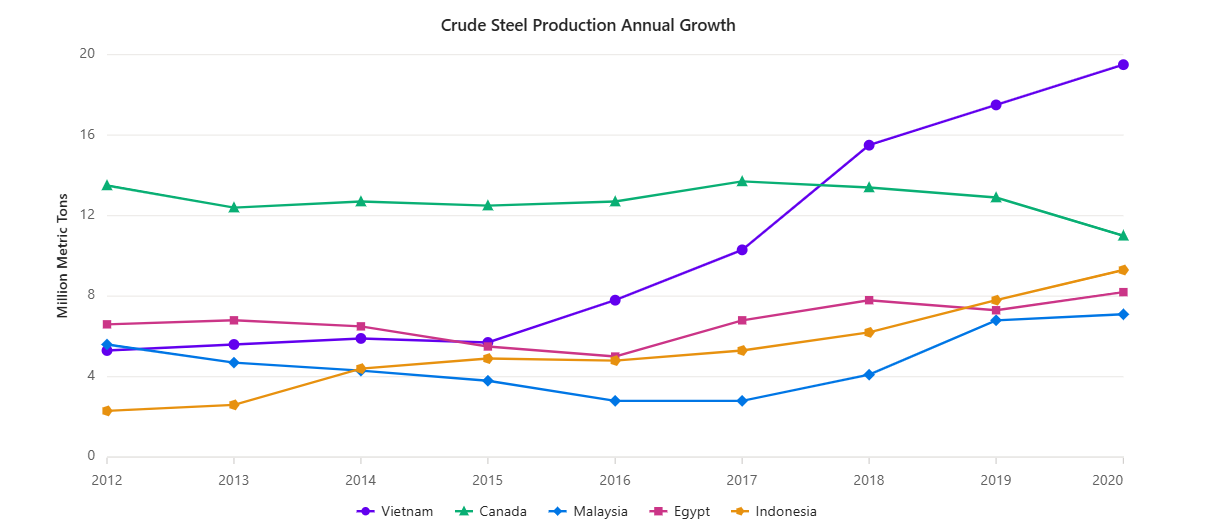
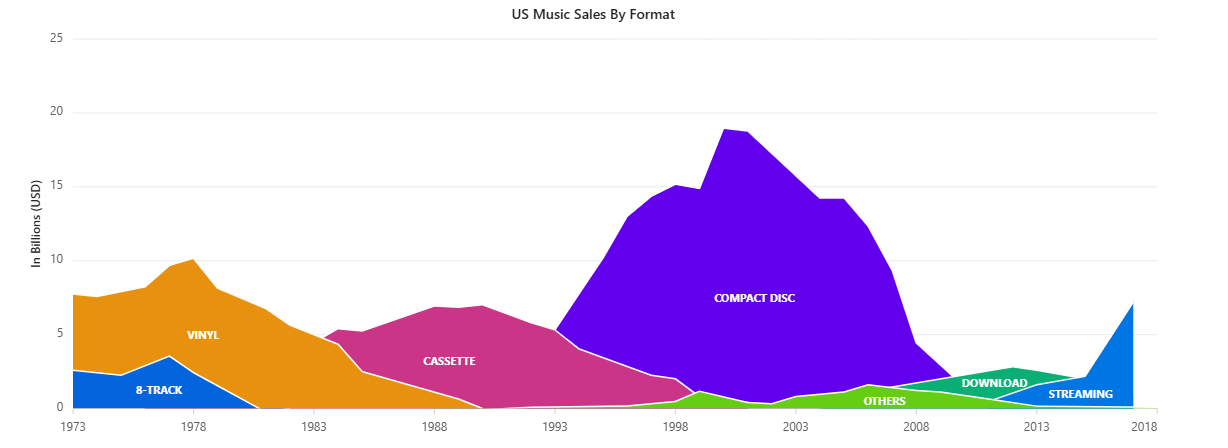
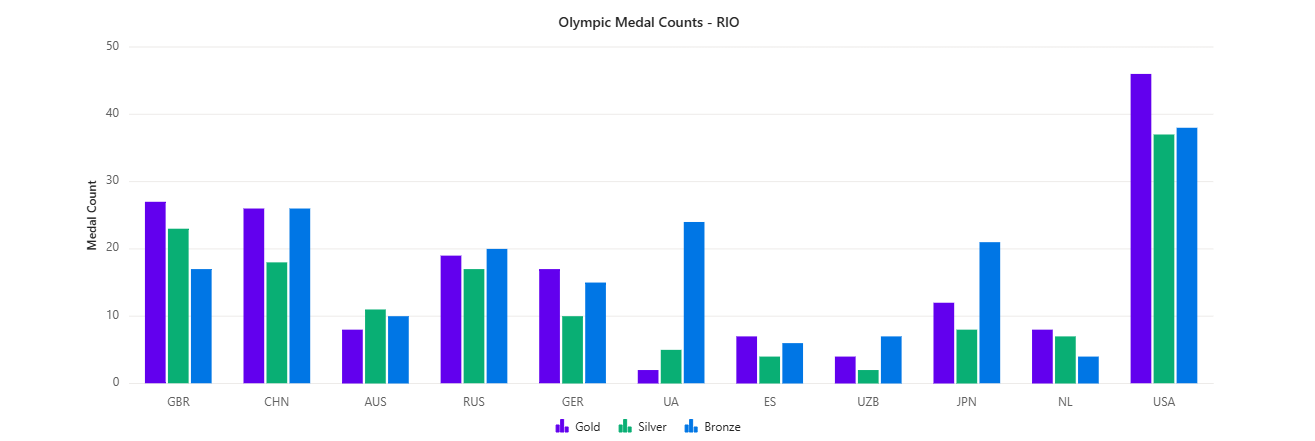
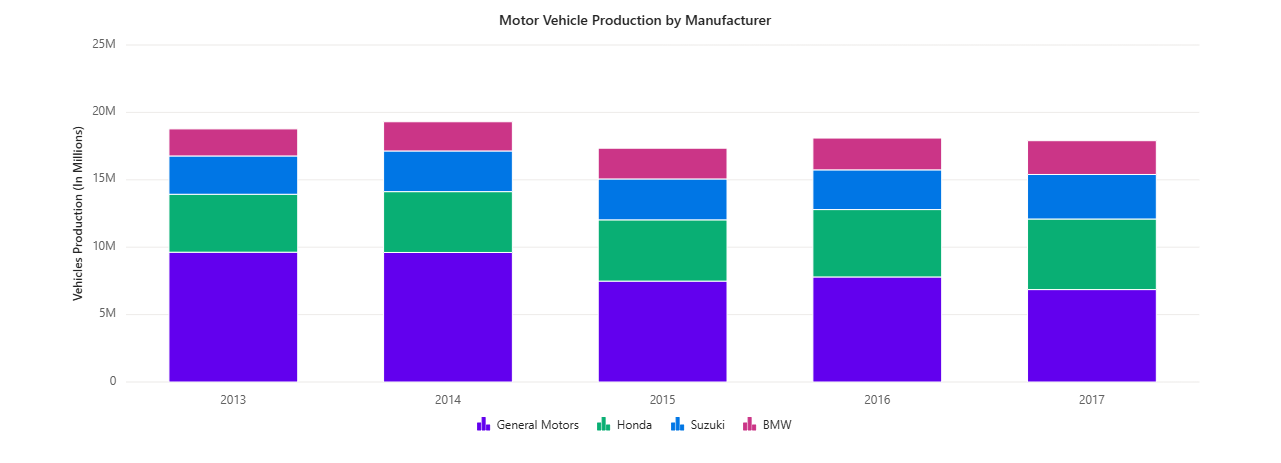
Syncfusion Angular Charts is designed for Angular teams building interactive dashboards, reporting systems, analytics platforms, operational monitoring tools, and data-heavy business applications.
The library supports 55+ chart and graph types along with built-in interactivity, export workflows, accessibility capabilities, and responsive rendering. Before publication, verify the latest chart counts and accessibility support details against the current Syncfusion documentation.
One of the biggest advantages of Syncfusion Angular Charts is its ability to support both simple reporting dashboards and more advanced analytical interfaces within the same Angular ecosystem.
Basic installation
npm install @syncfusion/ej2-angular-charts
Then import the ChartAllModule into your Angular application:
import { ChartAllModule } from '@syncfusion/ej2-angular-charts';For newer Angular applications, you can also evaluate standalone component integration depending on your project structure.
Key strengths
Syncfusion Angular Charts is suitable for teams that need both standard business charts and advanced dashboard features within an Angular ecosystem.
- Wide chart coverage: Supports common charts such as Bar, Line, Pie, Spline, Step Line, Area, and Scatter charts, along with advanced options like Pareto, Waterfall, Polar, Spline Area, Range, Box and Whisker, Pyramid, Bubble, Funnel, and Histogram.
- Built-in interactivity: Includes features such as zooming and panning, tooltips, crosshairs, trackball interaction, selection, drill-down support, and live updates for interactive dashboard experiences.
- Smooth animations: Syncfusion Angular Charts include smooth built-in animations, helping chart loading and data updates feel more natural without requiring extra configuration.
- Export support: Provides export options for PNG, JPG, PDF, Excel, CSV, and SVG, which are useful for business reporting, presentations, and documentation workflows.
- Angular-focused ecosystem: Offers Angular documentation, demos, support resources, and integration with the broader Syncfusion Angular component ecosystem.
Best fit
Syncfusion Angular Charts is a strong fit for:
- Enterprise dashboards
- Analytics platforms
- Operational reporting systems
- Admin portals
- Financial dashboards
- Applications requiring Export workflows, accessibility, and broader UI Infrastructure
Trade-off
For applications that only require a few basic charts, Syncfusion may provide more functionality than necessary. However, teams building dashboards expected to grow over time may benefit from the broader feature set and ecosystem support.
4. ng2-Charts
ng2-charts is a lightweight Angular wrapper for Chart.js.
It is often used in smaller Angular applications and lightweight reporting dashboards where simplicity and fast setup are priorities.
Basic installation
npm install ng2-charts
npm install chart.js
Key strengths
ng2-charts works well for:
- Simple dashboards
- Internal business tools
- Lightweight reporting pages
- Angular projects already using
Chart.js
It supports common chart types, including bar, line, pie, doughnut, radar, and polar area charts, depending on Chart.js capabilities.
Best fit
Choose ng2-charts if you are building:
- Lightweight Angular dashboards
- Internal reporting interfaces
- Applications where setup simplicity matters more than advanced analytics functionality
Trade-off
ng2-charts may become limiting for applications requiring:
- Advanced dashboard interactivity
- Export workflows
- Accessibility requirements
- Complex analytics
- Highly customized enterprise dashboards
5. ngx-echarts
ngx-echarts is an Angular wrapper for Apache ECharts.
It is a strong option for teams building highly customized analytical dashboards and advanced visualization experiences.
Basic installation
npm install echarts -S
npm install ngx-echarts -S
Key strengths
ngx-echarts provides access to the flexibility and depth of visualization of Apache ECharts.
It supports:
- Line charts and bar charts
- Heatmaps and tree visualizations
- Map-based charts
- Highly customized analytical interfaces
Its configuration-driven model makes it especially useful for advanced visualization scenarios.
Best fit
Choose ngx-echarts if your team needs:
- Highly customizable visualizations
- Advanced analytical dashboards
- Complex chart behavior
- Direct access to Apache
EChartscapabilities inside Angular applications
Trade-off
ngx-echarts can require more configuration expertise than simpler chart libraries, especially for teams unfamiliar with ECharts patterns and options.
Which Angular Chart Library Should You Choose?
The best choice depends on your application complexity, dashboard goals, and long-term scalability needs.
| Need | Recommended Option |
| Interactive enterprise dashboards | Syncfusion Angular Charts |
| Built-in export and accessibility workflows | Syncfusion Angular Charts |
| Polished commercial analytics dashboards | Highcharts |
| Reporting and presentation-heavy dashboards | FusionCharts |
| Lightweight Chart.js-based setup | ng2-charts |
| Highly customizable analytical visualizations | ngx-echarts |
| Small internal reporting tools | ng2-charts or Highcharts |
| Large Angular business applications | Syncfusion Angular Charts |
If you only need a few basic charts, ng2-charts is usually enough. For advanced customization and flexibility, ngx-echarts is a good choice. Highcharts and FusionCharts work well for polished dashboards and reporting. For larger Angular apps with interactive dashboards, exports, accessibility, and broader UI needs, Syncfusion Angular Charts is also a strong option.
Final Thoughts
Choosing the right Angular chart library is about aligning project requirements with capability:
- For simple use cases → go lightweight
- For flexibility → choose configuration-driven libraries
- For production dashboards → consider mature or enterprise-grade options
If you’re building data-heavy business applications with long-term scalability in mind, Syncfusion Angular Charts stands out as a comprehensive solution, especially when combined with a broader Angular UI component ecosystem.

 No spam, just valuable updates.