
 Meena Alagiah
TL;DR: Essential Studio® Volume 3, 2025 at a glance. Syncfusion’s third major release of 2025 is packed with powerful updates across Blazor, .NET MAUI, JavaScript frameworks, WPF, WinUI, and Document Processing Libraries. Highlights include new controls like the Rich Text Editor and Markdown Viewer, smarter UI components with enhanced performance, and modular SDKs for PDF, Word, and Spreadsheet editors. From AI-powered document summarization to blazing-fast Excel-to-PDF conversions, this release is all about building faster, more intuitive, and highly customizable applications across platforms.
We’re super excited to roll out Syncfusion Essential Studio® 2025 Volume 3! This release is a big deal, bringing new ways to pick the tools you need, plus a set of new controls, faster performance, and features that make building apps a breeze. Whether you’re creating web apps, mobile apps, or desktop tools, this update has everything you need to make your users happy.
Let’s dive into the details of every feature in a way that’s clear, simple, and super exciting!
New editions: Choose your perfect fit
Syncfusion® now offers new editions so you can pick exactly what you need for your project, making things simpler and more flexible:
- UI suite: Get all the controls for building amazing user interfaces, like grids, charts, and editors.
- Document SDK: Tools for working with PDFs, Word docs, and Excel files in one package.
- PDF Viewer SDK: Focused on viewing and interacting with PDFs.
- DOCX Editor SDK: Just for editing Word documents.
- Spreadsheet Editor SDK: Built for working with spreadsheets.
- Enterprise Edition: The full package, everything above in one go.
If you’re an enterprise user, you still get the whole shebang, but these editions let everyone else choose only what they need. Pretty neat, huh?
Web Platforms (React, Angular, Vue, and JavaScript)
JavaScript, React, Angular, and Vue developers, this release brings updates that will make your web apps pop with smarter, faster features. Let’s look at a few highlights.
DataGrid: Merge cells for clearer data
The DataGrid now lets you combine identical cells across rows or columns. This makes your data easier to read, especially for grouped or hierarchical info, by reducing clutter and highlighting patterns.
Pivot Table: Folder-like data navigation
The server-side Pivot Table now has a hierarchical field list that looks like a folder structure. This makes it super easy to browse and manage large datasets, giving users a clear, organized way to explore data.
Query Builder: Crazy fast performance
The Query Builder is now up to 24.9x faster when handling large datasets or complex rules (like 1,000 lock groups). This speed boost means your app stays snappy even with heavy data processing.
Rich Text Editor: Edit like a pro
The Rich Text Editor is your go-to for creating and editing text with style. New features include:
- Add interactive checklists to track tasks or to-dos.
- Drag and drop videos or audio files to create multimedia-rich content.
- Insert table rows or columns with a single click for quick edits.
- Customize table borders with colors and widths to match your app’s look.
- A cleaner source code view makes editing HTML simple and intuitive.
Diagram: Custom designs that stick
The Diagram control now lets you add custom HTML or SVG nodes to symbol palettes, so your designs match your app’s style. Plus, you can move nodes without messing up custom connector paths, and undo/redo keeps everything under control.
Gantt Chart: Optimized task loading and scrolling
Working with big project plans? You’ll see up to 3x faster task loading and buttery-smooth scrolling, even with large datasets.
Chat UI: Tagging users in messages
Want to build a collaborative chat experience? Users can now tag others using @, and suggestions pop up as they type, just like in modern messaging apps.
Kanban Board: Column rearrangement
Let your users personalize their workflow by dragging and dropping columns to reorder them.
Blazor: Ready for your next big project
Blazor developers, this release brings production-ready tools and features that make your apps faster and more user-friendly. Let’s take a look at a few important ones.
Smart Paste Button & TextArea
The Smart Paste Button and Smart TextArea are now stable and ready for production use, offering modern UX enhancements.
DataGrid: Smarter data handling
The DataGrid is now more flexible, faster, and ready for complex data tasks with these new features
- Keep grouped data expanded or collapsed, even when users navigate away.
- Select rows across multiple pages using simple public methods.
- Lazy load grouping and paging for faster performance with big datasets.
- Add custom tooltips to cells for extra context and better usability.
Gantt Chart: Project management made easy
The Gantt Chart is now better for managing projects
- Display a Work Breakdown Structure (WBS) column to break down tasks clearly.
- Support timezones to keep schedules accurate across regions.
- Use Excel-like filtering to sort and find data quickly.
Rich Text Editor: Better document editing
The Rich Text Editor for Blazor makes document creation a breeze:
- Insert table rows or columns with one click.
- Import Word documents by dragging and dropping (with size limits for safety).
- A revamped source code view makes HTML editing clear and straightforward.
.NET MAUI: Build cool apps for phones and desktops
.NET MAUI gets a big boost with new controls and features that make cross-platform apps a joy to build.
New controls
1. Meet the highly anticipated .NET MAUI Rich Text Editor
The new Rich Text Editor is a versatile control designed for creating and editing richly formatted text across mobile and desktop platforms. Whether you’re building an email composer, note-taking app, or document editor, this control delivers a polished and professional experience.
Key features
- WYSIWYG editing for intuitive formatting.
- Comprehensive styling tools: bold, italic, underline, font settings, colors, lists, alignment, and more.
- Hyperlink support for inserting and editing links.
- Image and table insertion for rich content creation.
- Customizable toolbar with configurable actions.
- Clipboard operations: copy, paste, and cut.
- Undo/redo history for flexible editing.
- Clear formatting to reset styles with ease.
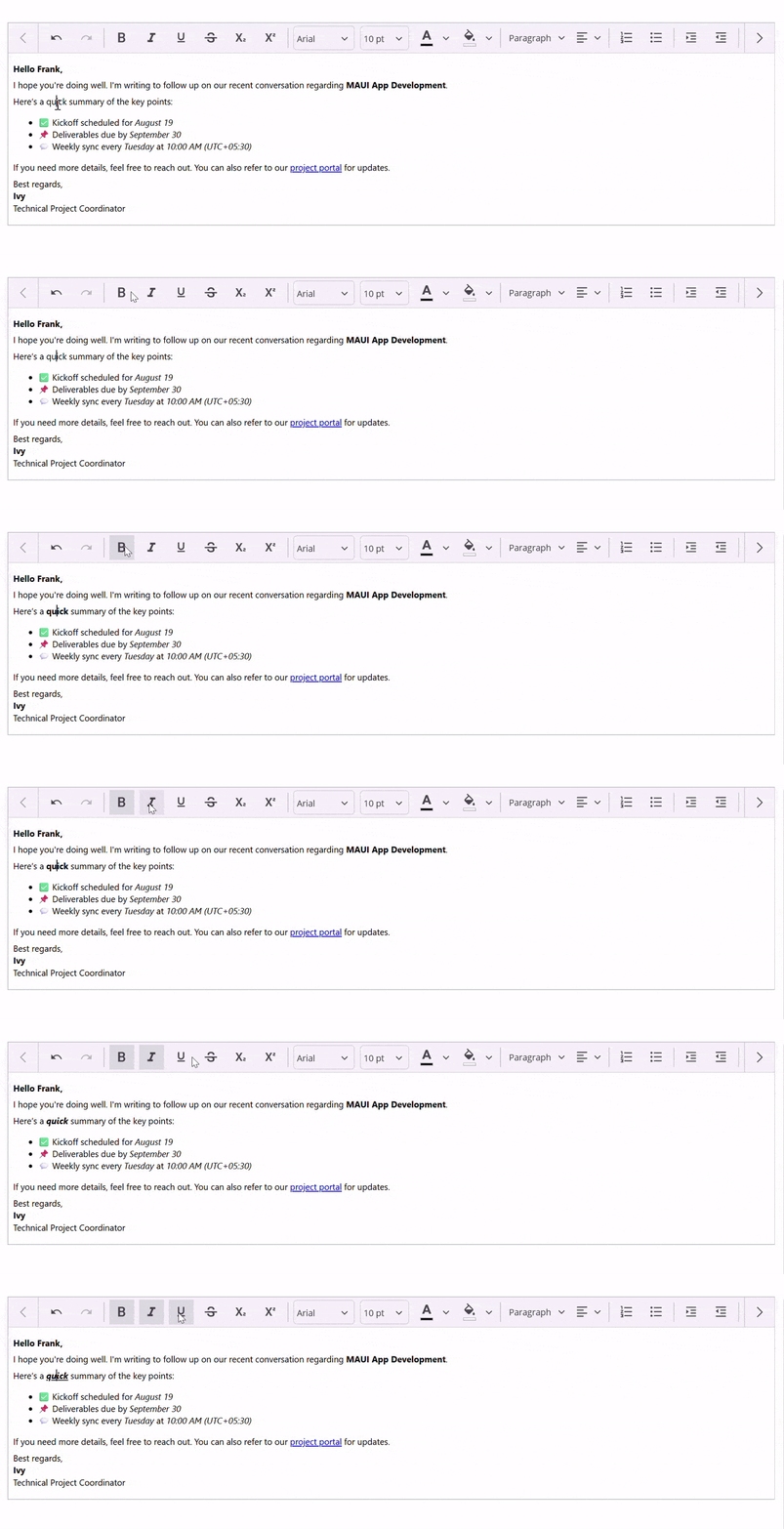
.NET MAUI Rich Text Editor
2. Say hello to the all-new Markdown Viewer
Need to render markdown content effortlessly? The new Markdown Viewer control makes it easy to display structured text like documentation, notes, or formatted content with clean styling and responsive design.
Key features
- Markdown rendering for headings, lists, links, and code blocks.
- Hyperlink navigation to external URLs or internal app pages.
- Custom styling matches your app’s theme.
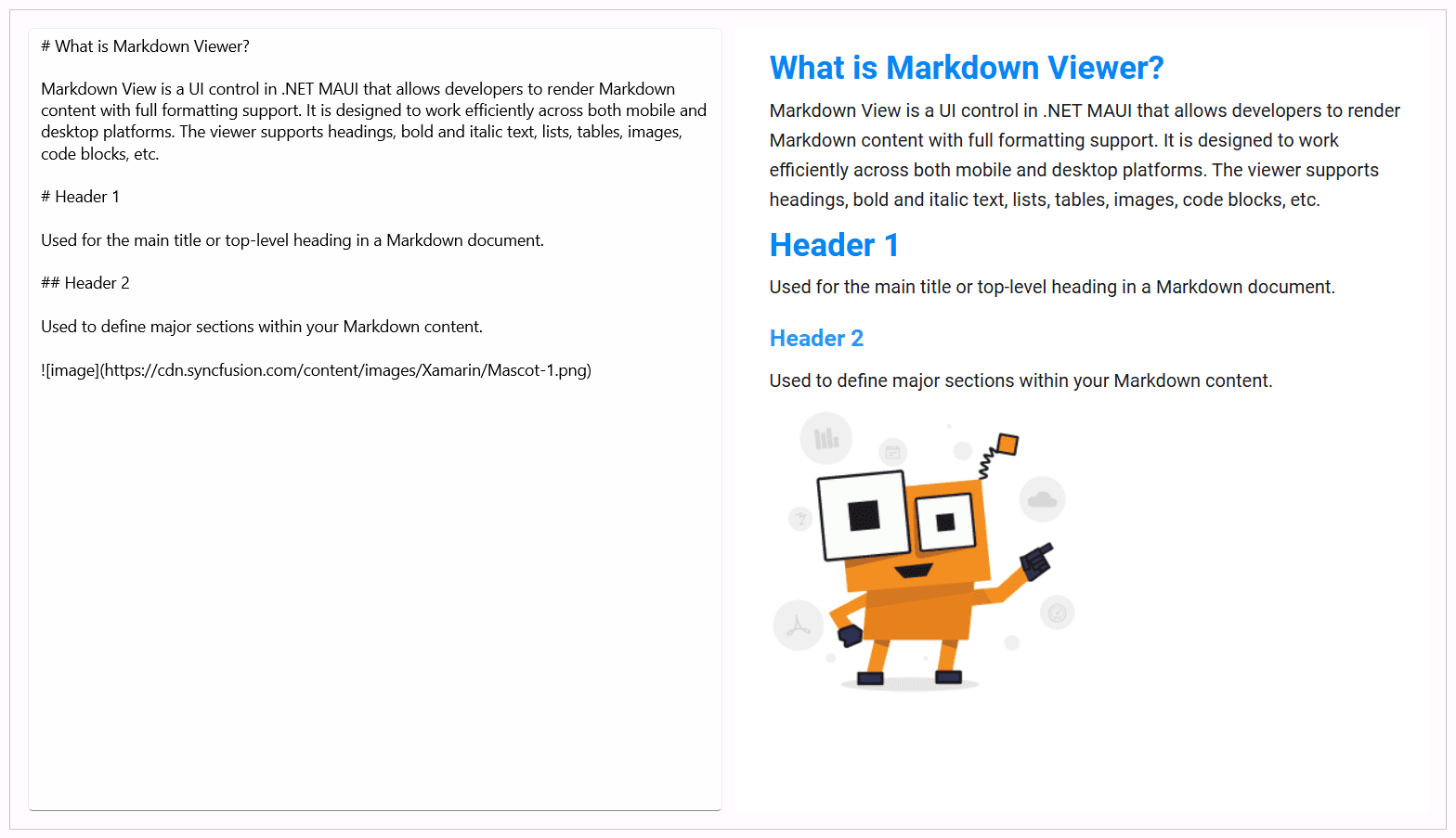
.NET MAUI Markdown Viewer
Other enhancements in .NET MAUI
DataGrid upgrades
- Easily add rows interactively and display tooltips for enhanced data entry and smoother navigation, making table management more intuitive and user-friendly.
Kanban improvements: Custom data mapping and column styling
- Bind your own data to Kanban cards and personalize columns with custom backgrounds, placeholders, and templates, even when they’re empty.
Scheduler: Horizontal Resource View
- The new horizontal resource view in Scheduler groups appointments by resource and date, making team scheduling across day, week, and work week views more intuitive.
Note: For more updates, visit our What’s new page.
Document Processing Libraries
Your document workflows just got smarter and faster with the following upgrades.
PDF Library: Precise and fast
- Redact sensitive content with pinpoint accuracy using quad points.
- Load large PDFs much faster, even those over 150 MB with annotations.
Excel Library: Speedy and visual
- Convert advanced charts to images or PDFs with ease.
- Turn Excel files into PDFs in just 4.5 seconds for large workbooks.
Word Library: Fancy Docs, global support
- Add rich charts like Treemaps and Histograms to Word documents.
- Support page numbers in multiple languages for global users.
- Preserve special characters during PDF or image conversion.
Modular SDKs
As mentioned earlier, the PDF Viewer, DOCX Editor, and Spreadsheet Editor are now available as separate SDKs, giving you the flexibility to integrate only what your app needs. This modular approach helps you build faster, more secure, and resource-efficient applications across web, desktop, and mobile platforms.
PDF Viewer SDK: View PDFs like a pro
- Use AI to summarize documents, redact sensitive info, and auto-fill forms.
- Enjoy a cleaner toolbar and up to 8x faster printing in Blazor.
- Choose print quality levels and get faster loading across platforms in .NET MAUI.
DOCX Editor SDK: Better word editing
- Pull tracked changes as HTML for custom review tools.
- Add notes to revisions for better context.
- Control paste behavior based on content type.
Spreadsheet Editor SDK: Excel made simple
- Skip heavy properties during import to speed things up.
- Use date interpolation for smoother chart visuals.
- Style non-contiguous cells and show quick summaries like SUM or COUNT.
WPF
We have also made a few updates to our WPF controls that make your apps feel smoother and more intuitive. They are,
- AI AssistView: You can now place toolbar items right inside the input area, making common actions easier to reach.
- Gantt Control: Drag and drop tasks with precision, while keeping their hierarchy intact. It’s a simple way to manage schedules better.
- Kanban Board: Want a more personalized layout? You can bind your own data and use custom templates for cards and headers.
WinUI enhancements in Volume 3, 2025
Here are a few enhancements we’ve made to the WinUI platform.
- AI AssistView: Just like in WPF, you can add toolbar items inside the input field for quicker access.
- DataGrid: Numeric and date columns now have a clear button, making it easier to fix or reset values.
- Kanban Board: Customize your board with your own data and templates to match your app’s style.
Why this release is awesome
Syncfusion Essential Studio® Volume 3, 2025 is all about making your apps faster, easier to build, and more fun for users. With new editions, you can pick exactly what you need, and the new controls, speed boosts, and smart features make coding a joy. Whether you’re working on a web dashboard, a mobile app, or a desktop tool, this release has what you need to create something amazing.
Ready to get started? Head over to Syncfusion’s website to check out the full details, try the demos, or read the Release Notes. We can’t wait to see what you build with these new tools!
Try out these features and share your feedback as comments on this blog. You can also reach us through our support forums, support portal, or feedback portal.




 No spam, just valuable updates.