
 Arun Kumar Chandrakesan
TL;DR: Explore what’s new in the Spreadsheet Editor SDK 2025 Volume 4, which brings smarter collaboration with threaded comments and notes, richer APIs, and advanced data handling features for Blazor, making it easier to build intuitive, Excel-like spreadsheet apps.
Building better spreadsheet experiences starts with reducing everyday friction
Reviewing spreadsheets is rarely a solo task. Comments pile up, feedback gets scattered across cells, and keeping track of conversations becomes increasingly difficult as more collaborators get involved. At the same time, developers are expected to deliver spreadsheet experiences that feel just as intuitive and powerful as Excel, directly inside web and Blazor applications.
The 2025 Volume 4 release of Syncfusion® Spreadsheet Editor SDK is designed to solve these exact challenges. This release focuses on smarter collaboration, smoother review workflows, and greater control over data presentation, helping teams work faster and developers build richer spreadsheet solutions with less effort.
At a high level, this update introduces:
- Threaded comments with a dedicated review experience
- Lightweight notes managed directly from the ribbon
- Advanced JavaScript APIs for full programmatic control
- Enhanced data handling and layout customization features for Blazor
All these improvements are available across JavaScript, Angular, React, Vue, ASP.NET Core, MVC, and Blazor Platforms.
Let’s explore how each of these enhancements improves real-world spreadsheet workflows.
Web Spreadsheet Editor (JavaScript, Angular, React, Vue, ASP.NET Core & MVC): Smarter review and contextual feedback
Modern spreadsheet collaboration depends heavily on how easily teams can review, discuss, and resolve feedback. The Web Spreadsheet Editor now delivers a significantly more structured and intuitive review experience.
Threaded comments
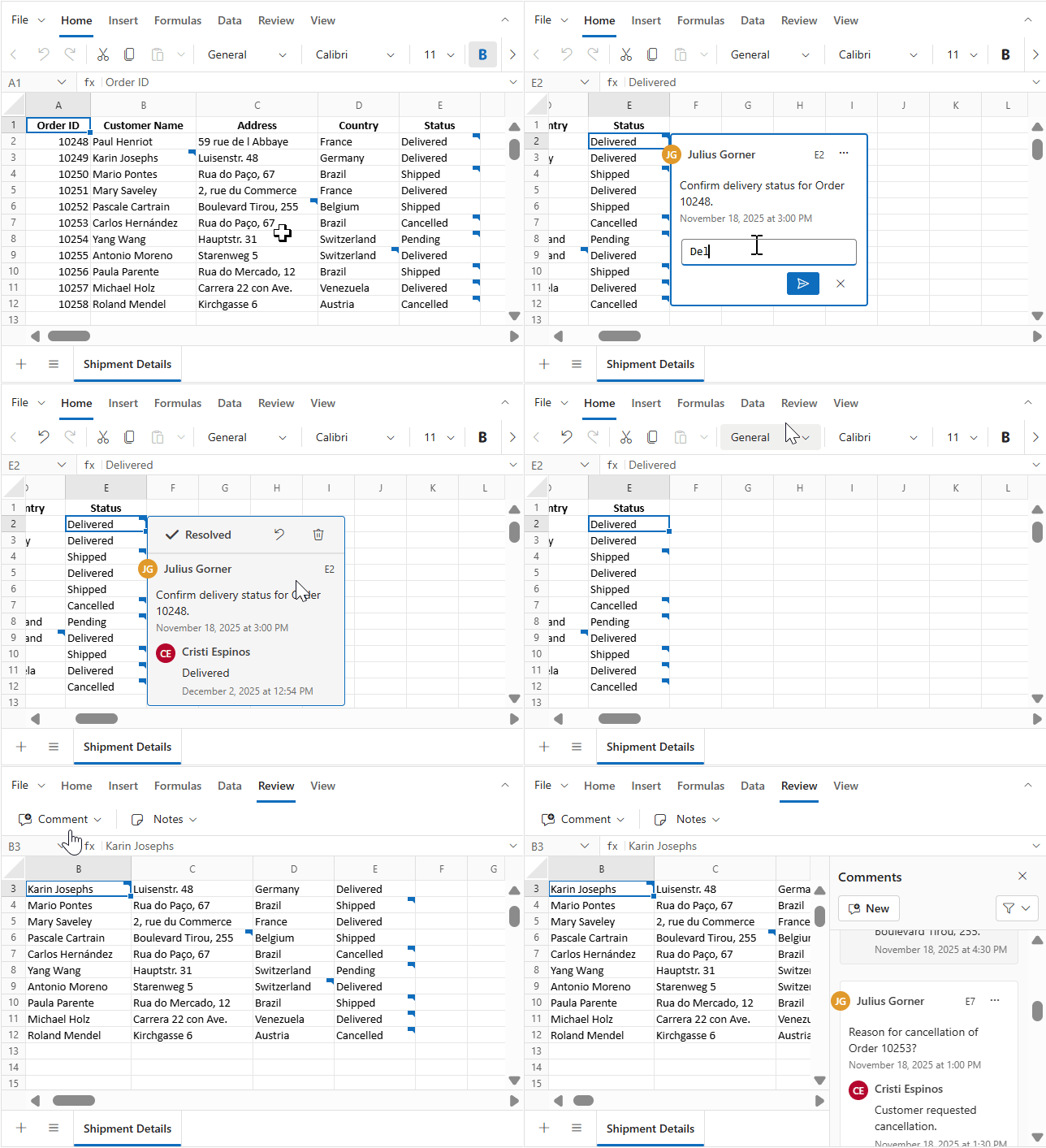
When multiple users review the same spreadsheet, conversations often become fragmented and difficult to follow. Threaded comments solve this problem by keeping discussions contextual, organized, and easy to track, directly within the relevant cell.
With threaded comments, you can:
- Add comments to any cell
- Reply within the same discussion thread
- Edit or delete comments
- Resolve conversations once feedback is addressed
Visual indicators make it easy to spot cells with active discussions, while a dedicated review panel allows users to navigate across comment threads efficiently, especially useful in large or complex workbooks.
For developers, this feature goes beyond UI enhancements. Comprehensive JavaScript APIs allow you to create, read, update, delete, and resolve comments programmatically. Thread state, author details, and timestamps are preserved automatically, ensuring complete conversational context during load and save operations.
Notes in the ribbon
Not every piece of feedback needs a full discussion thread. For quick reminders, clarifications, or personal annotations, notes provide a simpler and faster alternative.
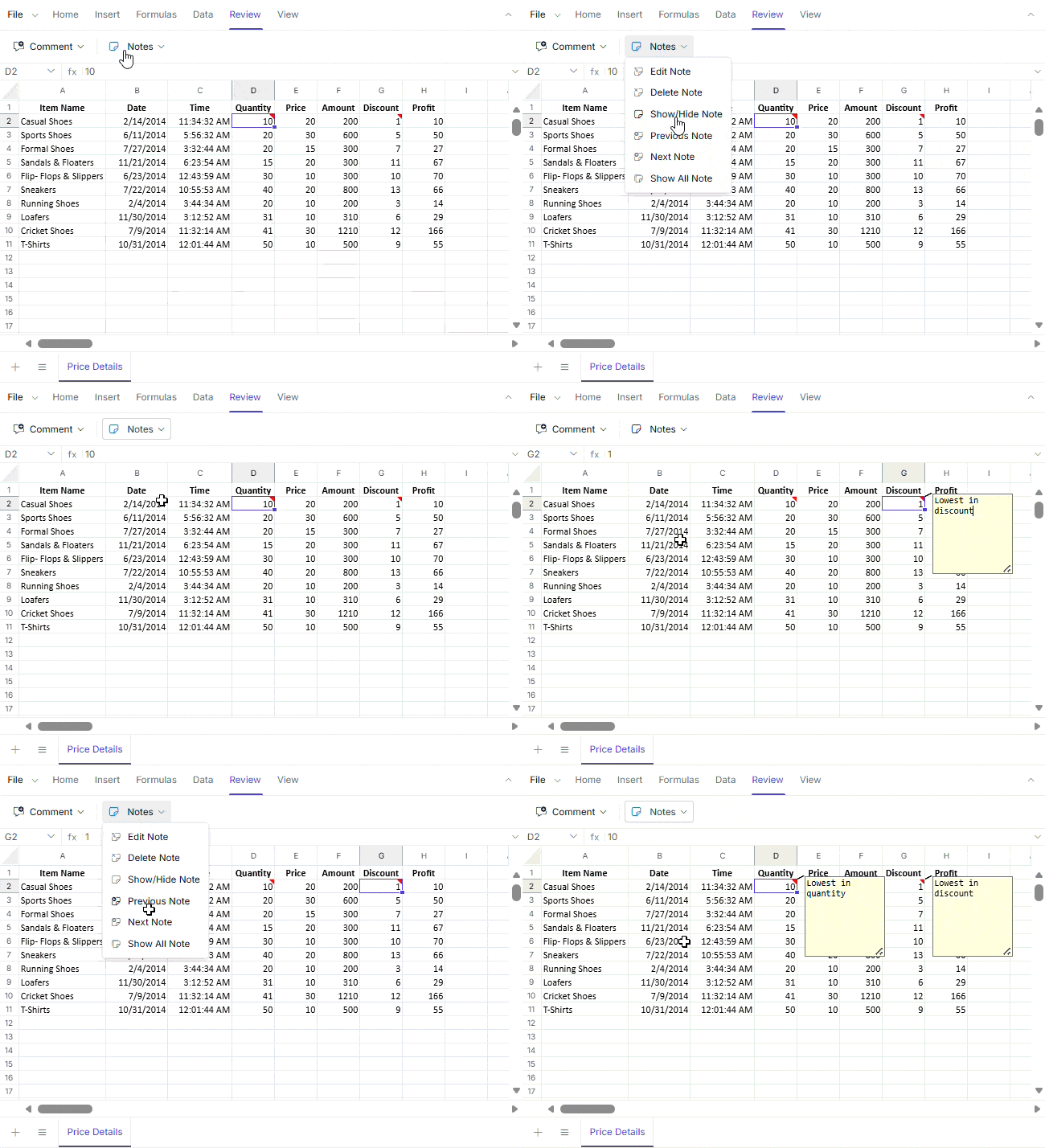
Notes can be managed directly from the ribbon, allowing you to:
- Insert notes into cells
- Navigate between notes easily
- Toggle note visibility to reduce visual clutter
- Automate not-related workflows using JavaScript APIs
Unlike temporary UI annotations, notes persist during file load and save operations, ensuring that important context is never lost, even when spreadsheets move between users or systems.
Blazor Spreadsheet Editor: Advanced data handling and layout customization
Beyond collaboration, spreadsheets must also handle data efficiently and present it clearly. The Blazor Spreadsheet Editor in this release introduces several features that simplify data entry while giving developers precise control over layout and appearance.
Autofill series
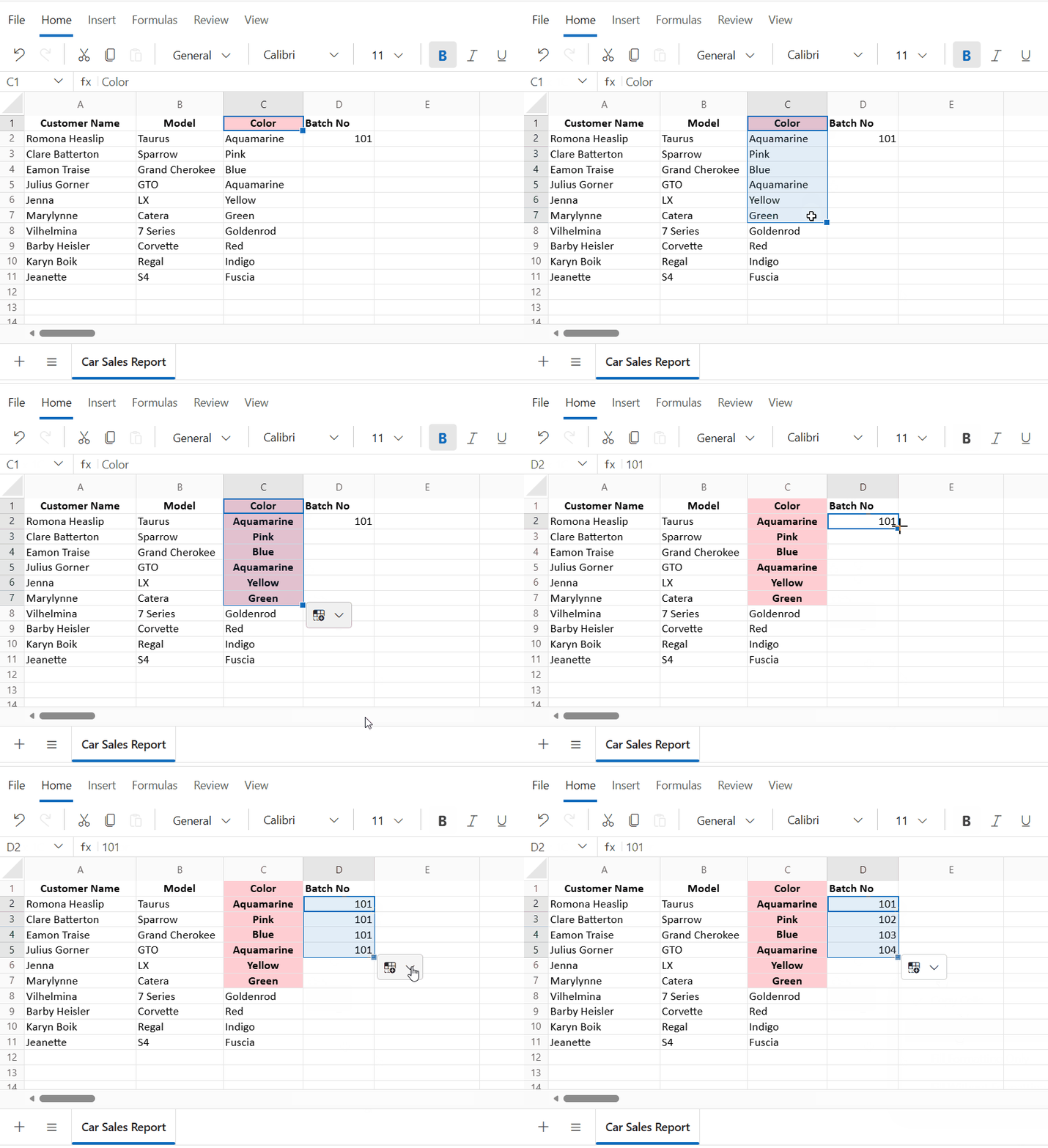
Autofill is one of those small features that dramatically improve everyday productivity, and it now works just as intuitively in Blazor spreadsheets.
The Autofill feature allows you to extend patterns horizontally or vertically, supporting:
- Number sequences
- Date series
- Custom lists
You can choose whether to copy values or fill a series, while preserving formatting and cell styles. Autofill intelligently respects selection direction and ensures consistent formatting across the filled range.
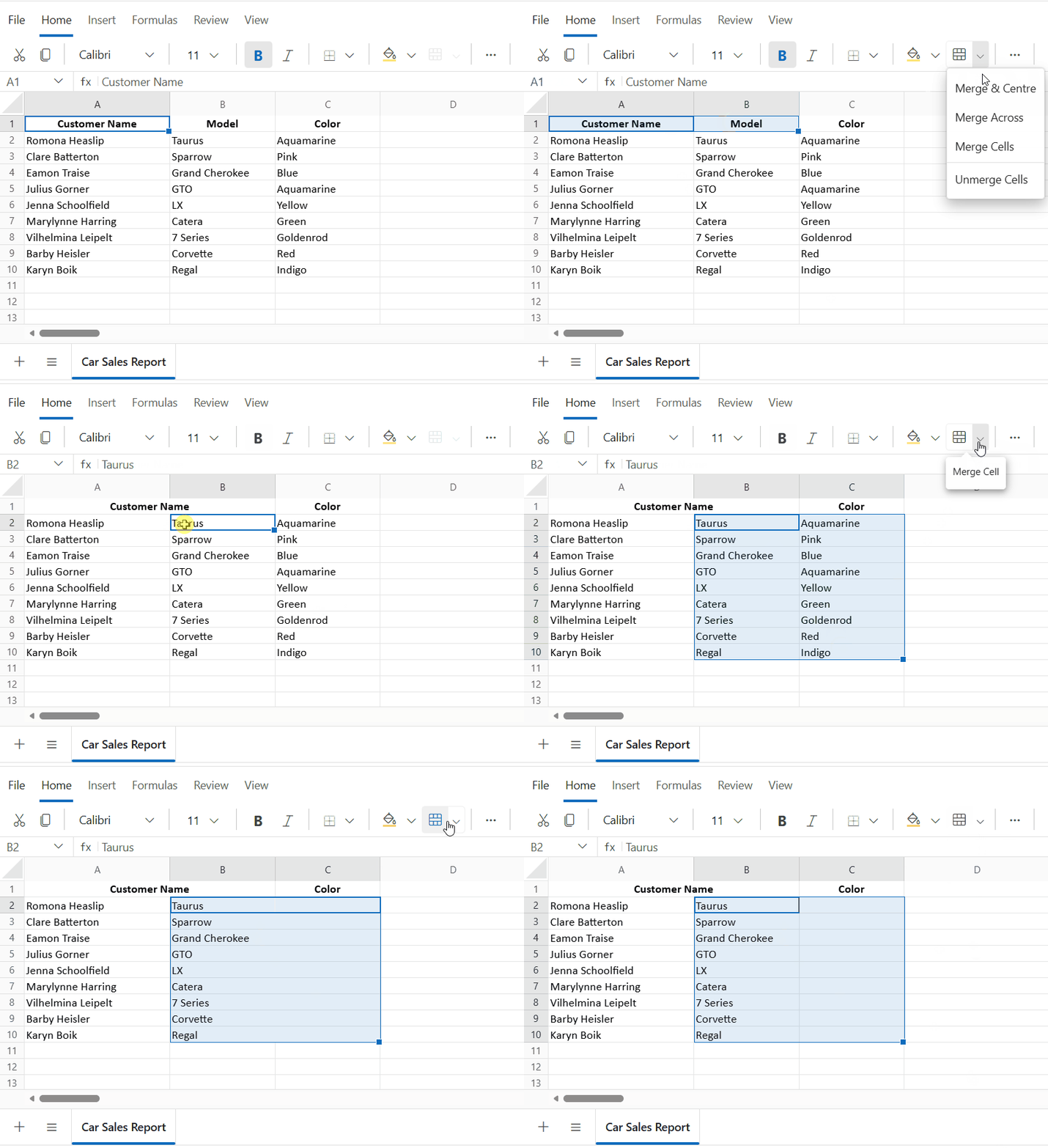
Merge cells
Whether you’re designing reports, dashboards, or structured templates, merged cells help create clear visual hierarchies and improve readability.
The Merge Cells feature lets you combine adjacent cells to:
- Create headers
- Group-related data
- Design cleaner worksheet layouts
This feature supports alignment and formatting operations and includes predictable validation for partial or overlapping selections. You can merge or unmerge cells using APIs based on selection, range address, or even as part of import and export workflows.
Cell borders and grid lines
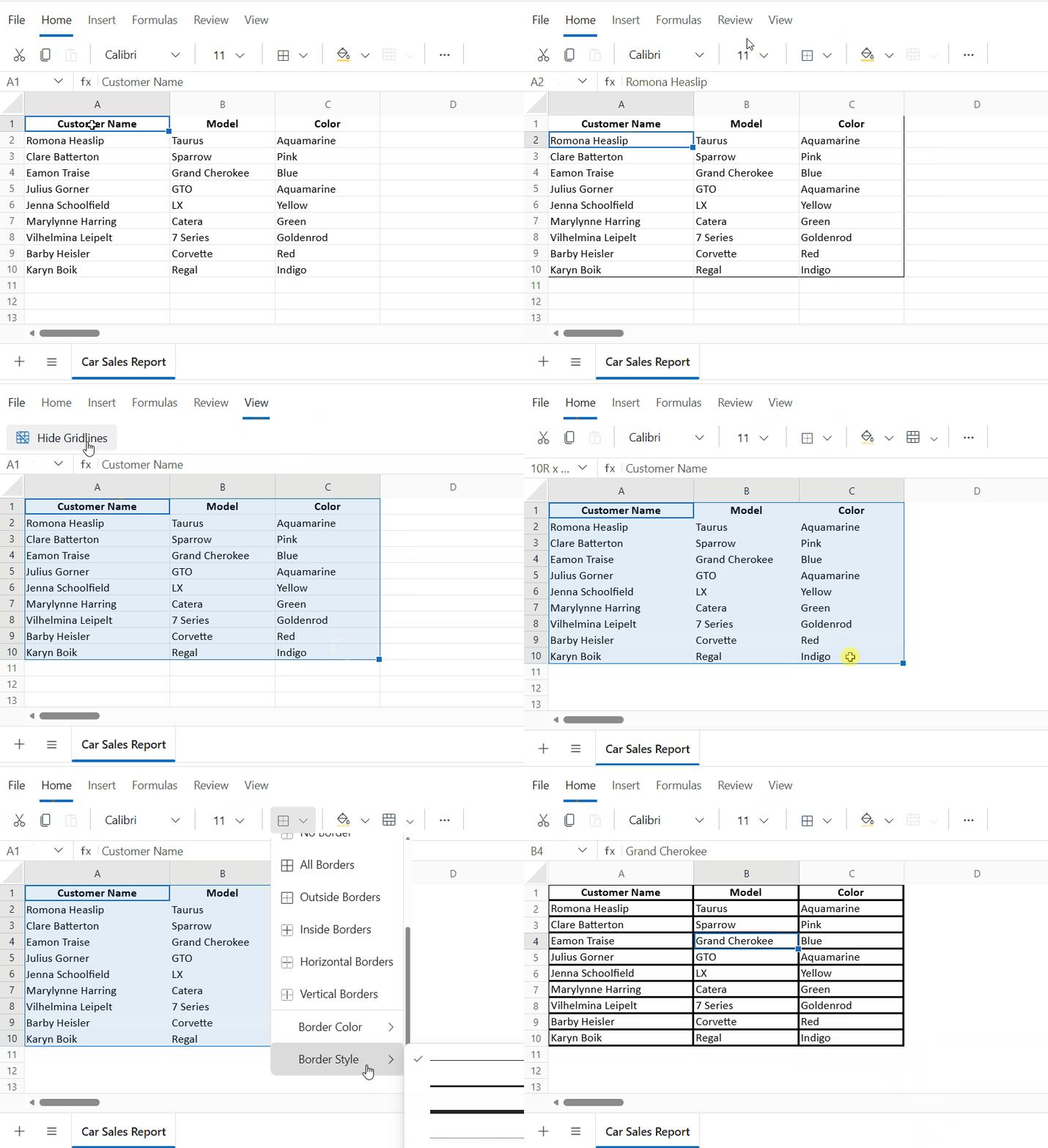
Clear visual separation is essential for readability, especially in data-heavy spreadsheets. With enhanced border and grid line controls, you can fine-tune how data is visually organized.
You can:
- Apply borders to individual cells or ranges
- Choose presets such as outline, inside, or all borders
- Customize line styles, colors, and thickness
- Toggle grid line visibility for the entire worksheet
All border and grid settings are saved with the workbook and remain fully compatible during import and export, ensuring visual consistency across platforms and sessions.
Visual Studio extension: Accelerating development with the Spreadsheet Editor SDK
Beyond runtime features, this release also improves how you build spreadsheet-enabled applications from day one.
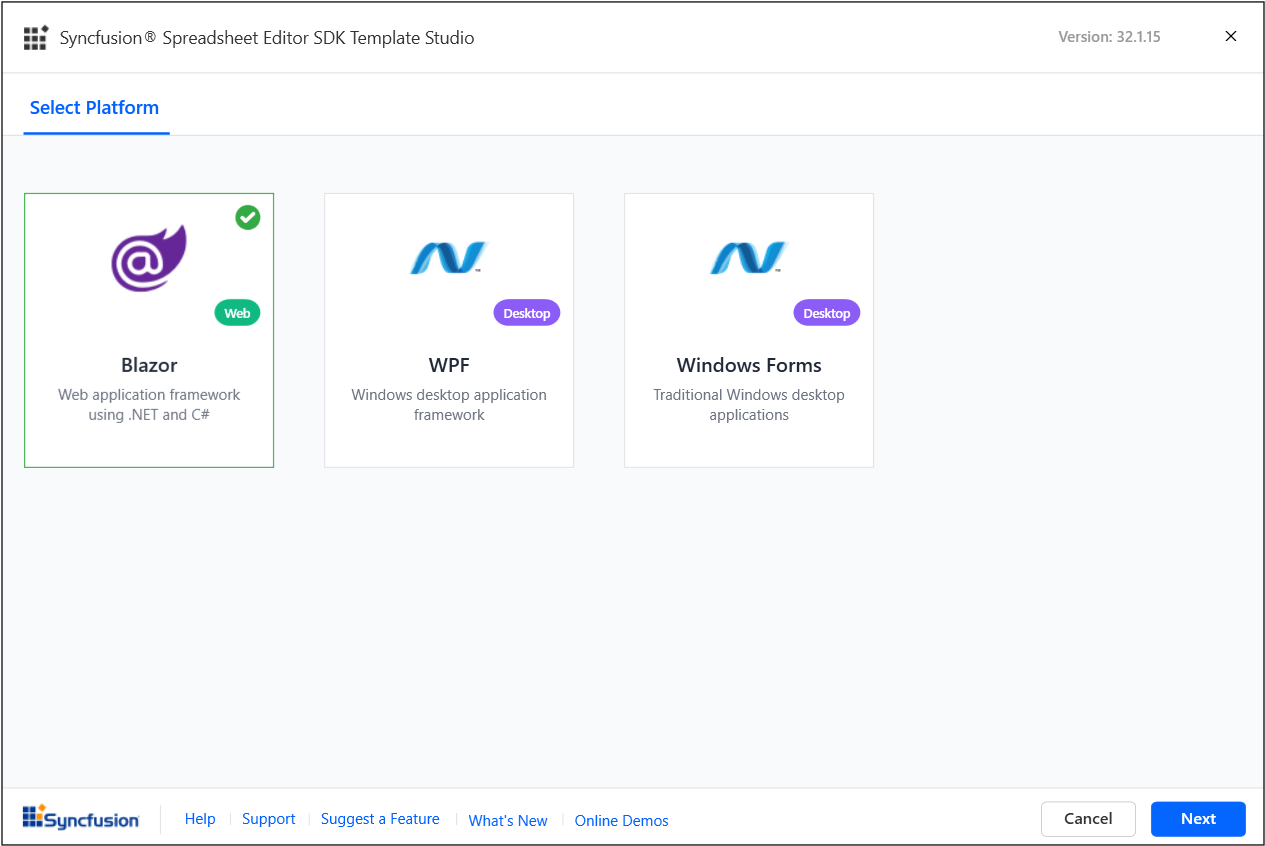
The Spreadsheet Editor SDK Visual Studio Extension helps you create applications for:
- Blazor
- WPF
- Windows Forms
For Blazor projects, the built-in code generator automatically inserts Spreadsheet Editor components into Razor files while configuring namespaces, styles, and required NuGet references, significantly reducing setup time.
You can also enhance existing WinForms or WPF applications by integrating Spreadsheet Editor SDK components using intuitive item templates and reference manager options.
Conclusion
The 2025 Volume 4 release of Syncfusion Spreadsheet Editor SDK is more than a feature update; it’s a step toward smoother collaboration and more polished spreadsheet experiences. From structured review workflows with threaded comments and notes to powerful data handling and layout controls in Blazor, these enhancements remove friction at every stage of spreadsheet usage.
Whether you’re building collaborative web apps or data-driven Blazor solutions, this release helps you deliver Excel-like functionality with greater flexibility, performance, and developer productivity.
To learn more, explore the complete list of enhancements in the 2025 Volume 4 Release Notes and What’s New pages.
If you’re already a Syncfusion user, download the latest version of Essential Studio from the license and downloads page. New users can start with a 30-day free trial to explore all our components and capabilities.
If you need assistance, reach out through our support forum, support portal, or feedback portal. We’re always here to help.




 No spam, just valuable updates.