
 Sumathi Uthayakumar
TL;DR: Many teams still rely on Microsoft Office Automation to generate documents on servers, but it quickly becomes unstable in modern server and cloud environments. Server-safe document generation uses headless, thread-safe libraries that run reliably in web apps, Docker, Linux, and cloud. Learn the risks of Office Automation, what “server-safe” actually means, and how Syncfusion Document SDK can replace Interop with managed .NET APIs.
Automated document generation powers invoices, statements, reports, dashboards, and customer communications. For years, many teams used Microsoft Office Automation to create Word, Excel, and PowerPoint files programmatically. But as businesses move toward modern web, cloud, and container environments, Office Automation simply can’t keep up. It’s slow, unstable on servers, difficult to scale, and introduces serious security and compatibility issues.
That’s why developers are shifting to server-safe, cloud-ready document processing frameworks built for today’s architecture. The Syncfusion® Document SDK is one of the most reliable alternatives, delivering fast, scalable, and fully automated generation of PDF, Word, Excel, and PowerPoint files without requiring Microsoft Office.
If you’re still using Office Automation in 2026, this is the perfect time to explore a modern, secure, and scalable way to generate documents at enterprise scale.
Why Microsoft Office Automation breaks at scale
Microsoft Office applications were not designed for automated or large-scale processing; they often fail to deliver the stability and scalability required for enterprise document generation. Let’s look at the major limitations:
- Requires a real user profile: Office relies on user-specific settings (registry, fonts, printers, add-ins). Server accounts often don’t have these. Result: initialization failures and “it works on my machine” incidents.
- Needs an interactive desktop: Office displays modal dialogs when issues occur. On servers, these dialogs can’t be dismissed, causing automation to freeze indefinitely and blocking all processing.
- Not designed for high‑volume or parallel workloads: Microsoft Office is fundamentally single‑threaded and non‑reentrant, meaning it cannot safely run multiple instances or handle parallel operations.
- Installation and self-repair features break automation: Office may trigger configuration wizards or “install on first use” screens that block background processes, something servers cannot handle.
- Creates security risks: Office can unintentionally run macros with elevated privileges, expose shared credentials, and increase overall attack surface on backend systems.
- Licensing restrictions: Using Office on a server for multiple users may violate licensing terms unless every consuming user is individually licensed, making it impractical for shared services.
What modern, server-safe document generation actually means
Modern, server-safe document generation goes far beyond simple libraries. It refers to server-friendly, cloud-ready technologies, including SDKs, APIs, services, and CLI tools, that can reliably create and manipulate Word, Excel, PowerPoint, and PDF files without requiring Microsoft Office. These solutions are purpose-built for today’s web, microservice, and distributed environments, offering the reliability and performance that Office Automation cannot match. A true modern document‑generation platform includes the following characteristics:
- Headless execution: No Office installed. No COM. No GUI dependencies.
- Thread-safe for high-volume workloads: Handle multiple concurrent requests, ideal for REST APIs, background workers, and microservices that process documents at scale.
- Cross-platform compatibility: Works on Windows, Linux, and macOS (including Docker/Kubernetes).
- High performance and low memory footprint: Optimized for speed, stability, and batch operations.
- Secure by design: No macro execution, privileged operations, and uncontrolled dialogs.
- Feature-rich API surface: Supports advanced document manipulation, including styling, tables, formulas, charts, images, shapes, sections, and more.
By adopting a modern, server‑safe document generation framework, organizations gain reliable, scalable, and secure document automation that meets the needs of cloud‑native and enterprise‑scale applications.
A practical alternative: Syncfusion Document SDK (No Microsoft Office required)
The Syncfusion Document SDK is a complete, enterprise-grade suite of .NET libraries designed to replace Microsoft Office Automation entirely. With fully managed APIs for creating, editing, and converting, PDF, Word (DOCX), Excel (XLSX), and PowerPoint (PPTX) files, it serves as a true end-to-end solution for report generation, data processing, and document automation.
Syncfusion’s Document SDK works seamlessly across the entire .NET ecosystem (.NET Core, Blazor, JavaScript, Flutter, WPF, WinForms). It fits naturally into web APIs, serverless functions, microservices, background jobs, desktop utilities, mobile apps, and large-scale cloud deployments.
Use it when you need consistent output without installing Microsoft Office on servers or containers.
Syncfusion PDF Library: Generate and process PDFs in code
The Syncfusion PDF Library is a server-safe .NET library for creating, editing, converting, and processing PDFs without Adobe Acrobat or Microsoft Office. It includes APIs for generating PDFs, filling forms, adding annotations, applying security, and optimizing files for web, cloud, and enterprise apps.
Generate PDFs from scratch
You can generate complete PDFs entirely in code, adding text, titles, tables, images, lines, and shapes, to automate fully customized documents that suit everyday business workflows like receipts, operational reports, executive summaries, and approval documents.
The following code example illustrates how to create a PDF from scratch.
//Create a new PDF document.
PdfDocument document = new PdfDocument();

//Add a page to the document.
PdfPage page = document.Pages.Add();

//Create PDF graphics for the page.
PdfGraphics graphics = page.Graphics;

//Set the standard font.
PdfFont font = new PdfStandardFont(PdfFontFamily.Helvetica, 20);

//Draw the text.
graphics.DrawString("Hello World!!!", font, PdfBrushes.Black, new PointF(0, 0));

//Save the document.
document.Save("Output.pdf");

//Close the document.
document.Close(true);
Note: For more advanced document‑generation patterns, refer to our official documentation.
Generate PDFs from templates + data (AcroForms)
Template-based PDF generation is common for invoices, certificates, HR forms, and contracts. With AcroForms, you fill fields programmatically and optionally flatten the form so values become permanent and non-editable. This pattern is useful when you need a consistent layout + data-driven output at high volume.
Note: If you’d like to see this workflow in action, try the AcroForm live demo.
Merge PDFs
You can assemble complex deliverables by merging multiple source PDFs into a single file, streamlining long documents by splitting them into logical parts, and enabling collaborative review by adding notes, highlights, stamps, and other annotations.
The following code example shows the process of merging multiple PDF documents.
//Creates a PDF document.
using (PdfDocument finalDoc = new PdfDocument())
{
    //Creates a string array of source files to be merged.
    string[] source = { "file1.pdf", "file2.pdf" };

    //Merges PDFDocument.
    PdfDocumentBase.Merge(finalDoc, source);

    //Save the document
    finalDoc.Save("Output.pdf");
}
Convert Word, Excel, or PowerPoint to PDF
You can produce consistent, server-safe PDFs by converting DOCX, XLSX, and PPTX files directly to PDF, ensuring repeatable output for office documents without relying on Office Automation.
Note: Want to convert a Word, Excel, or PowerPoint file to PDF instantly? Use our free Online PDF Tools to upload your file and get a high-quality PDF in seconds.
Generate PDFs from images
You can convert one or more images into a neatly paginated PDF so that scanned paperwork, medical imagery, site‑inspection photos, field evidence, or onboarding document scans can be archived and shared as a single, portable file.
Here’s how you can do it in code:
//Create Document
using (PdfDocument doc = new PdfDocument())
{
    //Add new page
    PdfPage page = doc.Pages.Add();

    //Load a bitmap
    using FileStream imageStream = new FileStream("Autumn Leaves.jpg", FileMode.Open, FileAccess.Read);
    PdfBitmap image = new PdfBitmap(imageStream);

    //Draw image
    image.Draw(page, 20, 400);

    //Save the PDF
    doc.Save("output.pdf");
}
Note: Looking for a simple guide to turn images into clean, multi-page PDFs? Check out our image‑to‑PDF user guide.
Generate PDFs from HTML
Syncfusion’s HTML‑to‑PDF converter transforms any HTML-based interface into a pixel-perfect PDF, while preserving your original layouts, styles, fonts, images, and even JavaScript-rendered content.
Implementation example:
//Initialize HTML-to-PDF converter.
HtmlToPdfConverter htmlConverter = new HtmlToPdfConverter();

//Convert URL to PDF
PdfDocument document = htmlConverter.Convert("https://www.syncfusion.com");

//Save and close the PDF document.
document.Save("Output.pdf");
document.Close(true);
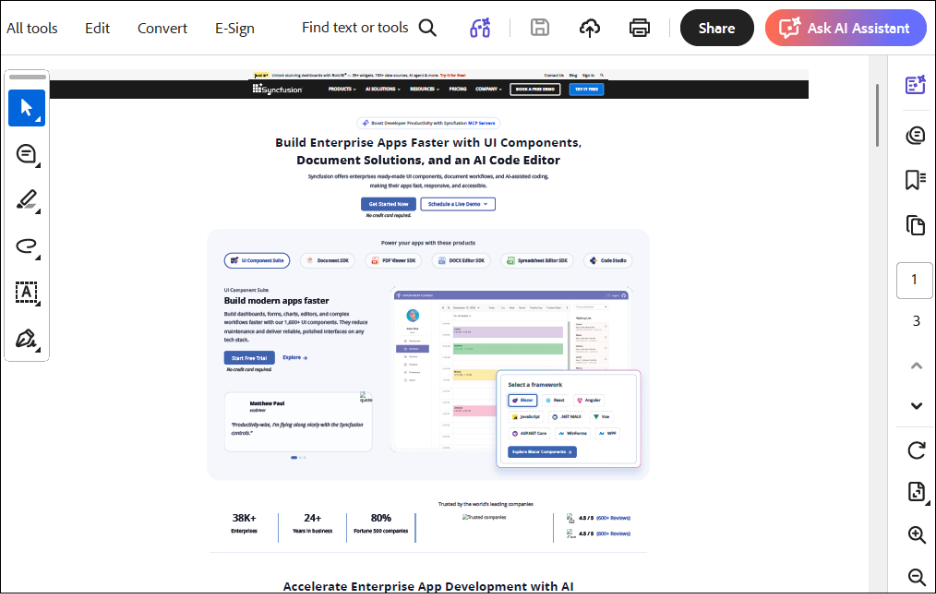
This converts an HTML page into a PDF, useful for invoices, dashboards, and “print-ready” versions of web views.
The following image shows the PDF converted from HTML.
Note: Want to quickly check how your web page looks as a PDF? Try the HTML-to-PDF converter live demo.
Syncfusion Word Library: Modern DOCX automation made simple
The Syncfusion Word Library (DocIO) makes it simple to create, read, edit, and convert Word documents entirely in code without installing Microsoft Word on your machine or server.
Create DOCX from scratch
Syncfusion allows users to create Word documents programmatically without using any template. Use the Syncfusion .NET Word Library to build documents step‑by‑step by adding text, headings, tables, or images through code.
Note: For more information about creating a Word document from scratch, refer to our official documentation.
Template-based document creation
Create Word documents easily with a template that you design in Microsoft Word. The layout remains the same, while only the content changes, saving time and avoiding manual editing.
Mail merge with data
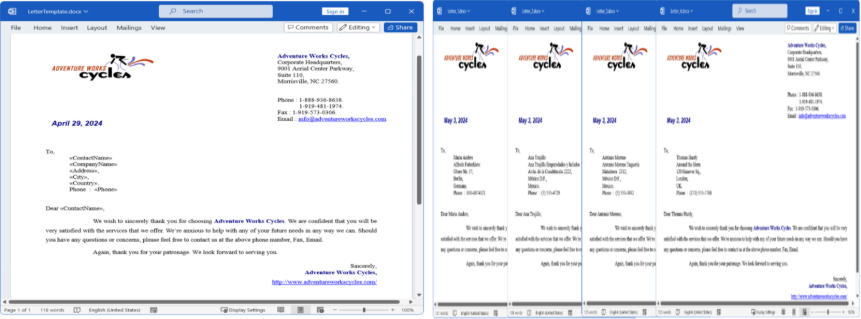
Mail merge helps you design a DOCX template in Word, add placeholders, and then merge data to generate personalized documents in bulk (letters, invoices, certificates).
Note: Want to give it a try? Check our mail merge live demo.
Advanced document elements
Syncfusion .NET Word Library supports more than plain text: tables, images, fields, bookmarks and tracked changes, useful when your “document generation” is really “document assembly.”
Note: Explore the complete Syncfusion Word Library user guide to dive deeper into working with tables, images, fields, bookmarks, and tracked changes, all in one place.
Syncfusion’s .NET Word Library supports conversions from HTML, Markdown (MD), plain text, and RTF to Word documents, and vice versa. The conversion engine preserves structure, formatting, and styles, ensuring clean DOCX output without requiring Microsoft Word.
Note: Want to learn how to convert Word documents into different formats? Check out the full documentation for examples and detailed steps.
Syncfusion Excel Library: Server-safe Spreadsheet generation
The Syncfusion Excel Library (XlsIO) is a .NET library for creating, editing, and converting Excel files (XLS, XLSX) without requiring Microsoft Office. It is fully headless, built using 100% managed code, and optimized for modern workloads, including web APIs, background services, microservices, and cloud deployments.
Generate Excel files with formulas
You can automate the spreadsheet creation with dynamic formulas that calculate values in real time. This is ideal for generating monthly sales reports, financial summaries, KPI sheets, performance dashboards, and any scenario where totals, margins, or business metrics must be computed automatically.
Below is the code you need:
using (ExcelEngine excelEngine = new ExcelEngine())
{
	IApplication application = excelEngine.Excel;
	application.DefaultVersion = ExcelVersion.Xlsx;
	IWorkbook workbook = application.Workbooks.Create(1);
	IWorksheet sheet = workbook.Worksheets[0];

	//Setting values to the cells
	sheet.Range["A1"].Number = 10;
	sheet.Range["B1"].Number = 10;

	#region Set Formula
	//Setting formula in the cell
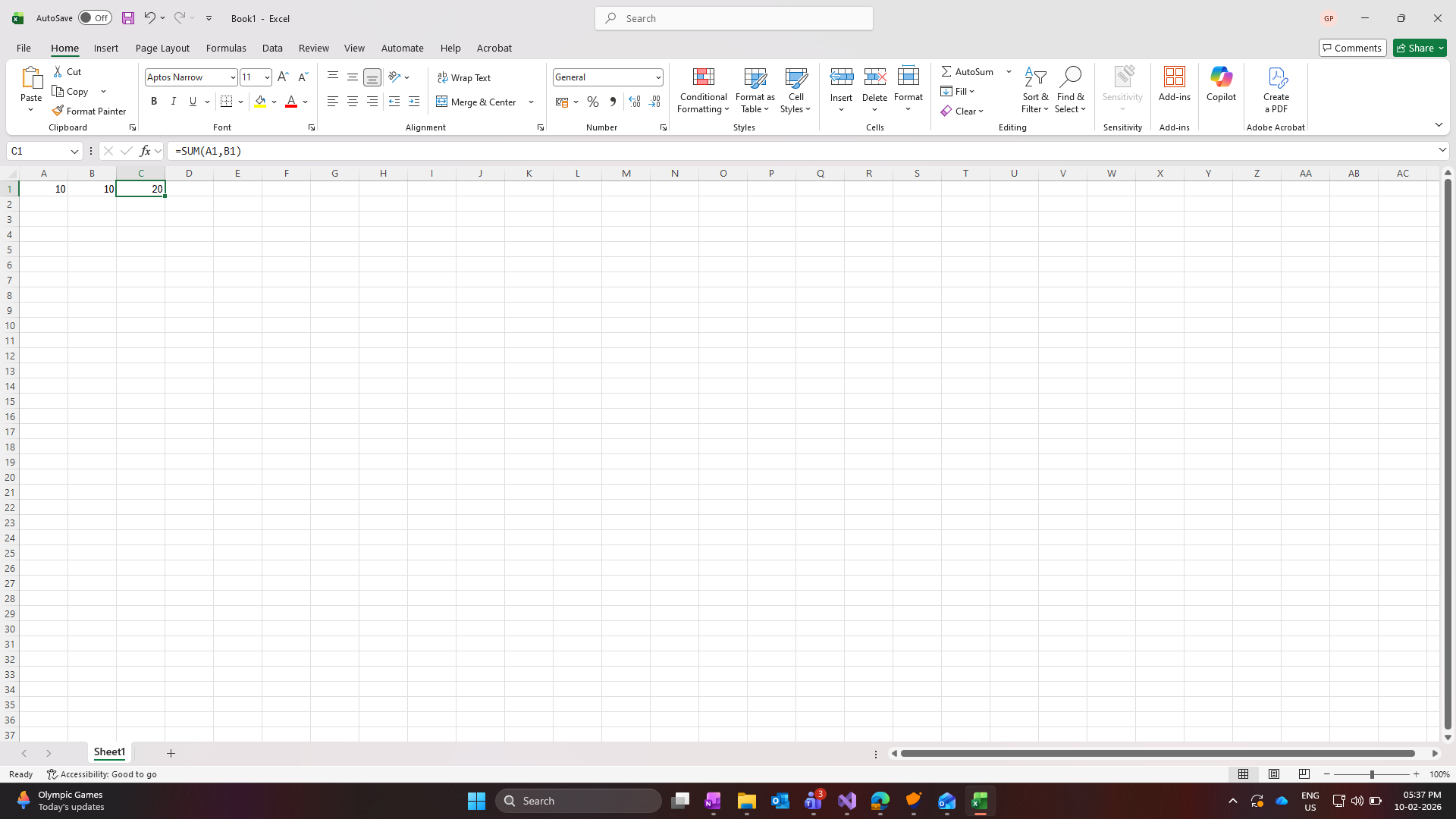
	sheet.Range["C1"].Formula = "=SUM(A1,B1)";
	#endregion

	#region Save
	//Saving the workbook
	workbook.SaveAs(Path.GetFullPath("Output/Formula.xlsx"));
	#endregion
}
After running the code, you’ll see this:
XlsIO also supports charts, pivot tables, and conversions (Excel to PDF/images), which are common “Interop-only” reasons teams get stuck.
Import and export data (CSV, JSON)
Import large datasets from CSV (or other delimited files) and convert them into structured Excel workbooks. Export entire workbooks or specific ranges to CSV or JSON for APIs, downstream systems, and archiving. You can also read from and write to databases directly to reduce manual transfers and improve reporting accuracy.
The following code example converts an Excel workbook to CSV for downstream systems or integrations.
// Export Excel as CSV

using (ExcelEngine excelEngine = new ExcelEngine())
{
IApplication application = excelEngine.Excel;
application.DefaultVersion = ExcelVersion.Xlsx;
IWorkbook workbook= application.Workbooks.Open(Path.GetFullPath(@"Data/InputTemplate.xlsx"));

//Saving the workbook
workbook.SaveAs(Path.GetFullPath("Output/Sample.csv"), ",");
}
Note: Explore the user guide and run the live demos to see how easily you can build server-friendly Excel workflows.
Syncfusion PowerPoint Library: Generate PPTX (and export) without PowerPoint
The Syncfusion PowerPoint Library makes it easy to generate, edit, and convert PowerPoint presentations entirely in code without installing Microsoft PowerPoint. If your workflow creates slide decks from data (weekly updates, executive summaries, customer reports), PowerPoint automation via Interop is especially brittle on servers.
A server-safe approach lets you:
- Create PPTX from scratch or from templates.
- Populate slides with text, tables, charts, and images.
- Clone/reorder slides programmatically.
- Export PPTX to PDF or images for sharing and archiving.
This is useful when presentations are part of an automated reporting pipeline.
Create PowerPoint presentations (PPTX) programmatically
You can build a presentation from scratch or open an existing file and add slides, text, shapes, tables, and charts. You can also fill slides with real-time data and keep formatting consistent across every presentation.
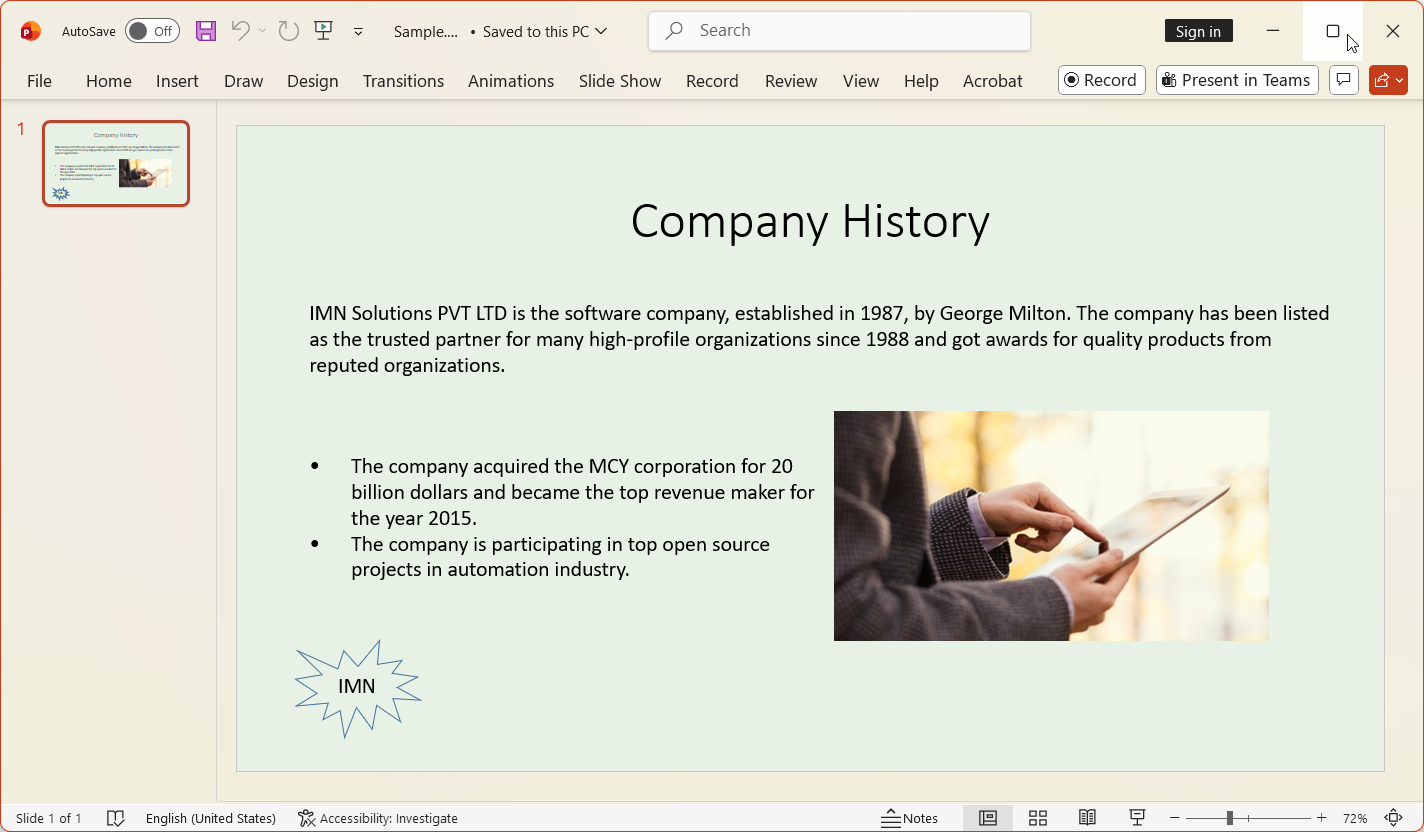
Note: For more information about creating a simple presentation from scratch, refer to this documentation.
If you need SmartArtstyle diagrams, you can create them using grouped shapes and connectors. This helps you generate clean, structured slide layouts for reports, dashboards, or summaries with consistent formatting. For more information about SmartArt, refer to this documentation.
Populate template-based slide decks with business data
Use PowerPoint templates that already contain your slide layout and placeholders, then, using .NET PowerPoint Library, fill those placeholders with real business data. Text boxes, tables, numbers, and charts can be updated automatically, making it easy to generate fresh sales reports or monthly review decks without editing slides by hand. For more information, refer to our official documentation.
Insert images, media, branding assets
Use the Syncfusion .NET PowerPoint Library to insert images, logos, and other branding assets into slides, and then control their size and placement programmatically to keep presentations visually consistent. For more information, refer to this documentation.
Clone, reorder, or modify slide layouts
Syncfusion .NET PowerPoint Library lets you manage slides easily through code. You can clone existing slides to reuse their layout, reorder slides to adjust the flow of your presentation, or change the slide’s layout when you need a different structure. For more information, refer to this documentation.
Export PPTX into PDF, images, or handout style output
Syncfusion .NET PowerPoint Library makes it easy to export your presentations to different formats. You can convert a PPTX to a PDF or convert each slide into an image for use in reports, dashboards, or web applications.
Take a moment to peruse the documentation, where you’ll find other options and features, all with accompanying code examples.
Migration from Office Automation: How to transition smoothly
Organizations are moving away from Office Interop because it relies on desktop applications and UI components, making automation unstable and difficult to scale on servers or in the cloud. The Syncfusion Document SDK offers a modern, cross-platform, and reliable alternative.
You can map your existing VBA or Interop workflows directly to Syncfusion APIs, Word tasks to DocIO, Excel tasks to XlsIO, PowerPoint tasks to the Presentation library, and PDF tasks to the PDF Library. Macro-based workflows can be replaced with clean .NET code that runs safely in any environment.
Looking for the simplest way to move your Office Automation workflows to a modern, server-safe solution? Read the Office Automation migration guide.
Looking for a simpler, ready‑to‑deploy option for document processing?
The Syncfusion Document Processing Web API is also available as a ready-to-deploy Docker image, providing a fully preconfigured, portable, and easily scalable environment for document conversion and PDF processing with minimal setup. It’s a cost-effective option because it reduces setup time, minimizes maintenance effort, and eliminates the need for complex infrastructure. And since you host the Web API in your own environment, you can apply your own security standards, authentication rules, and network controls, making your deployment even more secure.
Note: Ready to set it up quickly? View the hosting guide for complete setup instructions.
Frequently Asked Questions
Yes. A Syncfusion Document SDK license includes the full document processing suite, PDF, Word (DOCX), Excel (XLSX), and PowerPoint (PPTX), without requiring separate add-ons or additional purchases.Does a single Syncfusion license include PDF, Word, Excel, and PowerPoint libraries?
Yes. Syncfusion provides a ready-to-deploy Docker image for its Document Processing Web APIs, allowing you to start processing PDF, Word, Excel, and PowerPoint files in minutes with minimal setup or manual configuration.Can I set up the Document Processing Web API quickly without complex configuration?
No. There is no additional cost for using the Docker image. It uses the same libraries included in your existing Syncfusion Document SDK license, so you can deploy the Web API container without any extra fees.Do I need to pay extra to use the Document Processing API Docker image?
The Document SDK delivers stable, high-fidelity output by preserving layout, fonts, and formatting consistently across operating systems and deployment environments.Will the output look the same when switching from Office Automation to the Document SDK?
No. The Document SDK is a fully headless, standalone engine and does not require Adobe Acrobat, Microsoft Office, or any other external application to create, convert, or process documents.Does the Document SDK require external dependencies like Adobe Acrobat or Microsoft Office?
Conclusion: Future-proof document generation
Thank you for reading! Office automation relies on desktop apps, making it unreliable on servers and difficult to scale. This is why modern applications need a safer, faster, and more stable way to generate documents.
Syncfusion Document SDK provides a future-proof solution with fully headless, cross-platform libraries for PDF, Word, Excel, and PowerPoint. It works the same on Windows, Linux, and in the cloud and helps you build reliable document workflows without Office Interop.
If you want to take your document generation to the next level! Try our Syncfusion Document SDK.
If you’re a Syncfusion user, you can download the setup from the license and downloads page. Otherwise, you can download a free 30-day trial.
You can also contact us through our support forum, support portal, or feedback portal for queries. We are always happy to assist you!

 No spam, just valuable updates.