
 Sumathi Uthayakumar
TL;DR: Native JavaScript Spreadsheet editors in enterprise applications are examined through their impact on security exposure, third‑party dependencies, runtime behavior, performance characteristics, compliance, and long‑term maintainability.
Enterprise applications rely heavily on spreadsheet‑like interfaces to manage financial data, operational workflows, approvals, and reporting. When these spreadsheets are embedded inside web applications, security assumptions often change, sometimes without teams realizing it.
At a surface level, many JavaScript spreadsheet editors appear functionally similar. They offer formulas, formatting, validation, and interactive editing. However, security, compliance, and maintainability are not determined by feature parity. They are shaped by architectural choices:
- Where data is processed
- How identity is enforced
- How much control applications retain over spreadsheet operations
These architectural differences are implemented by Native JavaScript Spreadsheet Editors such as Syncfusion® JavaScript Spreadsheet Editor, which operate entirely within the application boundary rather than routing data through hosted services. By default, there is no background synchronization or external identity dependency, keeping data flow and authentication under your control.
This blog covers:
- Five architectural reasons why native JavaScript Spreadsheet Editors are better suited for enterprise spreadsheet security.
- How Syncfusion JavaScript Spreadsheet Editor implements these principles in practice.
The following sections examine five architectural considerations that frequently influence how spreadsheet editors behave in enterprise environments.
1. Spreadsheet data processing boundaries
Embedded spreadsheets differ significantly in how and where spreadsheet data is processed.
Some approaches route files, user edits, or session data through vendor‑managed services. This can introduce additional data processors, implicit network paths, and less visibility into how and where data is handled.
Native JavaScript Spreadsheet editors operate entirely within the application boundary:
- Spreadsheet rendering, calculations, and interactions occur in the browser.
- File open/save operations route only to application-defined backend services.
This distinction affects:
- Predictability of data flow
- Visibility into file handling
- Suitable for intranet, on-premises, and restricted networks
Clear processing boundaries form the basis for access control, auditing, and compliance alignment.
2. Authentication and identity ownership
Once data flow is understood, identity enforcement becomes the next critical concern.
Some embedded spreadsheet solutions introduce external identity layers, such as vendor‑managed authentication services or OAuth brokers, which divide authentication responsibility across systems outside the application’s direct control.
Native JavaScript spreadsheet editors do not impose identity systems of their own. They rely entirely on the application’s existing authentication and authorization mechanisms.
This consolidated identity model allows:
- A single authentication boundary across the application
- Consistent authorization logic in backend services
- Centralized audit logs and access reviews
Keeping identity enforcement inside the application reduces fragmentation and improves reviewability for security teams.
3. Granular access control within Spreadsheets
Authentication alone is not sufficient for enterprise scenarios. Many workflows require fine‑grained control over what authenticated users can see and modify.
Cloud‑based spreadsheet embeds often apply permissions at the workbook level, which can limit flexibility in complex workflows.
Native JavaScript spreadsheet editors enable applications to enforce access control through their own logic, allowing protection at multiple levels, such as:
- Sheets
- Rows and columns
- Individual cells or ranges
This enables scenarios like approvals, reviews, and role-based collaboration within a single spreadsheet, without duplicating files or broadly exposing sensitive data.
4. Compliance and audit readiness
Granular access control reduces risk at the user and data level. In regulated environments, these controls also play a central role in meeting spreadsheet compliance and audit requirements.
Regulatory frameworks like GDPR, HIPAA, and SOC 2 require clear documentation of:
- Where data is processed
- Who has access
- How controls are enforced
Cloud-based embeds often involve additional data processors and vendor-managed infrastructure, which increases the scope of compliance and audit complexity.
In contrast, native spreadsheet implementations provide compliance advantages such as:
- Clear file processing paths
- Easier audit evidence mapping
- Reduced third-party risk surface
This architectural clarity simplifies long-term compliance management.
5. Control over every Spreadsheet operation
Beyond data and identity, enterprise applications often need to govern how spreadsheet operations behave at runtime.
Cloud‑based spreadsheet services typically abstract core operations such as open, save, validation, and enforcement, limiting when applications can intercept or customize these actions.
Native JavaScript Spreadsheet editors expose spreadsheet operations through application‑controlled interfaces. This allows applications to:
- Apply data validation before persistence
- Reject unauthorized or malformed operations
- Attach verified user context and metadata
- Maintain consistent backend enforcement patterns
When spreadsheet operations follow the same execution paths as the rest of the application, security policies remain consistent and easier to reason about.
How Syncfusion JavaScript Spreadsheet Editor implements these principles
Syncfusion JavaScript Spreadsheet Editor is a fully native, browser-rendered spreadsheet component. It runs inside your application without relying on any hosted spreadsheet service. Every security principle discussed above is implemented through explicit developer-controlled APIs.
The following sections show how Syncfusion’s architecture aligns with the five spreadsheet security principles outlined above.
Secure data residency via explicit open and save configuration
Syncfusion’s JavaScript Spreadsheet Editor requires developers to explicitly enable file operations. Nothing is active by default, and all data flows remain under application control.
- Open support is enabled using allowOpen property with an application-defined openUrl.
- Save support is enabled using allowSave property with an application-defined saveUrl.
- Spreadsheet files are sent to your backend, processed at server‑side, and returned as a JSON model for rendering.
In production, open and save requests should always route to your own backend services to retain full control over data flow and security policies.
// Initialize the Spreadsheet component.
var spreadsheet = new ej.spreadsheet.Spreadsheet({
    allowOpen: true,
    openUrl: 'https://document.syncfusion.com/web-services/spreadsheet-editor/api/spreadsheet/open',
    allowSave: true,
    saveUrl: 'https://document.syncfusion.com/web-services/spreadsheet-editor/api/spreadsheet/save'
});

// Render initialized Spreadsheet.
spreadsheet.appendTo('#spreadsheet');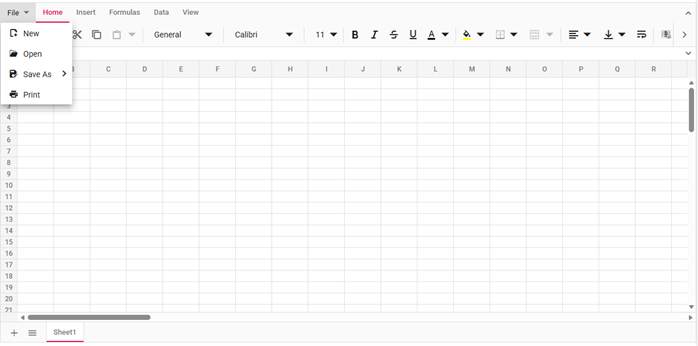
This design ensures open and save operations are explicitly enabled by the application, all spreadsheet data is sent only to application-defined services, and data handling stays entirely within your infrastructure boundary.
Your data. Your backend. No third‑party routing.
Explore the Syncfusion Spreadsheet architecture | View the live demo
Authentication without external dependencies
The Syncfusion JavaScript Spreadsheet Editor does not include a built‑in authentication system. All spreadsheet requests rely on your existing application authentication and authorization flow.
- Authentication details (tokens, headers, or user context) are passed directly from your application to backend endpoints.
- Use beforeOpen to attach authorization headers when opening files.
- Use beforeSave to attach authorization headers or user context during save operations.
A single authentication boundary ensures centralized auditing and consistent security enforcement.
//Initialize Spreadsheet component.
var spreadsheet = new ej.spreadsheet.Spreadsheet({
    openUrl: 'https://document.syncfusion.com/web-services/spreadsheet-editor/api/spreadsheet/open',
    saveUrl: 'https://document.syncfusion.com/web-services/spreadsheet-editor/api/spreadsheet/save',
    beforeOpen: function (args) {
        // Ensure requestData exists
        if (!args.requestData) {
            args.requestData = {};
        }
        // Ensure headers object exists (preserve any existing headers)
        if (!args.requestData.headers) {
            args.requestData.headers = {};
        }
        // Set/override the Authorization header
        args.requestData.headers.Authorization = 'YOUR TEXT';
    }
});
//Render initialized Spreadsheet component.
spreadsheet.appendTo('#spreadsheet');
This approach applies the same security rules used across the rest of your application, without introducing external identity providers or additional dependencies.
Granular access control: Sheet, cell, and workbook protection
The Syncfusion JavaScript Spreadsheet Editor provides built‑in APIs to control what users can view and edit within a spreadsheet. This prevents accidental or unauthorized changes while enabling role‑based access, allowing teams to collaborate in a single shared spreadsheet without exposing sensitive data.
- Sheet‑level protection: Prevents editing and structural changes on an entire worksheet while allowing selected actions like cell selection or formatting.
- Cell‑ and range‑level protection: Locks sensitive cells and exposes specific editable ranges within a protected sheet to support role‑based editing.
- Workbook‑level protection: Preserves the overall spreadsheet structure by blocking actions like inserting, deleting, renaming, or hiding sheets.
// Initialize the Spreadsheet component.
var columns = [
    { width: 100 },
    { width: 100 },
    { width: 100},
    { width: 100 }
];
var spreadsheet = new ej.spreadsheet.Spreadsheet({
    sheets: [
        {
            name: 'Budget',
            ranges: [{ dataSource: budgetData }],
            columns: columns,
            isProtected: true,
            protectSettings: {selectCells: true}
        },
        {
            name: 'Salary',
            ranges: [{ dataSource: salaryData }],
            columns: columns
        }
    ],
    dataBound: function () {
        spreadsheet.cellFormat({ fontWeight: 'bold', textAlign: 'center' }, 'A1:D1');
        spreadsheet.cellFormat({ fontWeight: 'bold'}, 'A11:D11');
    }
});

// Render initialized Spreadsheet.
spreadsheet.appendTo('#spreadsheet');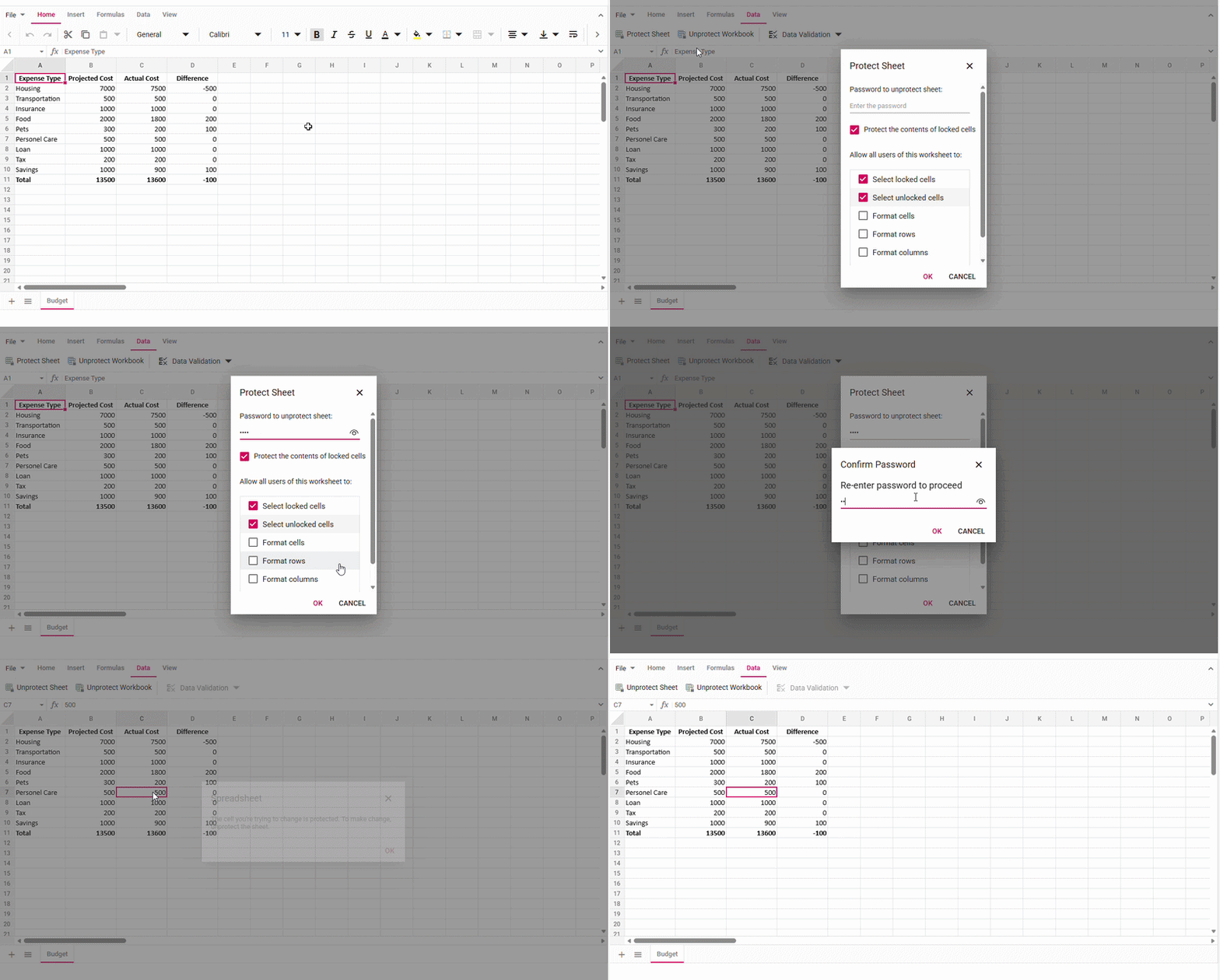
Control every sheet, cell, and workflow, without over‑exposing data! Explore the Live Demo.
Compliance-ready architecture
Syncfusion is SOC 2® Type II certified, and its controls for security, availability, and data handling have been independently assessed over time. This certification provides audit-ready evidence for enterprise vendor reviews and procurement processes.

Syncfusion designs its components to align with regulatory frameworks including, HIPAA and GDPR. However, compliance remains a shared responsibility:
- Syncfusion is responsible for secure component design, operational controls, and certified infrastructure practices.
- Customers retain responsibility for authorization rules, data retention policies, access governance, and regulatory enforcement within their applications.
This clarity is critical for completing security reviews, vendor assessments, and demonstrating audit readiness to regulators or internal compliance teams.
From an audit perspective, this architectural clarity reduces review time and documentation effort, since data processing paths, access enforcement, and control points are already explicitly defined.
Design secure spreadsheets the same way you design your application architecture.
Get started with the Syncfusion JavaScript Spreadsheet Editor.
Native vs. cloud-based Spreadsheet embeddings: A direct comparison
The table below summarizes how architectural choices translate into real-world security, access control, and compliance outcomes for embedded spreadsheets
| Capability | Native JavaScript Spreadsheet Editor | Cloud-Based Embed |
| Data residency | Processed within an app-controlled infrastructure | Processed via vendor‑managed services |
| Cell‑level access control | Sheet, range, and cell‑level APIs | Mostly workbook‑level controls |
| Compliance alignment | Clear processing boundaries | Additional sub‑processors may apply |
| Request interception | beforeOpen / beforeSave hooks | Generally not available |
| Third‑party data routing | No external routing by default | Depends on vendor architecture |
The comparison highlights that native embedded spreadsheets architectures give enterprise teams explicit control over data flow, authentication, and access enforcement. Syncfusion’s JavaScript Spreadsheet Editor covers all key capability areas, including request interception and full authentication delegation, making it a more complete solution for security-critical enterprise deployments than typical cloud-based alternatives.
Frequently Asked Questions
Yes. The Syncfusion JavaScript Spreadsheet Editor lets your application review and validate requests before a spreadsheet is opened or saved. This helps ensure only authorized users can access or store data.Can my application check permissions before opening or saving a spreadsheet?
With the Syncfusion JavaScript Spreadsheet Editor, all data processing and access control remain inside your application and backend systems. This makes it easier to track where data is handled, who can access it, and how security rules are enforced during audits or compliance reviews.Why is a native JavaScript spreadsheet easier to manage for audits and compliance?
Enterprises prefer Syncfusion’s JavaScript Spreadsheet Editor because sensitive data stays within the organization’s own systems. Since there is no default background data sharing with external services, the risk is reduced, and confidence in security and compliance is strengthened.Why do enterprises prefer native JavaScript spreadsheets for sensitive data?
Conclusion
Thank you for reading! Spreadsheet security in enterprise applications is not defined by feature lists or configuration toggles. It is determined by architecture.
Decisions about data flow, identity boundaries, access enforcement, and operational control directly affect compliance scope, audit complexity, and the ability to apply consistent security policies.
Native JavaScript Spreadsheet editors follow an architectural model that keeps processing, identity, and control within the application boundary. For security‑critical web applications, native JavaScript spreadsheet editors are not just an alternative to Excel Online; they are the safer architectural choice.
The Syncfusion JavaScript Spreadsheet Editor exemplifies this model. By keeping data ownership, identity enforcement, and operational control inside the application boundary, it enables enterprises to build secure, compliant, and auditable spreadsheet experiences without relying on external services. Try the live demo.
Ready to build secure, enterprise‑grade spreadsheets without cloud dependencies?
Start with the Syncfusion JavaScript Spreadsheet Editor.
If you’re a Syncfusion user, you can download the setup from the license and downloads page. Otherwise, you can download a free 30-day trial.
You can also contact us through our support forum, support portal, or feedback portal for queries. We are always happy to assist you!




 No spam, just valuable updates.