
 Arulraj Aboorvasamy
TL;DR: Model Context Protocol (MCP) introduces an open standard that allows LLMs to interact with external tools and data sources. With the new C# SDK, .NET developers can build interoperable AI workflows without relying on fragile custom integrations. This guide explains MCP’s architecture and demonstrates simple tool interactions, showing how MCP enables portable, reliable, and future-proof AI integrations.
In the rapidly evolving world of AI integration, developers want a reliable way to connect large language models (LLMs) with external tools and data. One emerging standard gaining traction is the Model Context Protocol (MCP).
In this blog post, you’ll learn what MCP is, how it’s structured (Host/Client/Server), and how to build a small MCP server using the Model Context Protocol C# SDK, including elicitation for interactive user input and structured outputs for predictable results. We’ll also compare MCP to traditional APIs and discuss where MCP fits compared to other AI SDK patterns.
What is MCP?
The Model Context Protocol (MCP) is an open protocol developed by Anthropic to connect AI applications (often called Hosts) with external tools and data sources via MCP servers. Released in November 2024 and updated with features such as streaming, MCP enables LLMs to access external resources as part of their context, so they can perform more complex, context-aware tasks.
MCP uses standardized message types (e.g., InitializeRequest, ListToolsRequest, and CallToolRequest) to handle communication between:
- MCP clients (on the AI/host side), and
- MCP servers (the tool-providing side).
You’ll often hear MCP described as a “USB-C for AI integrations”; it standardizes how models connect to diverse apps and data in a consistent, language-agnostic way.
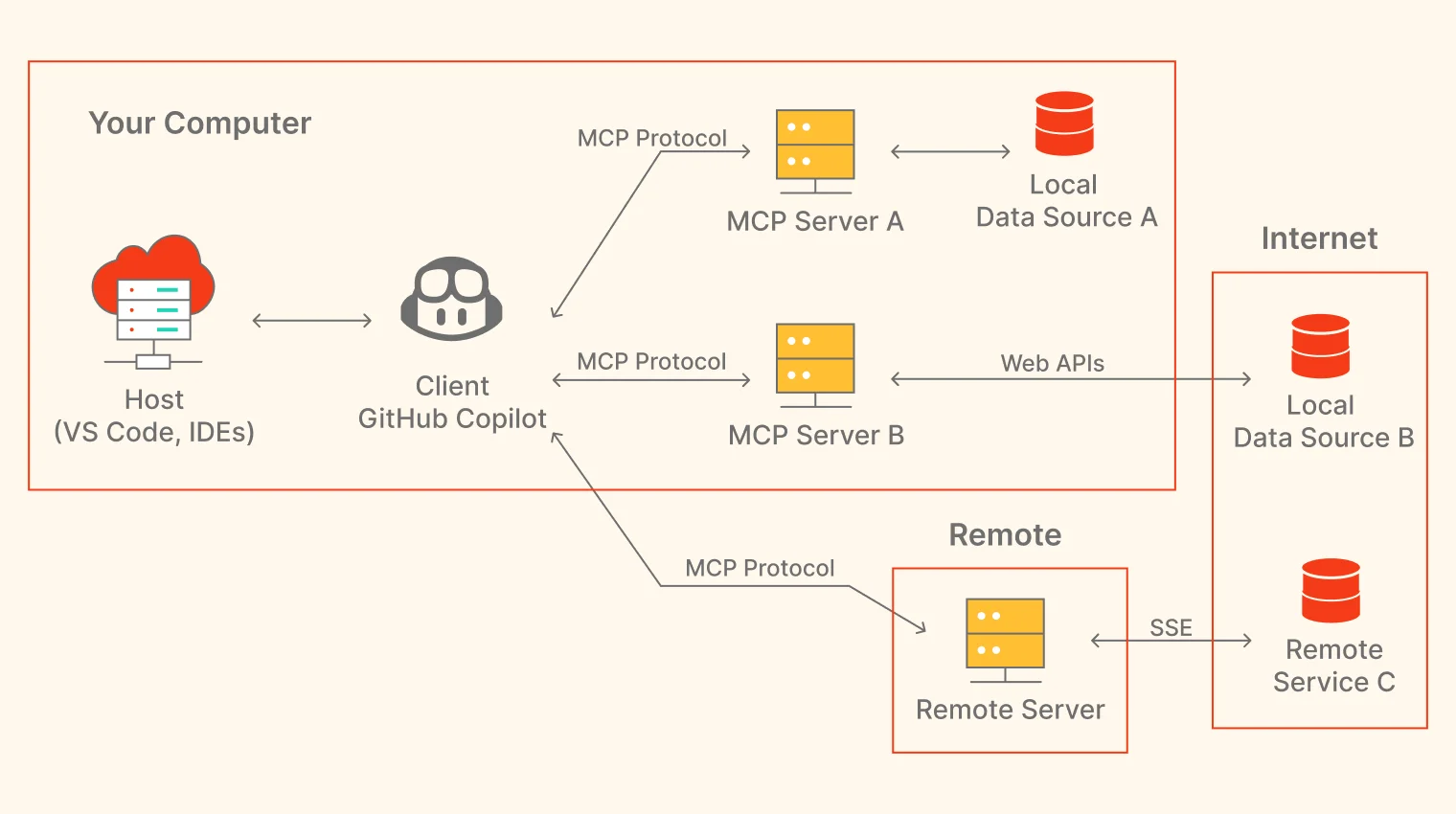
MCP core components (Host, Client, Server)
To understand MCP better, here are the core pieces:
- MCP Hosts: AI applications that use MCP to connect to external tools and data sources. Examples include IDEs like Visual Studio Code or other environments with AI features. The host is the “hub” that brings external capabilities into the model’s workflow.
- MCP Clients: Embedded within the Host, these are the components that implement the MCP protocol. They send requests (e.g., initialize a connection or invoke a tool) to MCP servers and process responses. For example, GitHub Copilot can act as an MCP client within a host like VS Code.
- MCP Servers: External services that provide tools, resources, and prompts. They receive requests from MCP clients via the protocol, process them (e.g., accessing local databases or web APIs), and return responses. Servers can be local or remote, enabling flexible integration.
Walkthrough: How MCP systems interact
The Model Context Protocol (MCP) enables seamless communication between clients and servers through a structured set of standardized message types. These include InitializeRequest for establishing connections, ListToolsRequest for discovering server-provided tools, CallToolRequest for invoking those tools, and additional message types such as ReadResourceRequest for accessing data. This design promotes flexibility, modularity, and extensibility, supported by a rapidly growing ecosystem of community-built MCP servers.
For developers integrating AI into applications, such as using .NET with the MCP C# SDK, creating a custom MCP server provides a clean way to expose reusable, AI-friendly capabilities. Instead of rebuilding logic across multiple projects, you can encapsulate functionality once and make it accessible to any MCP-compatible client, significantly boosting productivity.
The diagram below illustrates how different components within MCP interact across local and remote environments:
Note: For more information, you can check the official MCP documentation
What is Model Context Protocol C# SDK?
The Model Context Protocol C# SDK is an official, open-source toolkit developed through a partnership between Microsoft and Anthropic to simplify building MCP servers in C#. Available as a NuGet package (ModelContextProtocol), it helps .NET developers create MCP-compatible servers that expose tools, prompts, and resources to AI models.
It also supports capabilities such as:
- Authentication (where applicable in host/server setups).
- Elicitation (ask the user for input mid-execution).
- Structured tool outputs.
- Resource links in results.
This SDK builds on .NET’s performance features and is hosted on GitHub under the modelcontextprotocol organization. It integrates with Microsoft products like Copilot Studio, Visual Studio Code’s GitHub Copilot agent mode, and Semantic Kernel, making it easier to embed AI capabilities into C# applications.
Key features of MCP C# SDK
Here are the key features that make this approach efficient and easy to integrate:
McpServerToolType
This attribute marks a class that contains methods exposed as tools. It’s essential for organizing tool implementations, and the SDK scans these classes to register tools automatically.
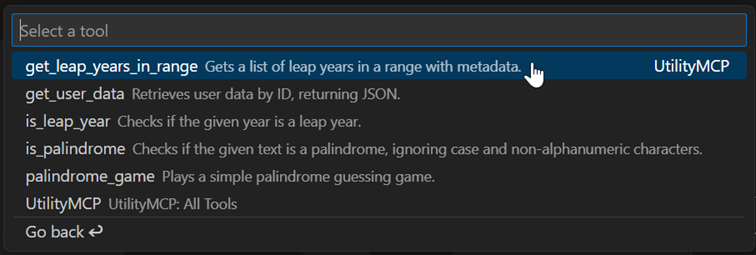
Here’s the sample MCP Tool implementation:
[McpServerToolType]
public static class UtilityTools
{
    [McpServerTool, Description("Checks if the given year is a leap year.")]
    public static bool IsLeapYear(int year)
    {
        return (year % 4 == 0 && year % 100 != 0) || (year % 400 == 0);
    }
}
McpServerPromptType
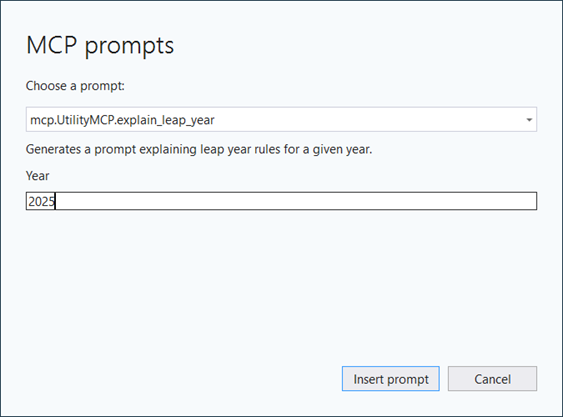
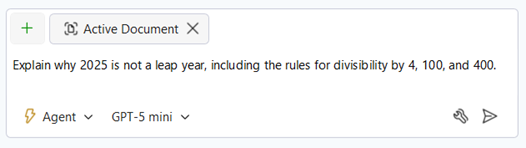
This attribute defines reusable prompt templates that can be parameterized. Prompts allow AI clients to generate content like commit messages or code snippets by filling in variables.
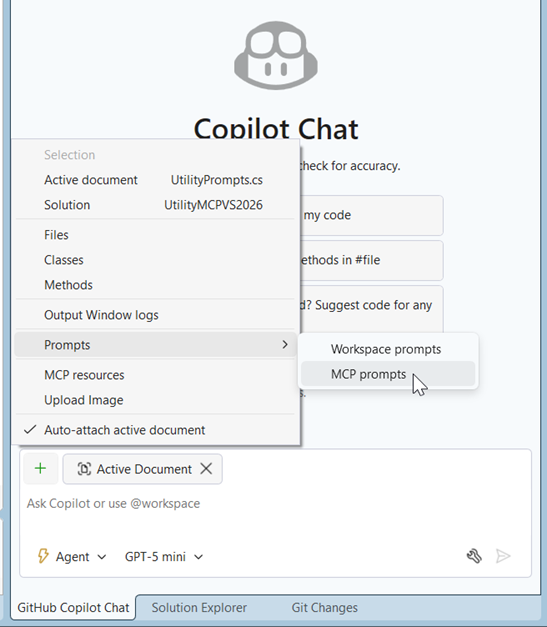
Here’s a quick demo of prompts in Visual Studio.
[McpServerPromptType]
public static class UtilityPrompts
{
    [McpServerPrompt(
        Description("Generates a prompt explaining leap year rules for a given year.")
    )]
    public static string ExplainLeapYear(
        [Description("The year to explain")] int year)
    {
        string isLeap = UtilityTools.IsLeapYear(year) ? "is" : "is not";
        return  $"Explain why {year} {isLeap} a leap year, including the rules for divisibility by 4, 100, and 400.";
    }
}
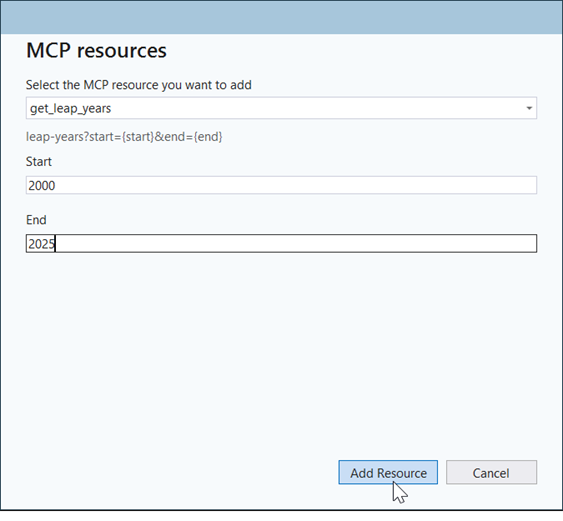
We can insert a prompt via chat interfaces for enhanced workflows.
McpServerResourceType
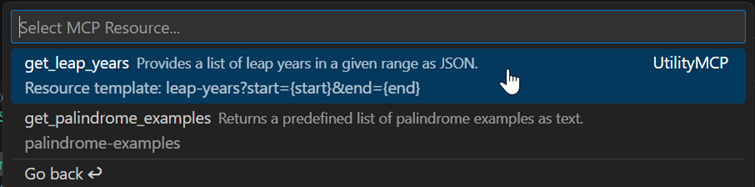
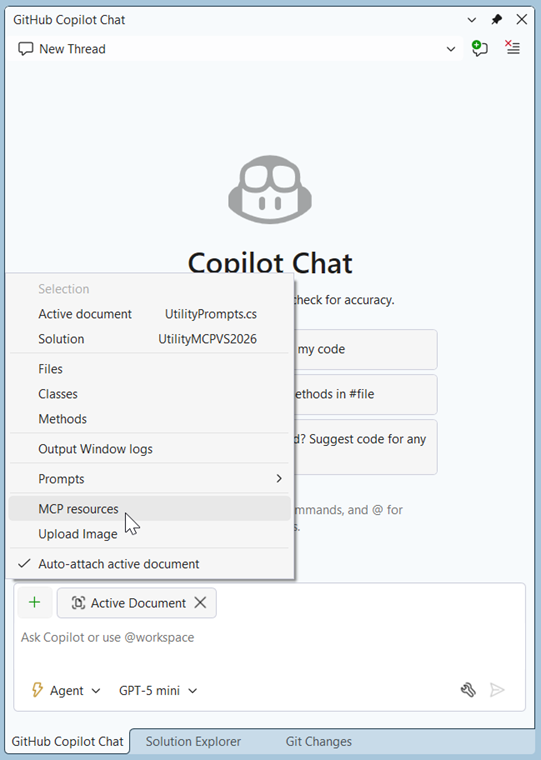
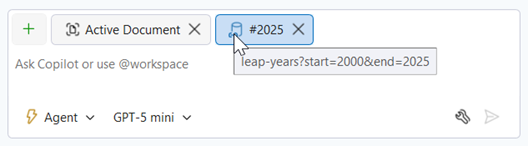
This attribute defines access to external data sources, such as files, databases, or URIs. Resources can be referenced in AI queries (e.g., via `#` syntax) and support templating with arguments.
Take a look at how this attribute behaves:
[McpServerResourceType]
public static class UtilityResources
{
    [McpServerResource(
        UriTemplate = "leap-years?start={start}&end={end}",
        Description("Provides a list of leap years in a given range as JSON.")
    )]
    public static string GetLeapYears(
        [Description("Start year of the range")] int start,
        [Description("End year of the range")] int end)
    {
        var leapYears = Enumerable.Range(start, end - start + 1)
            .Where(y => UtilityTools.IsLeapYear(y))
            .ToList();

        return JsonSerializer.Serialize(leapYears);
    }
}
Description attribute
When applied to tools, prompts, or resources, this attribute provides a human-readable metadata that helps AI clients understand each capability and choose the right one. It defines what a tool does, the parameters it expects, and the outputs it produces, enabling natural‑language-driven invocation and more intuitive integration.
Code example to achieve this:
`[Description("Echoes the message back to the client.")]`MCP server builder methods (automatic discovery)
During server setup (for example, in Program.cs), you can scan your assembly for MCP tool/prompt/resource types. These methods reflect over your assembly (the one containing your server code) and automatically register any types/members that follow the MCP server conventions. This simplifies types and members discovery and reduces boilerplate code.
Add this to your project:
builder.Services.AddMcpServer()
    .WithStdioServerTransport()
    .WithPromptsFromAssembly()
    .WithResourcesFromAssembly()
    .WithToolsFromAssembly();
If you want to avoid startup overload or need to register specific types with modularity capability, then use the generic WithX() methods explicitly.
Here’s how that looks in code:
builder.Services.AddMcpServer()
    .WithStdioServerTransport()
    .WithPrompts<UtilityPrompts>()
    .WithResources<UtilityResources>()
    .WithTools<UtilityTools>();
These features make the SDK developer-friendly, with support for transports like stdio, http, and sse, as well as advanced capabilities like elicitation for interactive user input.
Example implementation using the MCP C# SDK
To make this concrete, we’ll build a simple MCP server that exposes two utilities for:
- Checking whether a year is a leap year, and
- Checking whether text is a palindrome.
Let’s dive into the implementation steps. We’ll include:
- Dependency injection (DI).
UseStructuredContentfor structured outputs.- Elicitation for interactive input.
- URI templating for resources.
Step 1: Create a console project and install packages
First, create a new console project in Visual Studio Code and install the necessary packages.
Try this in your terminal:
dotnet new console -n UtilityMCP
cd UtilityMCP
dotnet add package ModelContextProtocol --prerelease
dotnet add package Microsoft.Extensions.Hosting
This sets up a console-hosted MCP server with the .NET hosting and DI infrastructure.
Step 2: Configure the server in Program.cs
In Program.cs, configure the server with DI and scanning:
using Microsoft.Extensions.DependencyInjection;
using Microsoft.Extensions.Hosting;

var builder = Host.CreateApplicationBuilder(args);
builder.Services.AddMcpServer()
    .WithStdioServerTransport()
    .WithPromptsFromAssembly()
    .WithResourcesFromAssembly()
    .WithToolsFromAssembly(); // Scans for tools, prompts, and resources
builder.Services.AddSingleton<DataService>();  // Example DI for services
await builder.Build().RunAsync();
WithStdioServerTransport() is commonly used for IDE integrations. Assembly scanning finds your annotated tool/prompt/resource types automatically.
Tools example (structured content + elicitation)
Define a tools class demonstrating structured content and elicitation:
Here’s the complete C# code block:
using ModelContextProtocol.Protocol;
using ModelContextProtocol.Server;
using System.ComponentModel;
using System.Text.Json;
using System.Text.Json.Serialization;
using static ModelContextProtocol.Protocol.ElicitRequestParams;

[McpServerToolType]
public class UtilityTools
{
    [McpServerTool, Description("Checks if the given year is a leap year.")]
    public bool IsLeapYear(int year)
    {
        return (year % 4 == 0 && year % 100 != 0) || (year % 400 == 0);
    }

    [McpServerTool, Description("Checks if the given text is a palindrome, ignoring case and non-alphanumeric characters.")]
    public static bool IsPalindrome(string text)
    {
        var cleaned = new string(text.Where(char.IsLetterOrDigit).Select(char.ToLower).ToArray());
        return cleaned == new string(cleaned.Reverse().ToArray());
    }

    // Tool with DI: Injects a service for more complex logic
    [McpServerTool, Description("Retrieves user data by ID, returning JSON.")]
    public static string GetUserData(DataService dataService, [Description("The unique ID of the user")] int userId)
    {
        var user = dataService.GetUserById(userId); // Assume DataService fetches or mocks data
        return JsonSerializer.Serialize(user);
    }

    // Structured output: Returns a typed list with auto-generated schema
    [McpServerTool(UseStructuredContent = true), Description("Gets a list of leap years in a range with metadata.")]
    public static List<LeapYearInfo> GetLeapYearsInRange([Description("Start year")] int start, [Description("End year")] int end)
    {
        return Enumerable.Range(start, end - start + 1)
            .Where(y => (y % 4 == 0 && y % 100 != 0) || (y % 400 == 0))
            .Select(y => new LeapYearInfo { Year = y, Explanation = $"Divisible by 4: {y % 4 == 0}, by 100: {y % 100 == 0}, by 400: {y % 400 == 0}" })
            .ToList();
    }

    // Interactive tool with elicitation: Prompts user for input during execution
    [McpServerTool, Description("Plays a simple palindrome guessing game.")]
    public static async Task<string> PalindromeGame(McpServer server, CancellationToken token)
    {
        string result = "Guess a palindrome word or phrase.";

        // Elicit user's guess
        var guessSchema = new RequestSchema
        {
            Properties = { ["guess"] = new StringSchema { MinLength = 1 } }
        };
        var elicitParams = new ElicitRequestParams
        {
            Message = "Enter your palindrome guess:",
            RequestedSchema = guessSchema
        };
        var response = await server.ElicitAsync(elicitParams, token);

        if (response?.Content is IDictionary<string, JsonElement> content &&
            content.TryGetValue("guess", out var guessElem) &&
            guessElem.GetString() is string guess)
        {
            bool isPal = IsPalindrome(guess);
            result += isPal ? " Yes, that's a palindrome!" : " No, that's not a palindrome.";
        }
        else
        {
            result += " No valid guess provided.";
        }

        return result;
    }
}

// Supporting types for structured output
public class LeapYearInfo
{
    [JsonPropertyName("year")]
    public int Year { get; set; }

    [JsonPropertyName("explanation")]
    public required string Explanation { get; set; }
}

// Example DataService
public class DataService
{
    public object GetUserById(int id)
    {
        // Mock data; in reality, this could query a DB or API
        return new { Id = id, Name = $"User{id}", Email = $"user{id}@example.com" };
    }
}
UseStructuredContent
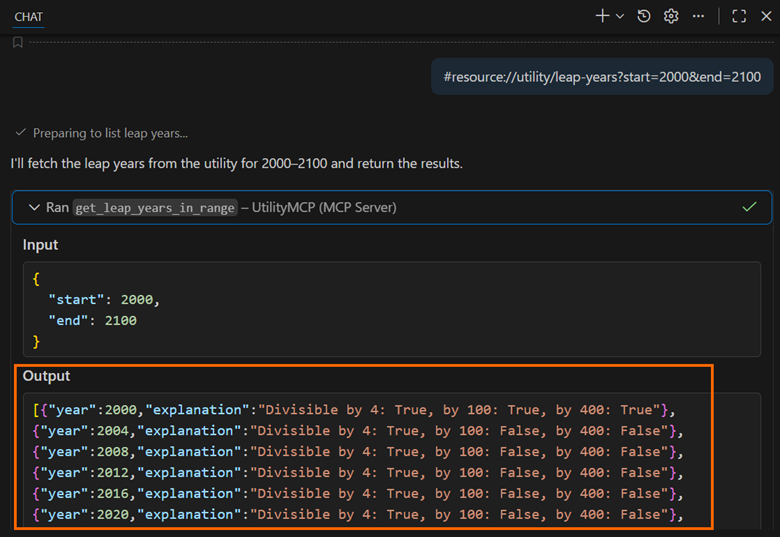
The UseStructuredContent property in the McpServerTool attribute enables schema-aware outputs for tools like GetLeapYearsInRange, allowing AI clients to parse results predictably.
After running the code, you’ll see this:
Prompts example
Prompts are reusable templates that hosts can insert into chat or use in agent workflows.
Here’s how that looks in code:
using ModelContextProtocol.Server;
using System.ComponentModel;

[McpServerPromptType]
public class UtilityPrompts
{
    [McpServerPrompt, Description("Generates a prompt explaining leap year rules for a given year.")]
    public string ExplainLeapYear(
        [Description("The year to explain")] int year)
    {
        string isLeap = new UtilityTools().IsLeapYear(year) ? "is" : "is not";
        return $"Explain why {year} {isLeap} a leap year, including the rules for divisibility by 4, 100, and 400.";
    }

    [McpServerPrompt, Description("Generates a prompt to create a palindrome sentence based on input text.")]
    public static string GeneratePalindrome(
        [Description("Base text to inspire the palindrome")] string baseText)
    {
        return $"Create a creative palindrome sentence incorporating the words from '{baseText}'. Ignore case and punctuation in the palindrome check.";
    }
}
Resources example (URI templates)
Resources expose data via URIs, with optional templating.
Example: How to implement this feature
using ModelContextProtocol.Server;
using System.ComponentModel;
using System.Text.Json;

[McpServerResourceType]
public class UtilityResources
{
    [McpServerResource(UriTemplate = "leap-years?start={start}&end={end}"), Description("Provides a list of leap years in a given range as JSON.")]
    public string GetLeapYears(
        [Description("Start year of the range")] int start,
        [Description("End year of the range")] int end)
    {
        var leapYears = Enumerable.Range(start, end - start + 1)
            .Where(y => new UtilityTools().IsLeapYear(y))
            .ToList();
        return JsonSerializer.Serialize(leapYears);
    }

    [McpServerResource(UriTemplate = "palindrome-examples"), Description("Returns a predefined list of palindrome examples as text.")]
    public static string GetPalindromeExamples()
    {
        return "Examples of palindromes:\n- Racecar\n- A man a plan a canal Panama\n- Madam, I'm Adam";
    }
}
UriTemplate
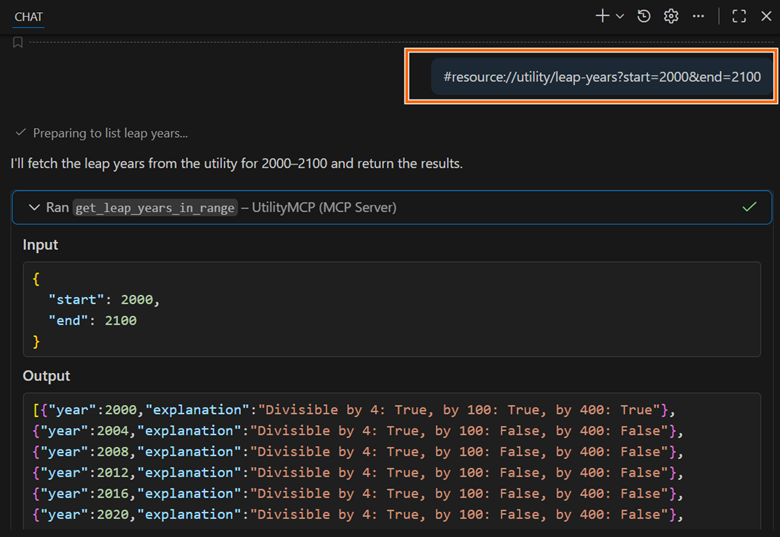
Customizes the resource URI for parameterized access, for example: `#resource://utility/leap-years?start=2000&end=2100`.
Below is the visual representation.
Configure VS Code integration (mcp.json)
Configure mcp.json in the .vscode folder for VS Code integration:
Below is the JSON code you need:
{
    "servers": {
        "UtilityMCP": {
            "type": "stdio",
            "command": "dotnet",
            "args": ["run", "--project", "UtilityMCP.csproj"]
        }
    }
}
Note: In Visual Studio, create .mcp.json where the .slnx (.sln) file is present.
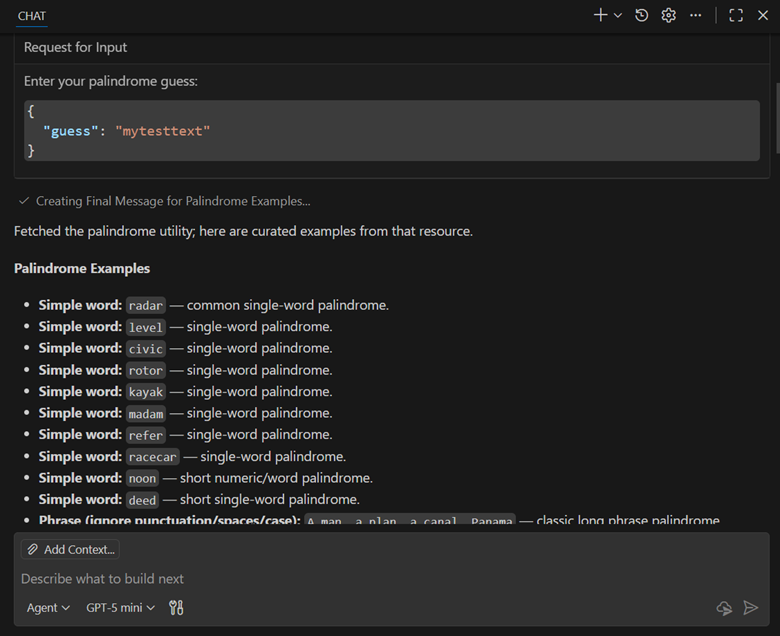
Let’s see this in action: In Copilot Chat (Agent mode), try:
- “Is 2024 a leap year?”
- “Check if ‘A man a plan a canal Panama’ is a palindrome.”
- #resource://utility/palindrome-examples.
Verify your server from a C# client
If you want to verify from a C# client that your server exposes tools/prompts/resources, use the SDK’s client APIs. McpClient.CreateAsync() instantiates and connects a client.
Code example for quick integration:
using ModelContextProtocol.Client;

await using var client = await McpClient.CreateAsync(
    new StdioClientTransport(new()
    {
        Name = "UtilityMcpServer",
        Command = "dotnet",
        Arguments = ["run", "--project", "UtilityMCP.csproj"]
    }),
    cancellationToken: CancellationToken.None
);


// Tools
var tools = await client.ListToolsAsync(cancellationToken:  CancellationToken.None);
Console.WriteLine("Tools: " + string.Join(", ", tools.Select(t => t.Name)));

// Prompts
var prompts = await client.ListPromptsAsync(cancellationToken: CancellationToken.None);
Console.WriteLine("Prompts: " + string.Join(", ", prompts.Select(p => p.Name)));

// Resources
var resources = await client.ListResourcesAsync(cancellationToken: CancellationToken.None);
Console.WriteLine("Resources: " + string.Join(", ", resources.Select(r => r.Name)));
Why isn’t GetLeapYears listed here?
GetLeapYears uses a UriTemplate that requires arguments (start, end). MCP treats that as a Resource Template, not a concrete Resource. VS Code’s current UI typically lists only concrete resources (fixed URIs) under “Resources,” while templates appear via the protocol as list_resource_templates. Visual Studio tends to surface templates more clearly.
Comparison of traditional APIs and MCP
Here is a quick comparison of traditional APIs (REST/SOAP/GraphQL) and MCP:
| Aspect | Traditional APIs | Model Context Protocol (MCP) |
| Communication model | Direct, structured calls with predefined endpoints and schemas. | AI-driven, natural language queries with automatic tool discovery and invocation. |
| Integration effort | Custom code for each API; manual endpoint handling. | Standardized protocol; LLMs handle selection and calling. |
| Use case | High-volume, stable operations with control. | AI agents need real-time, context-aware interactions. |
| Flexibility | Rigid contracts; changes require updates. | Extensible with tools, prompts, resources; supports elicitation. |
| Data exchange | Synchronous/asynchronous via HTTP, etc. | Two-way, protocol-based with metadata for AI interpretability. |
| When to use | For developer-to-service interactions. | For AI-to-service in dynamic, multi-step workflows. |
Advantages of MCP C# SDK over other SDKs
The MCP C# SDK emphasizes standardization and interoperability, which is especially useful when you don’t want tool calling logic tied to a single model vendor. Key advantages include:
- Language-agnostic interoperability: MCP is protocol-based, so a C# MCP client can call a Python MCP server (and vice versa).
- Open standard and extensibility: Reduces vendor lock-in and supports a growing ecosystem of servers.
- Enhanced orchestration: Structured outputs + elicitation help with reliability and interactive workflows.
- Seamless .NET integration: Fits naturally with DI and .NET hosting patterns.
- Two-way communication: Supports richer back-and-forth workflows than one-shot calls.
Conclusion
Thank you for reading! MCP and the Model Context Protocol C# SDK represent a practical shift toward standardized AI-tool integrations. Instead of building custom glue code for every model and every tool, you can expose reusable capabilities (tools, prompts, resources) through a consistent protocol that hosts can discover and invoke.
If you’d like a follow-up post, share a real scenario in the comments below (e.g., internal docs search, CI/CD automation, ticket triage, database lookup). We can map it to a clean MCP server design and implementation.




 No spam, just valuable updates.