- Home
- Forum
- General Discussion
- No Integration with Visual studio 2015, Sample Creator creates empty folders
No Integration with Visual studio 2015, Sample Creator creates empty folders
I have the following configuration:
Visual Studio 2015 Community Edition,
Essential Studio v13.2.0.34
SyncFusion Essential Extension v13.2.0.34
for ASP.NET MVC
I don't see Syncfusion integrate with visual studio, no context menus or templates, it doesn't even showup in Extensions.
Also when I run the Sample creator, and I chose to create the sample, whatever I chose the output folder is Empty!
Am I missing something here?
Thanks.
SIGN IN To post a reply.
5 Replies
AO
Amro Osama
September 5, 2015 06:16 PM UTC
I fixed the problem as suggested in another thread by reinstalling essential studio and the extension.
HP
Harikrishnan P
Syncfusion Team
September 7, 2015 04:46 AM UTC
Hi Amro,
Thanks for contacting Syncfusion support. Please get back to us if you need any assitance, we will happy to help you.
Regards,
HariKrishnan
Thanks for contacting Syncfusion support. Please get back to us if you need any assitance, we will happy to help you.
Regards,
HariKrishnan
PR
Prasanth
October 14, 2015 08:44 AM UTC
Hi ,
I have similar problem
I am using VS 2015 Community Edition and have syncfusion essential studio version 13.3.0.7.
The sample MVC folder is empty (it has only two folders "MVC6 Samples" and "Samples" but both folders don't have any content in there).
I have tried to uninstall and reinstall but no luck.
If you could assist with this issue that will be great
Regards
Prasanth
Hi ,I have similar problemI am using VS 2015 Community Edition and have syncfusion essential studio version 13.3.0.7.The sample MVC folder is empty (it has only two folders "MVC6 Samples" and "Samples" but both folders don't have any content in there).I have tried to uninstall and reinstall but no luck.If you could assist with this issue that will be greatRegardsPrasanth
Forgot to mention in previous post, I am currently using MVC 5
MS
Manivannan Sundararajan
Syncfusion Team
October 15, 2015 01:51 PM UTC
Hi Prasanth,
During the installation of Syncfusion Essential Studio setup, the extracting zip application will ship in below temp location.
Location: C:\Users\{User name}\AppData\Local\Temp
We suspect that the installer files are not shipping in your machine due to the ‘Temp’ folder does not have insufficient permission while installing our setup. Please uninstall the Syncfusion setup v13.3.0.7 installed in your system, clean your temp(Start -> Run -> Type %temp% -> Click OK) folder and then follow the below steps while reinstalling the Syncfusion setup v13.3.0.7.
1. After few minutes from when you click “Install” button, there will be a folder named “Install” shipped in your temp location. Please refer the below screenshot.

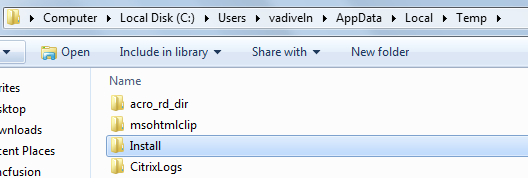
2. Navigate to the temp location and Right Click on “Install” folder and select Properties.
3. In Properties window select the Security tab, Administrators under the Group or user names, ensure the Permissions for Administrators as shown in the below screenshot and then click Advanced button.
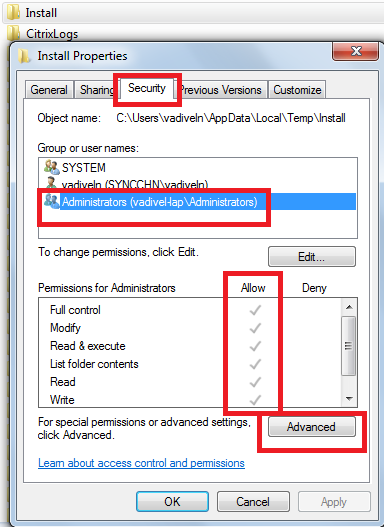
4. Pop up window will be open when you click the Advanced button. Please select the Owner tab and then click Edit button as shown in the below screenshot.
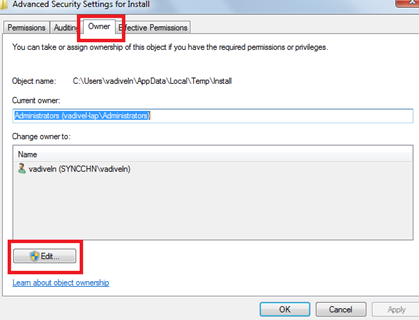
5. Pop up window will be open when you click the Edit button. Under the Change owner to, select Administrators. Then select Replace owner on subcontainers and click objects check box and click OK. Please refer the below screenshot.
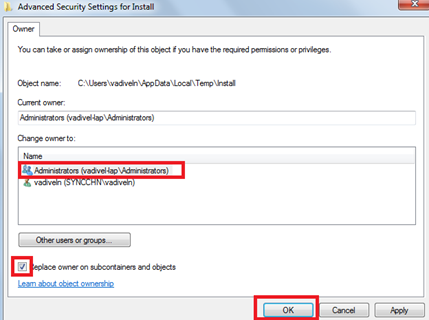
After the Essential Studio setup v13.3.0.7 was successfully installed in your system, please ensure that samples are present in the below mentioned location. If the samples are present, you can launch the samples successfully.
Location:
C:\Users\{user name}\AppData\Local\Syncfusion\EssentialStudio\13.3.0.7\MVC
Example:
C:\Users\ManivannanS\AppData\Local\Syncfusion\EssentialStudio\13.3.0.7\MVC
If you still face the same issue, please follow the steps suggested in the below KB article link and send us the zip file which consists of Syncfusion Installer logs generated by our tool. It would be much helpful for us to resolve the reported issue at the earliest.
https://www.syncfusion.com/kb/2331/gather-log-file
Regards,
Manivannan S.
During the installation of Syncfusion Essential Studio setup, the extracting zip application will ship in below temp location.
Location: C:\Users\{User name}\AppData\Local\Temp
We suspect that the installer files are not shipping in your machine due to the ‘Temp’ folder does not have insufficient permission while installing our setup. Please uninstall the Syncfusion setup v13.3.0.7 installed in your system, clean your temp(Start -> Run -> Type %temp% -> Click OK) folder and then follow the below steps while reinstalling the Syncfusion setup v13.3.0.7.
1. After few minutes from when you click “Install” button, there will be a folder named “Install” shipped in your temp location. Please refer the below screenshot.
2. Navigate to the temp location and Right Click on “Install” folder and select Properties.
3. In Properties window select the Security tab, Administrators under the Group or user names, ensure the Permissions for Administrators as shown in the below screenshot and then click Advanced button.
4. Pop up window will be open when you click the Advanced button. Please select the Owner tab and then click Edit button as shown in the below screenshot.
5. Pop up window will be open when you click the Edit button. Under the Change owner to, select Administrators. Then select Replace owner on subcontainers and click objects check box and click OK. Please refer the below screenshot.
After the Essential Studio setup v13.3.0.7 was successfully installed in your system, please ensure that samples are present in the below mentioned location. If the samples are present, you can launch the samples successfully.
Location:
C:\Users\{user name}\AppData\Local\Syncfusion\EssentialStudio\13.3.0.7\MVC
Example:
C:\Users\ManivannanS\AppData\Local\Syncfusion\EssentialStudio\13.3.0.7\MVC
If you still face the same issue, please follow the steps suggested in the below KB article link and send us the zip file which consists of Syncfusion Installer logs generated by our tool. It would be much helpful for us to resolve the reported issue at the earliest.
https://www.syncfusion.com/kb/2331/gather-log-file
Regards,
Manivannan S.
SIGN IN To post a reply.
- 5 Replies
- 4 Participants
-
AO Amro Osama
- Sep 5, 2015 04:03 PM UTC
- Oct 15, 2015 01:51 PM UTC

