Syncfusion vs. DevExtreme JavaScript File Manager
A side-by-side feature comparison to help you choose the right File Manager component for browsing, uploading, and managing files and folders in your JavaScript applications.
- Chunked & directory upload
- Virtualization
- Access control



At a glance
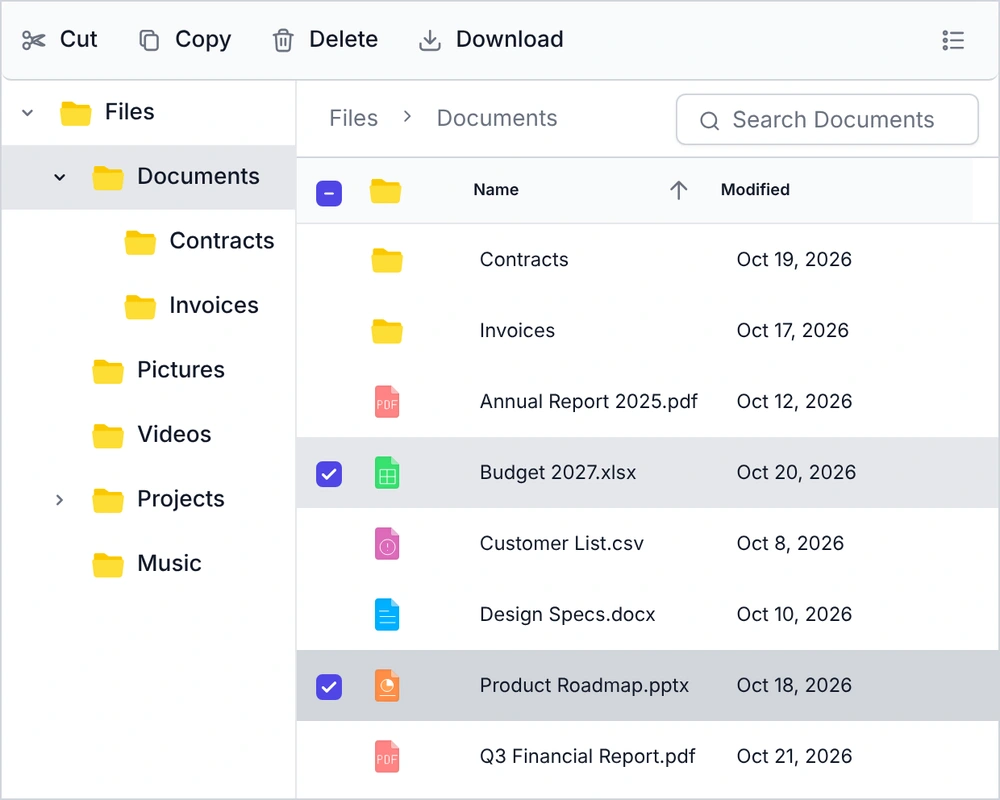
Both JavaScript File Manager components support core file management operations, including upload, download, rename, delete, create folder, and folder tree navigation. Syncfusion stands out with directory uploads, pause and resume for chunked uploads, virtualization for large directories, an extensive set of documented cloud and database storage providers, and granular path-based access control.
SYNCFUSION
JavaScript File Manager
- File Manager capabilities Upload (single, chunked, and directory) with pause and resume, download (ZIP for multiple files), create, rename, copy, move, delete, and drag-and-drop move, with built-in access control. Large icons and details views, a TreeView navigation pane, breadcrumb, search, and virtualization for large directories.
- Support Unlimited support tickets and bug reports across all support levels.
- Pricing and licensing Standalone File Manager SDK at $959/developer/year or the UI Component Suite at $1,199/developer/year, licensed annually per developer.
- Free option Free Community License for eligible small businesses.
- Accessibility Follows WCAG 2.2, ADA, and Section 508, with WAI-ARIA attributes validated using axe-core and accessibility-checker and full keyboard navigation.
DEVEXTREME
JavaScript File Manager
- File Manager capabilities Upload (single and chunked), download, rename, delete, create folder, copy, and move with single and multiple selection. Thumbnails and details views with hierarchical folder navigation and breadcrumbs are supported, but the built-in search bar is not documented.
- Support Support and updates included for the 12-month term.
- Pricing and licensing DevExtreme Complete is listed at $899.99 per developer for a 12-month subscription. The File Manager is not sold separately.
- Free option No free license; a free trial is offered.
- Accessibility DevExtreme's accessibility guide lists FileManager among components that do not currently meet accessibility requirements.
Comparing built-in File Manager features
Evaluate how each File Manager handles the everyday operations users expect, like uploading and downloading files, navigating folder structures, selecting items, and connecting to storage.
- Upload capabilities
- Download operations
- File operations
- Views & navigation
- Selection
- Storage providers
Upload capabilities
Evaluate how each component handles single file uploads, large file chunking, folder uploads, and file type restrictions.
SYNCFUSION
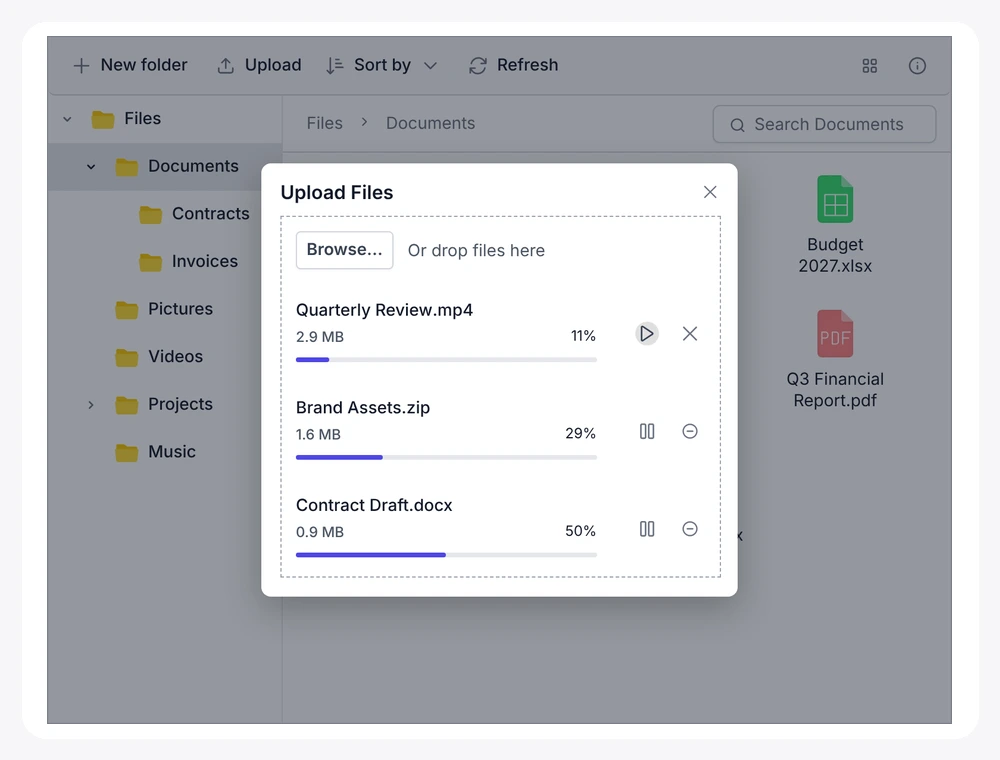
- Single and chunked upload, with configurable chunk size for large files.
- Directory upload mode lets users upload entire folder structures.
- Drag-and-drop uploads from the local File Explorer or Finder, automatic upload control, file type restrictions, and a configurable maximum file size.
- Pause and resume supported during chunked uploads.
DEVEXTREME
- Single and chunked uploads with configurable chunk and file size.
- File extension filtering configurable at the component level.
- Directory upload and pause/resume during upload are not documented.
Download operations
Let users download one file or a whole selection directly from the toolbar or context menu.
SYNCFUSION
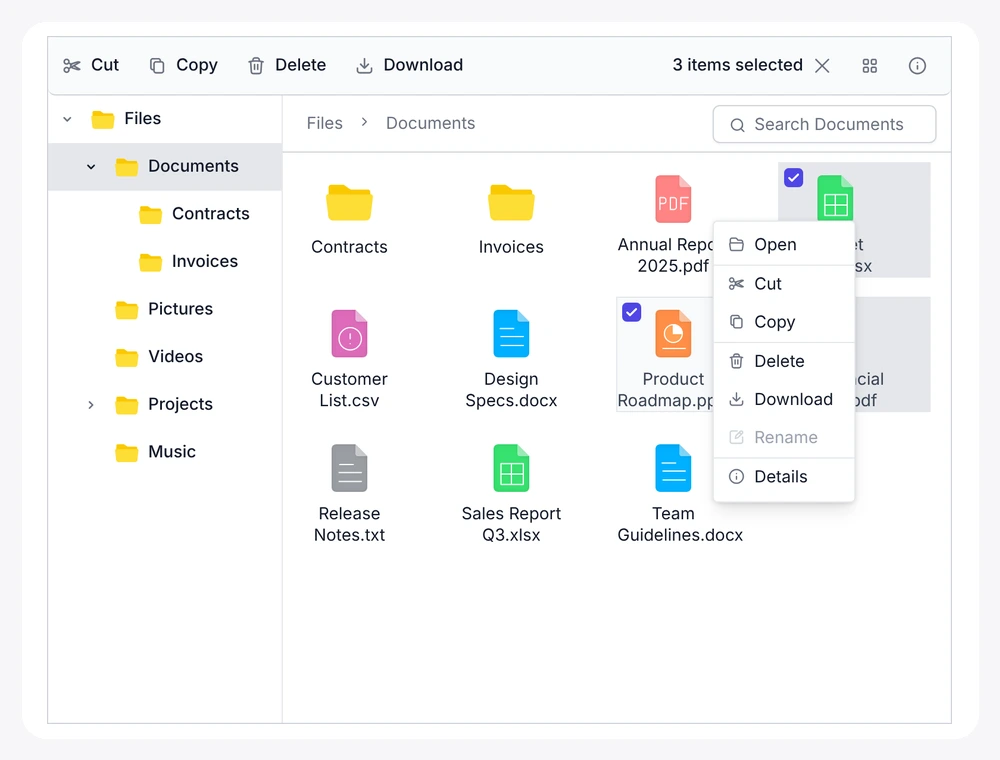
- Single file download from the toolbar or context menu, with configurable download permissions.
- Multiple selected files downloaded as a single ZIP archive.
DEVEXTREME
- Single file download from the toolbar or context menu, with configurable download permissions.
- Multi-file ZIP download is not documented.
File operations
Create, rename, copy, move, and delete items, and find files quickly without leaving the component.
SYNCFUSION
- Create folder, rename, copy, cut, paste, and delete operations.
- Drag-and-drop within the component moves items to the target folder.
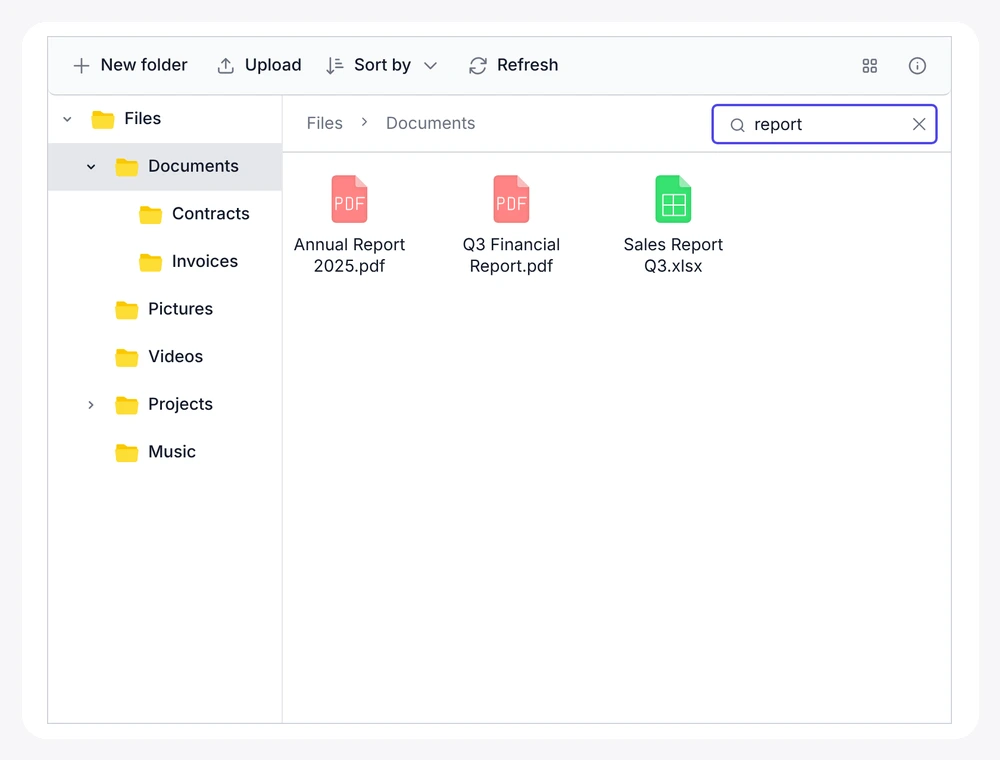
- Built-in search bar filters files within the current folder path.
DEVEXTREME
- Create folder, rename, copy, move, and delete operations.
- Internal drag-and-drop move is not documented.
- Built-in search or filter is not documented.
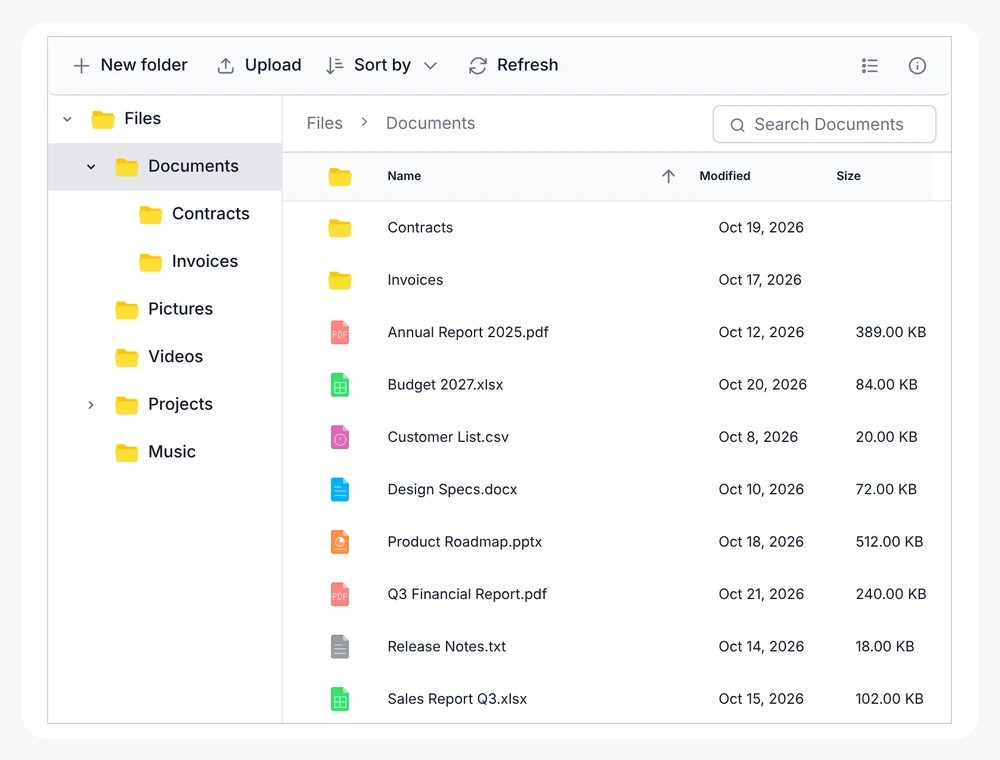
Views & navigation
Switch between layouts and move through deep folder hierarchies, even in very large directories.
SYNCFUSION
- Large icons view (default) and details view, switchable from the toolbar or context menu.
- Configurable TreeView navigation pane with adjustable width.
- Breadcrumb bar shows the current path with clickable segments.
- Virtualization renders only viewport-visible items in both views.
DEVEXTREME
- Thumbnails view and details view, switchable from the toolbar.
- Folder hierarchy displayed in a left panel with adjustable width.
- Breadcrumb bar shows the current path with clickable segments.
- Search bar and virtualization are not documented.
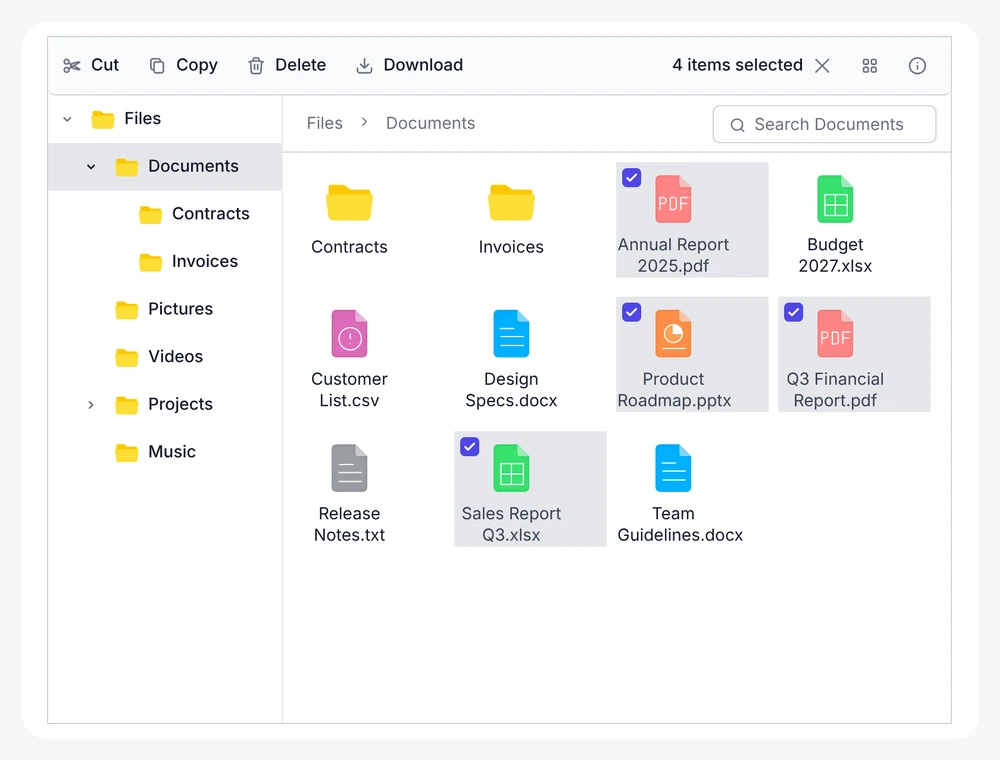
Selection
Select one or many items with the mouse, keyboard, or checkboxes before performing bulk operations.
SYNCFUSION
- Single and multiple selection modes with multi-selection using Ctrl/Shift keys and checkboxes.
- Ctrl+A selects all items in the current directory.
- Pre-selection at initialization or at runtime through the selected items setting.
DEVEXTREME
- Single and multiple selection modes with multi-selection using Ctrl/Shift keys and checkboxes.
- Ctrl+A selects all items in the current directory.
- Pre-selection at initialization through the configurable properties.
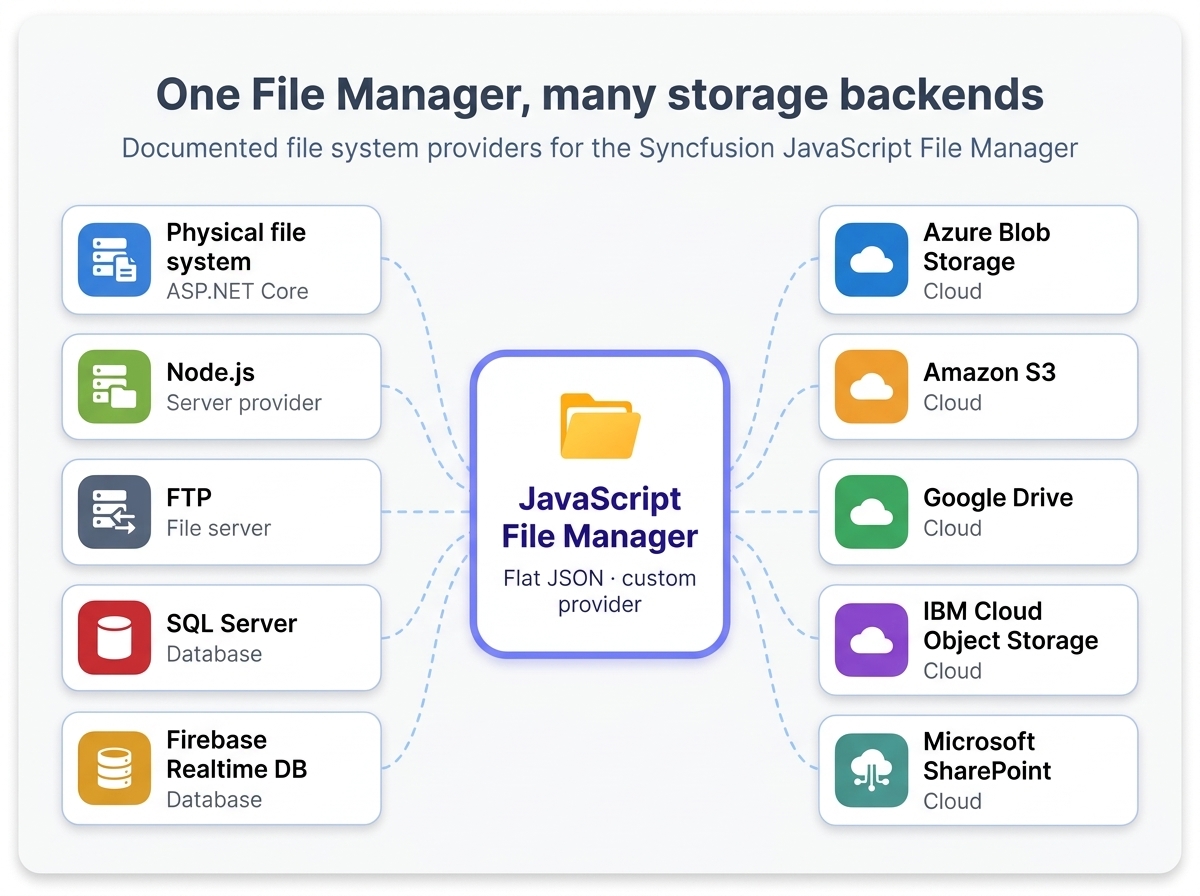
Storage providers
Neither component ships a managed cloud storage service. Both delegate file system operations to a backend you configure. The difference lies in the breadth of documented integrations.
SYNCFUSION
- Documented providers: physical file system (ASP.NET Core), Node.js, FTP, Azure Blob Storage, Amazon S3, Google Drive, Firebase Realtime Database, IBM Cloud Object Storage, Microsoft SharePoint, and SQL Server.
- Flat JSON data binding without a server provider.
- Custom provider implementations documented with a how-to guide.
DEVEXTREME
- Object provider (in-memory JSON), remote provider (any server endpoint), and custom provider.
- Amazon S3 and Azure Blob via the custom provider.
- Entity Framework demo; Google Drive not documented.
Performance
Measured performance of the Syncfusion JavaScript File Manager with a hosted physical storage provider. Results vary with the provider, backend, directory size, and network, so clone the sample to reproduce them in your own environment.
Initial load
1168.90
File Manager with a full toolbar and 4 visible folders containing 75,500 files
Opening a folder with a large volume of files
462.74
Opening a folder with 500 files
Opening a folder with a large volume of files
1272.82
5,000 files
Opening a folder with a large volume of files
2668.64
20000 files
Opening a folder with a large volume of files
5538.20
50000 files
Searching for a file
4034.98
| Test setup | |
|---|---|
| Package / version | @syncfusion/ej2-filemanager: "35.1.41" |
| Browser | Google Chrome (Version 156.0.8078.48) |
| Device | OS: Windows 11 Enterprise · CPU: AMD Ryzen 5 7520U with Radeon Graphics (2.80 GHz) · RAM: 16 GB |
| Method | Median of 5 runs |
| Tested | 22 Oct 2026 |
- RUN IT YOURSELF
Reproduce the benchmark in your own environment
The open-source sample includes the test harness, file generator, and scenarios used above. DevExtreme does not publish comparable JavaScript File Manager performance benchmarks.
LIVE DEMO
See the Syncfusion JavaScript File Manager in action
Navigate folders, browse files, and switch between different views in a live Syncfusion JavaScript File Manager sample.
Feature-by-feature comparison
A side-by-side look at how Syncfusion and DevExtreme support key JavaScript File Manager capabilities, based on each vendor's published documentation. Use the filters to focus on the features that matter most to your project.
Upload toolbar button with progress tracking, with files saved to the current folder path. View docs
Upload toolbar button with configurable file type filtering and maximum file size. View docs
Large files are split into sequential chunks with a configurable chunk size in the upload settings. View docs
Large files are split into sequential chunks with a configurable chunk size in the upload settings. View docs
Entire folder structures can be uploaded in a single operation, with directory uploads configurable separately from single-file uploads. View docs
Directory upload is not documented for the DevExtreme JavaScript File Manager.
Files are queued and uploaded one at a time in sequence. Sequential mode is configurable in the upload settings, ensuring each file completes before the next one begins. View docs
Sequential upload is not documented for the DevExtreme JavaScript File Manager.
Files dragged from the local File Explorer or Finder are uploaded to the current folder, with this behavior configurable in the upload settings. View docs
Files can be uploaded by drag and drop or from the toolbar. View docs
Accepted file types are configured through the upload settings. A comma-separated list of extensions filters the files available for selection. View docs
Accepted file extensions configured globally for the component, filtering which files users can select or upload. View docs
Chunked uploads can be paused and resumed, provided chunk upload is enabled. View docs
Pause and resume during upload are not documented.
Files downloaded from the server via the toolbar or context menu. View docs
Toolbar or context menu download, with configurable permission. View docs
Multiple selected files packaged and downloaded as a single ZIP archive. View docs
Multi-file ZIP download is not documented.
New folders can be created in the current path using the toolbar or context menu. View docs
New folders can be created in the current path using the toolbar or context menu. View docs
Selected file or folder renamed through the toolbar or context menu. View docs
Selected file or folder renamed through the toolbar or context menu. View docs
Items are duplicated to the target path by sending a copy request to the server. View docs
Items duplicated to a target path. View docs
Items are moved with cut and paste (toolbar, context menu, or Ctrl+X/Ctrl+V) or by dragging them to the target folder; the server updates their file locations. View docs
Items moved to a target path using the move to option. View docs
Selected files or folders removed after a confirmation prompt. View docs
Selected items deleted; delete permission configurable. View docs
Built-in search bar filters files within the current directory and can be configured through the search settings. View docs
Built-in search or filter is not documented for the DevExtreme JavaScript File Manager.
Large Icons view displays files and folders as icons. The view can be switched using the toolbar or context menu, and icons can be customized using templates. View docs
Thumbnails view displays files and folders as icons, and users can switch views from the toolbar. View docs
Tabular view with Name, Date Modified, Type, and Size columns; additional columns are configurable. View docs
Details view shows items in a table with column headers; accessible from the toolbar. View docs
Configurable TreeView navigation pane displays the full folder hierarchy; minimum and maximum width are configurable. View docs
Folder hierarchy is displayed in a left panel. View docs
Breadcrumb bar shows the current path with clickable segments. View docs
Breadcrumb bar shows the current path with clickable segments. View docs
Files and folders dragged within the component are moved to the target folder; drag events available for custom logic. View docs
Internal drag-and-drop move between folders is not documented.
On-demand rendering for large directories in both large icons and details views; items outside the viewport are not rendered. View docs
Virtualization is not documented for the DevExtreme File Manager.
Top toolbar with built-in items for file operations; overflow items move to a popup; fully customizable. View docs
Toolbar with configurable built-in items; custom items can be added. View docs
Right-click context menu with items that vary by target (file, folder, empty area); fully customizable. View docs
Context menu with configurable items; right-click opens context actions. View docs
Custom thumbnail templates defined per file type using the large icons template. View docs
Function returning an icon URL, icon name, CSS class, or Base64 image. View docs
Multi-select via checkboxes, Ctrl/Shift keys, Ctrl+A selects all items. View docs
Single and multiple selection with Ctrl/Shift and checkboxes. View docs
Flat JSON array binding without a separate server provider; items linked via parent ID; integrates with cloud services through action events. View docs
Object provider uses an in-memory hierarchical JSON array; no server required for basic use. View docs
Server-side providers connect to ASP.NET Core, Node.js, or FTP file systems. View docs
Remote provider connects to any server endpoint returning JSON. View docs
Custom provider implementations supported; each file operation handled independently. View docs
Custom provider; each operation defined by a dedicated function. View docs
Latest themes include Tailwind 3.4, Bootstrap 5.3, Fluent 2, and Material 3; legacy themes include Bootstrap 5/4/3, Google's Material, Tailwind CSS, Fluent, and Microsoft Office Fabric; plus a high-contrast accessibility theme. View docs
Multiple DevExtreme themes available, including Fluent Blue, Material, Bootstrap, and others across the full theme family. View docs
Dark variants available for all major themes, including Tailwind 3.4 Dark, Bootstrap 5.3 Dark, Fluent 2 Dark, and Material 3 Dark. View docs
Dark theme variants available; Fluent Blue Dark is one of the documented theme options. View docs
Full right-to-left layout support; the entire component mirrors for RTL languages. View docs
Right-to-left layout support; the entire component adapts for RTL layouts. View docs
All UI text localizable; any culture supported by loading translated string maps; default locale is English. View docs
UI text localizable through the DevExtreme localization system. View docs
Follows WCAG 2.2, ADA, and Section 508; 23 WAI-ARIA attributes across all subcomponents; validated with axe-core and accessibility-checker; full keyboard navigation. View docs
DevExtreme's accessibility guide lists FileManager among the components that "do not meet any accessibility requirements and currently are not accessible." View docs
Access control with role-based and path-based rules; read, write, copy, download, upload, and folder-write permissions configurable per path or file. View docs
Operation-level permissions (create, copy, move, delete, rename, upload, download) configurable globally; path-level or role-based access control is not documented. View docs
Full keyboard navigation: arrow keys, copy/cut/paste shortcuts, F2 for rename, Ctrl+A for select all, F5 for refresh, and more. View docs
Only general focus options (accessKey, tabIndex) are documented; DevExtreme's accessibility guide lists FileManager among components that are not currently accessible. View docs
Section 508 compliance documented alongside WCAG 2.2 and ADA. View docs
Section 508 not documented for FileManager.
Docker deployment guide covers containerizing the JavaScript File Manager with a server-side provider. View docs
Docker deployment documentation is not available.
WebMCP integration exposes 7 File Manager tools that let AI agents browse files, manage file operations, navigate, and control the UI through natural language. View docs
WebMCP integration is not documented.
Comparison based on publicly available documentation as of November 2026. "Not documented" indicates the absence of feature coverage in vendor documentation at time of review and does not necessarily mean the capability cannot be implemented with custom code.
Published pricing at a glance
Publicly listed pricing reviewed on 21 Oct 2026. Prices are in USD and may change. The products differ in scope and licensing models, so pricing is shown for context rather than as a direct cost comparison.
SYNCFUSION
JavaScript File Manager
Available as a standalone offering for secure file browsing, upload, and management, or as part of the full Syncfusion UI Component Suite.
File Manager SDK
Included with every support level
- Unlimited support tickets.
- Unlimited bug reports.
- Priority-based SLA support.
Support levels
- Standard ($799):Issues addressed in the next scheduled service pack or major release.
- Business ($959, recommended):Issues addressed in the weekly deployment cycle; no guaranteed hotfixes.
- Enterprise ($1,279):Hotfixes available outside regular release cycles.
Plans
- File Manager SDK ($959):File Manager; Business Support included.
- UI Component Suite ($1,199):All 7 standalone UI SDKs and 1,600+ UI components; Business Support included.
- Community License (Free):Eligible companies and individuals; support through forums, a feedback page, and support tickets.
Source:
Reviewed 21 Oct 2026
DEVEXTREME
JavaScript File Manager
The File Manager is included in the DevExtreme suite and is not sold separately.
Complete
- DevExtreme Complete ($899.99):DevExtreme JavaScript components, including the File Manager.
- ASP.NET and Blazor ($1,099.99):Includes DevExtreme.
- DXperience ($1,699.99):Includes DevExtreme.
- Universal ($2,299.99):Includes DevExtreme.
- Community License (None):Free trial available for evaluation.
Per developer, 12-month subscription. Multi-license discounts apply for teams.
Source:
Reviewed 21 Oct 2026
Prices and terms may change. Based on publicly available information as of 21 Oct 2026. DevExtreme and DevExpress are trademarks of Developer Express Inc.
Security and compliance context
This section describes vendor-level programs. It does not imply that one File Manager is more secure than the other.
SYNCFUSION
Security programs
Source:
Reviewed 4 Nov 2026
DEVEXTREME
Security programs
Source:
Reviewed 4 Nov 2026
Which JavaScript File Manager is right for you?
Use this guide to narrow your decision based on the priorities that matter most to your project.
SYNCFUSION
Choose Syncfusion if…
- You need advanced uploads Directory (folder) upload and pause and resume for chunked uploads are built in.
- You connect to many storage backends Documented providers cover Azure Blob, Amazon S3, Google Drive, Firebase, SharePoint, IBM Cloud, FTP, and SQL Server.
- You manage very large directories Virtualization renders only visible items in both large icons and details views.
- You need granular access control Path-based and role-based permission rules are configurable per folder or file.
- You need documented accessibility WCAG 2.2, ADA, and Section 508 targets with full keyboard navigation, plus Docker deployment guides.
DEVEXTREME
Choose DevExtreme if…
- You already use DevExtreme components The File Manager matches the rest of the DevExtreme UI suite and theming.
- You need simple in-memory or remote file management Object and remote providers cover basic JSON and server-endpoint scenarios.
- You want a fully custom backend The custom provider defines each file operation through a dedicated function.
- Standard uploads are enough Single and chunked uploads cover projects that don't need directory upload.
- You want a full suite at a lower price $899.99 per developer covers the File Manager and every DevExtreme component.
WHY SYNCFUSION
Trusted by developers
Syncfusion has been building UI components since 2001, and developers consistently rate the experience highly.
Ratings are as of 4 Nov 2026 and may change. G2, Capterra, and GetApp are trademarks of their respective owners.
Ready to build a JavaScript File Manager?
Start a free 30-day trial of the Syncfusion JavaScript File Manager, with no credit card required.
Frequently asked questions
Syncfusion offers a free Community License for companies and individuals with 5 or fewer developers, 10 or fewer employees, and annual gross revenue under $1 million USD. DevExtreme offers a free trial, but a paid license is required for production use.
Both support chunked upload for large files. Syncfusion also supports directory (folder) upload and pause and resume during chunked uploads, which DevExtreme does not document.
Syncfusion documents providers for Azure Blob, Amazon S3, Google Drive, Firebase Realtime Database, IBM Cloud, and SharePoint. DevExtreme supports Azure Blob and Amazon S3 through its custom provider with GitHub examples, but does not document Google Drive, Firebase, or other cloud backends.
Syncfusion documents virtualization that renders only items visible in the viewport in both large icons and details views. DevExtreme does not document a virtualization option for the File Manager.
Syncfusion follows WCAG 2.2, ADA, and Section 508 with documented WAI-ARIA attributes validated using axe-core and accessibility-checker. DevExtreme's accessibility guide lists FileManager among components that are not currently accessible.
Both support custom file system providers for any backend. Syncfusion provides a dedicated SQL Server provider; DevExtreme demonstrates an Entity Framework integration in its demos and supports any endpoint through the remote provider.
Syncfusion provides how-to guides for specific scenarios (custom provider, Amazon S3, custom thumbnails, custom context menu and toolbar items, pre-selection, custom sorting, and more), plus Docker deployment guides. DevExtreme's File Manager documentation covers the essentials with fewer topic-specific pages.
The Syncfusion File Manager SDK costs $959 per developer per year, or $1,199 in the UI Component Suite, with unlimited support at every level and a free Community License for eligible companies. DevExtreme Complete costs $899.99 per developer for a 12-month subscription, includes the File Manager with all DevExtreme components, and has no free license.
Resources and next steps
Ready to get started?
Start with the fully functional 30-day trial, or buy directly at the published price — no sales call, no quote wait, no procurement detour.