
 Satheeskumar S
TL;DR: Stop battling bloated bundles and complex state management. This guide shows you how to integrate React with HTMX to create high-performance, server-driven components. You will learn how to use the Syncfusion React Data Grid with a single SSE endpoint to overcome the browser’s connection limit and deliver efficient real-time updates in a Next.js environment.
React gives you a powerful foundation for building interactive, component-driven UIs. But as your app grows, heavy client-side rendering, large bundles, and complex state management can slow you down. That’s where HTMX fits perfectly.
HTMX lets you add dynamic, server-driven HTML updates with simple HTML attributes, no sprawling client-side logic or extra JavaScript layers. When you combine HTMX with React and Next.js, you unlock a workflow that keeps your UI responsive, SEO-friendly, and refreshingly lightweight.
In this guide, we’ll learn how to integrate HTMX into a Next.js (React 19) app, use it effectively with Syncfusion® components, specifically the React Data Grid, and enable real-time updates without relying on heavy client-side state.
If you’re new to HTMX, check out the post, Integrating HTMX with React and Next.js for Dynamic HTML Updates, for a quick intro before diving deeper.

Why HTMX works well with React and Next.js
HTMX shines when you want server-driven UI updates without complicating your React code. It’s especially useful in components like data grids, where small, frequent updates can quickly become expensive when handled entirely on the client.
For example, you can enhance React-based grids like Syncfusion ej2-react-grids by mixing HTMX attributes directly into cells. This hybrid model fits perfectly for dashboards and CRUD screens where data changes often, and you want real-time updates with minimal JavaScript. Spend less time building grid features from scratch. Syncfusion React DataGrid includes ready-to-use support for data binding, paging, sorting, filtering, editing, and exporting.
Setting up HTMX in a Next.js (React 19) app
Let’s walk through a clean, modern integration using the App Router. This guide assumes you already know basic React and Next.js concepts and want to reduce client-side complexity without losing interactivity.
Prerequisites
Before you get started, make sure your environment meets the following requirements:
- Node.js: Version 20.0.0 or higher.
- Package manager: npm, pnpm, or yarn.
- Next.js: Version 15.1 or later (required for full React 19 support).
- React/React-DOM: Version 19 (stable).
- Text editor: VS Code or a similar editor, along with a terminal.
Step 1: Create a Next.js project
To get started, create a new Next.js project configured with TypeScript and the App Router. These options ensure compatibility with React 19, modern routing patterns, server components, and future-friendly development practices.
Run the following command in your terminal:
npx create-next-app@latest my-htmx-app --typescript --appOnce the project is created, navigate to the project folder and install the dependencies:
cd my-htmx-app && npm installStep 2: Add HTMX to Next.js layout
HTMX works best when it loads early in the page lifecycle, so we include it directly in app/layout.tsx. This ensures:
- HTMX initializes before any UI interaction.
- Attributes such as
hx-get,hx-swap,hx-trigger, etc., work immediately. - The SSE extension is available globally for real-time updates.
Here’s how to include HTMX:
import { Script } from 'next/script';
export default function RootLayout({ children }: { children: React.ReactNode }) {
    return (
        <html lang="en">
            <head>
                <Script src="https://unpkg.com/[email protected]" />
                <script src="https://unpkg.com/[email protected]/dist/ext/sse.js"></script>
            </head>
            <body>{children}</body>
        </html>
    );
}
Why load HTMX via <Script>?
- Ensures Next.js handles the loading order correctly.
- Allows HTMX to run on both server-rendered and client-rendered content.
- No bundling or build configuration required.
This approach keeps your React code clean and lets HTMX act as a low-overhead enhancement layer.
Step 3: Install and configure Syncfusion React components
Next, install the required Syncfusion packages to start using the React Grid and button components in your project by running the command below:
npm install @syncfusion/ej2-react-grids @syncfusion/ej2-react-buttonsOnce the packages are installed, include the necessary Syncfusion styles in the styles/globals.css file so the components render correctly with the Tailwind theme.
@import "@syncfusion/ej2-react-grids/styles/tailwind.css";
@import "@syncfusion/ej2-react-buttons/styles/tailwind.css";Real-time updates in a React Data Grid
Imagine a dashboard showing a list of orders, with columns such as OrderID, CustomerID, and Freight. Now, imagine the Freight value updates every 5 seconds to simulate live price updates.
At first, you might try opening one Server-Sent Events (SSE) connection per row. This works but only for the first six rows. That’s because browsers limit the number of simultaneous SSE connections.
The fix: Use a single SSE Endpoint
To solve the limitation, we combined a few key pieces that work well together:
- Syncfusion GridComponent to render a responsive data grid in React.
- HTMX, along with its SSE extension, to handle real-time updates with minimal client-side code.
- Next.js (Pages Router) to create a single SSE endpoint (
/api/updates/route) that broadcasts updates for all rows. - A static API route to avoid issues commonly associated with dynamic routes and ensure consistent server-side logic.
Here’s where the approach really comes together. Instead of opening a separate SSE connection for each row, open one connection that broadcasts updates for all IDs (1001–1010). Each row listens for a uniquely named event, for example: freight-updated-1001.
This setup avoids browser connection limits entirely and ensures that every row in the grid updates in real time, reliably and efficiently, while remaining fully compatible with Next.js and HTMX.
Creating the Syncfusion React Data Grid
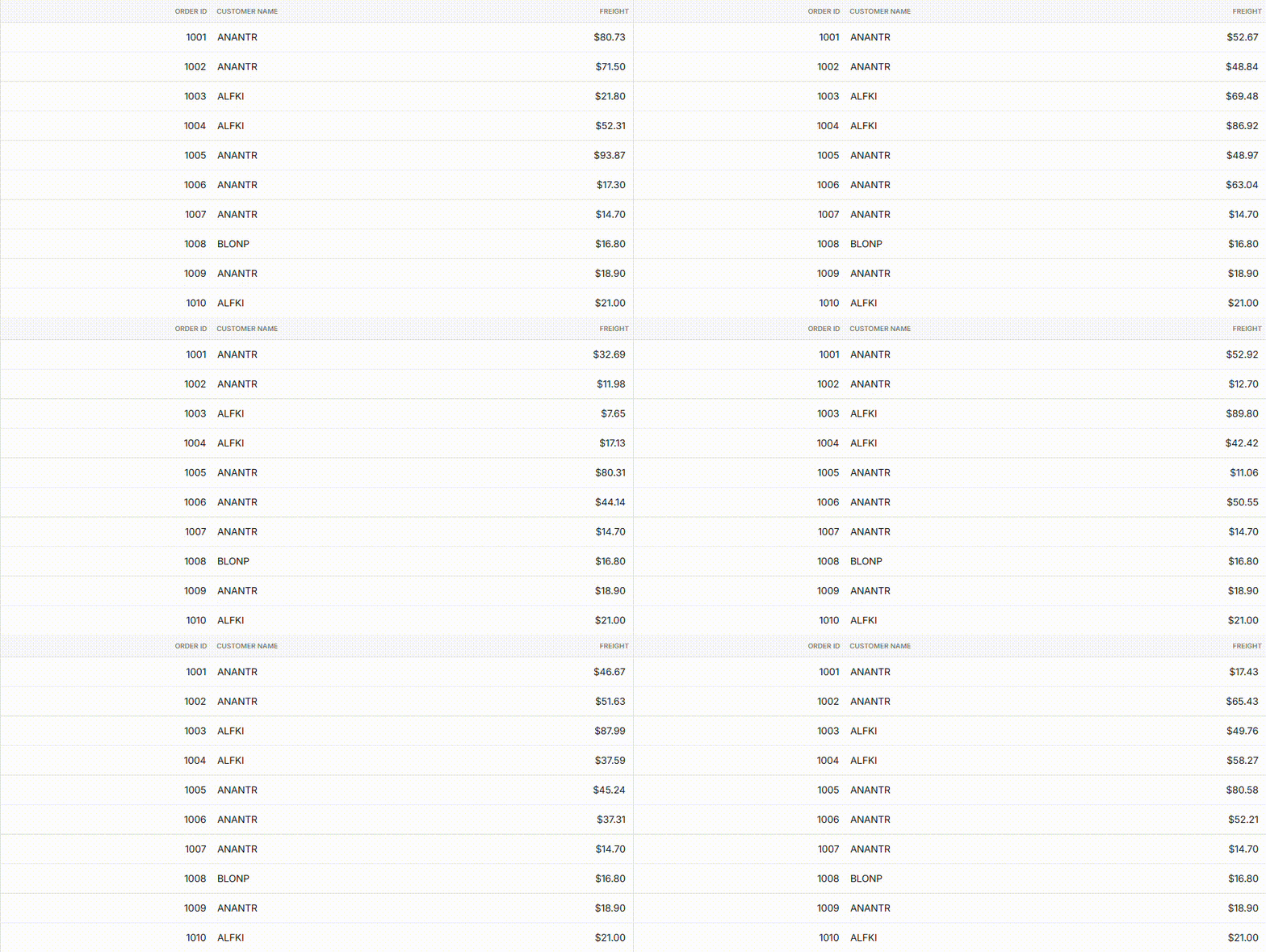
Now, we will render 10 sample rows in the grid and update the Freight values in real time through SSE. This React + HTMX approach delivers live data updates without adding unnecessary client-side state management.
Here’s the complete code block:
import { useEffect } from 'react';
import { GridComponent, ColumnsDirective, ColumnDirective } from '@syncfusion/ej2-react-grids';

declare global {
    interface Window {
      htmx?: any;
    }
}

const data = Array.from({ length: 10 }, (_, i) => ({
    OrderID: 1000 + i + 1,
    CustomerID: ['ALFKI', 'ANANTR', 'ANTON', 'BLONP', 'BOLID'][Math.floor(Math.random() * 5)],
    OrderDate: new Date(Date.now() - i * 24 * 60 * 60 * 1000).toISOString(),
    Freight: (2.1 * (i + 1)).toFixed(2),
}));

export default function Home() {
    useEffect(() => {
        if (typeof window !== 'undefined' && window.htmx) {
            const container = document.querySelector('#htmx-container');
            if (container) {
                console.log('Initializing HTMX on #htmx-container');
                window.htmx.process(container);
            } else {
                console.error('HTMX container not found');
            }
            // Observe DOM changes for grid rendering
            const observer = new MutationObserver(() => {
                console.log('DOM changed, reprocessing HTMX');
                if (container) {
                    window.htmx.process(container);
                }
            });
            observer.observe(document.querySelector('#htmx-container') || document.body, {
                childList: true,
                subtree: true,
            });

            return () => observer.disconnect();
        } else {
            console.error('HTMX not loaded');
        }
    }, []);

    return (
        <div className="p-6 max-w-4xl mx-auto">
            <GridComponent dataSource={data} className="border rounded-lg shadow" allowPaging={false}>
                <ColumnsDirective>
                    <ColumnDirective field="OrderID" headerText="Order ID" width="80" textAlign="Right" />
                    <ColumnDirective field="CustomerID" headerText="Customer" width="100" />
                    <ColumnDirective field="Freigh” headerText="Freight" width="80" format="C2" textAlign="Right" template={(props: any) => (
                        <div data-hx-sse={`connect:/api/updates?orderID=${props.OrderID} swap:freight-updated`} data-hx-target="this" data-hx-swap="innerHTML" className="p-1"> ${props.Freight}
                        </div>
                    )}
                </ColumnsDirective>
            </GridComponent>
        </div>
    );
}
Key feature:
- Freight column: Uses the
data-hx-sseattribute to connect to the/api/updates/allendpoint and listen to row-specific events such asfreight-updated-${OrderID}.
Creating the SSE endpoint
We use a single static API route that streams row‑specific events over Server‑Sent Events (SSE). This broadcasts updates for all OrderID values through one connection, avoiding browser connection limits.
Refer to the following code example for quick integration:
import { NextResponse } from 'next/server';

export async function GET(request: Request) {
    const headers = {
        'Content-Type': 'text/event-stream',
        'Cache-Control': 'no-cache',
        'Connection': 'keep-alive',
    };

    const stream = new ReadableStream({
        async start(controller) {
            const interval = setInterval(() => {
                // Send updates for all OrderIDs (1001–1010)
                for (let i = 1001; i <= 1010; i++) {
                    const newFreight = (Math.random() * 100).toFixed(2);
                    const data = `event: freight-updated-${i}\ndata: ${newFreight}\n\n`;
                    controller.enqueue(new TextEncoder().encode(data));
                }
            }, 5000);

            request.signal.addEventListener('abort', () => {
                clearInterval(interval);
                controller.close();
            });
        },
    });
    return new NextResponse(stream, { headers });
}

export const config = {
    api: {
        bodyParser: false,
    },
};
To understand the full implementation, let’s examine how the update flow works from the server to the grid cells.
- Single endpoint: The
/api/updatesendpoint broadcasts updates for all OrderIDs using one SSE connection. - Unique events: Each grid row listens to its own event (e.g., freight-updated-1001), enabling a single SSE connection to efficiently update multiple rows.
- SSE stream: The server pushes new Freight values every 5 seconds, simulating real-time updates.
This approach delivers reliable, real-time updates for the Freight column across all 10 rows in the Syncfusion React Data Grid using HTMX and Server-Sent Events (SSE) in a Next.js app, without hitting browser connection limits.
Here’s the Data Grid:
GitHub reference
For more details about using HTMX in a React (Next.js) App for real-time Data Grid updates, refer to the GitHub demo.
Frequently Asked Questions
HTMX delivers fast, lightweight HTML swaps for simple interactions (forms, lazy sections, live updates) with almost no JS. React handles complex, state-heavy UI parts. Result: smaller bundles, faster perceived speed, less code.Why combine HTMX with React?
Choose it when:When should you use React + HTMX instead of full React/Next.js?
For lists, filters, forms, and partial updates: often 50–200 ms quicker per interaction (no JSON → state → re-render cycle). Bundle size can drop significantly (e.g., <50 KB JS vs 200+ KB). Biggest wins on mobile and dynamic CRUD UIs.How much faster is it really?
Conclusion
Thanks for reading! By combining HTMX with Syncfusion React Data Grid component and Next.js, you get the best of both worlds: React’s component-driven architecture and HTMX’s lightweight, server-driven updates. This approach helps you build fast, SEO-friendly, and maintainable web applications without adding unnecessary JavaScript or complex client-side state.
Whether you’re implementing a simple interaction or managing real-time updates in a complex data grid, HTMX streamlines dynamic behavior while keeping your codebase clean and efficient.
If you’re a Syncfusion user, you can download the setup from the license and downloads page. Otherwise, you can try a free 30-day trial.
You can also contact us through the support forum, support portal, or feedback portal. We are always happy to assist you!




 No spam, just valuable updates.