---
title: "How to Keep Important Rows Visible in Angular and React Data Grids"
published_at: "2026-01-13T16:10:12+00:00"
modified_at: "2026-06-23T04:56:14+00:00"
url: "https://www.syncfusion.com/blogs/post/react-angular-data-grid-row-pinning"
excerpt: "Learn row pinning in React and Angular Data Grid and set conditional row selection to prevent invalid picks, ensuring a clean UX and reliable data."
taxonomy_category:
- "Angular"
- "DataGrid"
- "React"
- "Row Pinning"
- "Row Selection"
taxonomy_post_tag:
- "Angular Data Grid"
- "Checkbox Selection"
- "Frontend Performance"
- "Pinned Rows"
- "React Data Grid"
---
# How to Keep Important Rows Visible in Angular and React Data Grids
[Mohammed Farook J](https://www.syncfusion.com/blogs/author/mohamedj)
**TL;DR:** Learn to implement row pinning in React and Angular Data Grid to keep priority records fixed at the top while scrolling. Combine it with conditional row selection (e.g., skip archived/cancelled rows) to reduce user error and protect data integrity. Use a predicate (e.g., isRowSelectable) and a pinning callback/prop to programmatically control which rows stay visible and which can be selected. This approach works well with paging, filtering, and checkbox mode.
We’re excited to share the latest enhancements to the [Syncfusion Data Grid](https://www.syncfusion.com/react-components/react-data-grid)
component in the [Essential Studio® 2025 Volume 4](https://www.syncfusion.com/forums/197921/essential-studio-2025-volume-4-main-release-v32-1-19-is-available-for-download)
release. Designed to empower developers building data-intensive applications, these new features, **Row Pinning** and ** Conditional Selection** in Data Grid are now available for both React and Angular frameworks.
Whether you’re managing large datasets or improving user interactions, these updates integrate seamlessly with existing grid functionalities like paging, sorting, filtering, and CRUD operations.
Let’s dive into the details.
Build Powerful Angular Data Grids Faster
Create feature-rich data tables with Syncfusion Angular DataGrid. Easily add sorting, filtering, editing, paging, templates, and export options to your Angular apps.
[Explore Angular DataGrid](https://www.syncfusion.com/angular-components/angular-data-grid)
## Conditional Row Selection: Control which rows users can select
Conditional row selection allows you to define which rows in the Data Grid can be selected based on their data. This is ideal for scenarios where certain records, such as archived or canceled items, should be protected from selection. It ensures users focus only on relevant data, improving both usability and data integrity.
You can achieve this using the [isRowSelectable](https://ej2.syncfusion.com/react/documentation/api/grid/#isrowselectable)
property, which evaluates each row’s data and returns a Boolean value (`true` for selectable rows or `false` otherwise). For local data, this callback runs during initialization; for remote data, it evaluates rows on the current page and re-runs during actions like paging or filtering.
In checkbox selection mode, non-selectable rows remain unchecked, providing a smooth experience. For example, you can restrict the selection to rows where the status is set to `Cancelled`.
Here’s how you can do it in React.
```
const isRowSelectable = (data) => data.Status !== 'Cancelled';
```
Here’s how you can do it in Angular.
```
public isRowSelectable(data: any): boolean {
return data.Status !== 'Cancelled';
}
```
Here’s a quick demo of the feature in action:
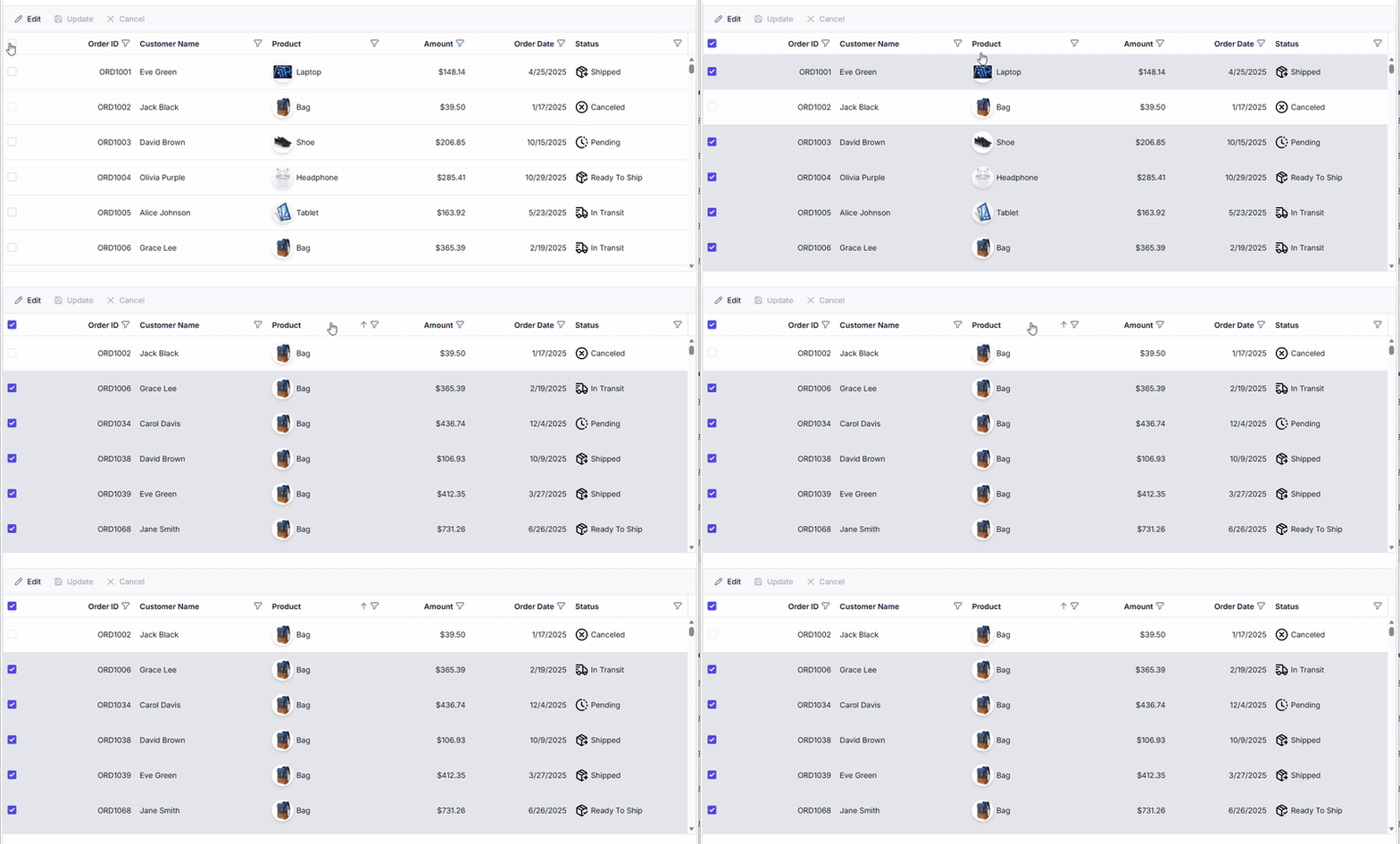
Conditional row selection in Data Grid
This feature enhances data integrity and user experience by limiting interactions to only valid rows.
**Note:** You can check out the conditional row selection demos in [React](https://ej2.syncfusion.com/react/demos/#/tailwind3/grid/conditional-row-selection)
and [Angular](https://ej2.syncfusion.com/angular/demos/#/tailwind3/grid/conditional-row-selection)
Data Grids to see how to restrict selection based on custom logic.
## Row pinning: Keep critical data always visible
Row Pinning allows you to fix specific rows at the top of the grid, keeping them visible during scrolling, paging, or other interactions. This is ideal for highlighting high-priority tasks or summaries, without disrupting the grid’s layout.
To implement this, use the [isRowPinned](https://ej2.syncfusion.com/react/documentation/api/grid/index-default#isrowpinned)
property, which checks the row data and returns true for rows that should be pinned. A primary key column (`isPrimaryKey={true}`) is required to maintain data consistency.
Pinned rows appear above the scrollable content, don’t count toward page size, and fully support selection, filtering, sorting, and CRUD operations. You can also enable context menu options, like**PinRow** and ** UnpinRow,** for dynamic user control.
Here’s the React code example**:**
```
const isRowPinned = (data) => data.Status === 'Open' && data.Priority === 'Critical';
```
Here’s the Angular code example:
```
public isRowPinned(data: any): boolean {
return data.Status === 'Open' && data.Priority === 'Critical';
}
```
Here’s a preview of the feature in action:
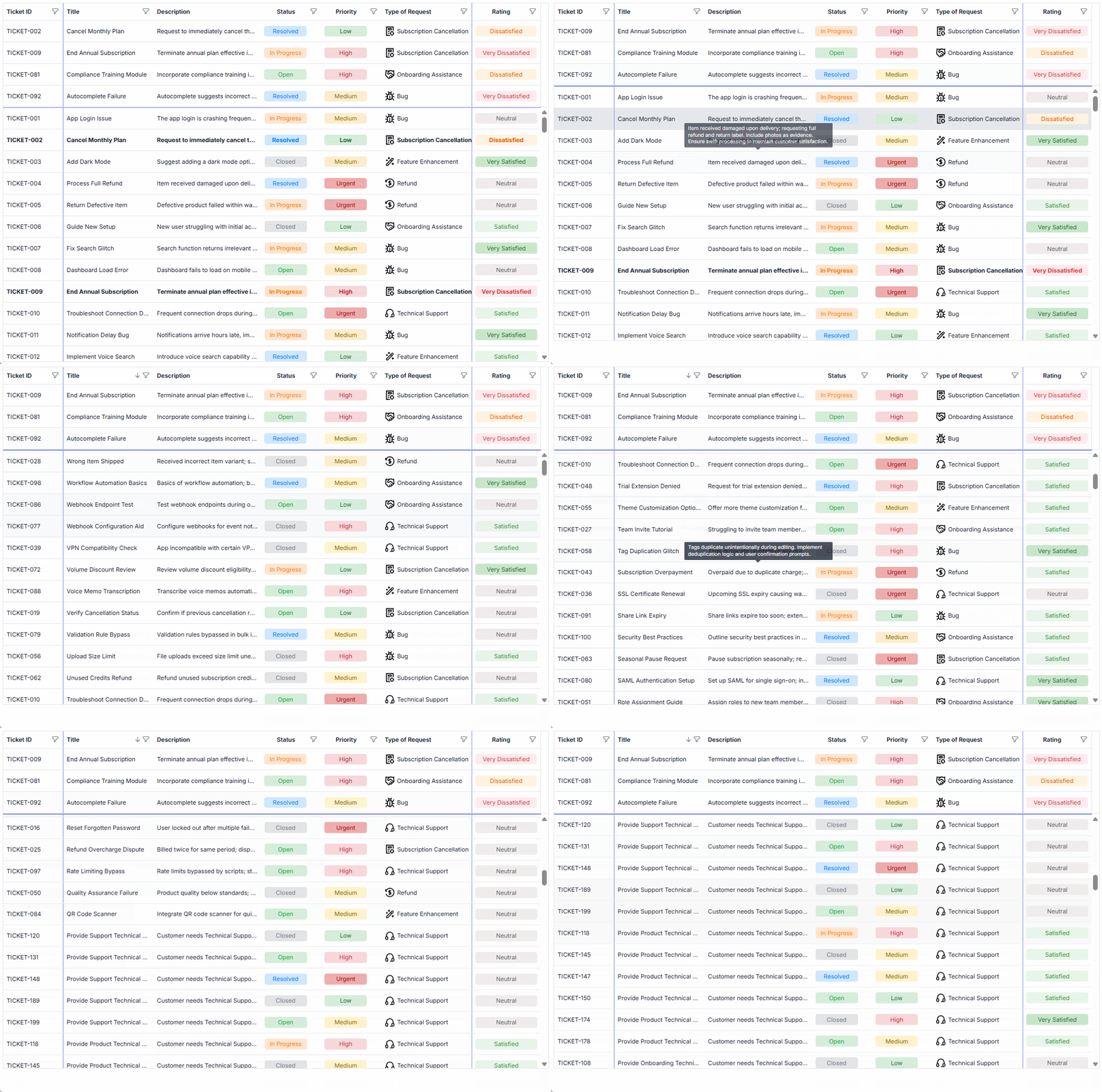
Row pinning in Data Grid
This keeps essential information front and center, boosting productivity in data-heavy applications.
**Note:** For more insights, explore the Pinned rows demos in [React](https://ej2.syncfusion.com/react/demos/#/tailwind3/grid/pinned-rows)
and [Angular](https://ej2.syncfusion.com/angular/demos/#/tailwind3/grid/pinned-rows)
Data Grid.
## Conclusion
Thank you for reading! The [Syncfusion Data Grid](https://www.syncfusion.com/react-components/react-data-grid)
in [Essential Studio 2025 Volume 4](https://www.syncfusion.com/forums/197921/essential-studio-2025-volume-4-main-release-v32-1-19-is-available-for-download)
, released in **December 2025**, introduces two powerful features: ** Conditional Row Selection** and ** Row Pinning**. These enhancements give greater control over user interactions and improve the usability of data-intensive applications.
Ready to implement these features? Update your packages to the latest version and start implementing them in your projects. If you have feedback or need support, visit our forums or contact our team.
Check out our [Release Notes](https://help.syncfusion.com/common/essential-studio/release-notes/v32.1.19)
and [What’s New](https://www.syncfusion.com/products/whatsnew)
pages to see the other updates in this release and leave your feedback in the comments section below. We would love to hear from you.
If you’re a Syncfusion user, you can download the setup from the [license and downloads](https://www.syncfusion.com/account/downloads)
page. Otherwise, you can download a free [30-day trial](https://www.syncfusion.com/downloads/)
.
You can also contact us through our [support forum](https://www.syncfusion.com/forums)
, [support portal](https://support.syncfusion.com/)
, or [feedback portal](https://www.syncfusion.com/feedback)
for queries. We are always happy to assist you!
## Related Blogs
[Essential Studio 2025 Volume 3: Latest UI Updates for React, Angular & JavaScript](https://www.syncfusion.com/blogs/post/javascript-ui-components-2025-vol-3)
[Syncfusion Essential Studio 2025 Volume 4: Key Updates for Developers](https://www.syncfusion.com/blogs/post/essential-studio-2025-volume-4)
[Introducing the Pure React Data Grid: Built with Hooks for Faster, Leaner UIs](https://www.syncfusion.com/blogs/post/pure-react-data-grid)
[Top React Data Grid Features Developers Love in Syncfusion®](https://www.syncfusion.com/blogs/post/react-data-grid-features)