
 Ajith R
Like everyone else, we are excited about the upcoming Microsoft ASP.Net Core 3.0 framework. We are particularly eager to try Blazor /Razor Components, which have the potential to turn web development more towards strongly-typed C# and WebAssembly. Syncfusion is thrilled to announce that a preview release of UI controls for ASP.NET Core Blazor /Razor Components is now available. In this post, we will provide a brief introduction to Blazor /Razor Components.
Introduction to Blazor
Blazor is a next-generation single-page application (SPA) for building client-side web apps with .NET. It supports writing C# code instead of using JavaScript for a client-side web application. The WebAssembly is used to build the .NET C# code in a web browser without any additional plugins.
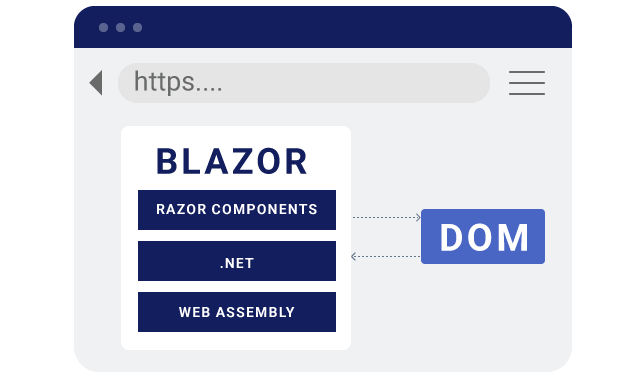
Blazor runs .NET code in the browser with WebAssembly.A Blazor app processes the following functionalities when it is built and run in the web browser:
- The Blazor application compiles the C# codes and Razor files into a .NET assembly.
- The client-side web browser downloads the assembly files.
- The WebAssembly will load the downloaded assembly files in the client-side.
- Blazor handles the DOM manipulation and triggers the browser API.
Blazor is the experimental client-side hosting model for Razor Components.
Introduction to Razor Components (Server-side Blazor)
Razor Components is a new web framework to build interactive web UI with .NET. It is designed to run client-side in the web browser on a Blazor application.
Now, .NET Core 3.0 provides support for hosting Razor Components from server-side by using an ASP.NET Core app. The SignalR connection handles UI updates from server to client and client to server.
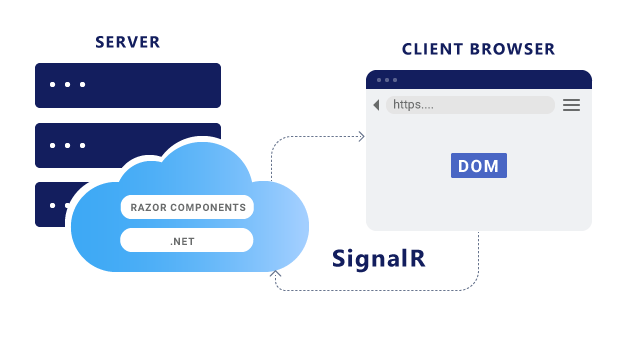
Razor Components runs .NET code on the server and interacts with the DOM in the client over a SignalR connection.Syncfusion ASP.NET Core Blazor / Razor Components
The Syncfusion UI controls for ASP.NET Core Razor Components is a complete suite of over 60+ UI controls for the Blazor framework that has been built on top of our popular Essential JS 2 JavaScript framework. We have put in a great deal of effort to ensure that the wrapper components behave exactly like native Razor Components from an application developer’s perspective. Application developers will be able to write all their code in C# and will not have to write a single line of JavaScript.
We could have taken the approach of building native Razor Components from scratch using C#, but the end result would have been little different from what we have achieved by building on Essential JS 2. Our current approach has enabled us to ship over 60 components in the very first version, and the framework will only grow richer over time as Essential JS 2 itself expands. We believe that the goal of the Blazor framework and WebAssembly itself is not to kill JavaScript, but rather to provide application developers the option to write all their application code in their favorite language, and our components help accomplish that.
Rendering a Syncfusion UI control in ASP.NET Core Razor Components
Now, we’ve learned about Blazor /Razor Components with their basic behavior. Let’s try out the Syncfusion DataGrid control with the server-side hosting model of ASP.NET Core Razor Components using the .NET Core CLI for practice:
- Install the required software, .NET Core SDK 3.0 Preview, to start the implementation.
- Create a new
Razor Componentsapplication by running the following command line from command prompt.
dotnet new razorcomponents -o EJ2Application
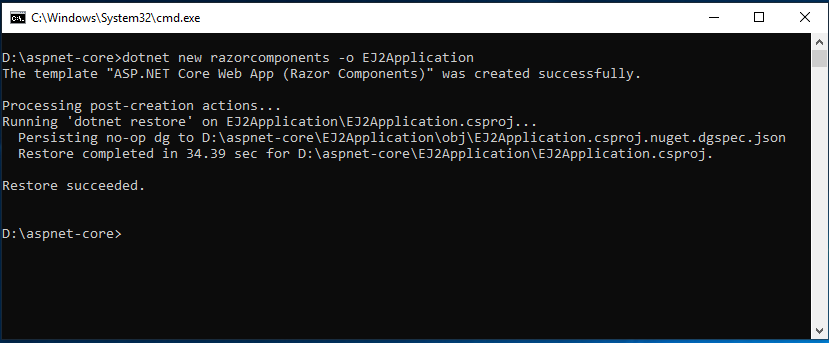
Creating a ASP.NET Core Razor Components application- This creates a new
ASP.NET Core Razor Componentsapplication in the EJ2Application folder. Navigate to the application from the command prompt and open the application inVisual Studio Codeor any code editor.
cd EJ2Application
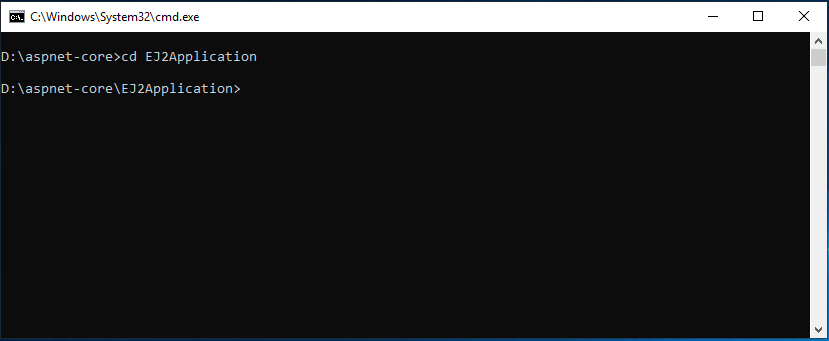
Navigate to the application folder- Now, add the Syncfusion.EJ2.AspNet.Core.RazorComponents
NuGetpackage to the new application and use the following command line to restore the packages.
dotnet add package Syncfusion.EJ2.AspNet.Core.RazorComponents -v 17.1.0.34-*
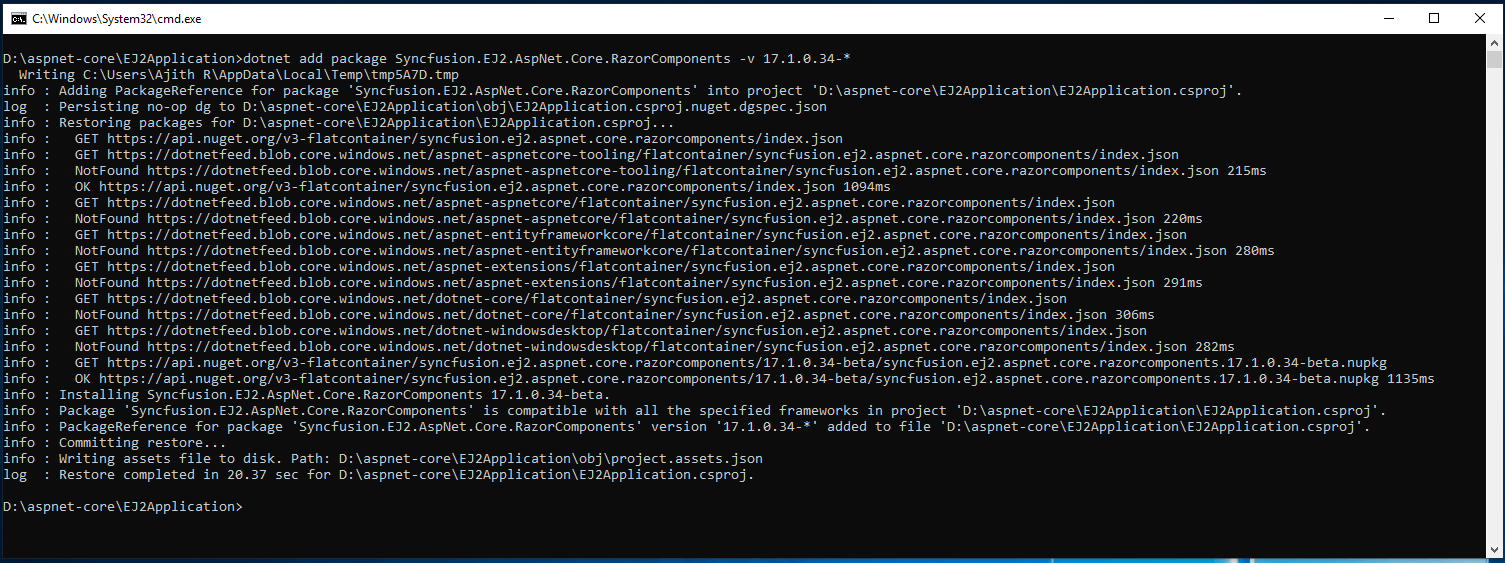
Installing Syncfusion ASP.NET Core Razor Components NuGet package- Open the ~/Components/_ViewImports.cshtml file and import the Syncfusion.EJ2.RazorComponents at the end.
@addTagHelper *, Syncfusion.EJ2.RazorComponents
- Add the required client-side resources as
CDNreferences in the<head>element of the ~/Pages/index.cshtml file.
<head>
    .....
    .....
    <link href="https://cdn.syncfusion.com/ej2/material.css" rel="stylesheet" />
    <script src="https://cdn.syncfusion.com/ej2/dist/ej2.min.js"></script>
    <script src="https://cdn.syncfusion.com/ej2/dist/ejs.introp.min.js"></script>
</head>
- Create a folder named Grid inside ~/Components/Pages/ and add the Default.razor file for rendering the DataGrid component.
- The
Razor Componentsapplication itself has the WeatherForecastService for data binding. It can be validated in the link<localhost>/fetchdataonce the application is run in the web browser. We are using the same service to bind the data to the Syncfusion DataGrid component.
@page "/Grid/Default"

@using EJ2Application.Services
@inject WeatherForecastService ForecastService
@using Syncfusion.EJ2.RazorComponents.Grids

<h2>Syncfusion DataGrid in Razor Components</h2>

<EjsGrid id="Grid" DataSource="@forecasts" AllowPaging="true" AllowSorting="true">
    <GridColumns>
        <GridColumn Field=@nameof(WeatherForecast.Date) HeaderText="Date" Format="yMd" Type="date" Width="130"></GridColumn>
        <GridColumn Field=@nameof(WeatherForecast.TemperatureC) HeaderText="Temp. (C)" Width="120"></GridColumn>
        <GridColumn Field=@nameof(WeatherForecast.TemperatureF) HeaderText="Temp. (F)" Width="150"></GridColumn>
        <GridColumn Field=@nameof(WeatherForecast.Summary) HeaderText="Summary" Width="130"></GridColumn>
    </GridColumns>
</EjsGrid>

@functions {
    WeatherForecast[] forecasts;

    protected override async Task OnInitAsync()
    {
        forecasts = await ForecastService.GetForecastAsync(DateTime.Now);
    }
}
- Now, use the following command line to run the application and it will run in a specific
<localhost>port. For example:http://localhost:5000.
dotnet run
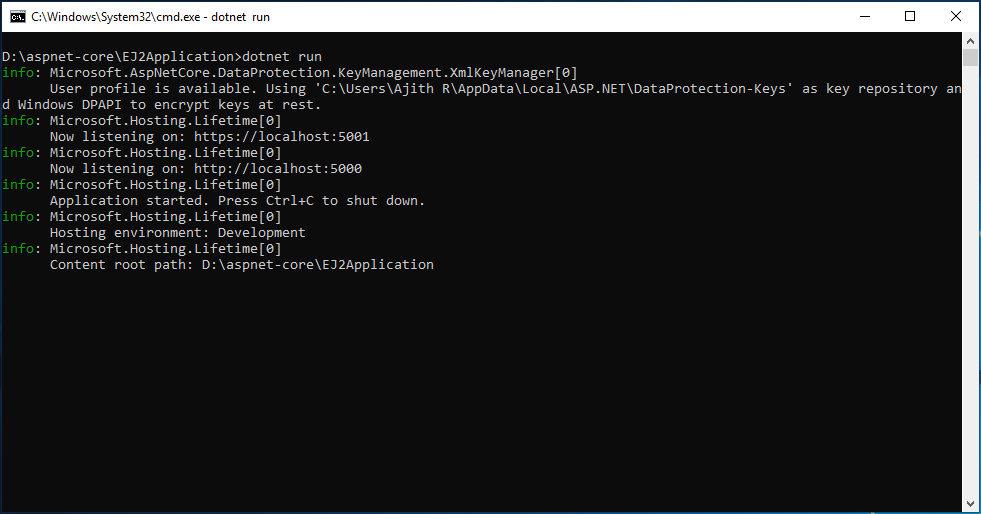
Running the application- Finally, navigate to the link
<localhost>/Grid/Defaultand the final output of the Synfusion DataGrid inRazor Componentswill look like the following.
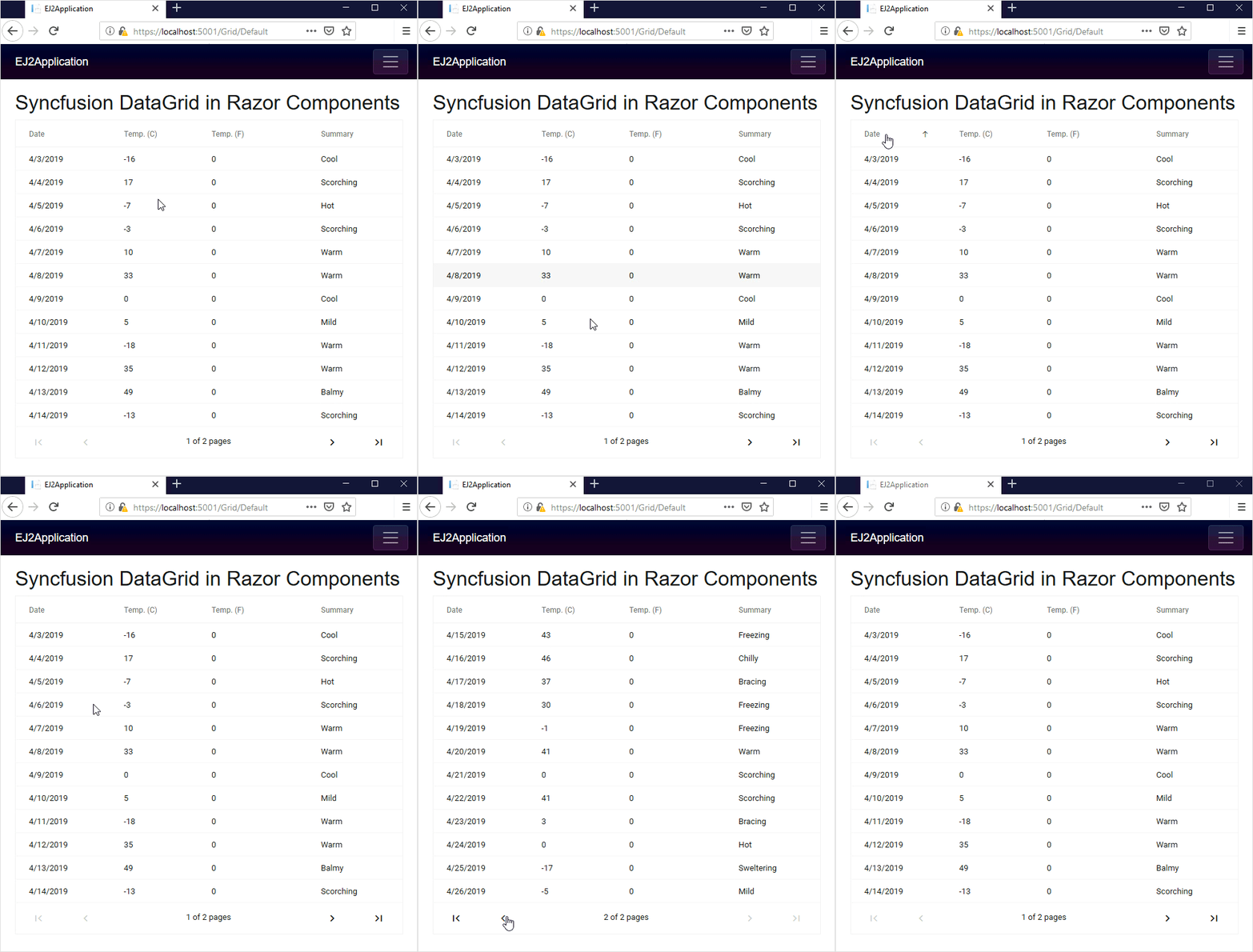
The Final output of Syncfusion DataGrid in Razor ComponentsThis application is available in the GitHub repository for reference.
Summary
In this blog, we have learned about Blazor /Razor Components, and rendering a Syncfusion UI control in ASP.NET Core Razor Components. Blazor is still an experimental project. So it is not yet ready for production. We are eagerly waiting to integrate the complete support of Blazor / Razor Components in the Syncfusion UI controls. Currently, we have provided most of the basic supports in our components. We will implement more features in our upcoming Volume 2, 2019, release. Feel free to download and test our preview version of Razor Components (demos, documentation, GitHub) and share your feedback in the support incident page or feedback page.



 No spam, just valuable updates.
Comments (14)
[…] Introducing Syncfusion’s ASP.NET Core Blazor / Razor Components (Ajith R.) […]
How does the JS for the components run on the server when running in Server-Side Blazor mode?
Hi STILGAR,
Thanks for your comments and sorry for the delay.
Our Blazor components property initialization has been done in the server-side and the components will be rendered in client-side by using jsinterop and SignalR.
Please let us know if you need any further assistance on this.
Regards,
Ajith R
… [Trackback]
[…] Informations on that Topic: blog.syncfusion.com/post/introducing-syncfusions-asp-net-core-blazor-razor-components.aspx […]
Hello!
Experimenting with your components.
I use the dialog component EjsDialog, I try to set the window title with the code, but it is not displayed. If I fill in the header attribute in the template, then everything is fine. And when I set Header property in the code – there is title blank.
Perhaps this is some kind of bug. You have no examples in the examples to change the window title in the code using the Header property.
Hi Arty,
Based on shared information, we were unable to reproduce the issue in our end. So, we requested some additional details in your forum.
https://www.syncfusion.com/forums/144612/the-title-of-the-dialogue-is-not-specified-from-the-code
Kindly share the details in the forum to follow up further.
Regards,
Rajendran R.
Hi Arty,
The Blazor Dialog provides the following ways to set its header from code.
1. If you want to set dialog’s header on page initialization itself, set by overriding “OnAfterRender” method. please find the code snippet below.
@functions
{
EjsDialog EJ2Dialog;
protected override void OnAfterRender()
{
this.EJ2Dialog.Header = “Title set from code”;
}
}
2. If you want to set dialog’s header dynamically through event, set using “StateHasChanged” and “DataBind” method of Dialog component. Please find the code snippet below.
@functions
{
EjsDialog EJ2Dialog;
public void SetHeader()
{
this.EJ2Dialog.Header = “Set Header on Button click”;
StateHasChanged();
this.EJ2Dialog.DataBind();
}
}
Note: Upgrade your nuget package reference to latest version.
We have prepared the sample for your requirement and attached the sample in this link.
Sample: Dialog-1920486527
Regards
Rajendran R
{ Blazor + Syncfusion } is definitely a game changer in JavaScript world.
Hi,
Is there a chance for Syncfusion Blazor components to be rewritten with C# in the future.
Hi Ahmet,
Thanks for your comments.
Currently we do not have plan to rewrite the components in C#. We are working to provide native control experience with our current component set itself. We will decide about rewriting based on the customers demand in future.
Regards,
Ajith R
posso usare l’italiano or english
i am from Italy hello. Can you help me translate? /rardor
Your demo link on the product page is broken
https://ej2.syncfusion.com/blazor/Grid/DefaultFunctionalities?theme=material&_ga=2.205388560.1038347163.1578658835-848422193.1578658835
“The resource you are looking for has been removed, had its name changed, or is temporarily unavailable.”
Hi Marshall,
Please refer this link for Blazor demos. We will fix the broken links on the website shortly.
https://blazor.syncfusion.com/demos/Grid/DefaultFunctionalities/
Regards,
Vijay