
 Sumathi Uthayakumar
TL;DR: Learn how to extract text, images, and metadata from PDF documents in .NET MAUI iOS apps using C#. This guide covers clean implementation patterns, efficient resource handling, and best practices to build reliable, high-performance PDF data extraction features using Syncfusion libraries.
Have you ever wondered why many iOS apps require support for PDFs? From invoices and contracts to reports and study materials, PDFs are everywhere. However, simply viewing a PDF isn’t enough; modern apps require advanced features such as text, image, and structured data extraction to make information searchable, automate workflows, and ensure compliance.
Using a .NET MAUI PDF extraction library in your iOS environment makes these tasks easier and more efficient. This approach allows developers to build cross-platform apps without relying on native iOS SDKs, while still delivering powerful PDF processing capabilities.
For iOS developers, building such functionality can be challenging, especially when aiming for cross-platform compatibility. That’s where Syncfusion .NET PDF Library comes in. Combined with .NET MAUI, it enables you to integrate PDF text and image extraction, as well as more, into your iOS apps using a single codebase.
In this guide, you’ll learn how to integrate an iOS PDF extraction library through .NET MAUI. We’ll cover everything from setting up the environment to implementing PDF text and image extraction with practical code examples. By the end, you’ll be ready to build apps that handle PDFs like a pro.
PDF extraction library: What does it mean?
A PDF extraction library is a tool that allow you to take content out of a PDF and use it in your app. This includes extracting text, images, and metadata, not just plain text. For example, you can extract text from PDFs to make documents searchable or extract images for reports and visual analysis.
Advanced PDF extraction libraries also support structured data extraction, enabling you to retrieve content such as invoices, data, and forms for seamless processing.
Why is PDF extraction important for iOS development?
The .NET MAUI PDF extraction library in your iOS environment turns static documents into actionable information, making apps smarter and more efficient.
Instead of just viewing a file, an app can read its contents to extract invoice totals, case details, or study notes. Businesses want to automate workflows, analyze data, and ensure regulatory compliance.
- Legal apps extract case details from lengthy documents.
- Finance apps pull invoice data for accounting.
- Educational apps use content from eBooks for study materials.
Syncfusion .NET PDF Library: A robust PDF extraction library
The Syncfusion .NET PDF Library is a powerful solution for developers who need a reliable iOS PDF extraction library through .NET MAUI. It supports text extraction, image extraction, and metadata handling, making it ideal for apps that process documents.
Whether you need to:
- Extract text from PDFs for searching and indexing.
- Pull images like charts or logos for reports.
- Work with structured data such as form fields and metadata.
The Syncfusion .NET PDF Library offers all these features in a single package for your iOS apps via .NET MAUI.
One of its biggest advantages is cross-platform support via .NET MAUI, allowing you to build apps for iOS, Android, and Windows using a single codebase. Integration is simple with NuGet, and the library is optimized for performance and accuracy. For developers building document-heavy apps, Syncfusion offers a feature-rich and efficient approach to PDF data extraction without complexity. Build powerful PDF viewing experiences in .NET MAUI with built-in support for annotations, highlighting, form filling, signatures, page navigation, thumbnails, bookmarks, and text search.
Setting up Syncfusion .NET MAUI PDF library
Building an iOS app that extracts text and images from PDFs is easier than you think with Syncfusion’s .NET PDF Library.
Follow this step-by-step guide to get started:
Step 1: Create a new .NET MAUI project
To begin, set up your project environment:
- Open Visual Studio for Mac (or Visual Studio 2022 paired with Mac).
- Select .NET MAUI App template.
- Enter the project name (e.g., PdfExtractionSample) and click Create.
Step 2: Add the required NuGet package
Next, install the libraries needed for PDF extraction:
- In Solution Explorer, right-click your project → Manage NuGet Packages.
- Search for Syncfusion.Pdf.Net and install it.
- This package enables PDF text extraction and image extraction for iOS apps.
Note: To extract images, ensure you add the Syncfusion.Pdf.Imaging.Net package to your project.
Step 3: Include Required Namespaces
Add the necessary namespaces in your code-behind file:
using Syncfusion.Pdf;
using Syncfusion.Pdf.Parsing;
using Syncfusion.Pdf;
using Syncfusion.Pdf.Graphics;
Step 4: Load a PDF document
Before loading a PDF, ensure platform-specific helper files are properly configured for .NET MAUI. For detailed setup instructions, refer to the official documentation.
Once your environment is ready, the next step is to load an existing PDF. For iOS apps, the recommended approach is to embed the PDF as a resource within your project. This approach avoids file permission issues and ensures the PDF remains consistently accessible during runtime.
// Access the embedded PDF file from the app's assembly.
// Make sure the PDF (e.g., Invoice.pdf) is added to your project
// and its Build Action is set to "EmbeddedResource".

Stream pdfStream = typeof(App).GetTypeInfo().Assembly.GetManifestResourceStream("Invoice.pdf");
//Load the document
PdfLoadedDocument   loadedDocument = new PdfLoadedDocument(pdfStream);
If you want to create a new PDF document instead of loading an existing one, you can do that easily. For complete steps and examples, check our official documentation for creating PDFs.
Step 5: Run the iOS project on Mac
With everything set up, it’s time to test your app on an iOS device or simulator:
- Connect your iPhone or use Xcode iOS Simulator.
- In Visual Studio for Mac, select iOS Simulator or your device from the target dropdown.
- Click Run to deploy the app.
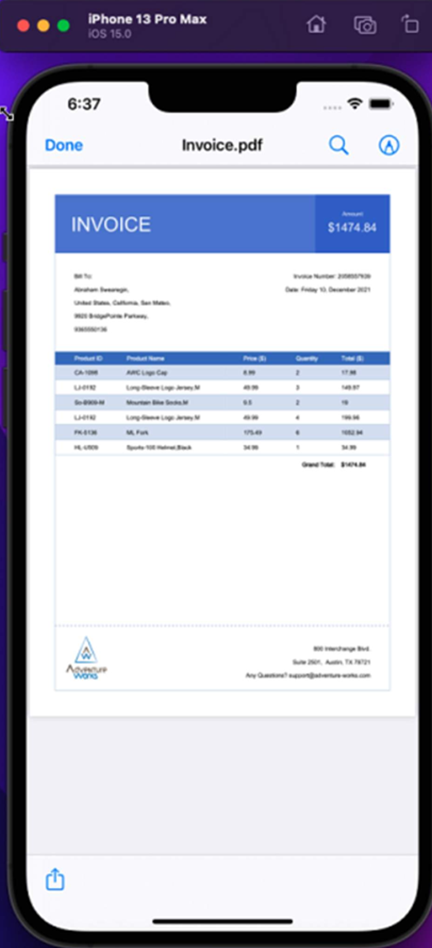
Here’s what the PDF in iOS Simulator looks like:
PDF extraction techniques
PDF extraction isn’t limited to just pulling text or images. An iOS PDF extraction library via .NET MAUI can handle multiple content types, making your app more powerful and user-friendly:
- Text extraction: Retrieve full document text or page-specific text for indexing, search, and analytics.
- Image extraction: Extract embedded images like charts, logos, and illustrations for reuse or processing.
- Metadata extraction: Access document properties such as author, title, and creation date for compliance and organization.
- Form fields: Extract dynamic input fields for structured data handling.
- Attachment extraction: Retrieve embedded files from PDFs for advanced workflows.
- Annotation extraction: Extract annotations for review workflows.
Now, let’s dive into the two most common types:
Text extraction
Text extraction is essential for apps that need to index documents, analyze content, or automate workflows. With Syncfusion’s .NET PDF Library, you can easily extract:
- Full document text for complete analysis.
- Page-specific text for targeted operations.
The following code example shows how to extract text from a PDF on a specific page, perfect for indexing or search features:
// Access the embedded PDF file from the app's assembly.
// Make sure the PDF (e.g., PDFSuccinctly.pdf) is added to your project
// and its Build Action is set to "EmbeddedResource".

Stream pdfStream = typeof(App).GetTypeInfo().Assembly.GetManifestResourceStream("PDFSuccinctly.pdf");
//Load the document
PdfLoadedDocument loadedDocument = new PdfLoadedDocument(pdfStream);
//Load the first page.
PdfPageBase page = loadedDocument.Pages[0];

//Extract text from first page.
string extractedText = page.ExtractText();
The following code example shows how to extract text from the entire PDF document.
// Access the embedded PDF file from the app's assembly.
// Make sure the PDF (e.g., PDFSuccinctly.pdf) is added to your project
// and its Build Action is set to "EmbeddedResource".
Stream pdfStream = typeof(App).GetTypeInfo().Assembly.GetManifestResourceStream("PDFSuccinctly.pdf");
//Load the document
PdfLoadedDocument loadedDocument = new PdfLoadedDocument(pdfStream);
// Extract all the text from the PDF document pages
foreach (PdfLoadedPage loadedPage in loadedDocument.Pages)
{
    extractedText.Append(loadedPage.ExtractText());
}
Here’s the extracted data from the sample PDF:
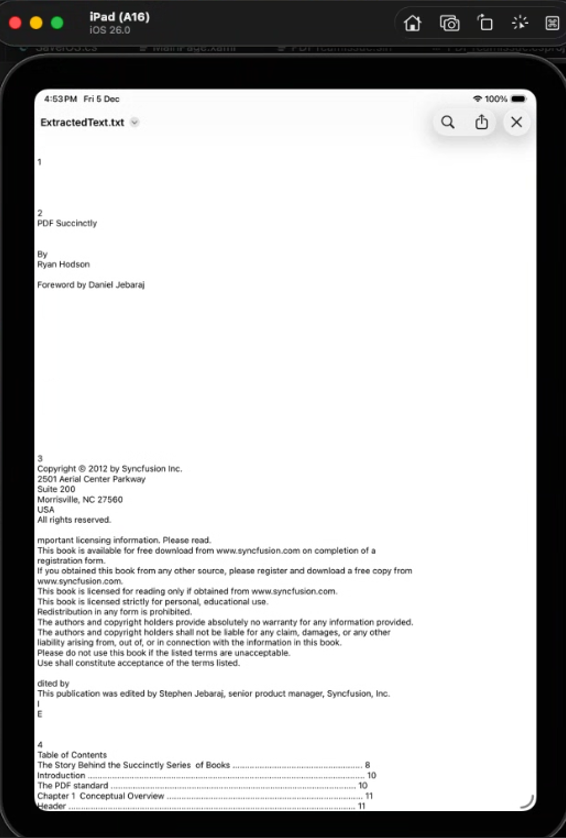
Image extraction
Images often contain critical visual data like charts, logos, or illustrations. Syncfusion .NET PDF Library allows you to extract images while preserving their original quality. This is useful for scenarios like generating reports, reusing graphics, or performing image analysis.
Here’s how you can do it in code:
// Access the embedded PDF file from the app's assembly.
// Make sure the PDF (e.g., Template.pdf) is added to your project
// and its Build Action is set to "EmbeddedResource".

Stream pdfStream = typeof(App).GetTypeInfo().Assembly.GetManifestResourceStream("Template.pdf");
//Load the document
PdfLoadedDocument   loadedDocument = new PdfLoadedDocument(pdfStream);
//Load the first page.
PdfPageBase page = loadedDocument.Pages[0];

PdfImageInfo[] extractedImages = page.ExtractImages();
The following image shows the result:

You can learn more about the different types of data you can extract from a PDF using C# in our blog post.
Real-world use cases of PDF extraction in iOS apps
PDF extraction isn’t just a technical feature. It solves real business problems across industries. Using a PDF extraction in .NET MAUI iOS apps, developers can build smarter apps that automate workflows and improve efficiency.
Here are some practical scenarios:
- Legal: Extracting case-related text from lengthy documents for quick reference and compliance.
- Finance: Streamline accounting by capturing invoice details and transaction records through PDF data extraction.
- Education: Extract text, images, and attachments from eBooks to create searchable and well-organized study materials.
- Healthcare: Improve patient care by extracting text from scanned PDF reports using OCR processes and seamlessly integrating the data into electronic health record (EHR) systems.
By leveraging PDF text and image extraction, as well as advanced features like extracting text from scanned PDFs through the OCR process, businesses can transform static documents into actionable insights.
Frequently Asked Questions
Absolutely. With .NET MAUI and Syncfusion’s PDF library, you can build apps for iOS, Android, and Windows using a single codebase.Is Syncfusion PDF Library suitable for cross-platform apps?
You can do both. Extract page-specific text for targeted workflows or full-document text for comprehensive search and analysis.Can I extract text from specific pages?
Yes. Syncfusion’s library supports: Text extraction (full document or page-specific) and Image extraction (charts, logos, illustrations). It also supports extracting metadata, annotations, form fields, and attachments.Can I extract both text and images from PDFs?
Yes, with optical character recognition technology, it’s possible to extract text and data even from scanned PDFs.Can I extract data from scanned PDFs?
Extracted data can be used for tasks such as data analysis, report generation, automated form filling, data migration, and integration with other systems.Where is data extracted from a PDF file used?
Yes. Install Do I need extra packages for image extraction?
Syncfusion.Pdf.Imaging.Net in addition to Syncfusion.Pdf.Net to access the image extraction APIs.
Yes. You can extract interactive form fields and their values, which is useful for automating data entry and processing structured information.Is it possible to extract form fields from PDFs?
Yes. If you only need certain information, such as an invoice number, you can extract text from specified bounds within a PDF using Syncfusion PDF Library.Can I extract specific text from predefined bounds in a PDF?

Conclusion
Thank you for reading! Integrating a PDF extraction library in .NET MAUI IOS apps using Syncfusion .NET PDF Library offers a robust, cross-platform solution for handling PDFs beyond simple viewing. With advanced capabilities like text, image, metadata handling, form fields, and attachment extraction, developers can build smarter apps that automate workflows and improve searchability across industries, including legal, finance, education, and healthcare.
Ready to get started? Check our official documentation and begin integrating PDF extraction into your iOS apps today!
If you’re a Syncfusion user, you can download the setup from the license and downloads page. Otherwise, you can download a free 30-day trial.
You can also contact us through our support forum, support portal, or feedback portal for queries. We are always happy to assist you!







 No spam, just valuable updates.