
 Arulraj Aboorvasamy
TL;DR: Choosing a PDF library in 2026 goes beyond basic rendering. Developers must evaluate ISO compliance, OCR and data extraction capabilities, cloud and serverless compatibility, security features, and performance optimizations like linearization and incremental updates. This guide provides a practical checklist, decision matrix, and real-world scenarios to help you select the right solution for modern applications.
Many teams learn the hard way that a quick win PDF helper breaks the moment it hits real workloads, failing compliance checks, choking on large files, or stalling inside serverless functions. Then comes the rewrite. Your best move is to avoid that path entirely by evaluating libraries against today’s real requirements: PDF/UA-2 accessibility, PAdES/LTV signatures, true redaction, cloud and WASM deployment, and AI-ready extraction.
This comprehensive guide helps developers across JavaScript, Python, Java, PHP, and .NET select a library that supports all ISO-standard PDF types, integrates with AI and cloud-native workflows, and delivers military-grade security, all while remaining performant and developer-friendly.

Essential basics you should validate first
Before you explore new trends, ground yourself in the basics. Our Resource Center emphasizes five pillars for PDF library selection:
- Functionalities: From basic creation to advanced editing (e.g., merging, annotations, digital signatures).
- Performance: Handling large-scale operations without choking on memory or CPU.
- Integration ease: Integration with your development environment, a clean and intuitive API that minimizes the learning curve, and quick start tutorials.
- Cost and licensing: Open source vs. commercial, with distribution rights and usage limitations.
- Support and community: Clear and up-to-date documentation, with enterprise-grade maintenance. Regular updates with bug fixes, new features, security updates, and compatibility enhancements.
Why your PDF library choice matters now
The following table highlights five transformative forces shaping PDF processing today.
| Trend | Impact on PDF Processing |
| AI-driven workflows | Extract meaning, not just text. AI software will summarize, classify, and detect anomalies from the PDF content. |
| Cloud & serverless | Run in AWS Lambda, Azure Functions, Vercel, with the latest infrastructure. |
| Regulatory compliance | PDF/UA (accessibility), PDF/A (archiving), ZUGFeRD (e-invoicing). |
| Security threats | Quantum risks, deepfakes, supply chain attacks. |
| User expectations | Instant load, searchable scans, biometric sign-off. |
ISO-Standard PDF types: Your library must support all
A robust PDF library does more than just open files; it preserves the original intent across various specialized formats. PDFs come in many types, each tailored for specific scenarios. The following table outlines these types and highlights their unique characteristics in context.
| PDF Type | ISO Standard | Use Case | Required Library Capabilities |
| PDF/A-1a/2u/3/4/4e/4f | ISO 19005 | Long-term digital preservation (including engineering content in 4e). | Font embedding, metadata, no JS, validation, U3D/PRC support (for 4e). |
| PDF/X-1a/4/6 | ISO 15930 | Print-ready graphics. | CMYK support, bleed boxes, ICC profiles, preflight checks. |
| PDF/VT-1/2 | ISO 16612 | Personalized transactional print. | Data merging, high volume output, and color management. |
| PDF/UA-1/2 | ISO 14289 | Accessibility (WCAG 2.2, ADA, EU EAA). | Semantic tagging, reading order, alt text, and logical structure maps. |
| PDF/E-1 | ISO 24517 | Engineering & 3D CAD documentation. | U3D/PRC models, measurements, annotations. |
| PDF/R-1 | ISO 19936 (2024) | Raster image archiving. | Multi-page TIFF-like (Raster) structure, OCR-ready, compression. |
Game-changing technologies in modern PDF libraries
Modern PDF libraries have moved far beyond simple file generation. As digital documents now power global e‑invoicing, AI-driven automation, and real-time analytics, PDF SDKs are evolving into platforms for intelligence, security, and scale.
Below are four technologies redefining what PDF processing means today.
AI-powered document intelligence
AI is transforming PDFs from static files into structured, machine‑readable data sources. Instead of just extracting text, modern libraries combine machine learning and computer vision to interpret layout, detect tables, infer semantics, and feed downstream automation pipelines in finance, legal, and healthcare.
Today’s ecosystem supports advanced capabilities such as:
- OCR with neural networks (e.g., LSTM‑based engines).
- Layout-aware parsing with bounding boxes, reading order, and table grids.
- Semantic extraction for classification, summarization, or risk/fraud checks.
- Integration with AI frameworks like ML.NET or Azure Cognitive Services.
Example: OCR extraction from a scanned PDF
// Syncfusion .NET Example: Extraction from PDF/R (scanned)
using Syncfusion.OCRProcessor;
using Syncfusion.Pdf.Parsing;

using (OCRProcessor processor = new OCRProcessor())
{
    PdfLoadedDocument doc = new PdfLoadedDocument("scanned-invoice.pdf");
    processor.Settings.Language = Languages.English;
    string text = processor.PerformOCR(doc);
}
Cloud-native and serverless-ready
Cloud native PDF libraries are optimized for distributed, event-driven environments. They support streaming from cloud storage, handle burst workloads, and scale without manual provisioning. Serverless functions such as AWS Lambda, Azure Functions, and Google Cloud enable cost-efficient, on-demand PDF generation and processing.
Cloud optimized features commonly include:
- Zero allocation, stream first APIs.
- Direct processing from S3, Blob Storage, or CDN URLs.
- AOT compilation for .NET Native or GraalVM.
This architecture makes it easy to support high-volume workflows, like generating thousands of invoices per second or processing documents in parallel during peak load.
Next-Gen security stack
As cyber threats escalate nowadays, with quantum computing looming and deepfakes proliferating, PDF libraries must incorporate robust, future-proof security stacks. This goes beyond basic encryption to layered defenses that protect document integrity, authenticity, and confidentiality in regulated sectors like finance, healthcare, and government.
| Feature | Why It Matters |
| AES-256 with Revision 6 | Standard in regulated industries |
| Biometric Signatures | Fingerprint/face ID embedded in PDF |
| Blockchain Timestamping | Immutable audit trail (e.g., Ethereum, Hyperledger) |
| Quantum-Resistant Crypto | Protects against “Harvest Now, Decrypt Later” |

Linearized + Optimized output
Linearized PDFs, also known as Fast Web View or web-optimized PDFs, are specially formatted to allow the first page to load instantly in a web browser, even before the entire file has finished downloading.
In a web-centric world, optimizing the PDF files is pivotal. Users expect instant access on low-bandwidth devices. You can linearize the PDFs using optimization tools like Ghostscript, reducing load times and environmental impact in the cloud apps.
The following are the advantages of optimizing the PDF files:
- First page loads in
<1second on 3G internet speed. - File size reduction via intelligent compression.
- Sustainability win:
Lower bandwidth = greener apps.
Decision Matrix: Choose the right PDF library for your project
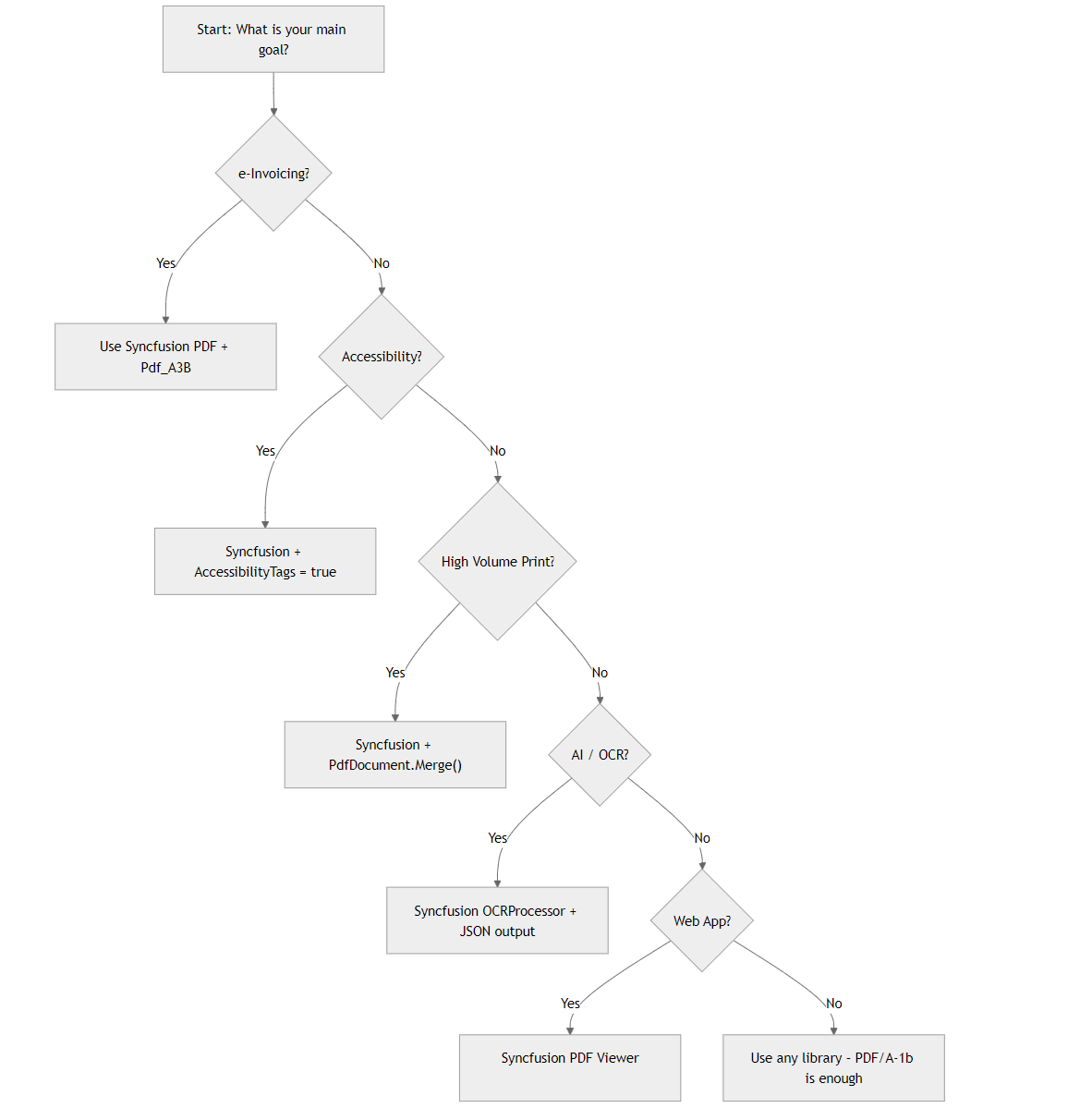
Here’s a complete, practical guide to the decision matrix to decide the PDF library needed for your project.
| Project Need | Must-Have Features |
| e-Invoicing (ZUGFeRD, Factur-X) | PDF/A-3 + embedded XML |
| Accessibility Compliance | PDF/UA-2 auto-tagging |
| High-Volume Print | PDF/VT data merge |
| AI Document Analysis | OCR + structured output |
| Web-First Apps | Linearized + viewer SDK |
Use this real-world workflow.
Real-world example
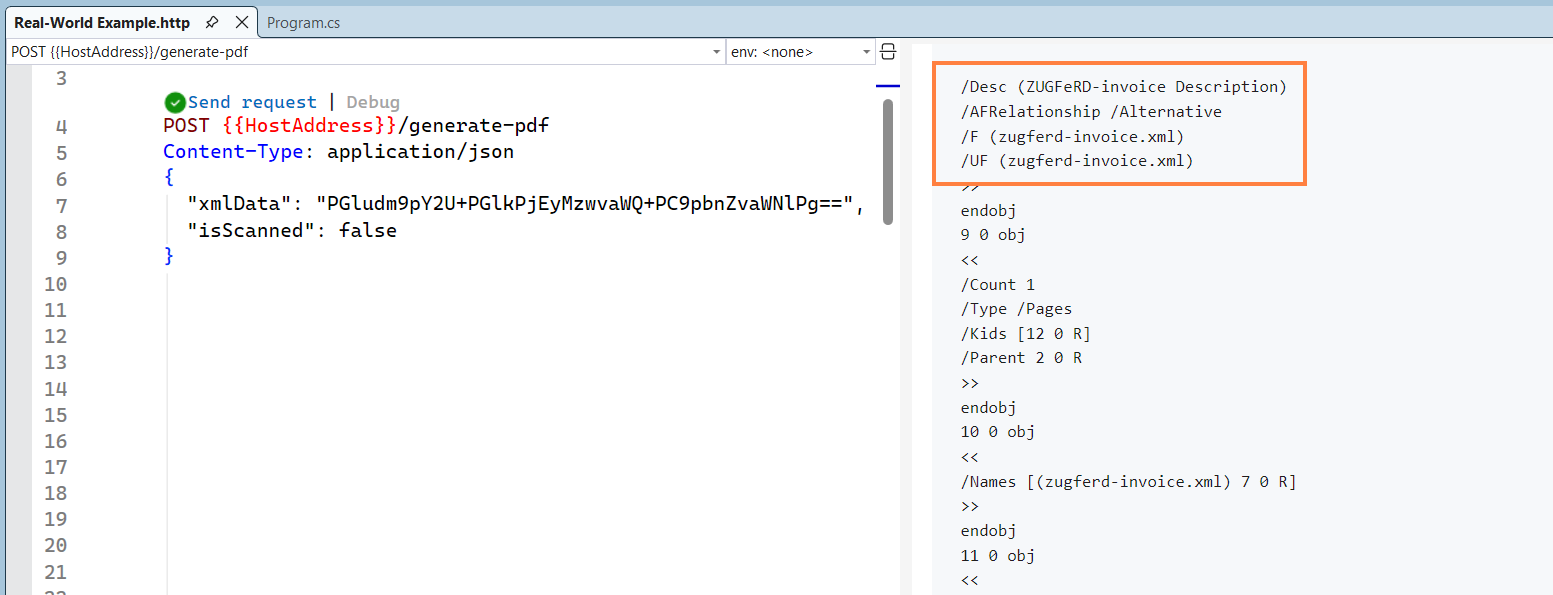
Generate a PDF/A-3B compliant invoice with embedded XML (ZUGFeRD).
using Syncfusion.Pdf;
using Syncfusion.Pdf.Graphics;
using Syncfusion.Pdf.Interactive;

app.MapPost("/generate-pdf", async (InvoiceRequest request) =>
{
    // Create PDF/A-3B
    PdfDocument doc = new PdfDocument(PdfConformanceLevel.Pdf_A3B);
    doc.ZugferdConformanceLevel = ZugferdConformanceLevel.Basic;

    PdfPage page = doc.Pages.Add();
    PdfGraphics g = page.Graphics;

    using var fontStream = new FileStream("Arial.ttf", FileMode.Open, FileAccess.Read);
    PdfTrueTypeFont font = new PdfTrueTypeFont(fontStream, 16f);

    g.DrawString("Invoice #INV-2025", font, PdfBrushes.Black, new PointF(20, 20));

    // Attach ZUGFeRD XML
    var attachment = new PdfAttachment("zugferd-invoice.xml", request.XmlData);
    attachment.MimeType = "application/xml";
    attachment.Relationship = PdfAttachmentRelationship.Alternative;
    attachment.Description = "ZUGFeRD-invoice Description";
    attachment.ModificationDate = DateTime.Now;
    doc.Attachments.Add(attachment);

    using var ms = new MemoryStream();
    doc.Save(ms);
    doc.Close(true);

    return Results.File(ms.ToArray(), "application/pdf", "Invoice.pdf");
});


public class InvoiceRequest
{
    [property: JsonPropertyName("xmlData")]
    public required byte[] XmlData { get; set; }

    [property: JsonPropertyName("isScanned")]
    public bool IsScanned { get; set; }
}
After calling the API with xmlData, the data will be added as a ZUGFeRD XML file in the PDF.
Final checklist: Is your PDF library ready?
- Supports all ISO types (PDF/A, X, VT, UA, E, R).
- Enables AI extraction with structured output.
- Runs in serverless/cloud with low memory.
- Offers biometric + blockchain security.
- Generates Linearized PDFs for instant load.
- Includes accessible viewer (bonus).
Frequently Asked Questions
Modern libraries with native conformance handling and attachment APIs typically cut integration effort compared to older toolkits, because developers avoid writing custom validation layers or manual XML embedding logic. Teams report moving from proof-of-concept to production in weeks instead of months.How much development time can be saved when building enterprise e-invoicing systems that must comply with both regional XML standards and long-term archiving rules?
Commercial SDKs with royalty-free distribution and per-developer licensing scale more predictably than open-source options that impose copyleft restrictions or require separate enterprise support contracts. This approach eliminates hidden per-document fees and simplifies audit compliance for multi-tenant environments.What licensing model works best for a SaaS platform that processes millions of PDFs monthly across multiple client tenants?
Yes. Most modern PDF SDKs support incremental migration. If the application uses Inversion of Control (IoC), the underlying PDF library can be swapped with minimal changes, typically limited to dependency updates and minor API adjustments, while preserving existing business logic.Is it feasible to migrate an existing PDF workflow built on a legacy open-source library to a standards-complete solution without rewriting the entire application?
Modern PDF libraries are designed to handle both features efficiently. When layout analysis, AI extraction, and accessibility tagging are executed in a single processing pass, large scanned documents (such as 50 pages) can typically be processed in near‑real‑time on standard cloud infrastructure, while producing structured JSON outputs suitable for LLMs and accessible formats like screen readers.What real-world performance impact should be expected when enabling both structured AI extraction and accessibility tagging on large scanned documents?
Finance, healthcare, and government agencies see the greatest value. These features reduce the need for separate encryption gateways and third-party signing services, cutting audit preparation time and simplifying adherence to evolving standards like post-quantum cryptography mandates.In which regulated sectors do quantum-resistant cryptography and biometric signature capabilities deliver the highest compliance ROI?
Automatic linearization improves user experience by enabling progressive document rendering, allowing users on slow or high‑latency networks to view the first page quickly, reducing perceived load time and bounce rates. At scale, efficient streaming lowers bandwidth usage, CDN load, and operational costs.How does automatic linearization (like PDFs) affect user experience and infrastructure costs in global web and mobile applications?
Teams avoid annual re-architecture cycles when standards evolve (e.g., newer PDF/R variants or updated OCR engines). Regular SDK releases incorporate these changes automatically, freeing engineering resources for core product features instead of chasing compliance patches every 12–18 months.What long-term maintenance advantages arise from selecting a library that continuously tracks new ISO revisions and AI model updates?
Conclusion
Thank you for reading! Choosing a PDF library is an engineering decision, not a feature list. Use the checklist and one‑day spike to validate accessibility, signatures, redaction, scale, and AI readiness against your real files. You’ll ship faster, cut risk, and avoid rewrites. If you want a head start, download a sample corpus + checklist and run the same tests with your preferred PDF Library trial.
Explore Syncfusion® .NET PDF Library, it’s battle-tested, standards-complete, and AI-ready.
What’s the PDF challenge you keep running into? Drop a comment, let’s solve it together.

 No spam, just valuable updates.