
 Naveenkumar Sanjeevirayan
TL;DR: The new .NET MAUI Color Picker is a powerful, cross-platform UI control that simplifies color selection in your apps. With support for palette and spectrum modes, custom colors, opacity control, and theme adaptation, it’s perfect for developers building modern, design-focused applications on iOS, Android, macOS, and Windows. This blog walks you through its key features and how to integrate it into your project in just five steps.
Introducing the .NET MAUI ColorPicker: A seamless solution
Color selection is no longer a challenge for cross-platform apps. Whether you’re building a design tool, a theme customizer, or any app that needs color input, the new .NET MAUI Color Picker from Syncfusion makes it easy. With a sleek, intuitive interface and seamless support across iOS, Android, macOS, and Windows, this control helps you deliver a consistent and customizable user experience without the usual complexity.
Key features
The .NET MAUI Color Picker combines versatility with ease of implementation, offering developers these powerful capabilities:
- Color selection modes
- Custom color palette
- Direct input values
- Opacity control
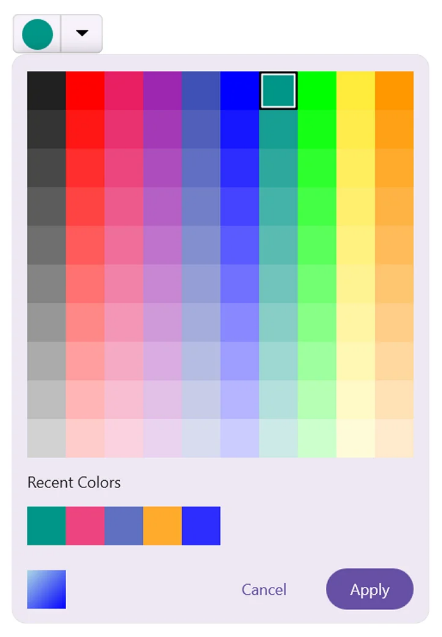
- Recent colors
- No color option
- Theme adaptation
- Inline mode
Color selection modes
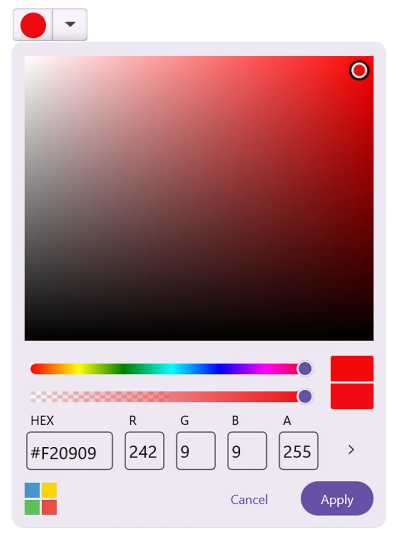
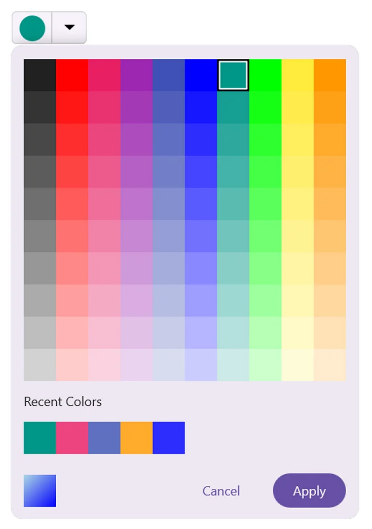
Switch effortlessly between two intuitive selection interfaces:
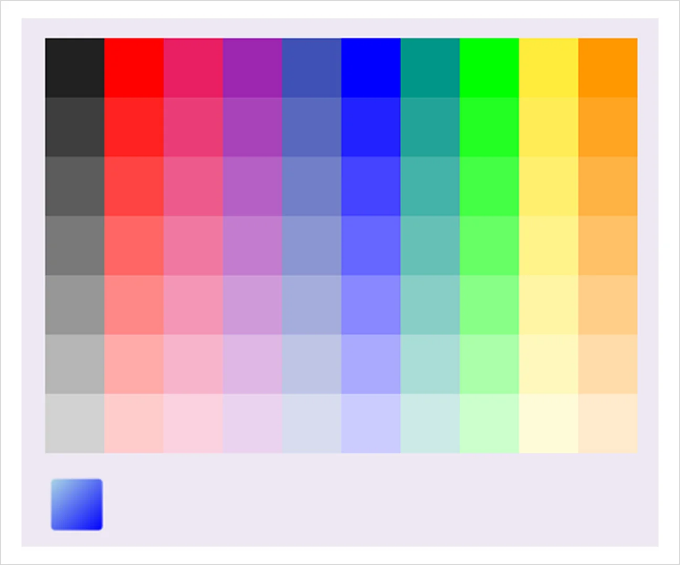
- Palette mode: Presents a grid of predefined colors for quick selection.
- Spectrum mode: Delivers a continuous color field for precise color picking.
 |
 |
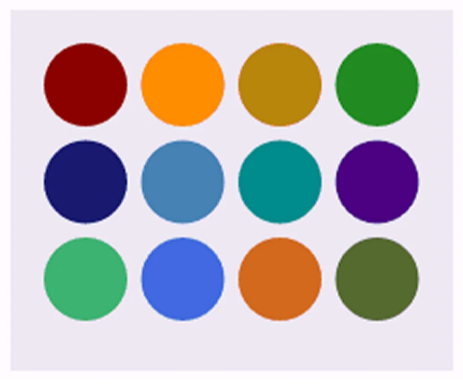
Custom color palette
Empower your users with personalization options:
- Add or remove custom colors to the palette.
- Save frequently used colors for easy access.
- Create application-specific color schemes.
Multiple format support
The control supports direct input of color values in multiple formats:
- RGB (Red, Green, Blue) for screen-based color work.
- HSV (Hue, Saturation, Value) for intuitive color adjustment.
- HEX codes for web and design compatibility.
Opacity control
Easily adjust transparency levels:
- Interactive slider for visual opacity adjustment.
- Direct numeric input for precise alpha values.
- Perfect for creating semi-transparent UI elements.
Recent Colors panel
Boost productivity with automatic color history:
- Automatically records recently selected colors.
- Displays a convenient panel for quick reuse.
- Improves workflow efficiency in design tasks.
Theme adaptation
Maintain visual consistency through your application:
- Adapts seamlessly to system or app themes.
- Supports light and dark mode transitions.
- Ensures the color picker feels like a native part of your UI.
No color option
Provide complete flexibility with the ability to clear selections:
- Dedicated “No Color” option.
- Essential for optional color selection scenarios.
Interaction states
Take control of the user experience:
- Programmatically toggle the color picker’s enabled state.
- Prevent interaction during specific application states.
Inline mode
Integrate the color picker directly into your layouts:
- Embeds color selection UI within existing views.
- Eliminates the need for pop-up dialogs.
- Creating a more seamless user experience.
Getting started with the .NET MAUI Color Picker control
Follow these five steps to integrate the .NET MAUI Color Picker control into your application.
Step 1: Create a .NET MAUI project
Start by creating a new .NET MAUI project in Visual Studio.
Step 2: Add the Syncfusion® MAUI Inputs package
Syncfusion® .NET MAUI components are available in the NuGet gallery. Open the NuGet Package Manager in Visual Studio, search for the Syncfusion.Maui.Inputs package and install it.
Step 3: Register the handler
Register the handler for the Syncfusion® Core package in your MauiProgram.cs file.
using Syncfusion.Maui.Core.Hosting;

public static class MauiProgram
{
    public static MauiApp CreateMauiApp()
    {
        var builder = MauiApp.CreateBuilder();
        builder
            .ConfigureSyncfusionCore()
            .UseMauiApp<App>()
            .ConfigureFonts(fonts =>
            {
                fonts.AddFont("OpenSans-Regular.ttf", "OpenSansRegular");
                fonts.AddFont("OpenSans-Semibold.ttf", "OpenSansSemibold");
            });

        return builder.Build();
    }
}
Step 4: Add the namespace
Add the namespace Syncfusion.Maui.Inputs in your XAML page, as shown below.
xmlns:inputs="clr-namespace:Syncfusion.Maui.Inputs;assembly=Syncfusion.Maui.Inputs "Step 5: Initialize the Syncfusion® MAUI Color Picker control
Now, initialize the .NET MAUI Color Picker control, as shown below
<inputs:SfColorPicker x:Name="colorPicker" />Below is an example showcasing the Color Picker control in action.

GitHub reference
For more details, refer to the .NET MAUI Color Picker control demo on GitHub.

FAQs
Q: What platforms does the Syncfusion® .NET MAUI Color Picker support?
A: The control works seamlessly across iOS, Android, macOS, and Windows platforms.
Q: Can I customize the default colors in the palette?
A: Yes, you can add, remove, and modify colors in the palette to create application-specific color schemes.
Q: Does the Color Picker support transparency/opacity selection?
A: Yes, the control includes an interactive slider and direct input for precise alpha value adjustment.
Q: Can I use the Color Picker in popup and inline modes?
A: Absolutely! The control supports both pop-up dialogs and inline integration directly within your layouts.
Q: Is it possible to programmatically set or get the selected color?
A: Yes, you can bind to the selected color property and manipulate it programmatically within your application logic.
Conclusion
Thanks for reading! The Syncfusion .NET MAUI Color Picker isn’t just another UI control. It’s a productivity booster and a design enabler. Whether you’re building a creative tool, a theme editor, or a fully customized user interface, this control gives you the flexibility and consistency you need across platforms.
Ready to elevate your app’s user experience? Download our free trial and explore the full power of Syncfusion’s .NET MAUI suite.
Check out our Release Notes and What’s New pages for the other updates in this release.
If you have any questions or comments, you can reach us through our support forums, support portal, or feedback portal. We are always happy to assist you!









 No spam, just valuable updates.