
 Ganesan Rengasamy
TL;DR: The Syncfusion® Document Viewer for Visual Studio Code allows you to open and view Excel, CSV, and TSV files directly in your editor. With features like sorting, filtering, and read-only mode, it enhances your workflow within Visual Studio Code, saving time and boosting productivity.
The Syncfusion® Document Viewer for Visual Studio Code is an extension that lets you open and view Excel, CSV, and TSV files within VS code editor.
With features like sorting, filtering, and a toggleable read-only mode, this extension allows you to view your files without switching between different apps.
Prerequisites
Before getting started, make sure your environment meets the following requirements:
Installing the Syncfusion® Document Viewer Extension
You can install the Syncfusion® Document Viewer extension directly from Visual Studio Code. Here’s how:
- Launch Visual Studio Code.
- Open the Extensions View. Select the Extensions icon in the Activity Bar on the left side of the editor (it looks like four squares with one detached), or press Ctrl+Shift+X (Windows/Linux) or Cmd+Shift+X (Mac).
- Search for Syncfusion® Document Viewer in the search bar.
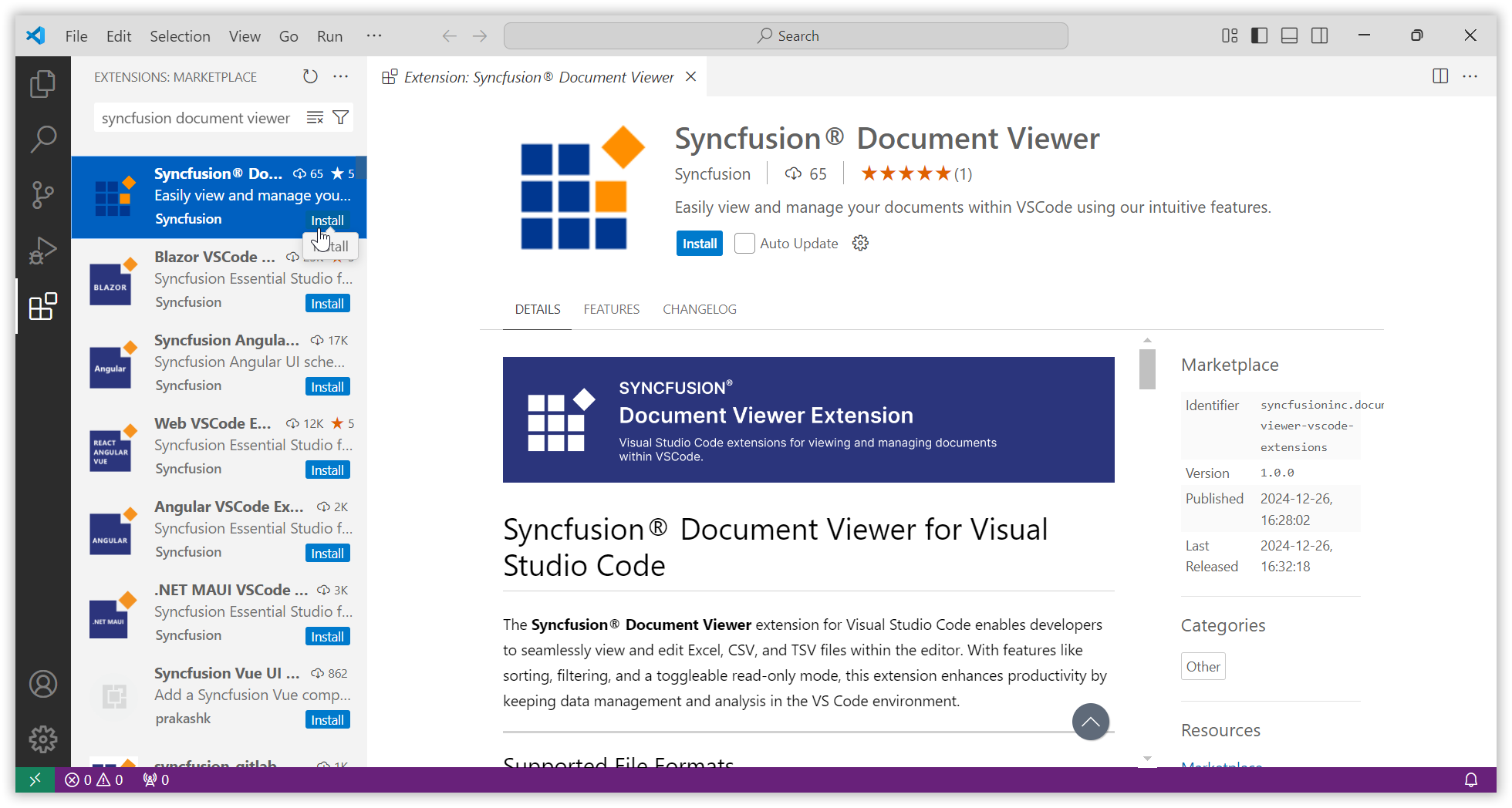
Syncfusion Document Viewer extension in Visual Studio Code - Click on the Install option to add the extension to your editor.
Once installed, you can start working with Excel, CSV, and TSV files within Visual Studio Code.
Why use the Syncfusion® Document Viewer?
The Syncfusion® Document Viewer streamlines your workflow by eliminating the need to switch between applications to view files, providing a more focused experience.
Key features
- Open and View: You can open and view Excel (.xlsx), CSV (.csv), and TSV (.tsv) files directly within Visual Studio Code, without need to switch between applications.
- Sorting and filtering: Utilize the sorting and filtering options in the column headers for improved viewing.
- Read-only mode: Safeguard your data by enabling read-only mode to prevent accidental edits.
How to customize the Syncfusion® Document Viewer extension?
The Syncfusion® Document Viewer allows you to customize its features to fit your workflow. Here’s how you can easily configure the extension:
Configuring read-only mode
You can enable read-only mode to view files without making any changes, helping to prevent accidental edits.
- Via the VSCode Status Bar:
- After opening a file, click the Syncfusion® Document Viewer icon in the VSCode status bar.
- A QuickPick bar will appear at the top of VSCode, with Enable or Disable read-only mode options.
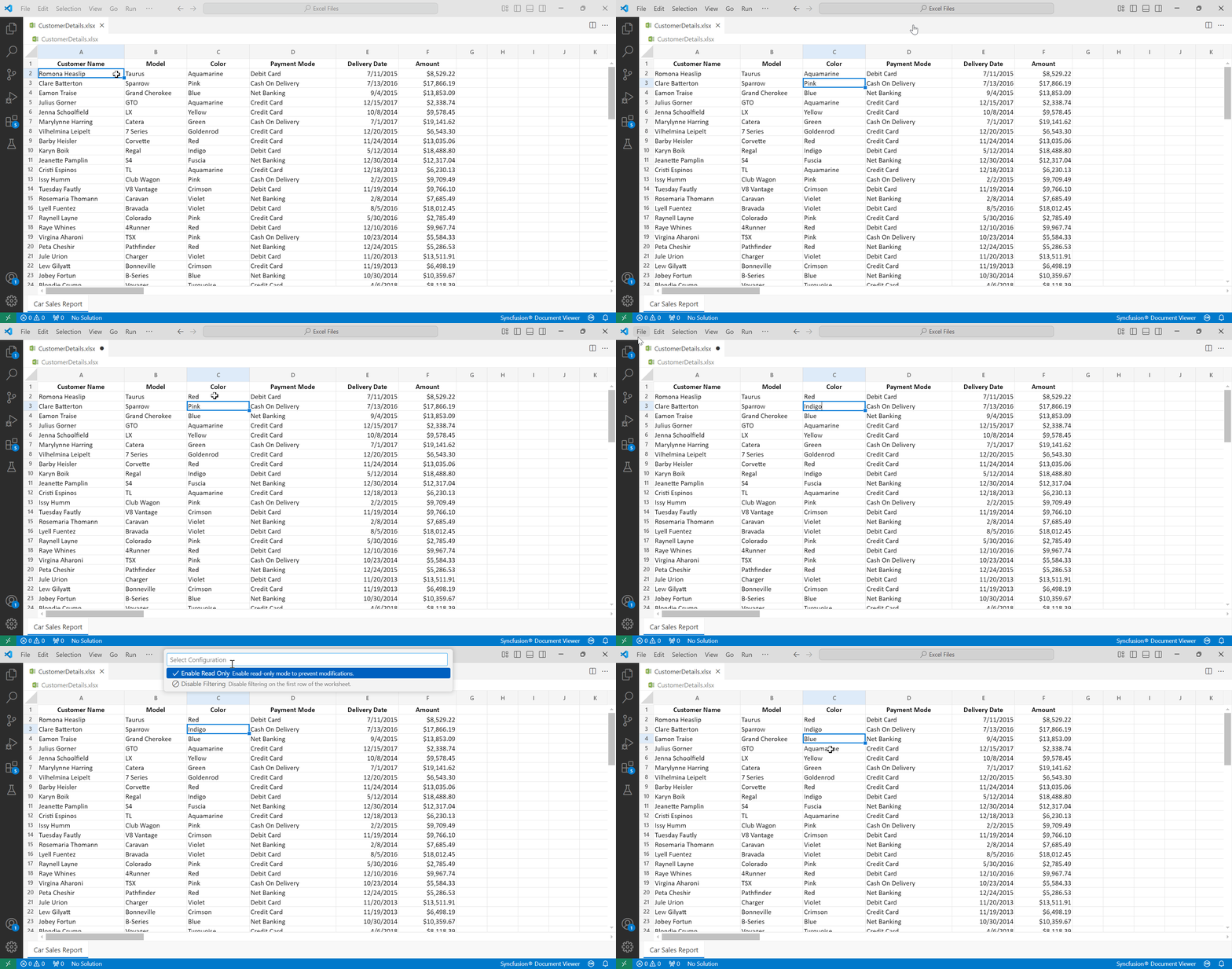
Enable/Disable read-only mode via icon in VS Code
- Via VSCode settings (User/Workspace):
-
- Go to VSCode Settings → Extensions → Syncfusion® Document Viewer.
- Toggle the Read-Only Mode setting to Enable or Disable based on your preference.
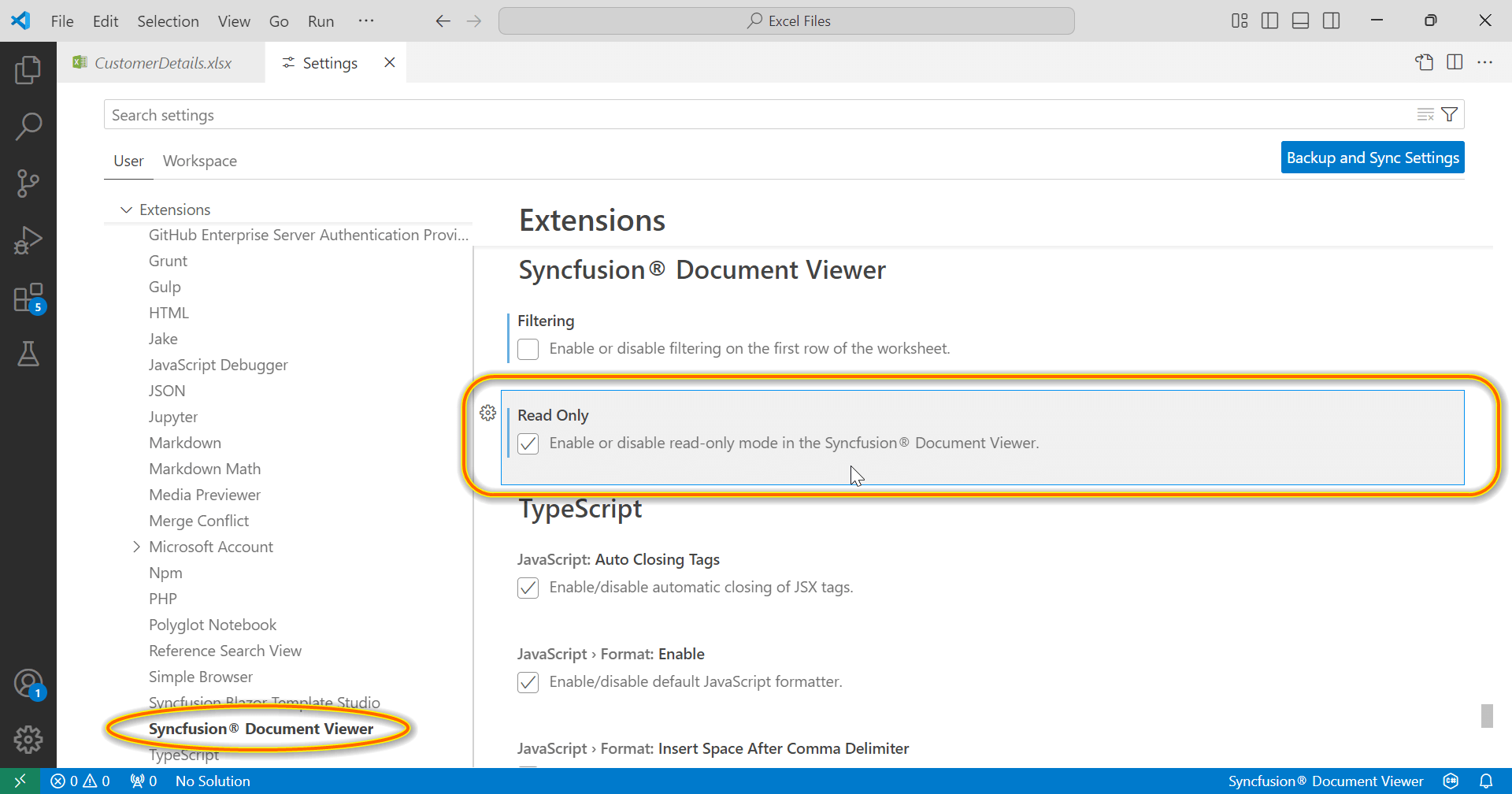
Configuring read-only mode via VSCode Settings
Configuring filtering and sorting on the first row
You can apply filtering and sorting to the first row of the worksheet for quicker access.
- Via the VSCode Status Bar:
- After opening a file, click the Syncfusion® Document Viewer icon in the VSCode status bar.
- A QuickPick bar will appear at the top of VSCode, enabling you to configure filtering and sorting on the first row of the worksheet.

Configuring filtering and sorting on the first row via the VSCode Status Bar
- Via VSCode Settings (User/Workspace):
-
- Go to VSCode Settings → Extensions → Syncfusion® Document Viewer.
- You can toggle filtering and sorting options here, turning these features on or off for the first row.

Configuring filtering and sorting via VSCode Settings
Accessing filtering and sorting directly in the file
- For more granular control, right-click on any cell or column header to open a context menu that provides access to filtering and sorting options.
Using column header:1By right-clicking on a cell:
Accessing filtering and sorting by right-clicking on a cell
Future plans for extension enhancement
As we continue to improve the Syncfusion® Document Viewer for Visual Studio Code, we are excited to announce plans to support additional file formats. In the near future, we will introduce support for additional file formats, including:
- Word documents (DOCX): Seamlessly open and view Word documents directly within Visual Studio Code.
- Rich text files (RTF, MD): Work with rich text formats like RTF and Markdown (MD) files, allowing for greater flexibility in viewing content.
- PDF files: View PDF documents directly in Visual Studio code.
These updates will further streamline your workflow by integrating even more document types directly into your coding environment.
Note: For more details, refer to the Syncfusion® Document Viewer extension for Visual Studio Code documentation.
Conclusion
The Syncfusion® Document Viewer for Visual Studio Code is an essential extension for viewing Excel, CSV, and TSV files directly in your coding environment. With features like read-only mode, sorting, and filtering, it helps you save time and stay productive by reducing the need to switch between apps.
If you’re an existing customer, you can download the latest version of Essential Studio® from the License and Downloads page. For those new to Syncfusion®, try our 30-day free trial to explore all our features.
For queries, you can contact us through our support forum, feedback portal, or support portal. As always, we are happy to assist you!
 No spam, just valuable updates.