
 Balaji Elumalai
TL;DR: Most AI tools generate UI code quickly, but not reliably. Layouts break, configs are missing, and accessibility is inconsistent. Syncfusion UI Builder fixes this by composing full interfaces, not just code, using verified component logic. You describe your UI → it generates:
- Structured layouts,
- Fully configured components,
- Responsive and accessible UI.
Result: Less debugging, fewer iterations, and faster production-ready output.
Why does building complete UIs with AI still feel hard
Let’s clarify why many developers encounter obstacles even as tools promise speed. AI assistants have become highly effective at generating UI code quickly. However, friction arises when developers attempt to use that code in real applications:
- The layout looks correct at first, but fails across different screen sizes.
- Components render, while accessibility remains incomplete.
- The UI functions yet fall short of enterprise design standards.
The issue isn’t speed, it’s composition.
Enterprise UI development is not about individual components. It’s about:
- Assembling structure,
- Navigation,
- Content,
- Visual hierarchy,
- Responsiveness, and
- Usability into a single, cohesive experience.
Most AI tools generate parts but not the complete experience you need.
Introducing Syncfusion UI Builder: Turn your UI ideas into complete, production‑ready interfaces
With a clear understanding of what’s lacking in current AI-generated UIs, let’s explore how Syncfusion UI Builder provides a solution.
To bridge the gap, Syncfusion UI Builder is designed to compose complete UIs, not just generate code snippets. It is an AI-powered agent skill that turns high-level UI intent into complete, production-ready enterprise interfaces. By combining agent-based orchestration with verified Syncfusion component intelligence, the UI Builder helps developers build complete UI layouts, dashboards, admin panels, and complex pages, with greater confidence, correctness, and consistency.
It translates natural-language descriptions into:
- Structured page layouts: No more assembling pieces manually.
- Correctly configured components: Everything works out of the box.
- Responsive UI scaffolding: Ready for all devices.
- Accessibility built in: No retrofitting later.
- Design-system alignment: Consistent and enterprise-ready.
At its core, UI Builder is powered by Syncfusion Component Skills, which provide deep, component-level intelligence to the AI.
You can move from “generated code” to ready-to-use UI solutions.
Powered by Syncfusion Component Skills
The UI Builder does not rely on generic training data or assumptions about UI libraries.
Instead, it uses Syncfusion Component Skills, which are structured, component-specific playbooks that define:
- Correct component APIs and usage patterns.
- Required modules and feature injections.
- Supported properties and configurations.
These skills act as the foundation layer for UI Builder. When the builder selects a grid, chart, or other component, it applies to the corresponding component skill to ensure correctness. As a result, UI Builder delivers more complete and reliable UI output.
How UI Builder works differently
Traditional AI assistance focuses on what to generate, while our UI Builder focuses on how the UI comes together.
It coordinates multiple concerns simultaneously:
- Page and layout structure.
- Component selection using component skills.
- Feature configuration (sorting, paging, filtering, etc.)
- Design choices table, including CSS framework, Syncfusion theme, light/dark mode, and core design basics with default values.
- Theming and responsiveness.
- Accessibility enforcement.
This orchestration enables the AI assistant to operate at the same level as developers think when designing real-world apps.
Getting started: Building UIs with Agentic UI Builder (React)
With the background established, let’s see how to get started with the Agentic UI Builder for building React-based user interfaces.
Prerequisites
Before using Syncfusion UI Builder, ensure your environment meets the following requirements:
- Install and configure the Agent Package Manager (APM) in your development environment.
- Ensure that Node.js version 18 or later is installed.
- Use an AI-powered IDE or agent that supports Skills (VS Code, Cursor, Syncfusion Code Studio, etc.).
- Create a new React app or use the existing one.
- Obtain a valid Syncfusion license (Commercial, Community, or Free Trial).
Installing Syncfusion UI Builder (React)
Once APM is installed, you can quickly get started by installing the Syncfusion React UI Builder skill.
Refer to the following code.
# GitHub Copilot
apm install Syncfusion/react-ui-builder -t copilot

# Claude Code
apm install Syncfusion/react-ui-builder -t claude

# Cursor
apm install Syncfusion/react-ui-builder -t cursor
After installation, the skill and agent files will be added to your project along with the supported AI tools to automatically detect and load the builder.
Once installed, using UI Builder is entirely prompt-driven.
- Open your supported IDE.
- In the AI chat panel, select the
syncfusion-react-ui-builderagent. - Describe the UI you want to build using natural language.
Example prompt
Design a full-viewport premium SaaS admin dashboard that feels fluid, spacious, and visually rich—avoid boxed or narrow layouts. Use a soft neutral background (#F8FAFC) with layered white surfaces, subtle shadows, soft borders, and light gradients to create depth. Include a floating glass-style header (logo, search, notifications, avatar dropdown) and a stylish collapsible sidebar with tinted background, smooth animations, and highlighted active states. Structure the main area with an asymmetrical, responsive grid layout using generous spacing (24–32px), featuring larger, visually dominant cards (with icons, gradients, trend indicators, and hover lift), charts (line/bar/pie in cards), and an enhanced data grid (sticky header, sorting, filtering, badges, hover states, pagination). Apply a modern design system (Inter font, 4/8px spacing, muted grays, indigo/blue accents, semantic colors) with smooth 150–250ms transitions, micro-interactions, tooltips, and high accessibility.Refer to the following output UI.
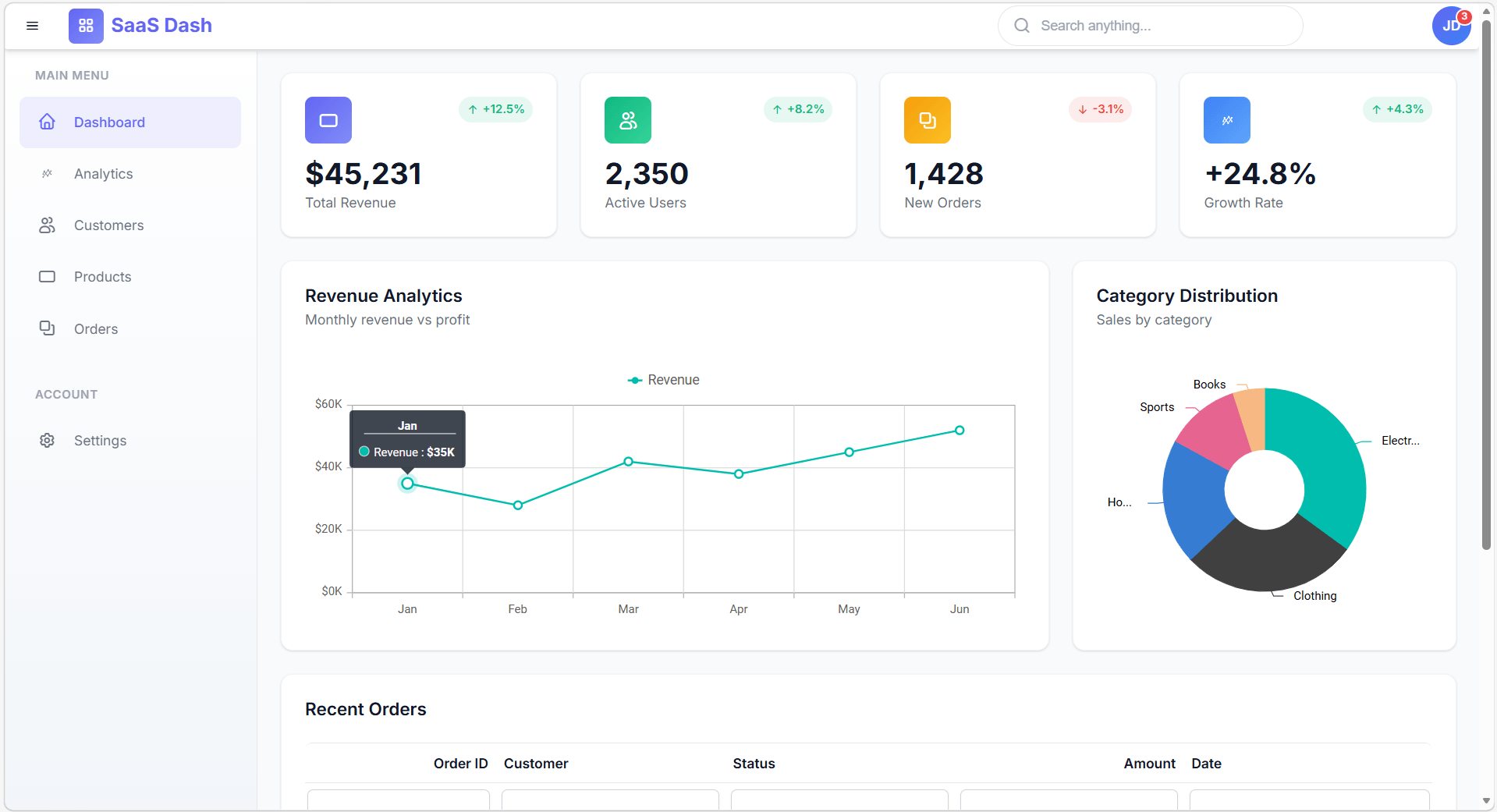
What happens behind the scenes
- The UI Builder selects the correct Syncfusion components and icons.
- Then, the corresponding component skills are applied.
- After that, the required features, modules, and configurations are automatically applied.
- Finally, the layout, accessibility, and responsiveness are enforced.
The result is complete, production-ready UI code, not disconnected code fragments.
What changes when you use UI Builder
Here’s the difference developers notice immediately:
| Without UI Builder | With UI Builder |
| Fragmented UI outputs | Cohesive, structured UI layouts |
| Missing configurations | Fully wired components |
| Manual module setup | Automatic feature injection |
| Layout inconsistencies | Consistent, enterprise-grade design |
| Repeated debugging cycles | Minimal follow-up work |
| Trial-and-error prompting | Reliable results in fewer iterations |
The same prompt delivers significantly better results because the AI operates on verified component knowledge.
Built for Essential Studio
The UI Builder is designed to work across the full range of frameworks and platforms supported by our Essential Studio, enabling consistent and accurate UI generation across your development stack.
Users can install the corresponding UI Builder using the following commands:
| Framework / SDK | Install command | GitHub |
| React | apm install Syncfusion/react-ui-builder -t copilot | React UI Builder |
| Angular | apm install Syncfusion/angular-ui-builder -t copilot | Angular UI Builder |
| Blazor | apm install Syncfusion/blazor-ui-builder -t copilot | Blazor UI Builder |
| .NET MAUI | apm install syncfusion/maui-ui-builder -t copilot | MAUI UI Builder |
| WPF | apm install Syncfusion/wpf-ui-builder -t copilot | WPF UI Builder |
| WinForms | apm install Syncfusion/winforms-ui-builder –t copilot | WinForms UI Builder |
| WinUI | apm install Syncfusion/winui-ui-builder –t copilot | WinUI UI Builder |
Built for real enterprise scenarios
The UI Builder excels in scenarios where accuracy and structure are critical:
- Dashboards
- Landing pages
- Portfolio
Component Skills ensure correctness, while UI Builder ensures overall UI cohesion.
Frequently Asked Questions
How is UI Builder different from AI coding assistants?
UI Builder goes beyond generating code snippets by composing full UI layouts, handling component selection, configuration, theming, and layout structure together.
Do I need prior experience with Syncfusion components?
No. UI Builder uses Syncfusion Component Skills to automatically apply correct APIs, modules, and configurations, so you can generate working UIs without deep prior knowledge.
Does UI Builder generate production-ready code?
Yes. The generated output follows best practices, includes proper configurations, and aligns with accessibility and responsive design standards.
Can UI Builder reduce debugging effort?
Yes. By applying correct component configurations and enforcing structure during generation, UI Builder significantly reduces manual fixes and debugging cycles.
Which IDEs or tools support UI Builder?
UI Builder works with AI-powered IDEs and tools that support agent skills, including VS Code, Cursor, Syncfusion Code Studio, and similar environments.
Stop settling for “almost done”, start shipping complete UIs with confidence
Thanks for reading! From here on, you don’t have to deal with broken layouts, missing configurations, or endless UI fixes anymore.
Syncfusion UI Builder transforms how you build UIs. Instead of stitching together incomplete pieces, you can now create fully structured, enterprise‑ready interfaces, right inside your workflow.
What does this mean for you:
- Build faster: Go from idea → working UI in minutes.
- Reduce rework: No more fixing half-generated outputs.
- Stay consistent: Enterprise-grade design, every time.
- Trust your output: AI that delivers usable results, not just starting points.
If you’re already using AI, this is your next leap: from “fast start” to “strong finish.”
Ready to experience the difference?
- Already a Syncfusion user? Download the latest version from the License and Downloads page.
- New here? Start your 30-day free trial and explore everything hands-on.
Have questions or need help?
We’re here for you. Reach out anytime via the support forum, support portal, or feedback portal.
Now it’s your turn: Build smarter, ship faster, and finally trust your UI output!




 No spam, just valuable updates.