
 Vignesh Natarajan
TL;DR: Need a Blazor DataGrid that does more than just display data? Syncfusion’s got you covered. This post highlights key features like real-time editing, Excel-style filtering, and virtualization that help developers build fast, responsive, and scalable web apps with ease.
Let’s be real, if your Blazor DataGrid is just showing rows and columns, you’re missing out. Today’s apps need grids that can handle live updates and massive data, and still look great on any screen. That’s where Syncfusion’s Blazor DataGrid shines. In this blog post, we’re diving into excellent features, like responsive layouts, inline editing, Excel-style filters, and column virtualization, that make building fast, flexible, and user-friendly apps easier.
Let’s explore the standout features that make Syncfusion’s Blazor DataGrid a smart choice for forward-thinking developers.
1. Real-Time editing in Blazor DataGrid
The Blazor DataGrid fully supports create, read, update, and delete (CRUD) operations. Along with built-in editor components for editing column values, custom editor components can be created using templates to suit application needs. Using a data manager, you can perform editing operations on both array collections and remote data services.
The DataGrid offers multiple editing modes, including inline (row), batch (cell-based), and dialog (popup) editing. Command buttons can be enabled to perform CRUD operations within the grid. For more specifics, refer to the demo and user guide.
2. Excel filter
The Syncfusion® Blazor DataGrid offers an intuitive Excel-like filter feature that enhances the data filtering experience by mimicking the familiar interface of Microsoft Excel. This functionality empowers users to perform complex filtering operations with ease, making data location and manipulation faster and more efficient.
By default, the filter dialog dynamically populates its content based on the data source values of the selected column. This ensures that users can quickly access relevant filtering options without additional configuration.
To further enhance customization, Syncfusion® provides two powerful APIs:
- FilterItemTemplate: This API allows developers to customize the list of filter options displayed in the Excel filter dialog. You can tailor the UI to match specific business needs or user preferences.
- CheckboxListData: With this property, you can override the default data and display a completely different set of records in the filter dialog. This is especially useful when you want to show a curated list of filter options that differ from the underlying data source.
Together, these features make the Syncfusion® Blazor DataGrid a robust and flexible solution for enterprise-grade data filtering. Refer to the user guide for additional details.
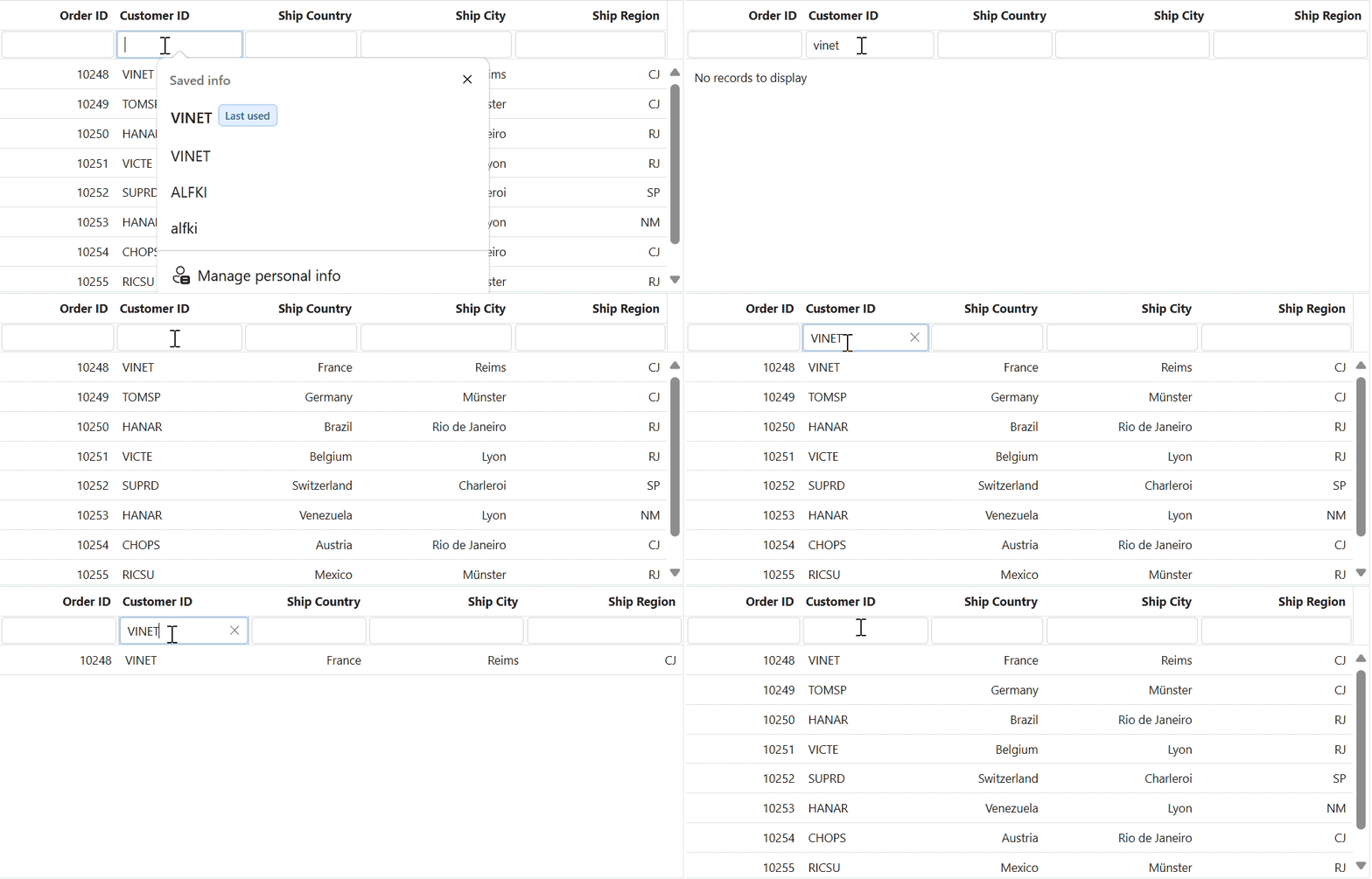
3. WildCard, like & diacritic filtering
The WildCard and like filter operators filter values in string-type columns based on a given string pattern, but they work in slightly different ways. The Like filter processes single search patterns using the “%” symbol to retrieve values that match the specified pattern. The DataGrid supports filtering on string-type columns. For more details, refer to the user guide.
The diacritics filter feature is helpful when working with text data that contains accented (diacritic) characters. By default, the grid ignores these characters during filtering. If you want the filtering process to consider diacritic characters, enable this by setting the filterSettings.ignoreAccent property to true in the filter settings. For more specifics, refer to the user guide.
4. Column chooser template
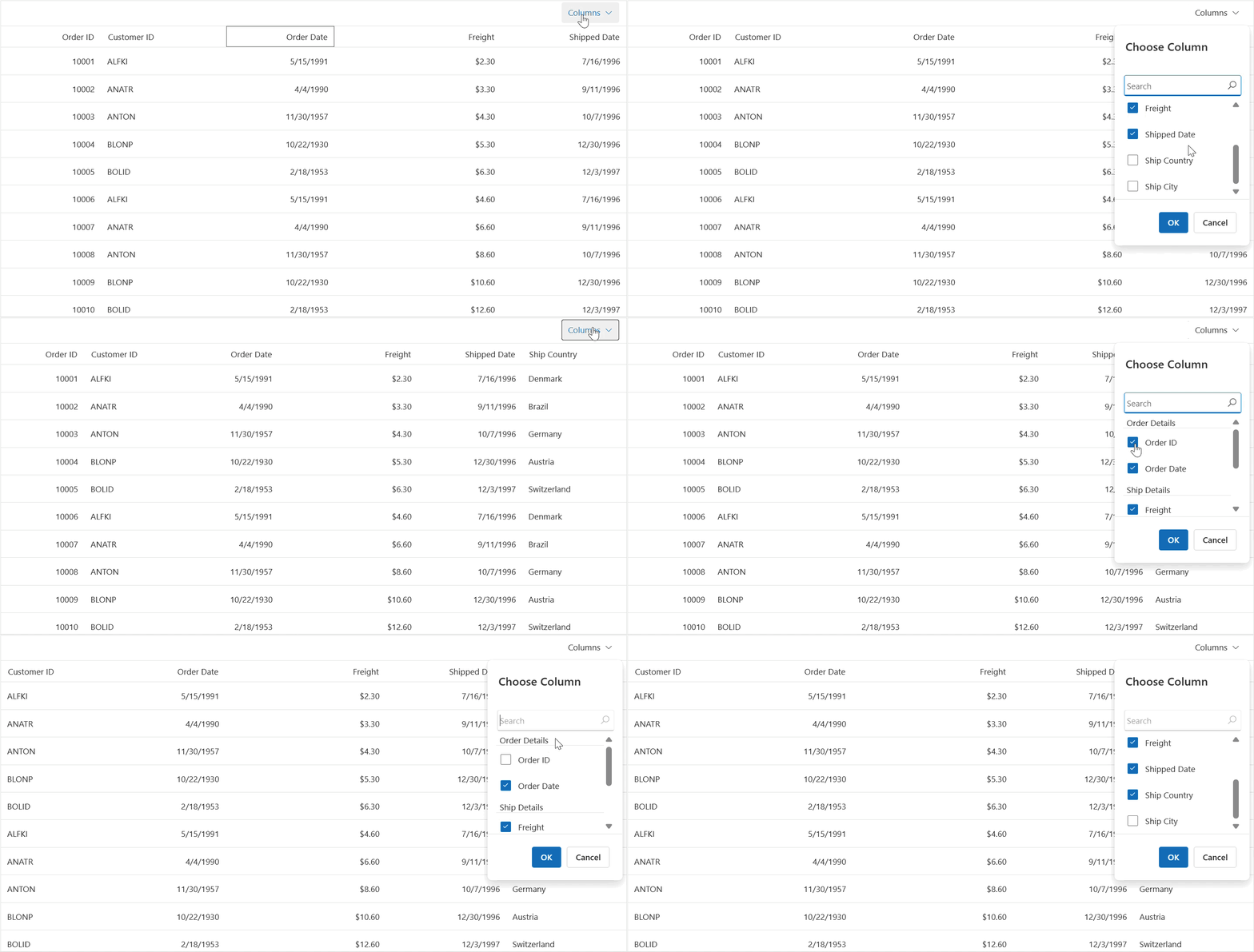
The Syncfusion® Blazor DataGrid includes a powerful column chooser feature that allows users to dynamically show or hide columns in the Grid. This is achieved through a popup dialog that lists all available columns, enabling users to simply check or uncheck column names to control their visibility.
To provide a more tailored user experience, Syncfusion® offers customization options through the following APIs:
- ColumnChooserTemplate: This API allows you to fully customize the appearance and behavior of the column chooser dialog. You can design a UI that aligns with your application’s style and user expectations.
- GridColumnChooserSettings.Template and GridColumnChooserSettings.FooterTemplate: These settings enable further customization of the column chooser dialog. You can modify both the main content and the footer area, offering a highly flexible and branded interface.
This feature enhances user control over the grid’s layout. For an in-depth explanation, refer to the demo and user guide.
5. Stacked headers
The Syncfusion® Blazor DataGrid supports stacked headers, allowing you to group and display column headers in a layered format. This feature is especially useful for organizing related columns under a common parent header, improving readability and structure in complex datasets. For more insights, refer to the demo and documentation.
6. AutoFill
The Syncfusion® Blazor DataGrid includes an intuitive AutoFill feature that significantly speeds up data entry and editing. With this functionality, users can copy the contents of selected cells and paste them into other cells by simply dragging the AutoFill icon across the desired area, just like in spreadsheet applications. For more details, refer to the user guide.
7. Clipboard
The Syncfusion® Blazor DataGrid offers robust copy and paste features that streamline data entry and manipulation. Users can easily copy the contents of individual cells or groups of cells and paste them into other cells within the grid, making it ideal for quick data adjustments and replication.
Key capabilities include:
- Keyboard shortcut support: Users can use familiar shortcuts (like Ctrl+C and Ctrl+V) to copy selected rows or cell data to the clipboard.
- Efficient data handling: Whether you’re working with single cells or bulk selections, the clipboard functionality ensures smooth and intuitive data operations.
This feature enhances productivity by allowing users to interact with the grid in a way that feels natural and responsive, especially in data-intensive applications. For an in-depth explanation, refer to the demo and user guide for copy and paste.
8. Paging
The Syncfusion® Blazor DataGrid includes a built-in paging feature that allows you to display data in segmented pages, making it easier to navigate through large datasets. Instead of loading all records at once, data is split into manageable chunks, improving both performance and user experience.
This feature is especially useful when working with:
- Extensive datasets
- Limited screen space
- Scenarios where users need to focus on a subset of data at a time
To enhance the paging experience, the DataGrid also supports customization through the PagerTemplate feature. This allows developers to design a custom pager UI that aligns with the application’s look and feel, offering greater control over the paging interface. Refer to the demo and user guide for further information.
9. Scrolling
The Syncfusion® Blazor DataGrid is equipped with advanced scrolling features that ensure smooth navigation and optimal performance, even when working with large or complex datasets. These include virtual scrolling and infinite scrolling, each designed to handle different data scenarios efficiently.
Scrolling allows users to move through content that extends beyond the visible area of the Grid. Scrollbars are automatically displayed when the content exceeds the specified Width or Height of the Grid element. This is especially useful when displaying large datasets within a confined layout. For further information, refer to the demo and user guide.
- Virtual scrolling: This enhances performance by rendering only the rows currently visible in the viewport. As users scroll vertically, new rows are loaded dynamically, while off-screen rows are removed from the DOM. This approach significantly reduces rendering time and memory usage, making it ideal for handling thousands of records. For further information, refer to the demo and user guide.
- Infinite scrolling: This operates on a load-on-demand model. As the user scrolls to the bottom of the grid, additional data is fetched and appended automatically. This ensures a seamless browsing experience without the need to load the entire dataset up front. These scrolling modes can be configured based on your application’s requirements, offering a flexible and high-performance solution for managing large-scale data in the Blazor DataGrid. For further information, refer to the demo and user guide.
10. Column virtualization
The Syncfusion® Blazor DataGrid includes a powerful column virtualization feature designed to enhance performance, especially when working with grids that contain a large number of columns.
With column virtualization enabled:
- Only the columns currently visible in the viewport are rendered, significantly reducing the initial load time.
- As users scroll horizontally, additional columns are dynamically rendered on demand.
- This results in faster rendering, lower memory usage, and a smoother user experience, even with complex datasets.
This feature is particularly beneficial for enterprise applications where performance and responsiveness are critical, and it mirrors the behavior seen in tools like Excel or Google Sheets. For further information, refer to the demo and user guide.
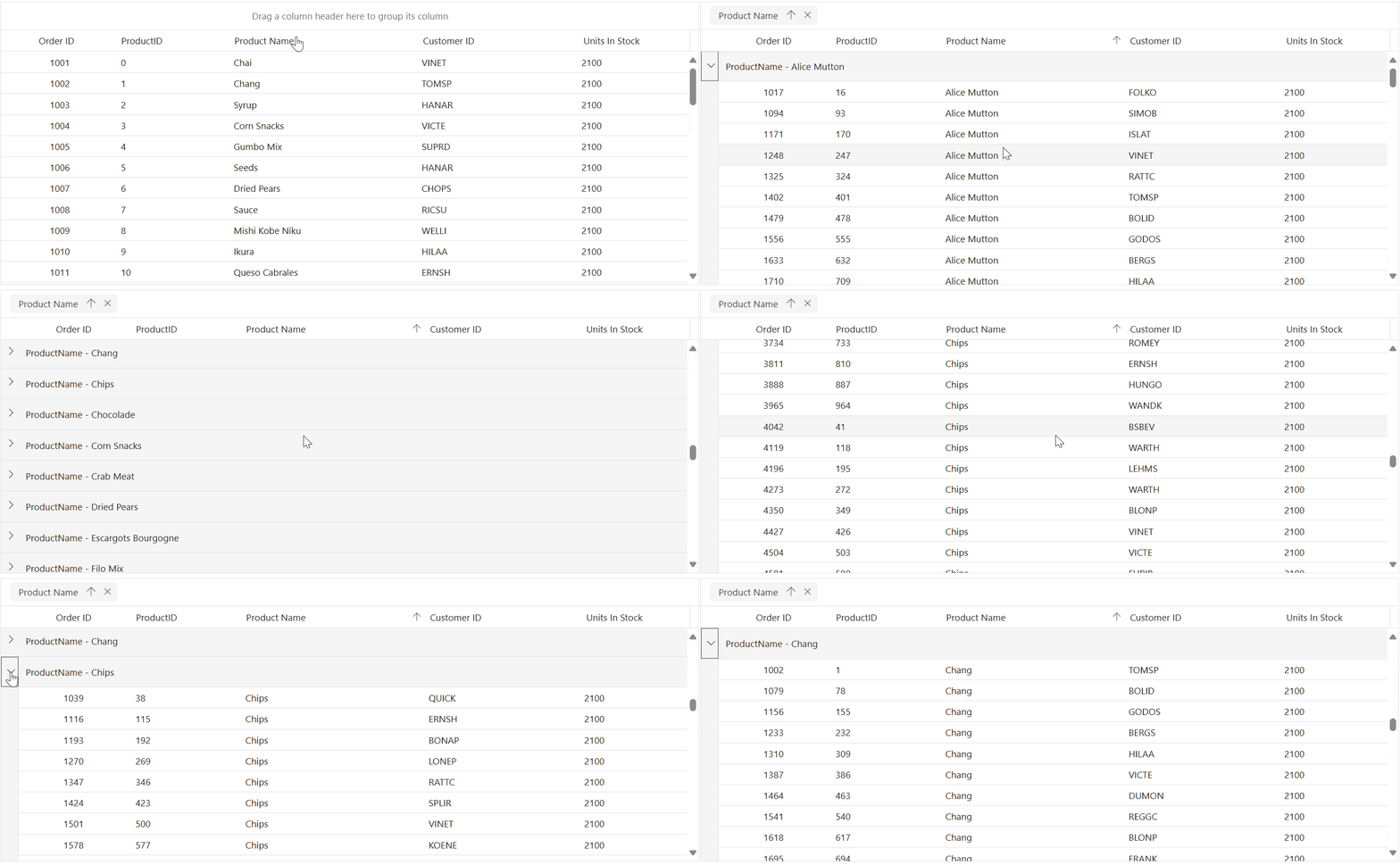
11. Lazy load grouping
Lazy load grouping in the Blazor DataGrid lets you efficiently display grouped data by loading only what is needed as you interact with the grid. When you group data, the grid initially shows only the top-level group rows in a collapsed state. The child rows for each group are loaded and displayed on demand when you expand a group, making this approach especially useful for large datasets. For more specifics, refer to the demo and user guide.
12. Column pinning or frozen column
Frozen rows remain visible at the top of the grid, while frozen columns can be positioned on the left, right, both sides, or at a fixed location. This keeps these rows or columns in view while making the rest of the grid content scrollable. This feature is useful for comparing cell values of different columns within the DataGrid. For comprehensive details, refer to the demo and user guide.
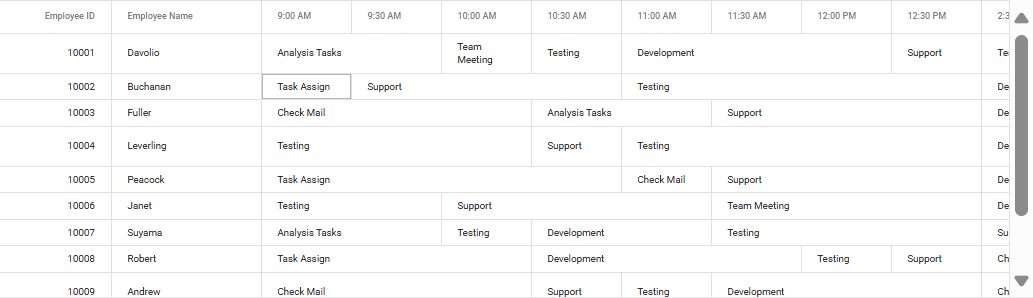
13. Column separator
The Syncfusion® Blazor DataGrid introduces a highly interactive feature that allows users to dynamically add or remove columns from the frozen content area by simply dragging and dropping the column separator. This intuitive functionality mirrors the experience found in tools like Google Sheets, making it familiar and easy to use.
With this feature, users can effortlessly customize the Grid layout through direct interaction, gaining flexible control over which columns remain frozen during horizontal scrolling. This is especially useful in large datasets where keeping key columns visible enhances readability and usability.
By enabling this drag-and-drop behavior, the Blazor DataGrid empowers users to personalize their data viewing experience without writing a single line of code. For more details, refer to the user guide.
14. Export data from Blazor grid
The Syncfusion® Blazor DataGrid provides seamless data export capabilities, allowing users to export grid content to PDF, Excel, or CSV formats. This feature is ideal for sharing, printing, or performing further analysis outside the application.
One of the standout aspects of this export functionality is that the exported files retain the same formatting and structure as seen in the grid view. This includes styles, alignments, and even custom templates, ensuring consistency between the UI and exported documents.
The DataGrid supports a wide range of templates, including:
- Cell and Column Templates
- Detail Templates
- Hierarchical Grids
Customizations made using these templates are preserved during export, offering a high-fidelity representation of the grid data in external formats.
Whether you’re building reports, sharing data with stakeholders, or archiving information, the export feature in Syncfusion Blazor DataGrid makes it both efficient and reliable. For more insights, see the demo and user guides for Excel and PDF.
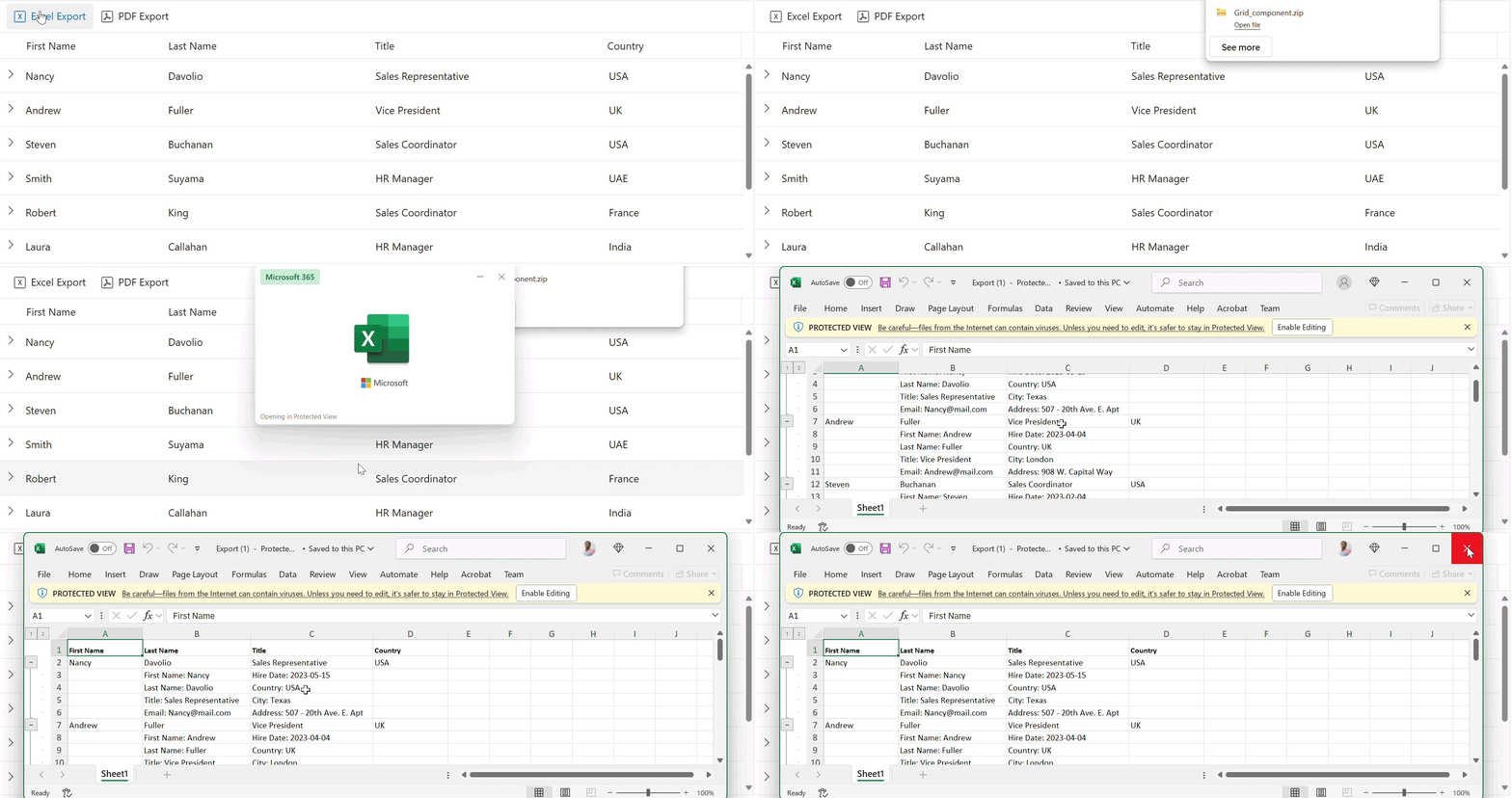
15. Add extra worksheets during export
The Syncfusion® Blazor DataGrid offers advanced export capabilities that go beyond exporting just the visible grid content. One such powerful feature is the ability to add extra worksheets when exporting to Excel or CSV formats.
This functionality is especially useful when you want to include:
- Supplementary information
- Summary reports
- Additional datasets
- Metadata or notes
These extra worksheets are exported alongside the main grid content, providing a more comprehensive and organized file for analysis, sharing, or archiving.
By leveraging this feature, developers can deliver richer, multi-sheet exports that cater to complex reporting needs, all while maintaining the structure and formatting of the original grid. For more insights, refer to the user guide.
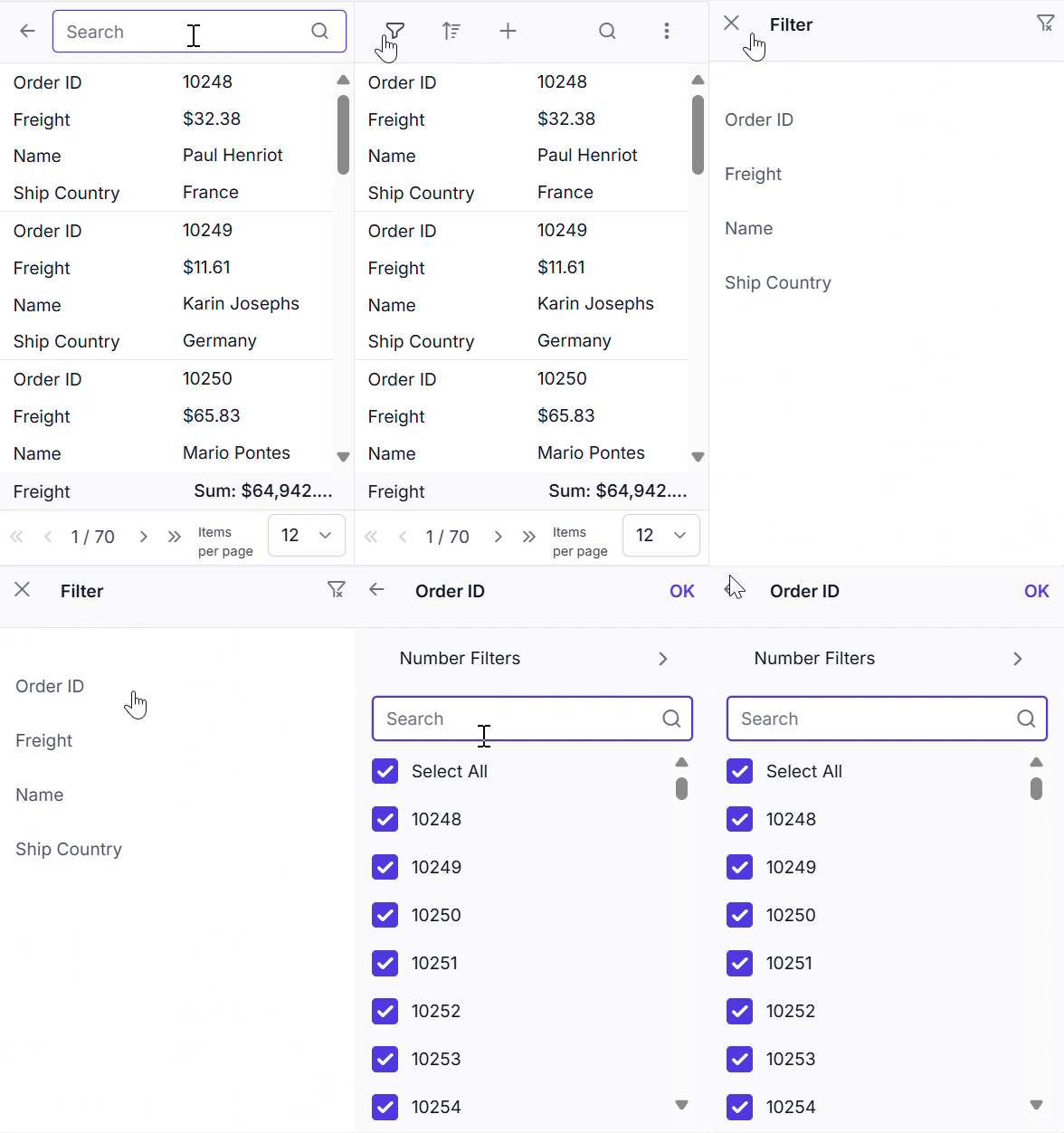
16. Adaptive UI layout
The Syncfusion DataGrid’s user interface has been customized and redesigned for excellent views and usability on small screens. Features such as filtering, sorting, searching, a column chooser, a column menu, a pager dropdown, and edit dialogs adapt dynamically to screen size, rendering row elements vertically. For more information, refer to the demo and user guide.

Conclusion
Blazor apps are evolving fast, and your data grid should keep up. With features like real-time editing, responsive layouts, and powerful export options, Syncfusion’s Blazor DataGrid gives you the tools to build apps that are not only functional but also a joy to use.
Whether you’re building internal dashboards or customer-facing platforms, these features can help you save time, reduce complexity, and deliver a better user experience.
Ready to level up your Blazor apps? Try Syncfusion® Blazor DataGrid today and experience the power of responsive, real-time data interaction.
Customers with an active license can download the latest release of Essential Studio® from the license and downloads page. If you’re new, we welcome you to begin a 30-day free trial to explore the latest features and gain access to a rich library of more than 1,900 UI components.
For further assistance, please reach out via our support forum, support portal, or feedback page. We’re here to help you build modern, feature-rich applications with confidence and ease.






 No spam, just valuable updates.