
 Sri Radhesh Nag Subash Sankar
TL;DR: Start with MVVM and data binding for page-level state, apply Visual State Manager for visual-only changes, and rely on DI-backed app-wide stores for shared state. For highly interactive or complex flows, MVU or reducer-style unidirectional updates offer better predictability.
State is the backbone of every .NET MAUI application. It determines what users see, how the UI reacts to interactions, and how consistently data flows across screens. Whether it’s the text inside an Entry, the enabled state of a button, or the user session shared across pages, effective state management ensures your UI remains predictable, testable, and easy to maintain.
.NET MAUI does not enforce a single state management solution. Instead, it provides flexible building blocks that allow you to choose the right approach based on your app’s complexity. This article walks through the most practical and production-ready ways to manage state in .NET MAUI, from simple ViewModel state to shared app-wide stores, and helps you decide when to use each.
Why state management in MAUI matters
In real apps, state stops being “just a couple of properties” fast:
- Authentication affects navigation, headers, API calls, and cached data.
- Offline support introduces queues and retry logic.
- Multiple pages need the same data (profile, cart, preferences).
- Background sync and push notifications mutate state while the user is elsewhere.
- Multi-window scenarios need a shared but safe global state.
If state changes can happen anywhere, debugging becomes guesswork. The goal is not a perfect architecture; it’s predictable updates and a UI that stays consistent.

Recommended state management approaches in .NET MAUI
Most real-world MAUI apps rely on a combination of the following patterns:
- MVVM with data binding for page-level and feature-level state.
- MVU-style updates for predictable, unidirectional state transitions.
- Visual State Manager (VSM) for purely visual UI changes.
- Dependency Injection (DI) for shared and app-wide state.
Rather than treating these as competing patterns, think of them as complementary tools. The key is applying each one where it fits best.
MVVM + INotifyPropertyChanged: The foundation
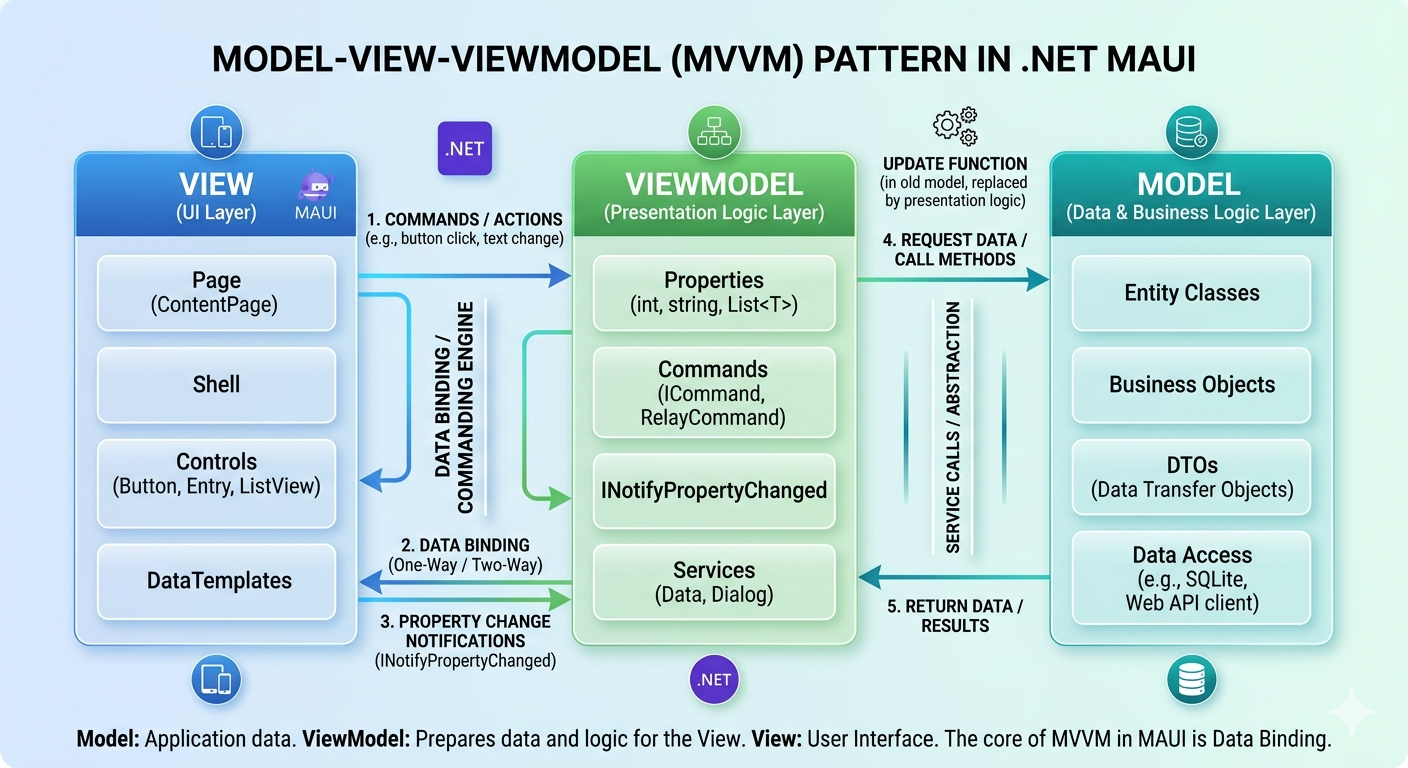
MVVM (Model-View-ViewModel) is the most widely used pattern in .NET MAUI and forms the foundation of state management for most applications.
In MVVM:
- The View defines the UI using XAML.
- The ViewModel holds the state and exposes it through bindable properties.
- The Model represents your domain or business data.
The View never directly manipulates state. Instead, it binds to ViewModel properties. When the ViewModel changes, the UI updates automatically through data binding.
Here’s the example MVVM implementation:
public class ViewModel : INotifyPropertyChanged
{
    private string name;
    public string Name
    {
        get => name;
        set
        {
            if (name != value)
            {
                name = value;
                OnPropertyChanged();
            }
        }
    }
    public event PropertyChangedEventHandler PropertyChanged;
    protected void OnPropertyChanged([CallerMemberName] string propertyName = null)
        => PropertyChanged?.Invoke(this, new PropertyChangedEventArgs(propertyName));
}<Label Text="{Binding Name}" FontSize="20" />public partial class MainPage : ContentPage
{
public MainPage()
{
InitializeComponent();
BindingContext = new ViewModel { Name = "Maui" };
}
}When to use:
- Forms, lists, and CRUD screens
- Input validation and command-based interactions
- Navigation flows and page-level logic
MVVM is ideal when you want strong separation of concerns, easy unit testing, and straightforward data binding.
MVU (Model-View-Update): Predictable state flow
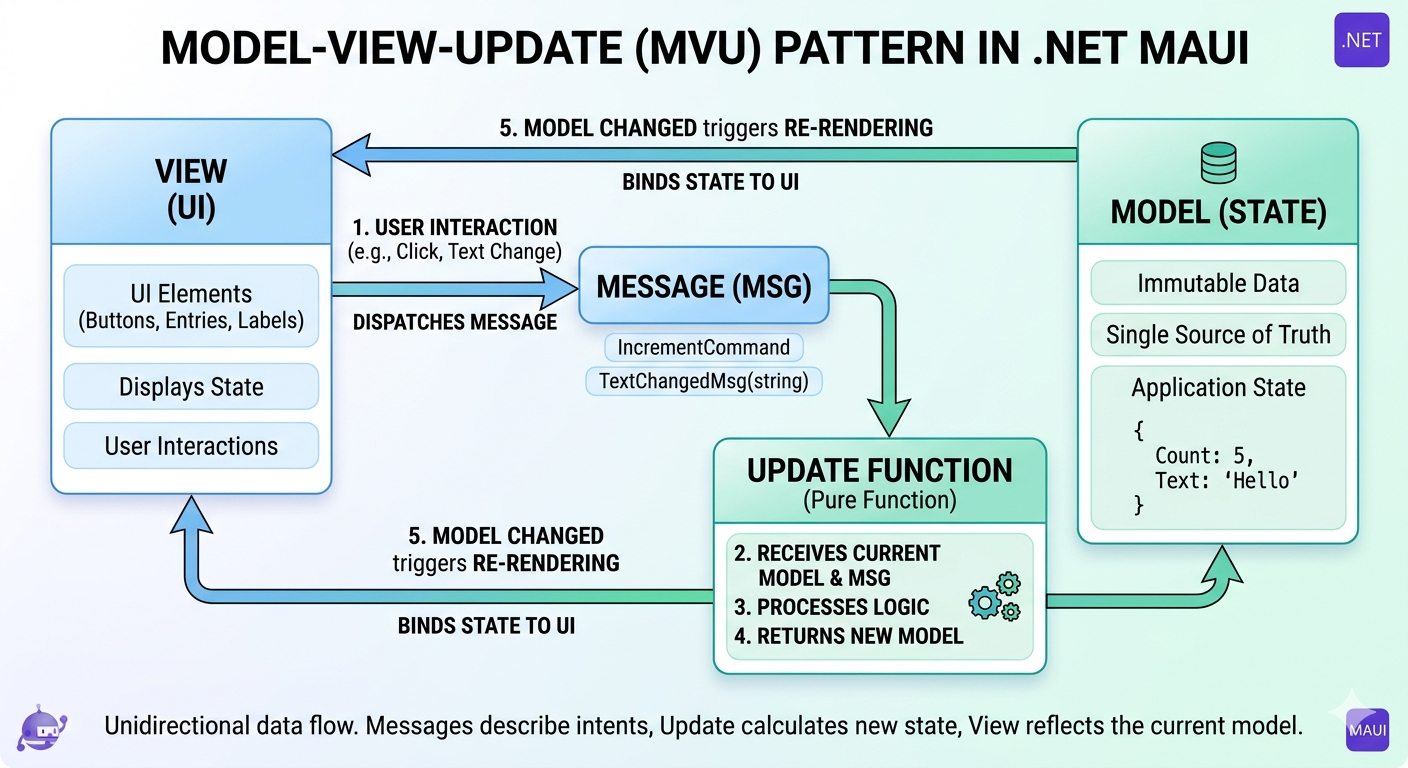
MVU introduces a functional, unidirectional approach to state management. Instead of mutating properties across different objects, MVU treats state as an immutable model that changes only through explicit updates.
The flow looks like this:
Model → View → Message → Update → Model
- Model represents the entire state snapshot.
- View renders UI based solely on the model.
- Update receives user actions or events messages and returns a new model.
Example
public record AppModel(int Count);
public enum Msg { Increment }

public static AppModel Update(AppModel model, Msg msg) =>
    msg == Msg.Increment ? model with { Count = model.Count + 1 } : model;
Because all state changes occur in a single Update function, MVU delivers predictable behavior and prevents unintended state mutations. It works best for UIs with complex, interdependent interactions.
When to use
- Highly interactive screens
- Complex workflows with many dependent UI updates
- Scenarios where unidirectional data flow is preferred
MVU is less common than MVVM in MAUI, but it shines in advanced use cases and pairs well with frameworks like Comet or MauiReactor.
Visual State Manager (VSM): Declarative UI states
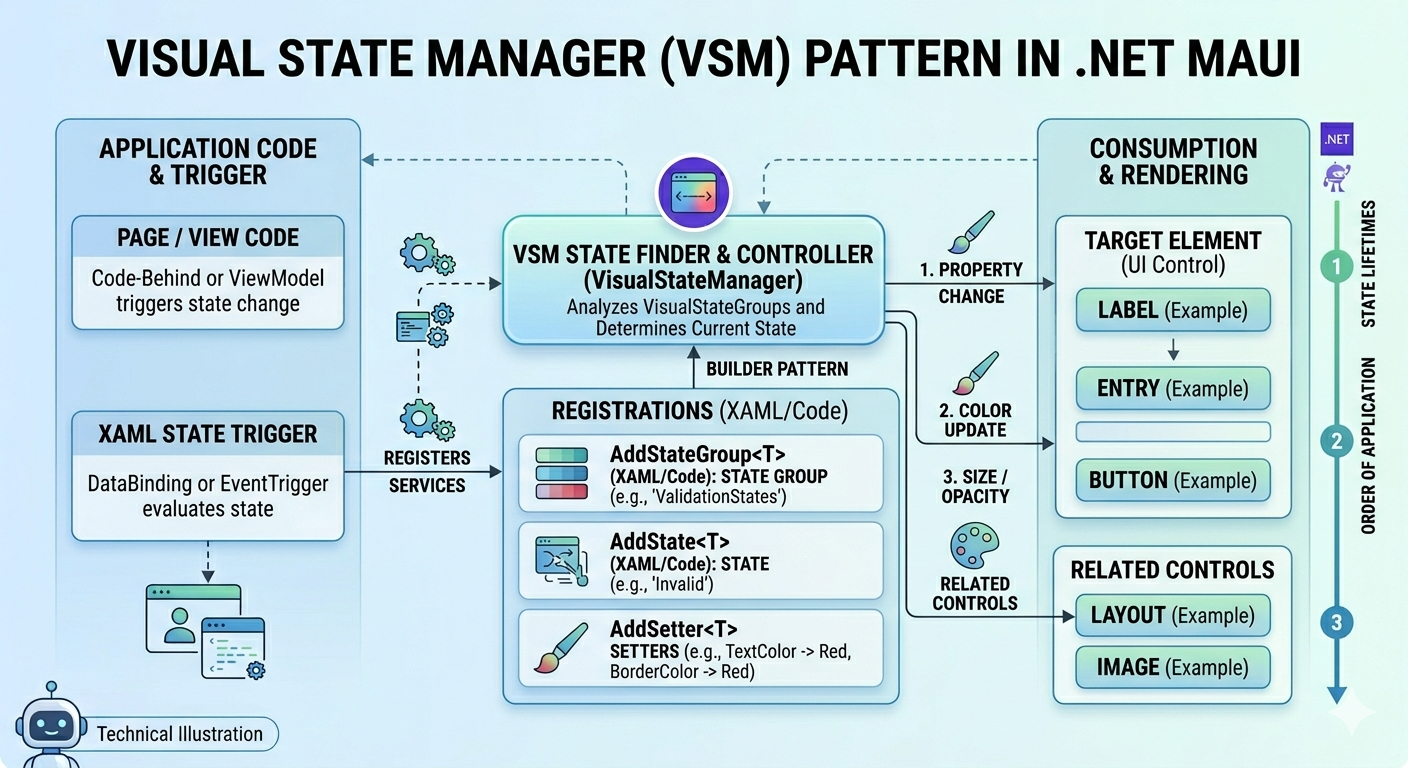
Visual State Manager (VSM) is designed specifically for visual changes, not business logic. It allows you to define named visual states, such as Normal, Pressed, or Selected, and let VSM handle the transitions.
- The View (XAML) declares
VisualStateGroupsand individualVisualStates, each containing the appearance rules for that state. - State changes are triggered through bindings, behaviors, or code.
Instead of manually toggling properties across controls, you switch visual states and let VSM handle the transitions. This keeps your UI logic organized, consistent, and easy to maintain.
Example:
<ContentView>
    <BoxView x:Name="box"
             WidthRequest="120"
             HeightRequest="120" />
    <VisualStateManager.VisualStateGroups>
        <VisualStateGroup Name="SelectionStates">
            <VisualState Name="Normal">
                <VisualState.Setters>
                    <Setter TargetName="box"
                            Property="BackgroundColor"
                            Value="LightGray" />
                </VisualState.Setters>
            </VisualState>
            <VisualState Name="Selected">
                <VisualState.Setters>
                    <Setter TargetName="box"
                            Property="BackgroundColor"
                            Value="LightBlue" />
                </VisualState.Setters>
            </VisualState>
        </VisualStateGroup>
    </VisualStateManager.VisualStateGroups>
</ContentView>
When to use
- Visual feedback such as selection, focus, or disabled states.
- Simple animations or appearance changes.
- Keeping UI logic declarative and XAML-focused.
Avoid placing business logic inside visual state transitions.
Dependency Injection and App-wide stores
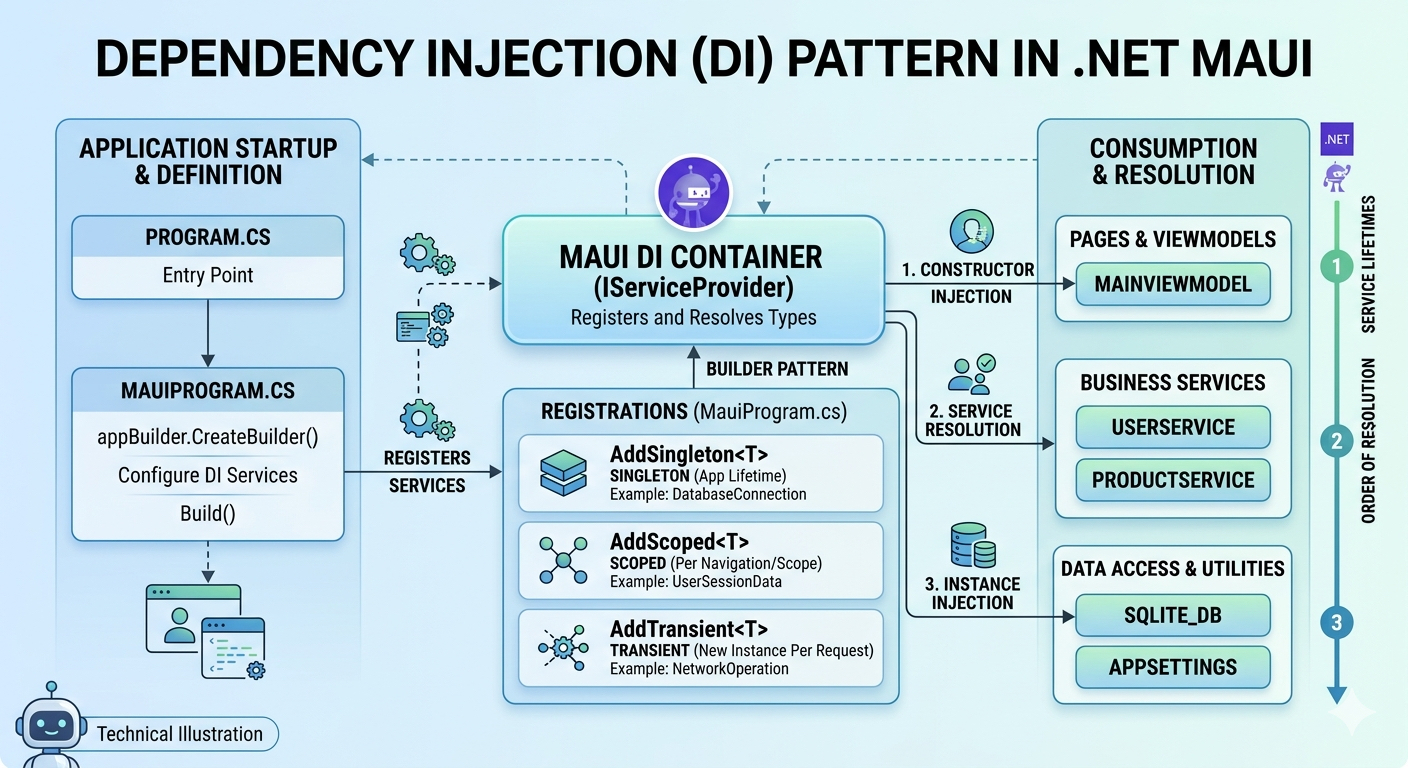
When multiple pages or features need access to shared state, such as authentication, settings, or cached data, Dependency Injection provides a clean solution.
By registering a service as a singleton, you ensure a single source of truth across the entire app.
It contains:
- Service/store: Exposes the state, mutation methods, and change notifications.
- DI container: Registers the store as a singleton, so only one instance exists throughout the app.
- Consumers: ViewModels or pages receive that shared store through constructor injection.
The UI sends intent to the store, which updates state and notifies subscribers, keeping shared state centralized and consistent.
Service and its registration example:
public interface IAppState { string CurrentUser { get; set; } event Action StateChanged; }

public class AppState : IAppState
{
    string currentUser;
    public string CurrentUser { get => currentUser; set { currentUser = value; StateChanged?.Invoke(); } }
    public event Action StateChanged;
}

// In MauiProgram.cs
builder.Services.AddSingleton<IAppState, AppState>();
Injection in a ViewModel:
public class ProfileViewModel
{
    readonly IAppState appState;
    public ProfileViewModel(IAppState appState) => this.appState = appState;
}
When to use
- Authentication and user sessions
- App-wide settings and configuration
- Shared caches or synchronization queues
DI-based stores work best when combined with MVVM, keeping UI logic separate from shared state concerns.
Comparison table
| Aspect | MVVM | MVU | DI App-Wide Store |
| State location | ViewModel | Immutable Model | Singleton service |
| Update style | Property change notifications | Pure update functions | Explicit mutations |
| Flow direction | Two-way binding | One-way | Mostly one-way |
| Predictability | Medium | Very high | High |
| Best suited for | Forms, lists, navigation | Complex interactions | Shared/global state |
State management best practices
Regardless of the pattern you choose:
- Centralize state mutations
- Keep business logic out of views
- Use ObservableCollection for UI-bound lists
- Avoid storing UI elements in singletons
- Ensure state updates are marshaled to the UI thread
- Prefer clarity and predictability over clever abstractions
Mixing patterns is fine, as long as responsibilities remain clear.
A practical way to choose: A quick decision guide
- Is the state only used on one page?
Use MVVM properties. - Is it list data that changes while the page is visible?
UseObservableCollection<T>(or a collection abstraction that raises notifications). - Is it purely a visual styling mode?
Use VSM. - Do multiple pages need it, but updates are simple?
DI singleton shared state/service. - Do many parts of the app mutate it, and do you need predictability?
Store + actions + reducer (unidirectional flow).
Frequently Asked Questions
Not exactly. MAUI relies heavily on MVVM and data binding, while Flutter and React Native favor immutable state and declarative UI. The concepts overlap, but the tooling and patterns differ.Is .NET MAUI state management similar to Flutter or React Native?
This usually indicates a missing or incorrectly implemented Why doesn’t my UI update when a property changes?
INotifyPropertyChanged. Without change notifications, bindings cannot refresh the UI.
Use ObservableCollection whenever the collection is bound to the UI and changes at runtime. When should I use ObservableCollection instead of List<T>?
List<T> does not notify the UI of changes.
Yes. Even if state updates instantly, missing or slow transitions can make the UI feel inconsistent. Use VSM and consistent visual feedback to match state changes.Can animations or transitions affect how state feels?
Use separate ViewModels per window, plus a shared DI store for global information that all windows must access.What about multi-window apps in .NET MAUI?
Conclusion
Thank you for reading! Effective state management directly impacts the stability and scalability of your .NET MAUI applications. For most real-world apps, MVVM combined with DI-based shared stores offers a practical and maintainable foundation. When interactions become complex, MVU-style patterns add predictability, while Visual State Manager keeps UI logic clean and declarative.
Choose the approach that fits your scenario, centralize state changes, and keep UI concerns separate from business logic to build robust, testable MAUI apps.
Try these patterns in your MAUI apps and let us know your thoughts in the comments below.




 No spam, just valuable updates.