
Azure Cosmos DB and DocumentDB Succinctly®

CHAPTER 5
Server-Side Development
Introduction
In the previous chapters, we explored several of DocumentDB’s features. We covered how to set it up and also did some development, such as querying documents through the Azure Portal using the SQL flavored syntax and writing code with the .NET SDK in C#.
The journey so far has been quite interesting and we’ve managed to get a good glimpse of what is possible and why DocumentDB is a great choice when considering a NoSQL back-end.
In this chapter, we’ll move our attention to server-side development. We’ll focus on how we can write code that runs on the server using the Azure Portal and does more than just query collections and documents. We’ll look at code that can perform inserts, updates, and deletions on documents, but run from the server directly in the form of stored procedures, triggers, and user-defined functions.
Knowledge of basic JavaScript is required and the examples should be fun to follow and implement.
By the end of this chapter, and therefore the e-book, you should have a good understanding of how to develop with DocumentDB to have a scalable back-end for your app. Have fun!
Server-side programming model
In DocumentDB it is possible to create server-side code as stored procedures, triggers, or user-defined functions (UDFs). Microsoft calls this server-side code in DocumentDB “JavaScript as T-SQL” because, as you might have figured out by now, it is written in JavaScript.
Server-side code runs inside DocumentDB with full transactional support (ACID guarantee), so all changes are rolled back in the event of an error. And if there are no errors, all commits are done at the same time.
Also, server-side code runs inside a sandboxed environment that is isolated from all other users and under bounded execution, which makes sure that code performs to certain standards and does not take too long to run. If the server code takes too long to run, then DocumentDB will abort the code and roll back any changes done by that code.
For code that needs a long time to execute, we can implement a continuation model for long running processes.
Furthermore, DocumentDB also supports error throttling. This is normally returned in the response header (x-ms-retry-after-ms), which indicates how long we need to wait before retrying.
Server-side code acts and runs on a collection level in which it is itself defined. A server-side JavaScript function works with a context object. The context exposes a collection, a request, and a response.
To understand server-side programming in JavaScript with DocumentDB, it is necessary to understand DocumentDB’s resource model, which is shown in Figure 2-h.
Server-side code is written directly on the Azure Portal, so it cannot be debugged with Visual Studio like client-side code can. It’s a good idea to check out the DocumentDB server-side scripting documentation throughout the course of this chapter.
So let’s get started by creating stored procedures.
Stored procedures
DocumentDB stored procedures are a great way to allow the execution of custom business logic on the server by registering a JavaScript function that acts like a T-SQL stored procedure.
The way to do this is to create a JavaScript function that uses a context to access the collection and response. It receives input values as function arguments and operates on any document in the collection, returning a response. It is also possible to adjust the code of a stored procedure to accommodate long running processes by implementing a continuation model, which works under bounded execution, but returns continuation information.
Let’s have a look at how we can create a stored procedure. On the Azure Portal, using Data Explorer, click the ellipsis (…) button next to Items. This will display a menu with several options. One of them is labeled New Stored Procedure. Click on it to create a stored procedure.

Figure 5-a: Creating a New Stored Procedure
Enter a Stored Procedure Id and the Stored Procedure Body. Some template code is provided by default.
Let’s remove the default code provided and write a simple example as follows.
Code Listing 5-a: A Simple Stored Procedure
function spHiDocumentDB() { var context = getContext(); var response = context.getResponse(); response.setBody('This is a simple DocumentDB stored procedure'); } |
Then, on the main Cosmos DB blade, look for Script Explorer, open the created stored procedure, and then click the Save & Execute button, as shown in the following figure.
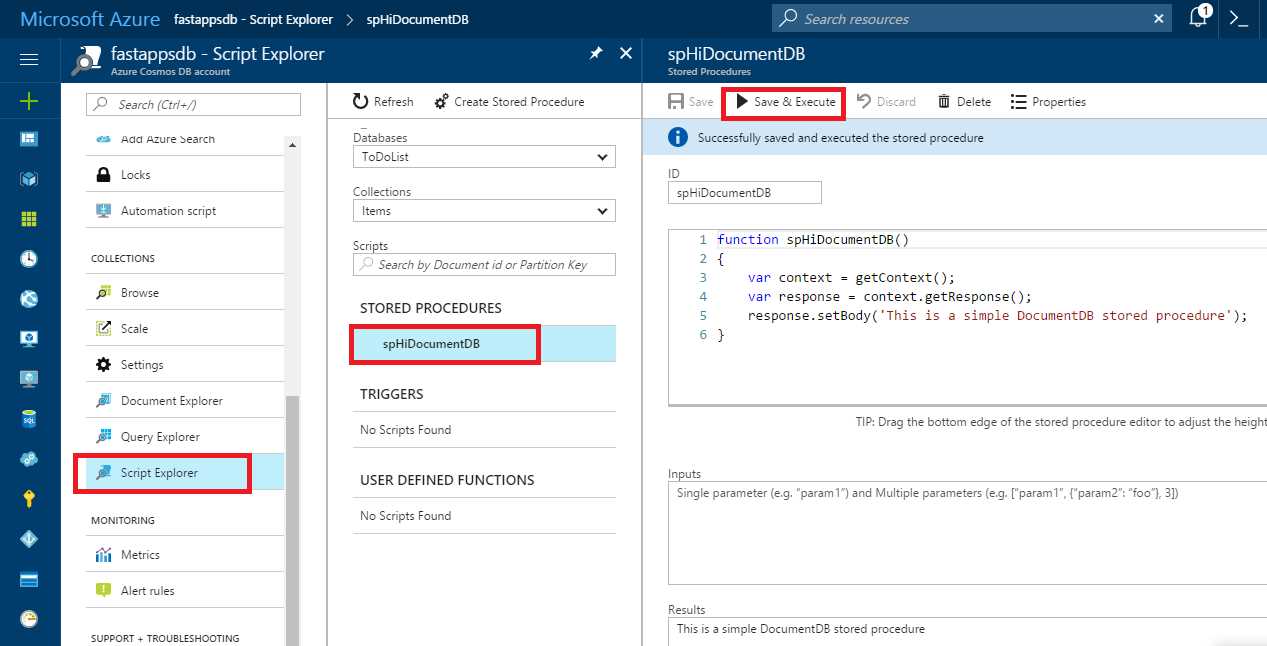
Figure 5-b: Execution of the Stored Procedure
Notice how the result of the execution of the stored procedure is displayed under the Results text area.
All we did here was get the context and response objects and then output a response by calling setBody. Very simple. So let’s now do something more exciting and create some stored procedures that do something useful.
First, let’s write a stored procedure that you can use to pass a document as a parameter and it will insert that document within the DocumentDB collection.
Code Listing 5-b: A Stored Procedure for Creating a Document
function spCreateDoc(doc) { var context = getContext(); var collection = context.getCollection(); var response = context.getResponse();
collection.createDocument(collection.getSelfLink(), doc, {}, function (err, doc) { if (err) throw new Error('Error creating document: ' + err.Message); response.setBody(doc); } ); } |
Using Script Explorer, click Create Stored Procedure, remove the default code, and enter the code provided in Code Listing 5-b. In the Inputs area, enter the JSON object shown in the following figure. Then click Save & Execute.
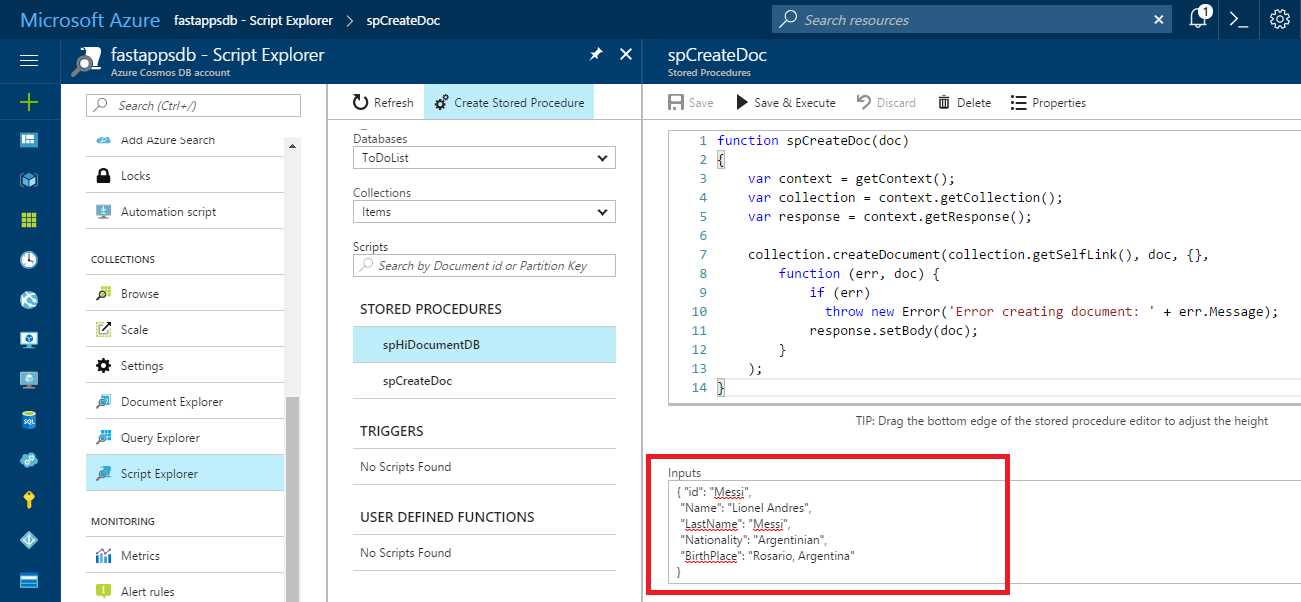
Figure 5-c: The spCreateDoc Stored Procedure
If we open Document Explorer, we’ll be able to see the newly created document.
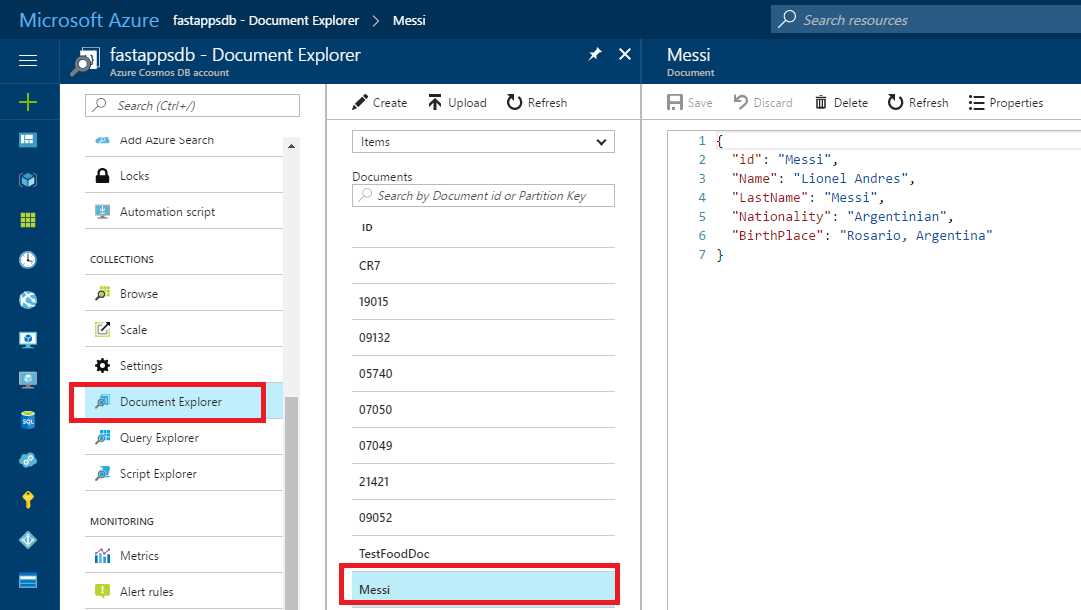
Figure 5-d: The New Messi Document Created with spCreateDoc
If we closely examine spCreateDoc, we can see that we get the context, response objects, and also the current collection. Once we have them, we call the createDocument method and pass the collection’s SelfLink, the doc that we want to insert, and a post-insertion function which is a callback (anonymous function) that displays the result, using response.setBody.
Also very simple and straightforward. Let’s look at another example.
Code Listing 5-c: A Stored Procedure for Checking and Creating a Document
function spCreateDocIfIdIsUnique(doc) { var context = getContext(); var coll = context.getCollection(); var collLink = coll.getSelfLink(); var response = context.getResponse();
CheckIdAndCreateDoc();
function createDoc() { coll.createDocument(collLink, doc, {}, function (err, doc) { if (err) throw new Error('Error creating document: ' + err.message);
response.setBody(doc); }); }
function CheckIdAndCreateDoc() { var query = { query: 'SELECT VALUE coll.id FROM coll WHERE coll.id = @id', parameters: [{name: '@id', value: doc.id}] };
var ok = coll.queryDocuments(collLink, query, {}, function (err, results) { if (err) { throw new Error('Error querying for document' + err.message); } if (results.length == 0) { createDoc(); } else { response.setBody('Document ' + doc.id + ' already exists.'); } });
if (!ok) { throw new Error ('Timeout for querying document...'); } } } |
This stored procedure creates a document, but it first checks whether there’s already a document in coll with the same id.
If there is an existing document with the specified id, the document is not inserted and an error message is displayed.
Now, in order to test this stored procedure, let’s run it with the same Messi document that already exists (the same one that was used in the previous query).
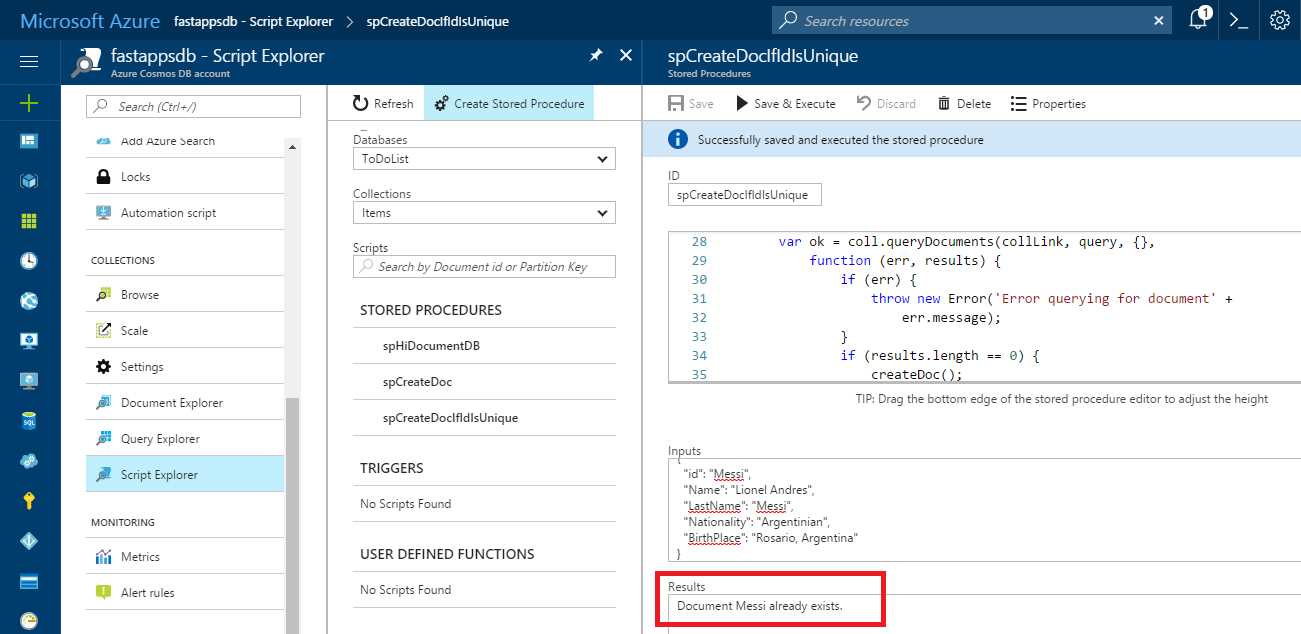
Figure 5-e: The Execution of spCreateDocIfIdIsUnique
As expected, the stored procedure clearly describes that a document with the id Messi already exists and therefore this is the result returned.
There are two very interesting parts to this stored procedure. One is that it has a function called CheckIdAndCreateDoc that checks whether the document already exists or not by executing a query on the collection using the familiar SQL flavored syntax we already know.
The other interesting part is that if queryDocuments returns a null, undefined, or false value, this means that the query execution has not been completed correctly and an exception is thrown in order to time out the stored procedure.
We’ve seen how we can combine SQL flavored syntax inside a stored procedure and how straightforward it is to write logic in JavaScript to insert documents in a collection. Let’s now focus our attention on triggers and then look at user-defined functions.
Triggers
DocumentDB triggers are JavaScript server-side functions associated with create (insert) or replace document operations.
There are two types of triggers: pre-triggers and post-triggers.
A pre-trigger runs before the operation executes and has no access to the response object. It basically provides a hook into the document that is about to be inserted or replaced.
A pre-trigger is particularly useful if you want to enforce some type of validation before the document gets inserted or replaced, or if you want to perform certain verifications on properties.
A post-trigger runs after the operation executes and is less common than a pre-trigger. With a post-trigger, you can run logic that is executed after the document has been saved, but before it has actually been committed.
There’s one important thing to mention about triggers: they are not automatically triggered like in a traditional relational database. In that sense, the name is a bit misleading. They must be explicitly requested with an operation in order to be executed.
Let’s go ahead and create a very simple validation pre-trigger that will be executed just before a document is created. We can do this easily by going into Script Explorer within the Azure Portal and then clicking Create Trigger. Let’s use the following code.
Code Listing 5-d: A Pre-Trigger that Validates New Documents
function validateNameExists() { var collection = getContext().getCollection(); var request = getContext().getRequest(); var doc = request.getBody(); if (!doc.name) { throw new Error('Document must include a "name" property.'); } } |
This is how we’ll see it on the Azure Portal.
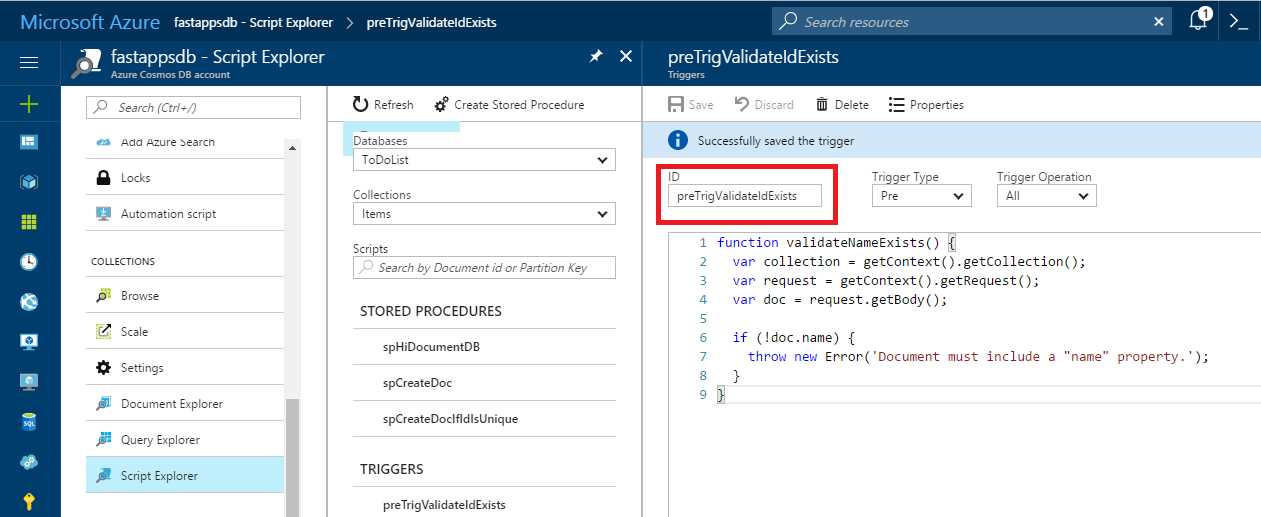
Figure 5-f: The Pre-Trigger on the Azure Portal (Script Explorer)
The Trigger Operation has been set to Create so that the trigger is only executed when a document is created. By default, the Trigger Operation is set to All, which also includes the Delete and Replace operations. Once done, give it a name (enter a value in the ID text box—I’ll call it preTriggerValidateIdExists) and then click Save.
To see it in action, let’s go ahead and slightly modify the client-side application we wrote with Visual Studio in the previous chapter. Let’s create a TestTrigger method inside the Program class.
Code Listing 5-e: TestTrigger Method in Our Client Application
public static async void TestTrigger(string dbName, string collName) { await Task.Run( async () => { using (var client = new DocumentClient( new Uri(cStrEndPoint), cStrKey)) { FoodDocType fd = new FoodDocType { id = "TestFoodDoc", description = "Organic food", isFromSurvey = false, foodGroup = "Organic", version = 1 }; string url = "dbs" + "/" + dbName + "/colls/" + collName; try { Document issue = await client.CreateDocumentAsync(url, fd, new RequestOptions { PreTriggerInclude = new[] { "preTrigValidateIdExists" } }); } catch (Exception ex) { Console.WriteLine("Exception: " + ex.ToString()); } } }); } |
In general, using async void for methods is not recommended because any exceptions thrown will be raised directly on the SynchronizationContext that was active when the async void method started. I use async void here to keep the main ideas of calling a DocumentDB trigger clear.
The Main method of the Program class has been modified as follows.
Code Listing 5-f: TestTrigger Method Invoked inside the Main Method
static void Main(string[] args) { TestTrigger("ToDoList", "Items"); Console.ReadLine(); } |
If we now execute this code, we get this result.

Figure 5-g: The Pre-Trigger Execution from the Client Application
We can clearly see that an exception is thrown and the returned message is the same one that we included in the pre-trigger code on the server, indicating that a name property must be included when creating the document.
The pre-trigger is actually invoked when CreateDocumentAsync is called. This is achieved by creating a RequestOptions object and specifying the ID that was given to the trigger when we created it through the Script Explorer within the Azure Portal.
When a trigger throws an exception, the transaction it is part of aborts, and everything gets rolled back. This includes the work done by the trigger itself and the work done by whatever request caused the trigger to execute.
So that’s a quick overview on triggers and how they can be invoked. Let’s move on now to user-defined functions.
User-defined functions
DocumentDB’s user-defined functions are the third type of JavaScript server-side functions that can be created and will seem familiar. User-defined functions are a great way to write custom business logic that can be called from within queries, such as extending DocumentDB’s flavored SQL with functionality that it doesn’t provide.
User-defined functions can’t make changes to the database—they’re read-only. Instead, they provide a way to extend DocumentDB SQL with custom code that otherwise would not be possible.
Because user-defined functions require a full scan (they cannot use index), adding one on a WHERE clause can have performance implications. If it is necessary to add one on a WHERE clause, I advise you to limit the query as much as possible with other conditions or by just selecting any properties needed (but not all of them).
It is also important to know that user-defined functions have no access to the context object, so they are essentially compute-only.
Let’s get started and create a user-defined function. We can do this by going into the Azure Portal, clicking Script Explorer, and then clicking the Create User Defined Function button. After doing this, we get the following default example provided by DocumentDB.
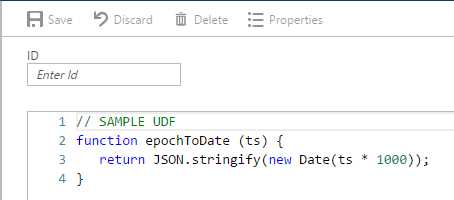
Figure 5-h: Out-of-the-Box User-Defined Function Provided by DocumentDB
Let’s now create a user-defined function we can use to check for matching a particular regular expression.

Figure 5-i: A Pattern Matching RegEx User-Defined Function
Here, we are using JavaScript’s built-in regular expression pattern matching to check whether a match is found within str.
This function will come in handy when looking for string patterns in documents that match a specific variable string value.
Let’s look at an example and expand our Visual Studio application by adding a TestUdf method to the Program class.
Code Listing 5-g: TestUdf Method in Our Client Application
public static void TestUdf(string dbName, string collName) { using (var client = new DocumentClient(new Uri(cStrEndPoint), cStrKey)) { string query = "SELECT c.id FROM c WHERE " + " udf.udfCheckRegEx(c.id, 'Messi') != null";
string url = "dbs" + "/" + dbName + "/colls/" + collName; Console.WriteLine("Querying for Messi documents"); var docs = client.CreateDocumentQuery(url, query).ToList(); Console.WriteLine("{0} docs found", docs.Count); foreach (var d in docs) { Console.WriteLine("{0}", d.id); } } } |
Now, let’s modify the Main method within the Program class to see this working correctly.
Code Listing 5-h: TestUdf Method Invoked inside the Main Method
static void Main(string[] args) { TestUdf("ToDoList", "Items"); Console.ReadLine(); } |
Before running this code, go to the Azure Portal, open Document Explorer, and create a new Messi document. Simply copy the details from the original Messi document previously created and change the id of the new one to Messi1.

Figure 5-j: The New Messi1 Document
Now if you run the updated code, you will see the following results.

Figure 5-k: The User-Defined Function Execution from the Client Application
Notice that on the TestUdf method within the client code, the udfCheckRegEx user-defined function created through the Azure Portal is prefixed with the string udf. So the actual name of the function from client code is udf.udfCheckRegEx.
In order to invoke a user-defined function, it is mandatory to always prefix it with udf using dotted notation.
That concludes our overview of user-defined functions. It was simple and easy to understand, but this barely scratches the surface of what is possible and can be achieved.
The DocumentDB documentation is a great resource for learning more about programming with them, so I encourage you to explore this topic further there.
Additional options
Before wrapping up, there are additional items that are interesting to mention and worth exploring if you want to expand your knowledge and understanding of DocumentDB.
The Azure documentation site is filled with valuable details and there’s a wealth of information about topics that were not covered in this e-book, but would certainly be beneficial for anyone willing to do serious development with DocumentDB.
For instance, there’s valuable information on how to partition data from client-side applications, how automatic indexing works, indexing policies, using multi-region accounts, how to perform global database replication, how to use DocumentDB with PowerBI for business intelligence, and many more topics.
So there’s plenty to keep learning and exploring. Also, if you still have any doubts about what kind of use cases DocumentDB is best suited for, here’s a great resource that addresses this topic.
Hadoop and DocumentDB
DocumentDB is a great companion for Hadoop, as explained here. It is not uncommon to want to do some kind of analytics on DocumentDB data or push the output of analytics into an operational store like DocumentDB. In the NoSQL world, by far the most common technology for doing analytics is Hadoop. In order to make this technology even easier to use, Microsoft provides a Hadoop Connector for DocumentDB.
This connector works with Azure’s Hadoop service, called HDInsight, and it also works with other Hadoop implementations, whether in the cloud or on premise.
HDInsight is an amazing solution from Microsoft that is also available through an Azure subscription, which consists of a managed Apache Hadoop, Spark, R, HBase, and Storm cloud service, fully hosted on Azure.
So whenever you think about Big Data, give DocumentDB a thought. You’ll be in for a treat.
Summary
DocumentDB is a relatively simple, scalable, and yet very powerful NoSQL database. It is able to provide advanced data management capabilities such as a SQL flavored query language, stored procedures, triggers, user-defined functions, and atomic transactions.
As seen, it provides out-of-the-box support for JSON and JavaScript, besides supporting many of the most popular programming languages such as C# (.NET), Node.js, Python, and Java.
DocumentDB provides the flexibility of not being locked into a schema and is hosted under a steady and reliable managed cloud service and platform.
As more and more companies continue to move their computing operations to the cloud, DocumentDB is becoming a true contender and great choice, both in terms of pricing and the features it supports.
In an increasingly connected society, DocumentDB is also a great choice when considering building a social network or social application and choosing a platform to support it. Here’s a very interesting article from a Microsoft blog that touches this topic.
As Microsoft continues to add more features to the product, the experience of using DocumentDB keeps improving and any barriers to entry continue to fade.
Throughout this e-book, we’ve explored the most developer-related facets of DocumentDB and how to interact with it in order to get you up-to-speed and able to appreciate its many benefits.
The overall objective was to make the experience of getting off the ground with this technology an enjoyable one and include some simple, yet fun examples on how to do it. Hopefully, that’s been achieved.
As mentioned before, I have another Syncfusion e-book called Customer Success for C# Developers Succinctly that devotes a chapter to creating a simple CRM application using DocumentDB. It includes examples on how to do more advanced client-side filtering and querying and provides a good use case for the adoption of DocumentDB.
To conclude, it’s been an absolute pleasure writing this e-book and the journey has been full of interesting small challenges that have helped shape a better picture of what this amazing NoSQL database can do. The Microsoft Azure team has done an outstanding job creating this product.
Thank you so much for reading along and following this journey of exploration through DocumentDB. Until our next adventure, have fun!


- 1800+ high-performance UI components.
- Includes popular controls such as Grid, Chart, Scheduler, and more.
- 24x5 unlimited support by developers.