How to display funnel in order by numbers
I'd like to sort the chart based on the numbers and the legend label too
e.g. this is from your demo code.
  public List<Statistics> StatisticsDetails = new List<Statistics>
	{
        new Statistics { Country = "China", Users = 1409517397 },
        new Statistics { Country = "India", Users = 1339180127 },
        new Statistics { Country = "United States", Users = 324459463 },
        new Statistics { Country = "Indonesia", Users = 263991379  },
        new Statistics { Country = "Brazil", Users = 209288278 },
        new Statistics { Country = "Pakistan", Users = 197015955 },
        new Statistics { Country = "Nigeria", Users = 190886311 },
        new Statistics { Country = "Bangladesh", Users = 164669751 },
        new Statistics { Country = "Russia", Users = 143989754 },
        new Statistics { Country = "Mexico", Users = 129163276 },
        new Statistics { Country = "Japan", Users = 127484450 },
        new Statistics { Country = "Ethiopia", Users = 104957438 },
        new Statistics { Country = "Philippines", Users = 104918090 },
        new Statistics { Country = "Egypt", Users = 97553151 },
        new Statistics { Country = "Vietnam", Users = 95540800 },
        new Statistics { Country = "Germany", Users = 82114224 },
    };
}
This is the result image
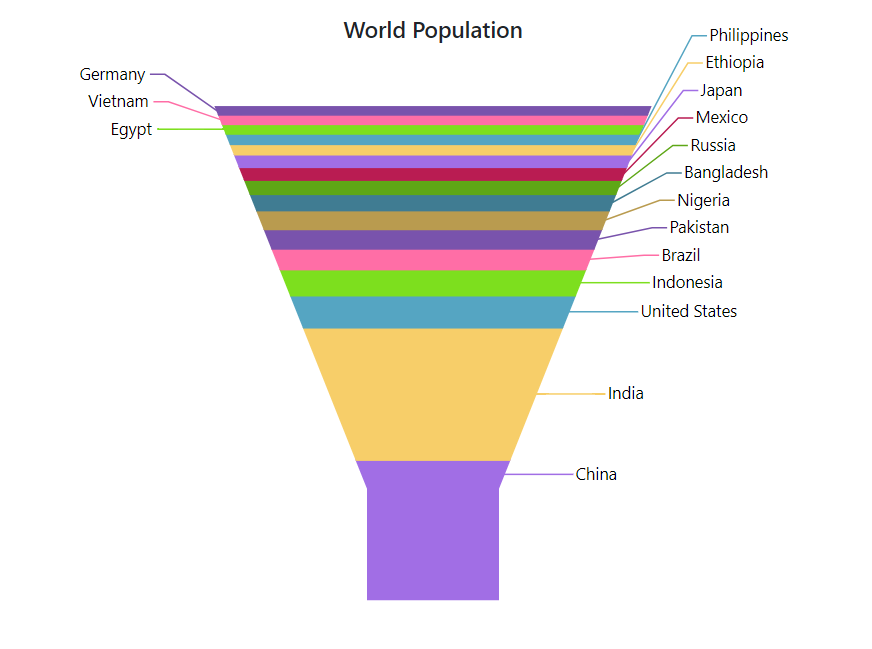
What I'd like to do is that as the China has the most population, I like to display it on the top, and then India,,,
The Legend Lebel also needs to be based on the number. [China on the top, then India,,,]

SIGN IN To post a reply.
6 Replies
1 reply marked as answer
DG
Durga Gopalakrishnan
Syncfusion Team
December 9, 2021 04:06 PM UTC
Hi Euijun,
Greetings from Syncfusion.
We suggest you to sort the chart series data points using OrderBy in OnInitialized method and change the order of legend text using OnLegendItemRender event. We have prepared sample based on your requirement. Please check with below snippet.
|
<SfAccumulationChart>
<AccumulationChartEvents OnLegendItemRender="LegendRenderEvent"></AccumulationChartEvents>
</SfAccumulationChart>
@code{
public int Count = 0;
protected override void OnInitialized()
{
FunnelChartPoints = FunnelChartPoints.OrderBy(o=>o.Population).ToList();
}
public String[] LegendNames = new String[] {"China", "India", "United States","Indonesia", "Brazil" };
public String[] Colors = new String[] {"#ff6ea6", "#7ddf1e","#55a5c2", "#f7ce69", "#a16ee5" };
public void LegendRenderEvent(AccumulationLegendRenderEventArgs args)
{
Console.WriteLine(LegendNames);
if(Count >= LegendNames.Length)
Count = 0;
args.Text = LegendNames[Count];
args.Fill = Colors[Count];
Count = Count + 1;
}
} |

Sample : https://www.syncfusion.com/downloads/support/directtrac/general/ze/FunnelOrder-1711201045.zip
Kindly revert us if you have any concerns.
Regards,
Durga G
Hi Durga,
Thanks for your help,
But there are still some issues with above solution,
- The color does not match,
- If you click China legend to hide, actually brazil is hidden.

- The last issue is when I set brazil population to 0, in the funnel chart, it's gone, but it stays on legend then Indonesia is gone.

- Is there any option that I can still display a chart even if it has 0 value?(brazil with 0 population in this example)
Thanks.
DG
Durga Gopalakrishnan
Syncfusion Team
December 10, 2021 03:08 PM UTC
Hi Euijun,
We have already logged feature request on “Support to reverse the legend items”. This feature will be available in our upcoming Volume 4 Main Release which is expected to be rolled out at end of December, 2021. You can keep track of this feature from the feedback portal below.
If you have any more specification/precise replication procedure or a scenario to be tested, you can add it as a comment in the portal.
Regards,
Durga G
Marked as answer
DG
Durga Gopalakrishnan
Syncfusion Team
December 21, 2021 03:14 PM UTC
Hi Euijin,
We are glad to announce that our Essential Studio 2021 Volume 4 release v19.4.0.38 is rolled out and is available for download under the following link.
We suggest you to enable Reverse as true for legend to render legend items in reverse order.
Sample : https://www.syncfusion.com/downloads/support/directtrac/general/ze/LegendReverse-1658152843.zip
We thank you for your support and appreciate your patience in waiting for this release. Please get in touch with us if you would require any further assistance.
Regards,
Durga G
EH
Euijun Han
December 21, 2021 03:30 PM UTC
Hi Durga,
Thanks for the update new!
I just updated to latest version and Reverse work well!
Thanks ;)
DG
Durga Gopalakrishnan
Syncfusion Team
December 22, 2021 07:53 AM UTC
Hi Euijin,
Most welcome. Please get back to us if you need any further assistance. We are always happy in assisting you.
Regards,
Durga G
SIGN IN To post a reply.
- 6 Replies
- 2 Participants
- Marked answer
-
EH Euijun Han
- Dec 7, 2021 05:20 PM UTC
- Dec 22, 2021 07:53 AM UTC

