- Home
- Forum
- Xamarin.Forms
- SfPopup not filling the entire screen
SfPopup not filling the entire screen
I am using the SfPopup control to recreate the 'OnBoard help' which can be found here: Syncfusion OnBoard help
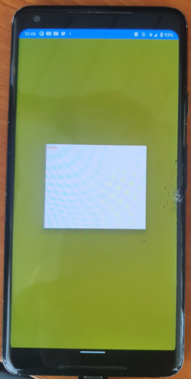
The problem however is that my SfPopup is not filling the entire screen height of my page. It becomes more obvious when setting the background color on the SfPopup, most of the screen gets an overlay but the bottom of the screen isn't. Any clue how I can overlay the entire height?
I reproduced the issue in an entire new Xamarin.Forms project (black app). The issue (made visible):

You can clearly see that the bottom is not getting an overlay.
The XAML of the page (no background code is involved, only XAML):
<?xml version="1.0" encoding="utf-8" ?>
<ContentPage
x:Class="App7.MainPage"
xmlns="http://xamarin.com/schemas/2014/forms"
xmlns:x="http://schemas.microsoft.com/winfx/2009/xaml"
xmlns:popuplayout="clr-namespace:Syncfusion.XForms.PopupLayout;assembly=Syncfusion.SfPopupLayout.XForms"
NavigationPage.HasNavigationBar="False">
<ContentPage.Content>
<popuplayout:SfPopupLayout
x:Name="popupLayout"
BackgroundColor="Yellow"
IsOpen="True"
StaysOpen="True">
<popuplayout:SfPopupLayout.PopupView>
<popuplayout:PopupView
AnimationMode="None"
BackgroundColor="Transparent"
HorizontalOptions="FillAndExpand"
ShowFooter="False"
ShowHeader="False"
VerticalOptions="FillAndExpand">
<popuplayout:PopupView.ContentTemplate>
<DataTemplate>
<Label Text="Hello" TextColor="Red" />
</DataTemplate>
</popuplayout:PopupView.ContentTemplate>
<popuplayout:PopupView.PopupStyle>
<popuplayout:PopupStyle BorderColor="Transparent" />
</popuplayout:PopupView.PopupStyle>
</popuplayout:PopupView>
</popuplayout:SfPopupLayout.PopupView>
</popuplayout:SfPopupLayout>
</ContentPage.Content>
</ContentPage>
My build, with the issue, was done using Android 11.0 (R) on a Pixel 4 (API 31) and also tested it on a real device (samsung S10, Android 11) with the same result. My package versions: Syncfusion.Xamarin.SfPopupLayout 19.2.0.60 and Xamarin.Forms 5.0.0.2012
After some more testing, it looks like it is working on other emulators (Pixel 2, 3, 3XL) but is just doesn't seem to work correctly on Pixel 4 or Samsung 10S.. perhaps some more that do't work..?
*Correction, on the Pixel 3XL it also does not seem to work. Perhaps it is a big screen issue?
As far as I can see it works on the following tested devices:
- Pixel 3 (1080 x 2160)
- Pixel 3a XL (1080 x 2160)
- Pixel 2 (1080 x 1920)
- Pixel 3 XL (1440 x 2960)
- Pixel 4 XL (1440 x 3040)
- Pixel 4 (1080 x 2280)
- Samsung S10 (tested on real device) - (1080 x 2280)

We are currently validating the reported issue. We will validate and update further details on or before 14th September 2021.
Regards,
Ranjith Kumar
Thanks for your patience.
We have checked the reported issue "Overlay is getting cropped at bottom in pixel 3 XL (emulator)" and we discovered that if we opened the popupview before page is rendered in pixel 3 XL, we are getting improper screen height. So, we suggest you to open the PopupView when page is rendering. For more details, please refer to the below code snippets.
Code snippet :
|
public partial class MainPage : ContentPage {
public MainPage()
{
InitializeComponent();
this.PropertyChanged += MainPage_PropertyChanged;
}
private void MainPage_PropertyChanged(object sender, PropertyChangedEventArgs e)
{
if (e.PropertyName == "Renderer")
{
popupLayout.Show();
}
}
protected override void OnAppearing()
{
base.OnAppearing();
}
..... } |
Sample link : https://www.syncfusion.com/downloads/support/directtrac/general/ze/PopupDemo-1636381355.zip
Regards,
Karthik Raja
- 6 Replies
- 4 Participants
-
NI Nicolas
- Sep 7, 2021 04:27 PM UTC
- Sep 14, 2021 11:00 AM UTC