[Grid][EditInline][CustomAdaptor] Cannot add new line base on CustomAdaptor
Dear all,
In ver 19.1.0.57 working normal. But in ver 19.1.0.58, edit inline not working with add action.
When add new line and fill value, I press button "Save" Or "Update" it no action anymore.
Please help me check it.
Thanks you & Best regards,
Mr. Sun
SIGN IN To post a reply.
5 Replies
1 reply marked as answer
RN
Rahul Narayanasamy
Syncfusion Team
May 4, 2021 01:50 PM UTC
Hi Mr Sun,
Greetings from Syncfusion.
Query: In ver 19.1.0.57 working normal. But in ver 19.1.0.58, edit inline not working with add action. When add new line and fill value, I press button "Save" Or "Update" it no action anymore.
We have validated your query and checked the reported problem in the mentioned version(19.1.0.58). We have prepared a sample based on the mentioned requirement(CustomAdaptor with inline editing). We could not reproduce the problem. The record add operation is working fine while pressing Update button in toolbar. Find the below sample for your reference.
If you are still facing the problem, then could you please share the below details.
- Full Grid code snippets.
- Whether did you provided IsPrimaryKey property to any one of the column(whose value is unique)?
- Reproduce the problem in the provided sample and revert back to us.
- Share a simple reproduceable sample if possible.
The above provided information will be helpful to validate the problem and provide a better solution.
Regards,
Rahul
MS
Mr Sun
May 5, 2021 10:10 AM UTC
Hi HiRahul Narayanasamy,
I have found the problem.
In ver 19.1.0.57 not check data annotation for child object. But in ver 19.1.0.58 check data annotation for child object.
You can see the picture or attachment file for more detail
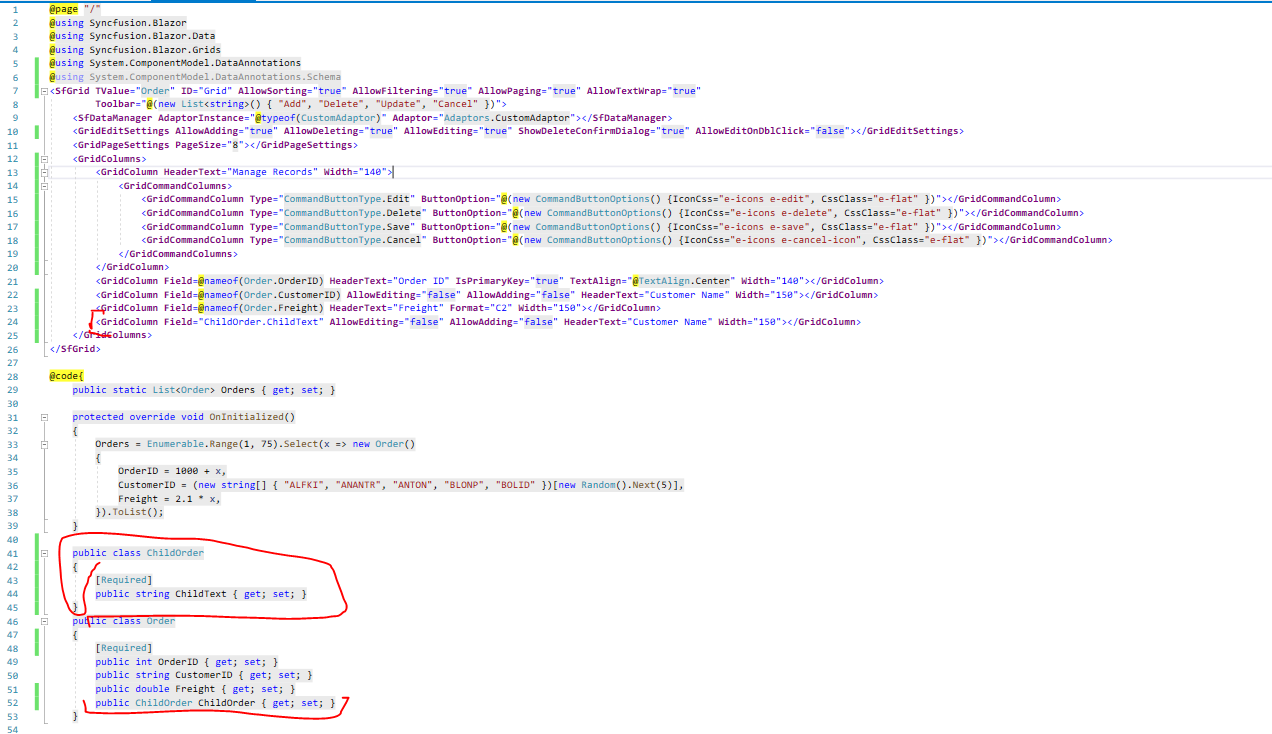
Could you please help me for this case?
Not relevant but I think related to this case: In some cases I have edited a lot of code, when edit inline object like
{
[Required]
public long ChildId {get; set;}
public Child Child {get; set;}
}
before i use ver 18.2 Child always = null, but in ver 19.1 Child has been initialized
Case SfTreeGrid: after edit Parent Object has been initialized with defautl value

I have to set Parent = null before calling api
Thank you & Best regards,
Mr. Sun
Attachment: Sun_Sample1773915011_1f07b634.zip
RN
Rahul Narayanasamy
Syncfusion Team
May 6, 2021 01:48 PM UTC
Hi Mr Sun,
Thanks for sharing the details.
Query: I have found the problem. In ver 19.1.0.57 not check data annotation for child object. But in ver 19.1.0.58 check data annotation for child object.
We have validated your query with the provided information and we would like to inform you that we added the fix for the issue “Validation message is not showing for complex fields while defining validation using DataAnnotation” in our previous release version(19.1.0.58). So the record was not added since the complex field has no values.
You have defined validation for complex field using DataAnnotation. You have not provided any values in complex field and you have set AllowEditing and AllowAdding property values as false to the complex field. So while updating/adding the record the validation operation is performed since there is no values in complex fields.
We suggest you to provide any values to complex fields or provide any default values while adding the records to resolve the problem. Here, we have added default value to complex column while adding the record.
|
<SfGrid TValue="Order" ID="Grid" AllowSorting="true" AllowFiltering="true" AllowPaging="true" AllowTextWrap="true"
Toolbar="@(new List<string>() { "Add", "Delete", "Update", "Cancel" })">
<SfDataManager AdaptorInstance="@typeof(CustomAdaptor)" Adaptor="Adaptors.CustomAdaptor"></SfDataManager>
<GridEditSettings AllowAdding="true" AllowDeleting="true" AllowEditing="true" ShowDeleteConfirmDialog="true" AllowEditOnDblClick="false"></GridEditSettings>
<GridPageSettings PageSize="8"></GridPageSettings>
<GridColumns>
<GridColumn HeaderText="Manage Records" Width="140">
. . .
</GridColumn>
<GridColumn Field=@nameof(Order.OrderID) HeaderText="Order ID" IsPrimaryKey="true" TextAlign="@TextAlign.Center" Width="140"></GridColumn>
<GridColumn Field="ChildOrder.ChildText" AllowEditing="false" AllowAdding="false" DefaultValue="@("default")" HeaderText="Child text" Width="150"></GridColumn>
</GridColumns>
</SfGrid>
@code{
public static List<Order> Orders { get; set; }
. . .
public class ChildOrder
{
[Required]
public string ChildText { get; set; }
}
public class Order
{
[Required]
public int OrderID { get; set; }
public string CustomerID { get; set; }
public double Freight { get; set; }
public ChildOrder ChildOrder { get; set; }
}
// Implementing custom adaptor by extending the DataAdaptor class
public class CustomAdaptor : DataAdaptor
{
// Performs data Read operation
. . .
}
} |
Reference:
Also we are quite unclear about the information about the SfTreeGrid related information. Could you please share more details regarding the tree grid related information. It will be helpful to validate and provide a better solution.
Regards,
Rahul
Marked as answer
MS
Mr Sun
May 7, 2021 06:41 AM UTC
Hi HiRahul Narayanasamy,
Thank you for support. Have a nice day!
Mr. Sun
RN
Rahul Narayanasamy
Syncfusion Team
May 10, 2021 05:18 AM UTC
Hi Mr Sun,
Thanks for the update.
Please get back to us if you need further assistance.
Regards,
Rahul
SIGN IN To post a reply.

