Hi Mikhail
Thank you for contacting Syncfusion support.
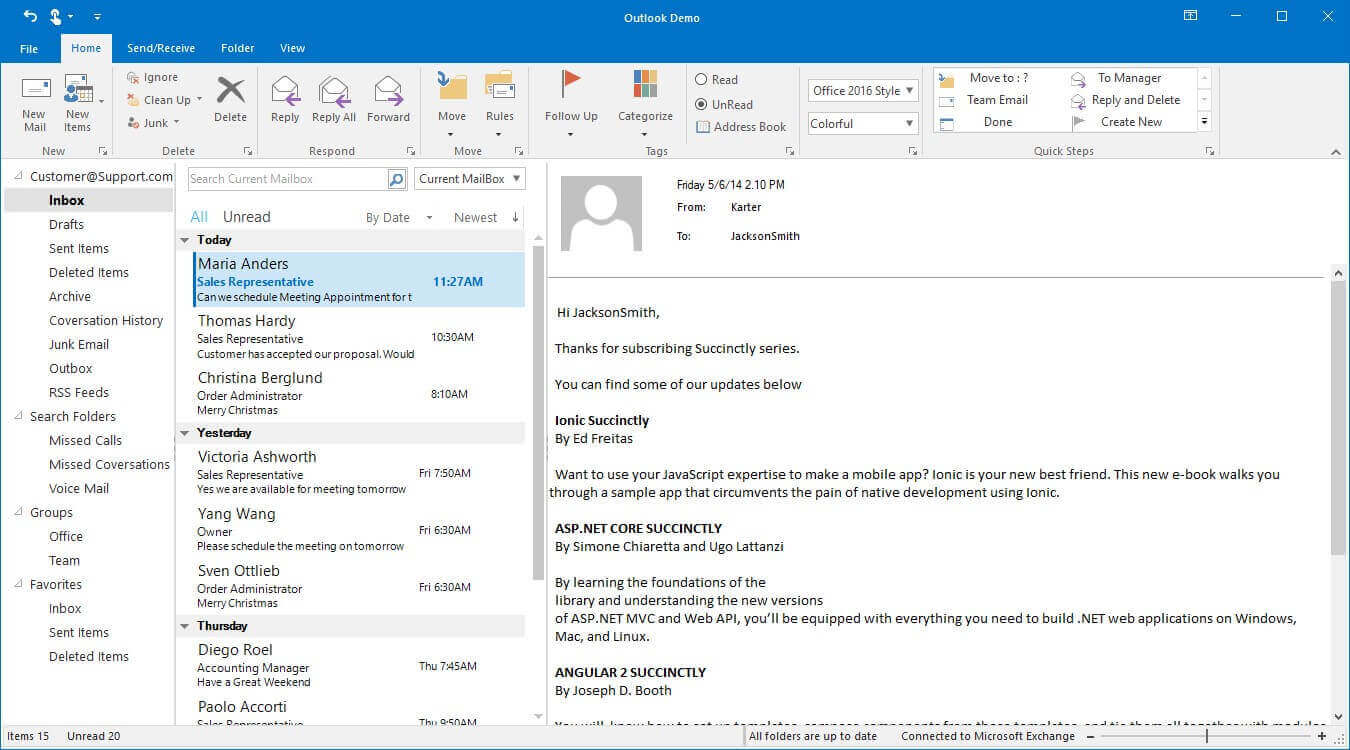
Query : how I can get really colorful Ribbon as in Windows Forms Outlook Demo, but with WPF control? Here is what I need nd one more question - how I can change accent color?
From your query, we could understand that you want to have the same color for Tab and titlebar of RibbonWindow. To achieve it, we can customize the titlebar background [accent color] by overriding the style of RibbonWindow and apply it in Ribbonwindow using Style property.
XAML:
|
<Style x:Key="TitleBarStyleKey" TargetType="{x:Type local:TitleBar}">
<Setter Property="Focusable" Value="False" />
<Setter Property="Foreground" Value="{StaticResource RibbonForeground}" />
<Setter Property="ClipToBounds" Value="False" />
<Setter Property="Background" Value="{StaticResource Office2013TitleBarBackgroundBrush}" />
<Setter Property="BorderBrush" Value="{StaticResource RibbonBorderBrush}" />
<Setter Property="BorderThickness" Value="0" />
<Setter Property="Template">
<Setter.Value>
<ControlTemplate TargetType="{x:Type local:TitleBar}">
<!--Customizing the titlebar background-->
<Border
Margin="0,0,0,0"
Background="{StaticResource RibbonBackStageColor}""
BorderBrush="{TemplateBinding BorderBrush}"
BorderThickness="{TemplateBinding BorderThickness}">
|
Screenshot
Please try this solution and let us know if it is helpful.
Regards,
Vijayalakshmi VR