
 Arulraj Aboorvasamy
TL;DR: Next.js 16 stabilizes Turbopack for 2–5× faster builds, introduces Cache Components for hybrid static/dynamic rendering, adds AI debugging via MCP in DevTools, and ships with the new React Compiler, routing improvements, and breaking changes like Node.js 20+ requirements, ideal for boosting developer efficiency.
Next.js 16 is a major update that aims to improve both developer productivity and application performance. It’s especially important in 2026 because many previously experimental features have now matured into a stable, performance‑first architecture capable of supporting complex modern web demands. With Turbopack as the default bundler and a more explicit caching model, you can expect faster builds, more consistent behavior, and improved reliability across environments.
In this guide, we’ll walk through what’s new in Next.js 16 and how you can use these features to streamline your development workflow.

Turbopack: The rust-based bundler
Turbopack is now the stable, high-performance successor to Webpack. Built in Rust, it focuses on optimizing build speeds and development responsiveness. As of Next.js 16, it becomes the default bundler for all new projects, offering near‑instant feedback during local development and substantially faster production pipelines.
Here are the key improvements Turbopack brings:
- 10x faster fast refresh: Code updates appear almost instantly in the browser, helping maintain developer flow.
- 2x to 5x faster production builds: This greatly reduces CI/CD bottlenecks.
- Filesystem caching: Compiled artifacts are stored on disk to speed up repeated runs.
To enable file system caching for even faster development restarts, add the following code to your next.config.ts:
import type { NextConfig } from "next";

const nextConfig = {
    experimental: {
        turbopackFileSystemCacheForDev: true,
    },
};

export default nextConfig;
If you prefer to continue using Webpack, you can switch back using commands such as next dev --webpack or by setting turbopack: false in your configuration.
import type { NextConfig } from "next";

const nextConfig: NextConfig = {
    turbopack: false,
};

export default nextConfig; 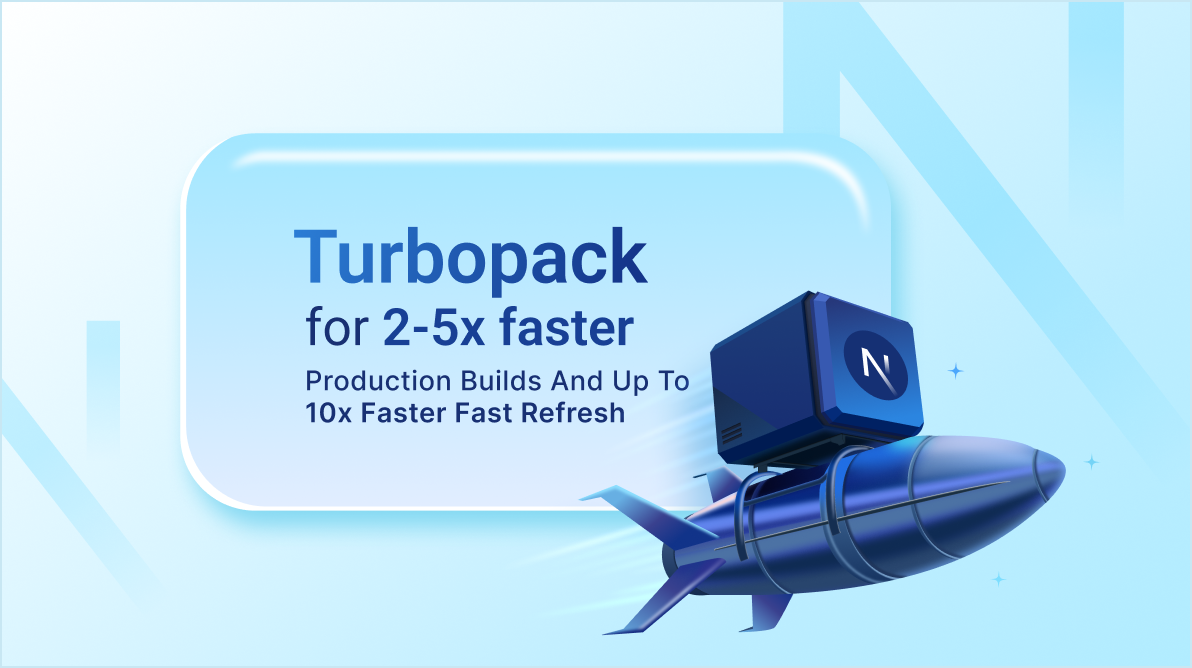
Cache components: Explicit performance control
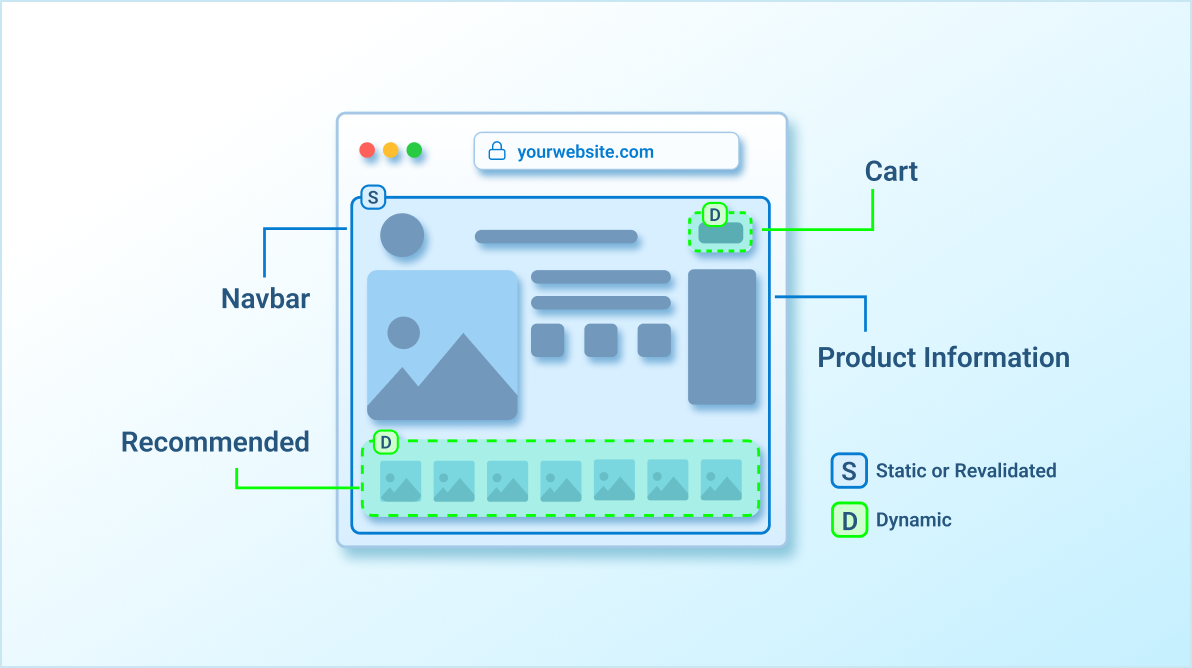
Cache components introduce a new explicit, opt-in caching model powered by the use cache directive. Unlike the older implicit caching system, this model gives developers fine‑grained control over exactly what gets cached and for how long. As a result, dynamic code now executes at request time by default, unless you deliberately mark it for caching, making application behavior more predictable and easier to reason about.
Installation
To enable Cache Components in your project, follow these steps:
Step 1: Open the configuration file
Locate and open your next.config.ts file in the project root.
Step 2: Enable Cache components
Add the property cacheComponents: true to your configuration object. Here’s how you can do it in code:
const nextConfig = {
    cacheComponents: true,
};

export default nextConfig;
Step 3: Add the use cache directive
Apply the use cache directive at the top of functions or components you wish to cache.
Add this to your project:
 // File level - When used at the file level, all function exports must be async functions.
'use cache'

export default async function Page() {
    // ...
}

// Component level
export async function MyComponent() {
    'use cache'
    return <></>
}

// Function level
export async function getData() {
    'use cache'
    const data = await fetch('/api/data')
    return data
}
Next.js 16 enhanced caching APIs for better control. Enhanced APIs include:
- revalidateTag(tag, profile): Uses required cacheLife profiles, such as ‘hours,’ to fine-tune stale-while-revalidate timing.
- updateTag(tag): Immediately refreshes cache data inside Server Actions.
- refresh(): Re-fetches uncached data without invalidating any existing cache entries.
These additions make caching more intentional, maintainable, and predictable, especially in dynamic, data‑heavy applications.
Next.js DevTools MCP: AI-assisted debugging
The Model Context Protocol (MCP) integration enables Next.js DevTools to share detailed application context with AI coding assistants. This provides AI agents with a deep understanding of your app’s routing, caching, and rendering behavior, enabling them to analyze issues more accurately and provide more useful guidance during development.
Key features
- Context-aware insights: AI agents can access unified browser and server logs without context switching.
- Automatic error access: Agents receive detailed stack traces and active route data automatically.
- Fix suggestions: AI can suggest specific code corrections based on real-time application metadata.

Other notable features and improvements
React compiler support
Next.js 16 includes full support for the React Compiler, a now stable build-time optimization tool. The compiler automatically optimizes your code by memorizing components and hooks. This eliminates the need for manual performance optimizations like useMemo and useCallback, reducing code complexity while preventing unnecessary re-renders.
To enable it, refer to the code below.
export const config = {
    reactCompiler: true,
};Enhanced routing
Routing performance receives significant improvements in Next.js 16, offering faster navigation and reduced network overhead. These gains are driven by two major enhancements.
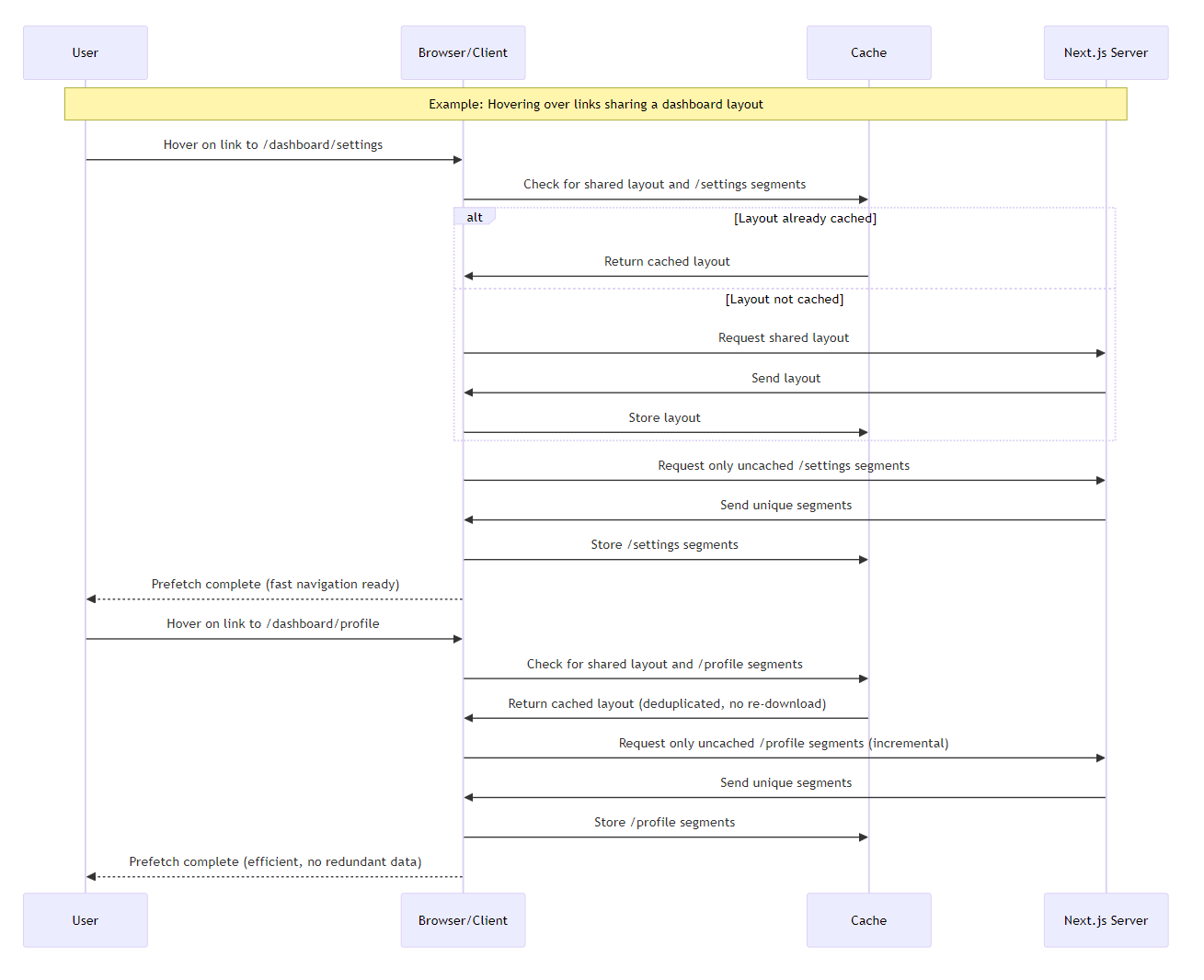
First, layout deduplication ensures that shared layouts are downloaded only once during prefetching, preventing redundant network requests. Additionally, incremental prefetching retrieves only the segments that have not already been cached, resulting in more efficient data loading.
Together, these features create a smoother and more responsive routing experience. The following sequence diagram illustrates these enhancements in action, showing how Next.js 16 optimizes the routing process by:
- Initial prefetch (/settings): The client checks the cache for the shared layout. If missing, it requests and stores it, then fetches only uncached unique segments, showing incremental behavior.
- Subsequent prefetch (/profile): Reuses the cached layout (deduplication, no re-download), and again requests only uncached segments, highlighting efficiency and no redundant data.
Proxy.ts replaces middleware.ts
Next.js 16 replaces the former middleware.tsfile with the new Node.js-native alternative Proxy.ts. This update clarifies where request interception occurs and makes the network boundary of your application more explicit. Importantly, the core logic handling redirects and authentication remains unchanged.
Here is an example migration:
// Old: middleware.ts
    export function middleware(req) { ... }

// New: proxy.ts
export function proxy(req) { ... }
Logging enhancements
Next.js 16 includes refined logging output to provide more visibility into performance:
- Dev logs now break down compile and render times.
- Build logs display step-by-step timings.
Next.js 16 (Turbopack)

 ✓ Compiled successfully in 615ms
 ✓ Finished TypeScript in 1114ms
 ✓ Collecting page data in 208ms
 ✓ Generating static pages in 239ms
 ✓ Finalizing page optimization in 5ms
Simplified project setup
create-next-app now defaults to a modern best‑practice stack, including:
- App Router.
- TypeScript.
- Tailwind CSS.
- ESLint.
This makes new projects more consistent and production-ready out of the box.
Build adapters API (Alpha)
Next.js 16 introduces a new Build Adapters API, enabling developers to customize builds for specific hosting platforms. This is currently available through the experimental.adapterPath option.
React 19.2 features
Includes View Transitions for smooth animations, useEffectEvent for non-reactive effects, and the Activity component.
Breaking changes and upgrade guide
Next.js 16 includes several breaking changes to modernize the framework:
- Requirements: Node.js 20.9+, TypeScript 5.1+; drops Node.js 18 support.
- Removals: AMP, next lint, runtime configs, various experimental flags.
- Async access: Params, searchParams, cookies, etc., must now be awaited.
- Deprecations: middleware.ts, images.domains.
To upgrade
To upgrade to the latest version of Next.js, run the following command.
bash
npx @next/codemod@canary upgrade latest
npm install next@latest react@latest react-dom@latestFrequently Asked Questions
What is Turbopack and how does it improve builds in Next.js 16?
Turbopack is a Rust-based bundler that replaces Webpack, as the default in Next.js 16, offering 10x faster Fast Refresh for instant code updates in development and 2x-5x faster production builds. It includes filesystem caching to store compiler artifacts, speeding up restarts. You can enable enhanced dev caching via `experimental: ` in { turbopackFileSystemCacheForDev: true }next.config.ts, or switch back to Webpack if needed.
How do Cache Components provide better control over caching in Next.js 16?
Cache Components introduce an explicit, opt-in caching model using the “use cache” directive, making dynamic code run at request time by default unless cached. To enable, add `cacheComponents: true` to next.config.ts. Apply the directive at file, component, or function levels for async exports. Enhanced APIs like `revalidateTag(tag, profile)` with cacheLife profiles (e.g., ‘hours’), `updateTag(tag)` for immediate refreshes, and `refresh()` offer finer control over data persistence.
What is the Model Context Protocol (MCP) in Next.js DevTools and how does it aid debugging?
MCP integrates AI-assisted debugging into Next.js DevTools, allowing AI agents to access app context like routing, caching, and rendering. Key features include context-aware insights with unified browser/server logs, automatic error access with stack traces and route data, and AI-suggested code fixes based on real-time metadata, making issue diagnosis more efficient.
How does React Compiler support work in Next.js 16?
React Compiler is a build-time tool that auto-optimizes code by memoizing components and hooks, eliminating manual use of useMemo or useCallback to prevent unnecessary re-renders and simplify code. Enable it with `reactCompiler: true` in your config, boosting performance without extra developer effort.
How can I upgrade my project to Next.js 16?
Run `npx @next/codemod@canary upgrade latest` followed by `npm install next@latest react@latest react-dom@latest`. Review the upgrade guide for handling breaking changes like async access and config updates. New projects via create-next-app default to App Router, TypeScript, Tailwind CSS, and ESLint for a streamlined setup.
Conclusion
Thank you for reading! Next.js 16 provides a reliable and future-ready foundation for web development in 2026 by focusing on explicit control and high performance. By adopting Turbopack for speed, Cache Components for clarity, and the React Compiler for efficiency, you can build applications that are both easier to maintain and faster for your users. These tools represent the current gold standard for full-stack React development, offering the stability required for professional, large-scale projects.
If you have any questions, contact us through our support forum, support portal, or feedback portal. We are always happy to assist you!




 No spam, just valuable updates.