
 Arulraj Aboorvasamy
TL;DR: ASP.NET Core 10 makes building modern web apps easier than ever. Key enhancements include persistent state and faster navigation for Blazor, built-in validation for Minimal APIs, and simplified API documentation with OpenAPI 3.1. This release focuses on speed, resilience, and developer productivity.
Are you a full-stack or backend developer passionate about building scalable web applications? Then you know how important it is to stay ahead of framework updates. With .NET 10 officially here, ASP.NET Core 10 delivers game-changing features that make your apps faster, more secure, and easier to maintain.
Why ASP.NET Core 10 is a game-changer?
Whether you’re crafting rich Blazor UIs, streamlining minimal APIs, or securing endpoints, this release addresses real-world pain points, such as handling network hiccups gracefully and enhancing JavaScript interoperability.
In this post, we’ll break down the most impactful ASP.NET Core 10 updates, explain why they matter, and share practical tips for upgrading from .NET 9.
Agenda
Here’s what we’ll cover to help you unlock the full potential of ASP.NET Core 10:
- Blazor: Enhanced interactivity and reliability
- Minimal APIs: Validation, streaming, and smart forms
- OpenAPI: YAML support and schema polish
- Performance and diagnostics across the board
- Breaking changes and migration roadmap
- ASP.NET Core 10 vs previous versions
Ready to supercharge your next project? Let’s dive in.
Blazor: Enhanced interactivity and reliability
Blazor continues to evolve as a powerhouse for building rich, client-side web experiences. The improvements made to ASP.NET Core 10 focus on security, performance, and UX refinements, making it easier to create resilient applications that handle real-world disruptions, such as network drops.
What’s new
- Automatic fingerprinting and asset optimization
- Reconnection UI and state persistence
- JavaScript interop upgrade
Let’s dive into each improvement in detail.
1. Automatic fingerprinting and asset optimization
In ASP.NET Core 10, Blazor scripts are now treated as static web assets with built-in compression and fingerprinting. This shift from embedded resources improves caching efficiency and strengthens security against tampering.
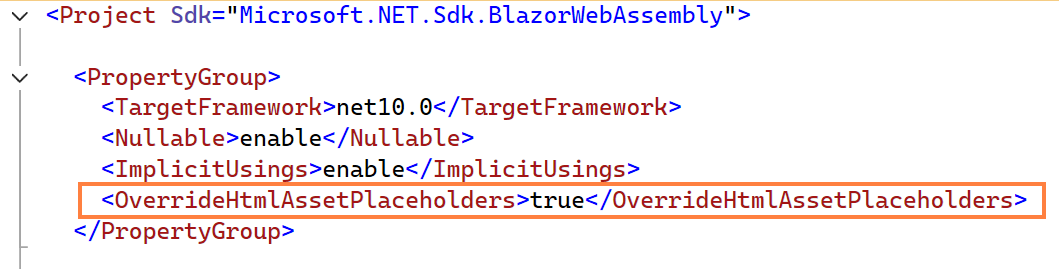
For standalone WebAssembly apps, you can enable client-side fingerprinting by adding the following setting to your .csproj file:
<OverrideHtmlAssetPlaceholders>true</OverrideHtmlAssetPlaceholders>Refer to the image below, which shows a Blazor WebAssembly project configuration snippet with the HTML asset placeholder override enabled.
From this release onwards, the <link> element will be automatically added in wwwroot/index.html file.
<link rel="preload" id="webassembly" />Enhanced performance
These new features provide the following performance enhancements:
- Faster load times due to browser‑friendly caching.
- Preload hints via Link headers ensure quicker startups.
- In tests, the initial rendering time for data‑heavy apps was reduced by several seconds.
Migration tips
- Update your index.html file placeholders.
- Remove the deprecated cache properties, such as BlazorCacheBootResources.
2. Reconnection UI and state persistence: No more lost sessions
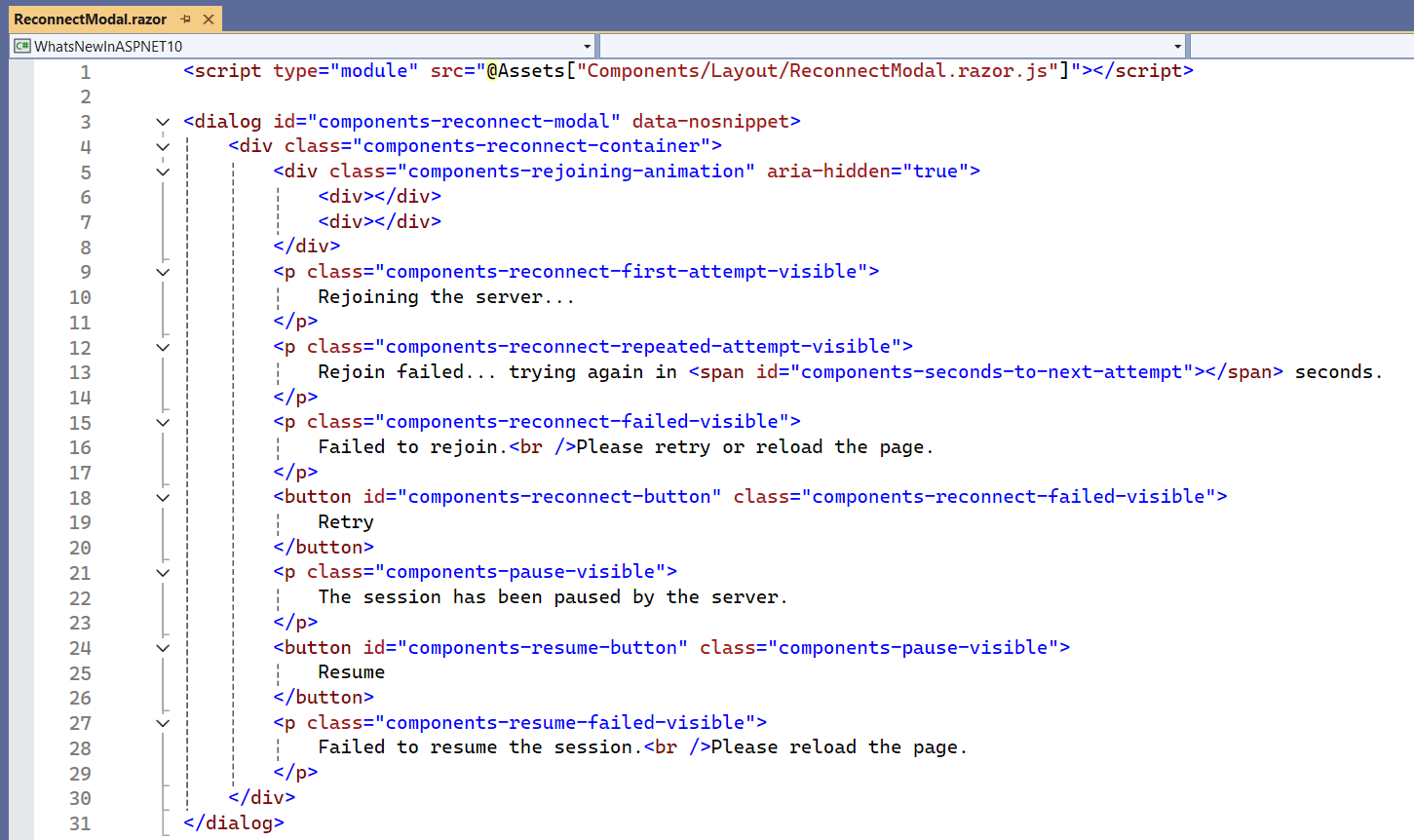
Say goodbye to frustrating network interruptions! Blazor in .NET 10 introduces the new ReconnectModal component in templates, along with custom CSS and JavaScript for handling retry states and events like component-reconnect-state-changed.
Pair this with declarative state persistence using the [PersistentState] attribute on properties. This feature automatically saves and restores data across pre-rendering, navigation, or disconnection, eliminating the need for manual JSON serialization.
Refer to the following image. Here’s how the ReconnectModal component looks in HTML, complete with classes and IDs for managing server reconnection attempts:
And here’s an example of using the PersistentState attribute on a property.
[PersistentState]
public List<Movie>? MoviesList { get; set; }

protected override async Task OnInitializedAsync()
{
    MoviesList ??= await GetMoviesAsync();
}
The PersistentState attribute replaces manual PersistAsJson/TryTakeFromJson patterns, making it easier to preserve form inputs during tab switches or unstable network conditions.
Pro tips for developers
- Enable AllowUpdates = true for live updates during enhanced navigation.
- Audit your state logic when upgrading and add RegisterPersistentService for injected services to ensure smooth persistence.
3. JavaScript interop upgrade
In ASP.NET Core 10, Blazor’s JavaScript interop now supports async methods on IJSRuntime and IJSObjectReference, including InvokeConstructorAsync and GetValueAsync<T>. There is also CancellationToken support for timeouts, as well as synchronous options for in-process scenarios.
Refer to the following example code.
// IJSRuntime
var cancellationTokenSource = new CancellationTokenSource();
CancellationToken token = cancellationTokenSource.Token;

var classRef = await JSRuntime.InvokeConstructorAsync("jsInterop.TestClass", "Blazor!", token);
var text = await classRef.GetValueAsync<string>("text");
var textLength = await classRef.InvokeAsync<int>("getTextLength");

// You can cancel the operation like this somewhere
cancellationTokenSource.Cancel();


// IJSInProcessRuntime
var inProcRuntime = ((IJSInProcessRuntime)JSRuntime);
var classRef = inProcRuntime.InvokeConstructor("jsInterop.TestClass", "Blazor!");
var text = classRef.GetValue<string>("text");
var textLength = classRef.Invoke<int>("getTextLength");
Why upgrade
- Simplifies complex JS manipulations (e.g., dynamic object creation) without callback hell.
- Adds AOT compatibility for trimmed deployments.
- Other Blazor gems in this release include:
- Hot Reload for WebAssembly (enabled by default in Debug).
- Improved 404 handling with NotFound.
- Source generator-based form validation for nested models.
For full AOT apps, this means lightning-fast validation without reflection overhead.
Minimal APIs: Validation, streaming, and smart forms
Minimal APIs in .NET 10 prioritize simplicity and robustness. They provide:
- Built-in validation with DataAnnotations
- Real-time streaming with Server-Sent Events
- Form binding enhancements
Let’s explore them!
1. Effortless validation with DataAnnotations
Validation is the process of ensuring that the data, whether from user input, API requests, or database interactions, meets predefined rules before processing. This prevents invalid, malformed, or malicious data from causing errors, security issues, or bad user experiences.
With ASP.NET Core 10, use builder.Services.AddValidation() for automatic validation of query, header, or body parameters via attributes. On failure, endpoints return a 400 Bad Request, and you can customize responses with IProblemDetailsService. Validation also applies to records and collections.
Key advantages
- We can avoid using manual if checks and focus on business logic.
- The source generator ensures AOT‑friendliness, making it perfect for edge deployments.
Refer to the following code example to register validation and enable/disable validation for properties.
//register the service in program.cs file
builder.Services.AddControllers();
builder.Services.AddValidation();
builder.Services.AddSingleton<IProblemDetailsService, MyProblemDetailsService>();

//Example endpoint
app.MapPost("/users", (UserDto user) =>
    Results.Created($"/users/{user.Email}", user));

public record UserDto(
    [property: JsonPropertyName("name")][Required] string Name,
    [property: JsonPropertyName("email")][EmailAddress] string Email
);
Refer to the following code example to customize the IProblemDetailsService.
// MyProblemDetailsService.cs
public class MyProblemDetailsService : IProblemDetailsService
{
    private readonly ProblemDetailsFactory _factory;

    public MyProblemDetailsService(ProblemDetailsFactory factory) => _factory = factory;

    public async ValueTask WriteAsync(ProblemDetailsContext context)
    {

        // other code
        var problem = context.ProblemDetails;

        // Customize fields
        problem.Title = "Validation Failed";
        problem.Detail = "Please correct the highlighted fields.";
        problem.Extensions["correlationId"] = context.HttpContext.TraceIdentifier;
        problem.Extensions["support"] = "[email protected]";
        problem.Extensions["docs"] = "https://help.syncfusion.com/";

        return;
    }
}
Here’s an example of invalid input (POST Request) given to a field.
POST /users
Content-Type: application/json

{ "email": "test" }
Refer to the custom response we get for the invalid input.
{
    "title": "Validation Failed",
    "detail": "Please correct the highlighted fields.",
    "errors": {
        "Name": ["The Name field is required."],
        "Email": ["The Email field is not a valid e-mail address."]
    },
    "correlationId": " 0HNGRC0VEQK63:00000001",
    "support": " [email protected] ",
    "docs": " https://help.syncfusion.com "
}
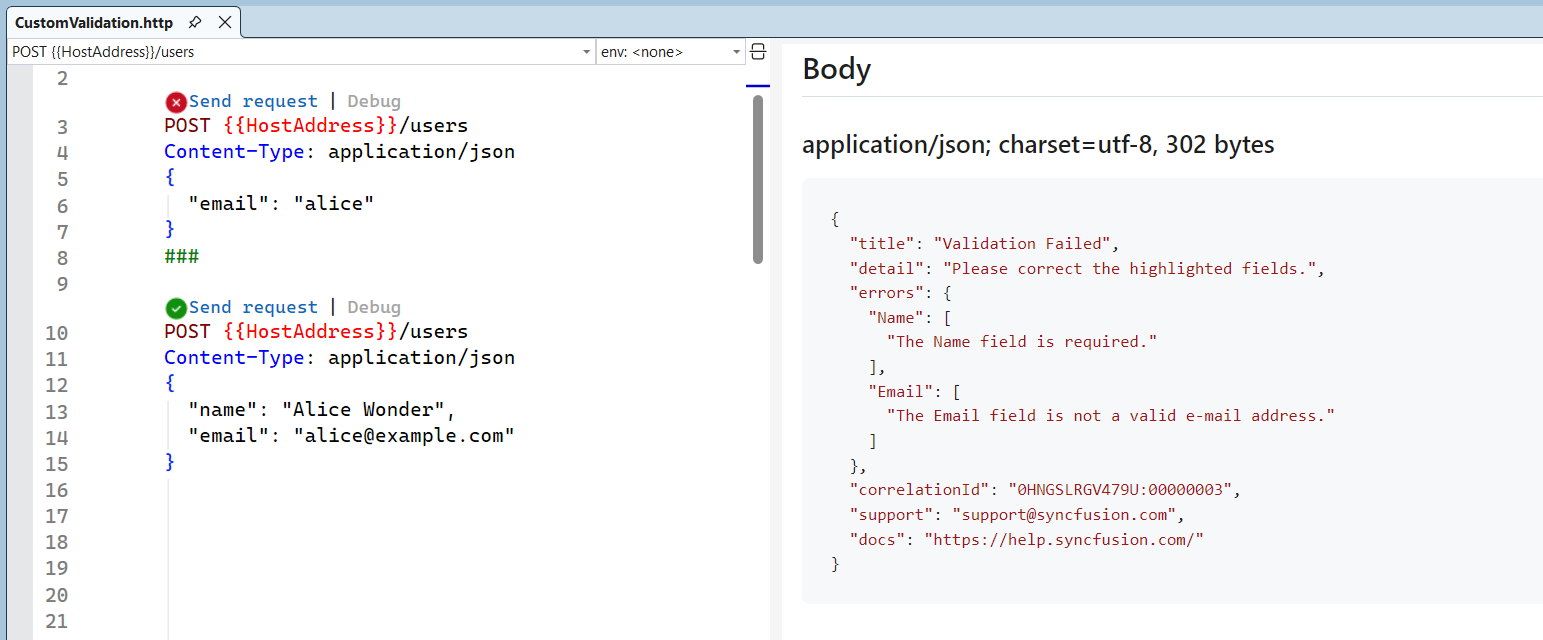
Refer to the following output image. It showcases the customized IProblemDetailsService with a 400 Bad Request response, including field-specific errors, correlation ID, and support links.
Breaking change alert: Some resolver APIs (Internal APIs, such as the Validation resolver) are experimental. In this case, stick to top-level ones (like AddValidation()) for stability.
2. Real-time streaming with Server-Sent Events(SSE)
Server-Sent Events (SSE) is a server-push technology that allows a server to send a stream of event messages to a client over a long-lived, single HTTP connection.
The ASP.NET 10 release supports returning a Server-Sent Events result using TypedResults.ServerSentEvents API. By using this API, we can automate the process of returning JSON and avoid common mistakes.
Use case
- Power dashboards with live metrics and no WebSockets are required.
- It is a lightweight alternative to push notifications.
- Ideal for scenarios where real‑time updates are needed without complex setup.
The following example illustrates the usage of ServerSentEvents.
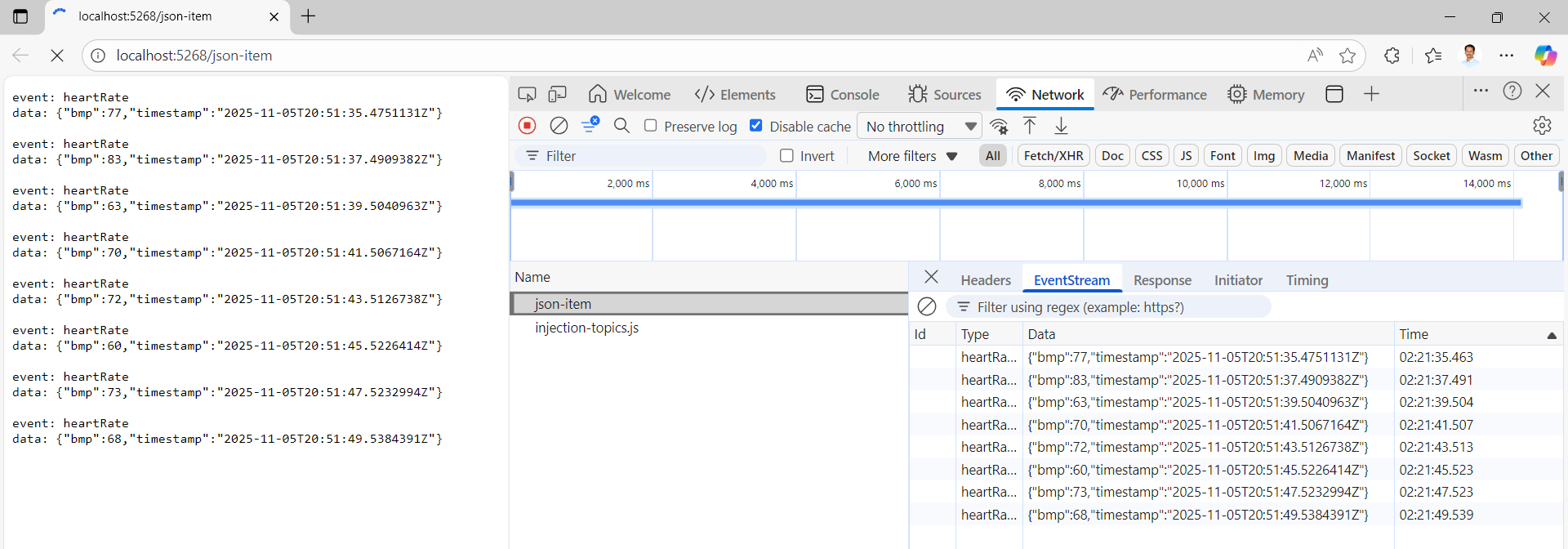
Here, the stream of heart rate events is sent as JSON objects to the client.
app.MapGet("/json-item", (CancellationToken cancellationToken) =>
{
    async IAsyncEnumerable<HeartRateRecord> GetHeartRate(
        [EnumeratorCancellation] CancellationToken cancellationToken)
    {
        while (!cancellationToken.IsCancellationRequested)
        {
            var heartRate = Random.Shared.Next(60, 100);
            yield return HeartRateRecord.Create(heartRate);
            await Task.Delay(2000, cancellationToken);
        }
    }

    return TypedResults.ServerSentEvents(GetHeartRate(cancellationToken),
                                                  eventType: "heartRate");
});

public record struct HeartRateRecord(
    [property: JsonPropertyName("bmp")] int Bpm,
    [property: JsonPropertyName("timestamp")] DateTime Timestamp)
{
    public static HeartRateRecord Create(int bmp) => new(bmp, DateTime.UtcNow);
}
The following is an example of an event received at the client side.
//Response Headers
HTTP/1.1 200 OK
Content-Type: text/event-stream
Cache-Control: no-cache
Transfer-Encoding: chunked

//Response
event: heartRate
data: {"bmp":77,"timestamp":"2025-11-05T20:51:35.4751131Z"}

event: heartRate
data: {"bmp":83,"timestamp":"2025-11-05T20:51:37.4909382Z"}
Refer to the following output image. It showcases the continuous heartRate updates received via TypedResults.ServerSentEvents.
3. Form binding enhancements
In ASP.NET Core 10, empty form strings now map to null for nullable types, such as DateOnly?, thereby avoiding parse errors in complex objects. These tweaks make Minimal APIs even more approachable for microservices or prototypes.
Previously, an empty string for a DateOnly? caused a model binding failure. Now, ASP.NET Core 10 gracefully maps empty strings to null for nullable types when using the [FromForm] attribute.
Refer to the following code example.
var app = builder.Build();

app.MapPost("/todo", ([FromForm] Todo todo) => TypedResults.Ok(todo));

app.Run();

public class Todo
{
    public int Id { get; set; }
    public DateOnly? DueDate { get; set; } // Empty strings map to null
    public string Title { get; set; }
    public bool IsCompleted { get; set; }
}

//Example form post where DueDate is an empty string
Id=1
DueDate=
Title=Test Task
IsCompleted=true
OpenAPI: YAML support and schema polish
ASP.NET Core 10 offers enhanced documentation options through OpenAPI 3.1 compliance. YAML offers a cleaner syntax compared to JSON. It removes curly braces and quotation marks where they can be inferred. It also supports multi-line strings, making it ideal for writing lengthy descriptions in a more readable format.
We can incorporate XML comments for richer descriptions and refine schemas for enums. XML comments on the [AsParameters] attribute enrich documentation.
Refer to the following code to enable XML document comments in your project file.
<PropertyGroup>
    <GenerateDocumentationFile>true</GenerateDocumentationFile>
</PropertyGroup>
In this ASP.NET Core 10 release, unknown HTTP methods are excluded. JSON Patch uses application/json-patch+json with detailed schemas, and invariant culture ensures consistent number/date formatting. Property descriptions are now supported for $ref in OpenAPI 3.1.
Performance and diagnostics across the board
In .NET 10, observability and performance get a major boost. New metrics for Blazor circuits, navigation tracing, and WebAssembly profiling tools are introduced. Preloaded assets and inlined boot configurations slim down payloads for faster startups..
Holistic gains: Expect faster startup times in Blazor apps, according to early benchmarks. We can enable it via the AddMetrics method in the Program.cs file.
builder.Services.AddMetrics();In .NET 10, the above simple call unlocks automatic instrumentation for Blazor-specific metrics like blazor.circuit.update_parameters (tracks component param processing time) and navigation traces.
Breaking changes and migration roadmap
Upgrading to ASP.NET Core 10 brings exciting new features, but it also introduces breaking changes that can impact existing apps. These changes are carefully considered by Microsoft to improve security, performance, and maintainability; however, they may require code updates during the migration process.
The following are the key breaking changes in ASP.NET Core 10:
- NavLinkMatch.All ignores query strings.
HttpClientstreaming is enabled by default.- Deprecated fragment in favor of
NotFoundPage. - Other key breaking changes.
1. NavLinkMatch.All ignores query strings
The NavLinkMatch.All ignores the query string and fragment. The NavLink is considered active as long as the path matches, regardless of changes to the query string or fragment.
The previous behavior of the NavLink component in Blazor when using NavLinkMatch.All included the query string and fragment in its matching logic. This means:
- If the URL path matched but the query string or fragment differed, the
NavLinkwould not be considered active. - The active class would only be applied if the entire URL, including query string and fragment, matched exactly.
In the latest release, both types of URLs are treated as active:
- Query-based URL: products?category=books
This URL includes a query string (?category=books) and still activates the Products link. - Fragment-based URL: /products#details
This URL includes a fragment (#details) and also activates the Products link.
In older versions, only exact matches would activate the link:
- Only products would be considered active.
- URLs with query strings or fragments (like the above examples) would not activate the link unless explicitly matched.
How do you revert to the old behavior?
To restore the original behavior (i.e., include query string and fragment in matching) set the following AppContext switch in the Program.cs file.
AppContext.SetSwitch("Microsoft.AspNetCore.Components.Routing.NavLink.EnableMatchAllForQueryStringAndFragment", true);This switch ensures that NavLinkMatch.All behaves as it did previously.
2. HttpClient streaming is enabled by default
In ASP.NET Core 10, response streaming is enabled by default, meaning all HttpClient requests now stream responses automatically unless explicitly opted out. In previous versions, response streaming was
What is response streaming?
Response streaming allows your app to start processing data as it arrives, rather than waiting for the entire response to be downloaded. This is useful for large payloads or real-time data.
Refer to the following code, where the streaming is enabled by default.
var response = await httpClient.GetAsync("api/data", HttpCompletionOption.ResponseHeadersRead);Explanation: HttpCompletionOption.ResponseHeadersRead instructs the HttpClient to begin reading the response as soon as the headers are received. This is now the default behavior in Blazor.
How to disable streaming?
If you want to wait for the full response before processing (i.e., disable streaming), use the following code:
var response = await httpClient.GetAsync("api/data", HttpCompletionOption.ResponseContentRead);Explanation: Here, the HttpCompletionOption.ResponseContentRead ensures the entire response is downloaded before it’s made available for code.
3. Deprecated fragment in favor of NotFoundPage
The NotFound render fragment (<NotFound>...</NotFound>) is not supported in .NET 10 or later.
Instead, the NotFoundPage parameter in the Router component should be used to specify a page for handling “Not Found” routes, improving routing consistency and enabling enhanced navigation scenarios.
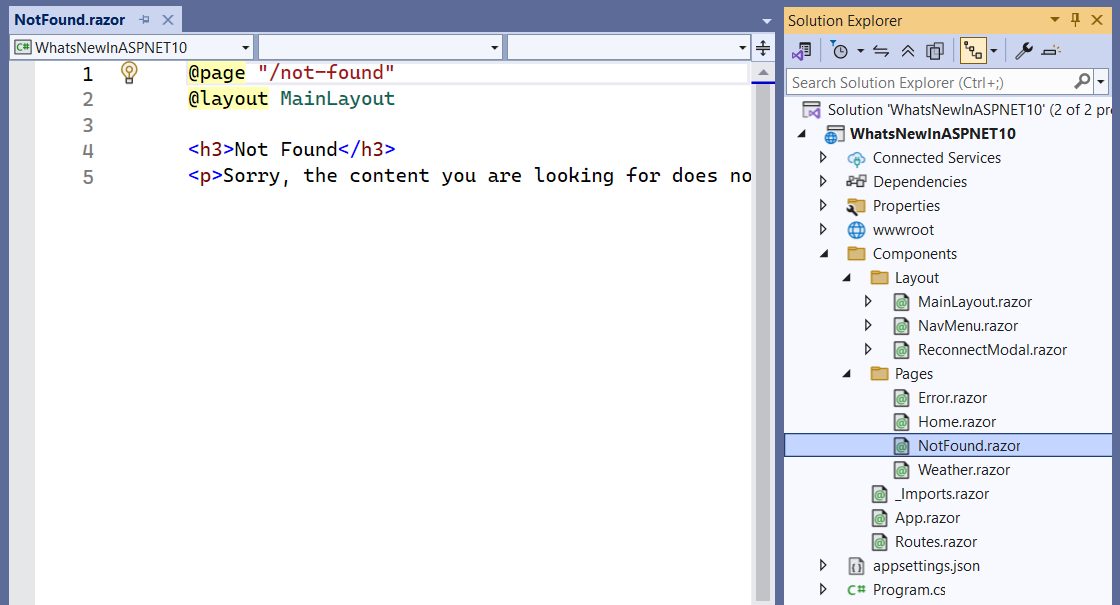
Refer to the following code example to implement the NotFoundPage parameter in the Router component.
<Router AppAssembly="@typeof(Program).Assembly" NotFoundPage="typeof(Pages.NotFound)">
    <Found Context="routeData">
        <RouteView RouteData="@routeData" />
        <FocusOnNavigate RouteData="@routeData" Selector="h1" />
    </Found>
    <NotFound>This content is ignored because NotFoundPage is defined.</NotFound>
</Router>
Refer to the following image, which illustrates the HTML structure for handling 404 (page not found) scenarios.
4. Other key breaking changes in ASP.NET Core 10
Cookie login redirects are disabled for known API endpoints:
- Type: Behavioral change.
- Impact: Prevents unnecessary redirects for API endpoints.
Deprecation of the WithOpenApi extension method:
- Type: Source incompatible.
- Impact: Use AddOpenApiOperationTransformer
Microsoft.Extensions.ApiDescription.Client package is deprecated:
- Impact: Remove or replace with supported alternatives.
Razor runtime compilation is obsolete:
- Impact: Use precompiled views for better performance and security.
WebHostBuilder, IWebHost, and WebHost are obsolete:
- Impact: Switch to HostBuilder and modern hosting APIs.
Note: For more details, refer to the ASP.NET Core 10 breaking changes page.
ASP.NET Core 10 versus previous versions
Here’s a concise comparison table for ASP.NET Core 10 versus previous versions (ASP.NET Core 8/9)
| Feature | ASP.NET Core 8/9 | ASP.NET Core 10 |
| Blazor | Manual optimization for load times; limited UI component flexibility. | Faster loading, static asset handling with compression and fingerprinting, QuickGrid RowClass for conditional styling, NavigateTo preserves scroll position for same-page navigation. |
| Minimal APIs | Introduced lightweight APIs but lacked advanced validation and streaming features. | First-class validation with AddValidation(), Server-Sent Events (SSE) support, and enhanced lightweight capabilities for microservices. |
| OpenAPI | Supported earlier OpenAPI versions, no native YAML or JSON Schema 2020-12 support. | Full OpenAPI 3.1 compliance, YAML output, JSON Schema 2020-12, XML comment integration, and improved schema handling. |
| Auth Metrics | Required custom logging for authentication and authorization events. | Built-in metrics for sign-ins, sign-outs, challenges, and authorization events; passkey support (WebAuthn + FIDO2). |
| Form Handling | Manual handling of empty form strings, prone to parsing errors. | Empty strings map to null for nullable types, [ValidatableType] simplifies validation, reducing custom checks. |
| JavaScript Interop | Limited async and synchronous JS integration, more manual setup. | Improved async/sync JS interop with InvokeConstructorAsync and GetValueAsync<T>, supporting AOT compatibility. |
| Developer Experience | Basic route handling and limited debugging tools. | Route template syntax highlighting, new Blazor WebAssembly profiling tools, and enhanced state persistence with [PersistentState] attribute. |
Final thoughts
Thanks for reading! In this blog, we’ve explored the key enhancements in ASP.NET Core for .NET 10. These updates refine what developers already love: minimal boilerplate, maximal performance, while tackling edge cases that make modern apps more resilient and efficient.
With Syncfusion’s Day 1 support for .NET 10, developers can confidently start building and deploying apps on the latest .NET platform without hesitation. Whether you’re working with Blazor, ASP.NET Core, ASP.NET MVC, .NET MAUI, WPF, WinForms, Document SDK libraries, or Viewer/Editor SDKs, Syncfusion ensures full compatibility and optimized performance from day one. Leverage the power of .NET 10 and Syncfusion’s extensive component suite to create the next generation of apps, faster, smarter, and more efficient than ever.
Existing Syncfusion users can download the newest version of Essential Studio from the license and download page, while new users can start a 30-day free trial to experience its full potential.
If you have any questions, contact us through our support forum, support portal, or feedback portal. We are always happy to assist you!




 No spam, just valuable updates.