
 Kavindu Gunathilake
TL;DR: If you’re choosing between Webpack and Vite, the decision comes down to configuration control vs development speed. Vite shines for modern React, Vue, or Svelte apps where fast startup and instant HMR matter. Webpack remains the safer choice for large, deeply customized, or legacy-heavy applications that need absolute control over their build pipeline.

What is a bundler?
A bundler is a tool that collects all your project’s JavaScript, CSS, images, and other assets and packages them into optimized files that the browser can load efficiently. Instead of making the browser request dozens or even hundreds of separate files, the bundler organizes everything, minimizes duplication, and prepares your app for production.
During development, it often runs a local server, watches your files, and refreshes the browser whenever you make changes, so you can see updates instantly.
Choosing the best bundler for your workflow
Choosing a bundler isn’t about picking whatever’s new or trending. It’s about selecting the tool that keeps your team productive over the long run.
Webpack has been the industry standard for years and still powers many large, complex apps. Vite came later with a fresh, modern approach using the browser’s native ES modules to deliver extremely fast startup times and instant feedback while developing.
Some developers may assume that Vite is always faster or that Webpack no longer matters. But reality is more balanced. Both tools are actively used in production, and each has strengths depending on your project’s needs. The true differences show up in your everyday workflow, like how quickly you can develop, how easily you can debug, and how much configuration your project requires as it grows.

Webpack
Overview
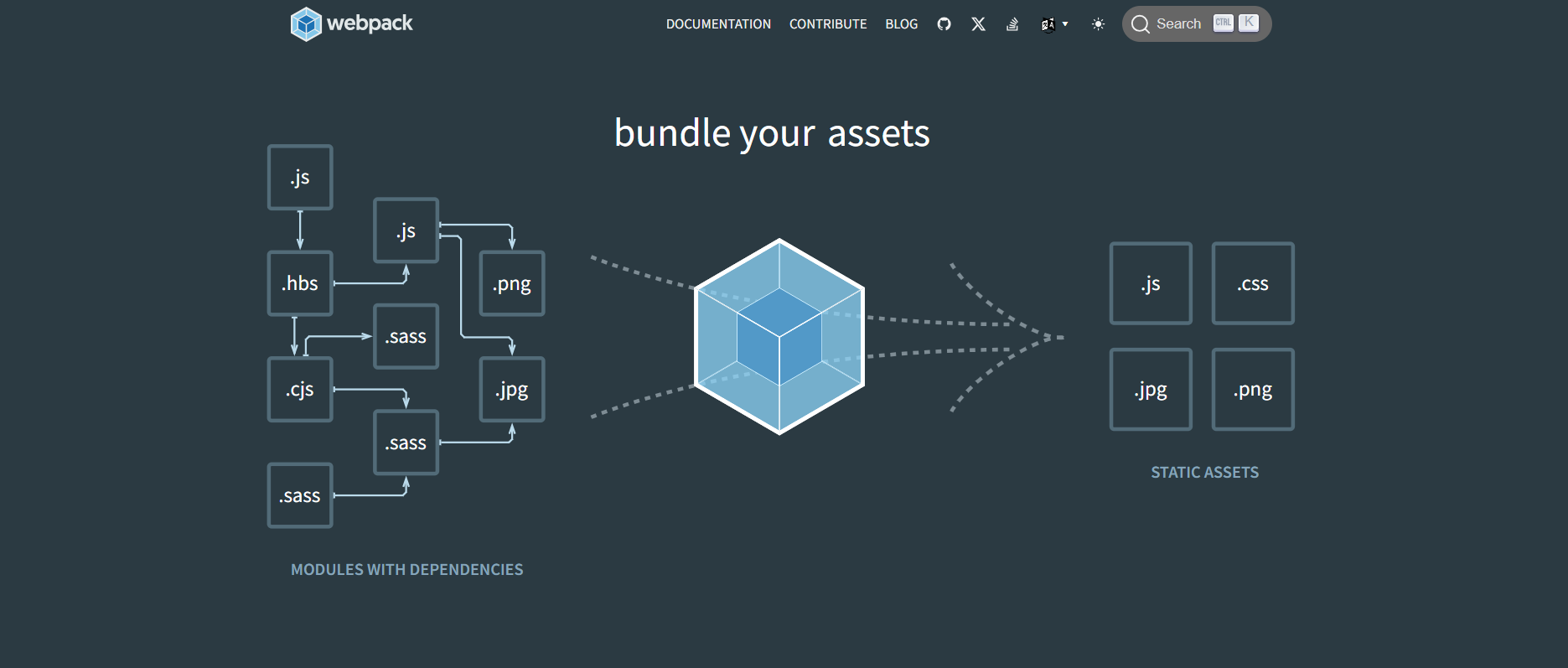
- Webpack takes your JavaScript and other assets (CSS, images, etc.) and bundles them into files that you can deploy.
- Webpack is an older, well-established bundler. It gives you a lot of control and is commonly used in big and complex production setups.
- It is widely used in both single-page apps (SPAs) and multi-page apps (MPAs). It supports advanced build setups through its configuration, loaders, and plugins.
Strengths
- Extremely flexible, you can configure it to handle almost any build requirements.
- Huge ecosystem of plugins and loaders built over many years.
- Great when you need fine-grained control over how every file is processed.
Limitations
- The configuration can become large and complex as your project grows.
- It’s harder for beginners because loaders or plugins take time to understand.
- The development experience can feel slower or heavier compared to newer tools.
Ideal use cases
- Very large apps with unusual or custom build needs.
- Teams that already know Webpack well and have existing Webpack-based pipelines.
- Projects that need deep customization and precise processing of many asset types.
Vite
Overview
- Vite provides fast startup and quick Hot Module Replacement (HMR) by serving files directly during development instead of bundling everything upfront.
- Vite is a modern build tool focused on fast development using native ES modules, with optimized production builds (usually using Rollup). For production, it still bundles the code into optimized output.
Strengths
- Very fast dev server startup and quick HMR for modern front-end development.
- Requires very little configuration for common frameworks like React, Vue, or Svelte.
- Great for teams that want simple setup and quick development cycles.
Limitations
- Very advanced or unusual build processes may need more tools or a custom setup.
- Migrating from a very complex Webpack setup may expose edge-case issues.
- It works best when your dependencies fit well with Vite’s ES module-based approach.
Ideal use cases
- New projects using modern frameworks and ES module-based dependencies.
- Teams prioritizing fast development and quick feedback loops.
- Small to medium apps where keeping the build setup simple is important.

Performance benchmarks
1. Build times
Build time is one of the most critical factors when optimizing performance. Vite utilizes esbuild in the background to pre-bundle dependencies in the browser. This approach reduces the startup time of the development server and ensures module compatibility by converting CommonJS and UMD modules into native ESM.
 Webpack employs a bundle-based methodology that pre-bundles dependencies and source code, which can lengthen server start times during development. While Webpack’s initialization process is more efficient, it ultimately requires more time to start servers than Vite.
However, Vite’s on-demand loading can result in unavoidable delays when extra data, CSS, or files are necessary for specific routes. In contrast, Webpack ensures all site data is available, leading to quicker navigation between pages in the development server.
2. Hot Module Replacement (HMR)
Webpack and Vite both support HMR but differ in efficiency and setup ease. Webpack’s HMR is highly configurable, making it a strong choice for large, complex projects, though it may slow down as the project grows.
Vite, however, leverages native ES modules, providing nearly instant HMR updates with minimal configuration, which makes it ideal for fast-paced front-end development and smaller projects. For complex, multi-layered apps, Webpack’s customization may be advantageous, but for a quicker, smoother development experience, Vite’s HMR is often the best choice.
3. Production build size
Both tools can create optimized bundles that reduce production build sizes. However, Vite generally performs better because Rollup has tree-shaking solid features.
- Webpack: Average bundle size of 150KB.
- Vite: Average bundle size of 130KB.
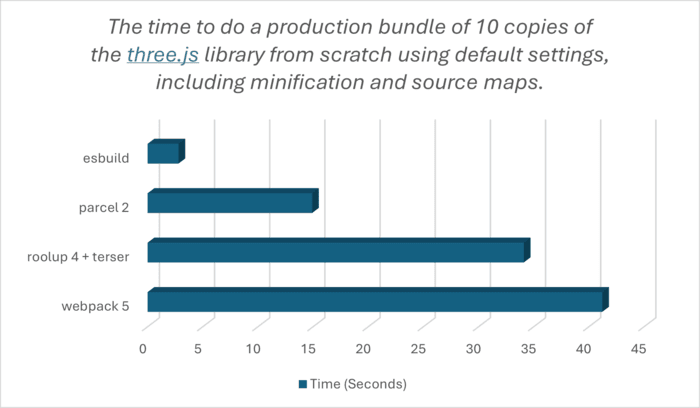
Let’s start by comparing bundling time:
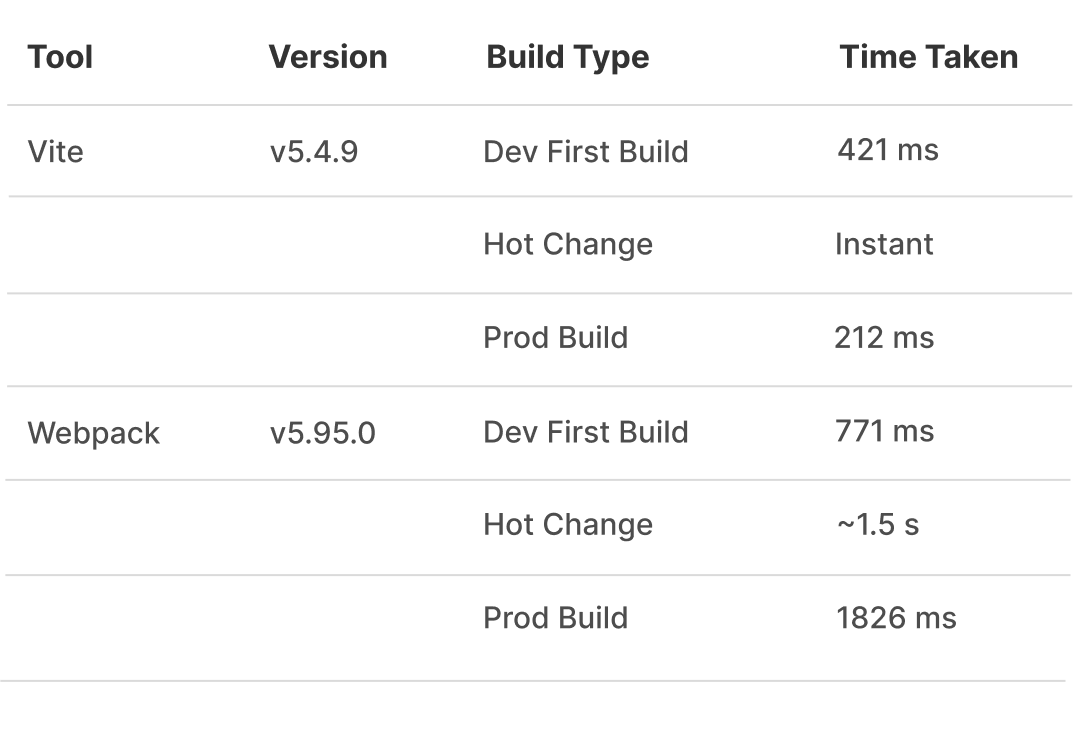
Note: Tests were run on 11th Gen Intel® Core™ i5-11400H processer.
Feature comparison
1. Configuration
Webpack’s configuration is powerful, but it might be challenging to implement. To set up a simple React app, you need a configuration file with loaders for Babel and CSS. Refer to the following code example.
const path = require('path');

module.exports = {
  entry: './src/index.js',
  output: {
    filename: 'bundle.js',
    path: path.resolve(__dirname, 'dist'),
    clean: true,
  },
  module: {
    rules: [
      {
        test: /\.js$/,
        exclude: /node_modules/,
        use: 'babel-loader',
      },
      {
        test: /\.css$/,
        use: ['style-loader', 'css-loader'],
      },
      {
        test: /\.(png|jpg|jpeg|gif|svg)$/,
        type: 'asset/resource',
      },
      {
        test: /\.json$/,
        type: 'json',
        parser: {
          parse: JSON.parse,
        },
      },
    ],
  },
  resolve: {
    extensions: ['.js', '.ts', '.json'],
  },
};
For more details, refer to the stackBlitz demo.
On the other hand, Vite requires minimal configuration. A simple Vite setup for a React app looks like the following:
import { defineConfig } from 'vite';
import react from '@vitejs/plugin-react';

export default defineConfig({
  plugins: [react()],
});
2. Code splitting
Code splitting can be achieved by both tools, but in very distinct ways. In Webpack, code splitting is not configurable and must be implemented as either a dynamic import or an entry point in the Webpack config file. It may be more cumbersome, but it allows you to define exactly how your code will be split.
Refer to the following code example.
// Webpack - Using dynamic import for code splitting
const LazyComponent = () => import('./LazyComponent.vue');

// This dynamically imports the component only when needed, reducing the initial bundle size.
LazyComponent().then((module) => {
  const Component = module.default;
  // Render or use Component here
});
Vite automatically handles code splitting using dynamic imports. Vite leverages ES module support in the browser so that you can split code without complex configurations.
const LazyComponent = () => import('./LazyComponent.vue');
3. Plugin ecosystem
Rich plugin ecosystems openly surround both, but Webpack has been around longer and thus more varied plugins. Vite is rapidly catching up, though, and many famous plugins have created Vite-specific versions in addition to or instead of their Webpack versions.
4. Framework support
Both tools support various frameworks, including React, Vue, and Angular. Webpack is more likely a standalone tool and offers varying levels of support for these frameworks.
Vite’s specialty is that Evan You, Vue’s creator, developed it. It provides seamless support for Vue right out of the box. So, it allows Vite to integrate seamlessly with automatic HMR and optimized builds designed explicitly for that framework.
5. Ease of use
With Vite, the learning curve for newcomers is gentler, thanks to minimal configuration and ease of setup. A large amount of heavy configuration in Webpack alone might intimidate new developers who need to be more hands-on with module bundling concepts.
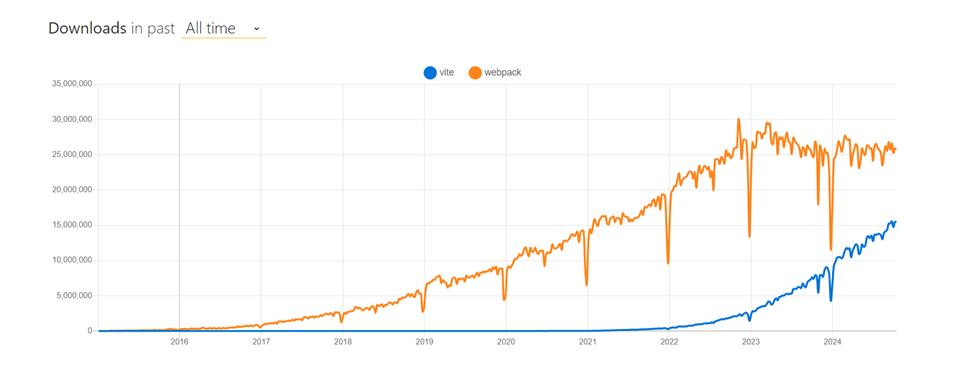
The chart above from npm trends compares download counts between Vite and Webpack. It shows that Webpack downloads are slightly decreasing while Vite downloads are increasing exponentially.

According to star-history, Vite has rapidly gained popularity in web development, surpassing Webpack on the GitHub star count. Currently, Vite has 68051 stars, while Webpack has 64645; that does say something about its presence. The secret of Vite’s popularity among developers from 2020 onwards is its fast speed, ease of use, and use of modern JavaScript by default. At the same time, due to the mature Webpack ecosystem, it’s widely used, so both tools are useful for today’s online development services market.
Developer experience
1. Community support
A large community and a wealth of resources available always backed Webpack. It also includes extensive documentation and tutorials. Vite is growing fast but still needs to work more on the community aspect of the growth.
2. Error handling
Both tools provide decent error handling, but Vite’s error messages are often more informative and actionable. Webpack’s error messages can sometimes be cryptic, requiring more debugging effort.
Let’s assume we have a typo in your import statement:
//JavaScript file
import { someFunction } from './nonexistentModule';
Webpack might produce an error like this:
ERROR in ./src/index.js
Module not found: Error: Can't resolve './nonexistentModule' in '/Users/username/project/src'
 @ ./src/index.js 1:0-54
While this error points to the file and line number, it doesn’t always provide clear guidance on how to fix the issue.
Vite might produce an error like this:
[vite] Error when evaluating entry point "src/main.js":

Failed to resolve import "./nonexistentModule" from "src/main.js". Does the file exist?

  1  |  import { someFunction } from './nonexistentModule';
     |                               ^^^^^^^^^^^^^^^^^^^^^
  2  |
  3  |  console.log(someFunction());
Possible solutions:
Did you mean to import './nonexistentModule.js'?
- Check if the file path is correct.
- See https://vitejs.dev/guide/troubleshooting.html for more info
Vite’s error message is more detailed, showing:
- The line and the position of the error.
- Solutions to fix the issue.
- A link to troubleshooting documentation.
Commonly missed considerations
The significant difference is their approach during development. Here are scenarios where teams may face challenges:
- Configuration debt vs performance gains
Vite might give you a faster development server. But if your project needs lots of custom build rules, you might spend more time maintaining your build setup.
So the “best” tool is the one that requires the least maintenance for your specific project, not just the one with faster dev speed. - Legacy and edge-case compatibility
Some older packages or unusual file types may not work smoothly in Vite.
If your project uses rare module formats or has complex asset handling, switching bundlers may lead to long debugging sessions. - Debuggability and “time to fix”
The speed at which you can find and fix errors is often more important than raw build speed.
Clear error messages, good stack traces, and easier debugging may matter more than a few seconds saved in builds.
Webpack vs Vite: Quick decision table
| Use case | Better fit | Reason |
| New React/Vue/Svelte app with modern dependencies | Vite | Minimal configuration and fast development server workflow for ESM‑first projects. |
| Large app with highly customized build steps and loaders | Webpack | Provides deep, explicit configuration and mature loader/plugin patterns. |
| Team wants the simplest “works by default” setup | Vite | Requires less configuration for common project patterns. |
| Existing Webpack app that’s stable and heavily integrated | Webpack | Migration cost is high due to build edge cases and integration rewiring. |
| Need fine‑grained control over bundling behavior across many entry points | Webpack | Configuration model is designed for complex bundling graphs. |
Summary
Before choosing, here’s a fast scan:
- Learning curve: Vite is easier to start with; Webpack requires more configuration knowledge.
- Dev server and HMR: Vite is faster during development; Webpack can feel slower in complex projects.
- Production builds: Both produce optimized builds; the difference is how much control you need.
- Ecosystem: Webpack has a bigger, more mature ecosystem; Vite’s ecosystem is modern and growing fast.
- Maintainability: Vite needs less config; Webpack can become complex, but is still best for heavy customization.
- Migration: Moving from Webpack to Vite is possible, but build-edge cases and integrations are usually the main challenges.
GitHub reference
You can find the complete example for Webpack vs Vite in the stackBlitz repository.
Frequently Asked Questions
Is Vite faster than Webpack?
Yes. Vite starts up faster and has faster HMR because it uses native ES modules rather than bundling everything upfront.
Can I easily migrate from Webpack to Vite?
If your setup is simple, yes. Complex loaders and legacy code may require extra changes.
Does Vite replace Webpack for production builds?
No. Vite uses Rollup for production. Webpack still excels in highly customized builds.
Which is better for large enterprise apps?
Webpack. It handles complex, custom pipelines more reliably in large-scale projects.
Is Vite good for older browser support?
It can support them, but it needs extra plugins. Webpack handles legacy browsers more smoothly.
Final thoughts: Choose smart, build faster
Thanks for reading! Both Webpack and Vite ultimately do the same job, turning your source code into production-ready assets, but they take very different paths to get there.
Webpack is still the go-to choice for large, complex, or long-running enterprise projects that rely on custom loaders, detailed build workflows, or heavy integration across teams.
Vite excels in modern frontend applications where fast startup, instant feedback, and minimal configuration enable developers to maintain productivity.
In the end, the best bundler is the one that reduces long-term build pain and fits the actual needs of your project, not the one with the flashiest feature list.
Build faster frontends with Syncfusion
If you spend your days crafting modern frontend apps, the Syncfusion® JavaScript UI controls component library can save you a massive amount of time. It includes 145+ high-performance, lightweight, and responsive UI components, everything from grids and charts to editors, dashboards, and data visualizations.
Each component is optimized for real-world apps, and the built-in AI coding assistant helps you scaffold UI, debug faster, and streamline your workflow, perfect for teams aiming to ship modern frontends quickly.
Already a Syncfusion user? Download the latest setup from your License and Downloads page. New here? Start building with a 30-day free trial and see how much smoother frontend development can feel.
You can also contact us through our support forum, support portal, or feedback portal for queries. We’re always happy to assist.




 No spam, just valuable updates.