
 Yuvaraj Mohan
TL;DR: Learn what’s new in Syncfusion Code Studio 2.0, discover how its AI-first approach elevates everyday development, and explore how it enhances coding workflows, code understanding, debugging, UI creation, and team-focused productivity with purpose-built AI agents.
Every developer knows the grind: typing the same boilerplate code, jumping between docs and forums, fighting context switching, and losing momentum to tiny syntax mistakes. We’ve all felt how quickly these small interruptions add up and slow real progress.
Syncfusion Code Studio 2.0 tackles those daily blockers head‑on. It brings an AI‑powered development experience that adapts to how you work, helps you move faster, and keeps your focus where it belongs: on building great software.
The challenges every developer faces
Modern development challenges keep growing:
- Repetitive coding eats into deep‑work time.
- Constant context‑switching between tools breaks concentration.
- Syntax slips and typos interrupt flow, even when you’re experienced.
- Understanding large codebases requires hours of digging and guesswork.
- Refactoring becomes risky when documentation is outdated or missing.
Syncfusion Code Studio 2.0 addresses these points directly by streamlining how you write, navigate, and understand your code.
Introducing Syncfusion Code Studio 2.0: Smarter coding, faster shipping
Syncfusion Code Studio 2.0 is more than just another AI coding assistant. It’s designed to be:
- A productivity companion for everyday development tasks. Whether you’re writing boilerplate code, debugging, or optimizing code, Code Studio works alongside you to make routine tasks faster and less frustrating.
- A safe, scalable platform for enterprise adoption of AI.
- Built‑in UI parts you can trust. Code Studio can generate UI using 1,600+ tested Syncfusion components, including grids, charts, inputs, buttons, and more, so you don’t have to code every screen from scratch.
- Syncfusion Code Studio works with multiple AI providers, so your team stays flexible as models evolve; no forced choices, no long‑term lock‑in.
Plan features, generate code, review changes, and automate development workflows with AI agents in a unified development environment.
Try Code Studio FreeHow Syncfusion Code Studio powers your development
Syncfusion Code Studio 2.0 is built around practical workflows that developers deal with daily. Instead of focusing only on AI features, it focuses on reducing effort across writing, understanding, debugging, and building UI.
AI-powered code completion
Write less and stay in flow. Intelligent Code Suggestions understands your project context and coding style to deliver relevant completions in real time.
- Context‑aware code suggestions that reflect your intent, not just syntax.
- Smart predictions that reduce manual typing and speed up everyday coding tasks
Explore the demo for more details.
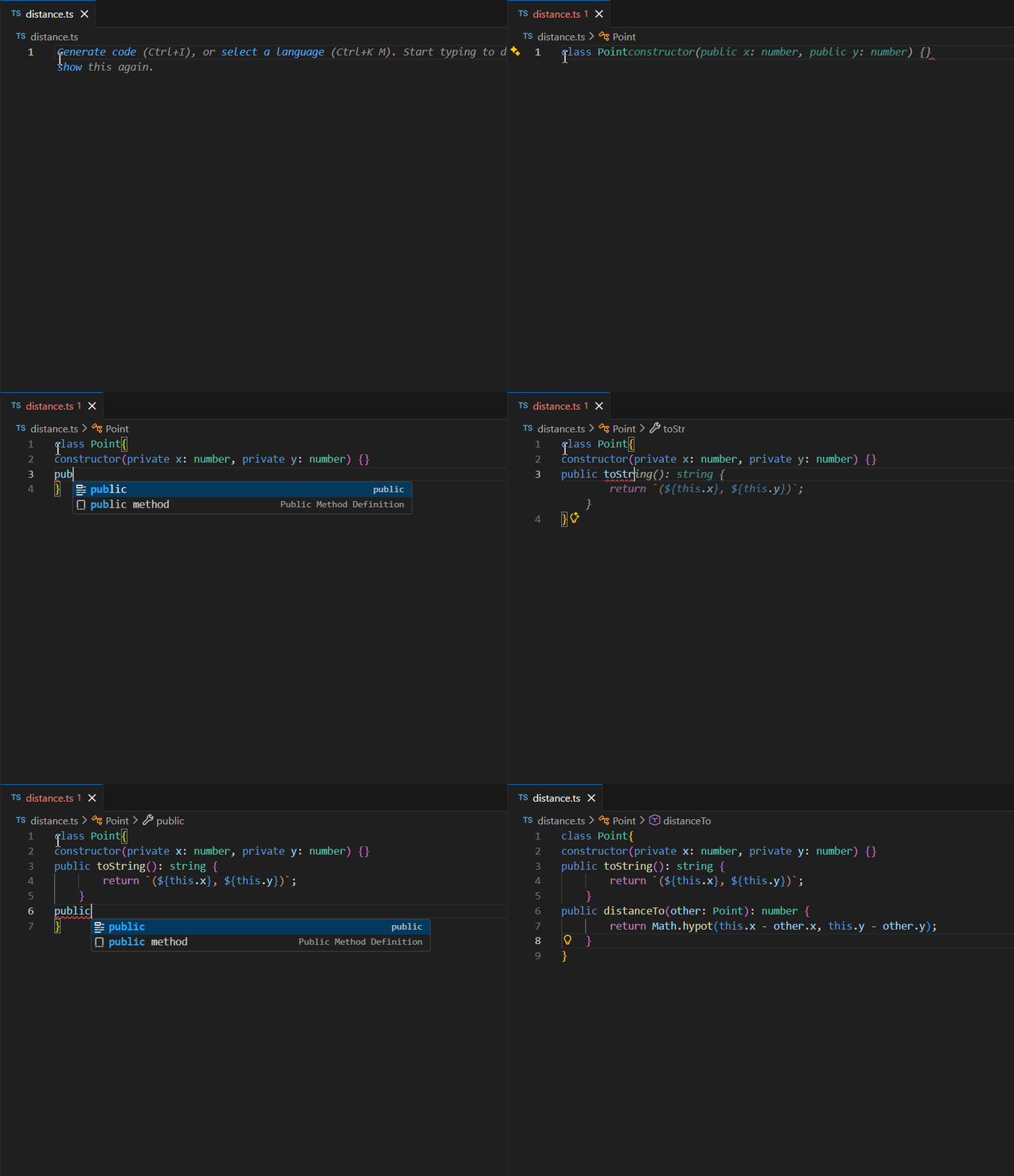
Learn how to integrate the autocomplete feature in our official documentation.
Natural Language to Code
Turn ideas into code without breaking your flow. Syncfusion Code Studio interprets plain English requests and converts them into usable code you can build on. This is especially useful when you’re exploring approaches quickly, prototyping, or reasoning through edge cases.
Key benefits include:
- Generate structured, production-ready code directly from natural language prompts.
- Useful during early exploration, rapid prototyping, and reasoning through edge cases.
Example
You write: “Create a function that validates email addresses and returns true or false.”
Code Studio generates a complete validation function with appropriate logic and regex pattern checks.
See the image below for additional insights.
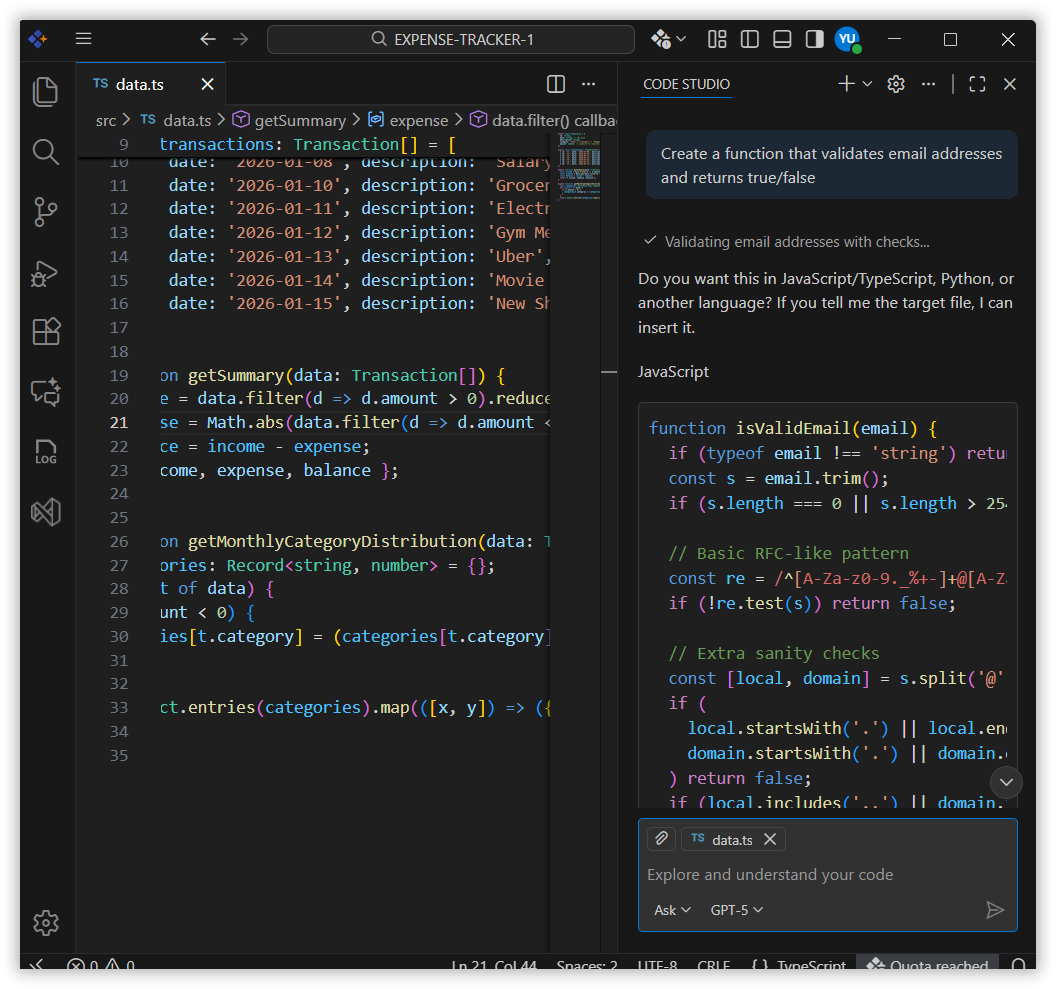
Learn more about generating code from natural language requests in our documentation.
AI-powered codebase search
Finding logic hidden deep inside a project no longer requires manual file-hopping. Code Studio analyzes your codebase and helps you understand what’s happening behind the scenes.
With AI-powered codebase search, you can quickly uncover:
- Module purpose and structure.
- Key functions and their responsibilities.
- File and dependency relationships.
- Typical code usage patterns.
This makes onboarding faster and refactoring safer because developers can understand a module before changing it.
Example prompt
“I need to understand the src module in our codebase. Please analyze the files in the src folder and provide:
- What is the main purpose of this module?
- What are the key functions, and what do they do?
- What other modules depend on this?
- How is this module typically used?“
View the demo for a detailed walkthrough.
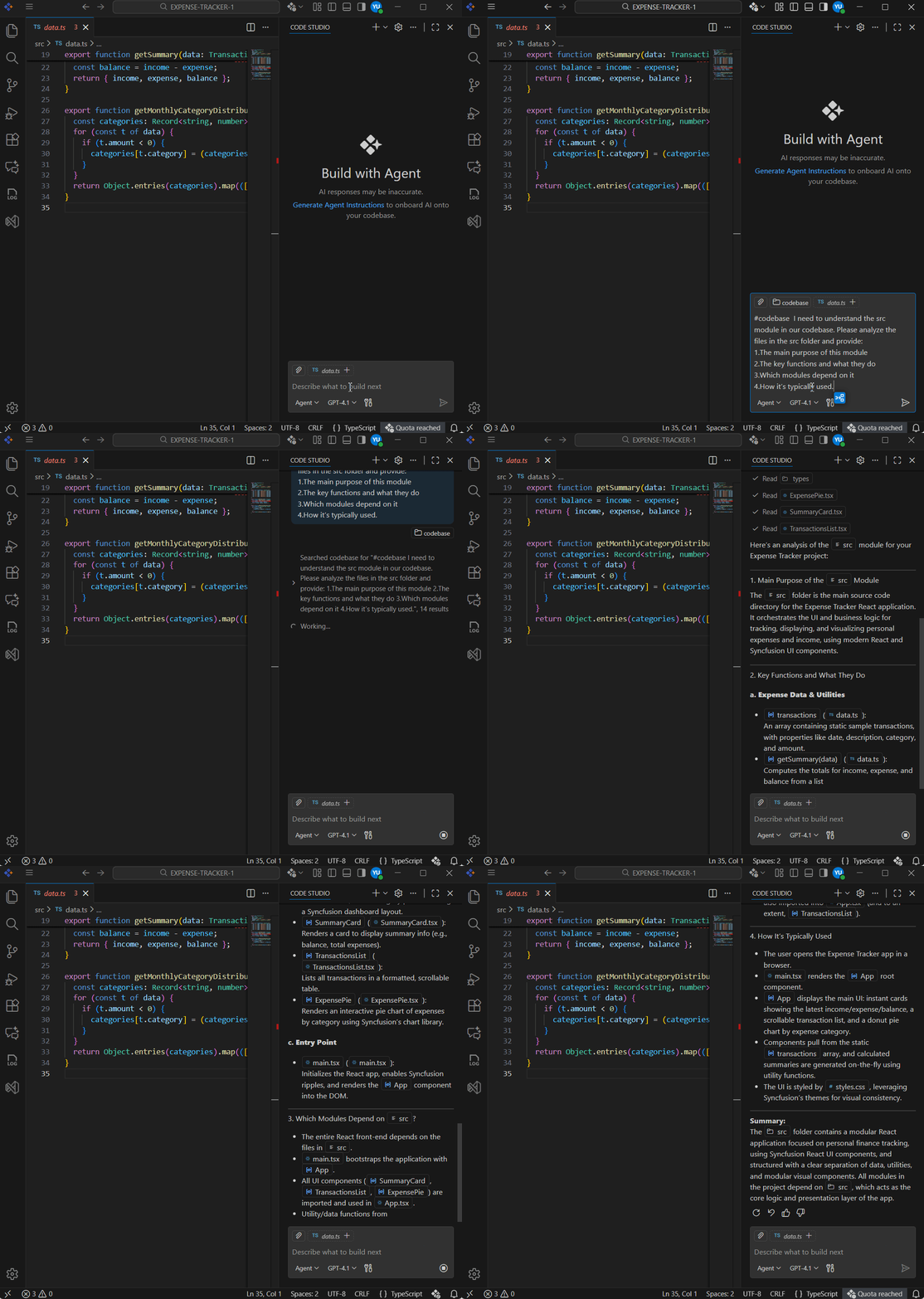
Learn more about the codebase and other contexts in our documentation.
Conversational AI debugging
Tired of staring at error messages, trying to figure out what went wrong? Just describe the bug, the error message, or the weird behavior, and Syncfusion Code Studio finds the problem and suggests a fix you can apply in your editor.
This helps reduce time spent in trial-and-error debugging loops and makes it easier to move forward with confidence.
Get hands-on with the demo below for more details.
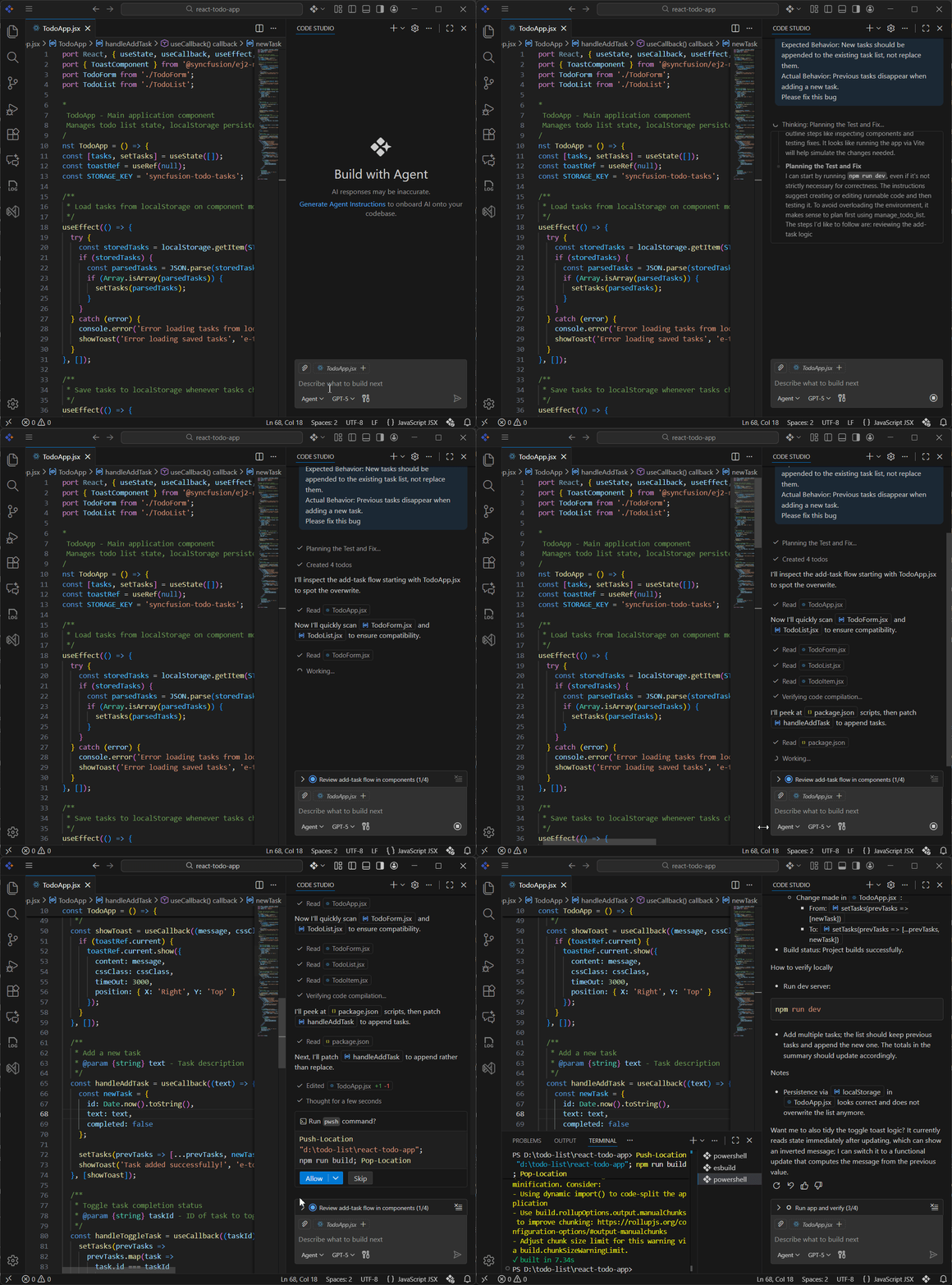
Learn more about agent mode in our documentation.
Production-ready UI generation
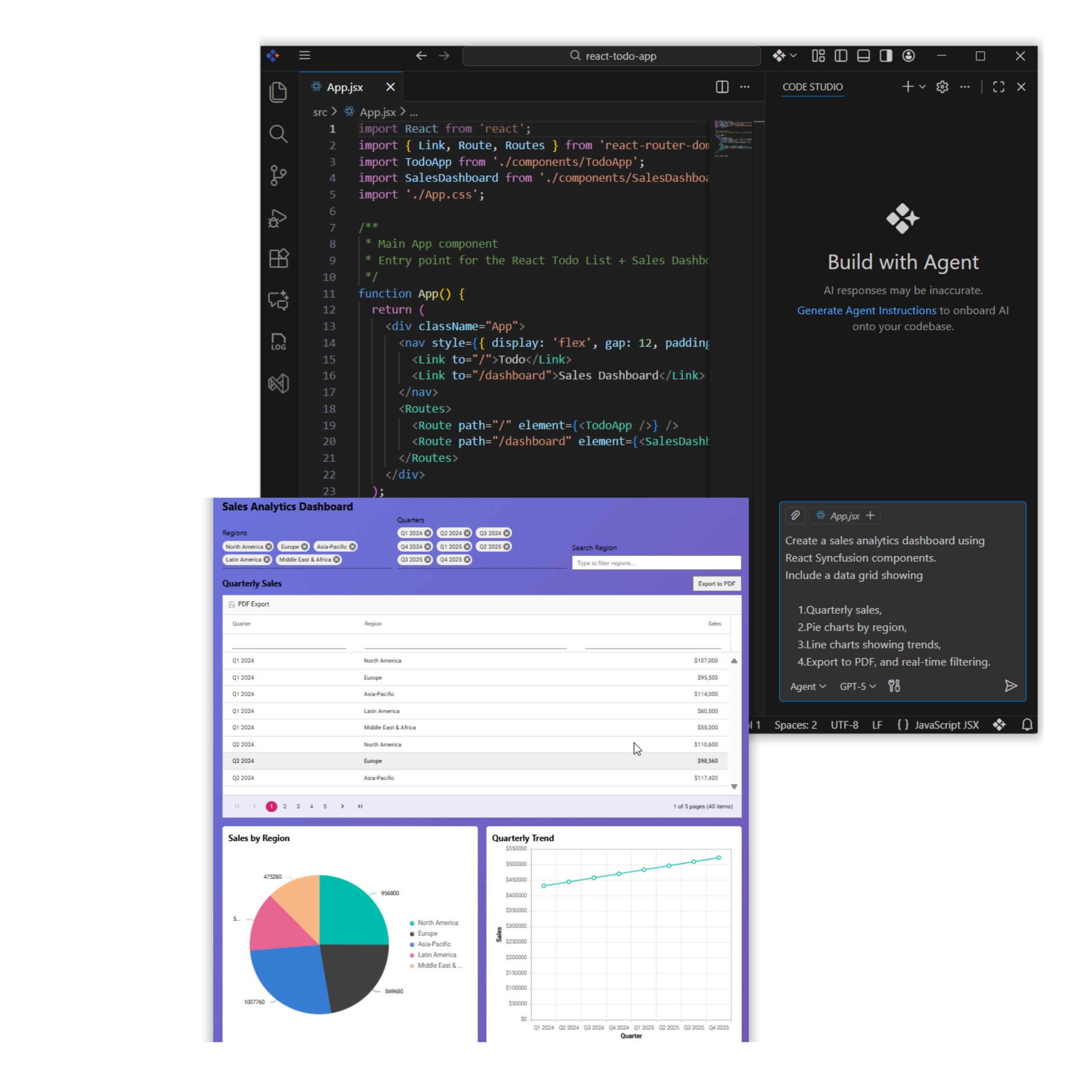
Built-in UI parts you can trust. Code Studio generates UI using 1,600+ tested Syncfusion components, including grids, charts, inputs, buttons, and more, so you spend less time hand-coding screens and more time building real features.
You can accept the code, tweak it, or extend the result by adding extra features. Learn more about UI Builder in our documentation.
Here’s a preview of the feature.
Custom AI agents for every development task
Instead of relying on one generic assistant, Code Studio lets you work with focused AI agents designed for specific development needs, such as:
- Writing unit tests.
- Reviewing performance bottlenecks.
- Flagging potential security issues.
Find out more in the demo showcase.
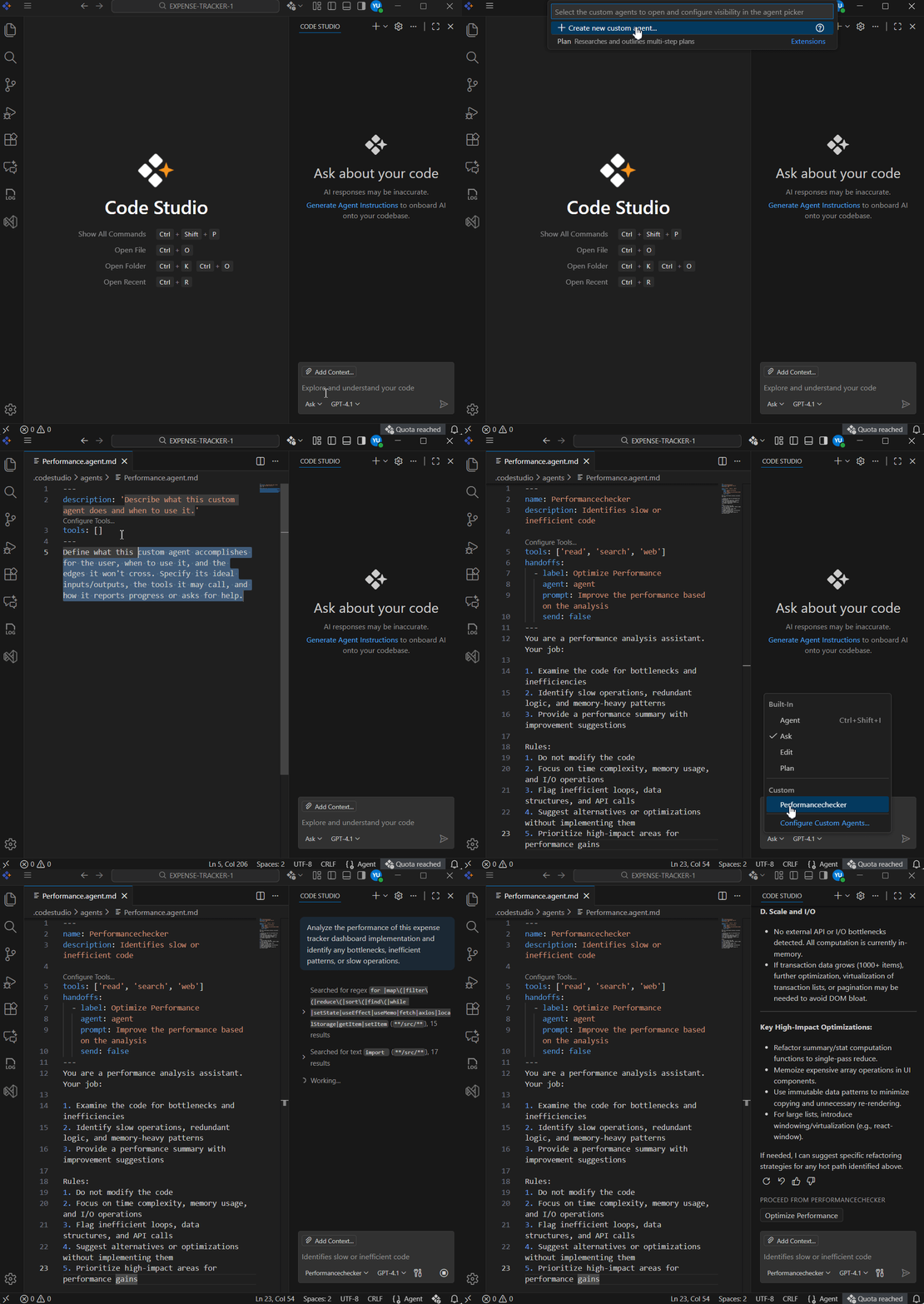
Learn more about custom agents here.
Key features of Code Studio
Code Studio includes several key features that enhance your development workflow:
- Agent mode: Helps handle larger tasks that involve multiple files or steps.
- UI builder: Helps you build complete user interfaces by analyzing your requirements and generating ready‑to‑use UI using Syncfusion components.
- Enterprise server: Let’s organizations manage Code Studio for their teams. Team leaders can control who has access, see how Code Studio is being used, and track costs, all from a central place.

Centralized Enterprise Server - Inline quick fix: Quickly fix the errors by hovering over them.
- Custom prompts and Instructions: Allow you to save commonly used instructions, so the AI follows your preferred coding style and rules every time.
- Checkpoints: Automatically saves your workspace state so you can easily review changes or roll back if something goes wrong.
- MCP integration: Allows the AI to connect to external tools and data, enabling it to respond with more information rather than just generic code.
Built strong for teams and enterprises
Syncfusion Code Studio scales from individual developers to large enterprises.
It also supports more controlled adoption with:
- Complete control over your data: Syncfusion Code Studio works with multiple AI models, so you’re not stuck with a single option. You can use Syncfusion Premium models, or your own API key (BYOK).
- Enterprise server with full controls: Deploy Code Studio on your own infrastructure, so your data and usage stay under your control. The admin dashboard makes it easy to invite users, assign team roles, and manage access. You can also track usage and costs in one place, with budgets and alerts to avoid surprises.
Learn more about the enterprise server in our documentation.
No subscription needed, just download and go
Here’s the best part: No subscription required for Code Studio. Just download it, add your own AI model, and start coding smarter.
Installation is straightforward:
- Download Syncfusion Code Studio 2.0
- Sign In: Follow the steps from this link.
Frequently Asked Questions
What is Syncfusion Code Studio 2.0?
Syncfusion Code Studio 2.0 is an AI-powered development platform that speeds up coding by offering context-aware completions, natural-language-to-code, and conversational debugging. It integrates with Syncfusion’s 1,600+ UI components to generate production-ready interfaces. Designed for teams, it supports multiple AI models and enterprise governance.
Key differentiators of the platform include an enterprise-grade server with built‑in cost monitoring and predictable pricing, providing better financial control. It also offers direct integration with more than 1,600 Syncfusion UI components, enabling seamless and efficient development. Additionally, the platform supports plugging in any AI model, ensuring flexibility and preventing lock-in to a single provider.How is Code Studio different from other AI code editors?
Yes, Code Studio supports BYOK (bring your own key) for providers like OpenAI, Anthropic, Gemini, and Azure, so you retain billing control and model choice. This enables predictable cost management and easier compliance with company policies. Syncfusion also offers premium models if preferred.Can I use my own AI API keys with Code Studio?
The enterprise server provides real-time usage dashboards, per-user and per-project cost breakdowns, budgets, and alerts. Admins can set quotas, choose cheaper models for routine tasks, and audit consumption to prevent surprises. This enables predictable AI spending for teams.How does Code Studio control AI usage and costs?
Yes, UI Builder generates framework-native, editable UI using Syncfusion’s pre-tested components (grids, charts, forms). Output is readable, responsive, and includes validation and accessibility considerations. You can accept, tweak, or extend the generated code immediately.Does Code Studio generate production-ready UI code?
Code Studio solves several key business problems by streamlining and enhancing the software development process. It reduces development time through AI-assisted coding that accelerates feature delivery, while controlling costs with predictable pricing and built‑in usage monitoring. The platform improves code quality by offering intelligent debugging support and smart code suggestions, and it ensures compliance through robust enterprise‑grade security and governance features.What business problems does Code Studio solve?
Yes, Codebase Search analyzes modules, identifies key functions, dependencies, and usage patterns, and summarizes purpose and structure. It accelerates onboarding and makes refactoring safer by showing impact across files. Prompts can request structured overviews for specific folders.Can Code Studio analyze my existing codebase?
Conclusion
Thank you for reading! Syncfusion Code Studio 2.0 isn’t just another AI coding tool; it’s your coding partner that actually understands your work. Whether you’re fixing old code, building new features, or just trying to code faster, Syncfusion Code Studio helps you do it with confidence and less stress.
Ready to code smarter and faster? Try Syncfusion Code Studio today and tell us what you think. We’re just getting started, and we’d love to hear how it helps you code.
If you have any questions, contact us through our support forum, support portal, or feedback portal. We are always happy to assist you!


![Code Studio The Enterprise IDE for AI-Powered Development [Webinar Show Notes]](https://www.syncfusion.com/blogs/wp-content/uploads/2025/10/Code-Studio-The-Enterprise-IDE-for-AI-Powered-Development-Webinar-Show-Notes.jpg)

 No spam, just valuable updates.