
 Rajesh Babu
TL;DR: The 2025 Volume 3 update to the Blazor Gantt Chart delivers powerful enhancements for modern project management. Developers can now implement timezone-aware scheduling, organize tasks using hierarchical WBS codes, and filter large datasets with an Excel-style interface. These features enable scalable, globally coordinated applications with intuitive data control and improved user experience
We’re excited to introduce the latest updates to the Syncfusion Blazor Gantt Chart as part of our 2025 Volume 3 release! This release introduces powerful new features, including timezone support, an Excel-like filter, and a Work Breakdown Structure (WBS) column, to provide better task visualization and productivity.
Let’s explore the highlights of this release!
Timezone support for global project coordination
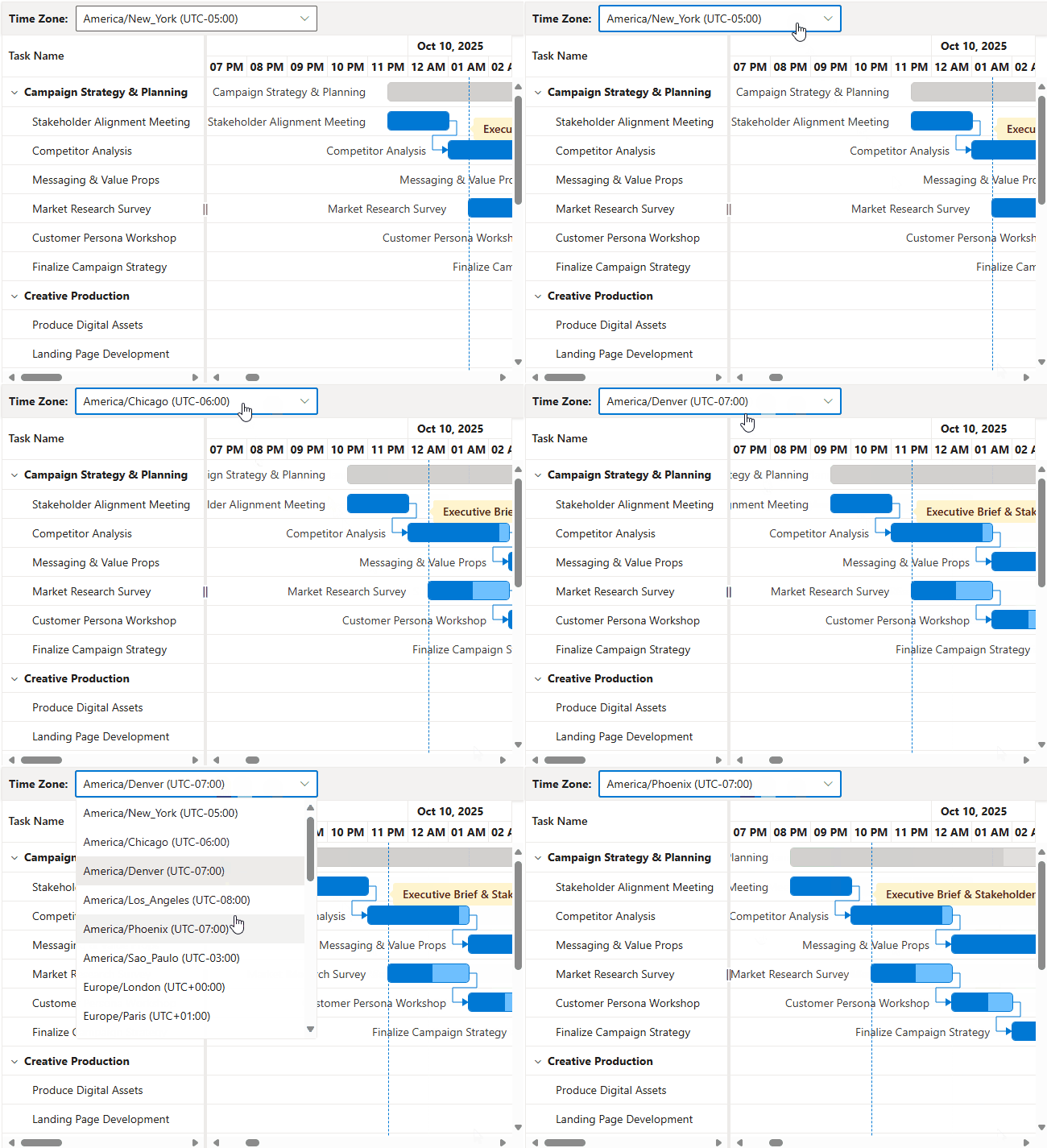
Ever struggled to schedule tasks across different time zones? The Blazor Gantt Chart now makes it effortless with built-in timezone support, ensuring task dates and times are automatically adjusted based on the selected timezone.
This feature is fully integrated with all CRUD operations (Create, Read, Update, Delete), ensuring your scheduling remains consistent and accurate across different geographic locations. It also handles Daylight Saving Time (DST) automatically, eliminating the need for manual adjustments and potential errors.
Key features
- Dynamic timezone adjustment: Automatically converts task start and end dates to the selected timezone.
- Integrated CRUD operations: Whenever you add, change, or remove tasks, the system automatically adjusts the time based on your selected timezone.
- Automatic DST handling: Seamlessly manages DST changes to prevent scheduling conflicts.
Key benefits
- Global scheduling accuracy: View and manage scheduled tasks accurately across different time zones.
- Consistent timelines: Keep your project timelines aligned, regardless of team location.
- Error-free planning: Avoid confusion caused by manual timezone conversions.
@using Syncfusion.Blazor.Gantt

<SfGantt @ref="GanttInstance"
         DataSource="@TaskCollection"
         DateFormat="MMM dd, hh:mm tt"
         IncludeWeekend="true"
         Height="550px"
         Timezone="America/Anchorage"
         Width="100%"
         ProjectStartDate="@(new DateTime(2025, 10, 09, 18, 00, 00))"
         AllowSelection="true"
         TreeColumnIndex="1">
    <GanttTaskFields Id="TaskId"
                     Name="TaskName"
                     StartDate="StartDate"
                     EndDate="EndDate"
                     Duration="Duration"
                     Progress="Progress"
                     Dependency="Predecessor"
                     ParentID="ParentId"
    </GanttTaskFields>
</SfGantt>

@code {
    public List<TimezoneInfoModel> TaskCollection { get; set; } = new List<TimezoneInfoModel>();
    public SfGantt<TimezoneInfoModel>? GanttInstance;

    public class TimezoneFields
    {
        public string? Id { get; set; }
        public string? Text { get; set; }
    }

    public class TimezoneInfoModel
    {
        public int TaskId { get; set; }
        public string? TaskName { get; set; }
        public DateTime? StartDate { get; set; }
        public DateTime? EndDate { get; set; }
        public string? Duration { get; set; }
        public int Progress { get; set; }
        public string? Predecessor { get; set; }
        public int? ParentId { get; set; }
    }

    protected override void OnInitialized()
    {
        TaskCollection = GetTimezoneCollection();
    }

    public static List<TimezoneInfoModel> GetTimezoneCollection()
    {
        List<TimezoneInfoModel> Tasks = new List<TimezoneInfoModel>
        {
            new TimezoneInfoModel { TaskId = 1, TaskName = "Campaign strategy & planning", StartDate = new DateTime(2025, 10, 10, 12, 0, 0), Duration = "8", Progress = 85 },
            new TimezoneInfoModel { TaskId = 2, TaskName = "Stakeholder alignment meeting", StartDate = new DateTime(2025, 10, 10, 12, 0, 0), ParentId = 1, Duration = "1.5", Progress = 100 },
            new TimezoneInfoModel { TaskId = 3, TaskName = "Competitor analysis", StartDate = new DateTime(2025, 10, 10, 13, 30, 0), ParentId = 1, Duration = "2.5", Progress = 90, Predecessor = "2FS" },
            new TimezoneInfoModel { TaskId = 4, TaskName = "Messaging and value propositions", StartDate = new DateTime(2025, 10, 11, 12, 0, 0), ParentId = 1, Duration = "4", Progress = 65, Predecessor = "3FS" },
            new TimezoneInfoModel { TaskId = 5, TaskName = "Market research survey", StartDate = new DateTime(2025, 10, 10, 12, 0, 0), ParentId = 1, Duration = "2", Progress = 55 },
        };
        return Tasks;
    }
}
Note: For more details on implementing timezone support in the Blazor Gantt Chart, refer to the documentation and try our online demo.
Work Breakdown Structure (WBS) for enhanced project clarity
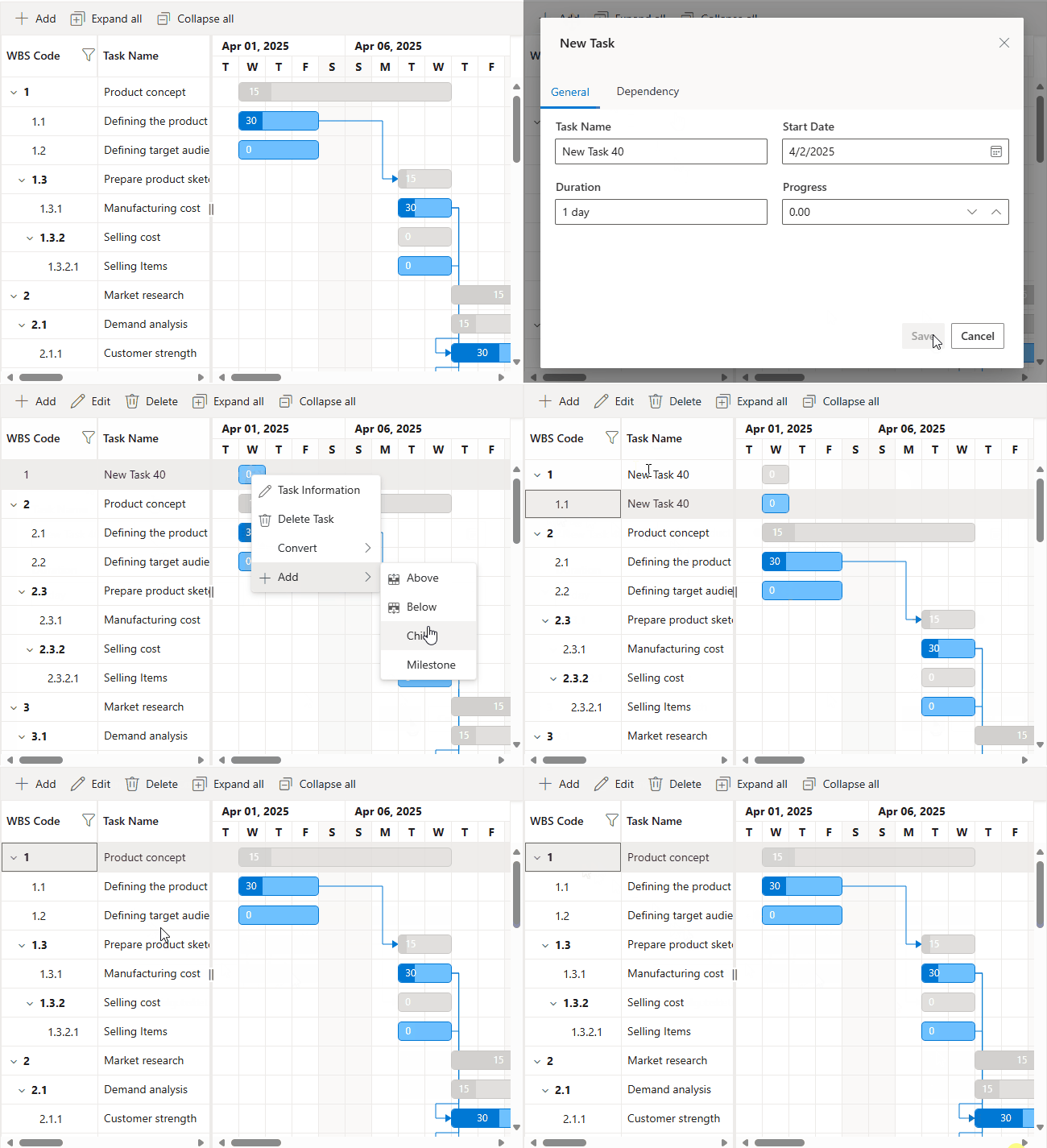
The Blazor Gantt Chart now supports a Work Breakdown Structure (WBS) column, offering a clear hierarchical view of your project tasks. Each task is assigned a unique WBS code (e.g., 1.0, 1.1, 1.1.1), making it easier to understand task relationships and dependencies.
You can now define task dependencies using WBS codes (e.g., 2.1FS, 3.1.1SS), which are more intuitive than traditional task IDs.
Key features
- Automatic WBS code generation: No need to manually assign codes, each task gets a unique WBS code based on its position in the project hierarchy (like 1.0, 1.1, 1.1.1), making your project structure instantly clear.
- WBS-based predecessors: Easily define task dependencies using logical WBS codes instead of traditional task IDs.
- Dedicated WBS column: View all your WBS codes in a dedicated column for quick reference. It is a simple way to keep your project organized and readable.
- Customizable display: Tailor the WBS column to your needs, adjust its visibility, order, and formatting to match your workflow and reporting style.
Key benefits
- Clear task organization: Easily identify parent-child relationships.
- Intuitive dependency mapping: Simplify linking tasks using logical WBS codes.
- Improved reporting: Align with standard project management documentation.
- Consistent communication: Provide a shared reference system for teams and stakeholders.
@using Syncfusion.Blazor.Gantt

<SfGantt DataSource="@TaskCollection"
         ShowWbsColumn="true"
         AutoGenerateWbs="true"
         TreeColumnIndex="1" >

	<GanttTaskFields Id="TaskId"
                         Name="TaskName"
                         StartDate="StartDate"
                         EndDate="EndDate"
                         Duration="Duration"
                         Progress="Progress"
		ParentID="ParentId"
                         Dependency="Predecessor"
                         WbsCode="WbsCode"
                         WbsPredecessor="WbsPredecessor">
	</GanttTaskFields>

</SfGantt>
Note: For more details on implementing the Work Breakdown Structure column, refer to the documentation and try our online demo.
Advanced filtering with an Excel-like UI
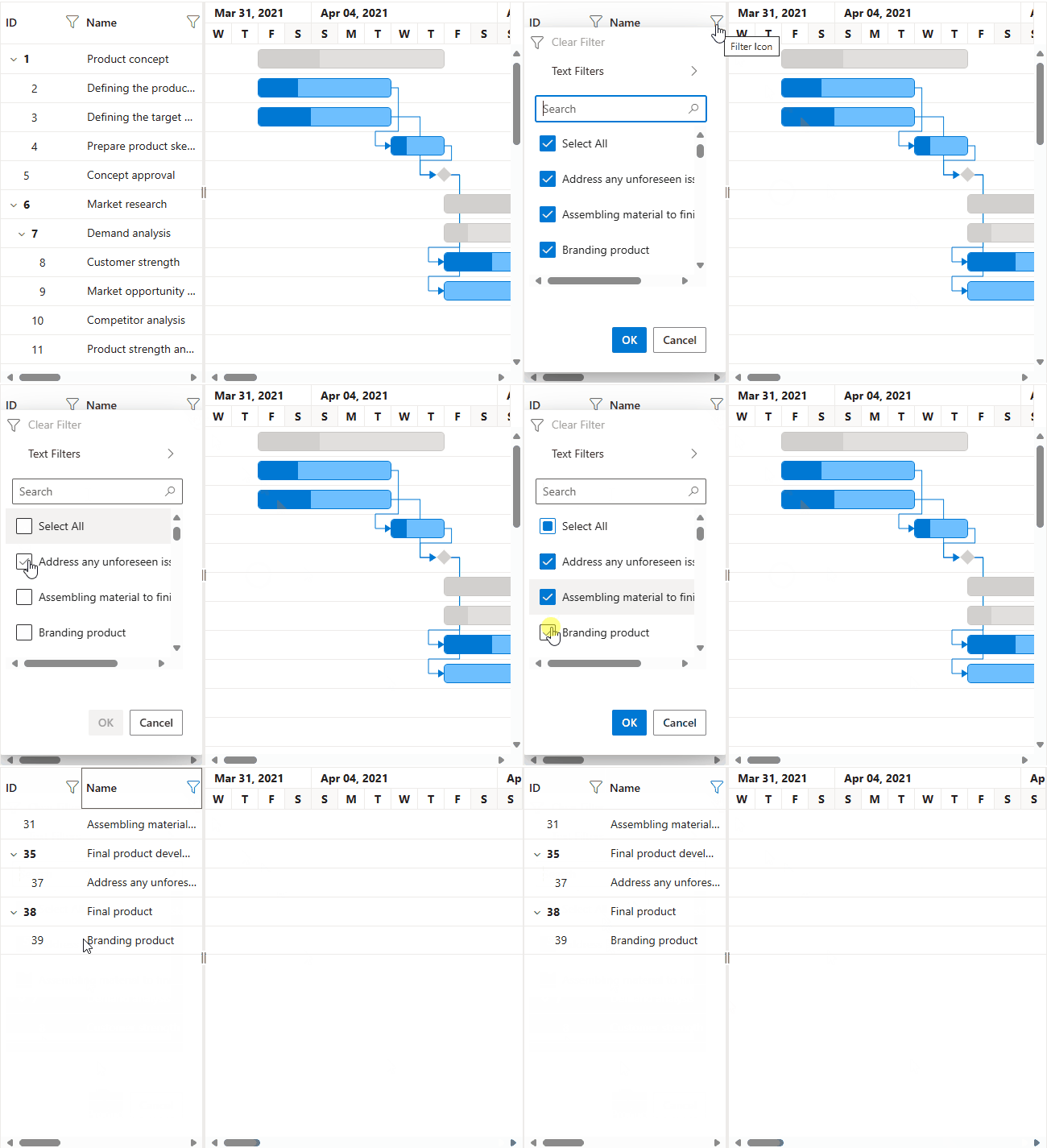
Navigating large datasets is now simpler with the new Excel-style filtering feature. This intuitive interface allows us to quickly select values using a checkbox-style list, and also apply multi-condition filters with operators like and, or, less than, and greater than. The filter also supports hierarchical data, with modes like Both, Parent, Child, and None.
Key features
- Excel-style interface: Familiar checkbox-based filter dialog with a search bar.
- Advanced operators: Build complex, multi-condition filters for precise data isolation.
- Hierarchical filtering: Filter tasks based on their position in the project hierarchy, whether they are parent tasks, child tasks, or both.
Key benefits
- Find data faster: Quickly locate tasks with a user-friendly interface.
- Precise data isolation: Target exactly what you need with advanced filters.
- Flexible hierarchical views: Tailor data display to your analysis needs.
@using Syncfusion.Blazor.Gantt

<SfGantt DataSource="@TaskCollection"
         Height="450px"
         Width="100%"
         HighlightWeekends="true"
         TreeColumnIndex="1"
         AllowFiltering="true"
         ProjectStartDate="@(new DateTime(2021, 3, 24))"
         ProjectEndDate="@(new DateTime(2021, 7, 6))">
    …
    …
    <GanttFilterSettings HierarchyMode="@FilterHierarchyMode.Both"
                         FilterType="Syncfusion.Blazor.Gantt.FilterType.Excel">
</GanttFilterSettings>

</SfGantt>
Note: For more details on implementing the Excel-lite filtering, refer to the documentation and try our online demo.

Conclusion
Thank you for reading! In this blog, we explored the latest enhancements to the Syncfusion Blazor Gantt Chart component from our 2025 Volume 3 release. With these features like timezone support, WBS columns, and Excel-like filtering, developers can build more efficient and scalable project management applications.
Ready to elevate your project scheduling? Try Syncfusion’s Blazor Gantt Chart and experience the powerful features, check the official documentation, Release Notes, and live demos.
If you’re an existing Syncfusion customer, you can download the latest version of Essential Studio from the license and downloads page. For those new to Syncfusion, we offer a 30-day free trial so you can experience these exciting features firsthand.
Need help? Feel free to reach out via our support forum, support portal, or feedback portal. We’re always here to assist you!





 No spam, just valuable updates.