
 Arulraj Aboorvasamy
TL;DR: .NET 11 Preview 1 brings Zstandard compression, AI/ML types, async runtime upgrades, and UI/tooling improvements. Preview 2 extends this with Blazor TempData, OpenTelemetry, EF Core vector search, smaller SDK images, MAUI enhancements, and further performance gains.
.NET 11 Preview 1 and Preview 2 are out, and they’re worth a look if you build high-throughput services, modern web apps with Blazor, or you’re starting to bring AI-ish workloads (embeddings, semantic search, model inference) into “normal” line-of-business systems.
This post focuses on four updates that materially change what you can do (or how easy it is to do it):
- Runtime Async (Preview 1, refined in Preview 2).
- Native Zstandard (zstd) compression (Preview 1).
- Blazor TempData for SSR (Preview 2).
- EF Core vector search for SQL Server (Preview 2).
I’ll also call out a few smaller but meaningful tooling/platform changes at the end.
What shipped in Preview 1 vs Preview 2 (quick map)
Preview 1 highlights
- Native Zstandard (zstd) compression APIs.
- Runtime Async foundation (enabled for experimentation via preview features).
BFloat16type for AI/ML and numerics scenarios.- C# preview improvements like collection expression arguments.
Preview 2 highlights
- Blazor TempData support for static SSR scenarios.
- Native OpenTelemetry tracing support in ASP.NET Core (baseline enablement).
- EF Core vector search support for SQL Server (vector distance + indexing support).
- Runtime Async V2 refinements.
- Smaller SDK/container images and a bunch of runtime/SDK polish.
Libraries: Powerful new APIs and performance wins
The Base Class Library (BCL) gains several production-ready additions that solve real-world pain points.
Zstandard compression support
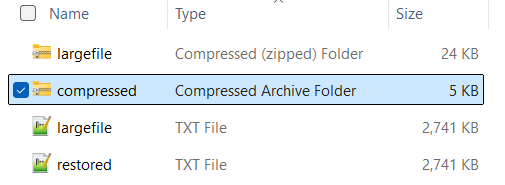
Need to shrink files or speed up data transfer? .NET now natively supports Zstandard (zstd), a modern algorithm that’s often faster than GZip or Brotli while keeping excellent compression ratios.
In web servers, logging pipelines, or big-data scenarios, Zstandard delivers 2–7x faster compression and up to 14x faster decompression (per official benchmarks). Lower latency and storage costs in production.
Example implementation:
using System.IO.Compression;
// Compress data
{
    using var inputStream = File.OpenRead("largefile.txt");
    using var outputStream = File.Create("compressed.zst");
    using var compressStream = new ZstandardStream(outputStream, CompressionMode.Compress);
    await inputStream.CopyToAsync(compressStream);
}

// Decompress
{
    using var decompressInput = File.OpenRead("compressed.zst");
    using var decompressOutput = File.Create("restored.txt");
    using var decompressStream = new ZstandardStream(decompressInput, CompressionMode.Decompress);
    await decompressStream.CopyToAsync(decompressOutput);
}
Pro tip: Pair it with HttpClientHandler.AutomaticDecompression for automatic zstd handling in APIs that helps you transmit significantly less data during HTTP data transfers if the payload is compressible.
Here’s the code example in C#:
var handler = new HttpClientHandler
{
    AutomaticDecompression = DecompressionMethods.GZip | DecompressionMethods.Zstandard
};

using var client = new HttpClient(handler);
// Automatically decompresses zstd-encoded responses
var response = await client.GetAsync("https://example.com");
BFloat16 floating-point type
Machine-learning models need numbers that balance range and memory. BFloat16 (16-bit “Brain Float”) gives you the wide range of a regular float while using half the memory.
Ideal for tensor operations in ML.NET, ONNX Runtime, or custom AI pipelines. Reduced memory footprint = larger models or batches on the same hardware.
Here’s the example C# code:
BFloat16 value = (BFloat16)3.14f;
float regularFloat = (float)value; // Lossless upcast to float

// ML-style computation
BFloat16 a = (BFloat16)1.5f;
BFloat16 b = (BFloat16)2.0f;
BFloat16 result = a * b;  // 3.0
C# collection expression arguments
Collection expressions (`[]`) just got smarter. You can now pass constructor arguments like capacity or a custom comparer directly inside the brackets. Pre-allocate capacity to avoid reallocations on hot paths; use an immutable FrozenDictionary or case-insensitive set with zero extra code.
Example implementation:
string[] values = ["apple", "banana", "cherry"];

// Set initial capacity as twice the capacity for better performance
List<string> names = [with(capacity: values.Length * 2), .. values];
Case-insensitive HashSet
HashSet<string> uniqueNames =
[
    with(StringComparer.OrdinalIgnoreCase),
    "Apple",
    "apple",
    "BANANA"
];

foreach (var name in uniqueNames)
{
    Console.WriteLine(name);
    // Outputs "Apple" and "BANANA" only once each
}
Note: To enable preview features, you need to set the LangVersion property to preview in your project.
<PropertyGroup>
    <LangVersion>preview</LangVersion>
</PropertyGroup>
Beyond collection expression arguments, extended layout support improves interop scenarios (great for performance-critical libraries). The language team continues making C# more concise and expressive, exactly what both new and veteran developers love.
Entity Framework Core improvements
Entity Framework Core continues to evolve in .NET 11 Preview 1 & 2 with several developer-friendly enhancements that make data access more expressive and productive.
The most notable addition is full support for complex types and JSON columns on entity types that use TPT (Table-Per-Type) or TPC (Table-Per-Concrete-Type) inheritance mappings. A long-requested capability that lets beginners model real-world hierarchical business objects (like an Animal base class with nested Details stored as JSON) without workarounds, while experienced architects gain powerful flexibility for rich domain-driven designs:
Here’s the code example in C#:
using Microsoft.EntityFrameworkCore;
using System.ComponentModel.DataAnnotations.Schema;

Main(args).GetAwaiter().GetResult();

public abstract class Animal
{
    public int Id { get; set; }
    public string Name { get; set; } = string.Empty;
    public required AnimalDetails Details { get; set; }
}

public class Dog : Animal
{
    public string? Breed { get; set; }
}

public class Cat : Animal
{
    public bool IsIndoor { get; set; }
}

[ComplexType]
public class AnimalDetails
{
    public DateTime BirthDate { get; set; }
    public string? Veterinarian { get; set; }
}

public class ApplicationDbContext : DbContext
{
    public DbSet<Animal> Animals { get; set; }

    public ApplicationDbContext(DbContextOptions<ApplicationDbContext> options) : base(options) { }

    protected override void OnModelCreating(ModelBuilder modelBuilder)
    {
        // New in .NET 11 / EF Core 11:
        // Complex types can now be stored as JSON columns with TPT/TPC inheritance
        modelBuilder.Entity<Animal>()
            .UseTptMappingStrategy()
            .ComplexProperty(a => a.Details, b => b.ToJson());

        modelBuilder.Entity<Dog>();
        modelBuilder.Entity<Cat>();
    }
}

partial class Program
{
    static async Task Main(string[] args)
    {
        var connectionString = "Data Source=SYNCLAPN-44605;Initial Catalog=AnimalDbTest;Integrated Security=True;Encrypt=False";

        var options = new DbContextOptionsBuilder<ApplicationDbContext>()
            .UseSqlServer(connectionString)
            .Options;

        await using var context = new ApplicationDbContext(options);

        // Create database + tables (perfect for quick testing)
        await context.Database.EnsureCreatedAsync();
        Console.WriteLine("Database created successfully!\n");

        // === INSERT TEST DATA ===
        var dog = new Dog
        {
            Name = "Buddy",
            Breed = "Labrador",
            Details = new AnimalDetails
            {
                BirthDate = new DateTime(2022, 5, 15),
                Veterinarian = "Dr. Smith"
            }
        };

        var cat = new Cat
        {
            Name = "Luna",
            IsIndoor = true,
            Details = new AnimalDetails
            {
                BirthDate = new DateTime(2023, 1, 10),
                Veterinarian = "Dr. John"
            }
        };

        context.Animals.AddRange(dog, cat);
        await context.SaveChangesAsync();
        Console.WriteLine("Inserted Dog and Cat successfully!\n");

        // === QUERY & DISPLAY ===
        Console.WriteLine("Dogs:");
        var dogs = await context.Animals.OfType<Dog>().ToListAsync();
        foreach (var d in dogs)
        {
            Console.WriteLine($"   • {d.Name} ({d.Breed}) - Born: {d.Details.BirthDate:yyyy-MM-dd}, Vet: {d.Details.Veterinarian}");
        }

        Console.WriteLine("\nCats:");
        var cats = await context.Animals.OfType<Cat>().ToListAsync();
        foreach (var c in cats)
        {
            Console.WriteLine($"   • {c.Name} (Indoor: {c.IsIndoor}) - Born: {c.Details.BirthDate:yyyy-MM-dd}, Vet: {c.Details.Veterinarian}");
        }

        // See the actual JSON stored in the database
        Console.WriteLine("\Raw JSON column example (Details column from SQL):");
        var raw = await context.Database
            .SqlQueryRaw<string>("SELECT Details FROM Animals WHERE Id = 1")
            .ToListAsync();

        Console.WriteLine(raw.FirstOrDefault() ?? "No data");
    }
}
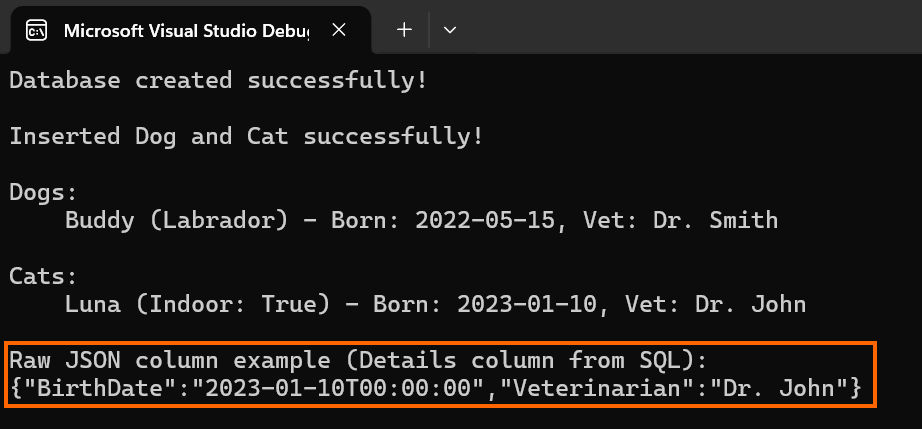
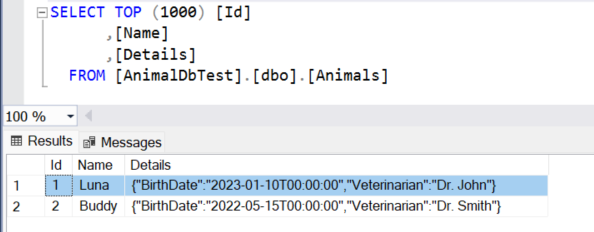
This will create a JSON column (e.g., Details) in the base Animal table while still using separate tables for Dog and Cat (TPT).
In Preview 2, EF Core takes a massive leap for AI workloads with native SQL Server vector search (DiskANN indexes + VECTOR_SEARCH()), LINQ MaxBy/MinBy, full-text catalog/index creation, and JSON_CONTAINS() support, a perfect companion to the BFloat16 type introduced in Preview 1.
You can now do AI-powered semantic search directly in LINQ, even on your existing JSON columns like AnimalDetails! Just add a vector column (e.g., Embedding) to your Animal class and use this code:
using Microsoft.Data.SqlTypes;

// Example: Find animals semantically similar to "young indoor cat with vet Dr. John"
float[] embeddingArray = await GetEmbeddingAsync("young indoor cat with vet Dr. John");
var queryEmbedding = new SqlVector<float>(embeddingArray);

var similarAnimals = await context.Animals
    .OrderBy(a => EF.Functions.VectorDistance("cosine", a.Embedding, queryEmbedding))
    .Take(5)
    .ToListAsync();

foreach (var animal in similarAnimals)
{
    Console.WriteLine(
        $"• {animal.Name} ({animal.GetType().Name}) - Vet: {animal.Details.Veterinarian}"
    );
}
Note: Requires Microsoft SQL Server 2025 (or later) for the native vector column type.
On the tooling side, you can now create and apply migrations in a single seamless command, which dramatically simplifies setup in containers, CI/CD pipelines, or .NET Aspire projects.
dotnet ef database update InitialCreate --addAzure Cosmos DB users get a big performance boost with transactional batches enabled by default for atomic multi-operation saves, new bulk execution for high-throughput writes, and session token management APIs for reliable read-your-writes consistency across distributed or load-balanced apps. LINQ MaxBy / MinBy is now translated to SQL. These updates keep EF Core the go-to ORM for everything from quick prototypes to enterprise-scale cloud systems.
Other notable library improvements
- MediaTypeMap for lightning-fast MIME lookups.
- CreateHardLink for efficient file deduplication.
- Happy Eyeballs in ConnectAsync (better dual-stack networking).
- Expanded Rune support across
String,StringBuilder,TextInfo,Char, andTextWriter. - Verify, DivisionRounding, and dozens of performance tweaks.
- GetDeterminant is now
~15%faster, and new support for choosing specific Tar archive formats (GNU/POSIX) when creating archives. (available from .NET 11 Preview 2).
Runtime: Smarter Async and broader platform reach
Runtime Async
Async/await used to rely entirely on compiler-generated state machines. .NET 11 moves more of that logic into the runtime itself. This delivers lower overhead, dramatically better diagnostics/profiling, improved stack traces, and native AOT compatibility. Perfect for microservices handling thousands of concurrent requests.
No code changes required for most apps; it’s enabled by default on CoreCLR. Enable <EnablePreviewFeatures>true</EnablePreviewFeatures> for full experimentation.
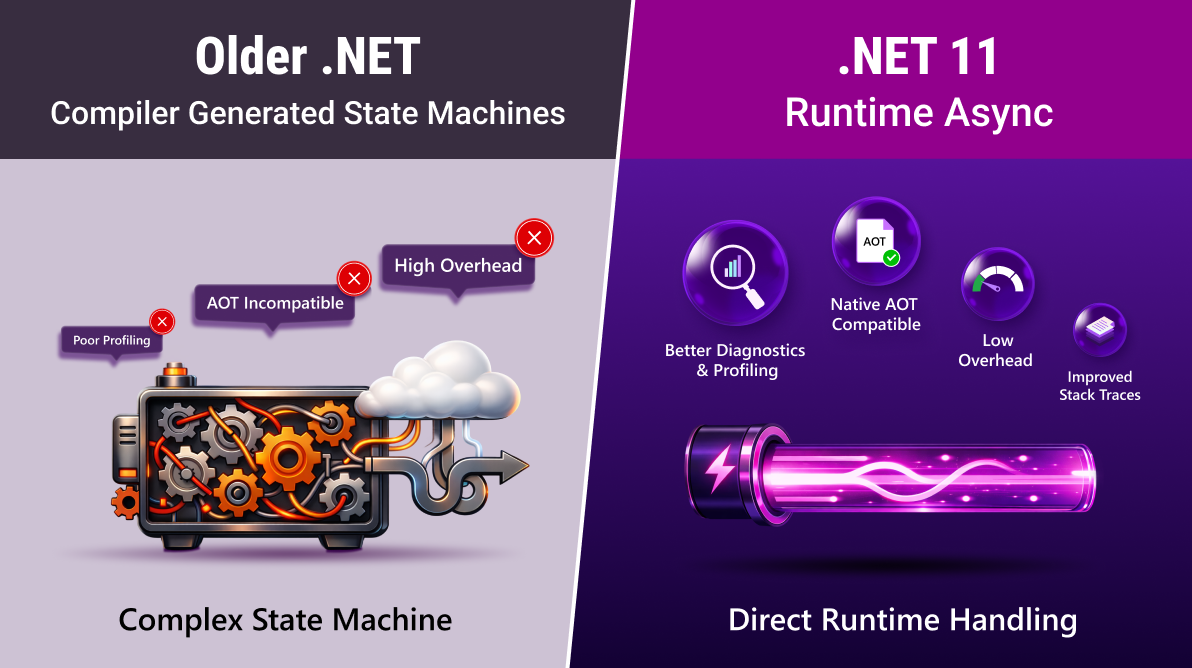
Runtime Async in .NET 11 shifts the heavy lifting of async/await state machines from the compiler directly into the runtime. The result is lower overhead, dramatically better diagnostics and profiling, crystal-clear stack traces, full Native AOT support, and perfect scaling for microservices handling thousands of concurrent requests.
Runtime Async has seen further refinements in .NET 11 Preview 2 (now called Runtime Async V2), delivering even lower overhead, reduced GC pressure, and improved scaling for high concurrency microservices.
Additional runtime highlights
- Foundational CoreCLR on WebAssembly (future faster Blazor WASM).
- JIT improvements (better inlining, loop optimizations,
Arm64gains). - GC heap hard-limit support for
32-bitprocesses. - New architecture enablement: RISC-V and s390x.
- SDK container images up to
17%smaller (using hard links).
These changes make .NET even more future-proof across cloud, edge, and emerging hardware.
SDK, CLI and tooling enhancements
The daily development just got smoother now with .NET 11:
dotnet runnow interactively lets you pick target framework and device (huge win for MAUI/Android/iOS developers).dotnet testaccepts positional arguments (e.g.,dotnet test MyProject.csproj).dotnet watchsupports hot-reload of project/package references and configurable WebSocket ports for containers.- New code analyzers and improved Terminal Logger in
MSBuild.
These small changes compound into massive time savings in large solutions.
Web development: Blazor gets more powerful
Blazor TempData support
One of the most requested features is finally here! TempData works perfectly with Blazor static Server-Side Rendering (SSR). This is perfect for flash messages and the classic Post-Redirect-Get (PRG) pattern after form submissions. It does not work yet in interactive Blazor Server or Blazor WebAssembly.
TempData values persist after same-page redirects and across different pages. Data is automatically protected via ASP.NET Core and cleared after a single read when .Get() is called. The Peek() method preserves values for subsequent requests, while Keep() retains all values or Keep(key) for a specific value. You can manually delete values using Remove(). It works with both the default cookie provider and session storage provider, all with zero boilerplate. The following example explains these behaviors in action.
@page "/my-form"
@inject NavigationManager NavigationManager

<h3>TempData Test Form (SSR - .NET 11 Preview 2)</h3>

<form method="post" @formname="myForm" @onsubmit="HandleSubmit">
    <AntiforgeryToken />
    <button type="submit">Submit Form</button>
</form>

@code {
    [CascadingParameter]
    public ITempData? TempData { get; set; }

    private void HandleSubmit()
    {
        TempData!["GetMsg"] = "This was set with .Get() - will disappear after one read";
        TempData!["PeekMsg"] = "This was set with .Peek() - survives refresh";
        TempData!["KeepMsg"] = "This was set with .Keep() - survives one extra request";

        NavigationManager.NavigateTo("/success", forceLoad: true);
    }
}@page "/success"
<h2>Success Page — TempData Test Results</h2>
@if (!string.IsNullOrEmpty(_getMsg))
{
<div class="alert alert-success" style="padding:15px; background:#d4edda; border-radius:6px;">
<strong>GetMsg: @_getMsg</strong>
</div>
}
else
{
<p><strong>GetMsg:</strong> Already consumed (normal behavior)</p>
}
@if (!string.IsNullOrEmpty(_peekMsg))
{
<div class="alert alert-success" style="padding:15px; background:#d4edda; border-radius:6px;">
<strong>PeekMsg: @_peekMsg</strong>
</div>
}
@if (!string.IsNullOrEmpty(_keepMsg))
{
<div class="alert alert-success" style="padding:15px; background:#d4edda; border-radius:6px;">
<strong>KeepMsg: @_keepMsg</strong>
</div>
}
<p><strong>Tip:</strong> Refresh this page (F5) to see the difference!</p>
@code {
[CascadingParameter]
public ITempData? TempData { get; set; }
private string? _getMsg;
private string? _peekMsg;
private string? _keepMsg;
protected override void OnInitialized()
{
//THIS LINE IS THE WORKAROUND (forces full load so .Get() actually removes)
_ = TempData?.ContainsKey("GetMsg");
_getMsg = TempData?.Get("GetMsg") as string; // consumes the value
_peekMsg = TempData?.Peek("PeekMsg") as string; // does NOT consume
_keepMsg = TempData?.Peek("KeepMsg") as string;
if (!string.IsNullOrEmpty(_keepMsg))
TempData?.Keep("KeepMsg"); // survives one more request
}
}After pressing F5 on the Success page, GetMsg is automatically consumed and removed (classic flash-message behavior), while PeekMsg and KeepMsg survive the refresh, exactly as ITempData is supposed to work in Blazor SSR with .NET 11 Preview 2.
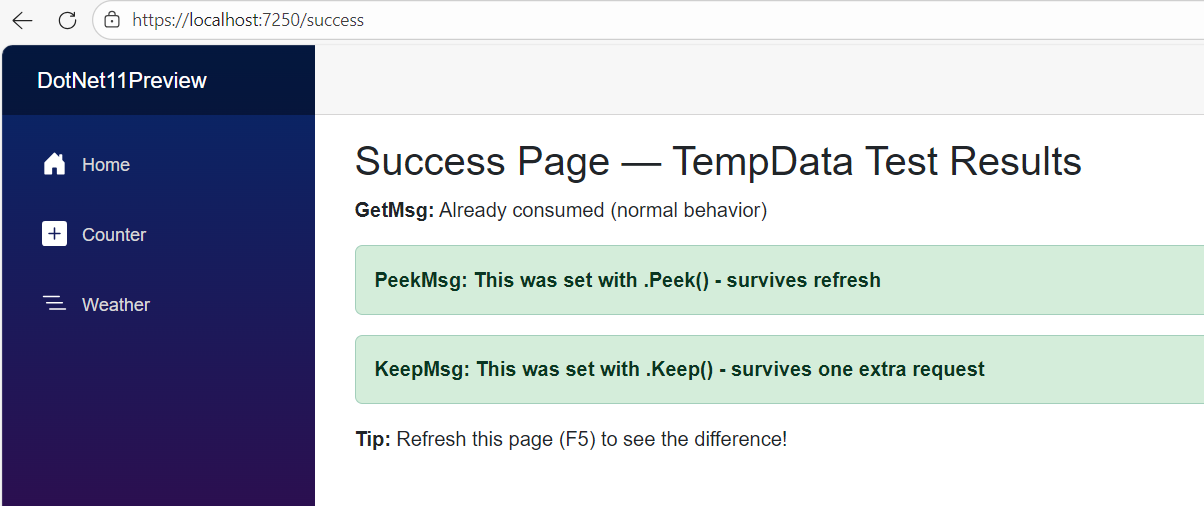
Note: TempData in .NET 11 Preview 2 is exactly the same as the one you loved in MVC, but now it works natively in Blazor SSR with zero extra packages!
New Blazor components and improvements
Blazor continues its ascent with developer-friendly components:
EnvironmentBoundary: conditional rendering based on Development/Staging/Production (like MVC’sEnvironmentTagHelper).LabelandDisplayNamecomponents for accessible, auto-localized forms.QuickGrid.OnRowClickevent for interactive data grids.IHostedServicesupport in Blazor WebAssembly.- Relative navigation, OpenAPI binary-file responses, and more.
Whether you’re building internal tools or customer-facing SPAs, these features reduce boilerplate and improve UX.
Native OpenTelemetry tracing for ASP.NET Core
No extra NuGet packages needed for basic semantic-convention tracing anymore. Just enable it, and you get beautiful observability out of the box.
Cross-platform: .NET MAUI & Mobile
CoreCLRis now the default for .NET for Android, with consistent performance across all platforms. From Preview 2, CoreCLR on Android requires API 24 or higher.- Enhanced Map control (better clustering & rendering).
- TypedBinding performance improvements.
- XAML Source Generation is enabled by default, which gives faster startup and makes apps smaller.
- Enhanced
dotnet runfor device selection and full build-deploy-run pipelines. (same explained in the CLI improvements topic)
How to get started
- Download the .NET 11 SDK.
- On Windows, install Visual Studio 2026 Insiders or use VS Code + C# Dev Kit extension.
- Create a new project:
dotnet new console -o MyNet11App
cd MyNet11App
dotnet run
In the
program.csfile, paste the following code:using System; using System.Threading.Tasks; class Program { static async Task Main(string[] args) { Console.WriteLine("=== Runtime Async Test (.NET 11) ==="); try { await DoWorkAsync(); // This will throw } catch (Exception ex) { Console.WriteLine("\n=== STACK TRACE ==="); Console.WriteLine(ex.ToString()); } Console.WriteLine("\nTest complete. Look at the stack trace above!"); } static async Task DoWorkAsync() { await Task.Delay(100); // simulate real work throw new InvalidOperationException("Test exception from async method"); } }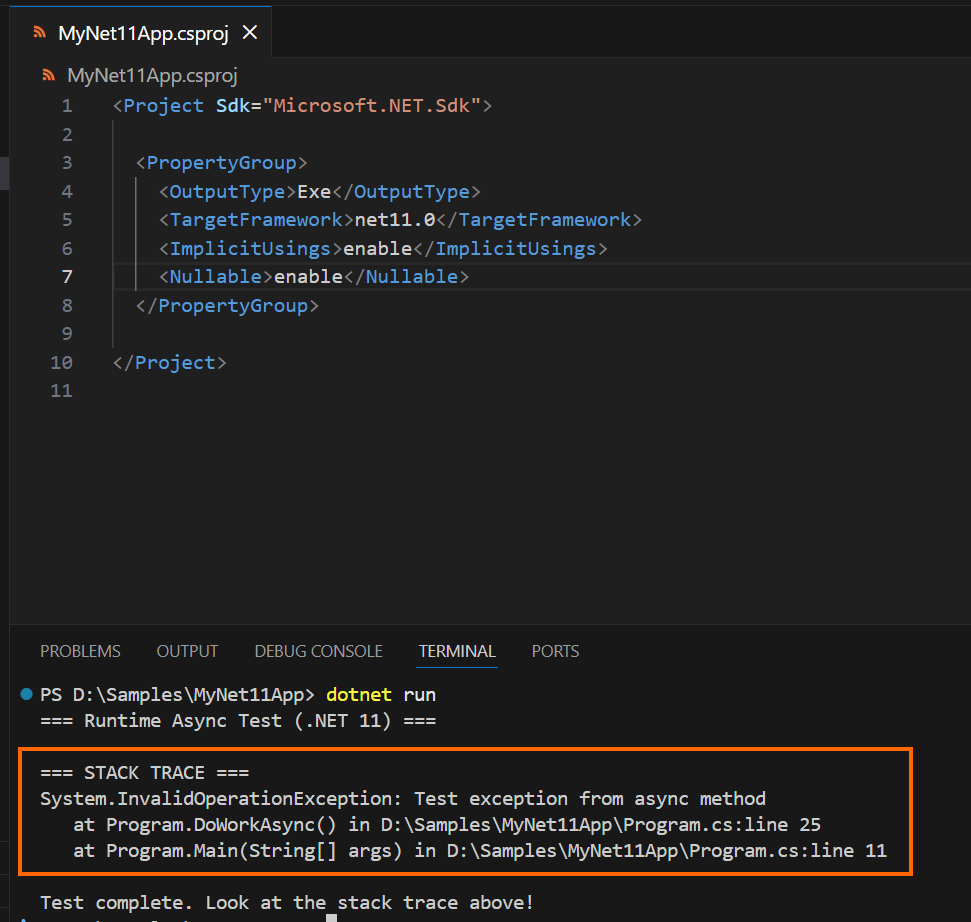
Stack trace exception while running .NET 11 project You can see the
TargetFrameworkasnet11.0and the standard stack trace when an exception is thrown, with a clean, human-readable output (Runtime Async is now enabled by default). - For preview features (Runtime Async, etc.), add the following in the project file:
<PropertyGroup>
    <EnablePreviewFeatures>true</EnablePreviewFeatures>
    <Features>$(Features);runtime-async=on</Features>
</PropertyGroup>
This will enable full Runtime Async (a compiler-level change).
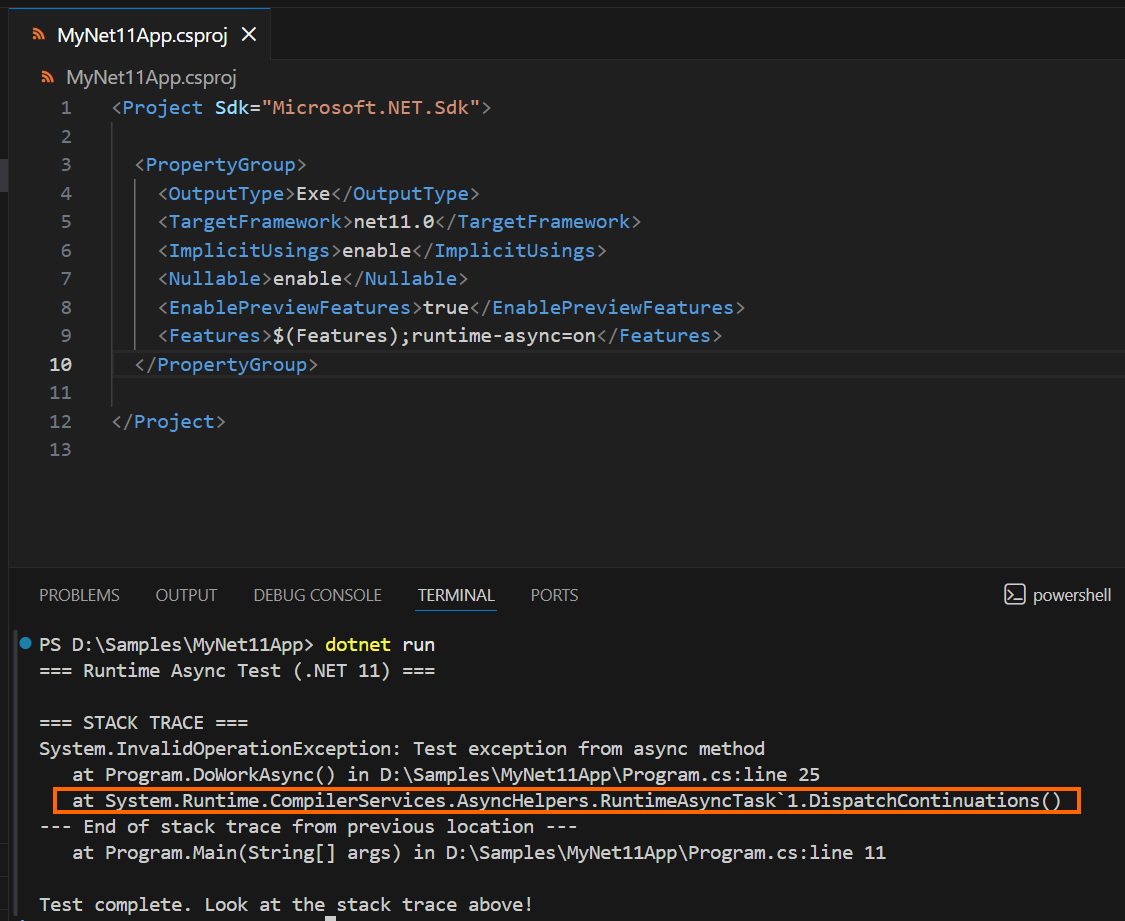
Runtime Async Enabled in .NET 11 This extra
RuntimeAsyncTask.DispatchContinuations()frame + the “End of stack trace” separator is the official signature of the compiler now generating runtime-native async code (instead of the old state-machine classes).Conclusion
Thank you for reading! Preview 1 lays the groundwork: runtime and library capabilities (notably Runtime Async and zstd). Preview 2 builds on it with features that show where .NET is heading: SSR-friendly web patterns (TempData) and first-class vector search workflows inside the platform stack.
If you try just one thing, try the one closest to production pain:
- Debugging async issues? start with Runtime Async.
- Paying for bandwidth/storage? try zstd.
- Building SSR forms? TempData.
- Adding semantic search? vector queries in EF Core.
Next step: install the preview SDK, run a targeted experiment, and share your feedback in the comments below.




 No spam, just valuable updates.