
 Ramkumar Ravy
TL;DR: Need to embed a DOCX editor in React for Word-like editing? This guide shows how to seamlessly integrate and configure it for real-time collaboration without relying on MS Word.
In today’s fast-paced digital landscape, users expect seamless, in-browser experiences, especially for document editing. Whether you’re building a collaborative workspace, a content management system, or an enterprise dashboard, the ability to embed a DOCX Editor in React can dramatically enhance your application’s functionality and user engagement.
Imagine allowing users to render DOCX files with React and edit them directly, no downloads, no external software, just smooth, integrated editing. This kind of experience is not just a convenience; it’s a competitive advantage. Syncfusion makes this possible with its powerful DOCX Editor component.
Why embed a DOCX Editor in React?
Embedding a DOCX Editor directly into your React app enables:
- Real-time collaboration
- In-browser editing without external software
- Rich formatting and seamless document workflows
- Improved productivity and user engagement
How to embed a DOCX Editor in React
Step 1. Set up your React project
Use create React app or Vite to initialize your project:
npx create-react-app syncfusion-doc-editor
cd syncfusion-doc-editor
Step 2. Install Syncfusion DOCX Editor
npm install @syncfusion/ej2-react-documenteditorStep 3. Import required styles
Add the following to your index.css to ensure proper styling:
@import '../node_modules/@syncfusion/ej2-base/styles/material.css';
@import '../node_modules/@syncfusion/ej2-buttons/styles/material.css';
@import '../node_modules/@syncfusion/ej2-inputs/styles/material.css';
@import '../node_modules/@syncfusion/ej2-popups/styles/material.css';
@import '../node_modules/@syncfusion/ej2-lists/styles/material.css';
@import '../node_modules/@syncfusion/ej2-navigations/styles/material.css';
@import '../node_modules/@syncfusion/ej2-splitbuttons/styles/material.css';
@import '../node_modules/@syncfusion/ej2-dropdowns/styles/material.css';
@import "../node_modules/@syncfusion/ej2-documenteditor/styles/material.css";
Step 4. Create and embed the DOCX Editor component
Create a new file named DOCXEditor.js inside the src folder and add the following code:
import React, { useRef, useEffect } from 'react';
import {
  DOCXEditorContainerComponent,
  Toolbar
} from '@syncfusion/ej2-react-DOCXeditor';

DOCXEditorContainerComponent.Inject(Toolbar);

function DOCXEditor() {
  const containerRef = useRef(null);

  const defaultSFDT = `{
    "sections": [{
      "blocks": [{
        "inlines": [{
          "text": "Welcome to Syncfusion Document Editor!",
          "characterFormat": {
            "bold": true,
            "fontSize": 14
          }
        }]
      }]
    }]
  }`;

  useEffect(() => {
    if (containerRef.current) {
      containerRef.current.DOCXEditor.open(defaultSFDT); // Empty document
      containerRef.current.DOCXEditor.documentName = 'New Document';
      containerRef.current.DOCXEditor.focusIn();
    }
  }, []);

  return (
    <DOCXEditorContainerComponent
      ref={containerRef}
      id="container"
      height="100vh"
      enableToolbar={true}
    />
  );
}

export default DocumentEditor;
Note: Syncfusion uses SFDT (Syncfusion DOCX Text) format for efficient DOCX rendering and editing. In the example above, we load a DOCX using SFDT to initialize the editor with a simple content.
Step 5. Use the component in App.js
Import and use the DOCXEditor component in your App.js file:
import React from 'react';
import DOCXEditor from './DOCXEditor';

function App() {
  return (
    <div className='App'>
      <DOCXEditor />
    </div>
  );
}

export default App;
Step 6. Run your application
Start the application using the start script
npm start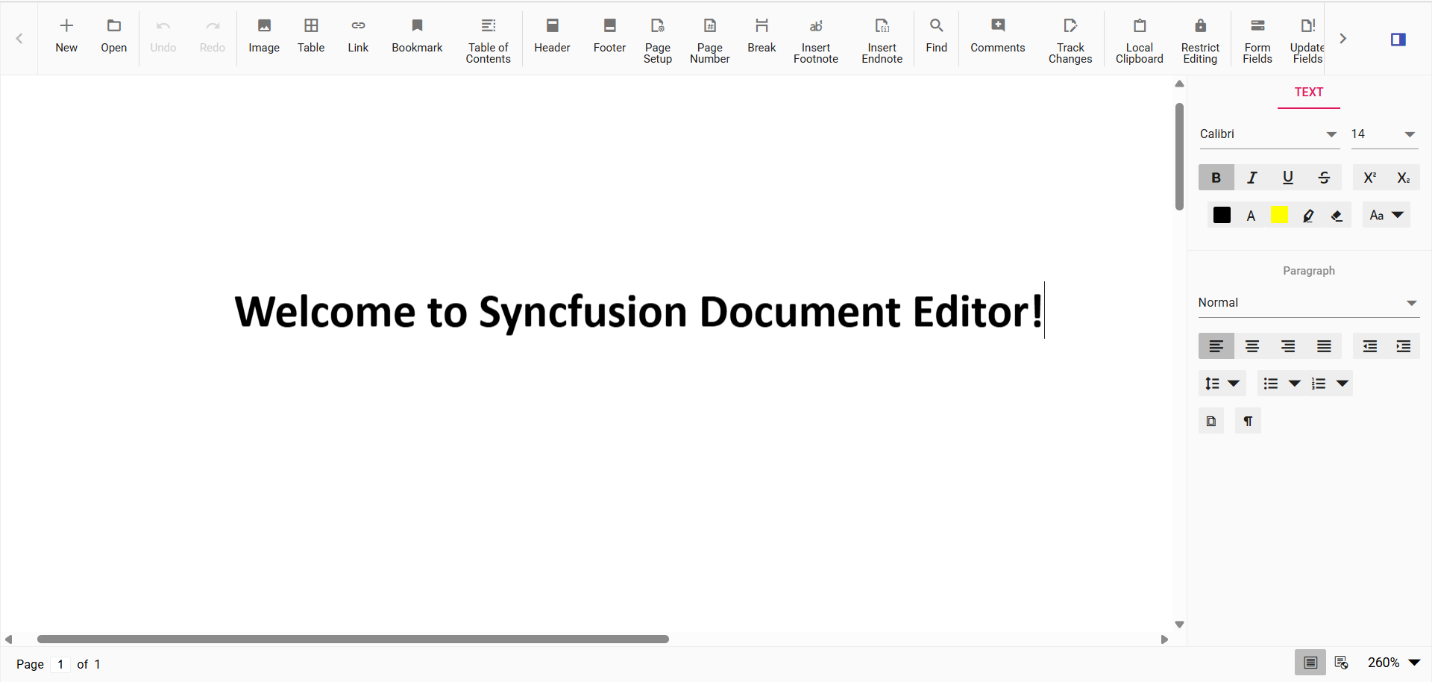
Editing DOCX files in React
We’ve successfully rendered the DOCX Editor inside our React application. Now, let’s explore its powerful editing functionality.
Core capabilities
- In-browser viewing and editing: Open and edit DOCX files directly within the React interface, no downloads or external tools required.
- Full DOCX fidelity: Maintains original formatting, styles, and structure for professional-grade document rendering.
- Advanced formatting support: Includes tables, images, headers, footers, and rich text styling for complex document layouts.
- Real-time collaboration: Enables track changes, comments, and co-authoring for team-based editing workflows.
- Seamless import and export: Supports high-fidelity DOCX import and export, ensuring data integrity and compatibility.
- Performance optimization: Engineered for speed and responsiveness, even with large documents and intensive editing tasks.
Developer advantages
- Customizable toolbar and UI: Adapt the editor interface to match specific workflows, user roles, or branding requirements.
- Modular and scalable architecture: Easily integrates into React projects with flexible configuration options.
- Extensive documentation and support: Accelerates development with clear guides, demos, and responsive technical support.
Check out our getting started guide to explore Syncfusion DOCX Editor features and learn how to seamlessly integrate the editor into your application.
Conclusion
Thank you for reading! Integrating a DOCX Editor into your React app is no longer a complex task. With Syncfusion’s DOCX Editor, you get a professional-grade, browser-based editing experience that rivals desktop tools.
Whether you’re building for legal, education, HR, or enterprise use cases, React DOCX Editor offers the flexibility, performance, and reliability you need.
The new version is available for current customers to download from the license and downloads page. If you are not a Syncfusion customer, you can try our 30-day free trial for our newest features.
You can also contact us through our support forums, support portal, or feedback portal. We are always happy to assist you!



 No spam, just valuable updates.