
 Chameera Dulanga
TL;DR: Micro frontend integration comes down to a trade-off: run-time integration maximizes team autonomy and independent deployments, while build-time integration maximizes predictable performance and centralized governance. Most teams land on a hybrid: a stable shell/core at build time, with optional or fast-changing modules loaded at runtime.
Micro frontends are easy to split but hard to integrate
Micro frontend architecture is a technique for splitting an app’s frontend development into smaller, easier-to-manage modules. It works similarly to the microservices pattern used in back-end development and improves scalability and efficiency in front-end development.
However, the effectiveness of this architecture depends on how you connect those components to create the main application.
There are two significant ways to do this:
- Build-time integration and
- Runtime integration.
Both have real benefits, and each suits different types of projects. This article explains both approaches, how they work, where they are commonly used, and the operational trade-offs that determine the right choice.

What are micro frontends?
Micro frontends split a monolithic frontend into several independent, smaller units that handle separate features. Different teams can develop, test, and deploy separate features using different technologies. These micro frontends are then combined at build time or runtime to run as one seamless application for users.
Benefits
- Each team can work on its part without waiting for others, improving overall project scalability.
- Teams can adopt new tools or frameworks without conflicts with other teams.
- Teams ship faster since they own individual features end-to-end.
Challenges
- Ensuring all separate pieces work together smoothly requires coordination effort.
- Maintaining consistency in user experience is difficult when different teams own different parts.
- Tracking many teams, dependencies, and module versions adds operational complexity.
Run-time integration in micro frontends
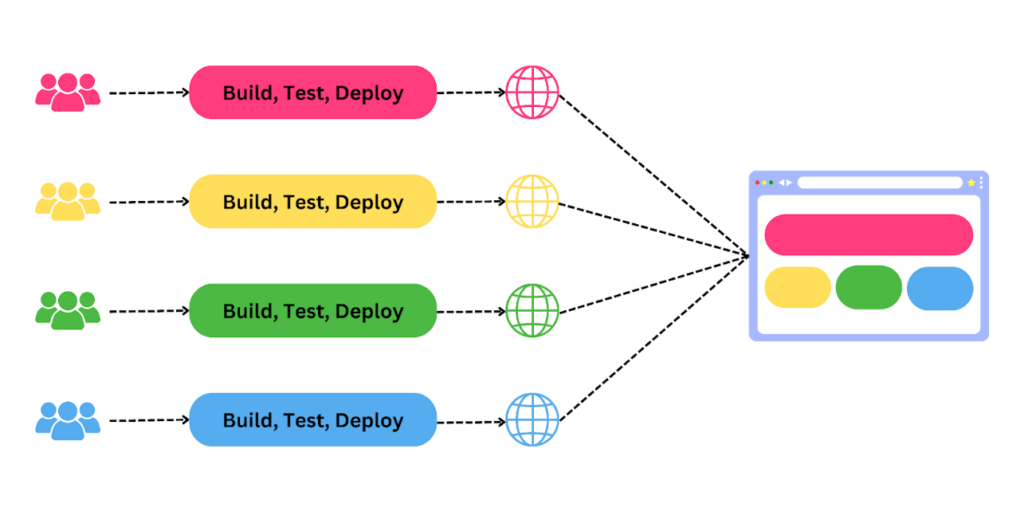
Run-time integration assembles the UI in the client by loading micro frontend artifacts on demand. A central app shell resolves which modules to request and mounts each one into the page. Decisions about which version or variant to load can be deferred until runtime, enabling per-tenant or per-user selection.
How does it work?
- Integration: An app shell is also called a central application or orchestrator. It bootstraps and integrates micro frontends. It is typically configured using a Module Federation or a single SPA.
- Dynamic loading: Micro frontends load on demand instead of all at once. Dynamic imports load only what is needed at any given time, improving responsiveness and reducing initial bundle size.
- Isolation: Every micro frontend uses techniques such as CSS Modules or Shadow DOM to prevent style conflicts. JavaScript is kept separate using sandboxing so that scripts in one module do not affect others.
- Communication and state management: Micro frontends communicate through a message bus or custom events without being directly coupled. Shared state is coordinated using tools like Redux to ensure consistency across modules.
- Routing: The app shell’s integration layer handles navigation by dynamically loading the appropriate micro frontend based on user interactions and the current URL.
Strengths
- Independent deployments: Teams release without rebuilding the whole application.
- Faster iteration: Rollbacks and hotfixes can be deployed for a single module.
- Flexible tech choices: Teams can adopt different frameworks where isolation permits.
- On-demand loading: Modules load only when needed.
Constraints and risks
- Dependency governance: Multiple module versions may conflict unless strict shared dependency rules are enforced.
- Runtime complexity: Bootstrapping, routing handoff, cross-module communication, and version negotiation add complexity.
- Performance pitfalls: Many network requests or blocking loads can harm Time to Interactive; careful bundling and caching strategies are required.
- UX drift: Inconsistent styles or accessibility issues arise unless shared design systems and linting are enforced across teams.
Tooling
The common tools for implementing runtime integration are:
- Module Federation (Webpack)
- Import Maps
- SystemJS
- Single-spa
- Dynamic ES module imports
When it fits best: Runtime integration in micro frontends is recommended for multi-team organizations that prioritize independent release cadence and rapid feature iteration.

Build-time integration in micro frontends
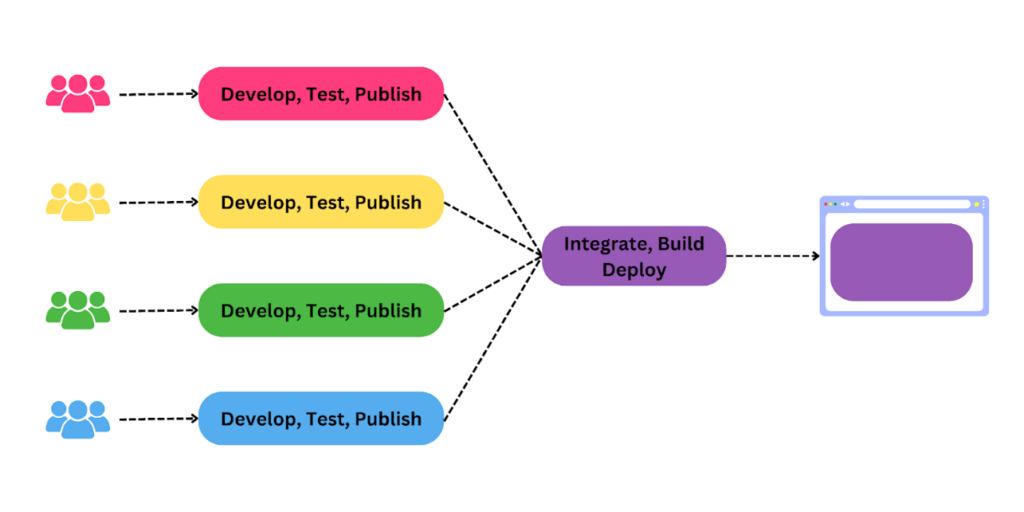
Build-time integration resolves and bundles all micro frontends into a single optimized artifact during the build process. The resulting bundle is deployed as a single unit; routing and composition are wired at build time.
How does it work?
- Build process: All micro frontends are merged into one bundle using a compiler such as Webpack or Rollup, which aggregates and minifies JavaScript, CSS, and other assets.
- Static integration: Interaction points and dependencies between components are resolved during the build step. Tools like Babel handle transpilation, and PostCSS handles CSS processing. The result is typically a monolithic bundle with all necessary code and resources included.
- Pre-defined configuration: Routing and configuration are pre-defined and hard-coded into the build using frameworks like React Router or Vue Router. This requires careful upfront planning across teams.
- Shared dependencies: Dependencies are managed centrally during the build process, ensuring all micro frontends use the same versions of shared libraries, minimizing runtime conflicts.
- Optimized delivery: Since all components are combined at build time, the final bundle is optimized using tools like UglifyJS for JavaScript minification, CSSNano for CSS, HTMLMinifier for HTML, and Webpack’s automatic tree shaking to remove unused code.
Strengths
- Predictable runtime: No runtime resolution or version negotiation simplifies production behavior.
- Optimal optimization: Global tree shaking, whole-app code splitting, and deterministic caching.
- Centralized dependency control: A single build process standardizes library versions.
- Earlier failure detection: Integration issues surface during CI builds rather than in production.
Constraints and risks
- Reduced independence: Updating a single module triggers a rebuild and redeploy of the whole application.
- Coordination overhead: Teams must align on the pipeline build, release schedule, and dependency upgrades.
- Tight coupling: Components are bound together at build time, making it harder to scale individual parts independently.
Tooling
The common tools for implementing build-time integration are:
When it fits best: Build-time integration in micro frontends is recommended for performance-sensitive sites where predictable startup and centralized governance outweigh the benefits of independent release cadence.
Micro frontend integration: Run-time vs build-time (deep comparison)
| Feature | Run-time integration | Build-time integration |
| Deployment autonomy | High, independent modules | Low, single artifact |
| Startup performance | Variable, optimized with code splitting | Predictable, globally optimized |
| Dependency governance | Harder, requires runtime version contracts | Easier, single resolved graph |
| Operational complexity | Higher, runtime composition and validation | Lower at runtime, higher in CI |
| Testing approach | End-to-end runtime tests are essential | CI build + integration tests catch regressions early |
| Isolation options | Shadow DOM, iframes, JS sandboxes | Name spacing and build-time encapsulation |
| Tech heterogeneity | Supported with isolation | Harder, unified stack favored |
The hybrid approach: Combine build-time performance with run-time flexibility
Combining runtime and build-time integration in micro-frontends offers the best of both worlds:
- Build-time performance
- Runtime flexibility
This hybrid approach leads to better performance, efficient development workflows, and more maintainable codebases.
The key advantages of the hybrid approach include:
- Enhanced flexibility and performance: Core components are prebuilt for speed and security, while dynamic or user-specific modules load at runtime as needed.
- Incremental upgrades: Stable parts of the application integrate at build time. Dynamic or frequently updated sections load at runtime, enabling teams to upgrade independently without coordinating a full release.
- Risk mitigation: High-risk, high-stability components integrate at build time to minimize dependency and runtime errors. Lower-risk modules can develop and deploy independently at their own pace.
Practical strategies for effective hybrid integration
A hybrid approach works best when teams are intentional about what’s built upfront, what’s loaded dynamically, and how everything is wired together.
- Hybrid architecture design: Decide upfront which components benefit from build-time integration (core libraries, shared shell) and which should load at runtime (user-specific features, frequently updated modules).
- Use module federation: Share libraries and components dynamically while still bundling shared dependencies at build time, the most widely used pattern for hybrid micro frontend architectures.
- Automate with CI/CD: Handle build-time bundling and runtime configuration updates through automated pipelines, ensuring a seamless transition between development, testing, and deployment.
Decision guide (quick mapping)
| Use case | Recommended approach | Reason |
| Multiple independent teams with frequent releases | Run-time | Enables independent deployment and rollback per module. |
| Site where the fastest possible first load matters | Build-time | Global optimization ,and deterministic bundles reduce FCP/LCP variance. |
| Stable core with optional or changing features | Hybrid | Stable shell guarantees performance.Run-time modules enable agility. |
| Strict single-version dependency policy | Build-time | Centralized build enforces one resolved dependency graph. |
| Tenant-specific UI or A/B variant rollout | Run-time | Load different module versions per tenant or experiment. |
| Small team with limited infrastructure | Build-time | Simpler CI/CD and fewer runtime responsibilities. |
Testing strategy (don’t skip composition tests)
Micro frontend testing must validate both individual modules and their composition in the shell.
| Test type | Purpose |
| Unit tests | Validate the internal logic of each module. |
| Contract tests | Verify the shell ↔ module interface (e.g., each module exposes a standard mount (container, props) function) |
| CI integration tests | Catch composition issues at build-time. |
| End-to-end tests | Load the shell in a real browser, trigger module loading, and assert behavior via Playwright or Cypress. |
Migration checklist (monoliths-> micro frontends)
When shifting from a monolith to a micro frontend architecture, follow these steps to reduce risk:
- Define public contracts, API shape, mount API, and cross-module events.
- Identify which modules are core (build-time) vs. dynamic (run-time).
- Publish a sample remote module to a CDN and validate the loading mechanism.
- Implement a minimal runtime loader in the app shell.
- Add contract tests and CI gates before onboarding more teams.
- Measure performance baselines (FCP, LCP, TTI, bundle size) before and after changes.
- Gradually onboard teams; use pinned versions for safe rollbacks.
Performance considerations: What to measure and watch
Measuring the right performance metrics helps you understand how both run‑time and build‑time integration choices impact real user experience.
- Key metrics to track:First Contentful Paint (FCP), Largest Contentful Paint (LCP), Time to Interactive (TTI), Total Blocking Time (TBT), bundle size, number of network requests, and module initialization latency.
- Watch for with runtime modules:
- Extra round trips for remote entry files hurting TTI.
- Long module initialization time even after fetch, usually caused by heavy bootstrap code.
- Watch for with build-time:
- Very large initial bundle sizes that increase parse and compile time.
- Cache invalidation forcing full re-downloads after minor changes.
Tools: Use Lighthouse, WebPageTest, or Chrome DevTools Performance tab to baseline before changes and compare after.
Frequently Asked Questions
What’s the difference between run‑time and build‑time micro frontend integration?
Run‑time loads micro frontends dynamically in the browser, while build‑time bundles them together during CI before deployment.
When should I use run‑time micro frontend integration?
Use run‑time integration when teams need independent releases, frequent updates, or tenant‑specific and experimental UI.
Is build‑time integration better for performance?
Yes. Build‑time integration usually delivers more predictable startup performance through pre‑resolved dependencies and optimized bundles.
Can I combine run‑time and build‑time integration?
Yes. Many teams use a hybrid approach: build‑time for the core shell and run‑time loading for fast‑changing features.
What tools support micro frontend integration?
Run‑time often uses Module Federation or a single‑spa. Build‑time commonly relies on Monorepo, bundlers like Webpack or Rollup, and CI/CD pipelines.
Design micro frontends that scale with your teams
Thanks for reading! Run-time vs build-time composition is a trade-off between deployment autonomy and runtime predictability. Choose run-time integration when independent releases, tenant customization, or rapid experimentation matter most. Choose build-time integration when deterministic performance, centralized dependency control, and simpler runtime operations matter most.
For many teams, the pragmatic answer is hybrid micro frontends: a build-time core shell for performance, plus run-time modules for agility. Whatever you choose, success depends on clear module contracts, automated testing, and performance baselines you can measure and enforce.
If you’re building micro frontends in JavaScript, you’ll eventually need a UI layer that stays consistent across teams and modules.
Syncfusion® JavaScript UI controls library includes 145+ modular components designed for performance (virtualization, fast rendering, frequent UI updates) and ships with an AI coding assistant to speed up implementation. It’s a practical fit when you’re trying to avoid “UX drift” across independently shipped micro frontends.
If you’re a Syncfusion user, you can download the setup from the license and downloads page. Otherwise, you can download a free 30-day trial.
You can also contact us through our support forum, support portal, or feedback portal for queries. We are always happy to assist you!



 No spam, just valuable updates.