
Web Servers Succinctly®

CHAPTER 11
View Engines
The source code presented in this section is in the folder Examples\Chapter 11 in the Bitbucket repository. The Visual Studio solution file is in the Chapter 11\Clifton.WebServer folder.
I am not a proponent of view engines, preferring instead to put the rendering logic into the client-side. As I’ve developed web applications, I’ve come to the conclusion that a significant portion of server-side development should simply be REST APIs that support the client. This is often the ideal approach for Single Page Applications (SPAs).[44] If you’re using a view engine for page rendering, then you are most likely doing lots of server-side refreshes, which degrades the user experience. In fact, the MVC approach heralded by ASP.NET and Rails is “opinionated” to such a degree that one easily falls into the paradigm of creating a multi-page web app that is server-side-rendered, and where updates require a postback. This is in stark contrast to an SPA web application. This is also why I think the MVC concept is, for the most part, inappropriate on the server-side. And interestingly, you can find on Google lots of articles on how to convert an ASP.NET MVC application to an SPA application.
That said, I don’t want to impose my opinion on the user, so supporting a view engine such as Razor[45] should definitely be possible in the web server. Now, Razor (like other view engines such as nHaml[46] and Spark[47]) are somewhat weighty in that they will actually create an on-the-fly code file that must be compiled at runtime to generate the HTML to be sent to the client. Many times, such as for CSRF replacement, or even working with a master page, this is unnecessary—simple keyword replacement will suffice. We’ll look at both approaches, first using the open source templating engine RazorEngine, [48] which is based on Microsoft’s Razor parsing engine. Second, we’ll look at CSRF handling with simple string replacement. If you’re interested in RazorEngine, check out Rick Strahl’s Westwind.RazorHosting[49] as well.
Note that special keywords like @Html and @Url are actually not part of Razor, but are implementation details of the MVC and WebPages frameworks, so the functions they implement are not available in the templating engine.
In order to build the code for this chapter, I suggest cloning the repository from the Bitbucket site and building the code directly. Installing from the NuGet package will probably result in a conflict between the RazorEngine version and the System.Web.Razor version. The code example in the Chapter 11 folder includes a pre-built version of RazorEngine.Core.dll, but again, depending on the version of .NET’s System.Web.Razor, the version that I built for this chapter might result in a “different version” compiler error when you try to build the code. For that reason, always reference the RazorEngine built on from the source code rather than the NuGet package.
First, Some Refactoring
In the code presented previously, the workflow effectively stops once the page file is loaded or the route handler is invoked. This was a design flaw because it doesn’t allow for any further processing of the data before it is sent to the response stream. To fix this, the HttpListenerContext instance needs a wrapper so that we can also include the pending response:
public class ContextWrapper { public HttpListenerContext Context { get; protected set; } public Response PendingResponse { get; set; } public ContextWrapper(HttpListenerContext context) { Context = context; } /// <summary> /// Text or HTML response, suitable for input to a view engine. /// </summary> public void SetPendingResponse(string text) { PendingResponse = new PendingPageResponse() { Html = text }; } } |
Code Listing 82
This required touching a lot of files to replace the references to HttpListenerContext with ContextWrapper, but it now allows us to define an explicit responder workflow step:
public static void InitializeWorkflow(string websitePath) { StaticContentLoader sph = new StaticContentLoader(websitePath); workflow = new Workflow<ContextWrapper>(AbortHandler, OnException); workflow.AddItem(new WorkflowItem<ContextWrapper>(LogIPAddress)); workflow.AddItem(new WorkflowItem<ContextWrapper>(WhiteList)); workflow.AddItem(new WorkflowItem<ContextWrapper>(sessionManager.Provider)); workflow.AddItem(new WorkflowItem<ContextWrapper>(requestHandler.Process)); workflow.AddItem(new WorkflowItem<ContextWrapper>(routeHandler.Route)); workflow.AddItem(new WorkflowItem<ContextWrapper>(sph.GetContent)); workflow.AddItem(new WorkflowItem<ContextWrapper>(Responder)); } |
Code Listing 83
The responder is implemented as follows:
/// <summary> /// The final step is to actually issue the response. /// </summary> public static WorkflowState Responder(WorkflowContinuation<ContextWrapper> workflowContinuation, ContextWrapper wrapper) { wrapper.Context.Response.ContentEncoding = wrapper.PendingResponse.Encoding; wrapper.Context.Response.ContentType = wrapper.PendingResponse.MimeType; wrapper.Context.Response.ContentLength64 = wrapper.PendingResponse.Data.Length; wrapper.Context.Response.OutputStream.Write( wrapper.Context.Response.StatusCode = 200; wrapper.Context.Response.OutputStream.Close(); return WorkflowState.Continue; } |
Code Listing 84
Adding the View Engine
Here we see at last the full beauty of the workflow and how it lets us create a workflow tailored to our web application’s needs. To add Razor view engine processing, we need these two assembly references:
using RazorEngine; using RazorEngine.Templating; |
Code Listing 85
And the implementation:
/// <summary> /// Apply the Razor view engine to a page response. /// </summary> public static WorkflowState ViewEngine( { PendingPageResponse pageResponse = wrapper.PendingResponse as PendingPageResponse;
// Only send page responses to the templating engine. if (pageResponse != null) { string html = pageResponse.Html; string templateKey = html.GetHashCode().ToString(); pageResponse.Html = Engine.Razor.RunCompile(html, templateKey, null, } return WorkflowState.Continue; } |
Code Listing 86
Here we initialize a template key that has the hash of the HTML. The template key is used for caching purposes—if the template is exactly the same, there’s no reason to re-build the assembly—we can simply execute it again. Please refer to the excellent RazorEngine GitHub site[50] for details on the additional usage of Engine.Razor.RunCompile.
We’ll talk about models in the next section. For now, we can add the view engine to our workflow:
public static void InitializeWorkflow(string websitePath) { workflow.AddItem(new WorkflowItem<ContextWrapper>(ViewEngine)); workflow.AddItem(new WorkflowItem<ContextWrapper>(Responder)); } |
Code Listing 87
Now let’s write a simple test page:
<!DOCTYPE html> <html lang="en" xmlns="http://www.w3.org/1999/xhtml"> <head> <meta charset="utf-8" /> <title>Razor Test</title> </head> <body> <ul> @for (int i=0; i<10; i++) { <li>@i</li> } </ul> </body> </html> |
Code Listing 88
Here’s the result:
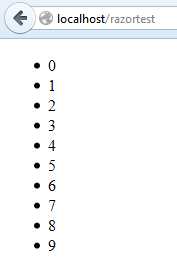
Figure 35: Razor View Engine
Great! We’ve added a sophisticated view engine to our web server. Because the view engine is a workflow step, the implementation is actually done in our web application rather than in the web server, leaving our web server un-opinionated with regard to the view engine being used. One thing you may notice, however, is that the responsiveness of the webpage is degraded.
Models
Here we run into an interesting problem, simply because our web server is MVC-agnostic. We haven’t done anything with models. Furthermore, the view engine lets us specify only one model. This is rather unrealistic—I may have a webpage that displays data from many different models. In classic MVC, the workaround to this is to create a “View Model” (hence we’re actually implementing the Model-View-ViewModel, or MVVM pattern). This is, at best, an awkward workaround, but it is what we have to live with in regard to the Razor view engine.
Let’s create a simple model consisting of the names of 2015 Code Project MVP winners:
public class Person { public string Name {get;set;} public Person(string name) { Name=name; } } public class Program { public static List<Person> codeProject2015Mvp = new List<Person>() { new Person("Christian Graus"), new Person("BillWoodruff"), new Person("Richard Deeming"), new Person("Marc Clifton"), } |
Code Listing 89
We’ll use this collection as the model:
pageResponse.Html = Engine.Razor.RunCompile( |
Code Listing 90
Now with a little Razor markup:
<!DOCTYPE html> <html lang="en" xmlns="http://www.w3.org/1999/xhtml"> <head> <meta charset="utf-8" /> <title>2015 MVP’s</title> </head> <body> <table> @foreach (var person in Model.People) { <tr> <td>@person.Name</td> </tr> } </table> </body> </html> |
Code Listing 91
We get a partial screenshot (apologies if your name is not on this screenshot):
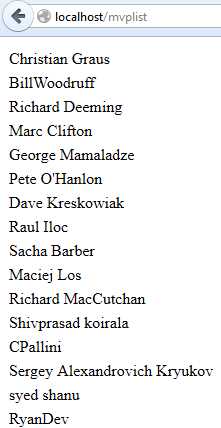
Figure 36: Razor Model
Now the question becomes, how do we associate the HTML page (the view!) with the desired model that we want to pass in to the view engine?
While the answer is left as an exercise for the reader (as it really is outside the purview of a web server not entangled with MVC or MVVM patterns), the simplest answer that I have is to write a route handler for each template page that acts as a “controller” and instantiates the desired model. With a little refactoring, the model can then be assigned to the PendingResponse instance and used by the view engine workflow step, giving you something that very closely resembles the existing MVC paradigms in ASP.NET and Rails.
CSRF
The interesting thing about “owning” the web server is you can do basically whatever you want in the HTML before you send it down to the browser. For example, in ASP.NET MVC, you specify a CSRF token in a form like this:
@Html.AntiForgeryToken() |
Code Listing 92
In Rails, the ApplicationController, if it’s included:
protected_from_forgery |
Code Listing 93
This will automatically reset the session if the CSRF token does not match. One then adds the following into the head section of the application layout page:
<%= csrf_meta_tag %> |
Code Listing 94
As you can see, there is no standard for how this token should be handled. In the chapter on sessions, we’re actually creating the token for a new session. Instead of using a heavy-weight view engine, we can do a simple search and replace for this token in the HTML. For example, in our earlier login page, we could add our own keyword %AntiForgeryToken% to be replaced with a hidden field containing the token value:
<body> <form name="myform" action="/login" method="post"> %AntiForgeryToken% <div class="center-inner top-margin-50"> Username: <input name="username"/> </div> <div class="center-inner top-margin-10"> Password: <input type="password" name="password"/> </div> <div class="center-inner top-margin-10"> <input type="submit" value="Login"/> </div> </form> </body> |
Code Listing 95
Instead of (or in addition to, if you’re using the view engine) calling the ViewEngine workflow step, we can call a new method, CsrfInjector, as part of the workflow:
workflow.AddItem(new WorkflowItem<ContextWrapper>(CsrfInjector)); |
Code Listing 96
Implemented as:
public static WorkflowState CsrfInjector(WorkflowContinuation<ContextWrapper> workflowContinuation, ContextWrapper wrapper) { PendingPageResponse pageResponse = wrapper.PendingResponse as PendingPageResponse; if (pageResponse != null) { pageResponse.Html = pageResponse.Html.Replace("%AntiForgeryToken%", "<input name=" + "csrf".SingleQuote() + " type='hidden' value=" + wrapper.Session["_CSRF_"].ToString().SingleQuote() + " id='__csrf__'/>"); } return WorkflowState.Continue; } |
Code Listing 97
Note how we’re actually injecting the markup to define a hidden field, csrf.
Now, when we log in with this page, the form’s POST request will include the CSRF token:
"csrf=ca64e53c-a9c5-4fde-ba15-e2fad4a334b9&username=admin&password=admin" |
Code Listing 98
For non-GET routes, we can make this a standard check as part of the route handler validation. If you want to put CSRF validation into an AJAX call (highly recommended), this should be done in the header of the request. For example:
headers: { 'RequestVerificationToken': '%CsrfValue%' } |
Code Listing 99
And we would modify the CsrfInjector to also replace these keywords:
pageResponse.Html = pageResponse.Html.Replace( |
Code Listing 100
As mentioned previously, there is no standard for how to do this. As with view engines, anyone who writes a web server is free to define how these special cases are handled. Except for significant changes in the pre-rendered HTML, such as when using HAML or SLIM, the syntax of the HTML is fairly portable between servers.


- 1800+ high-performance UI components.
- Includes popular controls such as Grid, Chart, Scheduler, and more.
- 24x5 unlimited support by developers.