
Web Servers Succinctly®

CHAPTER 4
Thread-Spanning Workflows
The source code presented in this section is in the folder Examples\Chapter 4 in the Bitbucket repository. The Visual Studio solution file is in the Chapter 4\Clifton.WebServer folder.
Processing client requests almost always involves a series of steps, which may include one or more of the following (and undoubtedly other things not in the list):
- Whitelist validation
- Blacklist exclusion
- Logging
- Work distribution
- Authorization
- Session expiration checks
- Routing
- Rendering (i.e. a view engine)
Therefore, we’ll look at requests as sequential workflows and implement them so that the tasks can span different threads. For example, in the single-listener thread implementation in the preceding chapter, we actually have three thread areas:
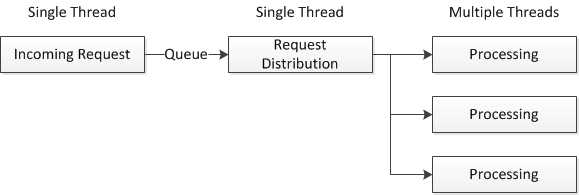
Figure 4: High-Level Workflow
Inside each of these boxes, we might see something like this:
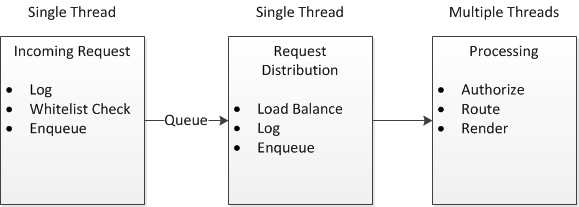
Figure 5: Low-Level Workflow
A thread-spanning workflow abstraction gives us is the following:
- The ability to define workflows declaratively.
- The ability to decouple the thread from the work implementation.
- The allowance of the work implementation to determine how work should be continued: on the same thread, or deferred to another thread.
The implementation requires that the “workflow continuation” be managed for every process as it sequences through the workflow steps, which is really the only “trick” to this implementation.
Workflow Continuation State
Each workflow continuation can be in one of three states:
- Abort
- Continue
- Defer
/// <summary> /// Workflow Continuation State /// </summary> public enum WorkflowState { /// <summary> /// Terminate execution of the workflow. /// </summary> Abort, /// <summary> /// Continue with the execution of the workflow. /// </summary> Continue, /// <summary> /// Execution is deferred until Continue is called, usually by another thread. /// </summary> Defer, } |
Code Listing 28
Workflow Continuation
This class tracks the state of a workflow context and allows the workflow to continue when it is passed to another thread. What this does is:
- Defines a single instance of a particular workflow pattern.
- Uses that instance simultaneously.
We are effectively implementing continuation-passing style—we are passing in the continuation state to each workflow function. The workflow, as a process, is thread-safe, even though we are sharing instances among different threads.
/// <summary> /// Thread-specific instance that preserves the workflow continuation context for that thread. /// </summary> public class WorkflowContinuation<T> { public int WorkflowStep { get; set; } public bool Abort { get; set; } public bool Defer { get; set; } public Workflow<T> Workflow { get; protected set; } public WorkflowContinuation(Workflow<T> workflow) { Workflow = workflow; } } |
Code Listing 29
WorkflowItem
A WorkflowItem is a lightweight container for the workflow function:
/// <summary> /// A workflow item is a specific process to execute in the workflow. /// </summary> public class WorkflowItem<T> { protected Func<WorkflowContinuation<T>, T, WorkflowState> doWork; /// <summary> /// Instantiate a workflow item. We take a function that takes the /// and a data item. We expect a WorkflowState to be returned. /// </summary> /// <param name="doWork"></param> public WorkflowItem(Func<WorkflowContinuation<T>, T, WorkflowState> doWork) { this.doWork = doWork; } /// <summary> /// Execute the workflow item method. /// </summary> public WorkflowState Execute(WorkflowContinuation<T> workflowContinuation, T data) { return doWork(workflowContinuation, data); } } |
Code Listing 30
Workflow Class
Now that we have the pieces in place, we can see how a workflow is executed:
/// <summary> /// The Workflow class handles a list of workflow items that we can use to /// determine the processing of a request. /// </summary> public class Workflow<T> { protected List<WorkflowItem<T>> items; public Workflow() { items = new List<WorkflowItem<T>>(); } /// <summary> /// Add a workflow item. /// </summary> public void AddItem(WorkflowItem<T> item) { items.Add(item); } /// <summary> /// Execute the workflow from the beginning. /// </summary> public void Execute(T data) { WorkflowContinuation<T> continuation = new WorkflowContinuation<T>(this); InternalContinue(continuation, data); } /// <summary> /// Continue a deferred workflow, unless it is aborted. /// </summary> public void Continue(WorkflowContinuation<T> wc, T data) { if (!wc.Abort) { wc.Defer = false; InternalContinue(wc, data); } } /// <summary> /// Internally, we execute workflow steps until: /// 1. We reach the end of the workflow chain. /// 2. We are instructed to abort the workflow. /// 3. We are instructed to defer execution until later. /// </summary> protected void InternalContinue(WorkflowContinuation<T> wc, T data) { while ((wc.WorkflowStep < items.Count) && !wc.Abort && !wc.Defer && !wc.Done) { WorkflowState state = items[wc.WorkflowStep++].Execute(wc, data); switch (state) { case WorkflowState.Abort: wc.Abort = true; break; case WorkflowState.Defer: wc.Defer = true; break; } } } } |
Code Listing 31
Putting It All Together
As an example, I’ll illustrate a more robust website, capable of responding to different kinds of content requests. We’ll define a workflow that:
- Logs the incoming IP address and webpage request.
- Checks that the requester’s IP address is on our whitelist.
- Hands off the request to our single-threaded queue handler.
- Processes the requests, managing different file types.
The workflow is defined like this:
workflow = new Workflow<HttpListenerContext>(); workflow.AddItem(new WorkflowItem<HttpListenerContext>(LogIPAddress)); workflow.AddItem(new WorkflowItem<HttpListenerContext>(WhiteList)); workflow.AddItem(new WorkflowItem<HttpListenerContext>(handler.Process)); workflow.AddItem(new WorkflowItem<HttpListenerContext>( StaticResponse)); |
Code Listing 32
And the logging and white list handler implementation is as follows:
/// <summary> /// A workflow item, implementing a simple instrumentation of the /// </summary> static WorkflowState LogIPAddress( { Console.WriteLine(context.Request.RemoteEndPoint.ToString() + return WorkflowState.Continue; } /// <summary> /// Only intranet IP addresses are allowed. /// </summary> static WorkflowState WhiteList( { string url = context.Request.RemoteEndPoint.ToString(); bool valid = url.StartsWith("192.168") || url.StartsWith("127.0.0.1") || url.StartsWith("[::1]"); WorkflowState ret = valid ? WorkflowState.Continue : WorkflowState.Abort; return ret; } |
Code Listing 33
The actual response handler is implemented with a bit more intelligence—here we can specify the loader function to call based on the file extension in the request:
public static WorkflowState StaticResponse( { // Get the request. HttpListenerRequest request = context.Request; HttpListenerResponse response = context.Response; // Get the path, everything up to the first ? and excluding the leading "/" string path = request.RawUrl.LeftOf("?").RightOf("/"); string ext = path.RightOfRightmostOf('.'); FileExtensionHandler extHandler; if (extensionLoaderMap.TryGetValue(ext, out extHandler)) { byte[] data = extHandler.Loader(context, path, ext); response.ContentEncoding = Encoding.UTF8; context.Response.ContentType = extHandler.ContentType; context.Response.ContentLength64 = data.Length; context.Response.OutputStream.Write(data, 0, data.Length); response.StatusCode = 200; // OK response.OutputStream.Close(); } return WorkflowState.Continue; } |
Code Listing 34
How the extension is routed to the static file loader handler is determined by the following mapping:
public static Dictionary<string, FileExtensionHandler> extensionLoaderMap = { {"ico", new FileExtensionHandler() {"png", new FileExtensionHandler() {"jpg", new FileExtensionHandler() {"gif", new FileExtensionHandler() {"bmp", new FileExtensionHandler() {"html", new FileExtensionHandler() {"css", new FileExtensionHandler() {"js", new FileExtensionHandler() {"json", new FileExtensionHandler() {"", new FileExtensionHandler() |
Code Listing 35
The three handlers are straightforward implementations—note how the page loader will append the extension .html if it is missing:
public static byte[] ImageLoader( { FileStream fStream = new FileStream(path, FileMode.Open, FileAccess.Read); BinaryReader br = new BinaryReader(fStream); byte[] data = br.ReadBytes((int)fStream.Length); br.Close(); fStream.Close(); return data; } public static byte[] FileLoader( { string text = File.ReadAllText(path); byte[] data = Encoding.UTF8.GetBytes(text); return data; } public static byte[] PageLoader( { if (String.IsNullOrEmpty(ext)) { path = path + ".html"; } string text = File.ReadAllText(path); byte[] data = Encoding.UTF8.GetBytes(text); return data; } |
Code Listing 36
Here we see the result of querying our server:
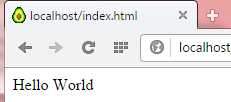
Figure 6: Result of a Workflow
Notice my cute little avocado icon is now rendering correctly!
Exception Handling
Exception handling is a critical requirement of a web server—you don’t want your server crashing because of a poorly formatted request, a database error, and so forth. Besides an exception handler, we might as well take the opportunity to specify an abort handler in the workflow definition as well:
workflow = new Workflow<HttpListenerContext>(AbortHandler, OnException); |
Code Listing 37
We’ll also refactor the Workflow<T> class:
… public Action<T, Exception> ExceptionHandler { get; protected set; } public Workflow(Action<T> abortHandler, Action<T, Exception> exceptionHandler) { items = new List<WorkflowItem<T>>(); AbortHandler = abortHandler; ExceptionHandler = exceptionHandler; } |
Code Listing 38
Now our workflow continuation can call back to the abort and exception handlers:
protected void InternalContinue(WorkflowContinuation<T> wc, T data) { while ((wc.WorkflowStep < items.Count) && !wc.Abort && !wc.Defer) { try { WorkflowState state = items[wc.WorkflowStep++].Execute(wc, data); switch (state) { case WorkflowState.Abort: wc.Abort = true; wc.Workflow.AbortHandler(data); break; case WorkflowState.Defer: wc.Defer = true; break; } } catch (Exception ex) { // We need to protect ourselves from the user’s exception // handler potentially throwing an exception. wc.Workflow.ExceptionHandler(data, ex); } } } |
Code Listing 39
And we can write a couple of handlers—our abort handler terminates the connection, whereas our exception handler returns the exception message.
static void AbortHandler(HttpListenerContext context) { HttpListenerResponse response = context.Response; response.OutputStream.Close(); } static void OnException(HttpListenerContext context, Exception ex) { HttpListenerResponse response = context.Response; response.ContentEncoding = Encoding.UTF8; context.Response.ContentType = "text/html"; byte[] data = Encoding.UTF8.GetBytes(ex.Message); context.Response.ContentLength64 = data.Length; context.Response.OutputStream.Write(data, 0, data.Length); response.StatusCode = 200; // OK response.OutputStream.Close(); } |
Code Listing 40
Now, for example, if we request a page whose corresponding file doesn’t exist, we get the exception message.

Figure 7: Error Handling Example
Of course, in real life, we probably want to redirect the user to the home page or a “page not found” page.
The salient point in this implementation is that, even if the specific workflow action doesn’t gracefully handle exceptions, the workflow engine itself manages the exception gracefully, giving your application options for notifying the user of the problem—and without bringing down the website.
Context Extension Methods
Before going any further, I need to introduce the extension methods that I’ve added to HttpListenerContext. You’ll see these extension methods used throughout the rest of this book:
public static class Extensions { /// <summary> /// Return the URL path. /// </summary> public static string Path(this HttpListenerContext context) { return context.Request.RawUrl.LeftOf("?").RightOf("/").ToLower(); } /// <summary> /// Return the extension for the URL path's page. /// </summary> public static string Extension(this HttpListenerContext context) { return context.Path().RightOfRightmostOf('.').ToLower(); } /// <summary> /// Returns the verb of the request: GET, POST, PUT, DELETE, and so forth. /// </summary> public static string Verb(this HttpListenerContext context) { return context.Request.HttpMethod.ToUpper(); } /// <summary> /// Return the remote endpoint IP address. /// </summary> public static IPAddress EndpointAddress(this HttpListenerContext context) { return context.Request.RemoteEndPoint.Address; } /// <summary> /// Returns a dictionary of the parameters on the URL. /// </summary> public static Dictionary<string, string> GetUrlParameters( { HttpListenerRequest request = context.Request; string parms = request.RawUrl.RightOf("?"); Dictionary<string, string> kvParams = new Dictionary<string, string>(); parms.If(d => d.Length > 0,
return kvParams; } /// <summary> /// Respond with an HTML string. /// </summary> public static void RespondWith(this HttpListenerContext context, string html) { byte[] data = Encoding.UTF8.GetBytes(html); HttpListenerResponse response = context.Response; response.ContentEncoding = Encoding.UTF8; context.Response.ContentType = "text/html"; context.Response.ContentLength64 = data.Length; context.Response.OutputStream.Write(data, 0, data.Length); response.StatusCode = 200; response.OutputStream.Close(); } |
Code Listing 41


- 1800+ high-performance UI components.
- Includes popular controls such as Grid, Chart, Scheduler, and more.
- 24x5 unlimited support by developers.