
W3.CSS Succinctly®

CHAPTER 3
Colors
The W3.CSS framework simplifies color management by providing classes to set the foreground and background colors of elements. The default color scheme is based on the Material Design colors. The color classes w3-color and w3-text-color can be applied to any element. There are hover classes, w3-hover-color and w3-hover-text-color, which can be applied when a user moves the mouse over an element.
Basic CSS colors
The basic color set available in the W3 framework is shown in the following figure.

Figure 12: W3.CSS colors
You can apply colors simply by adding the class name to the list of classes on the element. For example, the following container will have white lettering on a blue background.
<div class="w3-container w3-blue w3-text-white">
</div>
You can apply colors to any HTML element, such as <div> or <table>.
Note: Colors should be used carefully when designing a site—in particular, check for 508 compliance. The Web Content Accessibility Guidelines require a 4.5-to-1 contrast ratio between colors, to increase readability. For larger text sizes, 14 pixels and bold, or 18 pixels and larger, a 3.0-to-1 ratio is required. You should use tools such as this website to check that color combinations meet these guidelines. People with low vision or color-blindness will appreciate the effort.
Color libraries
You can also download separate color libraries from the W3.CSS site. Table 3 lists the libraries that are available.
Table 3: Color libraries
Library Name | Description | Download name |
Color Flat UI | Bold, bright colors for simple interfaces. | w3-colors-flat.css |
Window Metro UI | Metro modern colors. | w3-colors-metro.css |
Windows 8 | Flat design and modern colors. | w3-colors-win8.css |
Highway Colors | Highway colors based on federal standards. | w3-colors-highway.css |
Safety Colors | Safety colors based on federal standards. | w3-colors-safety.css |
European colors | European traffic colors, RA Color Standard. | w3-colors-signal.css |
Fashion colors | Fashion colors from Color Trends. | w3-colors-2017.css |
Vivid colors | Vibrant colors from ISCC-NBS standard. | w3-colors-vivid.css |
Food colors | Colors match foods, such as wine, tomatoes. | w3-colors-food.css |
Camouflage colors | Colors with earth tones, from federal standards. | w3-colors-camo.css |
Note that the colors in the libraries all have unique names, so you can use multiple color libraries, in addition to the standard material design colors in the framework. Each color will begin with the final portion of the name, such as _flat or _signal.
Color themes
Color themes are CSS classes that allow you to use variations of the same basic color. For example, if your site has a gray look about it, you can download the w3-theme-grey.css style sheet and include it in your style sheet references.
This will add 12 additional color classes for text, default theme color, and lighter/darker variations on theme.
Table 4: Color themes
Style name | Description |
w3-text-theme | Text color, generally against white background. |
w3-theme | Default theme color. |
w3-theme-l5 | Lightest variation of the theme background color (also w3-theme-light) . |
w3-theme-lX | Where x is 4 down to 1, progressively darker backgrounds, but still lighter than the default theme color. |
w3-theme-d5 | Darkest variation of the theme background color (also w3-theme-dark). |
w3-theme-dX | Where x is 4 down to 1, progressively lighter theme backgrounds, but still darker than the default theme color. |
The following figure shows a sample theme (blue-gray) to illustrate the appearance of themes.
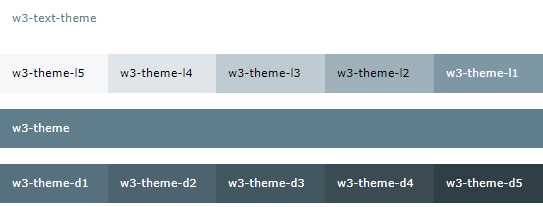
Figure 13: Sample blue-gray theme
You can use the theme color names and change the website color by simply specifying a different CSS theme style sheet. Note that many of the theme colors will not have sufficient contrast to meet accessibility guidelines. Be aware of the people using your site to ensure that a theme doesn’t make the site more difficult for some users.
Available themes
Table 5 lists the predefined themes available from W3.CSS.
Table 5: W3.CSS themes
Theme name | Download name | Color |
Amber | w3-theme-amber.css | Text color |
Black | w3-theme-black.css | Text color |
Blue | w3-theme-blue.css | Text color |
Blue-grey | w3-theme-blue-grey.css | Text color |
Brown | w3-theme-brown.css | Text color |
Cyan | w3-theme-cyan.css | Text color |
Dark Grey | w3-theme-dark-grey.css | Text color |
Deep Orange | w3-theme-deep-orange.css | Text color |
Deep Purple | w3-theme-deep-purple.css | Text color |
Green | w3-theme-green.css | Text color |
Grey | w3-theme-grey.css | Text color |
Indigo | w3-theme-indigo.css | Text color |
Khaki | w3-theme-khaki.css | Text color |
Light Blue | w3-theme-light-blue.css | Text color |
Light Green | w3-theme-light-green.css | Text color |
Lime | w3-theme-lime.css | Text color |
Orange | w3-theme-orange.css | Text color |
Pink | w3-theme-pink.css | Text color |
Purple | w3-theme-purple.css | Text color |
Red | w3-theme-red.css | Text color |
Teal | w3-theme-teal.css | Text color |
Yellow | w3-theme-yellow.css | Text color |


- 1800+ high-performance UI components.
- Includes popular controls such as Grid, Chart, Scheduler, and more.
- 24x5 unlimited support by developers.